1
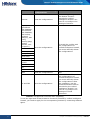
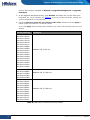
Hillstone Unified Intelligence Firewall Installation Guide Chapter 3 Installation and Upgrading This chapter introduces the following contents: Install unified intelligence system software in a virtual machine Upgrade Hillstone device to the specified firmware Before executing the installation and upgrading, note the following matters: Ensure the unified intelligence system software and firmware have the same version number. If the version number does not match, Hillstone device cannot integrate with the virtual machine. If StoneOS is lower than 5.0R1, you must clear the configurations of security policy before the upgrading. After the upgrading, you need to re-configure the security policy. If StoneOS is equal to or higher than 5.0R1, the configurations of security policy will be saved during the upgrading and take effect automatically after the upgrading. Partial functions are not supported after the upgrading. Table 6 lists the functions that will not be supported after the upgrading and it also lists the actions performed to the configurations of these functions. For some functions, you must manually delete the corresponding configurations before the upgrading, which can avoid the conflict with the configurations of unified intelligence firewall. Hillstone recommends that you back up all configurations of StoneOS before the upgrading. Function 8 Actions to Corresponding Configurations Comment QoS Clear the configurations After the upgrading, use the iQoS function provided by unified intelligence firewall. You need to reconfigure the settings of iQoS. 802.1x Save the global configurations; Clear the configurations under the interface N/A Role Save the configurations To avoid the conflict with the configurations of unified intelligence firewall, you must manually delete the configurations. Connect to HSM Save the configurations N/A Chapter 3 Installation and Upgrading | Hillstone