1
ASIO & Core Audio Guide
Installing the Ravenna ASIO Driver
The Merging Ravenna ASIO Driver can be installed on PC systems that do not have Pyramix
installed, but at least one Horus is required for the Driver to work if other Ravenna devices are
present.
Find here the description of the Merging Ravenna ASIO Driver installation steps for Horus/Ravenna
users.
1. Download the latest Merging Ravenna ASIO Driver from
http://www.merging.com/horus/download
2. Be aware that a 32bit and 64 bit versions are available and certified under Windows 7 only. Verify
your current OS configuration and then download and install the appropriate Ravenna ASIO
driver version.
3. Disable the Windows UAC (User Account Control) set it to never notify and restart your system.
We also recommend that you disable the Windows Firewall when working in Ravenna.
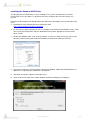
4. The installer might warn you of pending requirements (Bonjour & Microsoft Redistributable C++
2008 SP1) accept and proceed with those installations.
5. Afterwards Accept the software install agreement
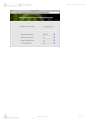
6. Open the Ravenna ASIO Panel (under windows Start Menu>Merging Technologies)
www.merging.com
15
Page 6 -