1
Challenger10
Users Manual
P/N MAUSER-TS1016 • REV 01 • ISS 18FEB13
Copyright
Trademarks and
patents
Manufacturer
Agency compliance
Contact information
© 2013 UTC Fire & Security. All rights reserved.
The Challenger name and logo are trademarks of
UTC Fire & Security.
Other trade names used in this document may be trademarks or
registered trademarks of the manufacturers or vendors of the
respective products.
Interlogix (a division of UTC Fire & Security Australia Pty Ltd)
Level 1, 271–273 Wellington Road, Mulgrave, VIC, 3170, Australia
N4131
For contact information, see www.interlogix.com.au.
Content
Important information ii
Agency compliance ii
Limitation of liability ii
Preface iii
Chapter 1 Introduction 1
Product overview 1
User interface 2
RAS indications 2
Accessing the user menu 4
Displaying input names 5
Selecting areas by searching 6
Chapter 2 Using Challenger 7
User authentication 7
Arming your Challenger system 8
Disarming your Challenger system 9
Timed disarming 11
Dealing with unsealed inputs 12
Opening doors 12
Handling alarms 14
Viewing the quick alarm history 16
Isolating inputs 17
De-isolating inputs 18
Glossary 19
Challenger10 Users Manual
i
Important information
Agency compliance
This product conforms to the standards set by Standards Australia on behalf of
the Australian Communications and Media Authority (ACMA). UTC Fire &
Security recommend enclosure covers remain fitted to maintain C-Tick
compliance.
Limitation of liability
To the maximum extent permitted by applicable law, in no event will Interlogix (a
division of UTC Fire & Security Australia Pty Ltd) be liable for any lost profits or
business opportunities, loss of use, business interruption, loss of data, or any
other indirect, special, incidental, or consequential damages under any theory of
liability, whether based in contract, tort, negligence, product liability, or otherwise.
Because some jurisdictions do not allow the exclusion or limitation of liability for
consequential or incidental damages the preceding limitation may not apply to
you. In any event the total liability of Interlogix shall not exceed the purchase
price of the product. The foregoing limitation will apply to the maximum extent
permitted by applicable law, regardless of whether Interlogix has been advised of
the possibility of such damages and regardless of whether any remedy fails of its
essential purpose.
Installation in accordance with this manual, applicable codes, and the instructions
of the authority having jurisdiction is mandatory.
While every precaution has been taken during the preparation of this manual to
ensure the accuracy of its contents, Interlogix assumes no responsibility for
errors or omissions.
ii
Challenger10 Users Manual
Preface
This is the Challenger10 Users Manual. It is part of the following suite of manuals
for the Challenger10 intrusion detection and access control panel.
•
The Challenger10 Installation and Quick Programming Manual is for
installation technicians to install a Challenger panel.
•
The Challenger10 Users Manual is suitable for most users of the
Challenger10 system to perform everyday tasks.
•
The Challenger10 Administrators Manual is for users and system
administrators who need to manage the Challenger10 system via its
text-based user interface.
•
The Challenger10 Programmers Manual is for system administrators and
installers who need to manage the Challenger10 system via its
text-based user interface (in particular the “Install” menu).
This manual describes the tasks that a user should know how to perform on a
Challenger system, using a keypad or reader remote arming station (RAS).
This manual includes an overview of the product and detailed instructions
explaining how to:
•
Arm and disarm your Challenger system
•
Isolate devices that are generating false alarms
•
Unlock doors (if applicable to your Challenger system)
•
Respond to alarms when they occur
Notes
•
The permissions assigned to you may not allow you to do everything
described in this manual. You may not be able to see all menu items
described in this manual.
•
A qualified service person, complying with all applicable codes, should
perform all required hardware installation.
Challenger10 Users Manual
iii
iv
Challenger10 Users Manual
Chapter 1 Introduction
This chapter provides an overview of a typical Challenger system and some user
interface devices that you may need to operate.
Product overview
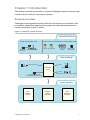
Challenger is an integrated intrusion detection and access control system. Addon modules expand the capacity of the system and add sophisticated access
control functionality (Figure 1 below).
Figure 1: Challenger system overview
User interface devices
Remote control (dialup or IP)
Smart Card
Programmer
Management software
Local control (connected directly to the Challenger panel)
Keypad Keypad/reader
Smart Card
Readers
Magnetic Swipe
Card Reader
Basic Challenger
Zone input devices
Detectors
Alarms
Challenger
panel
Remote monitoring
Outputs
Relays, sirens, and open collector outputs
Power supply from mains
(backup battery inside housing)
System expansion
Data
Gathering
Panels
Challenger10 Users Manual
Intelligent
Access
Controllers
Other
Expansion
Modules
1
User interface
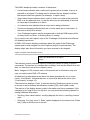
Figure 2 below depicts two examples of Challenger user interface devices called
remote arming stations (RASs).
A RAS with a keypad and liquid crystal display (LCD) screen enables authorised
users to enter a series of numbers called a “code”, in order to access the
Challenger’s menus, which are displayed on the LCD screen.
A device such as a Smart Card Reader is typically used for access control such
as for opening doors. However, your Challenger system may be programmed to
also use cards for alarm control, where an authorised user can disarm their
assigned areas by presenting their card to a reader. The Challenger system can
also be programmed to enable an authorised user to arm their assigned areas by
presenting their card three times within a few seconds.
Figure 2: Typical Challenger user interface devices (RASs)
CA1116 16-area RAS
with inbuilt card reader
TS0870 Smart Card Reader
RAS indications
RASs typically have one or more red light-emitting diodes (LEDs) to indicate
whether their assigned areas are armed (LED on), disarmed (LED off), or in
alarm state (LED flashing).
Note: When an area LED on a door’s RAS is lit, the area is armed. Do not open
the door unless you can disarm the area or you may trigger an alarm. Your
Challenger system may be programmed to shunt (ignore) certain inputs when a
door is opened in order to allow temporary access when armed. Consult your
installation company if in doubt.
Some RAS models have additional LEDs that indicate faults and other
conditions. Refer to the particular model’s Installation Guide for details.
A RAS with an LCD screen enables authorised users to use the Challenger
system’s menus, and displays messages about alarms or unsealed inputs that
may prevent an area from being armed.
2
Challenger10 Users Manual
The RAS’s beeper provides a number of indications:
•
A short beep indicates that a valid card is presented at a reader or a key is
pressed on a keypad. The beep may be followed by two beeps to indicate
that access has been granted (for example, to open a door).
•
Seven short beeps indicates that a code or card is not valid at the particular
RAS or at the particular time, or that the area you are attempting to arm has
an input that is unsealed or in alarm.
•
A continuous tone indicates that an input test is being performed.
•
Continuous beeping indicates that one or more inputs are in local alarm, or
the area is about to be armed.
•
Your Challenger system may be programmed so that the RAS beeps whilst
an entry timer, exit timer, or warning timer is running.
If you need to use the keypad, refer to the Challenger10 Administrators Manual
for detailed instructions.
A RAS’s LCD screen displays messages about the state of the Challenger
system and to help navigate the menu options (subject to permissions). The
display might also show information you have entered on the keypad.
Figure 3: Default LCD welcome screen
There Are No Alarms In This Area
Code:
The welcome screen indicates that the Challenger system is ready to receive
commands. The top line is a configurable message, such as the default time and
date, or other text such as the company name.
Note: Images of LCD screens used in this manual are for illustration only and
may not match actual RAS LCD screens.
A blank top line indicates that an alarm has been generated by one or more
inputs. “Local Alarm” indicates that one or more local alarms are active (see
“Local alarms” on page 15).
The bottom line displays “Code” to indicate that the Challenger system is ready
to accept a user’s personal identification number (PIN), also called a code.
The top line of the display shows system information and other messages. If the
message is too long to fit on the top line, you may have the following options for
seeing additional characters:
•
Scrolling. Also called rotation, scrolling displays the text in a scrolling ‘banner’
style.
•
Scanning. You may see a “1-Scan” option displayed on the bottom line. Press
the [1] key to shift the text to the left.
Challenger10 Users Manual
3
The bottom line of the LCD screen contains instructions and indicates the
characters you enter on the keypad (except for codes, which are shown as ‘*’
characters).
Accessing the user menu
The Challenger system’s user menu has 23 top-level options for use by
authorised users, administrators, or installers (see Table 1 below). A menu option
will be visible to you only if allowed by the alarm group assigned to you and to
the alarm group assigned to the particular RAS that you are using.
Table 1: Challenger user menu (top level)
1. Panel Status
13. Start Auto Access Test
2. Input Unsealed
14. Program Users
3. Input In Alarm
15. Time & Date
4. Input Isolated
16. Isolate/Deisolate RAS/DGP
5. History
17. Enable/Disable Service Tech
6. Test Report
18. Reset Cameras
7. Service Menu
19. Install Menu
8. Film Counters
20. Door and Floor Groups
9. Input Text
21. Holidays
10. Isolate
22. Open Door
11. Deisolate
23. Unlock, Lock, Disable and Enable
12. Test Input
24. Spare
Refer to the Challenger10 Administrators Manual for details about options that
are not explained in this manual.
Use the following steps to access the menu when the “Code” prompt is displayed
on the bottom line of the LCD screen.
In the following example, the system is configured to display the time and date
instead of the default message “There Are No Alarms In This Area”.
14:01 30/08/2012
Code:
1. Press [MENU*].
To Access Menu Enter Code
Code:
2. Press nnnn (where nnnn is your code), and then press [ENTER] to display the
user menu prompt.
4
Challenger10 Users Manual
“0”-Exit “ENTER”-Down “*”-Up
0-Exit, Menu:
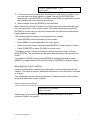
3. From the user menu prompt (see “Accessing the user menu” on page 4), you
can now select the menu option you need, or press [0] [ENTER] to exit.
Alternatively, press [ENTER] (or the RAS’s down button, if applicable) to view
the available user menu options in sequence.
4. When finished, press [0] [ENTER] to exit the menu.
Note: After a few minutes of inaction, the Challenger system automatically exits
the menu and return to the “Code” prompt. We recommend that you press [0]
[ENTER] to exit the menu to prevent unauthorised use (that would otherwise be
logged against your code).
The following keys are used to move between menu options:
•
Press [ENTER] to scroll forward one menu option.
•
Press [MENU*] to scroll backward one menu option.
•
Press the menu number, and then press [ENTER] to jump directly to a menu.
•
Press [0] [ENTER] or press [CLEAR] to exit the menu.
To program a value, such as a number or amount, enter the value, and then
press [ENTER]. The information will be saved and the display will show the next
option.
To program a YES/NO option, press [ENTER] to accept the display or press
[MENU*] to toggle between YES and NO. Press [0] [ENTER] to skip the options.
Displaying input names
Inputs are identified by a number and (optionally) a name programmed by the
installer. The name is useful to determine the location of an input that is unsealed
or in alarm.
Your Challenger system may be programmed to display inputs by their number,
along with their name (Figure 4 below).
Figure 4: Input name displayed
Unsealed On 6, Front Door
NEXT or ENTER
Alternatively, your system might be programmed to display a list of input
numbers (Figure 5 on page 6).
Challenger10 Users Manual
5
Figure 5: Input numbers displayed
Unsealed On 6, 7, 9
NEXT or ENTER
In this case, enter an input number, and then press [ENTER] to display the
input’s name.
Selecting areas by searching
Areas are identified by a number from 1 to 99 and (optionally) a name
programmed by the installer.
When arming or disarming the system, you may want to select a specific area
instead of selecting all areas. Some RAS models (such as the CA111x series)
support area search mode to help you quickly find areas by name.
Please refer to the Challenger10 Administrators Manual for details about this
procedure.
6
Challenger10 Users Manual
Chapter 2 Using Challenger
This chapter describes how to perform everyday tasks using an access card or
by entering a code on a Challenger system keypad.
User authentication
Before you can use the Challenger system (for example, to unlock a door) you
must first identify yourself as a user in the particular system. This is called
authentication, and can take various forms, such as:
•
By entering a code on a RAS keypad.
•
By presenting a card or key fob to a reader-equipped RAS.
•
Using a wireless remote device, such as a transmitter, read by appropriate
hardware.
•
Allowing appropriate hardware to read biometric factors, such as a fingerprint.
•
A combination of the above.
In order to operate various parts of the Challenger system, your user record must
also have appropriate permissions assigned via “groups” of privileges called
alarm groups, door groups, and floor groups. For example, authentication will fail
if you do not have access to the particular door at the particular time of day. If
authentication fails, the RAS beeps seven times in quick succession.
Note: Unless otherwise noted, this manual will use the term “enter your code”,
regardless of the type of authentication your Challenger system requires.
Cards
Cards are typically issued to users to enable them to unlock certain doors at
certain times. Depending on how your Challenger system is configured, cards
may be used to arm and disarm areas:
•
A single swipe of a card can disarm areas and unlock the door for you to
enter.
•
Three swipes of the card can arm areas and unlock the door for you to exit.
Only areas that are assigned to both the user and the reader can be armed or
disarmed.
Codes
An alarm code is a personal identification number (PIN) consisting of a series of
4 to 10 digits that uniquely identifies you to the Challenger system. Your
Challenger system may be programmed so that you can use your code to arm
and disarm the system and to open doors. Alternatively, your system may allow
the use of a door code to open doors, and a duress code to send a message to
the alarm monitoring company. These terms are explained below.
Challenger10 Users Manual
7
Door code: A door code is a shortened alarm code (but still must be at least four
digits). For example, if an alarm code is 123456, and the Challenger system is
configured to use two alarm code prefix digits, then the door code is 3456
because the two prefix digits are removed.
Duress code: Your system might be configured to use keypad duress, which
allows you to signal a duress condition (for example, a holdup) by entering a
special duress code on a keypad instead of your alarm code or door code.
When a duress code is used, the Challenger system operates as if the normal
code was entered (for example, it opens the door), and does the following:
•
Reports a (silent) duress alarm to the alarm monitoring company.
•
Displays the characters “...,” on the LCD screen.
The special duress code is the user’s alarm code +1 (last digit only). For
example, if your alarm code is 8914 then the duress code is 8915. If your alarm
code is 8919, then the duress code is 8910 because only the last digit is affected.
To reset (cancel) the duress alarm, enter your usual alarm code. The “...”
characters will be removed from the LCD screen.
Note: If duress was activated under conditions which are no longer valid (false
alarm), and it has been reset, it is important that you contact your alarm
monitoring company to ensure that no further action is taken by them.
Arming your Challenger system
You may need to arm your Challenger system in order to activate intrusion
detection when you leave the premises. Once you have armed the system, you
must leave the area within a preset exit time to avoid setting off the alarm.
Your ability to arm your premises at a particular RAS depends on the following:
•
Only the areas controlled by the RAS can be armed from that RAS. Alarm
system control for areas is determined by the RAS’s alarm group.
•
Only the areas controlled by your user record can be armed. Alarm system
control for areas is determined by your alarm group.
•
Inputs in the areas you need to arm may first need to be sealed (for example,
the contacts for all doors and windows must be closed), depending on how
your alarm group is programmed. If at any time during the arming process the
RAS sounds seven quick beeps and displays the word “unsealed”, you will
need to seal or isolate the input (see “Isolating inputs” on page 17).
The arming procedure will vary depending on whether your assigned alarm group
has been programmed to display a list of areas.
8
Challenger10 Users Manual
If areas are listed
Use the following steps to arm all unarmed areas that are assigned to your alarm
group:
1. Press nnnn (where nnnn is your code), and then press [ENTER] or [ON]. Any
disarmed areas that are assigned to your alarm group are listed. Press [*] to
see more areas, if applicable.
2. Press [0] [ENTER] to arm all disarmed areas. The corresponding RAS area
LEDs illuminate.
3. Alternatively, enter one of the displayed area numbers, and then press
[ENTER] to arm only that area. Repeat as needed to arm additional areas.
The corresponding RAS area LEDs illuminate.
Optionally (and if the RAS supports it), press the area search mode key to
begin area search. Please refer to the Challenger10 Administrators Manual
for details about this procedure.
4. When finished arming areas, press [CLEAR] or [MENU*] to exit the display.
If areas are not listed
To arm all unarmed areas that are assigned to your alarm group, press nnnn
(where nnnn is your code), and then press [ENTER] or [ON]. The corresponding
RAS area LEDs illuminate.
Secure test mode
Your system may be programmed to automatically go into secure test mode
when arming areas that contain inputs configured for secure testing. In such a
case, the RAS beeper sounds during the test interval, and the LCD screen
indicates that the secure test is running (Figure 6 below).
Figure 6: Secure test RAS display
Secure test, NEXT For Untested
“0”- Cancel:
Please refer to “Conducting a secure test” in the Challenger10 Administrators
Manual for details about this procedure.
Disarming your Challenger system
You must disarm your Challenger system in order to deactivate intrusion
detection so that you can enter the premises without setting off the alarm. If you
enter before disarming, you typically have a preset entry time to avoid setting off
the alarm. The RAS’s area LEDs illuminate to indicate which areas are armed.
If there is a current alarm condition when you disarm your system, the alarm may
be reset. To determine the cause of the alarm, see “Viewing the quick alarm
history” on page 16.
Challenger10 Users Manual
9
Your ability to disarm your premises at a particular RAS depends on the
following:
•
Only the areas controlled by the RAS can be disarmed from that RAS. Alarm
system control for areas is determined by the RAS’s alarm group.
•
Only the areas controlled by your user record can be disarmed. Alarm system
control for areas is determined by your alarm group.
•
Inputs in the areas you need to disarm may first need to be sealed (for
example, the contacts for all doors and windows must be closed), depending
on how your alarm group is programmed. If at any time during the disarming
process the RAS sounds seven quick beeps and displays the word
“unsealed”, you will need to seal or isolate the input (see “Isolating inputs” on
page 17).
The arming procedure will vary depending on whether your assigned alarm group
has been programmed to display a list of areas.
If areas are listed
Use the following steps to disarm areas that are assigned to your alarm group:
1. Press nnnn (where nnnn is your code), and then press [OFF]. Any armed
areas that are assigned to your alarm group are listed.
2. Press [0] [ENTER] to disarm all areas. The corresponding RAS area LEDs
extinguish.
3. Alternatively, enter one of the displayed area numbers, and then press
[ENTER] to disarm only that area. Repeat as needed to disarm additional
areas. The corresponding RAS area LEDs extinguish.
Optionally (and if the RAS supports it), press the area search mode key to
begin area search. Please refer to the Challenger10 Administrators Manual
for details about this procedure.
4. When finished disarming areas, press [CLEAR] or [MENU*] to exit the
display.
If areas are not listed
To disarm all areas that are assigned to your alarm group, press nnnn (where
nnnn is your code), and then press [OFF]. The corresponding RAS area LEDs
extinguish.
Access testing is typically used for inputs that you need to test as soon as the
area is disarmed. For example, to enable you to test a hold-up button
immediately after disarming the area. The areas that contain the inputs to be
tested must be assigned as vaults.
Access test mode
Your system may be programmed to automatically go into access test mode
when disarming areas that contain inputs configured for access testing. In such a
case, the RAS beeper sounds during the access test time and the LCD screen
indicates that the access test is running (Figure 7 on page 11).
10
Challenger10 Users Manual
Figure 7: Access test RAS display
Access test, NEXT For Untested
“0”- Cancel:
Please refer to “Conducting an access test” in the Challenger10 Administrators
Manual for details about this procedure.
Timed disarming or arming
The alarm group that is assigned to your code might be programmed (via a
concept called a user category) to:
•
Automatically rearm an area (delayed by the user category time) that
you’ve disarmed so that you don’t need to remember to arm it.
•
Automatically arm an area (delayed by the user category time) in
response to another area being armed (this is referred to a vault
programming).
A user category is programmed with a name to identify the purpose (for example,
‘Guard’). When a user category is in effect (the user category timer is running),
the LCD screen displays the user category name. Certain areas (and user
records) may be configured for timed disarming, where you don’t need to
remember to rearm the area when you leave because it automatically rearms
after a specified interval.
Guard,
Code:
When user categories are used and areas are programmed for timed disarm, a
warning will sound (if a warning time is programmed) indicating the areas are
about to alarm. During the warning time the LCD screen displays ‘ending’.
Guard, ending
Code:
When the warning timer expires, the area will automatically arm. To avoid setting
off an alarm, you need to do one of the following:
•
Enter your code to reset the delayed arming timer.
•
Vacate the area.
Challenger10 Users Manual
11
Dealing with unsealed inputs
An unsealed input (such as an open door or window contact) can prevent an
area from being armed or disarmed, depending on how your Challenger system
is programmed. If any input is unsealed when you try to arm or disarm an area,
the RAS may sound seven quick beeps and identify the unsealed inputs on the
LCD screen.
Unsealed On 6, Front Door
NEXT or ENTER
Press [NEXT] or [*] to display additional unsealed input numbers, if any.
The input's name is displayed if the system option Display One Input at a Time is
enabled. Alternatively, press the number for any unsealed input, and then press
[ENTER] to see the number and name.
Press [ENTER] to exit the display.
After you have determined which inputs are unsealed, you must seal them (for
example, close the door), and try again to arm or disarm the Challenger system.
Note: If you are unable to seal an input, you will need to isolate the input. See
“Isolating inputs” on page 17.
Opening doors
Opening a door means to use the Challenger system to unlock the door’s electric
locking mechanism so that the door can be opened. You would typically open a
local door that you want to pass through (see “Opening a local door” below). In
addition, a user (such as a security guard) may need to open a remote door for
someone else to pass though (see “Opening a remote door” on page 13).
Opening a local door
A RAS’s keypad may be used to unlock a door by entering a door code or alarm
code, as applicable (see “Codes” on page 7). Alternatively, the door may be
equipped with a card reader that performs the same function as entering a code
on a keypad (the reader must have the option “Door event flag on alarm codes”
enabled).
If the entered code is not valid, or if the time zone is not valid (for example, after
hours), or if it is not valid at the particular arming station or reader, then the
arming station or reader will emit seven quick beeps. The door must be included
in the door group assigned to the user in order for the user to be able to open the
door.
The following instructions are based on the system being ready to accept your
door code or alarm code, as shown below (note the word “Code” on the bottom
line).
12
Challenger10 Users Manual
There Are No Alarms In This Area
Code:
Entering a disarmed area
Use the following steps to unlock a door and to enter a disarmed area.
1. Press nnnn (where nnnn is your code).
2. Press [ENTER].
Exiting a disarmed area and then arming it
Use the following steps to unlock a door and to arm an area (i.e. to exit a room
that you want to arm after you leave), assuming that your user record has
permission to arm and disarm.
1. Press nnnn (where nnnn is your code).
2. Press [ON].
Entering an armed area
Use the following steps to unlock a door and to disarm an area (i.e. to enter a
room without setting off an alarm), assuming that your user record has
permission to arm and disarm.
1. Press nnnn (where nnnn is your code).
2. Press [OFF].
Your system may be programmed so that you can enter your code to unlock a
door and to enter an armed area without setting off an alarm by suppressing
(shunting) the relevant inputs (such as door contacts) for a specified time. In
such a case the LCD screen would indicate as follows.
Suppressed
Code:
If the door is closed prior to the end of the maximum open time, the word
“Suppressed” is removed from the LCD screen, and the RAS will sound the
warning buzzer for several seconds to indicate that the door is no longer
suppressed.
If the door is not closed when the warning time starts, the display will show
“Suppression Ending”, and the RAS will sound the warning buzzer for a preset
time to enable you to close the door, or to re-enter your code to extend the
suppression time.
Opening a remote door
Use the Open Door command to unlock a door that you are authorized (via the
door group assigned to you) to unlock so that a person can pass through it.
Challenger10 Users Manual
13
The Open Door command would typically be used at a RAS that’s at a different
location from the door (for example, from a security desk) otherwise the
commands described in “Opening a local door” on page 12 could be used.
From the user menu prompt (see “Accessing the user menu” on page 4), use the
following steps to open a remote door.
1. Press [22] [ENTER].
Open Door
Door No:
2. Enter the door number, and then press [ENTER]. Alternatively, press
[ENTER] to return to the User menu.
Tip: Use the Unlock, Lock, Disable and Enable command to unlock a door for an
indefinite time. This command is described in the Challenger10 Administrators
Manual.
Handling alarms
An alarm indicates that the Challenger system has detected a problem, for
example if a door is opened when its area is armed.
There are three types of alarms used in a Challenger system, and each type has
its own indication:
•
Alarm: For an input in alarm, the RAS’s area LED flashes (except where an
area LED has been assigned by the installer to indicate some other
condition), and the top line of the LCD screen is blank. See “Alarms” below.
•
Local alarm: “Local Alarm” displays on the top line of the LCD screen, and
the RAS beeps continuously. See “Local alarms” on page 15.
•
System alarm: The type of alarm (for example, “DGP tamper”) displays on
the top line of the LCD screen. Your system may be programmed to operate
the siren and strobe for system alarms. See “System alarms” on page 16.
The alarm signal (siren, flashing light, etc.) and the circumstances that cause it
depend on the Challenger system programming.
Alarms
When an alarm is generated there can be a number of inputs in alarm
simultaneously. It’s important to know which inputs are causing the alarm in order
to deal with them. Inputs are identified by a number in the range 1 to 1008, and a
name programmed by the installer.
Determine the source of the alarm
When there is an alarm, the corresponding area LED on the RAS flashes red and
the LCD screen displays the following.
14
Challenger10 Users Manual
Code:
Press [ENTER] [ENTER] to see which inputs are in alarm. If you see only
numbers and no names, refer to “Displaying input names” on page 5.
Alarm on A1,Front Door PIR
NEXT or ENTER
Press [NEXT] or [*] to update the list of inputs and display the next inputs in the
list (if any).
Note: Inputs in alarm are displayed with an A in front of the number. Inputs in
tamper are displayed with a T in front of the number.
Resetting alarms
An authorised user typically must enter a code at the keypad to reset
(acknowledge) an alarm.
Depending on how your assigned alarm group is programmed, you would
typically use one of the following ways to reset the alarm:
•
Arm or disarm the area.
•
Enter your code and then press [ENTER].
If you are unable to reset an alarm because of a faulty input, you will need to
isolate the input (see “Isolating inputs” on page 17).
If you reset an alarm before you determine which input it came from, you can
also find the input in the alarm history, see “Viewing the quick alarm history” on
page 16.
If the alarm conditions are no longer valid (false alarm), and the alarm has been
reset, it is important that you contact your alarm monitoring company to ensure
that no further action is taken by them.
Note: Individual RASs may be programmed to enable authorised users to reset
alarms without a code. In such cases, the reset key sequence is
[ENTER] [ENTER] [0] [ENTER].
Local alarms
A local alarm is one which occurs when an area is occupied (disarmed) and is
therefore transmitted only within the building and not relayed to an alarm
monitoring company (for example, a fire door has been opened during working
hours).
The alarm input may be programmed as a silent local alarm (input types 21 and
42). For silent local alarms “Local Alarm” is not displayed on the RAS and the
beeper does not sound. When resealed, the reset key sequence is nnnn (where
nnnn is your code) [OFF] [0] [ENTER].
Challenger10 Users Manual
15
Responding to a local alarm
When there is a local alarm, the corresponding area LED on the RAS flashes
red, and the RAS may beep continuously. The LCD screen may display the
following:
Local Alarm
Code:
Press [ENTER] [ENTER] to see which inputs are in alarm.
Local Alarm on 3,Rear Fire Door 1
NEXT or ENTER
Press [NEXT] or [*] to update the list of inputs and display the next inputs in the
list (if any). There may be more than one input in alarm, and if you reset without
checking you might not know about the additional inputs.
Correct the condition that caused the local alarm (for example, close the fire
door) before the local alarm reminder time expires, or the input will re-alarm.
If your system has been programmed with a reminder on local alarms, it will realarm after a pre-set time unless the cause has been fixed.
System alarms
System alarms indicate that a Challenger device (control panel, DGP, or RAS)
has been tampered with, has stopped communicating, or has detected a fault
condition such as mains fail, low battery, fuse fail, and so on.
Your Challenger system may be programmed so that system alarms
automatically reset and generate restoral messages when the alarm condition is
no longer present. For example, a mains fail alarm is cancelled when power is
restored.
Alternatively, your Challenger system may be programmed so that system
alarms latch. This means that a system alarm does not automatically reset, and a
valid code (that is authorised to reset system alarms) must be entered.
If you are unable to reset a system alarm because the conditions require a
service technician to attend, you may need to isolate the RAS or DGP. Refer to
option 16 Isolate/Deisolate RAS/DGP in the Challenger10 Administrators
Manual.
Viewing the quick alarm history
Quick alarm history is a simple way to determine the location of the input that
caused an alarm. This information may be necessary where you have to reset an
alarm without first checking the cause. See also “Determine the source of the
alarm” on page 14.
16
Challenger10 Users Manual
To display the quick alarm history, there must be no active alarms. The LCD
screen must show the default message on the top line and the word “Code” on
the bottom line.
There Are No Alarms In This Area
Code:
Press [ENTER] [ENTER] to display the quick alarm history, displayed in
chronological order from most recent.
*13:23 31/10 LOCAL ALARM Input 1 Fire D>
1-Scan, 0-Exit
The LCD screen shows the most recent alarm details:
•
The time the alarm occurred as hour and minutes (HH:MM).
•
The date the alarm occurred as day and month (DD:MM).
•
The type or alarm.
•
The input number and name of the alarm.
•
The number and name of the area in alarm (see note on page 17).
Press [ENTER] to display earlier alarms.
Press [NEXT] to display later alarms.
Press [1] to shift the text displayed on the top line to reveal any additional
characters.
Press [0] to exit quick alarm history.
Note: The area listed is a guide only. If the input in alarm is associated with
multiple areas, then only the first (lowest numbered) area is reported.
Isolating inputs
You may need to isolate an input to prevent false alarms (possibly due to a faulty
input device). Isolating the input excludes it from functioning as part of the
intrusion detection system.
If an input is in an alarm state, then isolating it resets the alarm. After the problem
is resolved the input must be de-isolated (see “De-isolating inputs” on page 18).
A faulty input is typically unsealed, and cannot be sealed.
From the user menu prompt (see “Accessing the user menu” on page 4), use the
following steps to isolate an input.
1. Press [10] [ENTER]. The LCD screen displays the first unsealed input or the
message “All Inputs are Sealed”.
Challenger10 Users Manual
17
Unsealed on 1,Front door
Input No:
2. Enter the number of an input, and then press [ENTER] to isolate that input.
3. Press [*] to display additional unsealed inputs (if any), and then isolate them if
required.
4. When finished, press [ENTER] to exit this menu option.
De-isolating inputs
An input may have been isolated to prevent false alarms (possibly due to a faulty
input device). Isolating the input excludes it from functioning as part of the
intrusion detection system (see “Isolating inputs” on page 17). After the problem
is resolved the input must be de-isolated.
Note: Do not de-isolate the input before checking the circumstances, because
de-isolating an unsealed input may cause an alarm.
From the user menu prompt (see “Accessing the user menu” on page 4), use the
following steps to de-isolate an input.
1. Press [11] [ENTER]. The LCD screen displays a list of isolated inputs or the
message “All Inputs are De-Isolated”. Isolated inputs that are unsealed are
indicated with a ‘u’ in front of the input number.
Isolated on u3, Rear door
Deisolate:
2. Press the number of an isolated input and then press [ENTER] to deisolate
that input.
3. Press [*] to display additional isolated inputs (if any), and then deisolate them
if required.
4. When finished, press [ENTER] to exit this menu option.
18
Challenger10 Users Manual
Glossary
Access
The state of an area when it’s disarmed, so that normal activity
does not set off an alarm.
Access control
Control of entry to, or exit from, a security area. The Challenger
system typically controls access by allowing only authorised
users to unlock a door or to enter a lift.
Acknowledge
See reset.
Alarm
The state of an intrusion detection system when a input is
unsealed and the condition of the area is such that state should
be signalled, for example, a door is opened when its area is
armed.
Alarm code
See code.
Area
A logical grouping of input devices that are armed and disarmed
simultaneously.
Card
A portable device (card or fob) that holds information to identify
a user to the Challenger system. The information to identify a
user can be stored in a chip (smart card), on a magnetic strip, a
bar-code, a Wiegand card.
Code
An identifying number entered via a keypad. A user’s alarm
code is typically the same as the user’s PIN. Depending on how
the system is configured there can also be a door code and a
duress code.
DGP
Data Gathering Panel. A DGP expands the capacity of the
Challenger system.
Door code
An optional version of the user’s alarm code shortened by the
number of digits specified in the alarm code prefix. The door
code is used for access control (to open a door) without
potentially revealing the entire PIN used for alarm control.
Duress code
Keypad duress allows a user to signal a duress condition (for
example, a holdup) by entering a special duress code on a
keypad RAS instead of their usual door. When enabled, the
duress code is the user’s code +1 (last digit only).
Input
An electrical signal from a security device (input device) to the
intrusion detection system. Each input device is identified by a
number and name, for example, “14. Reception Holdup Button”,
or “6. Fire Exit Door”.
Challenger10 Users Manual
19
Intrusion detection
Electrical detection devices (called inputs) are connected to the
Challenger panel or a DGP. Based on the type of device and
whether the device’s location (called area) is armed or
disarmed, the device triggers an alarm when something
activates it. For example, the device might be a reed switch that
detects a door being opened when the area is armed. An alarm
typically triggers a siren and flashing light to operate, and sends
a message to a remote monitoring company.
Isolate
The input device is inhibited from indicating sealed or unsealed
status. It is excluded from functioning as part of the system. If a
input device is defective or there is a reason it cannot be
sealed, then it may need to be isolated before the area can be
armed.
Local alarm
An alarm which is transmitted only within a building, and occurs
when an area is disarmed. The circumstances which cause a
local alarm can be checked and rectified by personnel on site
and it is therefore unnecessary for the alarm to be relayed to a
remote monitoring company.
PIN
Personal identification number
RAS
Remote arming station. A user interface device such as a
keypad or card reader that enables a user to perform operations
such as unlocking a door or arming the system.
Reset
To cancel an alarm. A users who is authorised to arm and
disarm the area in alarm, resets the alarm by arming or
disarming the area.
Sealed
The input is not activated, for example, door closed.
Secure
The state of an area when it’s armed.
Shunt
A process that inhibits an input from generating an alarm when
unsealed. For example, a shunt stops a door from generating
an alarm when opened for a short time.
Smart card
An electronic device in the form of a card or key fob that holds
information to identify a user to the Challenger system.
Tamper
A tamper alarm indicates that someone may have tampered
with a security device, such as a input or Challenger hardware
(cabinet, siren, DGP, or RAS). Your Challenger system may be
programmed to monitor tamper indications on input devices
(input tamper monitoring).
Unsealed
A input device is unsealed (active) when it detects a condition
that may be used to trigger an alarm when the area is armed.
For example, a front door’s detector is unsealed each time the
door is open, but the unsealed state is ignored unless the area
containing the detector is armed. An unsealed input may
prevent the area from being armed. For example, you need to
close the door before you can arm the area.
User
A user is a person recorded in the Challenger database. Users
can operate some or all of the Challenger system, depending on
their assigned functionality. A user might be someone with an
ID card to unlock a door, or someone with extended
functionality, such as an administrator or a security company
installer.
20
Challenger10 Users Manual