Download TiniARM Development Kit
Transcript
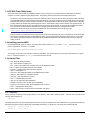
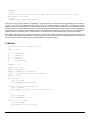
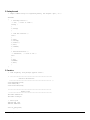
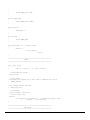
Compiling an Application for the TiniARM From Scratch Programming the Arm processor in C can be done for free with the use of the freely available and multi-optioned GNU compilers. It can be a little daunting with 70MB downloads and thousands of pages of text to wade through to find the essential ingredients to make the recipe you're trying to implement. This manual assumes a neophyte level user and walks through the paces to get a bare application running on the TiniARM. With the knowledge of this journey, it is hoped that you will be able to forge your own. NOTE: Changes from previous manual (V.1) are marked with a change bar like the one on the left. 1.0 Introduction The first job is to get programs and documentation. Some comes with the software but sometimes they need documentation. Don't get me wrong, it's great that there is a lot of documentation but it is vast and too many variables lie in the way of getting what I want. Where's my hello world program with an interrupt for only 234 bytes? Not 42K of behemoth layers of OS parts and services (which have their own empire of documentation). I often have to dig for a nugget of info to let me know which variable to modify each time something goes wrong in compiling, but to find that nugget again would be almost impossible. So here are the steps and nuggets (most of them) I took to get to the finish line. To work with the target board you will need: • • • • • • • • • the target board the development board power supply rs232 cable PC with COM port compiler downloader terminal program patience, luck and the NMI help forum 1.1 Overview First, edit your source code; compile it with a compiler; link it and write it out with a loader; possibly translate the output to one suitable for downloading; download the result to the target board; attach test equipment and reset board to test it out. Note all the steps and also note that this is a command line affair, no GUI. Although some are available, I have none to recommend yet. So crack the knuckles, rub the palms rapidly and push up the sleeves. In addition to being command line user interface (CLUI), it is Unixish and needs a Unix-like environment to run in. This means using the terminal window in Mac OSX and an extra download in Windows. 1.2 Get (with) the Program(s) Whether you are running MacOSX, Windows or Linux, there's a precompiled application out there waiting to be downloaded. These are big and always come with many more things that you and all of your related family would never be able to use, so be prepared for a long download even on high speed connections. This document is tied to the gnude 1.2/1.1 release on Windows 2000 and MacOSX. Search for gnude download or if this link is valid: http://sourceforge.net/projects/gnude/ Page down and download the appropriate version for your platform(s). In addition, for the Windows platform you will also need to download from redhat: http://www.redhat.com/download/cygwin.html To communicate with the board you will need to run another program on the PC available from Philips at: http://www.semiconductors.philips.com/files/products/standard/microcontrollers/utilities/ lpc2000_flash_utility.zip Download what you need and install (cygwin first on Windows). TiniARM Development Kit: User Manual Nov 1, 2004 2