1
Section 4: Adjustments and Functions
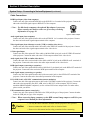
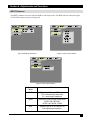
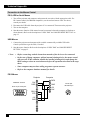
IMAGE Submenu
The IMAGE submenu is used to change the image characteristics.
SETUP
INPUT
IMAGE
KEYSTONE
BLANK
MIRROR
START UP
SETUP
KEYSTONE
BLANK
MIRROR
START UP
OPT.
±0
INPUT
IMAGE
NORMAL
H: INVERT
V: INVERT
H&V: INVERT
OPT.
SETUP
INPUT
IMAGE
OPT.
INPUT
IMAGE
OPT.
KEYSTONE
BLANK
MIRROR
START UP
SETUP
KEYSTONE
BLANK
MIRROR
START UP
TURN ON
TURN OFF
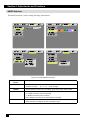
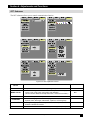
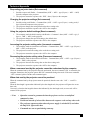
Figure 4.11 Image Adjustment Screens
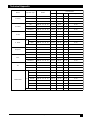
Adjustment
Screen
KEYSTONE
Reduce distortion
at bottom of image.
Reduce distortion
at top of image.
BLANK
Selects the blank screen color: red, orange, green, blue, purple, white or black.
MIRROR
Inverts the picture horizontally or vertically.
H: INVERT Inverts the picture horizontally.
V: INVERT Inverts the picture vertically.
H&V: INVERT Inverts the picture horizontally and vertically.
STARTUP
22
Value
Enable / Disable startup screen.
When canceled, the background color will change to blue.
3M™ Personal Projector MP8746/MP8747
© 3M IPC 2000