1
technical guides
www.cactusnav.com
GUIDE TO NMEA ctd
What you can/can’t do with NMEA
Troubleshooting
NMEA interfacing allows two pieces of equipment to share
simple data such as boat speed, course and current position expressed as Lat/Long. What it can’t do is transfer
large or complex items of data. For example, connecting a
chart plotter and a radar together may allow the radar to
read course and position data from the chart plotter, or the
chart plotter can plot a position based on a mark placed on
the radar, but the radar wouldn’t be able to download a
chart picture from the plotter via NMEA, and the plotter
couldn’t display a radar image. For large amounts of data
like this you need a high speed data link, such as
Raymarine’s HSB2 system or Furuno’s Navnet.
There are generally five reasons why NMEA interconnection
isn’t working -
With PCs and laptops becoming a more common feature on
boats and with a whole range of navigational software available on the market, it is useful to be able to connect a PC to
your boat equipment, which can be done via the RS232
serial ports.
The standard RS-232 connector is a 9 pin plug Connect To
NMEA Out Data
NMEA In Data
NMEA In/Out Common
NMEA In Data
NMEA In Common
NMEA Out Data
NMEA Out Common
To connect your PC to external equipment you need to
make up a serial cable with a 9 pin plug one end and bare
wires the other end. The bare wires go to the NMEA
In/Out terminals on the navigation equipment and the plug
end goes to the PC RS232 Rx Data
RS232 Tx Data
RS232 Signal Ground
9 Pin Serial
Use of a PC isn’t limited to charting - you can use your PC
as a SatC terminal, use it to send and receive emails via
your SSB or Satcom as well as display instrument data on
screen. Make sure you thoroughly read the instructions that
come with the software and the equipment you want to
interface - some require that external equipment is connected via a specific serial port for it to work.
page 2 of 3
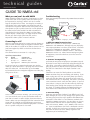
Well, I only speak
version 2.5.
Same language, different dialect
Connecting to a PC
Serial Port Connections
Pin
Signal
2
Rx Data <–
3
Tx Data –>
5
Signal ground
I talk NMEA0183
version 3.0!
1. Different NMEA formats/versions
NMEA data is available in three formats - NMEA0180,
NMEA0181 and NMEA0183, although only very old equipment outputs/receives in 0180 or 0181 format - all current
equipment is NMEA0183 compatible. However, even
NMEA0183 is available in different versions - the latest is
NMEA0183 version 3.0. When interconnecting two pieces
of equipment, ensure that both are set to the same format/version.
2. Sentence incompatability
Just because two pieces of equipment are NMEA compatibly doesn’t mean they’re necessarily saying/listening for the
same thing. Connecting a depth sounder to a radio isn’t
going to produce any kind of useful co-operation because
the radio isn’t interested in what depth sounder is outputting.
Check the user manual of both products to see which
NMEA sentences they are transmitting and receving. If you
want to plug your GPS into your chart plotter you need to
make sure that the plotter can recognise at least some of
the sentences the GPS is outputting. Also bear in mind that
some sentences contain more data than others - if you link
your radar to a compass, but the radar will only show magnetic heading (even though the compass can also show
true data), it’s probably because the NMEA heading sentence both units understand doesn’t include true data.
3. Incorrect wiring
There are only two wires involved - how difficult can it be?
Well, although you can’t do any damage if you get the wires
the wrong way round, the major problem with NMEA interconnection is that there is no set reference standard with
regarding to NMEA connections - the two wires can be any
colour and the terminals can be called anything - NMEA
Data and Common, NMEA + and -, NMEA A and B and so
on. Some manufacturers don’t have a dedicated Common
terminal, in which case you have to connect the common
wire from the other unit to the battery negative of the
equipment you’re interfacing with.
Issue 1.0 22/07/2003