1
(a) You're getting ‘Hard Errors’, Unrecoverable Read Errors or HER’s from each block when reading a new
tape.
(b) Previously read tapes can still be read without problem.
Item (b) rules out dirty heads and other hardware problems.
Maybe, even though you asked for a particular density they gave you a different density tape, one that your drive
can not read.
If the tape you're trying to read is the right density for your tape drive, chances are almost 100% that you'll be
able to read it without problem. Sometimes there are problems with old tapes or tapes written out of skew but
this is rarely seen with modern drives.
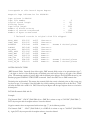
You can use the KEYS program to test for characteristics that are indicative of a wrong-density tape.
The following scenario is strongly suggestive of wrong density:
a) You can read known good tapes without error. This rules out other problems such as dirty heads or
hardware configuration problems.
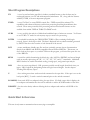
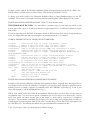
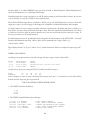
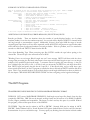
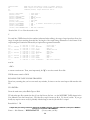
b) Using KEYS, enter "5B" to go forward 5 blocks (skipping past any possible label file).
Now enter a series of "R" commands in an attempt to read a bunch of successive, equal-length data blocks. If
it's a "wrong-density" tape, you'll get "Hard Error" (HER) on each block and the block lengths displayed will
vary by 10% or 20% but sort of hover around some value.
If you try to display the data using "D", neither the ASCII nor EBCDIC will make any sense.
Another scenario suggestive of a wrong density tape or a backup tape is as follows:
You can read in the label information fine, but you get hard errors every time you try to read in a data block.
This can happen when you are sent a tape in a backup data format from a mainframe system. The data in the
label can be read, but the blocks may be too large or may be compressed with a software program.
What code (EBCDIC, packed or Zoned Decimal) ?
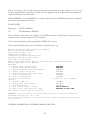
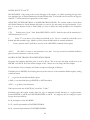
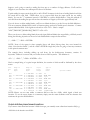
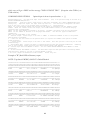
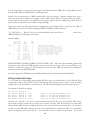
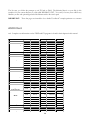
You probably want all the data you're importing to end up as ASCII on your PC. Use the KEYS program's "R"
command to read the first block of the data file on tape [if it is a "labeled" tape, first type "1F" to skip past the
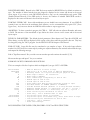
label file]. Then display that data, side-by-side, in DECIMAL, ASCII and EBCDIC converted to ASCII, by
hitting "D" or “-D”. The data type can be identified by the heading under the section of data that you can read.
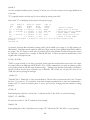
You can fit more data on the screen by re-displaying the data with the "E" command (if EBCDIC) or with the
"A" command (if ASCII) . The numbers and the other code will not be displayed with the E and A commands.
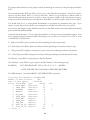
Other ways to determine code, if the tape is a labeled tape, is to use the CUBS program's "L" mode or KEYS
“C” command
If the data is pure EBCDIC, select EBCDIC to ASCII translation when importing the data with FX.
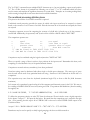
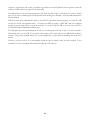
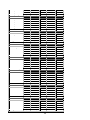
KEYS displays "un-printable" characters as decimal points. If your data contains PACKED DECIMAL or
ZONED DECIMAL fields you'll see bunches of decimal points where (in context) they don't make any sense.
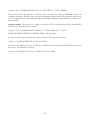
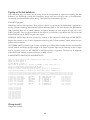
CAUTION - KEYS can easily write on tape if you hit the wrong key. WRITE PROTECT THE TAPE FIRST
by REMOVING THE WRITE RING or PUSHING THE THUMBWHEEL TO THE LOCKED
POSITION.
108