1
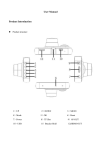
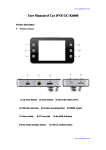
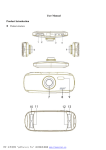
CAR DVR Table of contents Overview This product is designed using the latesttechnol ogy of digital high-definition camera, either as a nor mal HD camera to use, but also a professional HD D riving Recorder; either recording resolution up to 19 20 * 1080P FULL HD HD resolution images, and use the latest wide dynamic technology, but also can tak e 12 million photos; using TF card as a storage devi ce, compact, energy-saving, easy to carry. Compare d to conventional cameras, the product FULL HD vid eo recording, can record more detailed perfect video screen. The keys are touch-sensitive technology th at allows for better comfort touch sensitive. Enjoy true high-definition life by using this product. Feature Keys with touch-sensitive technology to bring the best comfort to human。 140 degree ultra wide angle lens. Advanced Wide Dynamic technology 1920×1080P FULL HD high quality resolution. Advanced H.264 video compression technology. 12 mega pixels 4X digital zoom, ranges from 12cm to unlimited distance. 2.7 inch high resolution LCD, can watching whole shooting. 30/60 frames per second for smooth video flow. Equipped with special auto suction cup holder. Conveniently fix and use. G-sensor keep and save records of sensor data, Emergencies and real-time display on the player. Powerful document protection, even in the recording process, the occurrence of sudden power outages, machine damage, etc., video files will be intact. Seamless continuous recording, will not miss any data. auto cigarette lighter power supply, to make the video recording while driving. auto automatic on; to start the video recording function automatically. Video was automatic circulating recording, being able to set the record time for each file. Watch and monitor video while video recording in driving. Support on-spot play back. Improve time & date format, no need reset when this machine re-start. Set the video recording time, stop recording automatically when the setting time is up. charge through USB. Humanized operation interface, easy to use. Maximum 32GB Structure 1) Camera 2) fill light 3) Speaker 4) switch on/off 5) TF card slot 6) USB 7) bracket mounting slots 8) Reset key 9) MIC 10) Indicator 11)touch-sensitive Key Key Functions Power: Turn on / off Up : Up / zoom Menu : Setup menu Down : Scroll down / Zoom Confirm: Start / pause Mode: Mode(Video / Photography/playback) Fill light: Switch Day / Night Mode Operation Starting to use the car camcorder ◣Turning ON/OFF ON: Press power button once to power on, blue light indicator is on; OFF: Press again to power off, blue light indicator is off. Attention: it will be WARNING Low battery, then shutting down ◣Changing Batteries There 3 ways of changing the battery, Red light indicator is on while charging;180 minutes for full charge, Red light indicator will turn off when fully charged 1.Using the AC adaptor to charge battery 2.Using USB to charge battery 3.In-car cigarette lighter power charging. ◣Micro SD card Place the micro SD card into the memory card slot according to the image instruction below; press it until you hear a click sound. Removing Micro SD card: Press it once and remove it after it pops up. ◣G-Sensor Function Select Off/High/Middle/Low, When the impact dynamics reached the value your setup, this video will de locked. ◣Basic operation: ◣How to switch between video, photos, playback modes Press MODE to switch modes. ◣How to enter setting mode Press MENU twice, enter “System Setting” option. Format: Format Micro SD card (this action will delete all file without locked in the Micro SD card) Language setting: 1) English 2) Traditional Chinese 3) Simplified Chinese 4) Japanese 5) Russian 6) German,7) French,8) Spanish,9) Italian,10) Portuguese, Reset System :Cancel /Proceed(Factory default) Date setup: Set Date/Time. ◣How to record video and enter setup ◣Video: Press OK to start recording ,press it again to stop. In recording mode, press fill light key to activate Day/Night mode. ◣Video option settings Press MENU key ,enter video option setting. Video resolution: 1080FHD, 720P, WVGA ,VGA. Time display: ON/OFF. Motion detect: ON/OFF. Recording: ON/OFF. Cycle recording: Off/3min/5min/10min. Auto power-off: Off/1min/3min. Press button voice: Off/On. ◣How to take photo and setting option ◣Taking photo Press OK key to take photo Photo shooting setup :Press MENU key, Enter photo shooting setup option. Shooting option: Single /2sec clocking /5sec clocking/10sec clocking. Image resolution: 4032*3024/3648*2736/3264*2448/2592*1944/ 2048*1536/1920*1080/1280*960/640*480 ◣Manage Files Press MODE key to enter File Management mode. There are 2 types of files: Video playback, Image playback. Most recent file will be displayed on LCD. For example: If your last action was photo shooting, The photo will be displayed on LCD. ◣Video and Photo playback ◣Video Playback Press UP/DOWN key to select the desired file for playback. Press OK key to start/stop the video playback, adjust volume by UP or DOWN button when play the video, Press UP/DOWN key adjust volume while playback to rewind, Press OK to stop video playback. ◣Image Playback Press UP/DOWN key to select desired file for playback, Playback option setting: While playback press MENU key to Playback option setting: 1. Delete: Press OK key to select action Single/All/Select delete File 2.Protect file:select locking or unlocking the file 3.Slide play: Select 2sec/5sec/8sec to play the video ◣Connect to PC Downloading Videos and Images. After USB cable is connected to computer, LCD display appear start picture, blue indicator will turn on, then will the display screen will be blue Computer will automatically detect the Micro SD card drive. Attention: System requirement: Windows 2000 / XP / Vista / windows7,MAC OS *10.3.6 or above. Browse or manage files through computer. Unplug the USB cable turn the device off. Remarks: If device crashes during usage, press the RESET button and restart ◣Accessories: 1) Vehicle specific power supply 3) USB cable 2) Car bracket 4) User Manual Specification LCD Display Lens Language selection 2.7LTPS 140°A+High Resolution Wide Angle Lens English/Traditional/Chinese/Japanese/Russian/ German/French/Spanish/Italian,Portuguese Video resolution Video format Image resolution 1080FHD 720P WVGA VGA MOV H.264 compress format 4032*3024\3648*2736\3264*2448\2592*1944\20 48*1536\1920*1080\1280*960\640*480\ JPG Image format Memory card Microphone/Speake r Shooting way TV mode Frequency USB Port Power input Built-in Battery Micro SD(MAX 32GB) Yes,High-resolution input / output quality Single/2sec clocking/5sec clocking/10sec clocking PAL/NTSC 50HZ/60HZ USB2.0 5V 500MA High-quality Re-chargeable Li-ion