1
Vehicle Blackbox DVR
?i+its*{y
{effi
iH, EE l$
USER MANUAL
PYKOBOaCTBP
Product Overview
i
t
This product has industry-leading digitalwide dynamic, FULLHD1080P
full
HD camera, G-sensor
gravity sensor,
SOS emergency
button to save,
voice storage, one-iouch recording switch, HDMI high definitlon output,
TV sync
output functions. This product
is exclusive design,
elegant
appearance, does not affect the oveiall appearance, humanized design
concept allows you to enjoy the noble class treatment!
Ti ps:
This user manual will detail how to use, operation, technical
specifications and precautions. Before use, please read this manual
thoroughly and fully understand, Please keep this manual, we hope our
products can meet your needs and long-term service to you
!
This manual in the printing proiess, the machine because of the
appearance, software or hardware repair process leads to the same part
.
of the manual operation of non-conformance, the company has
maintained the final interpretation!
This product complies with
FCC
&
CE
certification-authority such as
indicators, to ensure the safe use of customers.
fl
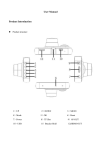
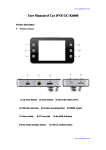
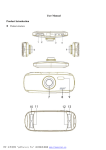
Product Structure
aa
KEY FU NCTION I NSTRUCTION
aa
I
I
a
r
\l
(,
tr &$-:
it
menu button
Short-Press to bring up the feature set menu;Continuous short press
a
a
this button can switch each other between each set;
a
tup
flta
Up to,select the function key menu
options; ; Standby or short video
process click here button can digital zoom adjust;
roK
Video and take pictures to confirm button, the camera mode, short
?.
Jr----'-.
[,-.*--.,.--_-+
liir
!'
\. -
--_
1) AV-ouTporr
3)
5)
7)
9)
Bracket mounting mouth
power button
menu
speaker
11,) HD lens
13
DOWN
15
Mtc
L7
reset hole
19
indicator
_---.\
press this key to start recording again press stop recording; camera
'ri
mode Short Press to take pictures; menu mode to confirm OK.
--..
2)
+)
6)
8)
r
-./'J
down
ln menu setting, press down shortly to open or close record functions.
After first press the digital zoom f unction keys, the keys into digital
HDMI port
shrink function keys.
use port
mode key
f
Mode
Short Press to switch between each other in the camera / camera
Emergency lock button
10) lnfrared night v;sion light
12) uP
14) oK
15) TF Deck
18) display
/
playback;
Video process short press this key will be on the current screen lock
I
HDMI
r
TF card
HDMI OUT PORT
i
1
I
J
slot
r
USB
r
data interface
(1) for connecting a
PC
SOS
Press this button, the current video
to transfer data;.
I
(2) for connecting an external power supply to charge the battery or
file
is saved as can
Automatically turn on/off
supplies power to operate;
When connected with car charger, device
!
RESET
turn off and save the last video when car power off.
Select to reset
does not leak seconds
r
Power Switch: Short press Power ON Press and shutdown; short press
r
emergency locking keys: ln the video mode, short press, can lockthe
boot time
current video file can not be deleted;
Again long press the power button is turned off,
Power lndicator
Note: The recording instrument will be prompted to low battery
low
a camera icon;
flashing red dot, indicating the video work
I
G-sensor
When gravity acceleration up to ?g, the machine will automatically
2G-4G-6G-8G;
out;
Short press ok button to start the camera, the camera icon will appear
Special Function Description
G-sensor can be adjusted in the menu
is
goes
mode
the screen displays
full after the light quench;
MIC:The recording receiver;
save the cu rrent video of the accident, not delete the
REC
the red,light
Short press mode key, switch to camera mode, the upper left corner of
nsert the USB line after the power light light said it was charging, the
is
first boot, the red indicator light lights up at
voltage automatic shutdown when battery
I
Battery charge indicator
battery
r
on/off
Press the power button
I
r
Power
short press to take pictures;
This power indicator lights turned on;
r
willturn on when car start,
REC/photo operation specifications
I
to open or close the infrared night vision light; in the camera mode,
I
not be deleted;
file;
r
I
corner display camera icon, press
i!
OK
/
Power key to take photo, ta ke
pictures when the screen flashes for one time,
l
I
i
4
t$
Camera mode
shortly press mode button to switch to camera mode, in the top left
is
r
it
indicate photographe
completed.
Photo mode
1
,i
!2
13
d
Short press mode key, switch to camera mode, the upper-left corner of
USB mode
the screen displays the camera icoil;
Connect DVRwith computer by USB Cable, press "poweron" button, car
Short press ok key camera, take pictures ofthe screen flashes once said
DVR
camera to complete.
USB-Disk : ln this mode we can access video files and photo files.
Video
/ photo playback
.t'
Short press mode key, switch to playback mode, the upper-left corner
.ts
willautomatically ihow
Short press up key up to select the file;
I
Short press down key down to select the
I
Short press ok button to play the selected video files;
I
Menu setting
up
key, you can
filei
r
m
here arethree methodsto charge, the red indicator light up when
Short press menu key to enter the set state, short press here Short
press down key to set up menu, though this button to select the date
and time options,Short press Short press ok key enter, Short press ok
button to select the date and time options,short press switch to
playback mode,
cha rgi ng
time
is
a
botit 180 m i n utes, a nd the red
3. Use vehicle power to charge
r
quit menu settinB
Time setting
the entire
2. Use Pc-USB to charge
Short press ok to enter set sub key.
r
[:f
1. Use power adapter to charge
setthe sub key up and down select
Short press menu key to quit menu setting;
:
indicator light automatically off when charging completed'
switch,
r
modes available
battery slightly low battery low battery battery empty
ch a rgi ng,
or down
l
Battery indication image:
Full
Short press menu key. key to enter the setting menu
shoil press
menu,there are
Battery instruction
r
ofthe Jcreen to display the playback icon
I
USB
\
I
I
Remark: when appearcrash because of improperoperation, remove
battery or press "reset" button to restart.
Products specifications
Features
HD Camera, HD
Video
Built-in (emergency save car accident case,
G-sensor
LCD screen size
will not be deleted)
Russian, English,Chinese (simplified),
Files
format
Chinese (Traditional),Korean,Japanese, etc...
MOV.
Video resolution
1920x1080 3ofps built in lens1200W
Recording video format
H.264, Audio: AAC
Color
sta nda rd
Continuous loop video
seamless loop recording,
Photo mode
12OOw
Photo format
JPEG
Memory card
TF (MAX 32GB)
mlc
support
Built-in stereo
su
IR
su p
Video format
PAL/NTSC
freq uency
SOHZ/6OUZ
function
pport
port
1 :USB-D|sk 2 :PC-Camera 3 :charginB
Power interface
5V 1A
battery
Built in :300mAh
don't leak second
Support auto ignition boot,
on/ott
turn offshutdown
Function
Built-in memory
USB
Automatically power
Motion Detection
Carrier media
high-resolution
ultra-wide-angle lens
Language
su p
2.7LTPS 15:9
170-degree-A+-grade
lens
port
Time synchronization
su ppo
rt
FAQ
try these methods
For problems in normal operating situation,please
below:
rl Can't take Photo and recording
Check the if the TF card has enough space or locked
t
Automatically stop when recording
Use the compatible high-speed TF card
with
SDHC because
of big
HD
C4 and C6
video data, the high-speed TF card have identifying of
Appear "files error" when replay photo orvideo
please use
Uncompleted files because ofTF card storage error'
r
formattihg function to format your
r
TF card
Unclearvideo
checksifthereareanydirtorfingerprint;anduselenspapertoclear
the camera lens.
r
Black image when recording sky or water scene
Scenes
r
to correct'
function of camera; you can adjust "EV in setting mode
light
outdoor
and
Color is not perfect in cloudyday
Set the
!
with big contrast will influence the automatic eiposure
"white balance" function to automatic
cross stripe interference in image
or 50Hz
Because of wrong "light frequency", please set it to 50Hz
according to the local poweii supply frequency
r
crash
Restart by pressing shortly on" RESET" button after crash