1
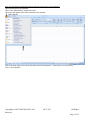
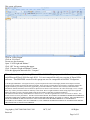
This screen will appear.
Click on “Office Button”
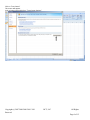
Click on “Exit Excel”
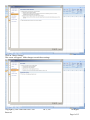
Do not save the document.
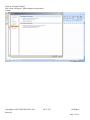
Open “CAP Weight and Balance”
Click “OK” for any warnings that appear.
Click “Compute Weight and Balance” button.
Fill in the appropriate data and click “Compute”
This software is compiled using Microsoft Excel 2003. The program should function normally
with Microsoft Excel 2000 through 2010. It is not compatible with any version of Open Office
software. The MACROS created in this program are not compatible with MAC Computers.
“CAP Weight and Balance” is designed for use by experienced pilots who must be thoroughly familiar and competent with the
operation of the aircraft specified in the Software Product. BCT expressly warrants that it has accurately, graphically depicted the
weight and balance procedures prescribed by applicable government authorities, and that it has accurately communicated the
information obtained from other sources which are depicted on its charts or other materials. BCT does not design, review, or flightcheck any of these procedures and has no authority to alter them. BCT's weight and balance charts simply depict the weight and
balance procedures exactly as designed, flight-tested and prescribed by applicable government authorities.
The Software Product and any documentation are delivered “as is,” and are not guaranteed to be free from errors or defects. You
assume all risk as to their performance. EXCEPT AS STATED ABOVE, BCT MAKES NO EXPRESS OR IMPLIED WARRANTY,
AND DISCLAIMS ANY LIABILITY FOR THE SOFTWARE OR THE DESIGN, ACCURACY, SAFETY, OR CONFORMANCE
WITH STANDARDS OR REGULATIONS OF ANY FLIGHT PROCEDURE PRESCRIBED BY A GOVERNMENT
AUTHORITY, INCLUDING, BUT NOT LIMITED TO, ANY EXPRESS OR IMPLIED WARRANTY OF MERCHANTABILITY
OR FITNESS FOR A PARTICULAR PURPOSE.
Copyright (c) 2007 2008 2009 2010 2011
Reserved
BCT, LLC
All Rights
Page 9 of 15