1
INTRODUCTION, SETUP, AND OPERATION (Continued)
RACK MOUNTING
Adequate ventilation is very important in
multi-channel installations. Units should be spaced
apart by at least one panel height wherever possible,
and some air movement is mandatory in enclosed
rack cabinets.
Excessive heat will shorten component life and modulator performance will be degraded without proper
cooling.
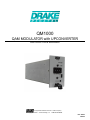
QM1000 OPERATION, SETUP, CONNECTIONS
AND CONTROLS
The following information may serve as an aid in setting up the QM1000 parameters:
Modulation Selector: the CW setting is for testing
and should be selected to allow setting of the up-converter output level using a device such as a signal
level meter or spectrum analyzer. For normal operation, one of the MOD settings (256QAM, or 64QAM) is
required.
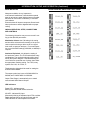
Interleave Dip Switch: this allows the setting of
the interleaver values. The ITU-B mode allows many
combinations. The required setting should be specified by the system designer. If the demodulating device must have a particular set of values, then select
the appropriate matching setting. For ITU-B, many
systems use I128, J4 or I128, J1.
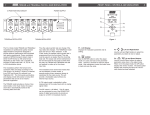
The chart to the right should be used for setting the
INTERLEAVER MODE:
The output symbol rate is set at 5.056941MS/S for
64QAM, and 5.360537MS/S for 256QAM.
Output Filter Range is automatically set to match
user-selected QAM Channel Output.
LED indicators:
Power LED - Indicates power.
Blinking indicates invalid channel selection.
ASI LED - Indicates ASI input.
Momentarily blinking off indicates input FIFO overflow. Rapid alternate blinking of both the power and ASI
LEDs indicates an over-temperature condition.
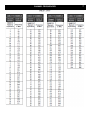
INTERLEAVER DIP SWITCH SETTINGS CHART
6