1
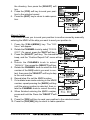
MATRIX SERIES
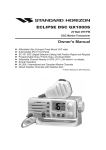
GX2000E and GX2100E
25 Watt VHF/FM
Marine Transceivers
Owner's Manual
GX2100E: Integrated dual channel AIS (Automatic Identification System) receiver
GX2000E: AIS support with external AIS receiver or transponder
AIS target display includes MMSi, Callsign, Ship Name, BRG, DST,SOG & COG
Select and make automatic DSC call to AIS target
Class D DSC (Digital Selective Calling) with Distress, Individual and All Ship calls
Navigation information (LAT/LONG,SOG,COG) information shown on display
Navigate to a DSC Distress Position
Enter, Save and Naviagate to a waypoing with Compass page
GX2100E output AIS VDM sentence to compatible GPS chart Plotter
Automatic DSC Position Poll request to up to 4 seperate vessels
E2O (Easy to operate ) Menu system with User programmable soft keys on Radio
Dedicated channel 70 receiverfor continous DSC watch
Submersible JIS-7/IPX-7 rating (1Metre for 30 mins)
GX2100E - 30 Watt PA/Loudhailer with pre programmed fog Signals and listenback
facility
ClearVoice noise cancelling microphone with channelselector and 16/9 key
Supports RAM3 Remote station speaker microphone and VLH-310 remote handset as
second remote station
Intercom facility between Remote Station and Radio
AIS and Navigation functions available on RAM3 Remote station speaker microphone
GX2100E requires connection to external GPS or
GX2000E requries connection to external GPS and AIS receiver or Transponder
MATRIX GX2000E
GX2000E/GX2100E
MATRIX AIS GX2100E
Page 1
TABLE OF CONTENTS
Quick Reference Guide ................................................................................................................................................. 4
1
GENERAL INFORMATION ..................................................................................................................................... 8
2
PACKING LIST ....................................................................................................................................................... 9
3
OPTIONS ................................................................................................................................................................. 9
4
SAFETY/WARNING INFORMATION .................................................................................................................... 10
5
GETTING STARTED ............................................................................................................................................ 11
5.1
ABOUT VHF RADIO .............................................................................................................................. 11
5.2
SELECTING AN ANTENNA ................................................................................................................... 11
5.3
COAXIAL CABLE .................................................................................................................................... 12
5.4
EMERGENCY (CHANNEL 16 USE) ........................................................................................................ 13
5.5
CALLING ANOTHER VESSEL (CHANNEL 16 OR 9) ........................................................................... 14
5.6
MAKING TELEPHONE CALLS .............................................................................................................. 14
5.7
OPERATING ON CHANNELS 13 AND 67 ......................................................................................... 15
6
INSTALLATION ..................................................................................................................................................... 16
6.1
LOCATION ............................................................................................................................................... 16
6.2
MOUNTING THE RADIO ....................................................................................................................... 16
6.3
ELECTRICAL CONNECTIONS .............................................................................................................. 18
6.4
ACCESSORY CABLE ............................................................................................................................. 19
6.5
CHECKING GPS CONNECTIONS ........................................................................................................ 21
6.6
CHANGING THE GPS TIME ................................................................................................................ 22
6.7
CHANGING THE TIME LOCATION ...................................................................................................... 23
6.8
CHANGING THE TIME FORMAT ......................................................................................................... 23
6.9
CHANGING COG TO TRUE OR MAGNETIC .................................................................................... 24
6.10
OPTIONAL CMP30 (RAM3) INSTALLATION .......................................................................................... 25
7
CONTROLS AND INDICATORS ......................................................................................................................... 28
8.1
CONTROLS AND CONNECTIONS ....................................................................................................... 28
8
BASIC OPERATION ............................................................................................................................................. 33
8.1
RECEPTION ............................................................................................................................................ 33
8.2
TRANSMISSION ..................................................................................................................................... 33
8.3
TRANSMIT TIME-OUT TIMER (TOT) ................................................................................................... 33
8.4
SIMPLEX/DUPLEX CHANNEL USE ..................................................................................................... 34
8.5
DISPLAY TYPE ....................................................................................................................................... 34
8.6
INTERNATIONAL, CANADA, AND USA MODE .................................................................................. 35
8.7
DUAL WATCH (TO CHANNEL16) .......................................................................................................... 35
8.8
SCANNING .............................................................................................................................................. 36
8.9
PRESET CHANNELS (0 ~ 9): INSTANT ACCESS .............................................................................. 38
8.10
PA/FOG OPERATION ............................................................................................................................. 39
8.11
INTERCOM OPERATION ....................................................................................................................... 42
8.12
VOICE SCRAMBLER ............................................................................................................................. 43
9
DIGITAL SELECTIVE CALLING ......................................................................................................................... 44
9.1
GENERAL ................................................................................................................................................ 44
9.2
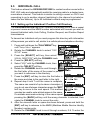
MARITIME MOBILE SERVICE IDENTITY (MMSI) ............................................................................... 45
9.2.1
What is an MMSI? ............................................................................................................... 42
9.2.2
Programming the MMSI ........................................................................................................ 45
9.3
DSC DISTRESS CALL .......................................................................................................................... 46
9.3.1
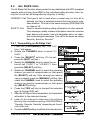
Transmitting a DSC Distress Call ....................................................................................... 46
9.3.2
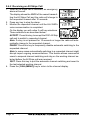
Receiving a DSC Distress Call ........................................................................................... 49
1. Accepting to auto switching to channel 16 .......................................................................... 49
2. Pausing the auto switching to channel 16 .......................................................................... 49
3. Quit to exit to the working channel ..................................................................................... 49
9.4
ALL SHIPS CALL ................................................................................................................................... 51
9.4.1
Transmitting an All Ships Call ............................................................................................. 51
9.4.2
Receiving an All Ships Call ................................................................................................. 52
1. Accepting to auto switching to channel 16 .......................................................................... 52
2. Pausing the auto switching to channel 16 .......................................................................... 52
3. Quit to exit to the working channel ..................................................................................... 52
9.5
INDIVIDUAL CALL .................................................................................................................................. 53
9.5.1
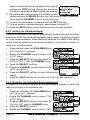
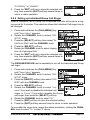
Setting up the Individual / Position Call Directory .............................................................. 53
9.5.2
Setting up Individual Reply .................................................................................................. 54
9.5.3
Enabling the Individual Acknowledgment ............................................................................ 54
9.5.4
Setting up Individual / Group Call Ringer ........................................................................... 55
9.5.5
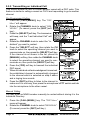
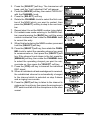
Transmitting an Individual Call ............................................................................................ 56
9.5.6
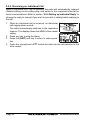
Receiving an Individual Call ................................................................................................ 58
9.6
DSC LOG OPERATION ......................................................................................................................... 59
9.6.1
Reviewing a Logged DSC Distress Call ............................................................................ 59
9.6.2
Reviewing a Logged All Ship or Individual Call ............................................................... 60
9.6.3
Deleting a Call from the "DSC LOG" Directory ................................................................ 61
9.7
GROUP CALL ......................................................................................................................................... 62
9.7.1
Setting up a Group Call ...................................................................................................... 62
9.7.2
Transmitting a Group Call .................................................................................................... 63
9.7.3
Receiving a Group Call ........................................................................................................ 65
9.8
POSITION REQUEST ............................................................................................................................ 66
9.8.1
Setting up a Position Reply ................................................................................................. 66
9.8.2
Setting up a Position Request Ringer ................................................................................ 67
9.8.3
Transmitting a Position Request to Another Vessel .......................................................... 67
9.8.4
Receiving a Position Request .............................................................................................. 68
Page 2
GX2000E/GX2100E
TABLE OF CONTENTS
9.9
10
11
12
13
14
15
16
17
18
19
20
POSITION REPORT ............................................................................................................................... 70
9.9.1
Setting up a DSC Position Report Ringer ......................................................................... 70
9.9.2
Transmitting a DSC Position Report Call .......................................................................... 70
9.9.3
Receiving a DSC Position Report Call .............................................................................. 72
9.9.4
Navigating to a Position Report .......................................................................................... 72
9.10
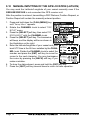
MANUAL INPUTTING OF THE GPS LOCATION (LAT/LON) ............................................................ 74
9.11
AUTO DSC POLLING .............................................................................................................................. 75
9.11.1
Selecting Stations to be Automatically Polled (tracked) .................................................... 75
9.12.2
Enable/Disable Auto DSC Polling ........................................................................................ 76
9.12
DSC TEST .............................................................................................................................................. 77
9.12.1
Programming MMSI into Individual Directory ..................................................................... 77
9.12.2
DSC Test Call by using Individual Directory ..................................................................... 77
9.12.3
DSC Test Call by Manually Entering MMSI ....................................................................... 78
GENERAL SETUP ................................................................................................................................................ 79
10.1
DISPLAY .................................................................................................................................................. 79
10.2
LOCAL DISTANCE RECEIVER ATTENUATOR ................................................................................... 80
10.3
BACKLIGHT ADJUSTMENT .................................................................................................................. 81
10.4
DISPLAY CONTRAST ............................................................................................................................ 81
10.5
TIME OFFSET ........................................................................................................................................ 82
10.6
TIME AREA ............................................................................................................................................. 83
10.7
TIME DISPLAY ....................................................................................................................................... 83
10.8
UNIT OF MEASURE .............................................................................................................................. 84
10.9
MAGNETIC .............................................................................................................................................. 85
10.10 KEY BEEP .............................................................................................................................................. 85
10.11
FOG ALERT TONE FREQUENCY ....................................................................................................... 86
10.12 SOFT KEYS ............................................................................................................................................ 87
CHANNEL FUNCTION SETUP ........................................................................................................................... 88
11.1
CHANNEL GROUP ................................................................................................................................. 88
11.2
SCAN MEMORY ..................................................................................................................................... 88
11.3
SCAN TYPE ............................................................................................................................................ 89
11.4
SCAN RESUME ...................................................................................................................................... 89
11.5
PRIORITY CHANNEL ............................................................................................................................. 90
11.6
CHANNEL NAME ................................................................................................................................... 91
11.7
STATION NAME ..................................................................................................................................... 92
11.8
SCRAMBLER SETUP ............................................................................................................................. 93
11.9
DEMO MODE ......................................................................................................................................... 94
DSC SETUP ......................................................................................................................................................... 95
12.1
INDIVIDUAL DIRECTORY ...................................................................................................................... 95
12.2
INDIVIDUAL REPLY ............................................................................................................................... 96
12.3
INDIVIDUAL ACKNOWLEDGMENT ....................................................................................................... 96
12.4
INDIVIDUAL RINGER ............................................................................................................................. 97
12.5
GROUP DIRECTORY ............................................................................................................................. 97
12.6
POSITION REPLY .................................................................................................................................. 99
12.7
DSC BEEP ............................................................................................................................................ 100
AIS / COMPASS SETUP .................................................................................................................................... 101
13.1
AUTOMATIC IDENTIFICATION SYSTEM (AIS) ................................................................................. 101
13.2
DIRECTION ........................................................................................................................................... 102
13.3
ACTIVATION RANGE ........................................................................................................................... 102
13.4
CPA ALARM .......................................................................................................................................... 103
13.5
TCPA ALARM ........................................................................................................................................ 103
13.6
DISPLAY RANGE ................................................................................................................................. 104
13.7
AIS OPERATION .................................................................................................................................. 105
13.8
AIS RANGE .......................................................................................................................................... 106
WAYPOINTS ........................................................................................................................................................ 107
14.1
MARKING A POSITION ....................................................................................................................... 107
14.2
ADDING A WAYPOINT ........................................................................................................................ 108
14.3
EDITING A WAYPOINT ....................................................................................................................... 109
14.4
DELETING A WAYPOINT .................................................................................................................... 109
14.5
SAVING A DSC POSITION CALL AS A WAYPOINT ...................................................................... 110
14.6
NAVIGATING TO A SAVED WAYPOINT ............................................................................................ 110
14.7
STOP NAVIGATING TO A WAYPOINT .............................................................................................. 111
ATIS SETUP ....................................................................................................................................................... 112
15.1
ATIS CH GROUP ................................................................................................................................. 112
15.2
ATIS CODE PROGRAMMING ............................................................................................................. 113
CMP30 (RAM3) REMOTE MIC OPERATION ................................................................................................. 114
16.1
REMOTE MIC CONTROLS ................................................................................................................ 114
16.2
ASSIGNING SOFT KEYS ................................................................................................................... 116
MAINTENANCE ................................................................................................................................................... 118
17.1
REPLACEMENT PARTS ...................................................................................................................... 118
17.2
FACTORY SERVICE ............................................................................................................................ 117
17.3
TROUBLESHOOTING CHART ............................................................................................................ 119
CHANNEL ASSIGNMENTS ............................................................................................................................... 120
SPECIFICATIONS ............................................................................................................................................... 122
RESET PROCEDURES ...................................................................................................................................... 125
GX2000E/GX2100E
Page 3
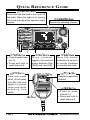
QUICK REFERENCE GUIDE
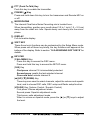
[PWR/VOL] KNOB
Press and hold this knob to turn on or off
the radio. When the radio is on, turning
this knob will adjust the speaker audio
volume.
[16/9] BUTTON
Press to recall channel 16.
Press and hold to
recall channel 9.
[CH/ENTER] KNOB
Selects the operating channel.
[H/L] BUTTON
[SQL] KNOB
When pressed,
toggles the transmit
power between High
(25W) and Low (1W).
Move this control
clockwise to squelch
or counter clockwise
un-squelch the radio.
[PTT] SWITCH
[] / [] KEY
Place your mouth
about 1/2 inch away
from Mic hole and
speak in a normal
voice level while
pressing this
switch.
Selects the operating
channel.
[16/9] BUTTON
MIC HOLE
Page 4
Press to recall
channel 16.
Press and hold to
recall channel 9.
GX2000E/GX2100E
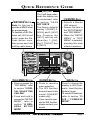
QUICK REFERENCE GUIDE
[SOFT] KEY
[DISTRESS] BUTTON
Note: for this key to
operate a MMSI must
be programmed.
To transmit a DSC Distress call, lift the red
cover, press the Distress button once,
then press and hold
until the radio alarms.
The 3 soft keys underneath the display can
be customized, refer
to section “10.12
SOFT KEYS”.
The factory defaults
are Key 1: [PRESET], 2:
[SCAN], and 3: [NEXT]
k e y. P r e s s i n g t h e
[ NEXT ] soft key will
show Key 1: [ DW ] ,
Key 2: [PA/FOG], Key
3: [NEXT].
[CH/ENTER] KNOB
Selects a Marine
VHF channel.
Selects the item in
the “SETUP MENU”
and “DSC MENU”.
When the “SETUP
MENU” or “DSC
MENU” is selected,
pressing this knob
enters a selection.
[CALL/MENU] BUTTON
[CLR/WX] BUTTON
[AIS] BUTTON
Press to access the
“DSC MENU”, refer
to section “9 DIGITAL SELECTIVE
CALLING”.
Press and hold to
access the “SETUP
MENU”, refer to
section “10 GENERAL SETUP
MODE”.
Press to cancel a
menu selection.
The WX function
does not work in this
model (USA/EXP
model only).
If you need to operate the WX function,
please contact your
dealer.
Press to change the
display to AIS (Automatic Identification
System) mode.
To setup AIS features,
refer to section “13
A I S / C O M PA S S
SETUP”.
GX2000E/GX2100E
Page 5
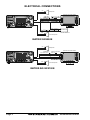
ELECTRICAL CONNECTIONS
Red
PA Speaker
Shield
GPS Receiver/Chart Plotter
NMEA COMMON ( )
AIS Receiver
Note: HS = 38400 baud
White
External Speaker
Shield
MATRIX GX2000E
Red
PA Speaker
Shield
Radio Wires
Gray: NMEA Output ( )
Blue: NMEA Input ( )
Green: NMEA Common
Brown: NMEA Output ( )
Plotter Connection
GPS Receiver/Chart Plotter
NMEA IN ( )
NMEA OUT ( )
NMEA COMMON ( )
NMEA-HS IN ( )
White
Shield
External Speaker
MATRIX AIS GX2100E
Page 6
GX2000E/GX2100E
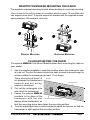
DESKTOP/OVERHEAD MOUNTING THE RADIO
The supplied universal mounting bracket allows desktop or overhead mounting.
Use a 5-mm bit to drill the holes to a surface which is more 10 mm thick and
can support more than 1.5 kg and secure the bracket with the supplied screws,
spring washers, flat washers, and nuts.
DESKTOP MOUNTING
OVERHEAD MOUNTING
FLUSH MOUNTING THE RADIO
The optional MMB-84 Flush-Mount Bracket allows flush mounting the radio on
your vessel.
1. Use the supplied template to mark the location where the rectangular hole
is to be cut. Confirm the space behind the dash or panel is deep enough to
accommodate the transceiver (at least 17 cm deep).
There should be at least 1.5
Bracket
cm between the transceiver’s
Adjusting Screw
heatsink and any wiring,
cables or structures.
2. Cut out the rectangular hole
and insert the transceiver.
3. Fasten the optional MMB-84
brackets to the sides of the
transceiver with the lock Lock-washer screw combination
washer screw combination; so
that the mounting screw base faces the mounting surface.
4. Turn the adjusting screw on each bracket to adjust the tension so that the
transceiver is tight against the mounting surface.
GX2000E/GX2100E
Page 7
1 GENERAL INFORMATION
The STANDARD HORIZON MATRIX Series GX2000E and GX2100E Marine
VHF/FM Marine transceiver are designed to be used in International, Canadian, and USA Marine bands. The GX2000E and GX2100E can be operated
from 11 to 16 VDC and has a switchable RF output power of 1 watt or 25 watts.
MATRIX AIS GX2100
Integrates a dual channel AIS (Automatic Identification System) receiver to
display AIS vessel information (MMSI, Call Sign, Ship Name, BRG, DST, SOG
and COG) directly on the VHF radio, so you will know what is out there in any
conditions. The GX2100E is also capable of entering and saving up to 100
waypoints, which may be selected and navigated to by using a unique navigation compass display. The MATRIX AIS allows you to contact an AIS Ship
directly using DSC, show your vessels position in relation to AIS targets and
alert you when an AIS ship may be approaching too close to your location via
the Closest Point of Approach (CPA) Alarm. To receive AIS targets from ships
with AIS class A or B transponders, simply connect the normal VHF antenna
(only one antenna needed!)
MATRIX - GX2000E
For the mariner who already has AIS on-board and desires a VHF with the
features of the MATRIX AIS, the MATRIX GX2000E has a connection for an
AIS receiver or transponder.
The MATRIX Series VHF’s are capable of DSC (Digital Selective Calling) Class
D operation. Class D operation allows continuous receiving of Digital Selective
Calling functions on channel 70 even if the radio is receiving a call. The MATRIX Series VHF’s operate on all currently-allocated marine channels which
are switchable for use with International, Canadian, or USA regulations. Emergency channel 16 can be immediately selected from any channel by pressing
the red [16/9] key.
Other features of the MATRIX Series VHF’s include: Speaker Microphone,
30W PA/Fog, optional RAM3 second station remote-control microphone with
display, intercom between radio and optional RAM3, scanning, priority scanning, submersible speaker mic, high and low voltage warning, and GPS repeatability.
The MATRIX series also support ATIS modoe, which is used in the inland
waterways of Europe. Please contact your local PTT adminstratioon or Marine
Authority to obtain your ATIs number.
ATIS operation is explained in Chapter 15 of this user manual.
Page 8
GX2000E/GX2100E
2 PACKING LIST
When the package containing the transceiver is first opened, please check it
for the following contents:
GX2000E or GX2100E Transceiver
Power Cord
Mounting Bracket and hardware
Owner’s Manual
Warranty Card
Flush Mount Template
3 OPTIONS
MMB-84 ......................................................................... Flush-Mount Bracket
CMP30B/W ............... Remote-Access Microphone (RAM3 Mic, Black/White)
CT-100 .................................................... 7 m Extension Cable for RAM3 Mic
CVS2500 ............................................................................... Voice Scrambler
MLS-310 ............ 10W amplified External Speaker with on/off Volume control
MLS-300 .................................................................... External Loud Speaker
220SW ................................................................. 12 cm Round Hail/PA Horn
240SW ................................................. 13 x 20 cm Rectangular Hail/PA Horn
GX2000E/GX2100E
Page 9
4 SAFETY / WARNING INFORMATION
IMPORTANT SAFETY INFORMATION
Please read this manual carefully to become familiar with the features
of this transceiver before using it for the first time.
The installation of this equipment should be made in such a manner as to
respect the EC recommended electromagnetic field exposure limits (1999/519/
EC).
The maximum RF power available from this device is 25 W. The antenna should
be mounted as high as possible for maximum efficiency and that this installation height should be at least 5 meters above ground (or accessible) level. In
the case that an antenna can not be installed at a reasonable height, then the
transmitter should neither be continuously operated for long periods if any
person is within 5 metres of the antenna, nor operated at all if any person is
touching the antenna. non compliance with these recommendations and transmitting for more than 50% of the total radio use time (50 % duty cycle) may
cause RF complaince exposure requirements to be be exceeded.
In all cases any possible risk depends on the transmitter being activated for
long periods (actual recommendation limits are specified as an average of 6
minutes). Normally the transmitter is not active for long periods of time. Some
radio licenses will require that a timer circuit automatically cuts the transmitter
after 1 - 2 minutes.
Do not transmit without an antenna connected to the radio. When transmitting
speak into the microphone holding it between 1.5 cm and 5 cm from your
mouth.
The radio must be used with a maximum operating duty cycle not exceeding
50 % in normal PTT configurations. Do not transmit for more than 50 % of the
total radio use time (50 % duty cycle)
Page 10
GX2000E/GX2100E
5 GETTING STARTED
5.1
ABOUT VHF RADIO
The radio frequencies used in the VHF marine band lie between 156 and 162
MHz. The marine VHF band provides communications over distances that are
essentially “line of sight” (VHF signals do not travel well through objects such
as buildings, hills or trees). Actual transmission range depends much more on
antenna type, gain and height than on the power output of the transmitter. On
a fixed mount 25 W radio transmission expected distances can be greater
than 25 km, for a portable 5W radio transmission the expected distance can
be greater than 8 km in “line of sight”.
5.2
SELECTING AN ANTENNA
Marine antennas are made to radiate signals equally in all horizontal directions, but not straight up. The objective of a marine antenna is to enhance the
signal toward the horizon. The degree to which this is accomplished is called
the antenna’s gain. It is measured in decibels (dB) and is one of the major
factors in choosing an antenna. In terms of effective radiated power (ERP),
antennas are rated on the basis of how much gain they have over a theoretical
antenna with zero gain. A 1 m, 3 dB gain antenna represents twice as much
gain over the imaginary antenna.
Typically a 1 m 3 dB gain stainless steel whip is used on a sailboat mast. The
longer 2.5 m 6 dB fiberglass whip is primarily used on power boats that require
the additional gain.
GX2000E/GX2100E
Page 11
5.3
COAXIAL CABLE
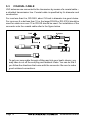
VHF antennas are connected to the transceiver by means of a coaxial cable –
a shielded transmission line. Coaxial cable is specified by it’s diameter and
construction.
For runs less than 6 m, RG-58/U, about 1/4 inch in diameter is a good choice.
For runs over 6 m but less than 15 m, the larger RG-8X or RG-213/U should be
used for cable runs over 15 m RG-8X should be used. For installation of the
connector onto the coaxial cable refer to the figure below.
Adapter
2 mm
1/16''
3/4''
20
mm
mm
1301/8''
20
3/4''
mm
31/8''
mm
5/8''
103/8''
mm 15
mm
To get your coax cable through a fitting and into your boat’s interior, you
may have to cut off the end plug and reattach it later. You can do this if
you follow the directions that come with the connector. Be sure to make
good soldered connections.
Page 12
GX2000E/GX2100E
5.4
EMERGENCY (CHANNEL 16 USE)
Channel 16 is known as the Hail and Distress Channel. An emergency may be
defined as a threat to life or property. In such instances, be sure the transceiver
is on and set to CHANNEL 16. Then use the following procedure:
1. Press the microphone push-to-talk switch and say “Mayday, Mayday, May,
,
” (your vessel’s name).
day. This is
2. Then repeat once: “Mayday,
” (your vessel’s name).
3. Now report your position in latitude/longitude, or by giving a true or magnetic bearing (state which) to a well-known landmark such as a navigation
aid or geographic feature such as an island or harbor entry.
4. Explain the nature of your distress (sinking, collision, aground, fire, heart
attack, life-threatening injury, etc.).
5. State the kind of assistance your desire (pumps, medical aid, etc.).
6. Report the number of persons aboard and condition of any injured.
7. Estimate the present seaworthiness and condition of your vessel.
8. Give your vessel’s description: length, design (power or sail), color and
other distinguishing marks. The total transmission should not exceed 1
minute.
9. End the message by saying “OVER”. Release the microphone button and
listen.
10. If there is no answer, repeat the above procedure. If there is still no response, try another channel.
NOTE
The GX2000E and GX2100E have DSC Distress calling, that can transmit a distress call digitally to all ships with compatible DSC radios. Refer
to section “9 DIGITAL SELECTIVE CALLING”.
GX2000E/GX2100E
Page 13
5.5
CALLING ANOTHER VESSEL (CHANNEL 16 OR 9)
Channel 16 should be used as the calling channel for initial contact with another vessel, however its primary purpose is for emergency communications
and should be monitored at all times when not using other channels.
It is monitored by Coast Guard stations in all countries and other vessels.
The use of Channel 16 should be limited to making initial contact only. Calling
should not exceed 30 seconds, but may be repeated at 2 minute intervals.
Prior to making contact with another vessel, refer to the channel charts in this
manual and select an appropriate channel (working channel) for use after initial contact. Monitor the proposed channel to ensure you will not be interruptng
other traffic and then go back to Channel 16 to make your initial call.
When the calling chqannel 16 is clear, state the name of the vessel you wish to
call and then “this is” followed by the name of your vessel and your vessel
callsign. When the other vessel returns your call, immediately request another
channel by saying “go to”, the number of the other channel, and “over”. Then
switch to the new channel. When the new channel is not busy, call the other
vessel.
After a transmission, say “over”, and release the PTT (Push-To-Talk) switch.
When all communication with the other vessel is completed, end the last transmission by stating your Call Sign and the word “out”. Note that it is not necessary to state your Call Sign with each transmission, only at the beginning and
end of the contact.
Remember to return to Channel 16 when not using another channel. Some
radios automatically monitor Channel 16 even when set to other channels or
when scanning.
5.6
MAKING TELEPHONE CALLS
To make a radiotelephone call, use a channel designated for this purpose, The
fastest way to learn which channels are used for radiotelephone traffic is to
ask at a local marina. Channels available for such traffic are designated Public Correspondence channels on the channel charts in this manual. Some
examples for USA use are Channels 24, 25, 26, 27, 28, 84, 85, 86, and 87.
Call the marine operator and identify yourself by your vessel’s name, The marine
operator will then ask you how you will pay for the call (telephone credit card,
collect, etc.) and then link your radio transmission to the telephone lines.
The marine telephone company managing the VHF channel you are using
may charge a link-up fee in addition to the cost of the call.
Page 14
GX2000E/GX2100E
5.7
OPERATING ON CHANNELS 13 AND 67
Channel 13 is used at docks and bridges and by vessels maneuvering in port.
Messages on this channel must concern navigation only, such as meeting and
passing in restricted waters.
Channel 67 is used for navigational traffic between vessels.
By regulation, power is normally limited to 1 Watt on these channels. Your
radio is programmed to automatically reduce power to this limit on these channels. However, in certain situations it may be necessary to temporarily use a
higher power. See page 30 ([H/L] key) for means to temporarily override the
low-power limit on these two channels.
GX2000E/GX2100E
Page 15
6 INSTALLATION
6.1
LOCATION
The radio can be mounted at any angle. Choose a mounting location that:
• is far enough from any compass to avoid any deviation in compass reading due to the speaker magnet
• provides accessibility to the front panel controls
• allows connection to a power source and an antenna
• has nearby space for installation of a microphone hanger
• choose a mounting location that is at least 1 m away from the radio’s
antenna.
Note: To insure the radio does not affect the compass or radios performance is
not affected by the antenna location, temporarily connect the radio in the desired location and:
a. Examine the compass to see if the radio causes any deviation
b. Connect the antenna and key the radio. Check to ensure the radio is
operating correctly by requesting a radio check.
6.2
MOUNTING THE RADIO
6.2.1 Supplied Mounting Bracket
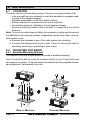
The supplied mounting bracket allows overhead or desktop mounting.
Use a 5 mm bit to drill the holes to a surface which is more 10 mm thick and
can support more than 1.5 kg and secure the bracket with the supplied screws,
spring washers, flat washers, and nuts.
DESKTOP MOUNTING
Page 16
OVERHEAD MOUNTING
GX2000E/GX2100E
6.2.2 Optional MMB-84 Flush Mount Bracket
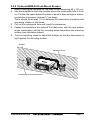
1. Make a rectangular template for the flush mount measuring 65 x 161 mm.
2. Use the template to mark the location where the rectangular hole is to be
cut. Confirm the space behind the dash or panel is deep enough to accommodate the transceiver (at least 17 cm deep).
There should be at least 1.5 cm between the transceiver’s heatsink and
any wiring, cables or structures.
3. Cut out the rectangular hole and insert the transceiver.
4. Fasten the brackets to the sides of the transceiver with the lock washer
screw combination; so that the mounting screw base faces the mounting
surface (see illustration below).
5. Turn the adjusting screw to adjust the tension so that the transceiver is
tight against the mounting surface.
Bracket
Adjusting Screw
Lock-washer screw combination
GX2000E/GX2100E
Page 17
6.3
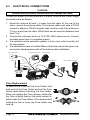
ELECTRICAL CONNECTIONS
CAUTION
Reverse polarity battery connections will damage the radio!
Connect the power cord and antenna to the radio. Antenna and Power Supply
connections are as follows:
1. Mount the antenna at least 1 m away from the radio. At the rear of the
radio, connect the antenna cable. The antenna cable must have a PL259
connector attached. RG-8/U coaxial cable must be used if the antenna is
7.6 m or more from the radio. RG58 cable can be used for distances less
than 7.6 m.
2. Connect the red power wire to a 13.8 VDC ±20% power source. Connect
the black power wire to a negative ground.
3. If an optional remote extension speaker is to be used, refer to section 6.4
for connections.
4. It is advisable to have a Certified Marine Technician check the power output and the standing wave ratio of the antenna after installation.
GPS Navigation Receiver
Optional HAIL/PA Horn
Ac
c
Antenna
es
so
r
Optional Speaker
Optional Speaker
y
Water proof
Deck Outlet
Ca
Optional CMP30 Remote MIC
bl
e
Fuse
Red
Black
Power Source
Fuse Replacement
To take out the Fuse from the Fuse Holder, hold
both ends of the Fuse Holder and pull the Fuse
Holder apart without bending the fuse Holder.
When you replace the Fuse, please confirm that
the Fuse is tightly fixed on the metal contact located inside the Fuse Holder. If the metal contact
holding the fuse is loose, the Fuse holder may
heat up.
Page 18
GX2000E/GX2100E
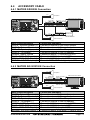
6.4
ACCESSORY CABLE
6.4.1 MATRIX GX2000E Connection
Red
PA Speaker
Shield
GPS Receiver/Chart Plotter
NMEA COMMON ( )
AIS Receiver
Note: HS = 38400 baud
White
External Speaker
Shield
Wire Color/Description
WHITE - External Speaker (+)
SHIELD - External Speaker (–)
RED - PA Speaker (+)
SHIELD - PA Speaker (–)
GREEN - NMEA Ground
BLUE - NMEA GPS Input (+)
GRAY - NMEA DSC Output (+)
BROWN - AIS DATA Input (+)
Connection Examples
Connect to external 4 Ohm audio speaker
Connect to external 4 Ohm audio speaker
Connect to external 4 Ohm PA speaker
Connect to external 4 Ohm PA speaker
Connect to NMEA (–) connection of GPS
Connect to NMEA (+) output of GPS
Connect to NMEA (+) input of GPS
Connect to NMEA 38.4K baud (+) output of AIS receiver
6.4.2 MATRIX AIS GX2100E Connection
Red
PA Speaker
Shield
Radio Wires
Gray: NMEA Output ( )
Blue: NMEA Input ( )
Green: NMEA Common
Brown: NMEA Output ( )
Plotter Connection
GPS Receiver/Chart Plotter
NMEA IN ( )
NMEA OUT ( )
NMEA COMMON ( )
NMEA-HS IN ( )
White
Shield
Wire Color/Description
WHITE - External Speaker (+)
SHIELD - External Speaker (–)
RED - PA Speaker (+)
SHIELD - PA Speaker (–)
GREEN - NMEA Ground
BLUE - NMEA GPS Input (+)
GRAY - NMEA DSC Output (+)
BROWN - AIS DATA Output (+)
GX2000E/GX2100E
External Speaker
Connection Examples
Connect to external 4 Ohm audio speaker
Connect to external 4 Ohm audio speaker
Connect to external 4 Ohm PA speaker
Connect to external 4 Ohm PA speaker
Connect to NMEA (–) connection of GPS
Connect to NMEA (+) output of GPS
Connect to NMEA (+) input of GPS
Connect to NMEA 38.4K baud (+) input of GPS
Page 19
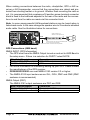
When making connections between the radio, chartplotter, GPS or AIS receiver or AIS transponder, ensure that the connections are robust and protected from shorting toether or to ground. Whether flush mounting the radio or
not, it is recommended that a waterproof 8 position screw terminal connector
block is fixed to the bulkhead adjacent to the rear of the radio and the connections to and from the radio are made via this connector block.
Note: In some areas powerful AM broadcast stations may be heard when in
listen-back mode. In this case change the speaker wire to 2-conductor shielded
audio cable. See the illustration below for connections.
Shield of cable is not
attached on PA Speaker end
Red
Bare
Connect the bare wire from the GX2000/GX2100
to one wire and to the shielded.
Make Red and bare connections short as possible
PA Speaker
GPS Connections (4800 baud)
NMEA INPUT (GPS Information)
• The GPS must have the NMEA Output turned on and set to 4800 Baud in
the setup menu. If there is a selection for PARITY select NOTE.
Wire Color/Description
BLUE - NMEA GPS Input (+)
GREEN - NMEA Ground
•
•
•
Connection
GPS NMEA output
GPS common
For further information on interfacing /setting up your GPS. Please contact
the manufacturer of the GPS receiver.
GX2000E/GX2100E can read NMEA-0183 version 2.0 or higher.
The NMEA 0183 input sentences are GLL, GGA, RMC and GNS (RMC
sentence is recommended).
NMEA Output (DSC)
The NMEA 0183 output sentences are DSC and DSE.
Wire Color/Description
GRAY - NMEA DSC Output (+)
GREEN - NMEA Ground
Page 20
Connection
Chart plotter NMEA input
Chart plotter common
GX2000E/GX2100E
AIS Connections (38400 baud only)
The MATRIX GX2000E (without internal AIS receiver) may be connected to an
external AIS receiver or transponder that outputs NMEA VDM sentence at
38400 baud.
Wire Color/Description
BROWN - AIS Input (+)
GREEN - NMEA common
Connection
AIS output
AIS common data wire or NMEA signal (–)
The MATRIX AIS GX2100E with internal dual channel AIS receiver has the
capability to output received Class A and B targets using VDM sentence at a
baud rate of 38400.
Wire Color/Description
BROWN - AIS Output (+)
GREEN - NMEA common
6.5
Connection
GPS Chart plotter input
GPS common data wire or NMEA signal (–)
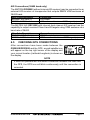
CHECKING GPS CONNECTIONS
After connections have been made between the
GX2000E/GX2100E and the GPS, a small satellite icon
will appear on the top right corner of the display and
your current location (Latitude/Longitude) is shown on
the display.
NOTE
If there is a problem with the NMEA connection between the radio and
the GPS, the GPS icon will blink continuously until the connection is
corrected.
GX2000E/GX2100E
Page 21
6.6
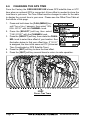
CHANGING THE GPS TIME
From the Factory the GX2000E/GX2100E shows GPS satellite time or UTC
time when an optional GPS is connected. A time offset is needed to show the
local time in your area. The Time Offset must be changed in order for the radio
to display the current time in your area. Please see the Offset Time Table at
the bottom of this page.
1. Press and hold down the [CALL(MENU)] key
until “Setup Menu” appears, then select “GENERAL SETUP” with the CHANNEL knob.
2. Press the [ SELECT] soft key, then select
“TIME OFFSET” with the CHANNEL knob.
3. Press the [SELECT] soft key, then rotate the CHANNEL knob to select time offset of your location. See
illustration below to find your offset time. If “00:00”
is assigned, the time is the same as UTC (Universal
Time Coordinated or GPS Satellite Time).
4. Press the [ENT] soft key to store the time offset.
5. Press the [QUIT] soft key several times to return to radio operation.
OFFSET TIME TABLE
Page 22
GX2000E/GX2100E
6.7
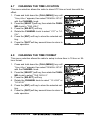
CHANGING THE TIME LOCATION
This menu selection allows the radio to show UTC time or local time with the
offset.
1. Press and hold down the [CALL(MENU)] key until
“Setup Menu” appears, then select “GENERAL SETUP”
with the CHANNEL knob.
2. Press the [SELECT] soft key, then rotate the CHANNEL knob to “TIME AREA”.
3. Press the [SELECT] soft key.
4. Rotate the CHANNEL knob to select “UTC” or “LOCAL”.
5. Press the [ENT] soft key to store the selected setting.
6. Press the [QUIT] soft key several times to return to
radio operation.
6.8
CHANGING THE TIME FORMAT
This menu selection allows the radio to setup to show time in 12-hour or 24hour format.
1. Press and hold down the [CALL(MENU)] key until
“Setup Menu” appears, then select “GENERAL SETUP”
with the CHANNEL knob.
2. Press the [SELECT] soft key, then rotate the CHANNEL knob to select “TIME DISPLAY”.
3. Press the [SELECT] soft key.
4. Rotate the CHANNEL knob to select “12 HOUR” or
“24 HOUR”.
5. Press the [ENT] soft key to store the selected setting.
6. Press the [QUIT] soft key several times to return to
radio operation.
GX2000E/GX2100E
Page 23
6.9
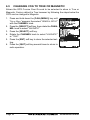
CHANGING COG TO TRUE OR MAGNETIC
Allows the GPS Course Over Ground to be selected to show in True or
Magnetic. Factory default is True however by following the steps below the
COG can be changed to Magnetic.
1. Press and hold down the [CALL(MENU)] key until
“Setup Menu” appears, then select “GENERAL SETUP”
with the CHANNEL knob.
2. Press the [SELECT] soft key, then rotate the CHANNEL knob to select “MAGNETIC”.
3. Press the [SELECT] soft key.
4. Rotate the CHANNEL knob to select “MAGNETIC”
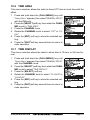
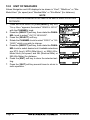
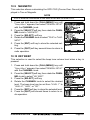
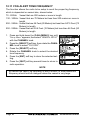
or “TRUE”.
5. Press the [ENT] soft key to store the selected setting.
6. Press the [QUIT] soft key several times to return to
radio operation.
Page 24
GX2000E/GX2100E
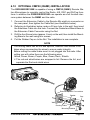
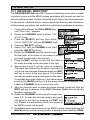
6.10 OPTIONAL CMP30 (RAM3) INSTALLATION
The GX2000E/GX2100E is capable of using a CMP30 (RAM3) Remote Station Microphone to remotely control the Radio, AIS, DSC and PA/Fog functions. In addition the GX2000E/GX2100E can operate as a full function intercom system between the RAM3 and the radio.
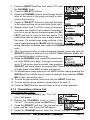
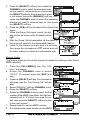
1. Connect the Extension Cable to the Remote Mic eight pin connector on
the rear panel, then tighten the Cable Nut (see illustration below).
2. Referring to illustration below, make a 30 mm hole in the wall, then insert
the Extension Cable into this hole. Connect the Gasket and Mount Base to
the Extension Cable Connector using the Nut.
3. Drill the four Screw holes (approx. 2 mm) on the wall, then install the Mounting Base to the wall using four screws.
4. Put the Rubber Cap on to the Nut. The installation is now complete.
NOTE
The routing cable can be cut and spliced, however care needs to be
taken when reconnecting the wires to ensure water integrity.
Before cutting the cable make sure it is not plugged into the radio. After
cutting you will notice there are the following wires:
Yellow, Green, Brown, Purple, Blue, Green, Red, Shield
The red and shield wires are wrapped in foil. Remove the foil, and
separate the Red and shield wires.
External Speaker Connections
Gasket
Cap
Wall
Routing Cable
Mounting Bracket
Nut
GX2000E/GX2100E
Page 25
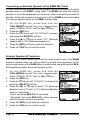
Connecting an External Speaker to the RAM3 Mic Cable
In noisy locations and optional external speaker may be connected to the white
speaker wires on the RAM3 routing cable. The RAM3 can drive the internal
speaker or the external speaker one at a time. When connecting an external
speaker, follow the procedure below to turn off the RAM3 audio and enable
the external speaker wires on the RAM3 routing cable.
1. O n t h e R A M 3 m i c , p r e s s a n d h o l d t h e
[CALL(MENU)] key until “Setup Menu” appears, then
select “GENERAL SETUP” with the [] / [] key.
2. Press the [ENT] key.
3. Press the [] key to until “EXT SPEAKER” is shown
and press the [SELECT] soft key.
4. Press the [ ] or [] key to select “OFF” (External
speaker off) or “ON” (External speaker on).
5. Press the [ENT] soft key to save the selection.
6. Press the [16/9] key to exit this mode.
External Speaker AF Selection
The “AF Select” menu allows you to set the audio output level of the RAM3
external speaker wires (on routing cable) to a fixed level regardless of the
volume level setting of the RAM3 which is useful when using the optional MLS310 amplified speaker with on/off volume control.
1. O n t h e R A M 3 m i c , p r e s s a n d h o l d t h e
[CALL(MENU)] key until “Setup Menu” appears, then
select “GENERAL SETUP” with the [] / [] key.
2. Press the [ENT] key.
3. Press the [] key to until “AF SELECT” is shown and
press the [SELECT] soft key.
4. Press the [ ] or [ ] key to select “PR” (External
Speaker Level is “Fixed”) or “PO” (External Speaker
Level is “Adjustable”).
“Fixed” use when MLS-310 is connected.
“Adjustable” use when MLS-300 or other speaker
without volume control is connected.
5. Press the [ENT] key to save the selection.
6. Press the [16/9] key to exit this mode.
Page 26
GX2000E/GX2100E
MEMO
GX2000E/GX2100E
Page 27
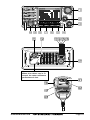
7 CONTROLS AND INDICATORS
NOTE
This section defines each control of the transceiver. See illustration at
the next page for location of controls. For detailed operating instructions
refer to chapter 8 of this manual.
7.1
CONTROLS AND CONNECTIONS
CHANNEL Knob
Rotary knob is used to select channels and to choose menu items (such
as the DSC menu, Radio Setup and DSC Setup menu). The [UP( )] /
[DOWN()] keys on the microphone can also be used to select channels
and menu items.
SECONDARY USE
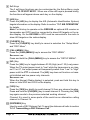
Press this knob to enter a selection in the “SETUP MENU” or “DSC
MENU”.
While holding down the [SCAN] soft key and turning this knob, you can
confirm memory channels that have been programmed for scanning.
When in the PA or Fog mode, turning this knob changes the output volume of the connected horn speaker.
PWR/VOL Knob (Power Switch / Volume Control)
Turns the transceiver on and off as well as adjusts the speaker volume.
To turn the transceiver on, press and hold this knob until the radio turns on.
When the power is turned on, the transceiver is set to the last selected
channel. Clockwise rotation of this knob increases the internal and speaker
microphone volume.
To turn the transceiver off, press and hold this knob until the radio turns off.
SECONDARY USE
When in PA or Fog mode, controls the listen back volume (GX2100E only).
SQL Knob (Squelch Control)
Adjusting this control clockwise, sets the point at which random noise on
the channel does not activate the audio circuits but a received signal does.
This point is called the squelch threshold. Further adjustment of the squelch
control will degrade reception of wanted transmissions.
Page 28
GX2000E/GX2100E
Never remove this rubber cap.
When this rubber cap is removed, the water resistance
performance is lost.
GX2000E/GX2100E
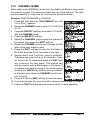
Page 29
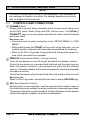
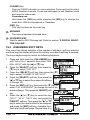
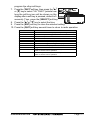
Soft Keys
The 3 soft keys functions can be customized by the Setup Menu mode
section “10.12 SOFT KEYS”. When one of the soft keys is pressed briefly,
the functions will appear above each key on the display.
[AIS] Key
Press the [AIS] key to display the AIS (Automatic Identification System)
targets information on the display. Refer to section “13.7 AIS OPERATION”
for details.
Note: For this key to operate on the GX2000E an optional AIS receiver or
transponder and GPS must be connected to show AIS targets on the radios display. On the GX2100E a GPS must be connected to the radio to
show AIS targets on the radios display.
[CLR(WX)] Key
Press the [CLR(WX)] key briefly to cancel a selection the “Setup Menu”
and “DSC Menu”.
[CALL(MENU)] Key
Press the [CALL(MENU)] key to access the “DSC MENU”.
SECONDARY USE
Press and hold the [CALL(MENU)] key to access the “SETUP MENU”.
[H/L] Key
Press the [H/L] key to toggle between 25 W (High) and 1 W (Low) power.
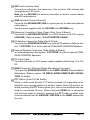
When the TX output power is set to “Low” while the transceiver is on channel 13 or 67, the output power will temporarily switch from “Low” to “High”
power until the PTT is released. The [H/L] key does not function on transmit inhibited and low power only channels.
SECONDARY USE
When the Normal (Radio display) is selected, push and hold this key to
show or hide SOG and COG on the display.
[16/9] Key
Press the [16/9] key briefly to recall channel 16 from any channel location.
Press and hold the [CLR(WX)] key to recall channel 9. Pressing the [16/9]
key again reverts to the previous selected working channel.
Channel 9 is used in some parts of the world as an alternative calling
channel to Channel 16.
[DISTRESS] Key
Used to send a DSC Distress Call. To send the distress call refer to section
“9.3.1 Transmitting a DSC Distress Call.”
Page 30
GX2000E/GX2100E
ANT Jack (Antenna Jack)
Connects an antenna to the transceiver. Use a marine VHF antenna with
an impedance of 50 ohms.
Note: On the GX2100E the antenna connection is used to receive marine
and AIS transmissions.
GND Terminal (Ground Terminal)
Connects the GX2000E/GX2100E to a good ground, for safe and optimum
performance.
Use the screw supplied with the GX2100E and GX2000E only.
Accessory Connection Cable (Green, Blue, Gray, & Brown)
Connects the GX2000E/GX2100E to a GPS receiver and AIS receiver
(GX2000E). Refer to section “6.4 ACCESSORY CABLE”.
PA Speaker Connection Cable (Red & Shield)
Connects the GX2000E/GX2100E to a optional PA speaker. Refer to section “3 OPTIONS” for a list of optional STANDARD HORIZON Speakers.
External Speaker Connection Cable (White & Shield)
an external speaker. See section “3 OPTIONS” for a list of optional STANDARD HORIZON Speakers.
DC Input Cable
Connects the radio to a DC power supply capable of delivering 11 to 16V
DC.
RAM3 Connector (Remote Station Microphone Connector)
Connects the GX2000E/GX2100E to the CMP30 (RAM3) Remote Station
Microphone. Refer to section “16 CMP30 (RAM3) REMOTE MIC OPERATION” for details
PTT Switch (Push-To-Talk Switch)
When in radio mode and the PTT button pressed, the transmitter is enabled for voice communications to another vessel. When PA mode is selected, pressing the PTT button allows your voice to be amplified and supplied to a connected PA horn. When a optional RAM3 mic is connected
and intercom mode is selected, pressing the PTT button enables voice
communications from the GX2000E / GX2100E to the RAM3 second station mic.
GX2000E/GX2100E
Page 31
Microphone
The microphone has ClearVoice Noise Reduction Technology which reduces the amount of background (wind, engine) noise transmitted.
Note: Position your mouth about 1.5 cm away from the microphone hole
and speak in a normal voice.
Microphone Speaker
Audio heard through internal radio speaker is heard through speaker inside the microphone.
[UP()] / [DOWN()] Keys
The [UP()] and [DOWN()] on the microphone function the same as the
CH knob on the front panel of the transceiver.
[16/9] Key
Pressing the [16/9] key immediately recalls channel 16 from any location.
Press and hold the [16/9] key to recall channel 9. Pressing the [16/9] key
again will revert the radio to the previous selected channel.
Channel 9 is used in some parts of the world as an alternative calling
channel to Channel 16.
Page 32
GX2000E/GX2100E
8 BASIC OPERATION
8.1
RECEPTION
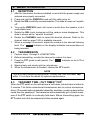
1. After the transceiver has been installed, ensure that the power supply and
antenna are properly connected.
2. Press and hold the PWR/VOL knob until the radio turns on.
3. Rotate the SQL knob fully counterclockwise. This state is known as “squelch
off”.
4. Turn up the PWR/VOL knob until noise or audio from the speaker is at a
comfortable level.
5. Rotate the SQL knob clockwise until the random noise disappears. This
state is known as the “squelch threshold.”
6. Rotate the CHANNEL knob to select the desired channel. Refer to the
channel chart on page 120 for available channels.
7. When a message is received, adjust the volume to the desired listening
” indicator on the display indicates communications is
level. The “
being received.
8.2
TRANSMISSION
1. Perform steps 1 through 6 of RECEPTION.
2. Before transmitting, monitor the channel to ensure it is clear.
3. Press the PTT (push-to-talk) switch. The “
” indicator on the LCD is
displayed.
4. Speak slowly and clearly into the microphone.
5. When the transmission is finished, release the PTT switch.
NOTE
This is a noise-canceling microphone. Position the Oval Slot label “MIC”
within 1.5 cm from the mouth for optimum performance.
8.3
TRANSMIT TIME - OUT TIMER (TOT)
When the PTT switch on the microphone is held down, transmit time is limited to
5 minutes. This limits unintentional transmissions due to a stuck microphone.
About 10 seconds before automatic transmitter shutdown, a warning beep will be
heard from the speaker(s). The transceiver will automatically go to receive mode,
even if the PTT switch is continually held down. Before transmitting again, the
PTT switch must first be released and then pressed again.
GX2000E/GX2100E
Page 33
8.4
SIMPLEX/DUPLEX CHANNEL USE
Refer to the VHF MARINE CHANNEL CHART (page 120) for instructions on
use of simplex and duplex channels.
NOTE
All channels are factory-programmed in accordance with FCC (USA),
Industry Canada (Canada), and International regulations. Mode of operation cannot be altered from simplex to duplex or vice-versa.
8.5
DISPLAY TYPE
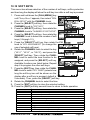
The GX2000E/GX2100E display can be setup to show displays other than the
default “NORMAL” VHF display by using the procedure below:
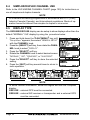
1. Press and hold down the [CALL(MENU)] key until
“Setup Menu” appears, then select “GENERAL SETUP”
with the CHANNEL knob.
2. Press the [SELECT] soft key, then rotate the CHANNEL knob to select “DISPLAY”.
3. Press the [SELECT] soft key.
4. Rotate the CHANNEL knob to select desired screen
“NORMAL”, “AIS”, “COMPASS”, or “WAYPOINT”.
5. Press the [SELECT] soft key to store the selected
setting.
6. Press the [QUIT] soft key several times to return to
radio operation.
“NORMAL” DISPLAY
“AIS” DISPLAY
“COMPASS” DISPLAY
“WAYPOINT” DISPLAY
NOTE
To show Position information, show AIS targets and use the Compass
display:
GX2100E - external GPS must be connected.
GX2000E - external AIS receiver or transponder and a external GPS
must be connected.
Page 34
GX2000E/GX2100E
8.6
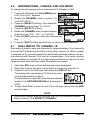
INTERNATIONAL, CANADA, AND USA MODE
To change the channel group from International to Canada or USA:
1. Press and hold down the [CALL(MENU)] key
until “Setup Menu” appears.
2. Rotate the CHANNEL knob to select “CH
FUNCTION SETUP”.
2. Press the [SELECT] soft key, then rotate the
CHANNEL knob to select “CH GROUP”.
3. Press the [SELECT] soft key.
4. Rotate the CHANNEL knob to select desired
channel group “USA”, “INTL”, or “CANADA”.
5. Press the [ENT] soft key to store the selected setting.
6. Press the [QUIT] soft key several times to return to radio operation.
8.7
DUAL WATCH (TO CHANNEL 16)
Dual watch is used to scan two channels for communications. One channel is
a normal VHF channel and the other is the priority, channel 16. When a signal
is received on the normal channel the radio briefly switches between the normal channel and Channel 16 to look for a transmission. If the radio receives
communications on channel 16 the radio stops and listens to Channel 16 until
communication ends and then starts Dual watch scan again.
1. Adjust the SQL knob until the background noise disappears.
2. Select the channel you wish to dual watch to the priority channel 16.
3. Press the one of the Soft keys, then press the [DW] soft key.
The display will scan between CH16 and the channel that was selected in step 2.
If a transmission is received on the channel selected
in step 2, the GX2000E/GX2100E will dual watch to
CH16.
4. To stop Dual Watch, press the one of the soft keys, then press the [DW]
key soft again.
NOTE
The priority channel may be changed from Ch16 to another channel.
Refer to section “11.5 PRIORITY CHANNEL”.
GX2000E/GX2100E
Page 35
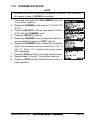
8.8
SCANNING
Allows the user to select the scan type from Memory scan or Priority scan.
“Memory scan” scans the channels that were programmed into memory. “Priority scan” scans the channels programmed in memory with the priority channel.
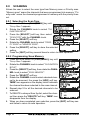
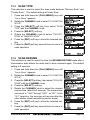
8.8.1 Selecting the Scan Type
1. Press and hold down [CALL(MENU)] key until
“Setup Menu” appears.
2. Rotate the CHANNEL knob to select “CH
FUNCTION SETUP”.
3. Press the [ SELECT] soft key, then select
“SCAN TYPE” with the CHANNEL knob.
4. Press the [SELECT] soft key.
5. Rotate the CHANNEL knob to select “PRIORITY SCAN” or “MEMORY SCAN”.
6. Press the [SELECT] soft key to store the selected
setting.
7. Press the [QUIT] soft key several times to return to radio operation.
8.8.2 Programming Scan Memory
1. Press and hold down the [CALL(MENU)] key until
“Setup Menu” appears.
2. Rotate the CHANNEL knob to select “CH FUNCTION
SETUP”.
3. Press the [SELECT] soft key, then rotate the CHANNEL knob to select “SCAN MEMORY”.
4. Press the [SELECT] soft key.
5. Rotate the CHANNEL knob to select a desired channel to be scanned, the press the [ADD] soft key.
“MEM” icon appears on the display, which indicates
the channel has been selected to the scan channel.
6. Repeat step 5 for all the desired channels to be
scanned.
7. To DELETE a channel from the list, select the channel then press the [DELETE] soft key. “MEM” icon
disappears from the display.
8. When you have completed your selection, press the [QUIT] soft key several times to return to radio operation.
Page 36
GX2000E/GX2100E
8.8.3 Memory Scanning (M-SCAN)
1. Adjust the SQL knob until background noise disappears.
2. Press the one of the soft key momentarily, then press the [SCAN] soft key.
“M-SCAN” appears on the display. Scanning will proceed from the lowest
to the highest programmed channel number and
Preset channel (described in the next chapter) and
will stop on a channel when a transmission is received.
3. The channel number will blink during reception.
4. To stop scanning, press the [16/9] or [CLR(WX)] key.
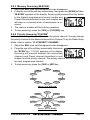
8.8.4 Priority Scanning (P-SCAN)
In the default setting, Channel 16 is set as the priority channel. You may change
the priority channel to the desired channel from Channel 16 by the Radio Setup
Mode, refer to section “11.5 PRIORITY CHANNEL”.
1. Adjust the SQL knob until background noise disappears.
2. Press the one of the soft key momentarily, then press
the [SCAN] key. “P-SCAN” appears on the display.
Scanning will proceed between the memorized
channels and Preset channel (described in next
chapter) and the priority channel. The priority channel will be scanned after each programmed channel.
3. To stop scanning, press the [16/9] or [WX] key.
CH01
CH88
CH09
CH72
CH12
CH68
CH15
CH61
CH22
CH18
MEMORY SCAN (M-SCAN)
CH01
CH88
CH09
CH72
CH12
Priority Channel
CH68
CH15
CH61
CH22
CH18
PRIORITY SCAN (P-SCAN)
GX2000E/GX2100E
Page 37
8.9
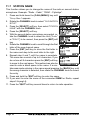
PRESET CHANNELS (0 ~ 9): INSTANT ACCESS
10 Preset Channels can be programmed for instant access. Press the one of
the soft keys, then press the [PRESET] soft key. Pressing the [PRESET] key
activates the user assigned channel bank. If the [PRESET] soft key is pressed
and no channels have been assigned, an alert beep will be emitted from the
speaker.
Before beginning the Instant Access operation, assign the “PRESET” command into the one of the Programmable key, refer to section “10.12 SOFT
KEYS”.
8.9.1 Programming
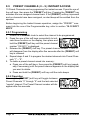
1. Rotate the CHANNEL knob to select the channel to be programmed.
2. Press the one of the soft keys momentarily to indicate these function on the display, then press and
hold the [PRESET] soft key until the preset channel
number “PRESET0” is displayed.
3. Release the [PRESET] soft key. The preset channel number “PRESET0”
will disappear from the display after five seconds after the [PRESET] soft
key is released.
4. Repeat steps 2 and 3 to program the desired channels into Preset Channels “1” ~ “9”.
5. To delete a preset channel saved into memory:
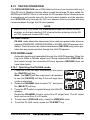
a. Press one of the soft keys, then press the [PRESET] soft key (repeatedly if necessary) until the preset channel appears on the display that
you want to delete.
b. Press and hold the [PRESET] soft key until the radio beeps.
8.9.2 Operation
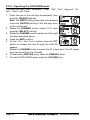
Pressing the [PRESET] soft key will toggle between
Preset Channels “0” through “9” and the last selected
“regular” channel. The Preset Channel number will disappear after five seconds.
Page 38
GX2000E/GX2100E
8.10 PA/FOG OPERATION
The GX2000E/GX2100E has a 30W Hailer built-in and can be used with any 4
Ohm PA Horns. Standard Horizon offers a small and a large PA horn called the
220SW and 240SW. When in Hail mode the PA speaker Listen’s Back (acts as
a microphone and sends sound to the front panel speaker and the speaker
mic: GX2100E only) through the PA horn speaker which provides two-way
communications through the PA horn speaker.
NOTE
When in PA or FOG mode, the GX2000E/GX2100E will receive communications on the last selected VHF channel before entering into the PA
or FOG mode and receive DSC calls.
PA HAIL mode:
PA HAIL mode allows the transceiver to be used as a power hailer when an
optional STANDARD HORIZON 220SW or 240SW HAIL/PA speaker is installed. The Hail mode has a listen-back feature (GX2100E only) which provides two way communication through the HAIL/PA speaker.
FOG HORN mode:
Automatic signaling is transmitted through the HAIL/PA speaker. When the
Fog horn, Bells or Whistle signal is not being outputted the GX2100E listens back through the connected PA Horn speaker (GX2000E does not
have listen back).
8.10.1 Operating the PA HAIL mode
1. Press one of the Soft keys momentarily, then press
the [PA/FOG] soft key.
Note: The [NEXT] soft key may have to be pressed
to see the [PA/FOG] soft key if the soft keys have
not be customized.
2. Rotate the CHANNEL knob to select “PA”, then press
the [SELECT] soft key.
3. Press the PTT switch to speak through the HAIL/PA
speaker.
Rotate the CHANNEL knob to control the AF output level. The AF output
level can be set from 0 to 30 watts.
4. To listen back (GX2100E only), rotate the PWR/VOL knob.
5. To exit the PA HAIL mode, press the [CLR(WX)] key.
GX2000E/GX2100E
Page 39
8.10.2 Operating the FOG HORN mode
The user can select from “Underway”, “Stop”, “Sail”, “Tow”, “Aground”, “Anchor”, “Horn”, and “Siren”.
1. Press the one of the soft keys momentarily, then
press the [PA/FOG] soft key.
Note: The [NEXT] soft key may have to be pressed
to see the [PA/FOG] soft key if the soft keys have
not be customized.
2. Rotate the CHANNEL knob to select “FOG”, then
press the [SELECT] soft key.
3. Rotate the CHANNEL knob to select one of the eight
functions described above.
4. Press the [ENT] soft key.
5. On the “Horn” and “Siren” modes, press the PTT
switch to activate the tone through the HAIL/PA
speaker.
Rotate the CHANNEL knob to control the AF output level. The AF output
level can be set from 0 to 30 watts.
6. To listen back (GX2100E only), rotate the PWR/VOL knob.
7. To exit the FOG HORN mode, press the [CLR(WX)] key.
Page 40
GX2000E/GX2100E
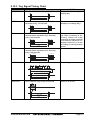
8.10.3 Fog Signal Timing Chart
TYPE
UNDERWAY
PATTERN
One 5-second blasts every 120 seconds.
USAGE
Motor vessel underway and
making way.
Listen Back
120s
STOP
Two 5-second blasts (separated by 2
seconds) every 120 seconds.
5s
Motor vessel underway but
stopped (not making way).
5s
Listen Back
2s
SAIL
120s
2s
One 5-second blasts followed by two 1second blasts (separated by 2 seconds)
every 120 seconds.
1s 1s
1s 1s
Listen Back
2s 2s
TOW
120s
2s 2s
One 5-second blasts followed by three 1second blasts (separated by 2 seconds)
every 120 seconds.
1s 1s 1s
Sailing vessel underway, fishing vessel (underway or anchored), vessel not under
command, a vessel restricted
in her ability to maneuver (underway or at anchor), or a vessel towing or pushing another
ahead.
Vessel under tow (manned).
1s 1s 1s
Listen Back
2s 2s 2s
AGROUND
120s
2s 2s 2s
One 11-second rings every 60 seconds.
Vessel is aground.
Listen Back
60s
ANCHOR
One 5-second rings every 60 seconds.
Vessel is at anchor.
Listen Back
60s
GX2000E/GX2100E
Page 41
8.11 INTERCOM OPERATION
To access the following Intercom functions one of the soft keys must be setup
as IC. Refer to section “10.12 SOFT KEYS”.
In addition an optional RAM3 must be connected to perform intercom functions between the radio and the RAM3.
8.11.1 Communication
1. Press the one of the soft keys momentarily, then
press the [IC] soft key to enable the intercom mode.
Note: Depending on the programming of the [IC]
soft key, the [NEXT] soft key may have to be pressed
to see the [IC] soft key.
2. When the intercom mode is enabled, “Intercom” is displayed on the radio
and CMP30 (RAM3) Remote Station Microphone.
3. Press the PTT switch on the
GX2000E/GX2100E
CMP30
radio. “Talk” will be shown on
the display.
Note: A warning beep will be
heard when the Radios PTT
(GX2000E/GX2100E’s PTT switch is pressed)
and CMP30 (RAM3) PTT are
GX2000E/GX2100E
CMP30
pushed at the same time.
4. Speak slowly and clearly into
the microphone, hold the microphone about 1.5 cm away
(CMP30’s PTT switch is pressed)
from your mouth.
5. When finished, release the PTT switch.
6. Press the [CLR(WX)] key to exit intercom mode and revert to radio mode.
8.11.2 Calling
Press and holding the [IC] soft key when in intercom mode on either the radio
or CMP30 (RAM3) mic will produce a calling beep to the other station.
Page 42
GX2000E/GX2100E
8.12 VOICE SCRAMBLER
If privacy of communications is desired, a CVS2500 4 code voice scrambler
(VS) can be installed in the transceiver. Contact your Dealer to have a CVS2500
installed. Refer to the section “11.8 SCRAMBLER SETUP” to program the
voice scrambler.
1. Select a channel that was programmed for scrambler mode (“Vs” and scrambler number will appear
on the display).
2. Monitor the channel before transmitting.
3. Transmit the voice message. The signal sent will be scrambled.
GX2000E/GX2100E
Page 43
9 DIGITAL SELECTIVE CALLING
9.1
GENERAL
WARNING
This radio is designed to generate a digital maritime distress and safety
call to facilitate search and rescue. To be effective as a safety device,
this equipment must be used only within communication range of a shorebased VHF marine channel 70 distress and safety watch system. The
range of signal may vary but under normal conditions should be approximately 20 nautical miles.
Digital Selective Calling is a semi-automated method of establishing a radio
call, it has been designated by the International Maritime Organization (IMO)
as an international standard for establishing VHF, MF and HF radio calls. It has
also been designated as part of the Global Maritime Distress and Safety System (GMDSS). It is planned that DSC will eventually replace aural watches on
distress frequencies and will be used to announce routine and urgent maritime
safety information broadcasts.
This system allows mariners to instantly send a distress call with GPS position
to the Coast Guard and other vessels within range of the transmission. DSC
will also allow mariners to initiate or receive Distress, Urgency, Safety, Routine, Position Request, and Position Send, and Group calls to or from another
vessel equipped with a DSC transceiver.
9.2
MARITIME MOBILE SERVICE IDENTITY (MMSI)
9.2.1 What is an MMSI?
An MMSI is a nine digit number used on Marine Transceivers capable of using
Digital Selective Calling (DSC). This number is used like a telephone number to
selectively call other vessels.
THIS NUMBER MUST BE PROGRAMMED INTO THE RADIO TO OPERATE
DSC FUNCTIONS.
Page 44
GX2000E/GX2100E
9.2.2 Programming the MMSI
WARNING
A user MMSI can be inputted only once. Therefore please be careful
not to input the incorrect MMSI number. If you need to change the
MMSI number after it has been entered, the radio will have to be returned
to Factory Service. Refer to the section “18.2 FACTORY SERVICE.”
1. Press and hold down the [CALL(MENU)] key
until the “Setup Menu” appears.
2. Rotate the CHANNEL knob to select “MMSI
SETUP”.
3. Press the [SELECT] soft key. (To cancel, press the
[ENT] soft key.)
4. Rotate the CHANNEL knob to select the first
number of your MMSI, then press the [ENT]
soft key to step to the next number.
5. Repeat step 4 to set your MMSI number (nine
digits).
6. If a mistake was made entering in the MMSI
number, press the [BACK] soft key until the
wrong number is selected, then rotate the
CHANNEL knob to correct the entry and press the
[ENT] soft key.
7. When finished programming the MMSI number, press
and hold the [ENT] soft key. The radio will ask you to
input the MMSI number again. Use steps 4 - 6 above.
8. After the second number has been input, press and
hold the CHANNEL knob to store the MMSI.
9. Press the [OK] soft key to return to radio operation.
NOTE
To view your MMSI after programming to ensure it is correct, perform
steps 1~3. Look that the MMSI number shown on the display is correct.
GX2000E/GX2100E
Page 45
9.3
DSC DISTRESS CALL
The GX2000E/GX2100E is capable of transmitting and receiving DSC Distress messages to all DSC radios. The GX2000E/GX2100E may be connected
to a GPS to also transmit the Latitude, Longitude of the vessel.
9.3.1 Transmitting a DSC Distress Call
NOTE
To be able to transmit a DSC distress call an MMSI number must be
programmed, refer to section “9.2.2 Programming the MMSI.” In order
for your ships location to be transmitted a GPS must be connected to
the GX2000E/GX2100E, refer to section “6.4 ACCESSORY CABLE.”
1. Lift the red spring loaded DISTRESS cover and
press the [DISTRESS] key. The “DISTRESS ALERT”
menu will appear on the display.
2. Press and hold the [DISTRESS] key. The radios display will count down (3-2-1) and then transmit the
Distress call. The backlight of the display and keypad flashes while the radios display is counting
down.
3. When the distress signal is sent, the transceiver
watches for a transmission between CH16 and CH70
until an acknowledgment signal is received.
4. If an acknowledgment is received, select channel
16 and advise your distress situation.
5. If no acknowledgment is received, the distress call
is repeated in 4 minute intervals until a DSC acknowledgment is received.
6. When a DSC Distress acknowledgment is received,
a distress alarm sounds and channel 16 is automatically selected. The display shows the MMSI of
the ship responding to your distress.
RECEIVED ACK: acknowledgment signal is received.
RECEIVED RLY: relay signal is received from another vessel or coast station.
7. Press the PTT button and state your name, vessel name, number of persons on board and the distress situation, then say over. wait for a reply
from the acknowledging ship.
8. To turn off the Distress alarm until the radio retransmits the distress call,
press the [16/9] key.
Page 46
GX2000E/GX2100E
Transmitting a DSC Distress Alert with Nature of Distress
The GX2000E/GX2100E is capable of transmitting a DSC Distress Alert with
the following “Nature of Distress” categories:
Undesignated, Fire, Flooding, Collision, Grounding, Capsizing, Sinking,
Adrift, Abandoning, Piracy, MOB
1. Lift the red spring loaded DISTRESS cover and
press the [DISTRESS] key. The “DISTRESS ALERT”
menu will appear on the display.
2. Press the [NATURE] soft key, then rotate the CHANNEL knob to select the desired nature of distress
category.
3. Press and hold the [DISTRESS] key. The radios display will count down (3-2-1) and then transmit the
Distress call. The backlight of the display and keypad flashes while the radios display is counting down.
4. When the distress signal is sent, the transceiver
watches for a transmission between CH16 and CH70
until an acknowledgment signal is received.
5. If no acknowledgment is received, the DSC distress
call is repeated in 4 minute intervals until an acknowledgment is received.
6. When a DSC Distress acknowledgment is received,
a distress alarm sounds and channel 16 is automatically selected. The display shows the MMSI of
the ship responding to your distress.
RECEIVED ACK:
acknowledgment signal is received.
RECEIVED RLY ACK: relay acknowledgment signal
is received from another vessel or coast station.
7. Press the PTT button and state your name, vessel name, number of persons on board and the distress situation, then say over. wait for a reply
from the acknowledging ship.
8. To turn off the Distress alarm until the radio retransmits the distress call,
press the [16/9] key.
GX2000E/GX2100E
Page 47
Transmitting a DSC Distress Alert with Manual Position of Input
When the GX2000E/GX2100E is not connected to a GPS receiver, you may
input the latitude/longitude of your vessel manually and may send DSC Distress Alert.
1. Lift the red spring loaded DISTRESS cover and
press the [DISTRESS] key. The “DISTRESS ALERT”
menu will appear on the display.
2. Press the [POS/TM] soft key.
3. Enter the latitude/longitude of your vessel and your
local UTC time in the 24-hour notation by the CHANNEL knob. Rotate the CHANNEL knob to select the
number and press the [ENT] soft key to move the
cursor to the next character. You may backspace
the cursor by pressing the [BACK] soft key, if you
make a mistake.
4. When you have completed your selection, press and
hold in the [ENT] soft key for two seconds to save
the setting.
5. Press and hold the [DISTRESS] key. The radios display will count down (3-2-1) and then transmit the
Distress call. The backlight of the display and keypad flashes while the radios display is countdown.
6. When the distress signal is sent, the transceiver
“shadow-watches” for a transmission between CH16
and CH70 until an acknowledgment signal is received.
7. If no acknowledgment is received, the distress call
is repeated in 4 minute intervals until an acknowledgment is received.
8. When a DSC Distress acknowledgment is received,
a distress alarm sounds and channel 16 is automatically selected. The display shows the MMSI of
the ship responding to your distress.
RECEIVED ACK:
acknowledgment signal is received.
RECEIVED RLY ACK: relay acknowledgment signal is received from another
vessel or coast station.
9. Press the PTT button and state your name, vessel name, number of persons on board and the distress situation, then say over. wait for a reply
from the acknowledging ship.
10. To turn off the Distress alarm until the radio retransmits the distress call,
press the [16/9] key.
Page 48
GX2000E/GX2100E
Pausing a DSC Distress Call
After a DSC Distress call is transmitted, the DSC distress call is repeated
every 4 minutes until the call is canceled by the user or until the radio is turned
on and off again. The GX2000E/GX2100E has provision to suspend (Pause)
the retransmitting of the distress call by the procedure below.
1. After the distress call is transmitted, the radio will
show the top display to the right.
Looking at this display you will notice TX in: 02:25,
this is the time when the radio will re-transmit the
DSC distress call.
2. To suspend re-transmitting the DSC call, press the
[PAUSE] soft key.
3. To resume counting down to transmit the DSC Distress call, press the [RESUME] soft key.
Cancel a DSC Distress Call
If a DSC Distress call was sent by error the GX2000E/GX2100E allows you to
send a message to other vessels to cancel the Distress Call that was made.
Press the [ CANCEL ] soft key,
then press [YES] soft key.
9.3.2 Receiving a DSC Distress Call
1. When a DSC Distress call is received, an emergency
alarm sounds.
2. Press any key to stop the alarm.
3. The display shows the position of the vessel in distress. To show additional information of the vessel
in distress, rotate the CHANNEL knob counter clockwise (refer to the second display).
On the display you will notice 3 soft key selections.
These selections are described below:
ACCEPT: Press this key to accept the DSC distress call and to switch to
Channel 16.
Note: If a key is not pressed for 10 seconds or longer the radio will automatically select Channel 16.
PAUSE: Press this key to temporarily disable automatic switching to channel 16.
QUIT: Press this key to quit the automatic channel 16 switching and revert
GX2000E/GX2100E
Page 49
to the last selected working channel.
Received DISTRESS
4. Press the [WPT] soft key to enter the “Waypoint InName:VERTEX
ID:123456789
put” menu, then enter the desired waypoint name
Since: 01:03
-DISTRESS INFO(up to 11 characters), described previously (select Nature of:Undesignate
DIST ID:123456789
WPT
QUIT
the letter/number by rotating the CHANNEL knob
and move the cursor by pressing the [ENT]/[BACK]
soft key).
5. The ID is the MMSI from the vessel in distress.
6. When you are finished entering the waypoint name,
press and hold the [ENT] soft key to replace the
display to the “WAYPOINT” Screen. The display indicates the distance and direction of the distressed
vessel, and also the compass indicates the distressed vessel by dot ().
7. To return to the radio operation:
1) Press and hold down the [CALL(MENU)] key until “Setup Menu” appears.
2) Rotate the CHANNEL knob to select “DSC SETUP” menu.
3) Press the [SELECT] soft key, then select “GENERAL SETUP” with the
CHANNEL knob.
4) Press the [SELECT] soft key, then select “NORMAL” with the CHANNEL
knob.
5) Press the [SELECT] soft key to return to radio operation.
NOTE
You must continue monitoring channel 16 as a coast station may require assistance in the rescue attempt.
Page 50
GX2000E/GX2100E
9.4
ALL SHIPS CALL
The All Ships Call function allows contact to be established with DSC equipped
vessels without having their MMSI in the individual calling directory. Also, priority for the call can be designated as Urgency or Safety.
URGENCY Call: This type of call is used when a vessel may not truly be in
distress, but have a potential problem that may lead to a distress situation. This call is the same as saying PAN PAN PAN
on channel 16.
SAFETY Call: Used to transmit boating safety information to other vessels.
This message usually contains information about an overdue
boat, debris in the water, loss of a navigation aid or an important meteorological message. This call is the same as saying
Securite, Securite, Securite.”
9.4.1 Transmitting an All Ships Call
1. Press the [ CALL ( MENU )] key. The “DSC
Menu” will appear.
2. Rotate the CHANNEL knob to select “All
SHIPS”.
3. Press the [ SELECT ] soft key. (To cancel,
press the [QUIT] soft key.)
4. Rotate the CHANNEL knob to select the nature of call (“SAFETY” or “URGENCY”), then
press the [SELECT] soft key.
5. Rotate the CHANNEL knob to select the operating
channel you want to communicate on, then press
the [SELECT] soft key. If the channel you want to
use is not listed, press the [MANUAL] soft key, then
rotate the CHANNEL knob to select the operating
channel you want to communicate on, then press
the [SELECT] soft key.
6. Press the [YES] soft key to transmit the selected
type of all ships DSC call.
7. After the All Ships Call is transmitted, the transceiver
will switch to the selected channel.
8. Listen to the channel to make sure it is not busy,
then key the microphone and say PAN PAN PAN or
“Securite, Securite, Securite” depending on the priority of the call.
9. Press the [QUIT] soft key to exit the ALL ship call menu.
GX2000E/GX2100E
Page 51
9.4.2 Receiving an All Ships Call
1. When an all ships call is received, an emergency
alarm will sound.
The display shows the MMSI of the vessel transmitting the All Ships Call and the radio will change to
the requested channel after 10 seconds.
2. Press any key to stop the alarm.
3. Monitor the requested channel until the ALL SHIPs
voice communication is completed.
On the display you will notice 3 soft key selections.
These selections are described below:
ACCEPT: Press this key to accept the DSC All Ship
call and to switch to requested channel.
Note: If a key is not pressed for 10 seconds or longer the radio will automatically change to the requested channel.
PAUSE: Press this key to temporarily disable automatic switching to the
requested channel.
Note: In some cases automatically switching to a requested channel might
disrupt import ongoing communications. This feature allows commercial
users to suspend channel switching and stay on the working channel selected before the All Ships call was received.
QUIT: Press this key to quit the automatic channel switching and revert to
the last selected working channel.
4. Press the [CALL(MENU)] key to return to the channel display.
Page 52
GX2000E/GX2100E
9.5
INDIVIDUAL CALL
This feature allows the GX2000E/GX2100E to contact another vessel with a
DSC VHF radio and automatically switch the receiving radio to a desired communications channel. This feature is similar to calling a vessel on CH16 and
requesting to go to another channel (switching to the channel is private between the two stations). Up to 80 Individual contacts may be programmed.
9.5.1 Setting up the Individual / Position Call Directory
The GX2000E/GX2100E has a DSC directory that allows you to store a vessel
or person’s name and the MMSI number associated with vessels you wish to
transmit Individual calls, Auto Polling, Position Request, and Position Report
transmissions.
To transmit an Individual call you must program this directory with information
of the persons you wish to call, similar to a cellular phones telephone directory.
1. Press and hold down the [CALL(MENU)] key
until “Setup Menu” appears.
2. Rotate the CHANNEL knob to select “DSC
SETUP” menu.
3. Press the [ SELECT] soft key, then select “INDIVIDUAL DIRECTORY” with the CHANNEL knob.
4. Press the [SELECT] soft key.
5. Select “ADD” with the CHANNEL knob, then
press the [SELECT] soft key.
6. Rotate the CHANNEL knob to scroll through
the first letter of the name of the vessel or person
you want to reference in the directory.
7. Press the [ENT] soft key to store the first letter in
the name and step to the next letter to the right.
8. Repeat step 6 and 7 until the name is complete.
The name can consist of up to eleven characters, if
you do not use all eleven characters press the [ENT]
soft key to move to the next space. This method
can also be used to enter a blank space in the name.
If a mistake was made entering in the name repeat
pressing the [BACK] soft key until the wrong character is selected, then
rotate the CHANNEL knob to correct the entry.
9. After the eleventh letter or space has been entered, press and hold the
[ENT] soft key to advance to the MMSI (Maritime Mobile Service Identity
Number) number entry.
10. Rotate the CHANNEL knob to scroll through numbers, 0-9. To enter the
GX2000E/GX2100E
Page 53
desired number and move one space to the right by
pressing the [ENT] soft key. Repeat this procedure
until all nine space of the MMSI number are entered.
11. If a mistake was made entering in the MMSI number
repeat pressing the [BACK] soft key until the wrong number is selected,
then rotate the CHANNEL knob to correct the entry.
12. To store the data entered, press and hold the [ENT] soft key.
13. To enter another individual address, repeat steps 5 through 12.
14. Press the [QUIT] soft key several times to return to radio operation.
9.5.2 Setting up Individual Reply
This menu item sets up the radio to automatically (default setting) or manually
respond to a DSC Individual call requesting you to switch to a working channel
for voice communications. When Manual is selected the MMSI of the calling
vessel is shown allowing you to see who is calling. This function is similar to
caller id on a cellular phone.
1. Press and hold down the [CALL(MENU)] key
until “Setup Menu” appears.
2. Rotate the CHANNEL knob to select “DSC
SETUP” menu.
3. Press the [SELECT] soft key, then select “INDIVIDUAL REPLY” with the CHANNEL knob.
4. Press the [SELECT] soft key.
5. Rotate the CHANNEL knob to select “AUTOMATIC” or “MANUAL”.
6. Press the [SELECT] soft key to store the selected
setting.
7. Press the [QUIT] soft key several times to return to radio operation.
9.5.3 Enabling the Individual Acknowledgment
The radio can be setup to transmit a reply automatically (default) or set so the
radio will not reply to an individual call.
1. Press and hold down the [CALL(MENU)] key
until “Setup Menu” appears.
2. Rotate the CHANNEL knob to select “DSC
SETUP” menu.
3. Press the [SELECT] soft key, then select “INDIVIDUAL ACK” with the CHANNEL knob.
4. Press the [SELECT] soft key.
5. Rotate the CHANNEL knob to select “ABLE
Page 54
GX2000E/GX2100E
TO COMPLY” or “UNABLE”.
6. Press the [ENT] soft key to store the selected setting, then press the [QUIT] soft key several times to
return to radio operation.
9.5.4 Setting up Individual/Group Call Ringer
When a Individual Call or Group Call is received the radio will produce a ringing sound for 2 minutes. This selection allows the Individual Call ringer time to
be changed.
1. Press and hold down the [CALL(MENU)] key
until “Setup Menu” appears.
2. Rotate the CHANNEL knob to select “DSC
SETUP” menu.
3. Press the [SELECT] soft key, then select “INDIVIDUAL RING” with the CHANNEL knob.
4. Press the [SELECT] soft key.
5. Rotate the CHANNEL knob to select ringing
time of a Individual Call.
6. Press the [ENT] soft key to store the selected setting, then press the [QUIT] soft key several times to
return to radio operation.
The GX2000E/GX2100E has the capability to turn off the Individual and Group
call ringer.
1. Press and hold down the [CALL(MENU)] key
until “Setup Menu” appears.
2. Rotate the CHANNEL knob to select “DSC
SETUP” menu.
3. Press the [SELECT] soft key, then select “DSC
BEEP” with the CHANNEL knob.
4. Press the [SELECT] soft key.
5. Rotate the CHANNEL knob to select “Individual” if you wish to disable the Individual call
ringer, or “Group” if you wish to disable the Group
call ringer, then press the [SELECT] soft key.
6. Rotate the CHANNEL knob to select “Off”.
7. Press the [ENT] soft key to store the selected setting.
8. Press the [QUIT] soft key several times to return to radio operation.
To re-enable the ringer tone, repeat the above procedure, rotating the CHANNEL knob to select “On” in step “6” above.
GX2000E/GX2100E
Page 55
9.5.5 Transmitting an Individual Call
This feature allows the user to contact another vessel with a DSC radio. This
feature is similar to calling a vessel on CH16 and requesting to go to another
channel.
Pre-Programmed Calling
1. Press the [ CALL ( MENU )] key. The “DSC
Menu” will appear.
2. Rotate the CHANNEL knob to select “INDIVIDUAL”. (To cancel, press the [QUIT] soft
key.)
3. Press the [SELECT] soft key. The transceiver
will beep, and the “Last Individual Call” will
appear.
4. Rotate the CHANNEL knob to select the “Individual” you want to contact.
5. Press the [SELECT] soft key, then rotate the CH
knob to select the operating channel you want to
communicate on, then press the [SELECT] soft key.
If the channel is not shown in the list, press the
[MANUAL] soft key, then rotate the CHANNEL knob
to select the operating channel you want to communicate on, then press the [SELECT] soft key.
6. Press the [YES] soft key to transmit the individual
DSC signal.
7. When an individual call acknowledgment is received,
the established channel is automatically changed
to the channel which is selected on step 5 above
and a ringing tone sounds.
8. Press the [QUIT] soft key to listen to the channel to
make sure it is not busy, then press the microphone’s PTT switch and talk
into the microphone to the other vessel.
Manual Calling
You may enter an MMSI number manually to contact without storing it in the
Individual Directory.
1. Press the [CALL (MENU )] key. The “DSC Menu”
menu will appear.
2. Rotate the CHANNEL knob to select “INDIVIDUAL”.
(To cancel, press the [QUIT] soft key.)
Page 56
GX2000E/GX2100E
3. Press the [SELECT] soft key. The transceiver will
beep, and the “Last Individual Call” will appear.
4. Press the [NEW ID] soft key, then select “MANUAL”
with the CHANNEL knob.
5. Press the [SELECT] soft key.
6. Rotate the CHANNEL knob to select the first number of the MMSI which you want to contact, then
press the [SELECT] soft key to step to the next number.
7. Repeat step 6 to set the MMSI number (nine digits).
8. If a mistake was made entering in the MMSI number, repeat pressing the [BACK] key until the wrong
number is selected, then rotate the CHANNEL knob
to correct the entry.
9. When finished entering the MMSI number, press and
hold the [SELECT] soft key.
10. Press the [SELECT] soft key, then rotate the CHANNEL knob to select the operating channel you want
to communicate on, then press the [SELECT] soft
key. If the channel is not shown in the list, press the
[MANUAL] soft key, then rotate the CHANNEL knob
to select the operating channel you want to communicate on, then press the [SELECT] soft key.
11. Press the [YES] soft key to transmit the individual
DSC signal.
12. When an individual call acknowledgment is received,
the established channel is automatically changed
to the channel which is selected on step 5 above
and a ringing tone sounds.
13. Press the [QUIT] soft key to listen to the channel to
make sure it is not busy, then press the microphone’s
PTT switch and talk into the microphone to the other
vessel.
GX2000E/GX2100E
Page 57
9.5.6 Receiving an Individual Call
When a Individual DSC call is received, the radio will automatically respond
(Default setting) to the calling ship, and switch to the requested channel for
voice communications. Refer to section “9.5.2 Setting up Individual Reply” to
change the reply to manual if you want to see who is calling before replying to
the call.
1. When an individual call is received, an individual
call ringing alarm sounds.
The radio automatically switches to the requested
channel. The display shows the MMSI of the vessel
calling.
2. Press any key to stop the alarm.
3. Press the [QUIT] soft key to return to radio operation
4. Press the microphone’s PTT switch and talk into the microphone to the
other vessel.
Page 58
GX2000E/GX2100E
9.6
DSC LOG OPERATION
The GX2000E/GX2100E logs received distress calls and individual calls. The
DSC Log feature is similar to an answer machine where calls are recorded for
review and a “ ” icon will appear on the radios display. The GX2000E/
GX2100E can store up to the latest 26 Distress, and up to the latest 64 other
calls (Individual, Group, All Ship etc.).
9.6.1 Reviewing a Logged DSC Distress Call
The GX2000E/GX2100E radios allows logged DSC distress call to be reviewed.
1. Press the [CALL(MENU)] key. The “DSC menu” will
appear.
2. Rotate the CHANNEL knob to select “DSC LOG”
menu.
3. Press the [SELECT] soft key, then rotate the CHANNEL knob to select “DISTRESS LOG”.
4. Press the [SELECT] soft key, then rotate the CHANNEL knob to select the station (name or MMSI number) you want to review and/or relay the distress
call to other vessels.
Note: When there is an unread received call, “ ”
icon will appear behind the station name (or MMSI
number).
5. Press the [SELECT] soft key, to review details for
the selected station.
GX2000E/GX2100E
Page 59
9.6.2 Reviewing a Logged All Ship or Individual Call
Reviewing a logged All ship or Individual call.
1. Press the [ CALL ( MENU )] key. The “DSC
Menu” will appear.
2. Rotate the CHANNEL knob to select “DSC
LOG” menu.
3. Press the [SELECT] soft key, then rotate the CHANNEL knob to select “OTHER CALL LOG”.
4. Press the [SELECT] soft key, then rotate the
CHANNEL knob to select the station (name or
MMSI number) you want to review and/or call
back. When there is an unread received call,
“ ” icon will appear behind the station name
(or MMSI number).
5. Press the [SELECT] soft key, to review details for the selected station.
Page 60
GX2000E/GX2100E
9.6.3 Deleting a Call from the “DSC LOG” Directory
1. Press the [ CALL ( MENU )] key. The “DSC
Menu” will appear.
2. Rotate the CHANNEL knob to select “DSC
LOG” menu.
3. Press the [SELECT] soft key, then rotate the CHANNEL knob to select “LOG DELETE” menu.
4. Press the [SELECT] soft key, then rotate the
CHANNEL knob to select the category (“DISTRESS LOG” or “OTHER CALL LOG”) to be deleted.
5. Press the CHANNEL knob.
1) If you want to delete all stations at a time, select
the “ALL LOG DELETE” with the CHANNEL knob,
then press the [SELECT] soft key, then press the
[OK] soft key. Press the [QUIT] soft key several
times to return to radio operation.
“ALL LOG DELETE”
2) If you want to delete one of
the logged stations, select
the “VIEW LOG LIST” with
the CHANNEL knob, then
press the [ SELECT ] soft
key. Rotate the CHANNEL
knob to select the station
(name or MMSI number) to
be deleted, then press the
[DELETE] soft key. The display will show “Are your
sure?” press the [OK] soft key.
6. Press the [QUIT] soft key several times to return to
radio operation.
GX2000E/GX2100E
“VIEW LOG LIST”
Page 61
9.7
GROUP CALL
This feature allows the user to contact a group of specific vessels (example
members of a yacht club) using DSC radios with Group call function to automatically switch to a desired channel for voice communications. This function
is very useful for yacht clubs and vessels traveling together that want to collectively make announcements on a predetermined channel. Up to 32 Group
MMSI may be programmed.
9.7.1 Setup a Group Call
For this function to operate, the same Group MMSI must be programmed into
all the DSC VHF radios within the group of vessels that will be using this feature. To understand Group MMSI programming, first a Ship MMSI has to be
understood.
Ship MMSI: The first three digits called a MID (Mobile Identity Group) of a Ship
MMSI denote the country the ship registered for a MMSI. The last 6 digits are
specific to the Ships ID.
Ship MMSI Example: If your MMSI is “366123456”, “366” is MID which denote
the country and “123456” is your ships MMSI.
Group MMSI:
FCC or other organizations licensed to assign ship MMSI numbers. European users should check with the local marine regulatory authority in their
country for assistance in assigning a group MMSI number. If permitted to
assign group numbers the following steps should be followed.
The first digit of a Group MMSI is always set to “0” by International rules.
All Standard Horizon radios are preset so when programming a Group
MMSI the first digit is set to “0”.
The USCG recommends programming the MID of a ships MMSI into the
Second, Third and Fourth digits of the Group MMSI as it denotes the area
the ship is located in.
The last 5 digits are decided upon by persons in the Group. This is an
important step as all radios in the Group must contain the same Group
MMSI so they can be contacted by each other. There is a chance that
another group of vessels may program in the same Group MMSI. If this
happens, simply change one or more of the last 5 digits of the Group MMSI.
1. Press and hold down the [CALL(MENU)] key
until “Setup Menu” appears.
2. Rotate the CHANNEL knob to select “DSC
SETUP” menu.
3. Press the [SELECT] soft key, then select “GROUP
DIRECTORY” with the CHANNEL knob.
Page 62
GX2000E/GX2100E
4. Press the [SELECT] soft key, then select “ADD” with
the CHANNEL knob.
5. Press the [SELECT] soft key.
6. Rotate the CHANNEL knob to scroll through the first
letter of the name of the group you want to reference in the directory.
7. Press the [SELECT] soft key to store the first letter
in the name and step to the next letter to the right.
8. Repeat step 6 and 7 until the name is complete.
The name can consist of up to eleven characters, if
you do not use all eleven characters press the [SELECT] soft key to move to the next space. This
method can also be used to enter a blank space in
the name. If a mistake was made entering in the
name repeat pressing the [BACK] soft key until the
wrong character is selected, then rotate the CHANNEL knob to correct the
entry.
9. After the eleventh letter or space has been entered, press and hold the
[SELECT] soft key to advance to the GROUP MMSI (Maritime Mobile Service Identity Number) number entry.
10. Rotate the CHANNEL knob to select the second number of the MMSI (nine digits: first digit permanently
set to “0”) which you want to contact, then press the
[SELECT] soft key to step to the next number. Repeat this procedure until
all eight space of the MMSI number are entered.
11. If a mistake was made entering in the MMSI number repeat pressing the
[BACK] soft key until the wrong number is selected, then rotate the CHANNEL knob to correct the entry.
12. To store the data entered, press and hold the [SELECT] soft key.
13. To enter another group address, repeat steps 5 through 12.
14. Press the [QUIT] soft key several times to return to radio operation.
9.7.2 Transmitting a Group Call
Pre-Programmed Calling
1. Press the [ CALL ( MENU )] key. The “DSC
Menu” will appear.
2. Rotate the CHANNEL knob to select
“GROUP”. (To cancel, press the [QUIT] key.)
3. Press the [SELECT] soft key. The transceiver will
beep, and the “Last Group Call” will appear.
4. Rotate the CHANNEL knob to select the “Group” you want to contact.
GX2000E/GX2100E
Page 63
5. Press the [SELECT] soft key, then rotate the
CHANNEL knob to select the operating channel you want to communicate on, then press
the [SELECT] soft key. If the channel you want
is not shown, press the [MANUAL] soft key, then
rotate the CHANNEL knob to select the operating
channel you want to communicate on, then press
the [SELECT] soft key.
6. Press the [YES] soft key to transmit the Group Call
signal.
7. When the Group Call signal is sent, the display will be as shown in the illustration at the
right.
8. After the Group Call is transmitted, all the radios in
the group will switch to the designated channel.
9. Listen to the channel to make sure it is not busy,
then press the microphone’s PTT switch and call
the other vessel you desire to communicate with.
Manual Calling
This feature allows you to contact a group of vessels by entering in their Group
MMSI manually.
1. Press the [ CALL ( MENU )] key. The “DSC
Menu” will appear.
2. Rotate the CHANNEL knob to select
“GROUP”. (To cancel, press the [QUIT] soft
key.)
3. Press the [SELECT] soft key. The transceiver
will beep, and the “Last Group Call” will appear.
4. Select “MANUAL” with the CHANNEL knob.
5. Press the [SELECT] soft key.
6. Rotate the CHANNEL knob to select the first
number of the MMSI (nine digits: first digit permanently set to “0”) which you want to contact, then press the [SELECT] soft key to step
to the next number.
7. Repeat step 6 to set the MMSI number.
8. If a mistake was made entering in the MMSI
Page 64
GX2000E/GX2100E
9.
10.
11.
12.
13.
number, repeat pressing the [BACK] soft key until the wrong number is
selected, then rotate the CHANNEL knob to correct the entry.
When finished entering the MMSI number, press and hold the [SELECT]
soft key.
Rotate the CHANNEL knob to select the operating channel you want to
communicate on, then press the [SELECT] soft key. If the channel you
want is not shown, press the [MANUAL] soft key, then rotate the CHANNEL knob to select the operating channel you want to communicate on,
then press the [SELECT] soft key.
Press the [YES] soft key to transmit the Group
Call signal.
After the Group Call is transmitted, all the radios in the group will switch to the designated
channel.
Listen to the channel to make sure it is not
busy, then press the PTT button and talk into
the microphone to the group of vessels.
9.7.3 Receiving a Group Call
1. When a group call is received, the GX2000E/GX2100E will produce a ringing alarm sound.
2. The radio will automatically switch to the requested
channel.
3. Press the [QUIT] soft key to stop the alarm.
4. Monitor the channel for the person calling the Group for a message.
5. If you want to respond, monitor the channel to make sure it is clear, then
press the microphone’s PTT switch and talk into the microphone to the
group of vessels.
6. Press the [QUIT] soft key to return to radio operation.
NOTE
After a Group call is received, the time the call was made and the ships
MMSI or vessels name will appear on the display.
GX2000E/GX2100E
Page 65
9.8
POSITION REQUEST
Advancements in DSC have made it possible to poll the location of another
vessel and show the position of that vessel on the display of the GX2000E/
GX2100E. Standard Horizon has taken this feature one step further, if any
compatible GPS chart plotter is connected to the GX2000E/GX2100E, the polled
position of the vessel is shown on the display of the GPS chart plotter making
it easy to navigate to the location of the polled vessel. This is a great feature for
anyone wanting to know the position of another vessel. For example your buddy
that is catching fish, or finding the location of a person you are cruising with.
NOTE
The other vessel must have an operating GPS receiver connected to its
DSC radio and must not have its radio set not to deny position requests.
(Refer the section “9.5 INDIVIDUAL CALL” to enter information into the
individual directory).
9.8.1 Setting up a Position Reply
The GX2000E/GX2100E can be set up to automatically (default setting) or
manually send your position when requested by another vessel. This selection
is important if you are concerned about someone polling the position of your
vessel that you may not want to. In the manual mode you will see the MMSI or
persons name shown on the display allowing you to choose to send your position to the requesting vessel.
1. Press and hold down the [CALL(MENU)] key until
“Setup Menu” appears.
2. Rotate the CHANNEL knob to select “DSC SETUP”
menu.
3. Press the [SELECT] soft key, then select “POSITION
REPLY” with the CHANNEL knob.
4. Press the [SELECT] soft key, then select “AUTOMATIC” or “MANUAL”. In “AUTOMATIC” mode, after
a DSC POS Request is received, the radio will automatically transmit your vessels position. In
“MANUAL” mode, the display of the GX2000E/
GX2100E will show who is requesting the position
and the YES soft key on radio has to be pressed to
send your position to the requesting.
5. Press the [ENT] soft key to store the selected setting.
6. Press the [QUIT] soft key several times to return to radio operation.
Page 66
GX2000E/GX2100E
9.8.2 Setting up a Position Request Ringer
The GX2000E/GX2100E has the capability to turn off the Position Request ringer.
1. Press and hold down the [CALL(MENU)] key
until “Setup Menu” appears.
2. Rotate the CHANNEL knob to select “DSC
SETUP” menu.
3. Press the [SELECT] soft key, then select “DSC
BEEP” with the CHANNEL knob.
4. Press the [SELECT] soft key, then select “POS
Request” with the CHANNEL knob.
5. Press the [ENT] soft key, then select “Off” with
the CHANNEL knob.
6. Press the [ENT] soft key to store the selected setting.
7. Press the [QUIT] soft key several times to return to radio operation.
To re-enable the ringer tone, repeat the above procedure, rotating the CHANNEL knob to select “On” in step “5” above.
9.8.3 Transmitting a Position Request to Another Vessel
Pre-Programmed Request
1. Press the [ CALL ( MENU )] key. The “DSC
Menu” will appear.
2. Rotate the CHANNEL knob to select “POS REQUEST”.
3. Rotate the CHANNEL knob to select a name
that was stored in the Individual DSC directory, then press the [SELECT] soft key.
4. Press the [YES] soft key to transmit the Position Request DSC call.
5. When the GX2000E/GX2100E receives the position from the polled vessel it is shown on the
radio display and also transferred to a GPS
Chart plotter with NMEA DSC and DSE sentences.
6. Press the [QUIT] soft key to return to radio operation.
NOTE
If the GX2000E/GX2100E does not receive a position data from the
polled vessel, the display will show “NO POSITION DATA.”
GX2000E/GX2100E
Page 67
Manual Request
This feature allows you to request the position of vessel by manually entering
the MMSI of the ship you want to send your position to.
1. Press the [CALL(MENU)] key. The “DSC Menu” will appear.
2. Rotate the CHANNEL knob to select “POS REQUEST”.
3. Press the [SELECT] soft key to show the “Last
Individual Call”.
4. Rotate the CHANNEL knob to select the
“MANUAL,” then press the [SELECT] soft key.
5. Rotate the CH knob to select the first number
of the MMSI (nine digits) which you want to
contact, then press the [SELECT] soft key to
step to the next number.
6. Repeat step 5 to set the MMSI number.
7. If a mistake was made entering in the MMSI
number, repeat pressing the [BACK] soft key
until the wrong number is selected, then rotate the CHANNEL knob to correct the entry.
8. When finished entering the MMSI number,
press and hold the [SELECT] soft key.
9. Press the [YES] soft key to transmit the position request DSC call.
10. When the GX2000E/GX2100E receives the position from the polled vessel it is shown on the radio
display and also transferred to the GPS Chart plotter with NMEA DSC and DSE sentences.
11. Press the [QUIT] soft key to return to radio operation.
9.8.4 Receiving a Position Request
When a position request call is received from another vessel, a ringing alarm
sounds and POS REQUEST will be shown in the display. Operation and transceiver function differs depending on “Position Reply” in the “DSC Setup” menu
setting discussed below:
Automatically reply:
1. When a position request call is received, a calling
alarm sounds 4 times. Then requested position coordinates are transmitted automatically to the vessel requesting your vessels position.
2. To exit from position request display, press the [QUIT] soft key.
Page 68
GX2000E/GX2100E
Manually reply:
1. When a position request call is received from another vessel, the display will be as shown in the illustration at the right.
2. A ringing alarm sounds 4 times. To send your vessels position to the requesting vessel, press the [REPLY] soft key. Or to exit from position request display, press the [QUIT] soft key.
GX2000E/GX2100E
Page 69
9.9
POSITION REPORT
The feature is similar to Position Request, however instead of requesting a
position of another vessel this function allows you to send your position to
another vessel. Your vessel must have an operating GPS receiver connected
for the GX2000E/GX2100E to send the position.
NOTE
To transmit a Position Report Call, a GPS must be connected to the
radio and the GX2000E/GX2100E Individual directory must be programmed with stations you wish to send your position to. To setup this
directory refer to section “9.5.1 Setting up the Individual / Position
Call Directory.”
9.9.1 Setting up a Position Report Ringer
The GX2000E/GX2100E has the capability to turn off the Position Report ringer.
1. Press and hold down the [CALL(MENU)] key
until “Setup Menu” appears.
2. Rotate the CHANNEL knob to select “DSC
SETUP” menu.
3. Press the [SELECT] soft key, then select “DSC
BEEP” with the CHANNEL knob.
4. Press the [SELECT] soft key, then select “POS
Report” with the CHANNEL knob.
5. Press the [ENT] soft key, then select “Off” with
the CHANNEL knob.
6. Press the [ENT] soft key to store the selected setting.
7. Press the [QUIT] soft key several times to return to
radio operation.
To re-enable the ringer tone, repeat the above procedure, rotating the CHANNEL knob to select “On” in step “5” above.
9.9.2 Transmitting a DSC Position Report Call
Pre-Programmed Calling
1. Press the [ CALL ( MENU )] key. The “DSC
Menu” will appear.
2. Rotate the CHANNEL knob to select “POS REPORT”. (To cancel, press the [QUIT] soft key.)
3. Press the [SELECT] soft key.
4. Rotate the CHANNEL knob to select the name in
Page 70
GX2000E/GX2100E
the directory, then press the [SELECT] soft
key.
5. Press the [YES] soft key to send your position to the selected vessel.
6. Press the [QUIT] key to return to radio operation.
Manual Calling
This feature allows you to send your position to another vessel by manually
entering the MMSI of the ship you want to send your position to.
1. Press the [ CALL ( MENU )] key. The “DSC
Menu” will appear.
2. Rotate the CHANNEL knob to select “POS REPORT”. (To cancel, press the [QUIT] soft key.)
3. Press the [SELECT] soft key. The transceiver will
beep, and the “Position Report Call” menu will appear.
4. Rotate the CHANNEL knob to select
“MANUAL”, then press the [SELECT] soft key.
5. Rotate the CHANNEL knob to select the first
number of the MMSI which you want to contact, then press the [SELECT] soft key to step
to the next number.
6. Repeat step 5 to set the MMSI number.
7. If a mistake was made entering in the MMSI
number, repeat pressing the [BACK] soft key
until the wrong number is selected, then rotate the CHANNEL knob to correct the entry.
8. When finished entering the MMSI number,
press and hold the Press the [SELECT] soft
key.
9. Press the [YES] soft key to send your position to the selected vessel.
10. Press the [CLR(WX)] key to return to radio operation.
GX2000E/GX2100E
Page 71
9.9.3 Receiving a DSC Position Report Call
When another vessel transmits their vessels location to the GX2000E/GX2100E
the following will happen:
1. A ringing sound will be produced when the call is received and NMEA
sentences DSC, DSE are outputted so the position
can be shown on a chart plotter or a computer.
2. Press the [CLR(WX)] key to stop ringing.
3. Rotate the CHANNEL knob to see position information of the station.
4. To exit to radio mode, press the [QUIT] soft key.
9.9.4 Navigating to a Position Report
The GX2000E/GX2100E has a feature that allows navigation to a received
Position Report call by using the Compass display. Navigating to the position
of a Position Report call may be enabled by the procedure below.
1. After the Position Report call has been received: press the [TO WPT] soft key.
2. To start navigating using the compass display,
press and hold the [ENT] soft key until the
Compass Page is shown. The display indicates the
distance and direction of the received vessel, and
also the compass indicates the received vessel by
dot ().
Stop Navigating to a Position Report
To stop navigation and return to the radio mode:
1. Press and hold down the [CALL(MENU)] key until
“Setup Menu” appears.
2. Rotate the CHANNEL knob to select “GENERAL
SETUP” menu.
3. Press the [SELECT] soft key, then select “DISPLAY”
with the CHANNEL knob.
4. Press the [SELECT] soft key.
5. Rotate the CHANNEL knob to select “NORMAL”.
6. Press the [ENT] soft key to return to radio operation.
Page 72
GX2000E/GX2100E
Saving a Position Report as a Waypoint
The GX2000E/GX2100E can save a Position Report call in the radios memory
as a waypoint.
1. After the Position Report call has been received: Press the [SAVE] soft key.
2. Rotate the CHANNEL knob to change the first
letter in the name of the waypoint and press
the [ENT] soft key.
3. Repeat step 2 until the WPT Name is entered.
4. Press and hold the [ENT] soft key to save the waypoint into memory.
Navigating to a saved waypoint
1. Press and hold down the [CALL(MENU)] key
until “Setup Menu” appears.
2. Select “GENERAL SETUP” with the CHANNEL
knob.
3. Press the [SELECT] soft key, then select “DISPLAY” with the CHANNEL knob.
4. Rotate the CHANNEL knob to select
“WAYPOINT” and press the [ENT] soft key.
5. Rotate the CHANNEL knob to select the
waypoint name and press the [ENT] soft key.
6. Press the [ENT] key so show the compass
display and to navigate to the waypoint. The
display indicates the distance and direction of the
saved waypoint, and also the compass indicates the
saved waypoint by dot ().
GX2000E/GX2100E
Page 73
9.10 MANUAL INPUTTING OF THE GPS LOCATION (LAT/LON)
You may send the Latitude/Longitude of your vessel manually even if the
GX2000E/GX2100E is not connected the GPS receiver unit.
After the position is entered, transmitting a DSC Distress, Position Request, or
Position Report will contain the manually entered position.
1. Press and hold down the [CALL(MENU)] key
until “Setup Menu” appears.
2. Rotate the CHANNEL knob to select “DSC
SETUP” menu.
3. Press the [SELECT] soft key, then select “POSITION INPUT” with the CHANNEL knob.
4. Press the [SELECT] soft key. The transceiver
will beep, and the display will be as shown in
the illustration on the right.
5. Enter the latitude/longitude of your vessel and your
local UTC time in the 24-hour notation by the CHANNEL knob. Rotate the CHANNEL knob to select the
number and press the [ENT] soft key to move the
cursor to the next character. You may backspace
the cursor by pressing the [BACK] soft key, if you
make a mistake.
6. To store the data entered, press and hold the [ENT] soft key.
7. Press the [QUIT] soft key several times to return to radio operation.
Page 74
GX2000E/GX2100E
9.11 AUTO DSC POLLING
The GX2000E/GX2100E has the capability to automatically track four stations
programmed into the Indvidual directory.
The following procedure allows the time interval between position requests to
be setup.
1. Press and hold down the [CALL(MENU)] key
until “Setup Menu” appears.
2. Rotate the CHANNEL knob to select “DSC
SETUP” menu.
3. Press the [ SELECT ] soft key, then select
“AUTO DSC INTERVAL” with the CHANNEL
knob.
4. Rotate the CHANNEL knob to select the desired interval time (1,2,3,4,5,10,30 and 40 minutes)
and press the [ENT] soft key.
5. Press the [QUIT] soft key numerous times to exit to
the radio mode.
9.11.1 Selecting Stations to be Automatically Polled (tracked)
NOTE
The radio uses the Individual directory to select stations. Refer to section “9.5.1 Setting up the Individual / Position Call Directory” and to
enter MMSI of stations you want to poll before proceeding.
1. Press the [ CALL ( MENU )] key. The “DSC
Menu” will appear.
2. Rotate the CHANNEL knob to select “AUTO
POS POLLING”, then press the [SELECT] soft
key.
3. Rotate the CHANNEL knob to select the “SELECT ADDRESS”, then press the [SELECT] soft
key.
4. The radio will show 4 calling stations to be
selected, select “CALL 1” and press the [SELECT] soft key.
5. The radio will show the stations programmed
in the Individual directory. Rotate the CHANNEL knob to select the desired station and
press the [SELECT] soft key.
GX2000E/GX2100E
Page 75
6. Repeat steps 4 and 5 for CALL 2, CALL 3 and CALL 4 entries.
7. When finished, press the [QUIT] soft key numerous times to exit to the
radio mode.
9.11.2 Enable/Disable Auto DSC Polling
1. Press the [ CALL ( MENU )] key. The “DSC
Menu” will appear.
2. Rotate the CHANNEL knob to select “AUTO
POS POLLING”, then press the [SELECT] soft
key.
3. Rotate the CHANNEL knob to select the “ACTIVATION”, then press the [SELECT] soft key.
4. Select “START” to enable transmissions to the
stations or “STOP” to disable transmissions to
stations.
5. Press the [ENT] soft key.
6. Press the [QUIT] soft key numerous times to exit to
the radio mode.
NOTE
When the radio receives position reports from a
called vessel the display will show the image to
the right and also output NMEA 0183 DSC and
DSE sentences to a GPS Chart plotter.
Page 76
GX2000E/GX2100E
9.12 DSC TEST
This function is used to contact another DSC equipped vessel to ensure the
DSC functions of the radio are operating.
NOTE
To use this feature, the radio you will be transmitting the test call to
needs to have the DSC Test feature.
To perform the DSC test you will need to enter a MMSI of another vessel into
the Individual directory or manually enter in the MMSI using the procedure
below.
9.12.1 Programming MMSI into Individual Directory
Refer to section “9.5.1 Setting up the Individual / Position Call Directory”.
9.12.2 DSC Test call by using Individual Directory
1. After programming a individual MMSI into the GX2000E/GX2100E (refer
to section “9.5.1 Setting up the Individual / Position Call Directory”).
2. Press the [ CALL ( MENU )] key. The “DSC
Menu” will appear.
3. Rotate the CHANNEL knob to select “DSC
TEST”, then press the [SELECT] soft key.
4. Rotate the CHANNEL knob to select the Ship name
and press the [SELECT] soft key.
5. Press the [YES] soft key to transmit the DSC
test call to the other vessel.
NOTE
After the radio receive a Test Call reply from vessel that was called, the radio will ring and show
TEST ACK display, which confirms the radio you
called received the test call.
GX2000E/GX2100E
Page 77
9.12.3 DSC Test Call by Manually Entering MMSI
1. Press the [ CALL ( MENU )] key. The “DSC
Menu” will appear.
2. Rotate the CHANNEL knob to select “DSC
TEST”, then press the [SELECT] soft key.
3. Rotate the CHANNEL knob to select “MANUAL” and
press the [SELECT] soft key.
4. Rotate the CHANNEL knob to select the first
digit in the MMSI and press the [SELECT] soft
key.
5. Repeat step 4 until all the numbers of the
MMSI are shown on the display.
6. Press and hold the [SELECT] soft key to show
the Test Call page.
7. Press the [YES] soft key to transmit the DSC
Test Call to the other vessel.
NOTE
After the radio receive a Test Call reply from vessel that was called, the radio will ring and show
TEST ACK display, which confirms the radio you
called received the test call.
Page 78
GX2000E/GX2100E
10 GENERAL SETUP
The optional CMP30 (RAM3) Remote Station Microphone can also
change the SETUP menu using the following procedure.
10.1 DISPLAY
The GX2000E/GX2100E can select additional screens other than the default
normal (Radio) display by using the procedure below.
1. Press and hold down the [CALL(MENU)] key until
“Setup Menu” appears, then select “GENERAL SETUP”
with the CHANNEL knob.
2. Press the [SELECT] soft key, then rotate the CHANNEL knob to select “DISPLAY”.
3. Press the [SELECT] soft key.
4. Rotate the CHANNEL knob to select desired screen
type “NORMAL”, “AIS”, “COMPASS”, or “WAYPOINT”.
5. Press the [SELECT] soft key to store the selected
setting.
6. Press the [QUIT] soft key several times to return to
radio operation.
“NORMAL” DISPLAY
“AIS” DISPLAY
“COMPASS” DISPLAY
“WAYPOINT” DISPLAY
NOTE
To show Position information, show AIS targets and use the Compass
display:
GX2100E - external GPS must be connected.
GX2000E - external AIS receiver or transponder and a external GPS
must be connected.
GX2000E/GX2100E
Page 79
10.2 LOCAL DISTANCE RECEIVER ATTENUATOR
In some areas, signals from external sources may cause interference to receiving marine transmissions. The GX2000E/GX2100E has two selections,
DISTANCE - used to receive weak signals (default), and LOCAL - which attenuates strong signals that may be interfering with reception.
1. Press and hold down the [CALL(MENU)] key until
“Setup Menu” appears.
2. Rotate the CHANNEL knob to select “GENERAL
SETUP” menu.
3. Press the [SELECT] soft key, then select “SENSITIVITY” with the CHANNEL knob.
4. Press the [SELECT] soft key.
5. Rotate the CHANNEL knob to select “LOCAL”. The
receiver sensitivity is now reduced.
6. Press the [ENT] soft key to store the selected level.
7. Press the [QUIT] soft key several times to return to
radio operation.
To return to normal sensitivity, repeat the above procedure, rotating the CHANNEL knob to select “DISTANCE” in step “5” above.
NOTE
In most cases, DISTANCE mode should be used. If LOCAL is selected,
remember the setting should be changed to DISTANCE when navigating away from land to receive weak signals.
Page 80
GX2000E/GX2100E
10.3 BACKLIGHT ADJUSTMENT
This menu selection adjusts the backlight intensity.
1. Press and hold down the [CALL(MENU)] key until
“Setup Menu” appears.
2. Rotate the CHANNEL knob to select “GENERAL
SETUP” menu.
3. Press the [SELECT] soft key, then select “DIMMER”
with the CHANNEL knob.
4. Press the [SELECT] soft key.
5. Rotate the CHANNEL knob to select the desired
level (“HIGH” is default). When “OFF” is selected, the
lamp is turned off.
6. Press the [ENT] soft key to store the selected level.
7. Press the [QUIT] soft key several times to return to
radio operation.
10.4 DISPLAY CONTRAST
The Display Contrast can be adjusted to suit overhead or dash board installations.
1. Press and hold down the [CALL(MENU)] key until
“Setup Menu” appears.
2. Rotate the CHANNEL knob to select “GENERAL
SETUP” menu.
3. Press the [ SELECT] soft key, then select “CONTRAST” with the CHANNEL knob.
4. Press the [SELECT] soft key.
5. Rotate the CHANNEL selector knob to select the
desired level. The contrast level can be set from “0”
to “31” (“HIGH” is default).
6. Press the [ENT] soft key to store the selected level.
7. Press the [QUIT] soft key several times to return to
radio operation.
GX2000E/GX2100E
Page 81
10.5 TIME OFFSET
Sets the local time offset between UTC and local time shown on the display.
The offset is added or subtracted from the time received from the GPS or
Chart plotter. Time is only displayed when a GPS or Chart Plotter is connected.
1. Press and hold down the [CALL(MENU)] key until
“Setup Menu” appears, then select “GENERAL SETUP”
with the CHANNEL knob.
2. Press the [SELECT] soft key, then select “TIME OFFSET” with the CHANNEL knob.
3. Press the [SELECT] soft key, then rotate the CHANNEL knob to select time offset of your location. See
illustration below to find your offset time. If “00:00”
is assigned, the time is the same as UTC (Universal
Time Coordinated or GPS Satellite Time).
4. Press the [ENT] soft key to store the time offset.
5. Press the [QUIT] soft key several times to return to
radio operation.
OFFSET TIME TABLE
Page 82
GX2000E/GX2100E
10.6 TIME AREA
This menu selection allows the radio to show UTC time or local time with the
offset.
1. Press and hold down the [CALL(MENU)] key until
“Setup Menu” appears, then select “GENERAL SETUP”
with the CH knob.
2. Press the [SELECT] soft key, then rotate the CHANNEL knob to “TIME AREA”.
3. Press the CHANNEL knob.
4. Rotate the CHANNEL knob to select “UTC” or “LOCAL”.
5. Press the [ENT] soft key to store the selected setting.
6. Press the [QUIT] soft key several times to return to
radio operation.
10.7 TIME DISPLAY
This menu selection allows the radio to show time in 12-hour or 24-hour format.
1. Press and hold down the [CALL(MENU)] key until
“Setup Menu” appears, then select “GENERAL SETUP”
with the CHANNEL knob.
2. Press the [SELECT] soft key, then rotate the CHANNEL knob to select “TIME DISPLAY”.
3. Press the [SELECT] soft key.
4. Rotate the CHANNEL knob to select “12 HOUR” or
“24 HOUR”.
5. Press the [ENT] soft key to store the selected setting.
6. Press the [QUIT] soft key several times to return to
radio operation.
GX2000E/GX2100E
Page 83
10.8 UNIT OF MEASURE
Allows Navigation and AIS displays to be shown in “Knot”, “Mile/Hour” or “KiloMeter/Hour” (for speed) and “Nautical Mile” or “Kilo-Meter” (for distance).
NOTE
A GPS must be connected to the radio to be able to show SPEED and
DISTANCE.
1. Press and hold down the [CALL(MENU)] key until
“Setup Menu” appears, then select “GENERAL SETUP”
with the CHANNEL knob.
2. Press the [SELECT] soft key, then rotate the CHANNEL knob to select “UNIT OF MEASURE”.
3. Press the [SELECT] soft key.
4. Rotate the CHANNEL knob to select “SPEED” or “DISTANCE” which you wish to change.
5. Press the [SELECT] soft key, then rotate the CHANNEL knob to select desired unit. Available selections
are KTS (knot), MPH (Mile/Hour), or KMH (KiloMeter/Hour) for speed, and NH (Nautical Mile) or
KM (Kilo-Meter) for distance.
6. Press the [ENT] soft key to store the selected setting.
7. Press the [QUIT] soft key several times to return to
radio operation.
Page 84
GX2000E/GX2100E
10.9 MAGNETIC
This selection allows customizing the GPS COG (Course Over Ground) displayed in True or Magnetic.
NOTE
A GPS must be connected to the radio to be able to show COG.
1. Press and hold down the [CALL(MENU)] key until
“Setup Menu” appears, then select “GENERAL SETUP”
with the CHANNEL knob.
2. Press the [SELECT] soft key, then rotate the CHANNEL knob to “MAGNETIC”.
3. Press the [SELECT] soft key.
4. Rotate the CHANNEL knob to select “TRUE” or “MAGNETIC”.
5. Press the [ENT] soft key to store the selected setting.
6. Press the [QUIT] soft key several times to return to
radio operation.
10.10 KEY BEEP
This selection is used to select the beep tone volume level when a key is
pressed.
1. Press and hold down the [CALL(MENU)] key until
“Setup Menu” appears, then select “GENERAL SETUP”
with the CHANNEL knob.
2. Press the [SELECT] soft key, then rotate the CHANNEL knob to select “KEY BEEP”.
3. Press the [SELECT] soft key.
4. Rotate the CHANNEL knob to select the desired
level. The beep level can be set from “LEVEL 1” to
“LEVEL 6”, “HIGH”, or “OFF”.
5. Press the [ENT] soft key to store the selected level.
6. Press the [QUIT] soft several times to return to radio operation.
GX2000E/GX2100E
Page 85
10.11 FOG ALERT TONE FREQUENCY
The function allows the radio to be setup to send the proper fog frequency
which is dependant on vessel size, shown below:
70 - 200Hz: Vessel that are 200 meters or more in length
130 - 350Hz: Vessel that are 75 Meters but less than 200 meters or more in
length
250 - 525Hz: Vessel that are 66 Feet (20 Meters) but less than 247.5 Feet (75
Meters) in length
250 - 525Hz: Vessel that are 39.6 Feet (12 Meters) but less than 66 Feet (20
Meters) in length
1. Press and hold down the [CALL(MENU)] key until
“Setup Menu” appears, then select “GENERAL SETUP”
with the CHANNEL knob.
2. Press the [SELECT] soft key, then rotate the CHANNEL knob to select “FOG FREQ”.
3. Press the [SELECT] soft key.
4. Rotate the CHANNEL knob to select the desired
tone frequency.
5. Press the [ENT] soft key to store the selected setting.
6. Press the [QUIT] soft key several times to return to
radio operation.
NOTE
By default the radio Fog frequency is set to 400Hz. In most cases this
frequency should not be changed unless the vessel is very large.
Page 86
GX2000E/GX2100E
10.12 SOFT KEYS
This menu item allows selection of the number of soft keys, soft key selection
and how long the display will show the soft key icon after a soft key is pressed.
1. Press and hold down the [CALL(MENU)] key
until “Setup Menu” appears, then select “GENERAL SETUP” with the CHANNEL knob.
2. Press the [SELECT] soft key, then rotate the
CHANNEL knob to “SOFT KEY”.
3. Press the [SELECT] soft key, then rotate the
CHANNEL knob to “NUMBER OF SOFT KEYS”.
4. Press the [SELECT] soft key, then rotate the
CHANNEL knob to select the number of soft
keys (3 through 10).
5. Press the [SELECT] soft key, then rotate the CH
knob to “KEY ASSIGNMENT” (to change the
use of selected soft keys).
6. Rotate the CHANNEL knob to select the key
(“KEY1”, “KEY2”, or “KEY3”), and press the
[SELECT] soft key. Then, rotate the CHANNEL knob to select the new function to be
assigned, and press the [SELECT] soft key.
Available functions are listed below. Repeat
step 6 to program the other soft keys.
7. Press the [QUIT] key, then rotate the CHANNEL knob to select “KEY TIMER” (selects how
long the soft key icon will be shown on the
display after a soft key is pressed, default is
5 seconds). Then, press the [SELECT] soft key.
8. Rotate the CHANNEL knob to select the time.
9. Press the [ENT] soft key to store the selected setting.
10. Press the [QUIT] soft key several times to return to radio operation.
DISPLAY
DIMMER
SCAN
DW
IC
PA/FOG
CMP: COMPASS
WPT
AIS
AIS AL
PRESET
PSET 0 - PSET 9
GX2000E/GX2100E
FUNCTION
Select the menu for the display and key back light intensity
Starts and stops Scanning.
Starts and stops Dual Watch Scan.
Activates Intercom between radio and RAM3 mic (optional RAM3 required).
Activates the PA / Fog Horn function.
Shows to the “Compass” display.
Shows to the “Waypoint” Navigation display.
Shows to the “AIS” display.
Toggles the AIS alarm “on” and “off”.
Porgrams or deletes the preset memory channel.
Immediately recalls the preset memory channel.
Page 87
11 CHANNEL FUNCTION SETUP
11.1 CHANNEL GROUP
This section selects a channel group from USA, Canada, and International.
1. Press and hold down the [CALL(MENU)] key
until “Setup Menu” appears.
2. Rotate the CHANNEL knob to select “CH
FUNCTION SETUP”.
3. Press the [SELECT] soft key, then rotate the
CHANNEL knob to select “CH GROUP”.
4. Press the [SELECT] soft key.
5. Rotate the CHANNEL knob to select desired
channel group “USA”, “INTL”, or “CANADA”.
6. Press the [ENT] soft key to store the selected setting.
7. Press the [QUIT] soft key several times to return to radio operation.
11.2 SCAN MEMORY
To be able to scan channels the radio must be programmed. This section allows channels to be stored in scan memory.
1. Press and hold down the [CALL(MENU)] key until
“Setup Menu” appears.
2. Rotate the CHANNEL knob to select “CH FUNCTION
SETUP”.
3. Press the [SELECT] soft key, then rotate the CHANNEL knob to select “SCAN MEMORY”.
4. Press the [SELECT] soft key.
5. Rotate the CHANNEL knob to select a desired channel to be scanned, the press the [ADD] key. “MEM”
icon appears on the display, which indicates the
channel has been selected to the scan channel.
6. Repeat step 5 for all the desired channels to be
scanned.
7. To DELETE a channel from the list, select the channel then press the [DELETE] key. “MEM” icon disappears from the display.
8. When you have completed your selection, press the [QUIT] soft key several times to return to radio operation.
Page 88
GX2000E/GX2100E
11.3 SCAN TYPE
This selection is used to select the scan mode between “Memory Scan” and
“Priority Scan”. The default setting is Priority Scan.
1. Press and hold down the [CALL(MENU)] key until
“Setup Menu” appears.
2. Rotate the CHANNEL knob to select “CH FUNCTION
SETUP”.
3. Press the [SELECT] soft key, then select “SCAN
TYPE” with the CHANNEL knob.
4. Press the [SELECT] soft key.
5. Rotate the CHANNEL knob to select “PRIORITY
SCAN” or “MEMORY SCAN”.
6. Press the [ENT] soft key to store the selected setting.
7. Press the [QUIT] soft key several times to return to
radio operation.
11.4 SCAN RESUME
This selection is used to select the time the GX2000E/GX2100E waits after a
transmission ends before the radio start to scan channels again. The default
setting is 2 seconds.
1. Press and hold down the [CALL(MENU)] key until
“Setup Menu” appears.
2. Rotate the CHANNEL knob to select “CH FUNCTION
SETUP”.
3. Press the [SELECT] soft key, then select “SCAN RESUME” with the CHANNEL knob.
4. Press the [SELECT] soft key.
5. Rotate the CHANNEL knob to select the desired
resume time, default is 2 seconds. The resume time
can be set to “1SEC” through “5SEC”, or “OFF”. In the
“OFF” selection, the scanner will resume after the
other station stops transmitting (carrier drops).
6. Press the [ENT] soft key to store the selected setting.
7. Press the [QUIT] soft key several times to return to
radio operation.
GX2000E/GX2100E
Page 89
11.5 PRIORITY CHANNEL
By default the radio priority channel is set to channel 16. This procedure allows
the radio to use a different priority channel used when priority scanning.
1. Press and hold down the [CALL(MENU)] key until
“Setup Menu” appears.
2. Rotate the CHANNEL knob to select “CH FUNCTION
SETUP”.
3. Press the [SELECT] soft key, then select “PRIORITY
CH” with the CHANNEL knob.
4. Press the [SELECT] soft key.
5. Rotate the CHANNEL knob to select the desired
channel to be a priority.
6. Press the [ENT] soft key to store the selected setting.
7. Press the [QUIT] soft key several times to return to
radio operation.
Page 90
GX2000E/GX2100E
11.6 CHANNEL NAME
When radio mode (NORMAL) is selected, the display will show a name under
the channel number. This name describes the use of the channel. The radio
has the capability to customize the name by the procedure below.
Example: CH69 PLEASURE to HOOKUP
1. Press and hold down the [CALL(MENU)] key until
“Setup Menu” appears.
2. Rotate the CHANNEL knob to select “CH FUNCTION
SETUP”.
3. Press the [SELECT] soft key, then select “CH NAME”
with the CHANNEL knob.
4. Press the [SELECT] soft key.
5. Rotate the CHANNEL knob to select the channel to
be named, then press the [ENT] soft key.
6. Rotate the CHANNEL knob to scroll through the first
letter of the new channel name.
7. Press the [ENT] soft key to store the first letter in
the name and step to the next letter to the right.
8. Repeat step 6 and 7 until the name is complete.
The name can consist of up to 16 characters, if you
do not use all 16 characters press the [ENT] soft
key to move to the next space. This method can
also be used to enter a blank space in the name. If
a mistake was made entering in the name repeat
pressing the [BACK] key until the wrong character
is selected, then rotate the CHANNEL knob to correct the entry.
9. Press and hold the [ENT] soft key to save the name.
10. If you want to enter the name of another channel, repeat steps 5 through 9.
11. Press the [QUIT] soft key several times to return to radio operation.
GX2000E/GX2100E
Page 91
11.7 STATION NAME
This function allows you to change the name of the radio or second station
microphone. Example: “Radio - Cabin”, “RAM1 - Flybridge”.
1. Press and hold down the [CALL(MENU)] key until
“Setup Menu” appears.
2. Rotate the CHANNEL knob to select “CH FUNCTION
SETUP”.
3. Press the [SELECT] soft key, then select “STATION
NAME” with the CHANNEL knob.
4. Press the [SELECT] soft key.
5. With the second station microphone connected, rotate the CHANNEL knob to select the Unit (“Radio”
or “RAM1”) to be named, then press the [ENT] soft
key.
6. Rotate the CHANNEL knob to scroll through the first
letter of the new channel name.
7. Press the [ENT] soft key to store the first letter in
the name and step to the next letter to the right.
8. Repeat step 6 and 7 until the name is complete.
The name can consist of up to 8 characters, if you
do not use all 8 characters press the [ENT] soft key
to move to the next space. This method can also be
used to enter a blank space in the name. If a mistake was made entering in the name repeat pressing the [BACK] key until
the wrong character is selected, then rotate the CHANNEL knob to correct
the entry.
9. Press and hold the [ENT] soft key to enter the name.
10. If you want to enter the name of the connected RAM3 or Radio, repeat
steps 5 through 9.
11. Press the [QUIT] soft key several times to return to radio operation.
Page 92
GX2000E/GX2100E
11.8 SCRAMBLER SETUP
NOTE
Operates only when the optional CVS2500 is installed. This menu will
not appear unless a CVS2500 is installed.
1. Press and hold down the [CALL(MENU)] key until
“Setup Menu” appears.
2. Rotate the CHANNEL knob to select “CH FUNCTION
SETUP”.
3. Press the [SELECT] soft key, then select “SCRAMBLER” with the CHANNEL knob.
4. Press the [SELECT] soft key.
5. Rotate the CHANNEL knob to select the channel to
be scrambled and press the [ENT] soft key.
6. Rotate the CHANNEL knob to select the scrambler
code. The scrambler code can be set from “0” to “3”
and “Off”. When “Off” is selected the voice scrambler is disabled.
7. Press the [ENT] soft key to store the selected code.
8. Repeat steps 5 through 7 to set other channels.
9. Press the [QUIT] soft key several times to return to
radio operation.
GX2000E/GX2100E
Page 93
11.9 DEMO MODE
This mode is used by Standard Horizon sales persons and dealers to demonstrate radio, DSC and AIS functions. Demo mode allows Latitude, longitude
and time to be entered to simulate radio displays. When DEMO mode is enabled, the radio display will automatically switch from NORMAL, COMPASS,
AIS and WAYPOINT displays.
NOTE
When demo mode is enabled and the radio is turned off and back on the
radio will still be in DEMO mode.
1. Press and hold down the [CALL(MENU)] key
until “Setup Menu” appears.
2. Rotate the CHANNEL knob to select “DEMO
MODE”.
3. Press the [SELECT] soft key, then select “POS INPUT” with the CHANNEL knob.
4. Press the [SELECT] soft key.
5. Enter the latitude/longitude of your vessel and
your local UTC time in the 24-hour notation
by the CHANNEL knob. Rotate the CHANNEL knob to select the number and press the [ENT]
soft key to move the cursor to the next character. You may backspace the cursor by
pressing the [BACK] soft key, if you make a
mistake.
6. To store the data entered, press and hold the
[ENT] soft key.
7. Rotate the CHANNEL selector knob to “DEMO
START” and press the [SELECT] soft key.
8. Select “START” using the CHANNEL selector knob and press the [ENT]
soft key.
NOTE
To stop DEMO mode, perform steps above, in step 8 select “STOP”.
Page 94
GX2000E/GX2100E
12 DSC SETUP
12.1 INDIVIDUAL DIRECTORY
The GX2000E/GX2100E has a DSC directory that allows you to store a vessel
or person’s name and the MMSI number associated with vessels you wish to
transmit Individual calls, Position Requests and Position Send transmissions.
To transmit an Individual call you must program this directory with information
of the persons you wish to call, similar to a cellular phones telephone directory.
1. Press and hold down the [CALL(MENU)] key
until “Setup Menu” appears.
2. Rotate the CHANNEL knob to select “DSC
SETUP” menu.
3. Press the [ SELECT] soft key, then select “INDIVIDUAL DIRECTORY” with the CHANNEL knob.
4. Press the [SELECT] soft key.
5. Select “ADD” with the CHANNEL knob, then
press the [SELECT] soft key.
6. Rotate the CHANNEL knob to scroll through
the first letter of the name of the vessel or person
you want to reference in the directory.
7. Press the [ENT] soft key to store the first letter in
the name and step to the next letter to the right.
8. Repeat step 6 and 7 until the name is complete.
The name can consist of up to eleven characters, if
you do not use all eleven characters press the [ENT]
soft key to move to the next space. This method
can also be used to enter a blank space in the name.
If a mistake was made entering in the name repeat
pressing the [BACK] soft key until the wrong character is selected, then
rotate the CHANNEL knob to correct the entry.
9. After the eleventh letter or space has been entered, press and hold the
[ENT] soft key to advance to the MMSI (Maritime Mobile Service Identity
Number) number entry.
10. Rotate the CHANNEL knob to scroll through numbers, 0-9. To enter the desired number and move
one space to the right by pressing the [ENT] soft
key. Repeat this procedure until all nine space of
the MMSI number are entered.
11. If a mistake was made entering in the MMSI number repeat pressing the
[BACK] soft key until the wrong number is selected, then rotate the CHANGX2000E/GX2100E
Page 95
NEL knob to correct the entry.
12. To store the data entered, press and hold the [ENT] soft key.
13. To enter another individual address, repeat steps 5 through 12.
14. Press the [QUIT] soft key several times to return to radio operation.
12.2 INDIVIDUAL REPLY
This menu item sets up the radio to automatically (default setting) or manually
respond to a DSC Individual call requesting you to switch to a working channel
for voice communications. When Manual is selected the MMSI of the calling
vessel is shown allowing you to see who is calling. This function is similar to
caller id on a cellular phone.
1. Press and hold down the [CALL(MENU)] key
until “Setup Menu” appears.
2. Rotate the CHANNEL knob to select “DSC
SETUP” menu.
3. Press the [SELECT] soft key, then select “INDIVIDUAL REPLY” with the CHANNEL knob.
4. Press the [SELECT] soft key.
5. Rotate the CHANNEL knob to select “AUTOMATIC” or “MANUAL”.
6. Press the [SELECT] soft key to store the selected
setting.
7. Press the [QUIT] soft key several times to return to radio operation.
12.3 INDIVIDUAL ACKNOWLEDGMENT
The radio can be setup to transmit a reply automatically (default) or set so the
radio will not reply to an individual call.
1. Press and hold down the [CALL(MENU)] key
until “Setup Menu” appears.
2. Rotate the CHANNEL knob to select “DSC
SETUP” menu.
3. Press the [SELECT] soft key, then select “INDIVIDUAL ACK” with the CHANNEL knob.
4. Press the [SELECT] soft key.
5. Rotate the CHANNEL knob to select “ABLE
TO COMPLY” or “UNABLE”.
6. Press the [SELECT] soft key to store the selected
setting.
7. Press the [QUIT] soft key several times to return to radio operation.
Page 96
GX2000E/GX2100E
12.4 INDIVIDUAL RINGER
The radio can be setup to ring like a telephone to alert you the radio received
a DSC Individual call. The default setting is 2 minutes, however this can be
changed to 15, 10 or 5 seconds with the procedure below.
1. Press and hold down the [CALL(MENU)] key
until “Setup Menu” appears.
2. Rotate the CHANNEL knob to select “DSC
SETUP” menu.
3. Press the [SELECT] soft key, then select “INDIVIDUAL RING” with the CHANNEL knob.
4. Press the [SELECT] soft key.
5. Rotate the CHANNEL knob to select ringing
time of a Individual Call.
6. Press the [ENT] soft key to store the selected setting.
7. Press the [QUIT] soft key several times to return to radio operation.
12.5 GROUP DIRECTORY
For this function to operate, the same Group MMSI must be programmed into
all the DSC VHF radios within the group of vessels that will be using this feature. To understand Group MMSI programming, first a Ship MMSI has to be
understood.
Ship MMSI: The first three digits called a MID (Mobile Identity Group) of a Ship
MMSI denote the country the ship registered for a MMSI. The last 6 digits are
specific to the Ships ID.
Ship MMSI Example: If your MMSI is “366123456”, “366” is MID which denote
the country and “123456” is your ships MMSI.
Group MMSI:
Group MMSI numbers are not assigned by the organizations licensed to
assign ship MMSI numbers.
The first digit of a Group MMSI is always set to “0” by International rules.
All Standard Horizon radios are preset so when programming a Group
MMSI the first digit is set to “0”.
The USCG recommends programming the MID of a ships MMSI into the
Second, Third and Fourth digits of the Group MMSI as it denotes the area
the ship is located in.
The last 5 digits are decided upon by persons in the Group. This is an
important step as all radios in the Group must contain the same Group
MMSI so they can be contacted by each other. There is a chance that
GX2000E/GX2100E
Page 97
another group of vessels may program in the same Group MMSI. If this
happens, simply change one or more of the last 5 digits of the Group MMSI.
1. Press and hold down the [CALL(MENU)] key until
“Setup Menu” appears.
2. Rotate the CHANNEL knob to select “DSC SETUP”
menu.
3. Press the [SELECT] soft key, then select “GROUP
DIRECTORY” with the CHANNEL knob.
4. Press the [SELECT] soft key, then select “ADD” with
the CHANNEL knob.
5. Press the [SELECT] soft key.
6. Rotate the CHANNEL knob to scroll through the first
letter of the name of the group you want to reference in the directory.
7. Press the [SELECT] soft key to store the first letter
in the name and step to the next letter to the right.
8. Repeat step 6 and 7 until the name is complete.
The name can consist of up to eleven characters, if
you do not use all eleven characters press the [SELECT] soft key to move to the next space. This
method can also be used to enter a blank space in
the name. If a mistake was made entering in the
name repeat pressing the [BACK] soft key until the
wrong character is selected, then rotate the CHANNEL knob to correct the entry.
9. After the eleventh letter or space has been entered,
press and hold the [SELECT] soft key to advance
to the GROUP MMSI (Maritime Mobile Service Identity Number) number entry.
10. Rotate the CHANNEL knob to select the second number of the MMSI (nine
digits: first digit permanently set to “0”) which you want to contact, then
press the [SELECT] soft key to step to the next number. Repeat this procedure until all eight space of the MMSI number are entered.
11. If a mistake was made entering in the MMSI number repeat pressing the
[BACK] soft key until the wrong number is selected, then rotate the CHANNEL knob to correct the entry.
12. To store the data entered, press and hold the [SELECT] soft key.
13. To enter another group address, repeat steps 5 through 12.
14. Press the [QUIT] soft key several times to return to radio operation.
Page 98
GX2000E/GX2100E
12.6 POSITION REPLY
The GX2000E/GX2100E can be set up to automatically (default setting) or
manually send your position when requested by another vessel. This selection
is important if you are concerned about someone polling the position of your
vessel that you may not want to. In the manual mode you will see the MMSI or
persons name shown on the display allowing you to choose to send your position to the requesting vessel.
1. Press and hold down the [CALL(MENU)] key until
“Setup Menu” appears.
2. Rotate the CHANNEL knob to select “DSC SETUP”
menu.
3. Press the [SELECT] soft key, then select “POSITION
REPLY” with the CHANNEL knob.
4. Press the [SELECT] soft key, then select “AUTOMATIC” or “MANUAL”. In “AUTOMATIC” mode, after
a DSC POS Request is received, the radio will automatically transmit your vessels position. In
“MANUAL” mode, the display of the GX2000E/
GX2100E will show who is requesting the position
and the YES soft key on radio has to be pressed to
send your position to the requesting.
5. Press the [ENT] soft key to store the selected setting.
6. Press the [QUIT] soft key several times to return to radio operation.
GX2000E/GX2100E
Page 99
12.7 DSC BEEP
This feature allows the alarm beeps to be turned on (default setting) or off
when a DSC call is received. The DSC calls that can be customized are: Individual, Group, All Ships, Position Request, Position Report, Geographic Call
using the procedure below:
1. Press and hold down the [CALL(MENU)] key until
“Setup Menu” appears.
2. Rotate the CHANNEL knob to select “DSC SETUP”
menu.
3. Press the [SELECT] soft key, then select “DSC BEEP”
with the CHANNEL knob.
4. Press the [SELECT] soft key, then rotate the CHANNEL knob to the desired DSC call type and press
the [ENT] soft key.
5. Rotate the CHANNEL knob to turn “On” or “Off” the
DSC beep and press the [ENT] soft key.
6. Press the [QUIT] soft key several times to return to
radio operation.
Page 100
GX2000E/GX2100E
13 AIS/COMPASS SETUP
13.1 AUTOMATIC IDENTIFICATION SYSTEM (AIS)
NOTE
The MATRIX AIS GX2100E does not require a special marine VHF antenna to receive AIS transmissions. The MATRIX AIS GX2100E does
not transmit AIS signals, it is NOT recommended to use an antenna
dedicated for AIS operation.
The Automatic Identification System (AIS) is a short range coastal tracking
system. AIS is intended to assist in collision avoidance by seeing positions
and courses of AIS equipped vessels around your vessel.
AIS is mandatory on passenger ships, irrespective of size, all ships 300 gross
tonnage and larger engaged on international voyages, cargo ships of 500 gross
tonnage and larger not engaged on international voyages.
AIS uses two marine VHF channels. Each ship equipped with an AIS transponder transmits a packet every few seconds with information about the ship
and its voyage. Radio frequencies: AIS1 = 161.975 MHz, or channel 87B and
AIS2 162.025 MHz , or channel 88B. A stand-alone AIS receiver or the AIS
receiver built in to a Class A or Class B transponder can pick up these radio
signals and translate them into a NMEA data sentence that can be understood
by a computer with the proper software or by an AIS-enabled chart plotter.
Classes of AIS:
Class A - 12.5W power output - mandated for use on SOLAS Chapter V vessels (and others in some countries).
Class B - 2W output - lower cost derivative for leisure and non-SOLAS markets.
The MATRIX AIS GX2100E is capable of receiving Class A and B transmission
with the internal Dual Channel AIS receiver. The GX2000E must be connected
to an optional AIS receiver or transponder.
What is the range for AIS receivers?
Since AIS uses similar VHF frequencies as a marine VHF radio, it has
similar radio reception capabilities - which are basically line of sight. This
means the higher your VHF antenna is mounted, the greater the reception
area will be.
Reception from Class A vessels that are 20 or even 30 miles away on open
water is not uncommon as their antennas are mounted high off the water.
Class B transponders use lower power for transmissions, therefore you can
expect Class B vessels to be received when they are 5 to 10 miles away.
For additional information on AIS visit the USCG web site: <http://
www.navcen.uscg.gov/marcomms/ais.htm>
GX2000E/GX2100E
Page 101
13.2 DIRECTION
This function allows you to set the AIS compass to be either Course Up or
North Up.
1. Press and hold down the [CALL(MENU)] key
until “Setup Menu” appears.
2. Rotate the CHANNEL knob to select “AIS/
COMPASS SETUP”.
3. Press the [SELECT] soft key, then select “DIRECTION” with the CHANNEL knob.
4. Press the [SELECT] soft key.
5. Rotate the CHANNEL knob to select “NORTH
UP” or “COURSE UP”.
6. Press the [ENT] soft key to store the selected setting.
7. Press the [QUIT] soft key several times to return to
radio operation.
13.3 ACTIVATION RANGE
his function allows you to set the range within which the radio will display AIS
targets. The default range is 10NM.
1. Press and hold down the [CALL(MENU)] key
until “Setup Menu” appears.
2. Rotate the CHANNEL knob to select “AIS/
COMPASS SETUP”.
3. Press the [SELECT] soft key, then select “ACTIVATION RANGE” with the CHANNEL knob.
4. Press the [SELECT] soft key.
5. Rotate the CHANNEL knob to select the desired range to an optional AIS receiver or transponder to display AIS information.
6. Press the [ENT] soft key to store the selected setting.
7. Press the [QUIT] soft key several times to return to radio operation.
Page 102
GX2000E/GX2100E
13.4 CPA ALARM
This function allows you to set the CPA (Closest Point of Approach) function.
: CPA means the positions at which two moving vessels reach their closest
possible distance.
1. Press and hold down the [CALL(MENU)] key
until “Setup Menu” appears.
2. Rotate the CHANNEL knob to select “AIS/
COMPASS SETUP”.
3. Press the [SELECT] soft key, then select “CPA
ALARM” with the CHANNEL knob.
4. Press the [SELECT] soft key.
5. Rotate the CHANNEL knob to select the distance you want the radio to alert you of an
approaching AIS fitted vessel.
6. Press the [ENT] soft key, then rotate the CHANNEL
knob to set the Alarm item to “On”.
7. Press the [ENT] soft key to store the selected setting.
8. Press the [QUIT] soft key several times to return to radio operation.
NOTE
The alarm will sound until it is disabled following the steps above and in
step 6 select “Off” or when the ship is out of the selected CPA alarm
distance. The alarm is produced from the front panel speaker, speaker
in the mic, the optional external speaker and optional RAM3 mic when
connected.
13.5 TCPA ALARM
This function allows you to set the TCPA (Time to Closest Point of Approach)
alarm.
: Setting up a TCPA alarm sets a time point where the radio will alarm when
an AIS equipped vessel approaching within the time selected.
1. Press and hold down the [CALL(MENU)] key until
“Setup Menu” appears.
2. Rotate the CHANNEL knob to select “AIS/COMPASS
SETUP”.
3. Press the [SELECT] soft key, then select “DIRECTION” with the CHANNEL knob.
4. Press the [SELECT] soft key.
5. Rotate the CHANNEL knob to select the time that
GX2000E/GX2100E
Page 103
the TCPA alarm will sound.
6. Press the [ ENT ] soft key, then rotate the
CHANNEL knob to set the Alarm item to “On”.
7. Press the [ENT] soft key to store the selected
setting.
8. Press the [QUIT] soft key several times to return to
radio operation.
NOTE
The alarm will sound until it is disabled following the steps above and in
step 6 select “Off” or when the ship is out of the selected TCPA alarm
time. The alarm is produced from the front panel speaker, speaker in the
mic, the optional external speaker and optional RAM3 mic when connected.
13.6 DISPLAY RANGE
The radio can show AIS targets on the display. This menu item allows setting
of the range rings on the display. The default setting is 15NM.
1. Press and hold down the [CALL(MENU)] key
until “Setup Menu” appears.
2. Rotate the CHANNEL knob to select “AIS/
COMPASS SETUP”.
3. Press the [SELECT] soft key, then select “DISPLAY RANGE” with the CHANNEL knob.
4. Press the [SELECT] soft key.
5. Rotate the CHANNEL knob to select the desired range. Available range selections are
0.5, 1.0, 2, 5, 10 and 15NM.
6. Press the [ENT] soft key to store the selected setting.
7. Press the [QUIT] soft key several times to return to
radio operation.
Page 104
GX2000E/GX2100E
13.7 AIS OPERATION
The GX2100E is equipped with an AIS (AUTOMATIC IDENTIFICATION SYSTEM) receiver and can display AIS targets around your vessel on the radios display.
Therefore, you can identify and avoid other large vessels nearby your vessel.
The GX2000E can also show AIS targets, however a separate AIS receiver or
transponder with NMEA VDM 34800 baud must be connected to the accessory cable.
NOTE
To show AIS targets on radios display, a GPS needs to be connected so
the radio knows it position relative to the AIS targets.
1. Press the [AIS] key to show the AIS screen. The
AIS display shows your vessel as a triangle in the
center of the display. AIS targets are shown as
circles. The line projected from the circle is the AIS
vessels course over ground (COG).
2. Press the one of the soft keys momentarily, then
press the [LIST] soft key to show a list of AIS vessels being received.
Note: Up to 10 AIS targets can be shown on the
display.
3. Rotate the CHANNEL knob to select the MMSI number (or vessel name). The selected AIS target is displayed with “ ” icon, other station is displayed with
“ ” icon.
4. Press the one of the soft key momentarily, then press the [INFO] key to
show more information of the AIS target.
Note: When the “LIST” and “INFO” pages are shown, the radio will update
every ten seconds, so it may take some time to show the vessels names
instead of the MMSI and update the navigation information of each ship.
The AIS output of the GX2100E is updated in realtime as transmissions
are received from the AIS equipped ships.
5. To see AIS information of another AIS target, press the [NEXT] key. Repeat presses of the [NEXT] key will scroll though all the AIS Targets.
GX2000E/GX2100E
Page 105
13.7.1 Transmitting and Individual call to a AIS Ship
It is possible for the GX2000E or GX2100E to transmit a DSC Individual call to
a received AIS target by the procedure below:
1. Press the one of the soft keys momentarily, then
press the [CALL] soft key.
2. Rotate the CHANNEL knob to select the operating
channel you want to communicate on and press the
CHANNEL knob. If the channel you want is not
shown, press the [MANUAL] soft key, then rotate
the CHANNEL knob to select the operating channel you want to communicate on, then press the
CHANNEL knob.
3. To transmit a Individual DSC call to the select AIS
ship, press the CHANNEL knob again.
After the GX2000E (when connected to an external
AIS) or GX2100E transmits, the radio waits for the
DSC radio on the AIS ship to transmit an reply, at
which time the radio will ring like a telephone. Pick
up the mic and press the PTT and hail the AIS vessel.
4. Press the [QUIT] key to return to AIS screen.
5. Press the [AIS] key to return to radio screen.
13.8 AIS RANGE
You may change the display range of the AIS screen.
Press the one of the soft key momentarily, then press
the [RANGE ] key to display the range selection
screen. Rotate the CHANNEL knob to select the
desired range and press the CHANNEL knob to save the
new range.
NOTE
You may change the display range unit of the AIS screen, refer to section “10.8 UNIT OF MEASURE”.
Page 106
GX2000E/GX2100E
14 WAYPOINTS
The GX2000E/GX2100E when connected to a GPS or Chartplotter is capable
of storing up to 100 waypoints and navigating to them using the compass
page.
In addition DSC distress calls with position or a position received from a another DSC radio using DSC polling can be navigated to.
14.1 MARKING A POSITION
This feature allows the radio to mark the current
position of the vessel.
1. Press and hold down the [CALL(MENU)] key
until “Setup Menu” appears.
2. Rotate the CHANNEL knob to select “WAYPOINT
SETUP”.
3. Press the [SELECT ] soft key, then select
“WAYPOINT DIRECTORY” with the CHANNEL
knob.
[
]
4. Press the SELECT soft key, then select
“MARK POSITION” with the CHANNEL knob.
5. Press the [SELECT] soft key, then enter the
Waypoint Name, by rotating the CHANNEL
knob to select the first letter.
6. Press the [ENT] soft key to store the first letter and to move to the second letter in the name.
7. Repeat step 5 and 6 until the name is shown. Press
the [ENT] soft key to skip a letter if needed.
8. Press and hold the [ENT] soft key two times to save the waypoint into
memory.
9. Press the [QUIT] soft key several times to return to radio operation.
GX2000E/GX2100E
Page 107
14.2 ADDING A WAYPOINT
1. Press and hold down the [CALL(MENU)] key
until “Setup Menu” appears.
2. Rotate the CHANNEL knob to select
“WAYPOINT SETUP”.
3. Press the [SELECT] soft key, then select “WAYPOINT
DIRECTORY” with the CHANNEL knob.
4. Press the [ SELECT ] soft key, then select
“ADD” with the CHANNEL knob.
5. Press the [SELECT] soft key.
6. Enter the Waypoint Name, by rotating the
CHANNEL knob to select the first letter.
7. Press the [ENT] soft key to store the first letter and to move to the second letter in the
name.
8. Repeat step 5 and 6 until the name is shown.
Press the [ENT] soft key to skip a letter if needed.
9. Press and hold the [ENT] soft key, then enter the coordinates of the waypoint
POSITION, by rotating the CHANNEL knob to select the first digit in the
Latitude.
10. Press the [ENT] soft key to store the first number
and to move to the second number in the position.
11. Repeat step 9 and 10 until the latitude is shown include N or S in the last digit.
12. Press the [ENT] soft key to select the first digit of
the Longitude is blinking.
13. Rotate the CHANNEL knob to select the first digit in
the Longitude.
14. Press the [ENT] soft key to store the first number
and to move to the second number in the position.
15. Repeat step 13 and 14 until the Latitude is shown
include E or W in the last digit.
16. After all information is entered, press and hold the
[ENT] soft key to store the waypoint into memory.
17. Press the [QUIT] soft key several times to return to radio operation.
Page 108
GX2000E/GX2100E
14.3 EDITING A WAYPOINT
This function allows a previously entered waypoint to be edited.
1. Press and hold down the [CALL(MENU)] key
until “Setup Menu” appears.
2. Rotate the CHANNEL knob to select
“WAYPOINT SETUP”.
3. Press the [SELECT] soft key, then select “WAYPOINT
DIRECTORY” with the CHANNEL knob.
4. Press the [ SELECT ] soft key, then select
“EDIT” with the CHANNEL knob.
5. Rotate the CHANNEL knob to select the
waypoint to be edited.
6. Press the [ENT] soft key to show the waypoint
Input display.
7. Press the [ENT] soft key repeatedly until the
number or letter is selected that is to be
changed.
8. Rotate the CHANNEL knob to change the letter or
number.
9. Repeat step 7 and 8 until the waypoint is updated.
10. Press and hold the [ENT] soft key to store the edited waypoint into memory.
11. Press the [QUIT] soft key several times to return to radio operation.
14.4 DELETING A WAYPOINT
1. Press and hold down the [CALL(MENU)] key
until “Setup Menu” appears.
2. Rotate the CHANNEL knob to select
“WAYPOINT SETUP”.
3. Press the [SELECT] soft key, then select “WAYPOINT
DIRECTORY” with the CHANNEL knob.
4. Press the [SELECT] soft key, then select “DELETE” with the CHANNEL knob.
5. Rotate the CHANNEL knob to highlight the
waypoint to be deleted.
6. Press and hold the [ENT] soft key until the
radio beeps and the waypoint directory is removed from the display.
7. Press the [QUIT] soft key several times to
return to radio operation.
GX2000E/GX2100E
Page 109
14.5 SAVING A DSC POSITION CALL AS A WAYPOINT
When a position is received from a another DSC radio the GX2000E/GX2100E
allows the position to be saved as a waypoint.
1. After a position has been received, press the
[SAVE] soft key two times.
2. The first digit in the WPT Name will be flashing, rotate the CHANNEL knob to the first letter of the name you want to input.
3. Press the [ENT] soft key, then rotate the CHANNEL
knob to select the second letter in the name.
4. Repeat step 3 until the name is shown.
5. Press and hold the [ENT] soft key until the radio
beeps to save the waypoint to memory.
6. Press the [QUIT] soft key several times to return to radio operation.
14.6 NAVIGATING TO A SAVED WAYPOINT
1. Press and hold down the [CALL(MENU)] key
until “Setup Menu” appears.
2. Rotate the CHANNEL knob to select “GENERAL SETUP”.
3. Press the [SELECT] soft key, then select “DISPLAY” with the CHANNEL knob.
4. Press the [ ENT ] soft key, and select
“WAYPOINT”, and press the [SELECT] soft
key.
5. Select the waypoint name and press the [ENT]
soft key to show the waypoint data display.
6. Press the [ENT] soft key to start navigating
the waypoint and show the Waypoint Nav display.
Page 110
GX2000E/GX2100E
14.7 STOP NAVIGATING TO A WAYPOINT
To stop navigating to a waypoint, the radio must be switched to Normal Mode
with the following procedure.
1. Press and hold down the [CALL(MENU)] key
until “Setup Menu” appears.
2. Rotate the CHANNEL knob to select “GENERAL SETUP”.
3. Press the [SELECT] soft key, then select “DISPLAY” with the CHANNEL knob.
4. Press the [ENT] soft key, and select “NORMAL”, and press the [SELECT] soft key.
GX2000E/GX2100E
Page 111
15 ATIS SETUP
The GX2000E/GX2100E supports the ATIS ( Automatic Transmitter Identification System) used in Inland waterways in Europe. When enabled ATIS mode
transmits a unique ATIS code each time the Microphone’s PTT button is released at the end of a transmission. Users should check with their local marine
regulatory authority in their country for assistance in obtaining an ATIS code.
15.1 ATIS CH GROUP
The GX2000E/GX2100E has the capability to turn on and off the ATIS feature
for each channel group.
1. Press and hold down the [CALL(MENU)] key
until “Setup Menu” appears.
2. Rotate the CHANNEL knob to select “ATIS
SETUP” menu.
3. Press the [SELECT] soft key, the select “GROUP”
with the CHANNEL knob.
4. Press the [SELECT] soft key, then rotate the
CHANNEL knob to select the channel group
you wish to change the setting.
5. Press the [ ENT ] soft key, then rotate the
CHANNEL knob to select “On” or “Off”.
6. Press the [ENT] soft key to store the selected
setting.
7. Press the [QUIT] soft key several times to return to radio operation.
NOTE
The “SCAN” and “Dual Watch” features do not activate on the Channel Group which turned on the ATIS feature.
The TX output power is set to “1W” automatically on the following
channels of the Channel Group which turned on the ATIS feature.
CH 06, 08, 10, 11, 12, 13, 14, 15, 17, 71, 72, 74, 75, 76, and 77
Page 112
GX2000E/GX2100E
15.2 ATIS CODE PROGRAMMING
1. Press and hold down the [CALL(MENU)] key
until “Setup Menu” appears.
2. Rotate the CHANNEL knob to select “ATIS
SETUP” menu.
3. Press the [SELECT] soft key, the select “ATIS CODE”
with the CHANNEL knob.
4. Press the [SELECT] soft key.
5. Rotate the CHANNEL knob to select the first
number of your ATIS, then press the [ENT]
soft key to step to the next number.
6. Repeat step 5 to set your ATIS (ten digits).
7. If a mistake was made entering, repeatedly
press the [BACK] soft key until the wrong
number is selected, then rotyate the CHANNEL knob to correct entry.
8. When finished programming the ATIS number, press
and hold the [ENT] soft key. The radio will ask you
to input the ATIS number again. Use steps 5 - 7
above, then press and hold the [ENT] sont key.
9. Press the [OK] soft key to store the ATIS number in
memory.
10. Press the [QUIT] soft key several times to return to
radio operation.
GX2000E/GX2100E
Page 113
16 CMP30 (RAM3) REMOTE MIC OPERATION
When the Remote MIC is connected to the GX2000E/GX2100E, all VHF, DSC,
setup menus, AIS, Waypoint, Compass functions and PA/Fog modes can be
remotely operated. The CMP30’s operation is same as GX2000E/GX2100E
except the receiver audio volume setting and squelch level setting. The reason for the same operation is to make the operation of the radio and CMP30
mic easy. For specific operation of the CMP30 mic review sections in the radio
manual. The CMP30 is supplied with 7 m of routing cable and can be extended
up to 21 m using three 7 m extension cables model CT-100. The Intercom
feature can be used between the CMP30 and the GX2000E/GX2100E. In addition, speaker wires are supplied at the panel mount of the routing cable for
external speakers to be connected in noisy environments.
16.1 REMOTE MIC CONTROLS
[H/L] KEY
Toggles between high and low power. When the [H/L] key is pressed while
the transceiver is on CH13 or CH67, the power is temporarily switched
from LO to HI until the PTT switch is released. The [H/L] key does not
function on transmit inhibited and low-power only channels.
Page 114
GX2000E/GX2100E
PTT (Push-To-Talk) Key
Push this key to enable the transmitter.
POWER ( ) Key
Press and hold down this key to turn the transceiver and Remote MIC on
or off.
MICROPHONE
The internal ClearVoice Noise Canceling mic is located here..
When transmitting, position your mouth about 1/2 to 1 inch (1.2 ~ 2.5 cm)
away from the small mic hole. Speak slowly and clearly into the microphone.
DISPLAY
Full dot matrix display.
SOFT KEY
These three key’s functions can be customized by the Setup Menu mode.
When press one of these key briefly, the key functions will appear at the
bottom of the display. Refer to section “16.2 ASSIGNING SOFT KEYS” for
details.
KEY PAD
[CALL/MENU] Key
Press this key to access the DSC menu.
Press and hold this key to access the SETUP menu.
[16/9] Key
First press: channel 16 is immediately selected.
Second press: recalls the last selected channel.
Press and hold: selects channel 9.
[](UP)/[](DOWN) Key
These keys are used to select channels, adjust the volume and squelch
level, and to choose DSC calls, DSC setup and Radio setup function.
[VOL/SQ] Key (Volume Control / Squelch Control)
First press: Volume adjustment mode
Second press: Squelch adjustment mode
Third press: exits adjustment mode
When in volume or squelch mode, press the [] or [] keys to adjust
the level.
GX2000E/GX2100E
Page 115
[CLR/WX] Key
Press to CLEAR a function or menu selection. Press and hold to select
NOAA Weather channels. Press and hold again to exit Weather mode
and revert to radio mode.
Secondary use
Hold down the [16/9] key while pressing the [WX] key to change the
mode from USA to International or Canadian.
[ENT] Key
This key functions as the enter key.
SPEAKER
The internal speaker is located here.
[DISTRESS] KEY
Used to send a DSC Distress call. Refer to section “9 DIGITAL SELECTIVE CALLING”.
16.2 ASSIGNING SOFT KEYS
This menu item allows selection of the number of soft keys, soft key selection
and how long the display will show the soft key icon after a soft key is pressed.
The keys maybe setup to control the following functions:
1. Press and hold down the [CALL/MENU] key
until “Setup Menu” appears, then select “GENERAL SETUP” with the [] or [] key.
2. Press the [SELECT] soft key, then press the
[] key to select “SOFT KEY”.
3. Press the [SELECT] soft key, then press the [ ]
key to select “NUMBER OF SOFT KEYS”.
4. Press the [SELECT] soft key, then press the
[] or [] key to select the number of soft keys
(3 through 10).
5. Press the [ENT] soft key, then press the [] key to
select “KEY ASSIGNMENT” (to change the use of selected soft keys). Then press the [SELECT] soft
key.
6. Press the [ ] or [ ] key to select the key
(“KEY1”, “KEY2”, “KEY3” etc), and press the
[SELECT] soft key. Then press the [] or []
key to select the new function to be assigned,
and press the [ENT] soft key. Available functions are listed next page. Repeat step 6 to
Page 116
GX2000E/GX2100E
program the other soft keys.
7. Press the [QUIT] soft key, then press the []
or [] key to select “KEY TIMER” (selects how
long the soft key icon will be shown on the
display after a soft key is pressed, default is 5
seconds). Then, press the [SELECT] soft key.
8. Press the [] or [] key to select the time.
9. Press the [ENT] soft key to store the selected setting.
10. Press the [QUIT] soft key several times to return to radio operation.
DISPLAY
DIMMER
SCAN
DW
IC
PA/FOG
CPS: COMPASS
WPT
AIS
AIS AL
PRESET
PSET 0 - PSET 9
GX2000E/GX2100E
FUNCTION
Select the menu for the display and key back light intensity
Starts and stops Scanning.
Starts and stops Dual Watch Scan.
Activates Intercom between radio and RAM3 mic.
Activates the PA / Fog Horn function.
Shows to the “Compass” display.
Shows to the “Waypoint” Navigation display.
Shows to the “AIS” display.
Toggles the AIS alarm “on” and “off”.
Porgrams or deletes the preset memory channel.
Refer to section 8.9 for operation
Immediately recalls the preset memory channel.
Refer to section 8.9 for operation
Page 117
17 MAINTENANCE
The inherent quality of the solid-state components used in this transceiver will
provide many years of continuous use. Taking the following precautions will
prevent damage to the transceiver.
•
•
•
•
Keep the microphone connected or the jack covered at all times to prevent
corrosion of electrical contacts;
Never key the microphone unless an antenna or suitable dummy load is
connected to the transceiver.
Ensure that the supply voltage to the transceiver does not exceed 16 VDC
or fall below 11 VDC.
Use only STANDARD HORIZON-approved accessories and replacement
parts.
In the unlikely event of serious problems, please contact your Dealer.
17.1 REPLACEMENT PARTS
Occasionally an owner needs a replacement mounting bracket or knob.
These can be ordered from your Dealer.
Commonly requested parts, and their part numbers are listed below.
• Power Cord: T9025406
• VOL and SQL Knob: RA1168000 (White), RA1168100 (Black)
• CH Knob: RA1167800 (White), RA1167900 (Black)
• Mounting Bracket: RA078410A (White), RA078400A (Black)
• Mounting Bracket Knob: RA0978500 (White), RA0978600 (Black)
• Microphone Hanger: RA0436000 (White), RA0458800 (Black)
• RAM3 Mic Routing Cable Assembly: S8101512
17.2 FACTORY SERVICE
In the unlikely event that the radio fails to perform or needs servicing, please
contact your Dealer.
An “RA” Return Authorization number is not necessary to send a product in for
service. Include a brief note describing the problem along with your name,
return address, phone number, and proof of purchase.
Page 118
GX2000E/GX2100E
17.3 TROUBLESHOOTING CHART
SYMPTOM
PROBABLE CAUSE REMEDY
Transceiver fails to
power up.
No DC voltage to the a. Check the 12VDC battery connections and
transceiver, or blown
the fuse.
fuse.
b. The VOL/PWR knob needs to be pressed and
held to turn the radio on.
Transceiver blows fuse
when connected to
power supply.
Reversed power
wires.
Check the power cable for DC voltage, or replace the fuse (6A 250V).
Make sure the red wire is connected to the positive (+) battery post, and the black wire is connected to the negative (-) battery post. If the fuse
still blows, contact your Dealer.
Popping or whining
noise from the speaker
while engine runs.
Engine noise.
Reroute the DC power cables away from the
engine. Add noise suppressor on power cable.
Change to resistive spark plug wires and/or add
an alternator whine filter.
Sound is not emitted
from the internal or external speaker.
Accessory cable.
Check the connections of the accessory cable
for short circuit on external speaker cable
(WHITE & SHIELD).
Sound is not emitted
from the PA speaker.
Accessory cable.
Check the connections of the accessory cable
for short circuit on PA speaker cable. (RED &
SHIELD).
Receiving station reports low transmit
power, even with transceiver set to HI power.
Antenna.
Have the antenna checked or test the transceiver with another antenna. If the problem persists, contact your Dealer for servicing.
“HI BATTERY” or “LO
BATTERY” message
appears when the
power is turned on.
The power supply
voltage is too high or
too low.
Confirm that the connected power supply voltage is not 17 volts or lower than 10 volts.
“AIS” information is not
displayed (GX2000).
Accessory cable.
Check the accessory cable connections for short
circuit between the BROWN NMEA HS (+) cable
and GREEN NMEA Common (-). Check the
baud rate setting for the AIS receiver is 38400
baud.
Your position is not displayed.
Accessory cable.
Check the accessory cable connection.
Some GPS use the battery ground line for NMEA
connection.
Setting of the GPS
navigation receiver.
Check the output signal format of the GPS navigation receiver. This radio requires NMEA0183
format with GLL, RMB, or RMC sentence as an
output signal. If the GPS has a baud rate setting make sure to select 4800 and parity to
NONE.
GX2000E/GX2100E
Page 119
18 CHANNEL ASSIGNMENTS
CH
01
02
03
04
05
06
07
08
09
10
11
12
13
14
15
16
17
18
19
20
21
22
23
24
25
26
27
28
60
61
62
63
64
65
66
67
68
69
70
71
72
73
74
75
76
77
78
79
TX (MHz)
156.050
156.100
156.150
156.200
156.250
156.300
156.350
156.400
156.450
156.500
156.550
156.600
156.650
156.700
156.750
156.800
156.850
156.900
156.950
157.000
157.050
157.100
157.150
157.200
157.250
157.300
157.350
157.400
156.025
156.075
156.125
156.175
156.225
156.275
156.325
156.375
156.425
156.475
—
156.575
156.625
156.675
156.725
156.775
156.825
156.875
156.925
156.975
Page 120
RX (MHz)
160.650
160.700
160.750
160.800
160.850
156.300
160.950
156.400
156.450
156.500
156.550
156.600
156.650
156.700
156.750
156.800
156.850
161.500
161.550
161.600
161.650
161.700
161.750
161.800
161.850
161.900
161.950
162.000
160.625
160.675
160.725
160.775
160.825
160.875
160.925
156.375
156.425
156.475
156.525
156.575
156.625
156.675
156.725
156.775
156.825
156.875
161.525
161.575
SIMPLEX/DUPLEX
DUPLEX
DUPLEX
DUPLEX
DUPLEX
DUPLEX
SIMPLEX
DUPLEX
SIMPLEX
SIMPLEX
SIMPLEX
SIMPLEX
SIMPLEX
SIMPLEX
SIMPLEX
SIMPLEX
SIMPLEX
SIMPLEX
DUPLEX
DUPLEX
DUPLEX
DUPLEX
DUPLEX
DUPLEX
DUPLEX
DUPLEX
DUPLEX
DUPLEX
DUPLEX
DUPLEX
DUPLEX
DUPLEX
DUPLEX
DUPLEX
DUPLEX
DUPLEX
SIMPLEX
SIMPLEX
SIMPLEX
SIMPLEX
SIMPLEX
SIMPLEX
SIMPLEX
SIMPLEX
SIMPLEX
SIMPLEX
SIMPLEX
DUPLEX
DUPLEX
LOW PWR
—
—
—
—
—
—
—
—
—
—
—
—
—
—
LOW
—
LOW
—
—
—
—
—
—
—
—
—
—
—
—
—
—
—
—
—
—
—
—
—
—
—
—
—
—
LOW
LOW
—
—
—
CHANNEL USE
TELEPHONE
TELEPHONE
TELEPHONE
INTL
INTL
SAFETY
INTL
COMMERCIAL
CALLING
COMMERCIAL
VTS
VTS
BRG/BRG
VTS
COMMERCIAL
DISTRESS
SAR
INTL
INTL
PORT OPR
INTL
INTL
INTL
TELEPHONE
TELEPHONE
TELEPHONE
TELEPHONE
TELEPHONE
TELEPHONE
INTL
INTL
INTL
TELEPHONE
INTL
INTL
BRG/BRG
SHIP-SHIP
PLEAURE
DSC
PLEASURE
SHIP-SHIP
PORT OPR
PORT OPR
PORT OPR
PORT OPR
PORT OPR
INTL
INTL
GX2000E/GX2100E
CH
80
81
82
83
84
85
86
87
88
M1
M2
TX (MHz)
157.025
157.075
157.125
157.175
157.225
157.275
157.325
157.375
157.425
157.850
161.425
RX (MHz)
161.625
161.675
161.725
161.775
161.825
161.875
161.925
157.375
157.425
157.850
161.425
SIMPLEX/DUPLEX
DUPLEX
DUPLEX
DUPLEX
DUPLEX
DUPLEX
DUPLEX
DUPLEX
SIMPLEX
SIMPLEX
SIMPLEX
SIMPLEX
LO PWR
—
—
—
—
—
—
—
—
—
—
—
CHANNEL USE
INTL
INTL
INTL
INTL
TELEPHONE
TELEPHONE
TELEPHONE
PORT OPR
PORT OPR
—
—
NOTE: Channel M1 and M2 are assigned to only U.K. version.
GX2000E/GX2100E
Page 121
19 SPECIFICATIONS
Performance specifications are nominal, unless otherwise indicated, and are
subject to change without notice.
19.1 GENERAL
Channels ............................................... All USA, International and Canadian
Input Voltage ................................ 12.0 VDC +30% / –10% (10.8 - 15.6 VDC)
Normal Operating Temperature Range ................................ –15 °C to +55 °C
Current Drain
Standby .......................................... 0.55 A (GX2100E), 0.45 A (GX2000E)
Receiver (at Maximum AF Output) ..... 0.9 A (GX2100E), 0.8 A (GX2000E)
Transmit ..................................................................... 5.0 A (Hi), 1.0 A (Lo)
Distress Call Log ......................................................................................... 26
Individual Call Log ....................................................................................... 64
Individual Call Directory ............................................................................... 80
Group Call Directory .................................................................................... 32
Waypoint Directory .................................................................................... 100
Display Type .............................. 70 x 34 mm Full Dot Matrix (132 x 64 pixels)
Dimensions (WxHxD) ....................................................... 180 x 80 x 160 mm
Flush-Mount Dimensions (WxHxD) .................................. 161 x 65 x 150 mm
Weight (GX2000E) .............................................................................. 1.40 kg
Weight (GX2100E) .............................................................................. 1.45 kg
19.2 TRANSMITTER
Frequency Range ............................................ 156.025 MHz to 157.425 MHz
RF Output Power ............................................................. 25 W (Hi), 1 W (Lo)
Conducted Spurious Emissions ........... Less than –80 dBc (Hi), –66 dBc (Lo)
Audio Response .......................................... within +1/–3dB of a 6 dB/Octave
pre-enphasis characteristic at 300 to 3000 Hz
Audio Distortion ........................................................................ Less than 5 %
Modulation .................................... 16K0G3E (for Voice), 16K0G2B (for DSC)
Frequency Stability .......................................... ±0.0003 % (–15 °C to +55 °C)
FM Hum and Noise ............................................................................... 50 dB
Page 122
GX2000E/GX2100E
19.3 RECEIVER (for Voice and DSC)
Frequency Range ............................................ 156.050 MHz to 162.000 MHz
Sensitivity
20 dB Quieting .............................................................................. 0.35 µV
12 dB SINAD ................................................................................. 0.30 µV
Squelch Sensitivity (Threshold) ..................................................... 0.13 µV
Modulation Acceptance Bandwidth ...................................................±7.5 kHz
Selectivity (Typical)
Spurious and Image Rejection ................ 75 dB for Voice (75 dB for DSC)
Intermodulation and Rejection ................ 75 dB for Voice (75 dB for DSC)
Audio Output ................................ 4.5 W (at 4 ohms external speaker output)
Audio Response .......................................... within +1/–3dB of a 6 dB/Octave
de-enphasis characteristic at 300 to 3000 Hz
Frequency Stability .......................................... ±0.0003 % (–15 °C to +55 °C)
Channel Spacing ................................................................................. 25 kHz
DSC Format .......................................................................... ITU-R M.493-12
Antenuator (Local) .................................................................... Approx. 10 dB
19.4 RECEIVER (for AIS)
Frequency .................................. 161.975 MHz (CH A), 162.025 MHz (CH B)
Sensitivity ................................................................. 0.5 µV (at 12 dB SINAD)
Selectivity(Typical)
Spurious and Image Rejection ......................................................... 70 dB
Intermodulation and Rejection ......................................................... 70 dB
19.5 NMEA Input/Output
NMEA 0183 GPS Input (4800 baud) .......................... GGA, GLL, GNS, RMC
NMEA 0183 DSC Output (4800 baud) ..................................... DSC and DSE
NMEA 0183 AIS Output (38400 baud) .................................................... VDM
GX2000E/GX2100E
Page 123
19.6 DIMENSIONS
159 mm
156 mm
180 mm
38.6 mm
180 mm
121.8 mm
97.4 mm
63 mm
80 mm
80 mm
25.1 mm
39.9 mm
159 mm
156 mm
138.6 mm
121.8 mm
97.4 mm
80 mm
80 mm
25.1 mm
63 mm
180 mm
180 mm
39.9 mm
Page 124
GX2000E/GX2100E
20 RESET PROCEDURES
20.1 MEMORY CLEAR
To clear the Scan memory and Preset memory:
1. Turn the radio off.
2. Press and hold in the three [Programmable] keys while turning the radio
on.
20.2 MICROPROCESSOR RESETTING
To clear all memories and other settings to factory defaults (except the Channel Group, MMSI number, and DSC directory information):
1. Turn the radio off.
2. Press and hold in the [16/9], [CALL(MENU)], and [CLR(WX)] keys while
turning the radio on.
GX2000E/GX2100E
Page 125
MEMO
Page 126
GX2000E/GX2100E
Declaration of Conformity
We, Yaesu UK Ltd. declare under our sole responsibility that the following equipment complies with the essential requirements of the Directive 1999/5/EC.
Type of Equipment:
Brand Name:
Model Number:
Manufacturer:
Address of Manufacturer:
VHF Transceiver
STANDARD HORIZON
GX2000E/GX2100E
Vertex Standard Co., Ltd.
4-8-8 Nakameguro Meguro-Ku, Tokyo 153-8644, Japan
Applicable Standards:
This equipment is tested and conforms to the essential requirements of directive, as included in following standards.
EN 300 698-2 V1.1.1
EN 300 698-3 V1.1.1
Radio Standard:
EN 301 025-2 V1.3.1
EN 301 025-3 V1.3.1
EN 301 843-1 V1.2.1
EMC Standard:
EN 301 843-2 V1.2.1
EN 60950-1: 2006
EN 50385: 2002 RF Safety
Safety Standard:
The technical documentation as required by the Conformity Assessment procedures is
kept at the following address:
Company:
Address:
Yaesu UK Ltd.
Unit 12, Sun Valley Business Park, Winnall Close
Winchester, Hampshire, SO23 0LB, U.K.
Attention in case of use
This transceiver works on frequencies which
are not generally permitted. For frequency
allocation, apply for a licence at your local
spectrum management authority. For actual
usage contact your dealer or sales shop in
order to get your transceiver adjusted to the
allocated frequency range.
AUT
ESP
IRL
POL
ISL
List of the practicable area
BEL BGR CYP CZE DEU
EST FIN FRA GBR GRC
ITA LTU LUX LVA MLT
PRT ROM SVK SVN SWE
LIE NOR
DNK
HUN
NLD
CHE
Disposal of your Electronic and Electric Equipment
Products with the symbol (crossed-out wheeled bin) cannot be disposed as
household waste.
Electronic and Electric Equipment should be recycled at a facility capable of
handling these items and their waste byproducts.
In EU countries, please contact your local equipment supplier representative
or service center for information about the waste collection system in your country.
GX2000E/GX2100E
Page 127
VERTEX STANDARD CO., LTD.
4-8-8 Nakameguro, Meguro-Ku, Tokyo 153-8644, Japan
VERTEX STANDARD
US Headquarters
10900 Walker Street, Cypress, CA 90630, U.S.A.
YAESU UK LTD.
Unit 12, Sun Valley Business Park, Winnall Close
Winchester, Hampshire, SO23 0LB, U.K.
VERTEX STANDARD HK LTD.
Unit 1306-1308, 13F., Millennium City 2, 378 Kwun Tong Road,
Kwun Tong, Kowloon, Hong Kong
Copyright 2011
VERTEX STANDARD CO., LTD.
All rights reserved.
No portion of this manual
may be reproduced
without the permission of
VERTEX STANDARD CO., LTD.
Printed in China
VERTEX STANDARD (AUSTRALIA) PTY., LTD.
Tally Ho Business Park, 10 Wesley Court, East Burwood, VIC, 3151
E
Page 128
M
0
4
4
N
2
GX2000E/GX2100E
0
2