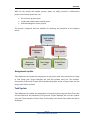
1
Overview Overview Team members who do not need to alter project plans use Seavus Project Viewer to view the tasks they have been assigned. But wouldn't it be better to know the progress status of each task in real time as well? Seavus Project Viewer is the only viewer for Microsoft® Project that provides a collaborative environment for project teams without server installation. The process of sharing is very simple: The project manager creates a project plan in Microsoft® Project and uploads it on a shared location Team members open the project plan with Seavus Project Viewer and report task progress or assignment progress (% Completed, % Work Complete or Actual Work). The project manager then opens the project plan and accepts or rejects submitted task updates. Create Project Update Task or Assignment Accept/Reject Page | 1 Seavus Project Viewer User Manual