1
TEXT INTEGRATION UTILITIES (TIU)
CLINICAL COORDINATOR & USER
MANUAL
Version 1.0
July 1997
Updated January 2012
Department of Veterans Affairs
Product Development
Revision History
Page 129, 214
Patch TIU*1*261
(Rescinding an Advance
Directive document ).
Patch 248 (Security For
Page 135
The Tiu Option Missing
Text Cleanup)
Patch 250 (Line Count)
Page 113, 152, 158
Patch 219 (DS Attending Requirements)
Patch 231 (Analyze potential Surgery TIU
problems)
Patch 234 (Expected Cosigner Edit and Disallow
Signed Document Edit)
Patch 215 (Disallow Edit)
Patch USR*1*31 (Informational on Business Rules)
Patch 220
Patch 200 (TUI HL7 Generic Interface)
Patch 214 (Mismatched ID Notes)
Patch 199
Patch 189 (Expected Cosigner)
Patch 191 (Disclosure of Adverse Event Note)
Patch 182 (Medicine Conversion)
Patch 173 (Unknown Addenda Cleanup)
Patch 157 (Additional Signer Changes)
Patches 174 & 177 (Blank Note)
Patch 171 (SCI Document Definitions)
192-352 applied (Patient Privacy Document
Scrubbing)
Patch 169 (C & P Document Definitions)
Patch 177 (Missing Text)
Patch 185 (Reassign Report)
Patch 112 (Surgery)
Patch 113 (Multidivision)
Patch 159 (WRIISC)
Patch 165 (Patient Record Flags)
Patch 137 (Anatomic Pathology)
Patch 158 (Alert Tools)
Patch 109 (Clinical Procedures)
Patches 61, 95, 100 & 105
Miscellaneous patches
Originally released
ii
January 212
J. Green,
June 2011
C Arceneaux, T Downing
June 2010
June 2008
January 2008
C Arceneaux, T Downing
C Arceneaux, A Ebert
G. Werner, A. Scott
December 2007
C Arceneaux, S Madsen
June 2007
June 2007
December 2006
October 2006
September 2006
May 2006
March 2006
May 2005
June 2005
April 2005
March 2005
Nov 2004
February 2005
December 2004
C Arceneaux, S Madsen
C Arceneaux, S Madsen
C Arceneaux, S Madsen
C Arceneaux, D Rickard
T Dawson, C Greening
T Dawson, C Greening
T Dawson, C Greening
C Arceneaux, G Smith
C Arceneaux, G Smith
C Arceneaux, G Smith
C Arceneaux, G Smith
C Arceneaux, G Smith
C Arceneaux, G Smith
C Arceneaux & S Wellman, P
Landy
C Arceneaux, G Smith
December 2004
October 2004
August 2004
February 2004
February 2004
October 2003
September 2003
June 2003
June 2003
June 2002
April 2001
July 2000
July 1997
Text Integration Utilities V. 1.0
Rev. May 2011
Clinical Coor
Preface
Purpose of Text Integration Utilities
Text Integration Utilities (TIU) simplifies the access and use of clinical documents for both
clinical and administrative VAMC personnel, by standardizing the way clinical documents
are managed. In connection with Authorization/Subscription Utility (ASU), a hospital can set
up policies and practices for determining who is responsible or has the privilege for
performing various actions on required VHA documents.
The initial release of Version 1.0 includes Discharge Summary and Progress Notes. TIU
replaces and upgrades the previous versions of these VISTA packages.
Scope of Manual
This manual provides descriptions of menus and options, as well as other information
required to effectively use the Text Integration Utilities package.
Audience
Information in this manual is intended for Clinical Coordinators, Automated Data Processing
Application Coordinators (ADPACs), and end users: clinicians, MIS Managers, Medical
Record Technicians, and transcriptionists.
Related Manuals
Text Integration Utilities (TIU) Implementation Guide
Text Integration Utilities & Authorization/Subscription Utility
Installation Guide
Text Integration Utilities (TIU) Technical Manual
Authorization/Subscription Utility (ASU) User Manual
Rev. January 2012
Text Integration Utilities V. 1.0
Clinical Coordinator & User Manual
iii
iv
Text Integration Utilities V. 1.0
Clinical Coordinator & User Manual
Rev. January 2012
Table of Contents
Revision History ....................................................................................................................... ii
Preface ..................................................................................................................................... iii
Section I: Introduction ............................................................................................................ 9
Chapter 1: Introduction to TIU ....................................................................................... 10
Purpose of Text Integration Utilities ............................................................................... 10
Benefits ........................................................................................................................... 10
Chapter 2: Orientation ..................................................................................................... 12
Manual organization ....................................................................................................... 12
Online documentation: Intranet ...................................................................................... 12
Special Instructions for the new VISTA Computer User ................................................ 12
Graphic Conventions Used in This Manual .................................................................... 13
TIU and VISTA Conventions .......................................................................................... 14
Section 2: Using TIU ............................................................................................................. 19
Chapter 3: TIU for Clinicians.......................................................................................... 21
Progress Notes/Discharge Summary Menu .................................................................... 22
Using Progress Notes through OE/RR 2.5 or CPRS ....................................................... 23
Select Search through CPRS ........................................................................................... 28
Progress Notes Options ............................................................................................... 29
Entry of Progress Note ................................................................................................ 30
Review Progress Notes by Patient .............................................................................. 36
Review Progress Notes ............................................................................................... 39
All MY UNSIGNED Progress Notes.......................................................................... 43
Show Progress Notes Across Patients ......................................................................... 44
Progress Notes Print Options ...................................................................................... 46
List Notes by Title....................................................................................................... 47
Search by Patient AND Title ...................................................................................... 49
Progress Notes Statuses and Actions .......................................................................... 50
Interdisciplinary Notes .................................................................................................... 52
The Parent Note .......................................................................................................... 52
The Child Note(s) ....................................................................................................... 52
Menu Actions .............................................................................................................. 54
The Display ................................................................................................................. 55
Meaning of Icons ........................................................................................................ 55
LM Considerations...................................................................................................... 56
CPRS ........................................................................................................................... 56
TIU .............................................................................................................................. 56
Discharge Summary ........................................................................................................ 59
Individual Patient Discharge Summary ...................................................................... 60
Rev. January 2012
Text Integration Utilities V. 1.0
Clinical Coordinator & User Manual
v
All MY UNSIGNED Discharge Summaries............................................................... 63
Steps to use option: ................................................................................................. 63
Multiple Patient Discharge Summaries .......................................................................... 64
Discharge Summary Statuses and Actions ...................................................................... 65
Integrated Document Management ................................................................................. 67
Individual Patient Document ...................................................................................... 68
All MY UNSIGNED Documents ............................................................................... 70
Multiple Patient Documents ....................................................................................... 72
Enter/Edit Document .................................................................................................. 74
Documents Requiring Additional Signature ............................................................... 76
Personal Preferences ................................................................................................... 77
Document List Management ................................................................................................... 79
Document Definitions (Clinician)................................................................................... 82
Edit Document Definitions ......................................................................................... 83
View Objects ............................................................................................................... 85
TIU and Health Summary ............................................................................................... 86
Chapter 4: TIU for MRTs ................................................................................................ 87
MRT Menu...................................................................................................................... 88
Individual Patient Document ...................................................................................... 89
Multiple Patient Documents ....................................................................................... 90
Review Upload Filing Events ..................................................................................... 93
Print Document Menu ................................................................................................. 95
Discharge Summary Print ........................................................................................... 95
Progress Note Print ..................................................................................................... 98
Clinical Document Print ........................................................................................... 101
Released/Unverified Report .................................................................................. 104
Search for Selected Documents ................................................................................ 105
Unsigned/Uncosigned Report ................................................................................... 106
Reassignment Document Report............................................................................... 108
Review Unsigned Additional Signatures .................................................................. 109
Chapter 5: TIU for MIS/HIMS Managers ................................................................... 112
MIS Manager’s Menu ................................................................................................... 113
Multiple Patient Documents ......................................................................................... 116
Print Document Menu ................................................................................................... 117
Discharge Summary Print ......................................................................................... 117
Progress Note Print ................................................................................................... 120
Clinical Document Print ........................................................................................... 123
Search for Selected Documents ..................................................................................... 124
Correcting Documents that are Entered in Error ........................................................... 126
Rescinding Advance Directives .................................................................................... 129
Statistical Reports ......................................................................................................... 131
6
Text Integration Utilities V. 1.0
Clinical Coordinator & User Manual
Rev. January 2012
Unsigned/Uncosigned Report ................................................................................... 135
Missing Text Report ................................................................................................. 136
Missing Text Cleanup ............................................................................................... 138
UNKNOWN Addenda Cleanup ................................................................................ 140
Missing Expected Cosigner Report .......................................................................... 144
Mark Documents ‘Signed by Surrogate’................................................................... 146
Mismatched ID Notes ............................................................................................... 147
TIU 215 ANALYSIS ................................................................................................ 150
Transcription Billing Verification Report ................................................................. 156
Chapter 6: TIU for Transcriptionists ........................................................................... 160
Transcriptionist Menu ................................................................................................... 161
Enter/Edit Discharge Summary............................................................................. 162
Enter/Edit Document .................................................................................................... 164
Upload Menu ........................................................................................................ 166
Batch Upload Reports ........................................................................................................... 167
Kermit Protocol Upload ........................................................................................ 167
ASCII Protocol Upload ........................................................................................ 168
Handling upload errors ......................................................................................... 169
Avoiding Upload Errors ....................................................................................... 171
Display Upload Help ............................................................................................ 174
Chapter 7: TIU for Remote Users ................................................................................. 175
Individual Patient Document ........................................................................................ 177
Multiple Patient Documents ......................................................................................... 179
Chapter 8: Progress Notes Print Options ..................................................................... 182
Progress Notes Print Menu ........................................................................................... 184
MAS Options to Print Progress Notes .......................................................................... 185
Section 3: Managing TIU .................................................................................................... 197
Chapter 9: Managing TIU: Introduction ..................................................................... 198
Legal Requirements ...................................................................................................... 199
Links and Relationships with Other Packages .............................................................. 200
Chapter 10: Menus and Option Assignment ................................................................ 201
TIU Conversion Clean-up Menu [GMRP TIU] ............................................................ 203
Suggested Clinical Coordinator Menu .......................................................................... 204
Menu Assignment ......................................................................................................... 205
Chapter 11: Setting up TIU Parameters ....................................................................... 206
TIU Parameters Menu ................................................................................................... 206
Chapter 12: Document Definitions ................................................................................ 207
Example of Document Definition Hierarchy ................................................................ 207
Chapter 13: Defining User Classes ................................................................................ 209
Chapter 14: National Document Titles ......................................................................... 210
Rev. January 2012
Text Integration Utilities V. 1.0
Clinical Coordinator & User Manual
7
National Classes ............................................................................................................ 210
National Document Classes .......................................................................................... 211
National Titles ............................................................................................................... 212
Chapter 15: TIU Alert Tools .......................................................................................... 215
Alert Tools FAQ ........................................................................................................... 217
Chapter 16: HL7 Generic Interface .............................................................................. 220
Message Manager ......................................................................................................... 220
Chapter 17: Helpful Hints/Troubleshooting ................................................................ 222
Questions about Document Definition......................................................................... 229
(Classes, Document Classes, Titles, Boilerplate text, Objects) .................................... 229
Action abbreviations on List Manager screens ............................................................. 233
Shortcuts ....................................................................................................... 233
Visit Information ........................................................................................... 233
Visit Orientation............................................................................................................ 237
Glossary ........................................................................................................................... 238
Index ..................................................................................................................................... 242
8
Text Integration Utilities V. 1.0
Clinical Coordinator & User Manual
Rev. January 2012
Section I: Introduction
Chapter 1: Introduction to TIU
Chapter 2: Orientation
Rev. January 2012
Text Integration Utilities V. 1.0
Clinical Coordinator & User Manual
9
Chapter 1: Introduction to TIU
Purpose of Text Integration Utilities
The purpose of Text Integration Utilities (TIU) is to simplify the access and use of
clinical documents for both clinical and administrative VAMC personnel, by
standardizing the way clinical documents are managed. In connection with Authorization/
Subscription Utility (ASU), a hospital can set up policies and practices for determining
who is responsible or has the privilege for performing various actions on required VHA
documents.
The initial release of Version 1.0 includes Discharge Summary and Progress Notes.
Consult Reports was added with the release of Computerized Patient Record System
(CPRS). TIU replaces and upgrades the previous versions of these VISTA packages. It has
also been designed to meet the needs of other clinical applications that address document
handling.
TIU lets you continue to access Progress Notes and Discharge Summaries from OE/RR
menus. The CPRS Graphical User Interface (GUI) allows point-and-click access to all
Progress Notes, Discharge Summaries, and Consults TIU documents.
Benefits
a. Standardized and common user interface
Clinicians can go through the same program to enter, review, and sign discharge
summaries, progress notes, and other clinical documents that may be set up locally for
processing through TIU.
b. Integration
Clinicians and management can search for and retrieve clinical documents more
efficiently because documents reside in a single location within the database. This is also
a benefit for other uses such as Incomplete Record Tracking, quality management, results
reporting, order checking, research, etc.
c. Data Capture Flexibility
TIU accepts document input from a variety of data capture methodologies. Those initially
supported are transcription and direct entry. TIU allows upload of ASCII formatted
documents into VISTA.
10
Text Integration Utilities V. 1.0
Clinical Coordinator & User Manual
Rev. January 2012
Benefits, cont’d
d. Links to Other Packages.
TIU interfaces, as appropriate, with such applications as Health Summary,
Problem List, Patient Care Encounter/Visit Tracking, and Incomplete Record
Tracking. Computerized Patient Record System (CPRS) further integrates
VISTA packages and allows point and click switching between packages.
A new Health Summary component is available (through Patch GMTS*2.7*12), Selected
Progress Notes, which allows selection of specific Progress Notes Titles for display on
Health Summaries. The PN, DS, and CWAD components now extract data from TIU,
rather than Progress Notes (GMRP), or Discharge Summary (GMRD). Care has been
taken to assure that the formatting and content of the components have remained the
same, except that the signature block information will now reflect the author's (and
cosigner's) name and title at the time of signature, rather than displaying their current
values at the time of output.
e. Improved management of Documents.
TIU has a file structure called the Document Definition Hierarchy for defining
elements and parameters of a document. It allows
Inheritance of document characteristics, such as signing, cosigning, visit linkage,
etc.
Site definition of document characteristics
Shared components
Ownership (personal or class) of document definitions
Boilerplate text functionality
Interdisciplinary Note functionality.
Embedded “Object” functionality which can extract data from otherVISTA
packages and insert it into boilerplate text
Rev. January 2012
Text Integration Utilities V. 1.0
Clinical Coordinator & User Manual
11
Chapter 2: Orientation
Manual organization
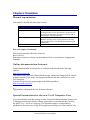
This manual is divided into four major sections:
Section
Purpose
I: Introduction
II: Using TIU
Presents overviews of TIU software and the User Manual.
Describes and demonstrates how to use the basic entry and
reporting functions of TIU. This section is divided into subsections for the four major users of TIU: clinicians, MRTs,
MIS Managers, and transcriptionists.
Describes the options and tools available to coordinators and
IRMS for assigning menus, setting parameters, and other
management functions. Also includes Troubleshooting and
Helpful Hints.
Definitions of terms and the index to the manual.
III: Managing TIU
Glossary and Index
How each chapter is formatted
Each chapter generally follows the format of:
Brief overview
Description of process (step-by-step description of how to use functions, if appropriate)
Examples
Online documentation: Intranet
Online Documentation for this product is available on the intranet at the following
address:
http://www.va.gov/vdl/
This address takes you to the Clinical Products page, which has a listing of all the clinical
software manuals. Click on the Text Integration Utilities link and it will take you to the
TIU Homepage.
You can also get there by going straight to the following address:
http://vista.med.va.gov/tiu/
Remember to bookmark this site for future reference.
Special Instructions for the new VISTA Computer User
If you are unfamiliar with this package or other Veterans Health Information Systems and
Technology Architecture (VISTA) software applications, we recommend that you study
the DHCP User’s Guide to Computing. This orientation guide is a comprehensive
handbook for first-time users of any VISTA application to help you become familiar with
12
Text Integration Utilities V. 1.0
Clinical Coordinator & User Manual
Rev. January 2012
basic computer terms and the components of a computer. It is reproduced and distributed
periodically by the Kernel Development Group. To request a copy, contact your local
Information Resources Management Service (IRMS) staff.
Graphic Conventions Used in This Manual
<Enter>
The Enter or Return key. It is pressed after every response you enter or when you wish to
bypass a prompt, accept a default (//), or return to a previous action. In this manual, it is
only included in examples when it might be unclear that such a keystroke must be
entered.
Option examples
Menus and examples of computer dialogue that you see on the screen are shown in boxes:
Select Menu Option:
User responses
User responses are shown in boldface.
Select PATIENT NAME: TIUPATIENT,ONE
NOTE
The pointing finger with a NOTE is used to call your attention to something especially
significant.
Example:
NOTE: You can respond to many prompts by typing the first few letters of a
name, option, or action.
Select PATIENT NAME: TIUPATIENT,O
Rev. January 2012
TIUPATIENT,ONE
Text Integration Utilities V. 1.0
Clinical Coordinator & User Manual
13
TIU and VISTA Conventions
^ , ^^, ^^^
Enter the up-arrow (also known as a caret or circumflex) at a prompt to exit
the current option, menu, sequence of prompts, or help. To get completely out
of your current context and back to your original menu, you may need to enter
two or three up-arrows. For example, when you’re reviewing a list of
documents, one up-arrow takes you to the next document; you need to enter
two up-arrows to get out of the option.
>>
TIU screens can contain more information to the right of the main screen display. To see
this information, enter the > character. To return to the main screen, enter the < character.
NOTE: The arrow keys on the keypads of some keyboards can sometimes be used for
navigation in List Manager applications, but this depends on the operating system. So if
you get funny characters on your screen when you use those arrows, use the > and <
symbols on the comma and period keys (the greater-than and less-than symbols).
Online Help ?, ??, ???
Online help is available by entering one, two, or three question marks at a prompt.
One question mark elicits a brief statement of what information is appropriate for
responding to the prompt; two question marks shows a list (and sometimes descriptions)
of more actions; and three question marks provide more detailed help, including a list of
possible answers, if appropriate.
Defaults (//) Defaults are responses provided to speed up your entry process. They are
either the most common responses, the safest responses, or the previous response.
Examples:
Most common: Enter the ending date: NOW//
Safest: Do you wish to delete the entire entry: NO//
Last entered Enter the Provider Name: TIUPROVIDER,THREE//
14
Text Integration Utilities V. 1.0
Clinical Coordinator & User Manual
Rev. January 2012
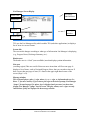
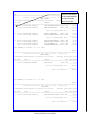
List Manager Screen Display
# of pages
indicated here
Screen Title
Header area
List area
Message
window
Action Area
TIU uses the List Manager utility which enables TIU (and other applications) to display a
list of items in a screen format.
Screen title
The screen title changes according to what type of information List Manager is displaying
(e.g., Progress Notes, Discharge Summary, etc.).
Header area
The header area is a “fixed” (non-scrollable) area that displays patient information.
List area
(scrolling region) This area scrolls if there are more items than will fit on one page. It
displays a list of items, such as Unsigned Progress Notes, that you can take action on. If
there’s more than one page of items, it’s listed in the upper right-hand corner of the
screen (Page 1 of #).
Message window
This section displays a plus (+) sign, minus (-), or >> sign, or informational text (i.e.,
Enter ?? for more actions). If you enter a plus sign at the action prompt, List Manager
“jumps” forward a page. If a minus sign is displayed and you enter it at the action
prompt, List Manager “jumps” back a screen. The plus, minus, and > signs are only
valid actions if they are displayed in the message window.
Rev. January 2012
Text Integration Utilities V. 1.0
Clinical Coordinator & User Manual
15
List Manager Screen Display cont’d
Action area
A list of actions display in this area of the screen. If you enter a double question mark (??)
at the “Select Item(s)” prompt, you are shown a “hidden” list of additional actions that are
available to use.
Entering Actions
The List Manager utility lets you:
browse through the list
select items that need action
take action against those items
select other actions without leaving the option
Actions are entered by typing the name or abbreviation at the “Select Action” prompt.
Shortcut: Actions may also be preselected by typing the action abbreviation, then the
number of the document on the list (Example: ED=1 will let you edit entry 1, Consult
Report.
Besides the actions specific to the option you are working in, List Manager provides
generic actions applicable to any List Manager screen. Enter a double question mark
(??) at the “Select Action” prompt for a list of all actions available. The abbreviation
for each action is shown in brackets following the action name. These actions are
described on the next page.
16
Text Integration Utilities V. 1.0
Clinical Coordinator & User Manual
Rev. January 2012
List Manager Screen Display, cont’d
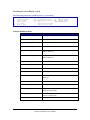
The following actions are available (enter ?? to see these):
+
FS
LS
UP
DN
Next screen
Previous Screen
First Screen
Last Screen
Up a Line
Down a Line
GO
RD
ADPL
Q
>
<
Go to Page
Re Display Screen
Auto Display(On/Off)
Quit
Shift View to Right
Shift View to Left
Generic (hidden) actions
Action
DD
EC
CT
CWAD
Detailed Display
Edit Cosigner
Change Title
CWAD Display
Description
Next Screen [+]
Move to the next screen (may be shown as a default)
Previous Screen [-]
Move to the previous screen
Up a Line [UP]
Move up one line
Down a Line [DN]
Move down one line
Shift View to Right [>]
Move the screen to the right if the screen width is more
than 80 characters
Shift View to Left [<]
Move the screen to the left if the screen width is more
than 80 characters
First Screen [FS]
Move to the first screen
Last Screen [LS]
Move to the last screen
Go to Page [GO]
Move to any selected page in the list
Re Display Screen [RD]
Redisplay the current screen
Print Screen [PS]
Prints the header and the portion of the list currently
displayed
Print List [PL]
Prints the list of entries currently displayed
Search List [SL]
Finds selected text in list of entries
Auto Display (On/Off) [ADPL]
Toggles the menu of actions to be displayed/not
displayed automatically
Change Title (CT)
Lets you change the Title of a note from, e.g., a CWAD
note to a Nursing Note
Displays details of any CWAD notes available
CWAD Display (CWAD)
Rev. January 2012
Text Integration Utilities V. 1.0
Clinical Coordinator & User Manual
17
List Manager Screen Display, cont’d
Action
Description
Edit Cosigner [EC]
Allows authorized users to modify the Expected
Cosigner (Attending Physician for Discharge
Summaries) of documents without having access to the
text of the document. It is intended for Clinical
Coordinators when they need to change the Expected
Cosigner of a document whose Expected Cosigner
cannot be otherwise changed because it is already signed.
It permits the Expected Cosigner field to be edited for
unsigned or uncosigned documents of type Progress
Notes, Consults, Clinical Procedures, or Discharge
Summaries.
Note: Recent changes enforce limits on cosigning
privileges. No provider may be a cosigner on Discharge
Summaries if the provider requires a cosignature. To
correct expected cosigners who were erroneously
assigned before this restriction went into effect, perform
a search on uncosigned notes, then use the (hidden) Edit
Cosigner (EC) action to correct any problems.
Quit [QU]
18
Exits the screen (may be shown as a default)
Text Integration Utilities V. 1.0
Clinical Coordinator & User Manual
Rev. January 2012
Section 2: Using TIU
Chapter 3: TIU for Clinicians
Chapter 4: TIU for MRTs
Chapter 5: TIU for MIS Managers
Chapter 6: TIU for Transcriptionists
Chapter 7: TIU for Remote Users
Chapter 8: Progress Notes Print Options
20
Text Integration Utilities V. 1.0
Clinical Coordinator & User Manual
Rev. January 2012
Chapter 3: TIU for Clinicians
Progress Notes/Discharge Summary Menu
Using Progress Notes through OE/RR 2.5 or CPRS 1.0
Progress Notes Options
Progress Notes Actions and Statuses
Interdisciplinary Notes Actions
Discharge Summary Options
Discharge Summary Actions and Statuses
Integrated Document Management Options
Personal Preferences
Document Definitions
TIU and Health Summary
Rev January 2012
Text Integration Utilities V. 1.0
Clinical Coordinator & User Manual
21
Chapter 3: TIU for Clinicians
Progress Notes/Discharge Summary Menu
This is the main TIU menu for clinicians. It includes all of the options necessary for
clinicians to manage their Progress Notes, Discharge Summaries, and other clinical
documents which may be set up locally, either separately or in an integrated fashion. TIU
also lets you continue to access Progress Notes and Discharge Summaries through
OE/RR menus. CPRS allows point and click access to all Progress Notes, Discharge
Summaries, and Consults TIU documents.
The Progress Notes/Discharge Summary (TIU) menu also includes a Personal Preferences
menu that lets clinicians change their own parameters for viewing clinical documents.
22
Option Name
Description
Progress Notes User Menu
This menu includes options for reviewing, entering,
printing, and signing progress notes, either by individual
patient or by multiple patients.
Discharge Summary User
Menu
This menu includes options for reviewing, entering,
printing, and signing discharge summaries, either by
individual patient or by multiple patients.
Integrated Document
Management
This menu lets clinicians perform actions on progress notes,
discharge summaries, and other clinical documents from a
single menu
For example, a clinician may want to bring up all his
unsigned documents.
Personal Preferences
This menu allows users to
1) enter preferences about the behavior of the TIU Package.
These preferences include:
DEFAULT LOCATION,
REVIEW SCREEN SORT FIELD
SORT ORDER
DISPLAY MENUS
PATIENT SELECTION PREFERENCE
2) specify “pick lists” for document selection when
composing or editing documents (e.g., when choosing
documents from the class Progress Notes, “Let me see these
three specific titles”).
Text Integration Utilities V. 1.0
Clinical Coordinator & User Manual
Rev. January 2012
Using Progress Notes through OE/RR 2.5 or CPRS
Clinicians who enter and review Progress Notes through OE/RR 2.5 will also be able to
do so with TIU. CPRS (Computerized Patient Record System) access to and operations
on Progress notes is streamlined. Here we give an example of reviewing Notes through
the List Manager version of CPRS. The GUI version has a different sequence of steps, but
should seem even easier to most people.
Example: Reviewing and signing Notes through CPRS
1. Select the Clinician Menu from your CPRS menu.
OE
CPRS Clinician Menu
RR
Results Reporting Menu
AD
Add New Orders
RO
Act On Existing Orders
PP
Personal Preferences ...
Select Clinician Menu Option: OE CPRS Clinician Menu
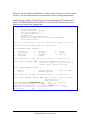
2. The Patient Selection screen is displayed. If you have a patient or team list defined, the
patients are on this display.
Ward 2B
Mar 17, 1997 17:07:09
Current patient: ** No patient selected **
1
2
3
4
5
6
7
8
9
Patient Name
TIUPATIENT,ONE
TIUPATIENT,THREE
TIUPATIENT,FIVE
TIUPATIENT,SEVEN
TIUPATIENT,TEN
TIUPATIENT,NINE
TIUPATIENT,ELEVEN
TIUPATIENT,TWO
TIUPATIENT,FOURTEEN
ID
(3456)
(1996)
(3779)
(3234)
(2432)
(2591)
(8910)
(3243)
(4723)
DOB
Jan
Mar
Nov
Mar
Apr
Apr
Jan
Apr
Oct
Page:
1 of
1
Room-Bed
01,
05,
19,
03,
04,
25,
01,
04,
23,
Enter the number of the patient chart to be opened
+
Next Screen
CG Change List ...
Previous Screen
SV Save as Default List
Select Patient: Close// 1
TIUPATIENT,ONE
Searching for the patient's chart ...
1951
1949
1991
1966
1932
1931
1934
1954
1927
FD
Q
9-B
A-4
A-2
Find Patient
Close
If you have a
patient list
defined in your
personal
preferences it is
displayed here.
If not, just enter
a patient name.
3. Select a patient by:
Entering a name from a list (if you have one defined and set as your default
Entering a patient’s name (or last initial + last 4 letters of SSN)
Entering FD (Find Patient), entering a ward or clinic name, then selecting a
patient name from the list that appears.
Rev January 2012
Text Integration Utilities V. 1.0
Clinical Coordinator & User Manual
23
Example: Reviewing Notes, cont’d
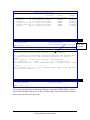
4. The “Cover Sheet” for the patient’s record is displayed. Select Chart Contents.
Cover Sheet
TIUPATIENT,ONE
1
2
3
4
5
666-12-3456
Page: 1 of
JAN 1,1951 (46)
2
<CW>
Item
Allergies/Adverse Reactions
PENICILLIN 1 (rash, nausea,vomiting)
Patient Postings
CRISIS NOTE
CRISIS NOTE
CLINICAL WARNING
CLINICAL WARNING
Recent Vitals
No data available
Immunizations
No immunizations found.
+
NW
+
Mar 17, 1997 17:07:50
2B
Enter the numbers of
Document New Allergy CG
Next Screen
CC
Select: Next Screen// cc
Entered
|
| 01/03/97
|
|
| 02/24/97 08:28
| 12/03/96 10:44
| 02/21/97 09:16
| 01/15/97
|
|
|
|
|
|
|
the items you wish to act on.
>>>
(Change List ...)
SP Select New Patient
Chart Contents ...
Q
Close Patient Chart
CHART CONTENTS
Shortcut: Enter CC;N to
bypass the next screen.
5. A new set of actions is displayed. These are the Contents or categories of the Patient
Chart (also known as “Tabs.”) Select the Notes tab.
Cover Sheet
TIUPATIENT,ONE
1
2
3
4
5
666-12-3456
Mar 17, 1997 17:07:50
2B
Alert
Allergies/Adverse Reactions
PENICILLIN 1 (rash, nausea,vomiting)
Patient Postings
CRISIS NOTE
CRISIS NOTE
CLINICAL WARNING
CLINICAL WARNING
Recent Vitals
No data available
Page: 1 of
JAN 1,1951 (46)
Entered
|
|
|
|
|
|
|
|
|
|
|
01/03/97
02/24/97 08:28
12/03/96 10:44
02/21/97 09:16
01/15/97
+
Enter the numbers of the items you wish to act on.
Cover Sheet
Orders
Imaging
Problems
Meds
Consults
Notes
Labs
D/C Summaries
Select chart component: N
Notes
Searching for the patient's chart ...
24
2
<CW>
Text Integration Utilities V. 1.0
Clinical Coordinator & User Manual
>>>
Reports
Rev. January 2012
Example: Reviewing Notes, cont’d
6. The patient’s completed progress notes are displayed. This is the default set up
through Personal Preferences. You can “change view” to see a different status, such as
unsigned notes.
Completed Progress Notes
TIUPATIENT,ONE
666-12-3456
1
2
3
4
5
6
7
8
9
NW
+
Mar 17, 1997 17:10:56
2B
Title
CRISIS NOTE
CLINICAL WARNING
General Note
CLINICAL WARNING
SOAP - GENERAL NOTE
SOAP - GENERAL NOTE
CRISIS NOTE
SOAP - GENERAL NOTE
SOAP - GENERAL NOTE
Page: 1 of 1
JAN 1,1951 (46)
<CW>
Written
| 02/24/97
| 02/21/97
| 01/24/97
| 01/15/97
| 12/04/96
| 12/04/96
| 12/03/96
| 12/03/96
| 11/22/96
08:28
09:16
14:18
14:39
11:32
10:44
10:31
12:37
Sig Status
completed
completed
completed
completed
completed
completed
completed
completed
completed
Enter the numbers of the items you wish to act on.
>>>
Write New Note
CG Change List ...
SP Select New Patient
Next Screen
CC Chart Contents ... Q
Close Patient Chart
Select: Chart Contents// CG
CHANGE LIST
Date range
Status
Select attribute(s) to change: S
STATUS
Select Signature Status: completed//??
Enter the signature status you would like to screen on
Choose from:
amended
completed
deleted
purged
uncosigned
undictated
unreleased
unsigned
untranscribed
unverified
Select Signature Status: completed//UNSigned
Searching for the patient's chart ...
Rev January 2012
Text Integration Utilities V. 1.0
Clinical Coordinator & User Manual
25
Example: Reviewing Notes, cont’d
7. The patient’s unsigned notes are displayed.
Unsigned Progress Notes
TIUPATIENT,ONE
666-12-3456
1
NW
+
Mar 17, 1997 17:13:22
2B
Title
Addendum to CLINICAL WARNING
Page:
1 of
JAN 1,1951 (46)
Written
| 01/28/97
1
<CW>
Sig Status
unsigned
Enter the numbers of the items you wish to act on.
>>>
Write New Note
CG Change List ...
SP Select New Patient
Next Screen
CC Chart Contents ...
Q
Close Patient Chart
Select: Chart Contents//
Example: Writing a note
Select: Chart Contents// NW
Write New Note
Available note(s): 11/22/96 thru 02/24/97 (9)
Do you wish to review any of these notes? NO// YES
--- Select note(s) to review --Please specify a date range from which to select note(s):
List Notes Beginning: 11/22/96//<Enter>
(NOV 22, 1996)
Thru: 02/24/97//<Enter>
(FEB 24, 1997)
1
02/24/97 08:28
2
02/21/97 09:16
3
01/24/97 14:18
4
SUBJECT: TEST
01/15/97 00:00
CRISIS NOTE
Adm: 09/21/95
CLINICAL WARNING
Adm: 09/21/95
General Note
Adm: 09/21/95
CLINICAL WARNING
Visit: 08/14/95
5
12/04/96 14:39 SOAP - GENERAL NOTE
Adm: 09/21/95
Choose Notes: (1-5): <Enter>
Two TIUProvider
Sixteen TIUProvider
Three TIUProvider
One TIUProvider, MD
Three TIUProvider
Nothing selected.
26
Text Integration Utilities V. 1.0
Clinical Coordinator & User Manual
Rev. January 2012
Example: Writing a note, cont’d
Personal PROGRESS NOTES Title List for NINE TIUPROVIDER
1
Crisis Note
2
Advance Directive
3
Adverse Reactions
4
Other Title
TITLE: (1-4): 3
Adverse React/Allergy
Creating new progress note...
Patient Location: 2B
Date/time of Admission: 09/21/95 10:00
Date/time of Note: NOW
Author of Note: TIUPROVIER,NINE
...OK? YES// <Enter>
SUBJECT (OPTIONAL description):
Calling text editor, please wait...
1>TEST
2> <Enter>
EDIT Option:
Save changes? YES// <Enter>
Saving Adverse React/Allergy with changes...
Enter your Current Signature Code: XXX
SIGNATURE VERIFIED..
Print this note? No// YES
Do you want WORK copies or CHART copies? CHART//<Enter>
DEVICE: HOME// <Enter> VAX
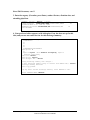
-------------------------------------------------------------------------TIUPATIENT,ONE
666-12-3456
Progress Notes
-------------------------------------------------------------------------NOTE DATED: 03/17/97 17:15
ADVERSE REACT/ALLERGY
ADMITTED: 09/21/95 10:00 2B
TEST
Signed by: /es/ NINE TIUPROVIDER
NINE TIUPROVIDER 03/17/97 17:15
Enter RETURN to continue or '^' to exit: <Enter>
You may enter another Progress Note. Press RETURN to exit.
Select PATIENT NAME: <Enter>
Rev January 2012
Text Integration Utilities V. 1.0
Clinical Coordinator & User Manual
27
Select Search through CPRS
You can narrow your view to signed notes by author, unsigned notes, etc. You can also
specify the date order your notes will appear in: ascending (oldest first) or descending
(most recent first) order.
Caution: Avoid selecting too large a date range or too general a category, as big
searches are very system-intensive. This means that not only might it slow down your
work, but everyone else’s as well.
Progress Notes
Apr 09, 1997 14:42:58
Page:
1 of
1
<CWA>
P R O G R E S S
N O T E S
Last 15 note(s)
TIUPATIENT,ONE
666-12-3456 2B/
JAN 1,1951 (46)
Title
Author
Date/Time
1
Psychology Notes
TIUPROVIDER,ONE 04/08/97 15:49
compl
2
CRISIS NOTE
TIUPROVIDER,THR 04/08/97 00:00
compl
3
Adverse React/Allergy
TIUPROVIDER,NIN 04/07/97 16:28
compl
6
Adverse React/Allergy
TIUPROVIDER,NIN 04/03/97 19:31
compl
7
Adverse React/Allergy
TIUPROVIDER,NIN 03/17/97 17:15
compl
8
CRISIS NOTE
TIUPROVIDER,NIN 02/24/97 08:28
compl
+ Next Screen - Prev Screen
?? More Actions
NW
New Note
SP
Select New Patient
AD
Make Addendum
B
Browse
SS
Select Search
$
Complete Note(s)
PC
Print Copy
RS
Reset to All Signed Q
Quit
Select Action: Quit// SS
Select Search
Valid selections are:
1 - signed notes (all)
4 - signed notes/author
2 - unsigned notes
5 - signed notes/dates
3 - uncosigned notes
Select context: 1// 4 AUTHOR
Select AUTHOR: TIUPROVIDER,TWO// <Enter>
jg
Please Specify Sort Order: descending// ?
Enter a code from the list.
Select one of the following:
A
ascending (OLDEST FIRST)
D
descending (NEWEST FIRST)
Please Specify Sort Order: descending// A ascending (OLDEST FIRST)
Searching for the progress notes.
Progress Notes
Apr 09, 1997 14:42:50
<CWA>
P R O G R E S S
N O
TIUPATIENT,ONE
666-12-3456 2B/
Title
Author
1
CRISIS NOTE
TIUPROVIDER
2
Adverse React/Allergy
TIUPROVIDER
3
Adverse React/Allergy
TIUPROVIDER
4
Adverse React/Allergy
TIUPROVIDER
+ Next Screen
NW
New Note
B
Browse
PC
Print Copy
Select Action: Quit//
28
SP
SS
RS
Page:
1 of
1
4 note(s)
JAN 1,1951 (46)
Date/Time
02/24/97 08:28
compl
03/17/97 17:15
compl
04/03/97 19:31
compl
04/07/97 16:05
compl
T E S
- Prev Screen
?? More Actions
Select New Patient
AD
Make Addendum
Select Search
$
Complete Note(s)
Reset to All Signed Q
Quit
Text Integration Utilities V. 1.0
Clinical Coordinator & User Manual
Rev. January 2012
Progress Notes Options
Clinicians can review, enter, print, and sign progress notes, either by individual patient or
by multiple patients, through TIU.
NOTE: When reviewing several notes sequentially, the up-arrow (^) entry takes you
to the next note. To exit from the review, enter two up-arrows (^^).
Clinician's Progress Notes Menu
Option
Description
Entry of Progress Note
This is the main option for entering a new progress note. You
can also edit patient progress notes.
Review Progress Notes by
Patient
This option lets you review, edit, or sign a selected patient’s
progress notes, by selected criteria.
Review Progress Notes
This option lets clinicians get quickly to a patient’s list of notes,
without preliminary prompts to select criteria for displaying
notes.
This option retrieves all your unsigned progress notes for review,
edit, or signature.
All MY UNSIGNED
Progress Notes
Show Progress Notes
Across Patients
Progress Notes Print
Options ...
List Notes By Title
Search by Patient AND
Title
Personal Preferences...
Rev January 2012
This option lets you search for and review progress notes by
many different criteria: status, type, date range, and category.
Caution: Avoid selecting too large a date range or too general a
category, as big searches are very system-intensive. This means
that not only might it slow down your work, but everyone else’s
as well.
The options on this menu support the printing of chart or work
copies, by author, location, patient, or ward. These options are
described in Chapter 8.
This option lets you look up progress notes by title within a
specified date range.
This option lets you search for and review progress notes by
patient, as well as many other criteria: status, type, date range,
and category.
The two options on this menu let you customize the way TIU
operates for you; that is, which prompts will appear, what lists
you will see to select from, etc. You can also specify the way
documents are displayed on your review screens, by patient, by
author, by type, in chronological or reverse chronological order,
etc.
Text Integration Utilities V. 1.0
Clinical Coordinator & User Manual
29
Entry of Progress Note
This is the main option for entering a new progress note. You can also edit patient
progress notes.
Example 1: Inpatient progress note
Steps to use option:
1. Select Entry of Progress Note from your Progress Notes Menu. If you have a patient
list set up (through Personal Preferences), it is displayed here.
Loading Ward Patient List...
2B ward list
1
2
3
4
5
6
7
TIUPATIENT,ONE
TIUPATIENT,NINE
TIUPATIENT,FOUR
TIUPATIENT,SEVEN
TIUPATIENT,THREE
TIUPATIENT,FIVE
TIUPATIENT,SIX
(3456)
(2591)
(2384)
(3234)
(1996)
(3779)
(2476)
~
~
~
~
~
~
9-B
8
9
10
11
12
13
14
TIUPATIENT,TWO
TIUPATIENT,EIGHT
TIUPATIENT,TEN
TIUPATIENT,TWELV
TIUPATIENT,FOURT
TIUPATIENT,SIXTE
TIUPATIENT,ELEVE
(3243)
(3242)
(2432)
(3213)
(4723)
(1321)
(1414)
A-4
~
A-2
A-1
~
A-3
~
2. Type in a patient name or a number from the list. Demographic data and CWAD
(Cautions, Warnings, Adverse Reactions, and Directives) notes are displayed. You are
prompted to choose if you want to see any of the previous Progress Notes for this patient.
Select Patient(s): 7
RETIREE
(6 notes)
(1 note )
TIUPATIENT,TWO 04-25-31
666043243P
NO
MILITARY
W: 01/27/97 15:17 (addendum 02/08/97 17:19)
A: Known allergies
D: 03/26/97 13:02
Available notes: 11/11/96 thru 04/15/97 (27)
Do you wish to see any of these notes? NO// <Enter>
This indicates that
there are 27 notes
for this patient.
30
Text Integration Utilities V. 1.0
Clinical Coordinator & User Manual
Rev. January 2012
Entry of Progress Note, cont’d
3. Select a Title. If you have a personal Progress Notes title list set up through Personal
Preferences, that list is displayed for you to choose from. Enter a Subject, if desired, and
the text of the Progress Note.
Personal PROGRESS NOTES Title List for THREE TIUPROVIDER
1
Crisis Note
2
Advance Directive
3
Adverse Reactions
4
Other Title
TITLE: (1-4): 3// <Enter>
Adverse React/Allergy
Creating new progress note...
Patient Location: 1A
Date/time of Admission: 05/30/97 10:43
Date/time of Note: NOW
Author of Note: TIUPROVIDER,NINE
...OK? YES// <Enter>
SUBJECT (OPTIONAL description): <Enter>
Calling text editor, please wait...
1>Mr. TIUPatient improving; renewed prescription.
2> <Enter>
EDIT Option:
Save changes? YES// <Enter>
Saving Adverse React/Allergy with changes...
4. Enter your electronic signature code. If you wish to print the note (either a Work or
Chart copy), answer yes to the next prompt, and enter a printer device name.
Enter your Current Signature Code: XXX
SIGNATURE VERIFIED..
Print this note? No// y YES
Do you want WORK copies or CHART copies? CHART// w WORK
DEVICE: HOME//<Enter>
VAX
The note is printed. You are prompted to enter another note or to exit.
-----------------------------------------------------------------------TIUPATIENT,SEVEN 666-04-3234P
Progress Notes
-----------------------------------------------------------------------NOTE DATED: 05/31/97 14:58
ADVERSE REACT/ALLERGY
ADMITTED: 05/30/97 10:43 1A
Mr. TIUPatient improving; renewed prescription.
Signed by: /es/ NINE TIUPROVIDER
NINE TIUPROVIDER 05/31/97 14:59
Enter RETURN to continue or '^' to exit:
You may enter another Progress Note. Press RETURN to exit.
Select PATIENT NAME: <Enter>
Rev January 2012
Text Integration Utilities V. 1.0
Clinical Coordinator & User Manual
31
Example 2: Outpatient note
Outpatient notes require more information than inpatient notes, because every outpatient
encounter must now be associated with a visit to get workload credit. Most Progress
Notes automatically get the visit data from Checkout or a scanned Encounter Form.
Steps to use option:
1. Select Entry of Progress Note from your Progress Notes Menu.
2. Type in a patient name.
Select Patient(s): TIUPATIENT,ONE TIUPATIENT,ONE 09-12-44 666233456
SC VETERAN
(1 note ) C: 11/19/96
(addendum 01/28/97 09:55)
A: Known allergies
YES
For Patient TIUPATIENT,ONE
3. Type in a Progress Note Title. You can use an existing Title or create a new one. If
you have created a personal document list through the Personal Preferences’ Document
Management option, that list is displayed here.
Personal PROGRESS NOTES Title List for THREE TIUPROVIDER
1
2
3
4
TITLE:
Crisis Note
Advance Directive
Adverse Reactions
Other Title
(1-4): 3
Adverse React/Allergy
4. Since this is a note for an outpatient, you may be prompted to select an existing
visit or create a new visit to associate the progress note with.
This patient is not currently admitted to the facility...
Is this note for INPATIENT or OUTPATIENT care? OUTPATIENT// <Enter>
The following VISITS are available:
1> FEB 24, 1997@09:00
2> SEP 05, 1996@10:00
CHOOSE 1-2 or <N>EW VISIT
<RETURN> TO CONTINUE
OR '^' TO QUIT: N
Creating new progress note...
Patient Location: NUR 1A
Date/time of Visit: 02/24/97 14:29
Date/time of Note: NOW
Author of Note: TIUPROVIDER,THREE
...OK? YES//<Enter>
SERVICE: MEDICINE// <Enter>
111
32
DIABETES CLINIC
CARDIOLOGY
Text Integration Utilities V. 1.0
Clinical Coordinator & User Manual
Rev. January 2012
Entry of Progress Note, cont’d
5. Enter a subject for your note (optional).
SUBJECT (OPTIONAL description): ?
Enter a brief description (3-80 characters) of the contents
of the document.
SUBJECT (OPTIONAL description): Blue Note
6. Type in the text of the note. If it’s a SOAP Note or there’s a boilerplate for this, you
can fill in the blanks or edit existing text. You can use the FileMan text editor or fullscreen editor. Sign the Note when you’re finished.
Calling text editor, please wait...
1>Follow-up visit to ensure compliance with regimen.
2><Enter>
EDIT Option: <Enter>
Save changes? YES//<Enter>
Saving General Note with changes...
Enter your Current Signature Code: [HIDDEN CODE]
SIGNATURE VERIFIED..
7. Enter the Diagnosis associated with this Progress Note.
NOTE: To receive workload credit, VAMCs must now capture Provider,
Diagnosis, and Procedure for all outpatient visits.
Please Indicate the Diagnoses for which the Patient was Seen:
1
Abdominal Pain
2
Abnormal EKG
3
Abrasion
A list of diagnoses
4
Abscess
relating to the type
5
Adverse Drug Reaction
6
AIDS/ARC
of Progress Note is
7
Alcoholic, intoxication
presented for you to
8
Alcoholism, Chronic
9
Allergic Reaction
choose from.
10
Anemia
ANGINA:
11
Stable
12
Unstable
13
Anorexia
14
Appendicitis, Acute
15
Arthralgia
ARTHRITIS
16
Osteo
17
Rheumatoid
18
Ascites
19
ASHD
20
OTHER Diagnosis
Select Diagnoses: (1-20): 9
Rev January 2012
Text Integration Utilities V. 1.0
Clinical Coordinator & User Manual
33
Entry of Progress Note, cont’d
8. Enter the Procedure associated with this Progress Note.
Please Indicate the Procedure(s) Performed:
CARDIOVASCULAR
1
Cardioversion
2
EKG
3
Pericardiocentesis
4
Thoracotomy
MISCELLANEOUS
5
Abscess
6
Less than 2.5 cm
7
2.6 - 7.5 cm
8
Greater than 7.5 cm
9
Burns 1 * Local Treatment
10
Dressings Medium
11
Dressings Small
12
Transfusion
13
Venipuncture
UROLOGY
14
Foley Catheter
ENT
15
Removal Impacted Cerumen
16
Anterior, Simple
17
Anterior, complex
18
Posterior
EYE
19
Foreign Body Removal
20
OTHER Procedure
Select Procedure:
A list of procedures
relating to the type
of Progress Note is
presented for you to
choose from.
(1-20): 19
You have indicated the following data apply to this visit:
DIAGNOSES:
995.3
Allergic Reaction
<<< PRIMARY
PROCEDURES:
65205
Foreign Body Removal
...OK? YES// <Enter>
Posting Workload Credit...
34
Text Integration Utilities V. 1.0
Clinical Coordinator & User Manual
Rev. January 2012
8. If you wish, you can print the note now.
Print this note? No// y YES
Do you want WORK copies or CHART copies? CHART// work
DEVICE: HOME// <Enter> VAX
---------------------------------------------------------------------TIUPATIENT,ONE
666-23-3456
Progress Notes
---------------------------------------------------------------------NOTE DATED: 02/24/97 08:30
ADVERSE REACT/ALLERGY
VISIT: 02/24/97 08:30 GENERAL MEDICINE
new tests
Signed by: /es/ THREE TIUPROVIDER
THREE TIUPROVIDER 02/24/97 08:30
Enter RETURN to continue or '^' to exit:
You may enter another CLINICAL DOCUMENT. Press RETURN to exit.
Select PATIENT NAME: <Enter>
Rev January 2012
Text Integration Utilities V. 1.0
Clinical Coordinator & User Manual
35
Review Progress Notes by Patient
This option lets you review, edit, or sign a selected patient’s progress notes.
Steps to use option:
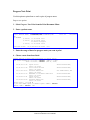
1. Select Review Progress Notes by Patient from the Progress Notes menu, then enter
the name of the patient.
Select Progress Notes User Menu Option: 2 Review Progress Notes by Patient
Select PATIENT NAME: TIUPATIENT,ONE TIUPATIENT,ONE
09-12-44
666233456
If the patient
YES
has SC VETERAN
(2 notes) C: 05/28/96 12:37
Cautions,
(2 notes) W: 05/28/96 12:33
A: Known allergies
Warnings,
(2 notes) D: 05/28/96 12:36
Allergies, or
Directives
Available notes: 02/17/95 thru 06/21/96 (31)
(CWAD),
they are
2. Enter the date range of notes you wish to review.
displayed
here.
Please specify a date range from which to select notes:
List notes Beginning: 12/01/96 (DEC 01, 1994)
Thru: 05/01/96// <Enter> (MAY 01, 1997)
3. From the selection displayed, choose the notes you wish to review.
1
Social Work Service
Visit: 04/18/97
2
06/21/96 07:47 Lipid Clinic
Visit: 06/18/96
3
06/07/96 00:00 Diabetes Education
Visit: 04/18/96
4
01/19/96 10:37 SOAP - General Note
Visit: 1/10/96
Choose notes: (1-8): 2
36
04/18/97 11:38
Three TIUProvider, MD
Three TIUProvider, MD
One TIUProvider, MD
Three TIUProvider, MD
Text Integration Utilities V. 1.0
Clinical Coordinator & User Manual
Rev. January 2012
Review Progress Notes by Patient, cont’d
4. The note you selected is then displayed.
Opening Lipid Clinic record for review...
Browse Document
Jun 26, 1996 10:55:18
Page: 1 of 4
Lipid Clinic
TIUPATIENT,O
666-23-3456
Visit Date: 06/18/96@10:00
DATE OF NOTE: JUN 21, 1996@07:47:47
AUTHOR: TIUPROVIDER,ONE
URGENCY:
SUBJECTIVE:
ENTRY DATE: JUN 21, 1996@07:47:47
EXP COSIGNER:
STATUS: COMPLETED
5 year old AMERICAN INDIAN OR ALASKA NATIVE MALE here for
initial evaluation of his DYSLIPIDEMIA.
COPIED FROM TIUCLIENT TO TIUPATIENT.
PMH:
Significant negative medical history pertinent to the
evaluation and treatment of DYSLIPIDEMIA:
FH:
+
+ Next Screen - Prev Screen ?? More actions
Find
Make Addendum
Identify Signers
Print
Sign/Cosign
Delete
Edit
Copy
Link ...
Quit
Select Action: Next Screen// <Enter>
NOTE: The screen indicates that this is Page 1 of 4; press Enter after each screen to
see all the pages of this note. When reviewing several notes, the up-arrow (^) entry takes
you to the next note. To exit from the review, enter two up-arrows (^^).
Browse Document
TIUPATIENT,O
+
SH:
MEDICATION
HISTORY:
DIET:
ACTIVITY:
OBJECTIVE:
Jun 26, 1996 10:56:09
Page: 2 of 4
Lipid Clinic
666-23-3456
Visit Date: 04/18/96@10:00
CURRENT MEDICATIONS
Counseled on AHA Step I diet today by NINE TIUPROVIDER.
See her evaluation.
HT:
70 (08/23/95 11:45)
WT:
207 (08/23/95 11:45)
+
+ Next Screen - Prev Screen ?? More actions
Find
Make Addendum
Identify Signers
Print
Sign/Cosign
Delete
Edit
Copy
Link ...
Select Action: Next Screen// <Enter>
Rev January 2012
Text Integration Utilities V. 1.0
Clinical Coordinator & User Manual
37
Review Progress Notes by Patient, cont’d
Browse Document
Jun 26, 1996 10:56:43
Page: 3 of 4 Lipid
Clinic
TIUPATIENT,O
666-23-3456
Visit Date: 04/18/96@10:00
TSH/T4: 1.7/1.1
FBG: 200
SGOT: 44
HEMOGLOBIN A1C: 15.2
URIC ACID: 4.7
ASSESSMENT:
1.
2.
3.
MALE with / without documented CAD
CV Risk factors:
Lipid pattern:
PLAN:
1.
2.
3.
Implement recommendations to lower fat intake.
Repeat FBG and HBG A1C on:
Return to review lab on:
+
+ Next Screen
- Prev Screen ?? More actions
Make Addendum
Identify Signers
Sign/Cosign
Delete
Copy
Link ...
Quit
Select Action: Next Screen// <Enter>
Find
Print
Edit
Browse Document
Jun 26, 1996 10:57:04
Page:
4 of
4
Lipid Clinic
666-23-3456
Visit Date: 04/18/96@10:00
TIUPATIENT,O
+
/es/ Three TIUProvider, MD
Medical Intern
+ Next Screen
Find
Print
Edit
- Prev Screen ?? More actions
Make Addendum
Identify Signers
Sign/Cosign
Delete
Copy
Link ...
Quit
Select Action: Quit//
5. You can then select an action to perform on the note.
Select Action: Quit// m
Make Addendum
Adding ADDENDUM
DATE/TIME OF NOTE: 10/25/96@11:21// <Enter> (OCT 25, 1996@11:21:00)
AUTHOR OF NOTE: TIUPROVIDER,ELEVEN// <Enter> jg
Calling text editor, please wait...
1>Should say 55 year old...
2><Enter>
EDIT Option: <Enter>
Saving Addendum with changes...
Addendum Released.
Enter your Current Signature Code: xxxxxxx (code hidden) SIGNATURE VERIFIED..
Press RETURN to continue...<Enter>
38
Text Integration Utilities V. 1.0
Clinical Coordinator & User Manual
Rev. January 2012
Review Progress Notes
This option lets clinicians get immediately to a patient’s list of notes, without preliminary
prompts for selection criteria. It’s particularly useful for when physicians are seeing
patients in clinics and want to pull up their records quickly, as they are able to do with
Progress Notes 2.5 (frequently accessed through OE/RR 2.5). Note that the actions below
the black bar look more like OE/RR (and CPRS) actions than the ones you’ll see in other
TIU options.
1. Select Review Progress Notes from your Progress Notes or OE/RR menu,
whichever one you commonly use. Then enter the name of the patient you are seeing.
Select Progress Notes User Menu Option: 2b Review Progress Notes
Select PATIENT NAME: TIUPATIENT,ONE TIUPATIENT,ONE
09-12-44
YES
SC VETERAN
(2 notes) C: 02/24/97 08:44
(1 note ) W: 02/21/97 09:19
A: Known allergies
(2 notes) D: 03/25/97 08:57
Searching for the progress notes.
666233456
2. A screen with a list of notes for your patient is displayed. Items with the plus
symbol (+) have addenda. You can look at details of any of the notes shown (by
selecting the Browse or Detailed Display action), create a new note, make an
addendum, sign a note, or perform any of the other actions listed below (as well as
hidden actions).
Progress Notes
May 31, 1997 14:20:10
<CWAD>
P R O G R E S S
N
TIUPATIENT,O
666-23-3456
Title
Author
1
Adverse React/Allergy
TIUPROVIDER,FIV
2
Adverse React/Allergy
TIUPROVIDER,ONE
3
CRISIS NOTE
TIUPROVIDER,THR
4
Adverse React/Allergy
TIUPROVIDER,SEV
5
GENERAL NOTE
TIUPROVIDER,SEV
6
CARDIOLOGY NOTE
TIUPROVIDER,SEV
7
Adverse React/Allergy
TIUPROVIDER,FIV
8
Adverse React/Allergy
TIUPROVIDER,FIV
9
CARDIOLOGY NOTE
TIUPROVIDER,FIV
10 CRISIS NOTE
TIUPROVIDER,FIV
Page:
1 of
1
O T E S
Last 15 note(s)
SEP 12,1944 (52)
Date/Time
05/27/97 00:00
compl
05/20/97 17:18
compl
05/20/97 17:01
compl
05/20/97 11:23
compl
05/20/97 11:21
compl
05/20/97 10:56
compl
04/21/97 16:02
compl
04/15/97 06:23
compl
04/11/97 12:09
compl
04/11/97 09:09
compl
+ Next Screen
- Prev Screen
?? More Actions
NW
New Note
SS
Select Search
IN
Interdiscipl'ry Note
B
Browse
RS
Reset to All Signed EE
Expand/Collapse Entry
PC
Print Copy
AD
Make Addendum
Q
Quit
SP
Select New Patient $
Complete Note(s)
Select Action: Quit// B
BROWSE
Rev January 2012
Text Integration Utilities V. 1.0
Clinical Coordinator & User Manual
39
Review Progress Notes, cont’d
3. If you select the action Browse, you can see more details of a note.
Select Action: Next Screen// b
Browse
Select Progress Note(s): (1-15): 1
Reviewing Item #1
Opening Adverse React/Allergy record for review...
Browse Document
TIUPATIENT,O
May 31, 1997 14:29:07
Page: 1 of
1
Adverse React/Allergy
666-23-3456 GENERAL MEDICINE
Visit Date: 04/18/96@10:00
DATE OF NOTE: MAY 27, 1997
AUTHOR: TIUPROVIDER,ONE
URGENCY:
ENTRY DATE: MAY 27, 1997@12:15:13
EXP COSIGNER:
STATUS: COMPLETED
Another test...is the antibiotic working?
/es/ ONE TIUPROVIDER, MD
PGY2 Resident
Signed: 05/27/97 12:21
+ Next Screen - Prev Screen ?? More actions
Find
Sign/Cosign
Print
Copy
Edit
Identify Signers
Make Addendum
Delete
Select Action: Quit//
40
NOTE:
Link ...
Encounter Edit
Interdiscipl'ry Note
Quit
When reviewing several notes sequentially, the up-arrow (^)
entry takes you to the next note. To exit from the review, enter
two up-arrows (^^).
Text Integration Utilities V. 1.0
Clinical Coordinator & User Manual
Rev. January 2012
Review Progress Notes, cont’d
4. If you select the action Detailed Display, you can see even more details of a note.
Enter DT for Detailed Display. Detailed Display is a “hidden action,” an action that
appears when you enter two question marks.
Select Action: Next Screen// det
Detailed Display
Select Progress Note(s): (1-15): 1
Reviewing #1
Opening Adverse React/Allergy record for review........
Detailed Display
TIUPATIENT,O
May 31, 1997 13:36:09
Page:
1 of
2
Adverse React/Allergy
666-23-3456
Visit Date: 04/18/96@10:00
Source Information
Reference Date: MAY 27, 1997@10:44:19
Author:
Entry Date: MAY 27, 1997@10:44:19
Entered By:
Expected Signer: TIUPROVIDER,EIGHT
Expected Cosigner:
Urgency: None
Document Status:
Line Count: 46
TIU Document #:
Division: ISC-SLC-A4
VBC Line Count:
Subject: None
Associated Problems
TIUPROVIDER,ONE
jg
None
COMPLETED
1132
56.25
No linked problems.
EEdit Information
Edit Date: JAN 17, 1997@10:45:08
Edited By: TIUPROVIDER,EIGHT
Reassignment History Document Never Reassigned.
+ Next Screen - Prev Screen ?? More actions
Find
Print
Select Action: Next Screen// <Enter>
Quit
Detailed Display
May 31, 1997 13:37:40
Page:
2 of
2
Adverse React/Allergy
666-23-3456
Visit Date: 04/18/96@10:00
TIUPATIENT,O
+
Signature Information
Signed Date: MAY 27, 1997@10:45:17
Cosigned Date: None
Signed By:
Signature Mode:
Cosigned By:
Cosignature Mode:
TIUPROVIDER,ONE
ELECTRONIC
None
None
Document Body
Mr. TIUPATIENT'S allergies improved with medication.
06/08/97 ADDENDUM:
Improvement was temporary; patient relapsed after a few days.
SIXTEEN TIUPROVIDER
+ Next Screen - Prev Screen ?? More actions
Find
Print
Quit
Select Action: Quit//
Rev January 2012
Text Integration Utilities V. 1.0
Clinical Coordinator & User Manual
41
Review Progress Notes, cont’d
5. If you select the action Select Search, you can narrow your view to a specific
context of notes: signed, unsigned, by author, or by a date or date range.
Progress Notes
May 31, 1997 14:20:10
Page:
1 of
1
<CWAD>
P R O G R E S S
N O T E S
Last 15 note(s)
TIUPATIENT,O
666-23-3456
SEP 12,1944 (52)
Title
Author
Date/Time
1
Adverse React/Allergy
TIUPROVIDER,N
05/27/97 00:00
compl
2
Adverse React/Allergy
TIUPROVIDER,N
05/20/97 17:18
compl
3
CRISIS NOTE
TIUPROVIDER,N
05/20/97 17:01
compl
4
Adverse React/Allergy
TIUPROVIDER,N
05/20/97 11:23
compl
5
GENERAL NOTE
TIUPROVIDER,N
05/20/97 11:21
compl
6
CARDIOLOGY NOTE
TIUPROVIDER,N
05/20/97 10:56
compl
7
Adverse React/Allergy
TIUPROVIDER,T
04/21/97 16:02
compl
8
Adverse React/Allergy
TIUPROVIDER,T
04/15/97 06:23
compl
9
CARDIOLOGY NOTE
TIUPROVIDER,T
04/11/97 12:09
compl
10
CRISIS NOTE
TIUPROVIDER,T
04/11/97 09:09
compl
+ Next Screen - Prev Screen
NW
New Note
SP
B
Browse
SS
PC
Print Copy
RS
Select Action: Quit// ss
Select Search
Valid selections are:
1 - signed notes (all)
4 - signed notes/author
Select context: 1// 2
?? More actions
Select New Patient
Select Search
Reset to All Signed
2 - unsigned notes
5 - signed notes/dates
AD
$
Q
Make Addendum
Complete Note(s)
Quit
3 - uncosigned notes
UNSIGNED NOTES
Progress Notes
May 31, 1997 14:20:10
Page:
1 of
1
<CWAD>
P R O G R E S S
N O T E S
1 note(s)
TIUPATIENT,O
666-23-3456
1A/A-2
SEP 12,1944 (52)
Title
Author
Date/Time
1
Adverse React/Allergy
TIUPROVIDER,N
05/31/97 15:51
unsig
+ Next Screen
NW
New Note
B
Browse
PC
Print Copy
Select Action: Quit//
42
- Prev Screen ?? More Actions
SP
Select New Patient
AD
SS
Select Search
$
RS
Reset to All Signed Q
Text Integration Utilities V. 1.0
Clinical Coordinator & User Manual
Make Addendum
Complete Note(s)
Quit
Rev. January 2012
All MY UNSIGNED Progress Notes
When you select this option, the program retrieves all your unsigned progress notes for
review, edit, or signature.
Steps to use option:
1. Select All My Unsigned Progress Notes from the Clinician’s Progress Notes Menu.
2. The list is then displayed, from which you can choose any of the listed actions.
My UNSIGNED Progress Notes
Oct 25, 1996 11:33:52
by AUTHOR (TIUPROVIDER,ONE) or EXPECTED
Patient
Document
1
TIUPATIENT(D3456) Psychology - Crisis
2
TIUPATIENT(D3456) Addendum to Lipid Clinic
Page: 1 of 1
COSIGNER 2 documents
Ref Date
Status
10/25/96 unsigned
10/25/96 unsigned
+ Next Screen - Prev Screen ?? More Actions
>>>
Find
Sign/Cosign
Change View
Add Document
Detailed Display
Copy
Edit
Browse
Delete Document
Make Addendum
Print
Quit
Link ...
Identify Signers
Select Action: Quit// s
Sign/Cosign
Select Progress Note(s): (1-2): 1
Opening Psychology - Crisis record for review...
SIGN/COSIGN
Oct 25, 1996 11:34:21
Page:1 of
Psychology - Crisis
TIUPATIENT,ONE 666-23-3456
2B
Visit Date: 10/25/96@11:32
1
DATE OF NOTE: OCT 25, 1996@11:32:55 ENTRY DATE: OCT 25, 1996@11:32:55
AUTHOR: TIUPROVIDER,ONE
EXP COSIGNER:
URGENCY:
STATUS: UNSIGNED
Six-month follow-up visit. Patient continues to improve; no change
in treatment required.
+ Next Screen - Prev Screen
Print
Ready for Signature: NO// y
Yes
Item #: 1 Added to signature list.
?? More Actions
No
Enter your Current Signature Code: xxxxxxx (code hidden) SIGNATURE VERIFIED..
Rev January 2012
Text Integration Utilities V. 1.0
Clinical Coordinator & User Manual
43
Show Progress Notes Across Patients
This option lets you search for and review progress notes by many different criteria:
status, type, date range, and cateogory. By different combinations of these criteria, you
can see almost any view of your progress notes you could want.
NOTE:
Use caution in how broad your search is (date range, # of
patients, etc.), because searches for a lot of documents can be
very system-intensive, slowing down response time for
everyone.
Steps to use option:
1. Select Show Progress Notes Across Patients from the Clinician’s Progress Notes
Menu.
2. Select one of the following status(es) of progress notes:
undictated
uncosigned
untranscribed
completed
unreleased
amended
unverified
retracted
unsigned
3. Select one of the following Progress Note Types.
Advance Directive Crisis Note
Adv React/Allergy Clinical Warning
Historical Titles
4. Select one or more of the following search categories:
1
2
3
4
5
All Categories
Author
Division
Expected Cosigner
Hospital Location
6
7
8
9
10
Patient
Problem
Service
Subject
Title
11
12
13
Transcriptionist
Treating Specialty
Visit
5. Select the range of dates to include.
6. The notes meeting the criteria you selected are displayed.
UNSIGNED Progress Notes
Jun 18, 1997 09:19:20
Page: 1 of 1
by AUTHOR from 06/15/96 to 06/18/97
2 documents
Patient
Document
Ref Date
Status
1
TIUPATIENT,(R0482) Clinical Warning
06/14/97
unsigned
2
TIUPATIENT,(D4029) Crisis Note
06/14/97
unsigned
+ Next Screen
Find
Add Document
Edit
Make Addendum
Link ...
44
- Prev Screen ?? More Actions
>>>
Sign/Cosign
Change View
Detailed Display
Copy
Browse
Delete Document
Print
Quit
Identify Signers
Text Integration Utilities V. 1.0
Clinical Coordinator & User Manual
Rev. January 2012
Select Action: Quit//
Rev January 2012
Text Integration Utilities V. 1.0
Clinical Coordinator & User Manual
45
Progress Notes Print Options
See Chapter 8 for examples and further descriptions of these options.
46
Option
Description
Author Print Progress Notes
This option produces chart or work copies of progress
notes for an author for a selected date range.
Location Print Progress Notes
This option prints chart or work copies of progress notes
for all patients who were at a specific location when the
notes were written. The patients whose progress notes
are printed on this report may not still be at that location.
If Chart is selected, each note will start on a new page.
Patient Print Progress Notes
This option prints or displays progress notes for a
selected patient by selected date range.
Ward Print Progress Notes
This option lets you print progress notes for all patients
who are now on a ward for a selected date range. This
option is only for ward locations. NOTE: This option
only prints to a printer, not to your computer screen.
Text Integration Utilities V. 1.0
Clinical Coordinator & User Manual
Rev. January 2012
List Notes by Title
This option lets you look up progress notes by title within a specified date range. You can
then take any of the usual actions on these notes.
Steps to use option:
1. Select List Notes by Title from the Clinician’s Progress Notes Menu. Select the
titles (one or more) of progress notes to search for.
Select Progress Notes User Menu Option: 6 List Notes By Title
Please Select the PROGRESS NOTES TITLES to search for:
1) ??
Answer with TIU DOCUMENT DEFINITION NAME, or ABBREVIATION, or
PRINT NAME
Do you want the entire TIU DOCUMENT DEFINITION List? y (Yes)
Choose from:
ADMISSION ASSESSMENT
TITLE
ADVANCE DIRECTIVE
TITLE
ADVERSE REACTION/ALLERGY
TITLE
CLINICAL WARNING
TITLE
CRISIS NOTE
TITLE
FINAL DISCHARGE NOTE
TITLE
GENERAL NOTE
TITLE
PATIENT EDUCATION
TITLE
Please Select the Progress Notes TITLES to search for:
1) ADVERSE REACTION/ALLERGY
TITLE
2) CLINICAL WARNING
TITLE
3) <Enter>
2. Enter a beginning and ending date range to choose documents from. The selected
documents are displayed.
Start Reference Date [Time]: T-2// t-10 (MAR 01, 1997)
Ending Reference Date [Time]: NOW// <Enter> (MAR 11, 1997@09:10)
Searching for the documents.........
Progress Notes by Title Mar 11, 1997 09:10:09
from 03/01/97 to 03/11/97
Patient
Document
1
TIUPATIENT(H2591) Adverse React/Allergy
2
TIUPATIENT(D3456) Adverse React/Allergy
3
TIUPATIENT(R1239) CLINICAL WARNING
4
TIUPATIENT(H2591) Adverse React/Allergy
Page:
Ref Date
03/05/97
03/05/97
03/05/97
03/11/97
+ Next Screen - Prev Screen ?? More Actions
Find
Sign/Cosign
Change View
Add Document
Detailed Display
Copy
Edit
Browse
Delete Document
Make Addendum
Print
Quit
Link ...
Identify Signers
Select Action: Quit//
Rev January 2012
Text Integration Utilities V. 1.0
Clinical Coordinator & User Manual
1 of
1
8 documents
Status
unsigned
completed
completed
completed
>>>
47
List Notes by Title, cont’d
3. You may now choose an action such as Edit, Sign/Cosign, Make Addendum or
Detailed Display.
Progress Notes by Title Mar 11, 1997 09:10:09
from 03/01/97 to 03/11/97
Patient
Document
1
TIUPATIENT(H2591) Adverse React/Allergy
2
TIUPATIENT(D3456) Adverse React/Allergy
3
TIUPATIENT(R1239) CLINICAL WARNING
4
TIUPATIENT(H2591) Adverse React/Allergy
5
TIUPATIENT(H2591) Adverse React/Allergy
6
TIUPATIENT(S1462) CLINICAL WARNING
7
TIUPATIENT(P4365) Adverse React/Allergy
8
TIUPATIENT(N1234) Adverse React/Allergy
Page:
Ref Date
03/05/97
03/05/97
03/05/97
03/11/97
03/10/97
03/04/97
03/04/97
03/06/97
1 of
1
8 documents
Status
unsigned
completed
completed
completed
completed
uncosigned
completed
completed
+ Next Screen - Prev Screen ?? More Actions
Find
Sign/Cosign
Change View
Add Document
Detailed Display
Copy
Edit
Browse
Delete Document
Make Addendum
Print
Quit
Link ...
Identify Signers
Select Action: Quit//
DET=3
>>>
4. A detailed display of the note you chose appears on your screen.
Detailed Display
TIUPATIENT,NINE
Mar 11, 1997 09:21:40
Page: 1 of
2
CLINICAL WARNING
666-12-1239
Visit Date: 02/04/97@13:00
Source Information
Reference Date: MAR 05, 1997@14:50:17
Entry Date: MAR 05, 1997@14:50:18
Expected Signer: TIUPROVIDER,FIFTEEN
Urgency: None
Line Count: 46
Division: ISC-SLC-A4
Subject: None
Associated Problems
No linked problems.
Edit Information
Edit Date: MAR 05, 1997@14:50:41
Signature Information
+ Next Screen - Prev Screen
Find
Print
Select Action: Next Screen//
+
48
Author: TIUPROVIDER,ONE
Entered By: DP
Expected Cosigner: None
Document Status: COMPLETED
TIU Document #: 27752
VBC Line Count: 56.25
Edited By: TIUPROVIDER,FIFTEEN
?? More actions
Text Integration Utilities V. 1.0
Clinical Coordinator & User Manual
Quit
Rev. January 2012
Search by Patient AND Title
This option lets you search for and review progress notes by patient, as well as many
other criteria: status, type, date range, and category. You can then take any of the usual
actions on these notes.
Steps to use option:
1. Select the Search by Patient AND Title option from the Progress Notes User Menu.
2. Select a Patient.
Select Progress Notes User Menu Option: Search by Patient AND Title
Select PATIENT NAME: TIUPATIENT,ONE TIUPATIENT,ONE 09-12-44 666233456
SC VETERAN
(1 note ) C: 07/22/91 11:27
(1 note ) W: 07/22/91 11:34
A: Known allergies
(1 note ) D: 04/01/92 10:58
3. Type in one or more Progress Note Titles to search for.
Please Select the PROGRESS NOTE TITLES to search for:
1) Lipid CLINIC
TITLE
2) Diabetes EDUCATION
TITLE
3) <Enter>
Start Reference Date [Time]: T-2// <Enter> (SEP 10, 1996
Ending Reference Date [Time]: NOW//<Enter> (SEP 12, 1996@11:06)
Searching for the documents...
YES
If the
patient has
Cautions,
Warnings,
Allergies,
or
Directives
(CWAD),
they are
displayed
here.
4. A list is displayed of all notes that meet the criteria you specified.
ALL Progress Notes
1
2
Sep 12, 1996 11:06:24
Page:
1 of
1
by PATIENT from 07/14/96 to 09/12/96
2 documents
Patient
Document
Ref Date
Status
TIUPATIENT,(D3456)
Diabetes Education
09/12/96
completed
TIUPATIENT,(D3456)
Addendum to Diabetes Edu 09/09/96
unsigned
+ Next Screen - Prev Screen
Find
Sign/Cosign
Add Document
Detailed Display
Edit
Browse
Make Addendum
Print
Link ...
Identify Signers
Select Action: Quit// <Enter>
Rev January 2012
?? More Actions
Change View
Copy
Delete Document
Quit
Text Integration Utilities V. 1.0
Clinical Coordinator & User Manual
>>>
49
Progress Notes Statuses and Actions
Statuses
Status
Amended *
Completed *
Description
The document has been completed and a privacy act issue has
required its amendment. By design, only the following user
classes are allowed to amend a note:
CHIEF, MIS
CHIEF, HIM
PRIVACY ACT OFFICER
The document has acquired all necessary signatures and is legally
authenticated.
deleted
Status DELETED is no longer operable. Before status RETRACTED was
introduced deleting a document removed the text of the document leaving a
stub with status DELETED.
Retracted *
When a signed document is reassigned, amended, or deleted, a retracted copy
of the original is kept for audit purposes.
The document is complete with the exception of cosignature (e.g., by a
supervisor).
Uncosigned *
undictated
The document is required and a record has been created in anticipation of
dictation and transcription, but the system has not yet been informed of its
dictation.
unreleased
The document is in the process of being entered into the system, but has not
yet been released by the originator (i.e., the person who entered the text
directly online).
unsigned
The document is online in a draft state, but the author hasn’t signed.
untranscribed
The document is required and the system has been informed of its dictation,
but the transcription hasn’t been entered or received by upload.
unverified
The document has been released or uploaded, but must be verified before the
document may be displayed.
* As of TIU*1*234, documents of these statuses (i.e., signed documents) cannot be edited
regardless of business rules.
NOTE:
+ = a report has addenda.
* = priority (STAT) document.
50
Text Integration Utilities V. 1.0
Clinical Coordinator & User Manual
Rev. January 2012
Progress Note Actions
Find
Add Document
Edit
Make Addendum
Link ...
Sign/Cosign
Detailed Display
Browse
Print
Identify Signers
Change View
Copy
Delete Document
Quit
Action
Description
Find
Allows you to search a list of documents for a text string (word or partial
word) from the current position to the end of the list.
Lets you add a new Progress Note.
Same as Add Document, used in CPRS contexts.
Allows authorized users to edit selected documents online.
Allows authorized users to add addenda to selected documents online.
Physicians will be prompted for their signatures upon exit.
Allows you to link documents to either problems, visits, or other documents.
Such associations permit a variety of clinically useful “views” of the online
record.
Allows clinicians to electronically sign selected discharge summaries or
addenda. NOTE: Electronic signature carries the same legal ramifications that
wet signature of a hard-copy discharge summary carries. You are advised to
carefully review each discharge summary for content and accuracy before
exercising this option.
Displays the report type, patient, urgency, line count, VBC line count, author,
attending physician, transcriptionist, and verifying clerk, and also admission,
discharge, dictation, transcription, signature, and amendment dates.
Lets you browse through Documents from the Review Screen, by scrolling
sequentially through the selected documents and their addenda. You can
search for a word or phrase, or print draft copies.
Allows you to print copies of VAF 10-1000 for selected summaries.
Allows authorized users to identify additional signers for a document.
Lets you change the displayed reports to signature status, review screen, or
dictation date range.
Allows authorized users to copy one or more documents to other patients and
encounters. This is particularly useful when documenting group sessions, etc.
Allows the author to delete an unsigned document. In rare cases, a signed
document can be deleted but a copy is kept as a retracted document.
This action on the “hidden” list lets you change a Title for a Progress Note
(e.g., CWAD Notes) to another Title.
Lets you quit the current menu level.
Add Document
New Note
Edit
Make Addendum
Link
Sign/Cosign
Detailed Display
Browse
Print
Identify Signers
Change View
Copy
Delete Document
Change Title
Quit
Rev January 2012
Text Integration Utilities V. 1.0
Clinical Coordinator & User Manual
51
Interdisciplinary Notes
Interdisciplinary Notes are a new feature of Text Integration Utilities (TIU) for expressing
notes from different care givers as a single episode of care. They always start with a
single note by the initial contact person (e.g., triage nurse, attending) and continue with
separate notes created and signed by other providers and attached to the original note.
To accomplish this, your facility must:
1. Set up note titles for the initiating note and the attachment notes—also called parent
note and child notes.
2. Use version 15 of the CPRS Windows (GUI) interface or later.
The Text Integration Utilities (TIU) Implementation Guide contains a new appendix,
Appendix C, that describes in detail the technical aspects of setting up Interdisciplinary
Notes.
The rest of this section shows the actions Interdisciplinary Notes using Version 15 of the
CPRS Windows interface.
The Parent Note
You start any interdisciplinary note with a parent note. A parent is a note title that
includes an ASU (Authorization/Subscription Utility) rule allowing attachments. Your
facility should have set up these titles with unique names that allow you to easily identify
them.
Only certain members of your team should start Interdisciplinary Notes. To establish a
parent note for a patient and a specific episode of care, all they do is create a note with the
proper title, and sign it.
The Child Note(s)
Continue an interdisciplinary note by attaching one or more child notes to the parent
note. The intention is for each child note to be by a different provider involved in this
episode of care. Again your facility has established a number of notes with unique
titles to act as child notes.
52
Text Integration Utilities V. 1.0
Clinical Coordinator & User Manual
Rev. January 2012
Interdisciplinary Notes, cont’d
Previously created note attachments are made to the parent node by dragging and
dropping. (Dragging and dropping may be a new concept to you. To drag and drop:
1. Point the cursor at the child note.
2. Hold down the left mouse button.
3. Move the cursor over the parent note. A ghost of the child note title will follow the
cursor.
4. Release the left mouse button.
The following dialog appears to confirm the attachment:
Rev January 2012
Text Integration Utilities V. 1.0
Clinical Coordinator & User Manual
53
Interdisciplinary Notes, cont’d
Menu Actions
There are two Interdisciplinary Note specific menu commands in the CPRS Windows
interface. They are:
Add New Entry to ID Note
Detach from ID Note
These commands become active (usable) when the correct kind of note is selected as in
these illustrations:
In the first case, the parent note has been selected. In this case, you can add a new note to
the Interdisciplinary Note without having to later attach it (via drag and drop).
In the second case, one of the child notes has been selected. In this case, you can detach
this note from the parent.
54
Text Integration Utilities V. 1.0
Clinical Coordinator & User Manual
Rev. January 2012
Interdisciplinary Notes, cont’d
The Display
CPRS displays all notes in the Interdisciplinary Note reference date order unless one of
the child notes is selected. In this case, CPRS displays the child note, then it displays all
the notes in the Interdisciplinary Note reference date order; repeating the current note. In
all other respects, the format of the display is the same as a regular note.
The display of unsigned notes depends upon the business rules in effect at your site.
These rules may allow you to view the unsigned child notes of other providers in the
context of an Interdisciplinary Note. This is up to your local authorities.
Meaning of Icons
In the CPRS Windows interface, notes are listed in a tree-structured arrangement. This is
intended to graphically show a number of things:
1. Signed and Unsigned notes.
2. Notes with an addendum attached.
3. Interdisciplinary notes.
4. Regular notes.
The meaning of the various icons is:
Icon
Meaning
A list of notes, either signed or unsigned.
An Interdisciplinary Note. The open folder indicates that all the children are listed.
A child to an Interdisciplinary Note.
A regular note, or a child note that has not yet been attached to a parent.
The plus sign indicates an addendum is present.
An addendum
Rev January 2012
Text Integration Utilities V. 1.0
Clinical Coordinator & User Manual
55
Interdisciplinary Notes, cont’d
In the List Manager interface, similar devices are used to indicate the type of note:
Symbol
Meaning
(Nothing)
<
>
+
+<
+>
A regular note, or a child note that has not yet been attached to a parent.
An Interdisciplinary Note parent.
An Interdisciplinary Note child.
An addendum is present.
An Interdisciplinary Note with one or more addendum present. The addenda may
be in the child note(s).
An Interdisciplinary Note child with one or more addendum present.
LM Considerations
CPRS
Interdisciplinary Notes are not supported in the List Manager (LM) interface of CPRS
with the following exception: Interdisciplinary Notes are viewed and printed just as other
notes supported by TIU.
TIU
To access the full range of Interdisciplinary Notes features, use the Progress Note User
Menu and choose exported option 2b, Review Progress Notes.
The IN (Interdiscipl'ry Note) action is the universal action for operations on
Interdisciplinary Notes. You should select a note before selecting this menu option. If the
note selected is a parent note, it will prompt you to enter a child of this note. If the note
selected is an unattached child note, it will prompt you to select the parent that goes with
it.
56
Text Integration Utilities V. 1.0
Clinical Coordinator & User Manual
Rev. January 2012
In this example, a new child note is added to an existing parent note:
Progress Notes
Feb 14, 2001@15:09:32
Page:
1 of
6
<DA>
P R O G R E S S
N O T E S
74 note(s)
TIUPATIENT,FOUR
666-55-2384
MAR 3,1960 (40)
Title
Author
Date/Time
_
1
- ID PARENT NINE
TIUPROVIDER, 02/14/01 08:15
compl
2
|_ID CHILD OCCUPATIONAL THER TIUPROVIDER, 02/14/01 08:16
compl
3
ER NOTE
TIUPROVIDER, 02/14/01 08:14
compl
4
- ID PARENT REHAB TREATMENT PL TIUPROVIDER, 02/08/01 08:26
compl
5
|_- ID CHILD REHAB INITIAL A TIUPROVIDER, 02/08/01 13:29
compl
6
|
|_Addendum to ID CHILD R TIUPROVIDER, 02/14/01 08:11
compl
7
|_ID CHILD REHAB PSYCHOLOGY
TIUPROVIDER, 02/09/01 09:13
compl
8
- ANGIOPLASTY NOTE
TIUPROVIDER, 01/08/01 13:16
compl
9
|_Addendum to ANGIOPLASTY NO TIUPROVIDER, 02/14/01 08:13
compl
10
ID CHILD AMY
TIUPROVIDER, 01/08/01 13:14
compl
11
ID ANY CHILD NOTE
TIUPROVIDER, 01/02/01 07:52
compl
12
SEVEN'S CHILD SIX
TIUPROVIDER, 12/28/00 13:49
compl
13
SEVEN'S CHILD FIVE
TIUPROVIDER, 12/28/00 13:48
compl
14
+< SEVEN'S ID NOTE
TIUPROVIDER, 12/28/00 13:31
compl
+
+ Next Screen - Prev Screen ?? More Actions
NW
New Note
SS
Select Search
IN
Interdiscipl'ry Note
B
Browse
RS
Reset to All Signed EE
Expand/Collapse Entry
PC
Print Copy
AD
Make Addendum
Q
Quit
SP
Select New Patient
$
Complete Note(s)
Select Action: Next Screen// IN
To ADD a new entry to an interdisciplinary note, please select the
interdisciplinary note.
To ATTACH an existing stand-alone note to an interdisciplinary note,
please select the note you want to attach.
Select Progress Note:
(1-14): 4
Are you adding a new interdisciplinary entry to this note? YES// <Enter>
Adding a new interdisciplinary entry to
ID PARENT REHAB TREATMENT PLAN
Please select a title for your entry:
TITLE: ??
Choose from:
ER NURSE NOTE
TITLE
ER PHYSICIAN NOTE
TITLE
OCCUPATIONAL THERAPY CHILD NOTE
TITLE
REHAB CHILD DISCHARGE PLANNING NOTE
TITLE
REHAB CHILD INITIAL ASSESSMENT NOTE
TITLE
REHAB CHILD NURSE NOTE
TITLE
REHAB CHILD PHARMACY NOTE
TITLE
REHAB CHILD PHYSICAL THERAPY NOTE
TITLE
REHAB CHILD PSYCHOLOGY NOTE
TITLE
^
TITLE: REHAB CHILD PHYSICAL THERAPY NOTE
TITLE
Enter/Edit PROGRESS NOTE...
Patient Location: PULMONARY CLINIC
Date/time of Visit: 02/08/01 08:26
Date/time of Note: NOW
Author of Note: TIUPROVIDER,TWENTY ONE
...OK? YES// <Enter>
Calling text editor, please wait...
1>The Pt is doing very well ...
2>
EDIT Option: <Enter>
Saving ID CHILD REHAB PHYSICAL THERAPY NOTE with changes...
Enter your Current Signature Code: ********
Rev January 2012
Text Integration Utilities V. 1.0
Clinical Coordinator & User Manual
57
Progress Notes
Feb 14, 2001@16:05:36
Page:
1 of
6
<DA>
P R O G R E S S
N O T E S
74 note(s)
TIUPATIENT,FOUR
666-55-2384
MAR 3,1960 (40)
Title
Author
Date/Time
_
1
- ID PARENT NINE
TIUPROVIDER, 02/14/01 08:15
compl
2
|_ID CHILD OCCUPATIONAL THER TIUPROVIDER, 02/14/01 08:16
compl
3
ER NOTE
TIUPROVIDER, 02/14/01 08:14
compl
4
- ID PARENT REHAB TREATMENT PL TIUPROVIDER, 02/08/01 08:26
compl
5
|_+ ID CHILD REHAB INITIAL A TIUPROVIDER, 02/08/01 13:29
compl
6
|_ID CHILD REHAB PSYCHOLOGY
TIUPROVIDER, 02/09/01 09:13
compl
7
|_ID CHILD REHAB PHYSICAL TH TIUPROVIDER, 02/14/01 16:02
compl
8
- ANGIOPLASTY NOTE
TIUPROVIDER, 01/08/01 13:16
compl
9
|_Addendum to ANGIOPLASTY NO TIUPROVIDER, 02/14/01 08:13
compl
10
ID CHILD ONE
TIUPROVIDER, 01/08/01 13:14
compl
11
ID ANY CHILD NOTE
TIUPROVIDER, 01/02/01 07:52
compl
12
SEVEN'S CHILD SIX
TIUPROVIDER, 12/28/00 13:49
compl
13
SEVEN'S CHILD FIVE
TIUPROVIDER, 12/28/00 13:48
compl
14
+< SEVEN'S ID NOTE
TIUPROVIDER, 12/28/00 13:31
compl
+
** Entry attached **
NW
New Note
SS
Select Search
IN
Interdiscipl'ry Note
B
Browse
RS
Reset to All Signed EE
Expand/Collapse Entry
PC
Print Copy
AD
Make Addendum
Q
Quit
SP
Select New Patient
$
Complete Note(s)
Select Action: Next Screen//
58
Text Integration Utilities V. 1.0
Clinical Coordinator & User Manual
Rev. January 2012
Discharge Summary
Clinicians can review, enter, print, and sign discharge summaries, either by individual
patient or by multiple patients.
Clinician’s Discharge Summary Menu
Option
Description
Individual Patient Discharge
Summary
This option lets you review, edit, or sign a patient’s
discharge summaries.
All MY UNSIGNED Discharge
Summaries
This option shows you all unsigned discharge
summaries for you to review, edit, or sign. You must
have signing or cosigning privileges to sign or cosign,
based on your document definition, user class status,
and business rules governing these actions. See your
Clinical Coordinator if you have any problems or
questions.
Multiple Patient Discharge
Summaries
This option shows you discharge summaries for selected
statuses, types, and categories, which you can then
review, edit, and/or sign.
Rev January 2012
Text Integration Utilities V. 1.0
Clinical Coordinator & User Manual
59
Individual Patient Discharge Summary
This option lets you review, edit, or sign a patient’s discharge summaries.
Steps to use option:
1. Select Individual Patient Discharge Summary from your TIU menu, then select a
patient.
Select Discharge Summary User Menu Option: Individual Patient Discharge Summary
Select PATIENT NAME: TIUPATIENT,ONE TIUPATIENT,ONE 09-12-44
666233456
YES SC
VETERAN
(2 notes) C: 05/28/96 12:37
If the patient has any CWAD
(2 notes) W: 05/28/96 12:33
(Crisis, Warning, Allergies,
A: Known allergies
Available summaries:
02/12/96 thru 02/12/96
(1)
and Directives) notes, they are
displayed here.
2. Enter a date range to select summaries from, then select a summary from the ones
displayed. The selected summary is displayed. Then select an action.
Browse Document
Jun 26, 1996 14:21:22
Page:
1 of
7
Discharge Summary
TIUPATIENT,O 666-23-3456
1A
Adm: 07/22/91 Dis: 02/12/96
DICT DATE: JUN 09, 1996
ENTRY DATE: JUN 12, 1996@15:07:22
DICTATED BY: TIUPROVIDER,ONE
ATTENDING: TIUPROVIDER,THREE
URGENCY: priority
STATUS: UNSIGNED
DIAGNOSIS:
1. Status post head trauma with brain contusion.
2. Status post cerebrovascular accident.
3. Coronary artery disease.
4. Hypertension.
+
+ Next Screen - Prev Screen ?? More actions
Find
Make Addendum
Identify Signers
Print
Sign/Cosign
Delete
Edit
Copy
Link ...
Quit
Select Action: Quit// p
Print
DEVICE: HOME//<Enter> VAX
60
Text Integration Utilities V. 1.0
Clinical Coordinator & User Manual
Rev. January 2012
Printed Discharge Summary Example
SALT LAKE CITY
priority
06/26/96 14:24
Page: 1
------------------------------------------------------------------------------PATIENT NAME
| AGE | SEX | RACE |
SSN
| CLAIM NUMBER
TIUPATIENT,ONE
| 51 | M | MEXI | 666-23-3456 |
------------------------------------------------------------------------------ADM DATE
| DISC DATE
| TYPE OF RELEASE
| INP | ABS | WARD NO
JUL 22, 1991 | FEB 12, 1996 | REGULAR
|1666 |
0 | 1A
------------------------------------------------------------------------------DICTATION DATE: JUN 09, 1996
TRANSCRIPTION DATE: JUN 12, 1996
TRANSCRIPTIONIST: bs
DIAGNOSIS:
1. Status post head trauma with brain contusion.
2. Status post cerebrovascular accident.
3. End stage renal disease on hemodialysis.
4. Coronary artery disease.
5. Congestive heart failure.
6. Hypertension.
7. Non insulin dependent diabetes mellitus.
8. Peripheral vascular disease, status post thrombectomies.
9. Diabetic retinopathy.
OPERATIONS/PROCEDURES:
1. MRI.
2. CT SCAN OF HEAD.
HISTORY OF PRESENT ILLNESS:
Patient is a 49-year-old, white male with past medical history of end stage
renal disease, peripheral vascular disease, status post BKA, coronary artery
disease, hypertension, non insulin dependent diabetes mellitus, diabetic
retinopathy, congestive heart failure, status post CVA, status post
thrombectomy admitted from Anytown VA after a fall from his wheelchair in the
hospital. He had questionable short-lasting loss of consciousness but patient
is not very sure what has happened. He denies headache, vomiting, vertigo.
D R A F T
Press RETURN to continue or '^' to exit:
SALT LAKE CITY
priority
06/26/96 14:24
Page: 2
------------------------------------------------------------------------------PATIENT NAME
| AGE | SEX | RACE |
SSN
| CLAIM NUMBER
TIUPATIENT,ONE
| 51 | M | MEXI | 666-23-3456 |
------------------------------------------------------------------------------On admission patient had CT scan which showed a small area of parenchymal
hemorrhage in the right temporal lobe which is most likely consistent with
hemorrhagic contusion without mid line shift or incoordination.
ACTIVE MEDICATIONS: Isordil 20 mgs p.o. t.i.d., Coumadin 2.5 mgs p.o. qd,
ferrous sulfate 325 mgs p.o. b.i.d., Ativan 0.5 mgs p.o. b.i.d., Lactulose 15
ccs p.o. b.i.d., Calcium carbonate 650 mgs p.o. b.i.d. with food, Betoptic
0.5% ophthalmologic solution gtt OU b.i.d., Nephrocaps 1 tablet p.o. qd,
Pilocarpine 4% solution 1 gtt OU b.i.d., Compazine 10 mgs p.o. t.i.d. prn
nausea, Tylenol 650 mgs p.o. q4 hours prn.
Patient is on hemodialysis, no known drug allergies.
Rev January 2012
Text Integration Utilities V. 1.0
Clinical Coordinator & User Manual
61
Printed Discharge Summary Example cont’d
PHYSICAL EXAMINATION: Patient had stable vital signs, his blood pressure was
160/85, pulse 84, respiratory rate 20, temperature 98 degrees. Patient was
alert, oriented times three, cooperative. His speech was fluent,
understanding of spoken language was good. Attention span was good. He had
moderate memory impairment, no apraxia noted. Cranial nerves patient was
blind, pupils are not reactive to light, face was asymmetric, tongue and
palate are mid line. Motor examination showed muscle tone and bulk without
significant changes. Muscle strength in upper extremities 5/5 bilaterally,
sensory examination revealed intact light touch, pinprick and vibratory
sensation. Reflexes 1+ in upper extremities, coordination finger to nose test
within normal limits bilaterally. Alternating movements without significant
changes bilaterally. Neck was supple.
LABORATORY: Showed sodium level 135, potassium 4.6, chloride 96, CO2 26,
BUN 39, creatinine 5.3, glucose level 138. White blood cell count was 7,
hemoglobin 11, hematocrit 34, platelet count 77.
HOSPITAL COURSE: Patient was admitted after head trauma with multiple medical
problems. His coumadin was held. Patient had cervical spine x-rays which
showed definite narrowing of C5, C6 interspace, slight retrolisthesis at this
level, prominent spurs at this level as well as above and below. CT scan on
admission showed a moderate amount of scalp thinning with subcutaneous air
overlying the left frontal lobe. The basal cisterns are patent and there
is no mid line shift or uncal herniation. Patient has also a remote left
posterior border zone infarct with hydrocephalus ex vaccuo of the left
occipital horn, a rather large remote infarct in the inferior portion of the
left cerebellar hemisphere. He had hemodialysis q.o.d. He restarted treatment
with Coumadin. His last PT was 11.9, PTT 31. Patient refused before
hemodialysis new blood tests. His condition remained stable.
DISCHARGE MEDICATIONS: Isordil 20 mgs p.o. t.i.d., Ferrous sulfate 325 mgs
p.o. b.i.d., Ativan 0.5 mgs p.o. b.i.d., Lactulose 15 ccs p.o. b.i.d., Calcium
carbonate 650 mgs p.o. b.i.d., Compazine 10 mgs p.o. t.i.d. prn nausea,
Betoptic 0.5% OU b.i.d., Nephrocaps 1 p.o. qd, Pilocarpine 4% solution 1 gtt
OU b.i.d., Coumadin 2.5 mgs p.o. qd, Tylenol 650 mgs p.o. q6 hours prn pain.
DISPOSITION/FOLLOW-UP:
Recommend follow PT/PTT. Patient is on coumadin and CBC with differential
because patient has chronic anemia and thrombocytopenia.
Patient will be transferred to Anytown VA in stable condition on 5/19/96.
WORK COPY =========== UNOFFICIAL - NOT FOR MEDICAL RECORD ========== DO NOT FILE
SIGNATURE PHYSICIAN/DENTIST
SIGNATURE APPROVING PHYSICIAN/DENTIST
THREE TIUPROVIDER, MD
PGY2 Resident
ONE TIUPROVIDER, MS
Medical Informaticist
=========================== CONFIDENTIAL INFORMATION ===========================
62
Text Integration Utilities V. 1.0
Clinical Coordinator & User Manual
Rev. January 2012
All MY UNSIGNED Discharge Summaries
This option shows you all unsigned discharge summaries for you to review, edit, or sign.
You must have signing or cosigning privileges to sign or cosign, based on your document
definition, user class status, and business rules governing these actions. See your Clinical
Coordinator if you have any problems or questions about electronic signature or
cosigning.
Steps to use option:
1. Select All MY UNSIGNED Discharge Summaries from your TIU menu.
2. Your unsigned discharge summaries are displayed.
Discharge Summaries
Jun 18, 1996 10:13:45
Page: 1 of
1
by AUTHOR (TIUPROVIDER,ONE) or EXPECTED COSIGNER 0 documents
Patient
Document
Ref Date
Status
2 TIUPATIENT,S(T4831) Discharge Summary
03/15/96
uncosig
+ Next Screen - Prev Screen ?? More Actions
>>>
Find
Sign/Cosign
Change View
Add Document
Detailed Display
Copy
Edit
Browse
Delete Document
Make Addendum
Print
Quit
Link ...
Identify Signers
Select Action: Quit// COSIGN
3. Select an action such as Sign/Cosign if you are authorized to perform these.
NOTE:
Rev January 2012
You can enter Cosign rather than Sign/Cosign if you want to
cosign.
Text Integration Utilities V. 1.0
Clinical Coordinator & User Manual
63
Multiple Patient Discharge Summaries
This option shows you discharge summaries for selected statuses, types, and categories,
which you can then review, edit, and/or sign.
Caution: Avoid making your requests too broad (in statuses, search categories, and
date ranges) because these searches can use a lot of system resources, slowing the
computer system down for everyone.
Steps to use option:
1. Select Multiple Patient Discharge Summaries from your TIU menu.
2. Select one or more of the following statuses:
untranscribed
unreleased unverified
unsigned
uncosigned completed
amended
purged
deleted
3. Select one of the following search categories:
1
2
3
4
5
All Categories
Author
Division
Expected Cosigner
Hospital Location
6
7
8
9
10
Patient
Problem
Service
Subject
Title
11
12
13
Transcriptionist
Treating Specialty
Visit
4. Enter a date range.
5. A list is displayed of the summaries that meet your specifications.
My UNSIGNED Disch Summaries
Jun 05, 1997 14:02:15
Page: 1 of
1
by AUTHOR (TIUPROVIDER,ONE) from 05/06/97 to 06/05/97 1 documents
Patient
Document
Ref Date
Status
1
+ TIUPATIENT,T(T2591) Discharge Summary
06/02/97
UNSIGNED
+ Next Screen - Prev Screen ?? More actions
Find
Sign/Cosign
Add Document
Detailed Display
Edit
Browse
Make Addendum
Print
Link ...
Identify Signers
Select Action: Quit// s
Change View
Copy
Delete Document
Quit
6. You can now take an appropriate action on one or all of the
summaries.
64
Text Integration Utilities V. 1.0
Clinical Coordinator & User Manual
Rev. January 2012
Discharge Summary Statuses and Actions
Statuses
Status
Amended *
Completed *
deleted
Retracted *
uncosigned *
undictated
unreleased
unsigned
untranscribed
unverified
Description
The document has been completed and a privacy act issue has
required its amendment. By design, only the following user
classes are allowed to amend a Discharge Summary:
CHIEF, MIS
CHIEF, HIM
PRIVACY ACT OFFICER
The document has acquired all necessary signatures and is legally
authenticated.
Status DELETED is no longer operable. Before status RETRACTED was
introduced deleting a document removed the text of the document leaving a
stub with status DELETED.
When a signed document is reassigned, amended, or deleted, a retracted copy
of the original is kept for audit purposes.
The document is complete with the exception of cosignature (i.e., by the
supervisor).
The document is required and a record has been created in anticipation of
dictation and transcription but the system has not yet been informed of its
dictation.
The document is in the process of being entered into the system but has not
yet been released by the originator (i.e., the person who entered the text
directly online).
The document is online in a draft state but the author hasn’t signed.
The document is required and the system has been informed of its dictation
but the transcription hasn’t been entered or received by upload.
The document has been released or uploaded but must be verified before the
document may be displayed.
* As of TIU*1*234, documents of these statuses (i.e., signed documents) cannot be edited
regardless of business rules.
Rev January 2012
Text Integration Utilities V. 1.0
Clinical Coordinator & User Manual
65
Actions
Find
Add Document
Edit
Make Addendum
Link ...
Change View
Copy
Delete Document
Quit
Actions
Description
Add Document
Change View
Enter a new Document.
Allows you to modify the list of reports by signature status, review
screen, and dictation date range without exiting the review screen.
Allows authorized users to duplicate the current document. This is
especially useful when composing a note for a group of patients (e.g.,
therapy group) and rapid duplication to all members of the group is
appropriate.
Allows the author to delete an unsigned document. In rare cases, a
signed document can be deleted but a copy is kept as a retracted
document.
Displays the report type, patient, urgency, line count, VBC line count,
author, attending physician, transcriptionist, and verifying clerk, in
addition to the admission, discharge, dictation, transcription, signature
and amendment dates, without showing the narrative report text.
Allows authorized users to edit the current document online. When
electronic signature is enabled, physicians will be prompted for their
signatures upon exit, thereby allowing doctors to review, edit, and sign
as a one-step process.
Allows you to search for a text string (word or partial word) from the
current position in the summary through its end. Upon reaching the
end of the document, you will be asked whether to continue the search
from the beginning of the document through the origin of the search.
Allows authorized users to identify additional users who are to be
alerted for concurrence signature. These signers may enter an
addendum if they do not concur with the content of the document, but
they may not edit the document itself.
Allows you to link documents to either problems, visits, or other
documents. Such associations permit a variety of clinically useful
“views” of the online record.
Allows authorized users to add an addendum to the current document
online. When electronic signature is enabled, physicians are prompted
for their signatures upon exit, thereby allowing doctors to review, edit
and sign as a one-step process.
Allows you to print copies of selected documents on your
corresponding VA Standard Forms to a specified device.
Allows you to quit the current menu level.
Allows clinicians to electronically sign the current summary. NOTE:
Electronic signature carries the same legal ramifications that wet
signature of a hard-copy discharge summary carries. Carefully review
each discharge summary for content and accuracy before exercising
this option.
Copy
Delete Document
Detailed Display
Edit
Find
Identify Signers
Link
Make Addendum
Print
Quit
Sign/Cosign
66
Sign/Cosign
Detailed Display
Browse
Print
Identify Signers
Text Integration Utilities V. 1.0
Clinical Coordinator & User Manual
Rev. January 2012
Integrated Document Management
The options on this menu allow clinicians to review, edit, or sign progress notes,
discharge summaries, and any other documents set up at your site. This menu is
especially useful for clinicians who wish to see an integrated view of documents, to be
able to edit or sign many types in one session without changing applications.
Option Name
Description
Individual Patient Document
Allows you to interactively review, edit, or sign
a designated clinical document for a designated
patient.
All MY UNSIGNED Documents
Gets all unsigned documents for review, edit,
and signature.
Multiple Patient Documents
Provides an integrated Review Screen of all
TIU documents.
Enter/edit Document
Allows you to enter and edit clinical documents
directly online.
ALL Documents requiring my
Additional Signature
Prints a report showing all documents that
require an additional signature.
Rev January 2012
Text Integration Utilities V. 1.0
Clinical Coordinator & User Manual
67
Individual Patient Document
Use this option to review an individual document for a patient. You can then edit, sign,
delete, or perform other actions, as appropriate, on the document.
Steps to use option:
1. Select Individual Patient Document from your Integrated Document Management
menu on your TIU menu.
2. Select a patient.
3. Enter a date range to display documents for. A list is displayed of that patient’s
documents for the specified time period.
Please specify a date range from which to select documents:
List documents Beginning: 02/17/92// 1/96 (JAN 1996)
Thru: 06/07/96// <Enter> (JUN 07, 1996)
1
06/07/96 00:00
2
06/05/96 17:23
3
06/05/96 11:10
4
05/28/96 12:37
5
05/28/96 12:37
Diabetes Education
Visit: 04/18/96
Lipid Clinic
Visit: 04/18/96
Addendum to Lipid Clinic
Visit: 04/24/96
Crisis Note
Visit: 02/20/96
Crisis Note
Visit: 02/20/96
ONE TIUPROVIDER, MD
THREE TIUPROVIDER,
THREE TIUPROVIDER,
SEVEN TIUPROVIDER
SEVEN TIUPROVIDER
4. Choose a document from the list.
Choose documents:
(1-6): 1
Opening Diabetes Education record for review...
68
Text Integration Utilities V. 1.0
Clinical Coordinator & User Manual
Rev. January 2012
Individual Patient Document cont’d
Browse Document
Jun 26, 1996 17:08:45
Page: 1 of
1
Diabetes Education
TIUPATIENT 666-23-3456
Visit Date: 07/22/91@11:06
DATE OF NOTE: JAN 09, 1996@17:51:04 ENTRY DATE: JAN 09, 1996@17:51:04
AUTHOR: TIUPROVIDER,THREE
EXP COSIGNER: TIUPROVIDER,SIX
URGENCY:
STATUS: COMPLETED
Provided Mr. TIUPatient with Diabetes diet pamphlet and explained areas he
especially needed to be concerned about.
/es/ TIUPROVIDER,THREE MD
for TIUPROVER,SIX MS3
Medical Student III
+ Next Screen
Find
Print
Edit
- Prev Screen
Make Addendum
Sign/Cosign
Copy
?? More actions
Identify Signers
Delete
Link…
Quit
Select Action: Quit//
5. Select one of the actions to perform on the document (e.g., edit, sign, make
addendum).
Rev January 2012
Text Integration Utilities V. 1.0
Clinical Coordinator & User Manual
69
All MY UNSIGNED Documents
When you choose this option from the Integrated Document Management Menu, all your
unsigned documents are displayed to review, edit, or sign.
Steps to use option:
1. Select All MY UNSIGNED Documents from your Integrated Document
Management menu on your TIU menu.
Select Integrated Document Management Option: All MY UNSIGNED Documents
Searching for the documents.
2. After all your unsigned documents are displayed, you can select an action such as
add, edit, or sign/cosign, etc.
MY UNSIGNED Documents
June 31, 1997 15:38:13
Page:
1 of
1
by AUTHOR (TIUPROVIDER,ONE) or EXPECTED COSIGNER 4 documents
Patient
Document
Ref Date Status Complete Auth
1
SC501050
ONE-PER-VISIT NOTE
12/18/02 com
12/24/02 TIUP
2
TB668832
Cardiology Note
09/23/02 uns
CPRS
3
FW120870
CARDIOLOGY CS CONSULT
11/11/01 uns
CPRS
4
- CPRSPATI Discharge Summary
10/12/01 com
01/16/01 ARTP
5
|_CPRSPA Addendum to Discharge Summ 02/09/01 comple 02/12/01 LUPR
+ Next Screen - Prev Screen ?? More actions
Add Document
Detailed Display
Edit
Browse
Make Addendum
Print
Link ...
Identify Signers
Sign/Cosign
Change View
Select Action: Quit// s Sign/Cosign
Delete Document
Interdiscipl'ry Note
Expand/Collapse Entry
Encounter Edit
Quit
Select Document(s): (1-5): 3-5
Opening Adverse React/Allergy record for review...
SIGN/COSIGN
Jun 06, 1997 12:03:52
Page:
1 of
1
Adverse React/Allergy
TIUPATIENT,TWO 666-12-3243
2B
Visit Date: 09/21/95@10:00
DATE OF NOTE: MAY 20, 1997@10:51:18 ENTRY DATE: MAY 20, 1997@10:51:18
AUTHOR: TIUPROVIDER,ONE
EXP COSIGNER:
URGENCY:
STATUS: UNSIGNED
MORE TESTS ORDERED
+ Next Screen - Prev Screen ?? More actions
Print
Ready for Signature: NO// y
Yes
Item #: 3 Added to signature list.
70
Text Integration Utilities V. 1.0
Clinical Coordinator & User Manual
No
Rev. January 2012
All MY UNSIGNED Documents, cont’d
Opening General Note record for review...
SIGN/COSIGN
Jun 06, 1997 12:04:59
Page:
1 of
1
General Note
TIUPATIENT,FIVE 666-04-3779P 2B
Visit Date: 05/28/96@15:58
DATE OF NOTE: APR 07, 1997@15:50:26 ENTRY DATE: APR 07, 1997@15:37:25
AUTHOR: TIUPROVIDER,ONE
EXP COSIGNER:
URGENCY:
STATUS: UNSIGNED
general malaise
+ Next Screen - Prev Screen
Print
Ready for Signature: NO// y
Yes
Item #: 4 Added to signature list.
?? More actions
No
Opening Adverse React/Allergy record for review...
SIGN/COSIGN
TIUPATIENT,ONE
Jun 06, 1997 12:04:10
Page:
1 of
1
Adverse React/Allergy
666-23-3456
Visit Date: 07/22/91@11:06
DATE OF NOTE: MAR 24, 1997@11:03:39
AUTHOR: TIUPROVIDER,FIVE
URGENCY:
ENTRY DATE: MAR 24, 1997@11:03:39
EXP COSIGNER:
STATUS: UNSIGNED
Hay fever reactions severe – antihistamines not working. Prescribed new
medication.
+ Next Screen - Prev Screen ?? More actions
Print
Ready for Signature: NO// y
Yes
Item #: 5 Added to signature list.
Enter your Current Signature Code: XXX
No
SIGNATURE VERIFIED......
MY UNSIGNED Documents
Jun 06, 1997 12:04:27
Page:
1 of
1
by AUTHOR (TIUPROVIDER,FIVE) or EXPECTED COSIGNER
5 documents
Patient
Document
Ref Date
Status
1
+ TIUPATIENT,FIVE (T3779) Discharge Summary
06/02/97 UNSIGNED
2
TIUPATIENT,ONE
(T3456) Adverse React/Allergy
05/31/97 completed
3
TIUPATIENT,TWO
(T3243) Adverse React/Allergy
05/20/97 completed
4
TIUPATIENT,FIVE
(T3779) General Note
04/07/97 completed
5
TIUPATIENT,SIX
(T3476) Adverse React/Allergy
03/24/97 completed
** Items 3, 4, 5 Signed. **
Find
Sign/Cosign
Add Document
Detailed Display
Edit
Browse
Make Addendum
Print
Link ...
Identify Signers
Select Action: Quit//
Rev January 2012
Text Integration Utilities V. 1.0
Clinical Coordinator & User Manual
>>>
Change View
Copy
Delete Document
Quit
71
Multiple Patient Documents
Use this option to see an integrated Review Screen of all TIU documents.
Caution: Avoid making your requests too broad (in statuses, search categories, and
date ranges) because these searches can use a lot of system resources, slowing the
computer system down for everyone.
Steps to use option:
1. Select Multiple Patient Documents from your Integrated Document Management
menu on your TIU menu.
Select Integrated Document Management Option: Multiple Patient Documents
2. Select one or more of the following statuses.
1 undictated
6 uncosigned
2 untranscribed
7 completed
3 unreleased
8 amended
4 unverified
9 purged
5 unsigned
10 deleted
Enter selection(s) by typing the name(s), number(s), or abbreviation(s).
Select Status: UNSIGNED// <Enter>
3. Select a document type (from whatever you have set up at your site):
Select Clinical Documents Type(s): 1-3
Addendum
Discharge Summary
Progress Notes
4. Select one of the following search categories
1
All Categories
6
Patient
11
Transcriptionist
2
Author
7
Problem
12
Treating Specialty
3
Division
8
Service
13
Visit
4
Expected Cosigner
9
Subject
5
Hospital Location
10
Title
Enter selection(s) by typing the name(s), number(s), or abbreviation(s).
72
Text Integration Utilities V. 1.0
Clinical Coordinator & User Manual
Rev. January 2012
Multiple Patient Documents, cont’d
5. Enter a date range.
Start Reference Date [Time]: T-7// T-60 (APR 01, 1997)
Ending Reference Date [Time]: NOW// <Enter> (MAY 31, 1997@15:42)
Searching for the documents.
6. All the documents for the criteria selected are displayed. Choose an action to
perform, then the document to perform it on.
UNSIGNED Documents
May 31, 1997 15:42:40
Page: 1 of
1
by AUTHOR (TIUPROVIDER,ONE) from 04/01/97 to 05/31/97 3 documents
Patient
Document
Ref Date Status
1
TIUPATIENT,FIVE
(T3779) Discharge Summary
06/02/97 unsigned
2
TIUPATIENT,ONE
(T3456) Adverse React/Allergy
05/31/97 unsigned
3
TIUPATIENT,TWO
(T3243) Adverse React/Allergy
05/20/97 unsigned
+ Next Screen
Find
Add Document
Edit
Make Addendum
Link ...
Select Action: Quit//
Rev January 2012
- Prev Screen ?? More actions
Sign/Cosign
Change View
Detailed Display
Copy
Browse
Delete Document
Print
Quit
Identify Signers
Text Integration Utilities V. 1.0
Clinical Coordinator & User Manual
73
Enter/Edit Document
This option lets you enter and edit clinical documents directly online.
NOTE:
NOTE:
All documents for outpatients must be associated with a Visit
or Admission in order to receive workload credit.
Signed notes may not be edited even if there is a business rule
allowing them to be. Hard code within TIU prevents editing of
signed documents. The following categories are considered
signed: Un-cosigned, completed, amended, and retracted.
Steps to use option:
1. Select Enter/Edit Document from your Integrated Document Management menu
on your TIU menu and enter a patient name.
Select Integrated Document Management Option: Enter/edit Document
Select PATIENT NAME: TIUPATIENT,ONE TIUPATIENT,ONE 09-12-44
666233456
SC VETERAN
A: Known allergies
YES
Select the Document type.
Select TITLE: ??
Choose from:
ADVANCE DIRECTIVE
TITLE
ADVERSE REACTION/ALLERGY
CLINICAL WARNING
TITLE
CRISIS NOTE
TITLE
DISCHARGE SUMMARY
TITLE
TITLE
Select TITLE: ADVERSE REACTION/ALLERGY
TITLE
3. If the patient is an outpatient, choose the Visit (admission) from the list displayed
that you wish to associate with the Adverse Reaction/Allergy note.
All outpatient TIU
This patient is not currently admitted to the facility...
data has to be
Is this note for INPATIENT or OUTPATIENT care? OUTPATIENT// <Enter> associated with a
visit. If a visit
The following VISITS are available:
related to TIU
1> APR 18, 1996@10:00
GENERAL MEDICINE
documents already
2> FEB 21, 1996@08:40
PULMONARY CLINIC
exists, you only need
3> FEB 20, 1996@10:00
ONCOLOGY
4> FEB 20, 1996@08:00
GENERAL MEDICINE
to confirm it;
CHOOSE 1-4 or <N>EW VISIT
otherwise you’ll
<RETURN> TO CONTINUE
OR '^' TO QUIT: 1
have to enter a new
visit.
74
Text Integration Utilities V. 1.0
Clinical Coordinator & User Manual
Rev. January 2012
Enter/Edit Document cont’d
Creating new progress note...
Patient Location: GENERAL MEDICINE
Date/time of Visit: 04/18/96 10:00
Date/time of Note: NOW
Author of Note: TIUPROVIDER,NINE
...OK? YES// <Enter>
SUBJECT (OPTIONAL description): <Enter>
Calling text editor, please wait...
1>Mr. TIUPatient's allergies improved with medication.
2>
EDIT Option: <Enter>
Save changes? YES// <Enter>
Saving Adverse React/Allergy with changes...
Enter your Current Signature Code: xxx
Print this note? No// <Enter> NO
SIGNATURE VERIFIED..
You may enter another CLINICAL DOCUMENT. Press RETURN to exit.
Select PATIENT NAME: <Enter>
--- Clinician's Menu --1
2
3
4
Individual Patient Document
All MY UNSIGNED Documents
Multiple Patient Documents
Enter/edit Document
Select Integrated Document Management Option: <Enter>
Rev January 2012
Text Integration Utilities V. 1.0
Clinical Coordinator & User Manual
75
Documents Requiring Additional Signature
A report is available that will give you all documents requiring your additional signature.
This report is available from the Integrated Document Management Menu and the
Progress Notes User Menu.
To run this report:
1. From a menu, select ALL Documents requiring my Additional Signature.
2. The following report is displayed:
Select Integrated Document Management Option: ?
1
2
3
4
5
6
Individual Patient Document
All MY UNSIGNED Documents
All MY UNDICTATED Documents
Multiple Patient Documents
Enter/edit Document
ALL Documents requiring my Additional Signature
Enter ?? for more options, ??? for brief descriptions, ?OPTION for help text.
Select Integrated Document Management Option: 6
Additional Signature
Searching for the documents.
My Identified Signer Docs
ALL DOCUMENTS
Patient
1
CPRSPATIENT,S (C1050)
2
CPRSPATIENT,T (C6572)
3
CPRSPATIENT,T (C6572)
+ Next Screen
Edit
Make Addendum
Link ...
Sign/Cosign
Detailed Display
Select Action:Quit//
76
ALL Documents requiring my
Feb 21, 2005@19:00:32
Page:
Requiring My Additional Signature
Document
Ref Date
ONE-PER-VISIT NOTE
12/18/02
PATIENT EDUCATION
06/19/98
MEDICINE CS CONSULT
06/09/98
1 of
1
Status
completed
completed
completed
- Prev Screen ?? More Actions
>>>
Browse
Expand/Collapse Entry
Print
Encounter Edit
Identify Signers
Quit
Delete Document
Interdiscipl'ry Note
Text Integration Utilities V. 1.0
Clinical Coordinator & User Manual
Rev. January 2012
Personal Preferences
The two options on this menu let you customize the way TIU operates for you; that is,
which prompts will appear, what lists you will see to select from, etc. Thus, if you only
work with Discharge Summaries or Progress Notes, or only a specific set within these
categories, you can set your preferences so that only these documents appear on selection
lists. You can also specify the way documents are displayed on your review screens: by
patient, by author, by type, in chronological or reverse chronological order, etc.
If you require cosignatures on your documents (for example, because you’re a medical
student, PA, or some other category that your site has designated as needing cosignature),
you can designate your “Default Cosigner” and then this person will be the default when
you’re prompted for the Expected Cosigner.
Option
Description
Personal Preferences
Specify defaults that you want in TIU (e.g., Default
Location, Sort Order, Display Menus, Patient Selection
Preference, etc.)
Specify your “pick lists” for document selection when
composing or editing documents.
Document List Management
Personal Preferences
Steps to use option:
1. Select Personal Preferences from your TIU menu.
Select Progress Notes/Discharge Summary [TIU] Option: Personal Preferences
1
Personal Preferences
2
Document List Management
Select Personal Preferences Option: 1
Personal Preferences
2. Select Personal Preferences from your Personal Preferences menu.
Rev January 2012
Text Integration Utilities V. 1.0
Clinical Coordinator & User Manual
77
Personal Preferences, cont’d
3. Answer the following prompts, as appropriate.
Select Personal Preferences Option: Personal Preferences
Enter/edit Personal Preferences for TIUPROVIDER,ONE
OT
Are you adding 'TIUPROVIDER,ONE' as
a new TIU PERSONAL PREFERENCES (the 5TH)? y (Yes)
DEFAULT LOCATION: Cardiology Clinic
REVIEW SCREEN SORT FIELD: ?
Specify the attribute by which the document list should be sorted.
Choose from:
P
patient
D
document type
R
reference date
S
status
C
completion date
A
author
E
expected cosigner
REVIEW SCREEN SORT FIELD: p patient
REVIEW SCREEN SORT ORDER: ?
Please specify the order in which you want the list sorted
Choose from:
A
ascending
D
descending
REVIEW SCREEN SORT ORDER: a ascending
DISPLAY MENUS: ?
Indicate whether menus (for document selection, etc.) should
be displayed.
Choose from:
0
NO
1
YES
DISPLAY MENUS: 1 YES
PATIENT SELECTION PREFERENCE: ?
Please indicate your patient selection preference
Choose from:
S
single
M
multiple
PATIENT SELECTION PREFERENCE: m multiple
DEFAULT COSIGNER: ?
Indicate which person will usually cosign your Progress Notes.
Answer with NEW PERSON NAME, or INITIAL, or SSN, or NICK NAME, or DEA#,
or VA#
Do you want the entire 66-Entry NEW PERSON List? N
DEFAULT COSIGNER: TIUPATIENT,TWO
TIUPATIENT, TWO, CA
PHYSICIAN
ASK 'Save changes?' AFTER EDIT: y YES
ASK SUBJECT FOR PROGRESS NOTES: YES// ??
Enter YES if you want to be prompted for a SUBJECT when entering or
editing a Progress Note. Subject is a freetext, indexed field which
may help you to find notes about a given topic, etc.
Choose from:
1
YES
0
NO
ASK SUBJECT FOR PROGRESS NOTES: YES// <Enter>
NUMBER OF NOTES ON REV SCREEN: ??
This determines the number of notes that will be included in your
initial list when reviewing progress notes by patient.
78
Text Integration Utilities V. 1.0
Clinical Coordinator & User Manual
Rev. January 2012
Personal Preferences, cont’d
NUMBER OF NOTES ON REV SCREEN: 5??
Type a Number between 15 and 100
NUMBER OF NOTES ON REV SCREEN: 15
SUPPRESS REVIEW NOTES PROMPT: ??
Allows user to specify whether to suppress the prompt to
Review Existing Notes on entry of a Progress Note. YES will
SUPPRESS the prompt, while NO, or no entry will allow the
site's default setting to take precedence.
Choose from:
1
YES
0
NO
SUPPRESS REVIEW NOTES PROMPT: 0
Select DAY OF WEEK: Monday
Are you adding 'Monday' as a new DAY OF WEEK (the 1ST for this TIU PERSONAL
PREFERENCES)? Y (Yes)
HOSPITAL LOCATION: GENERAL MEDICINE
TIUPATIENT,TWO
Select DAY OF WEEK: <Enter>
1
Personal Preferences
2
Document List Management
Document List Management
This option lets you specify which types (Titles) of documents you wish to choose from
when asked to select from a given Class (e.g., Discharge Summary or Progress Notes).
Then when you create a Progress Note, you will be prompted to select from the specified
list of Titles, say, Lipid Clinic Note, History & Physical, Interservice Transfer Note, and
Discharge Planning, in that order. This option also lets you specify a default title for the
selected Class.
Steps to use option:
1. Select Document List Management from your Personal Preferences Menu on your
TIU menu.
Select Personal Preferences Option: 2 Document List Management
--- Personal Document Lists --This option allows you to create and maintain lists of TITLES for any of the
active CLASSES of documents supported by TIU at your site.
Explain Details? NO// y
YES
When you use the option to enter a document belonging to a given class, you will
be asked to select a TITLE belonging to that class.
Rev January 2012
Text Integration Utilities V. 1.0
Clinical Coordinator & User Manual
79
Document List Management, cont’d
For any particular class, you may find that you only wish to choose from among a
few highly specific titles (e.g., if you are a Pulmonologist entering a PROGRESS
NOTE, you may wish to choose from a short list of three or four titles related
to Pulmonary Function, or Pulmonary Disease).
Rather than presenting you with a list of hundreds of unrelated titles, TIU will
present you with the list you name here.
In the event that you need to select a TITLE which doesn't appear on your list,
you will always be able to do so.
NOTE: If you expect to enter a single title, or would be unduly restricted by
use of a short list, then we recommend that you bypass the creation of a list,
and simply enter a DEFAULT TITLE for the class. This option will afford you the
opportunity to do so.
2. Answer the following prompts, as appropriate.
Enter/edit Personal Document List for ONE TIUPROVIDER
Add a new Personal Document List? YES// <Enter>
CLASS: ?
Please select the parent group to which the document list
belongs. You may only pick CLASSES of documents at this
prompt.
Answer with TIU DOCUMENT DEFINITION NAME, or ABBREVIATION,
or PRINT NAME
Do you want the entire TIU DOCUMENT DEFINITION List? y (Yes)
Choose from:
DISCHARGE SUMMARY
CLASS
PROGRESS NOTES
CLASS
CLASS: Progress Notes
Edit (L)ist, (D)efault TITLE, or (B)oth? BOTH// <Enter> both
When selecting from this PARENT CLASS, which TITLES would you like to be
presented with initially?
Select
Select
Select
Select
TITLE:
TITLE:
TITLE:
TITLE:
PSYCHOLOGY - CRISIS
PSYCHOLOGY - FAMILY THERAPY
PSYCHOLOGY - NURSING NOTE
NURSING NOTES - ENCOUNTER GROUP
Now, Specify the TITLE you'd like as your DEFAULT for PROGRESS NOTES
DEFAULT TITLE: ??
This determines what TITLE will be offered by default when
selecting from a given parent class (e.g., when entering a
PROGRESS NOTE, you may want the DEFAULT TITLE to be DIABETES
EDUCATION, etc.).
80
Text Integration Utilities V. 1.0
Clinical Coordinator & User Manual
Rev. January 2012
Document List Management, cont’d
DEFAULT TITLE: PSYCHOLOGY
1
PSYCHOLOGY - BEHAV MED
2
PSYCHOLOGY - BIOFEEDBACK
3
PSYCHOLOGY - CRISIS
4
PSYCHOLOGY - FAMILY THERAPY
5
PSYCHOLOGY - IP SATC
TYPE '^' TO STOP, OR
CHOOSE 1-5: 3
TITLE
TITLE
TITLE
TITLE
TITLE
Select PERSONAL DOCUMENT LIST Name: SUBSTANCE ABUSE
1
SUBSTANCE ABUSE
TITLE
2
SUBSTANCE ABUSE COMMITTEE
TITLE
3
SUBSTANCE ABUSE TLC
TITLE
4
SUBSTANCE ABUSE TREATMENT CENTER CONSULT
TITLE
CHOOSE 1-4: 1
Are you adding 'SUBSTANCE ABUSE' as
a new PERSONAL DOCUMENT LIST (the 1ST for this TIU PERSONAL DOCUMENT TYPE
LIST)? Y
(Yes)
SEQUENCE: 1
DISPLAY NAME: SUBSTANCE ABUSE
Rev January 2012
Text Integration Utilities V. 1.0
Clinical Coordinator & User Manual
81
Document Definitions (Clinician)
TIU uses a structure called Document Definitions to organize Progress Notes, Discharge
Summaries, and other documents. It contains the Document Definition Hierarchy, which
allows documents (Titles) to inherit characteristics of the higher levels, Class and
Document Class, such as signature requirements and print characteristics. This structure
creates the capability for better integration, shared use of boilerplate text, components,
and objects, and a more manageable organization of documents. End users (clinical,
administrative, and MIS staff) need not be aware of the hierarchy. They work at the Title
level, with the actual documents.
The Document Definitions menu for Clinicians may be assigned to those clinicians who
are interested in creating and editing boilerplate text or in viewing or editing Document
Definition entries (Class, Document Class, or Title). You can also view available Objects
that can be embedded in boilerplate text. See your Clinical Coordinator or the TIU
Implementation Guide if you need further information about these options or descriptions
of Document Definition concepts.
Option
Description
Edit Document
Definitions
This option lets you view and edit entries. Entries are presented in
hierarchy order. Items of an entry are in Sequence order, or if they
have no Sequence, in alphabetic order by Menu Text, and are
indented below the entry. Since Objects don’t belong to the
hierarchy, they can’t be viewed/edited using the Edit Option.
The Sort option lets you view and edit entries, by sort criteria. It
then displays selected entries in alphabetic order by Name, rather
than in hierarchy order. Depending on sort criteria, entries can
include Objects.
The option displays Objects within selected Start With and Go To
values in alphabetic order by Name.
Sort Document
Definitions
View Objects
82
Text Integration Utilities V. 1.0
Clinical Coordinator & User Manual
Rev. January 2012
Edit Document Definitions
This example shows you how to traverse the hierarchy to see details about a Title in
Document Definitions, in this case, an Advance Directive. The first screen shows just the
top level of document types. A + indicates that there are items under that document type.
To see these, select Expand/Collapse, then enter the number of the document type to be
expanded.
Select Document Definitions (Clinician) Option: 1 Edit Document Definitions
Edit Document Definitions
Apr 17, 1997 16:42:53
Page: 1 of
1
BASICS
1
2
3
4
Name
CLINICAL DOCUMENTS
+DISCHARGE SUMMARY
+PROGRESS NOTES
+ADDENDUM
Type
CL
CL
CL
DC
?Help
>ScrollRight
PS/PL PrintScrn/List
Expand/Collapse
Detailed Display
Jump to Document Def
Try
Boilerplate Text
Find
Select Action: Quit// e
Expand/Collapse
Select Entry: (1-4): 3........
Edit Document Definitions
1
2
3
4
5
6
7
8
9
+/-
>>>
Quit
Apr 17, 1997 16:43:56
BASICS
Page:
Name
CLINICAL DOCUMENTS
+DISCHARGE SUMMARY
PROGRESS NOTES
+ADVANCE DIRECTIVE
+ADVERSE REACTION/ALLERGY
+CRISIS NOTE
+CLINICAL WARNING
+HISTORICAL TITLES
+ADDENDUM
?Help
>ScrollRight
PS/PL PrintScrn/List
Expand/Collapse
Detailed Display
Jump to Document Def
Try
Boilerplate Text
Find
Select Action: Quit// Expand/Collapse=4
Rev January 2012
1 of
1
Type
CL
CL
CL
DC
DC
DC
DC
DC
DC
+/-
>>>
Quit
Shortcut:
Enter action, =, and
the item number
Text Integration Utilities V. 1.0
Clinical Coordinator & User Manual
83
Edit Document Definitions, cont’d
Edit Document Definitions
1
2
3
4
5
6
7
8
9
10
Apr 17, 1997 16:44:17
BASICS
Page:
1 of
Name
CLINICAL DOCUMENTS
+DISCHARGE SUMMARY
PROGRESS NOTES
ADVANCE DIRECTIVE
ADVANCE DIRECTIVE
+ADVERSE REACTION/ALLERGY
+CRISIS NOTE
+CLINICAL WARNING
+HISTORICAL TITLES
+ADDENDUM
?Help
>ScrollRight
PS/PL PrintScrn/List
Expand/Collapse
Detailed Display
Jump to Document Def
Try
Boilerplate Text
Find
Select Action: Quit// DET
DETAILED DISPLAY
Select Entry: (1-11): 5
1
Type
CL
CL
CL
DC
TL
DC
DC
DC
DC
DC
+/Quit
>>>
Non-Owner; View Only
Press RETURN to continue or '^' or '^^' to exit: <Enter>
Detailed Display
Apr 17, 1997 16:44:31
Page:
Title ADVANCE DIRECTIVE
Basics
Name:
Abbreviation:
Print Name:
Type:
National
Standard:
Status:
Owner:
In Use:
1 of
1
Note: Values preceded by * have been inherited
ADVANCE DIRECTIVE
ADIR
ADVANCE DIRECTIVE
TITLE
YES
ACTIVE
CLINICAL COORDINATOR
YES
Items
Boilerplate Text
? Help
Try
Select Action: Quit//
84
+, - Next, Previous Screen
Find
Text Integration Utilities V. 1.0
Clinical Coordinator & User Manual
PS/PL
Quit
Rev. January 2012
View Objects
This option displays Objects in alphabetical order by Name. You can print all available
Objects from your site, or specific ones.
--- Clinician Document Definition Menu --Edit Document Definitions
Sort Document Definitions
View Objects
Select Document Definitions (Clinician) Option: 3
View Objects
START WITH OBJECT: FIRST// <Enter>........................................
Objects
Objects
Apr 17, 1997 11:57:57
Page:
Name
ACTIVE MEDICATIONS
ALLERGIES/ADR
BLOOD PRESSURE
CURRENT ADMISSION
NOW
PATIENT AGE
PATIENT DATE OF BIRTH
PATIENT DATE OF DEATH
PATIENT HEIGHT
PATIENT NAME
PATIENT RACE
PATIENT SEX
PATIENT SSN
PATIENT WEIGHT
PULSE
RESPIRATION
TEMPERATURE
TODAY'S DATE
VISIT DATE
3
Status
A
A
A
A
A
I
A
A
A
A
A
A
A
A
A
A
A
A
A
+
?Help
>ScrollRight
PS/PL PrintScrn/List
+/Find
Detailed Display
Quit
Change View
Select Action: Next Screen//
Rev January 2012
1 of
Text Integration Utilities V. 1.0
Clinical Coordinator & User Manual
>>>
85
TIU and Health Summary
A new Health Summary component is available (through Patch GMTS*2.7*12), Selected
Progress Notes, which allows selection of specific Progress Notes Titles for display on
Health Summaries. Patch GMTS*2.7*45, Interdisciplinary Progress Notes, expands this
functionality to include Interdisciplinary Notes.
All Progress Notes, Discharge Summary, and CWAD components now extract data from
TIU, rather than Progress Notes (GMRP), or Discharge Summary (GMRD).
Care has been taken to assure that the formatting and content of the components have
remained the same, except that the signature block information will now reflect the
author's (and cosigner's) name and title at the time of signature, rather than displaying
their current values at the time of output.
86
Text Integration Utilities V. 1.0
Clinical Coordinator & User Manual
Rev. January 2012
Chapter 4: TIU for MRTs
Individual Patient Document
Multiple Patient Documents
Review Upload Filing Events
Print Document Menu
Released/Unverified Report
Search for Selected Documents
Unsigned/Uncosigned Report
Rev January 2012
Text Integration Utilities V. 1.0
Clinical Coordinator & User Manual
87
Chapter 4: TIU for Medical Record Technicians
Medical Record Technicians in the MIS or HIMS of Medical Administration Service
complete the tasks of assuring that all discharge summaries placed in a patient’s medical
record have been verified for accuracy and completion. They are also responsible for
assuring that a permanent chart copy has been placed in a patient’s medical record for
each separate admission to the hospital.
MRT Menu
This is the main TIU menu for Medical Record Technicians (MRTs). It includes all of the
options necessary for MRTs to review, edit, sign, and print documents, print reports on
TIU documents, search for documents, and review upload filing events.
Option
Description
Individual Patient Document
This option allows MRTs to review, edit, or sign patient
Documents.
Text Integration Utilities review screen of all types of
TIU documents available for MRTs.
This option lets MRTs generate a list of all upload filing
events (i.e., successes, filing errors, or missing field
errors) by division, by status, by date range, and to print
the corresponding error records or resolve the error (e.g.,
correct the Patient SSN or Admission date), and retry the
filer.
This menu lets MAS personnel print chart or work
copies of discharge summaries, progress notes, or mixed
Documents.
This report gives information on documents for a
specified time period that have been released from
transcription but still aren’t verified.
This menu action can be eliminated if Transcription
Release or MAS Verification parameters are not
enabled.
Allows MRT’s to generate lists of selected documents by
extended search criteria (e.g., status, search category,
and reference date range). These can then be reviewed
individually or by groups, verified, sent back to
transcription, reassigned, or printed.
Provides information on unsigned/uncosigned
documents for one, multiple, or all divisions. The report
can be either Summary or Full. The summary report lists
the number of documents by the service or section of the
author. The full report lists detailed document
information (such as author, patient, patient SSN, etc.)
by the service or section of the author.
Provides a list of reassigned notes based on date range.
Multiple Patient Documents
Review Upload Filing Events
Print Document Menu ...
Released/Unverified Report
Search for Selected Documents
Unsigned/Uncosigned Report
Reassignment Document Report
88
Text Integration Utilities V. 1.0
Clinical Coordinator & User Manual
Rev. January 2012
Option
Description
Review unsigned additional signatures
Gives a list of documents that require additional
signatures. Provides either a detailed report listing each
document that requires an additional signature, or a
summary report.
Individual Patient Document
Use this option to review, verify, print or other actions an MRT can perform on clinical
documents for a selected patient.
Steps to use option:
1. Select Individual Patient Document from the TIU MRT menu, and then enter a
patient name to view documents for.
Select Text Integration Utilities (MRT) Option: 1 Individual Patient Document
Select PATIENT NAME: TIUPATIENT,ONE TIUPATIENT,ONE
666-23-3456
1A
YES
SC VETERAN
If the patient
(2 notes) W: 05/28/96 12:33
has Cautions,
Available documents: 10/24/96 thru 10/28/96 (3)
Enter a date range, then choose a document from the list.
Please specify a date range from which to select documents:
List documents Beginning: 02/17/96// <Enter> (FEB 17, 1992)
Thru: 10/28/96//<Enter>
(OCT 28, 1996)
1
10/28/96 17:11 BP TEST
One TIUProvider, MD
Adm: 07/22/91 Dis: 02/12/96
2
10/25/96 11:32 Psychology - Crisis
Four TIUProvider
Adm: 10/25/96
Choose documents: (1-6): 1
Rev January 2012
Text Integration Utilities V. 1.0
Clinical Coordinator & User Manual
Warnings,
Allergies, or
Directives
(CWAD), they
are displayed
here. In this
case, the patient
has a Warning
(W).
89
Individual Patient Document, cont’d
3. The selected document is displayed. You may press Enter to see the remaining
two pages, or choose an action to perform.
Browse Document
TIUPATIENT, O
Oct 30, 1996 10:33:54
BP TEST
666-23-3456
1A
DATE OF NOTE: OCT 28, 1996@17:11:51
AUTHOR: TIUPROVIDER, ONE
URGENCY:
Page:
1 of
3
Visit Date: 07/22/91@11:06
ENTRY DATE: OCT 28, 1996@17:11:51
EXP COSIGNER:
STATUS: COMPLETED
NAME: TIUPATIENT, ONE
SEX: MALE
DOB: SEP 12,1944
ALLERGIES: Amoxicillin, Aspirin, MILK
LABS:
WBC 8.7, RBC 5.1, HGB 16, HCT 47, MCV 91, MCH 29, MCHC 34, Plt
+ Next Screen - Prev Screen ?? More Actions
>>>
Find
Edit
Copy
Verify/Unverify
Send Back
Print
On Chart
Reassign
Quit
Select Action: Next Screen//
320
Multiple Patient Documents
Use this option to display TIU documents of selected types, which can then be
individually or multiply reviewed, verified, sent back to transcription, reassigned, or
printed.
Caution:
Avoid making your requests too broad (in statuses, search
categories, and date ranges) because these searches can use a
lot of system resources, slowing the computer system down for
everyone.
Steps to use option:
1. Select Multiple Patient Documents from your TIU menu.
90
Text Integration Utilities V. 1.0
Clinical Coordinator & User Manual
Rev. January 2012
Multiple Patient Documents, cont’d
2. Select one or more divisions.
Select division: ALL// ?
ENTER:
- Return for all divisions, or
- A division and return when all divisions have been selected--limit 20
Imprecise selections will yield an additional prompt.
(e.g. When a user enters 'A', all items beginning with 'A' are displayed.)
Answer with MEDICAL CENTER DIVISION NUM, or NAME, or FACILITY NUMBER, or
TREATING SPECIALTY
Choose from:
1
SALT LAKE OEX
660
2
ISC-SLC-A4
660HA
3
SALT LAKE CIOFO
660GC
Select division: ALL// <Enter>
3. Select one or more of the following statuses.
1 undictated
6 uncosigned
2 untranscribed
7 completed
3 unreleased
8 amended
4 unverified
9 purged
5 unsigned
10 deleted
Enter selection(s) by typing the name(s), number(s), or abbreviation(s).
Select Status: UNSIGNED// 4
UNVERIFIED
Multiple Patient Documents, cont’d
4. Select one of the following types (these may be different at your site):
Addendum
Discharge Summary
Progress Notes
Select Clinical Documents Type(s): All Addendum, Discharge Summary, Progress Notes
5. Enter a date range.
Start Entry Date [Time]: T-7// t-30 (May 02, 1997)
Ending Entry Date [Time]: NOW// <Enter> (JUN 02, 1997@14:31)
Searching for the documents............
Rev January 2012
Text Integration Utilities V. 1.0
Clinical Coordinator & User Manual
91
6. All the documents for the criteria selected are displayed. Choose an action to
perform, then the document.
Verify action example
UNVERIFIED Documents
1
2
3
4
5
6
Jun 02, 1997 14:31:12
from 05/02/97 to 06/02/97
Patient
Document
TIUPATIENT,ONE(T1255) Adverse React/Allergy
TIUPATIENT,TWO(T3456) ADVANCE DIRECTIVE
TIUPATIENT,FIV(T3456) ADVANCE DIRECTIVE
*+ TIUPATIENT,(T1462) Discharge Summary
+ TIUPATIENT,F(T3456) Discharge Summary
*+ TIUPATIENT,O(T3456) Discharge Summary
Page:
1 of
1
9 documents
Admitted Disch'd
05/03/97 05/31/97
05/18/96
08/14/95
05/04/92 05/31/97
09/21/95
07/22/91 05/12/97
+ Next Screen - Prev Screen ?? More Actions
Verify/Unverify
Link with Request
On Chart
Send Back
Edit
Detailed Display
Reassign
Browse
Select Action: Quit// V
Verify/Unverify
Select Document(s): (1-3): 4
Opening Discharge Summary record for review...
>>>
Print
Interdiscipl'ry Note
Change View
Quit
7. The selected document is displayed for you to verify.
Verify Document
Jun 02, 1997 14:38:22
Page:
1 of
20
Discharge Summary
TIUPATIENT,SEVEN 666-45-3234
1A
Adm: 05/04/92 Dis: 05/31/97
DICT DATE:
DICTATED BY:
URGENCY:
*** Discharge
MAY 25, 1997
ENTRY DATE: MAY 26, 1997@08:54:19
TIUPROVIDER,THREE
ATTENDING: TIUPROVIDER,ONE
priority
STATUS: UNVERIFIED
Summary Has ADDENDA ***
DIAGNOSIS:
1. Status post head trauma with brain contusion.
2. Status post cerebrovascular accident.
3. End stage renal disease on hemodialysis.
4. Coronary artery disease.
+
+ Next Screen
- Prev Screen
?? More actions
Find
Verify/Unverify
Print
Quit
Select Action: Next Screen// v Verify/Unverify
Do you want to edit this Discharge Summary? NO// <Enter>
VERIFY this Discharge Summary? NO// y YES
Discharge Summary VERIFIED
Chart copy queued.
Refreshing the list.
92
Text Integration Utilities V. 1.0
Clinical Coordinator & User Manual
Rev. January 2012
Review Upload Filing Events
Steps to use option:
1. Select Review Upload Filing Events from the TIU MRT menu.
Select Text Integration Utilities (MRT) Option:
Review Upload Filing Events
Select division displayed.
Select division: ALL// SALT
1
SALT LAKE CIOFO
660GC
2
SALT LAKE OEX
660
CHOOSE 1-2: 2 SALT LAKE OEX
660
Select another division: <Enter>
Note:
This prompt is only displayed if you are at a multi-division
medical center. In other words, if the MULTIDIVISION MED
CENTER field of the MAS PARAMETERS file is set to YES.
3. Select the event type to be displayed.
Select Event Type: FILING ERRORS// ?
Enter a code from the list.
Select one of the following:
F
M
S
A
Filing Errors
Missing Field Errors
Successes
All Events
Select Event Type: FILING ERRORS// <Enter>
Filing Errors
4. Select the Resolution Status (Unresolved Errors, Resolved Errors, or All Errors).
Select Resolution Status: UNRESOLVED// ?
Enter a code from the list.
Select one of the following:
U
R
A
Unresolved Errors
Resolved Errors
All Errors
Select Resolution Status: UNRESOLVED// <Enter>
Rev January 2012
Unresolved Errors
Text Integration Utilities V. 1.0
Clinical Coordinator & User Manual
93
Review Upload Filing Events, cont’d
5. Enter the range of dates.
Start Event Date [Time]: T-30// <Enter> (MAY 27, 1996)
Ending Event Date [Time]: NOW// <Enter>
Searching for the events.....
6. All the documents for the criteria selected are displayed. Choose an action to
perform, then the document to perform it on.
Filing Events
Jun 26, 1996 09:07:53
Page:
1 of
1
RESOLVED FILING EVENTS from 05/27/96 to 06/26/96
Document Type
Event Type
Event Date/time
1 DISCHARGE SUMMARY
Filing Error
06/06/96 13:29
FILING ERROR: STAT DISCHARGE SUMMARY Record could not be found or created.
2 PROGRESS NOTES
Filing Error
06/06/96 14:39
+ Next Screen - Prev Screen ?? More Actions
Find
Print event
Display/Fix
Change view
Select Action: Next Screen// Display/Fix=1-2
94
Text Integration Utilities V. 1.0
Clinical Coordinator & User Manual
>>>
Quit
Rev. January 2012
Print Document Menu
This menu contains options that print chart or work copies of discharge summaries,
progress notes, or mixed documents.
1
2
3
Discharge Summary Print
Progress Note Print
Clinical Document Print
Discharge Summary Print
Use this option to print chart or work copies of discharge summaries.
Steps to use this option:
1. Select Discharge Summary Print from the MIS Manager’s Print Document Menu.
2. Enter the name of the patient whose discharge summary you want to print.
1
2
3
Discharge Summary Print
Progress Note Print
Clinical Document Print
Select Print Document Menu Option: 1 Discharge Summary Print
Select PATIENT NAME: TIUPATIENT,ONE TIUPATIENT,ONE
09-12-44
YES
SC VETERAN
(2 notes) C: 05/28/96 12:37
(2 notes) W: 05/28/96 12:33
A: Known allergies
(2 notes) D: 05/28/96 12:36
Available summaries:
02/12/96 thru 02/12/96
666233456
(1)
3. Enter the range of dates from which to choose the discharge summary or
summaries you want to print.
Please specify a date range from which to select summaries:
List summaries Beginning: 02/12/96//
<Enter> (FEB 12, 1996)
Thru: 02/12/96// <Enter>
1
02/12/96 13:56
Discharge Summary
Adm: 07/22/91 Dis: 02/12/96
ONE TIUPROVIDER, MD
Choose summaries: (1-1): 1
Do you want WORK copies or CHART copies? CHART// WORK
DEVICE: HOME// <Enter> VAX
Rev January 2012
Text Integration Utilities V. 1.0
Clinical Coordinator & User Manual
95
Discharge Summary Print Example
SALT LAKE CITY
priority
06/27/96 08:45
Page: 1
----------------------------------------------------------------------------PATIENT NAME
| AGE | SEX | RACE |
SSN
| CLAIM NUMBER
TIUPATIENT,ONE
| 51 | M | MEXI | 666-23-3456 |
----------------------------------------------------------------------------ADM DATE
| DISC DATE
| TYPE OF RELEASE
| INP | ABS | WARD NO
JUL 22, 1991 | FEB 12, 1996 | REGULAR
|1666 |
0 | 1A
----------------------------------------------------------------------------DICTATION DATE: JUN 09, 1996
TRANSCRIPTION DATE: JUN 12, 1996
TRANSCRIPTIONIST: bs
DIAGNOSIS:
1.
2.
3.
4.
5.
6.
7.
8.
9.
10.
11.
Status post head trauma with brain contusion.
Status post cerebrovascular accident.
End stage renal disease on hemodialysis.
Coronary artery disease.
Congestive heart failure.
Hypertension.
Non insulin dependent diabetes mellitus.
Peripheral vascular disease, status post thrombectomies.
Diabetic retinopathy.
Below knee amputation.
Chronic anemia.
OPERATIONS/PROCEDURES:
1. MRI.
2. CT SCAN OF HEAD.
HISTORY OF PRESENT ILLNESS:
Patient is a 49-year-old, white male with past medical history of end stage
renal disease, peripheral vascular disease, status post BKA, coronary artery
disease, hypertension, non insulin dependent diabetes mellitus, diabetic
retinopathy, congestive heart failure, status post CVA, status post
thrombectomy admitted from Anytown VA after a fall from his wheelchair in the
hospital. He had questionable short lasting loss of consciousness but patient
is not very sure what has happened. He denies headache, vomiting, vertigo.
On admission patient had CT scan which showed a small area of parenchymal
hemorrhage in the right temporal lobe which is most likely consistent with
hemorrhagic contusion without mid line shift or incoordination.
ACTIVE MEDICATIONS: Isordil 20 mgs p.o. t.i.d., Coumadin 2.5 mgs p.o. qd,
ferrous sulfate 325 mgs p.o. b.i.d., Ativan 0.5 mgs p.o. b.i.d., Lactulose 15
ccs p.o. b.i.d., Calcium carbonate 650 mgs p.o. b.i.d. with food, Betoptic
0.5% ophthalmologic solution gtt OU b.i.d., Nephrocaps 1 tablet p.o. qd,
Pilocarpine 4% solution 1 gtt OU b.i.d., Compazine 10 mgs p.o. t.i.d. prn
nausea, Tylenol 650 mgs p.o. q4 hours prn.
Patient is on hemodialysis, no known drug allergies.
PHYSICAL EXAMINATION: Patient had stable vital signs, his blood pressure was
160/85, pulse 84, respiratory rate 20, temperature 98 degrees. Patient was
alert, oriented times three, cooperative. His speech was fluent,
understanding of spoken language was good. Attention span was good. He had
D R A F T
Press RETURN to continue or '^' to exit: <Enter>
96
Text Integration Utilities V. 1.0
Clinical Coordinator & User Manual
Rev. January 2012
Discharge Summary Print Example cont’d
SALT LAKE CITY
priority
06/27/96 08:46
Page: 4
----------------------------------------------------------------------------PATIENT NAME
| AGE | SEX | RACE |
SSN
| CLAIM NUMBER
TIUPATIENT,ONE
| 51 | M | MEXI | 666-23-3456 |
----------------------------------------------------------------------------moderate memory impairment, no apraxia noted. Cranial nerves patient was
blind, pupils are not reactive to light, face was asymmetric, tongue and
palate are mid line. Motor examination showed muscle tone and bulk without
significant changes. Muscle strength in upper extremities 5/5 bilaterally,
sensory examination revealed intact light touch, pinprick and vibratory
sensation. Reflexes 1+ in upper extremities, coordination finger to nose test
within normal limits bilaterally. Alternating movements without significant
changes bilaterally. Neck was supple.
LABORATORY: Showed sodium level 135, potassium 4.6, chloride 96, CO2 26,
BUN 39, creatinine 5.3, glucose level 138. White blood cell count was 7,
hemoglobin 11, hematocrit 34, platelet count 77.
HOSPITAL COURSE: Patient was admitted after head trauma with multiple medical
problems. His coumadin was held. Patient had cervical spine x-rays which
showed definite narrowing of C5, C6 interspace, slight retrolisthesis at this
level, prominent spurs at this level as well as above and below. CT scan on
admission showed a moderate amount of scalp thinning with subcutaneous air
overlying the left frontal lobe. A small area of left parenchymal hemorrhage
adjacent to the right petros bone in the temporal lobe which most likely
represents a hemorrhagic contusion. Repeated CT scan on 5/13/94 didn’t show any
progressive changes. Patient remained in stable condition. He had hemodialysis
q.o.d. He restarted treatment with Coumadin. His last PT was 11.9, PTT 31.
Patient refused before hemodialysis new blood tests. His condition remained
stable.
DISCHARGE MEDICATIONS: Isordil 20 mgs p.o. t.i.d., Ferrous sulfate 325 mgs
p.o. b.i.d., Ativan 0.5 mgs p.o. b.i.d., Lactulose 15 ccs p.o. b.i.d., Calcium
carbonate 650 mgs p.o. b.i.d., Compazine 10 mgs p.o. t.i.d. prn nausea, Betoptic
0.5% OU b.i.d., Nephrocaps 1 p.o. qd, Pilocarpine 4% solution 1 gtt OU b.i.d.,
Coumadin 2.5 mgs p.o. qd, Tylenol 650 mgs p.o. q6 hours prn pain.
DISPOSITION/FOLLOW-UP:
Recommend follow PT/PTT. Patient is on coumadin and CBC with differential
because patient has chronic anemia and thrombocytopenia.
Patient will be transferred to Anytown VA in stable condition on 5/19/94.
WORK COPY ========= UNOFFICIAL - NOT FOR MEDICAL RECORD ======== DO NOT FILE
SIGNATURE PHYSICIAN/DENTIST
SIGNATURE APPROVING PHYSICIAN/DENTIST
TIUPROVIDER, ONE, MD
THREE TIUPROVIDER, MS
PGY2 Resident
Medical Internist
========================= CONFIDENTIAL INFORMATION =========================
D R A F T
JUN 26, 1996@17:36:02 ADDENDUM:
Routine visit today--no change to condition.
SIGNATURE PHYSICIAN/DENTIST
SIGNATURE APPROVING PHYSICIAN/DENTIST
Three TIUProvider, MD
Medical Internist
Rev January 2012
Text Integration Utilities V. 1.0
Clinical Coordinator & User Manual
97
Progress Note Print
Use this option to print chart or work copies of progress notes.
Steps to use option:
1. Select Progress Note Print from the Print Document Menu.
2. Enter a patient name.
Select Print Document Menu Option: 2 Progress Note Print
Select PATIENT NAME: TIUPATIENT,ONE TIUPATIENT,ONE
09-12-44
YES
SC VETERAN
(2 notes) C: 05/28/96 12:37
(2 notes) W: 05/28/96 12:33
A: Known allergies
(2 notes) D: 05/28/96 12:36
Available notes:
02/17/96 thru 06/21/96
666233456
(31)
3. Enter the range of dates for progress notes you want to print.
4. Choose a note from those listed.
Please specify a date range from which to select notes:
List notes Beginning: 02/17/96// <Enter> (FEB 17, 1996)
Thru: 06/21/96// <Enter> (JUN 21, 1996)
1
06/21/96 11:40
2
06/21/96 11:38
3
06/07/96 00:00
4
05/15/96 13:10
5
04/24/96 15:41
Visit: 04/24/96
6
02/23/96 14:08
Lipid Clinic
Visit: 02/21/96
Social Work Service
Visit: 04/18/96
Diabetes Education
Visit: 04/18/96
Addendum to Diabetes Education
Visit: 02/21/96
Lipid Clinic
Diabetes Education
Visit: 02/21/9
Choose notes: (1-6):3, 5
Do you want WORK copies or CHART copies? CHART// <Enter>
DEVICE: HOME// <Enter> VAX
98
Text Integration Utilities V. 1.0
Clinical Coordinator & User Manual
FIVE TIUPROVIDER
FIVE TIUPROVIDER
ONE TIUPROVIDER MD
SEVEN TIUPROVIDER
THREE TIUPROVIDER
THREE TIUPROVIDER
Rev. January 2012
Progress Notes Print Example
----------------------------------------------------------------------------TIUPATIENT,ONE 666-23-3456
Progress Notes
----------------------------------------------------------------------------NOTE DATED: 06/07/96 17:51
DIABETES EDUCATION
ADMITTED: 07/22/95 11:06 1A
SUBJECT: Routine diabetes education
Patient understanding good.
Signed by: /es/ Three TIUProvider, MD
Medical Internist 06/23/96 08:34
Analog Pager: 555-1213
Digital Pager: 555-1215
Cosigned by: /es/ TIUProvider,Three
06/23/96 08:34
Analog Pager: 555-1213
Digital Pager:555-1215
NOTE DATED: 04/24/96 08:00
ARTERIAL EVALUATION - LOWER EXTREMITY
VISIT: 04/17/92 08:00 FOURTEEN’S CLINIC
SUBJECT: Rule out embolus, lower extremity
AGE:
UNIT:
REFERRING MD:
DIAGNOSIS:
HISTORY:
OTHER:
SYMPTOMS:
RESTING SYMPTOMS:
EXERTIONAL SYMPTOMS:
LESIONS:
MEDICATIONS:
50
General Medicine
Eight CPRSProvider
Rule out embolus
severe pedal edema, foot ulcers
cyanosis
RECORDED
RIGHT
LEFT
_____
_____
AUDIBLE DOPPLER SIGNAL
COMMON FEMORAL
SUPERFICIAL FEMORAL
POPLITEAL
POSTERIOR TIBIAL
DORSALIS PEDIS
N=NORMAL
_____
_____
_____
_____
ABN=ABNORMAL
_____
_____
_____
_____
O=ABSENT
DOPPLER WAVEFORM:
COMMON FEMORAL
PRE-EXERCISE
POST-EXERCISE
OTHER
RECORDED
RIGHT LEFT
_____ _____
_____
_____
_____
_____
_____
_____
B=BIPHASIC
TRANSCUTANEOUS PO2 VALUES:
RIGHT
LEFT
SUBCLAVICULAR
___40___
___40___
ABOVE KNEE
___39___
___40___
HIGH BK
___39___
___40___
CALF
___37___
___39___
ANKLE
___36___
___39___
DORSUM OF FOOT
___22___
___38___
OTHER
___18___
___38___
Enter RETURN to continue or '^' to exit: <Enter>
Rev January 2012
Text Integration Utilities V. 1.0
Clinical Coordinator & User Manual
99
Progress Notes Print Example cont’d
----------------------------------------------------------------------------TIUPATIENT,ONE 666-23-3456
Progress Notes
----------------------------------------------------------------------------04/24/92 08:00
** CONTINUED FROM PREVIOUS SCREEN **
40
=ADEQUATE FOR HEALING
39-30
=EQUIVOCAL FOR HEALING
29-0
=INADEQUATE FOR HEALING
SEGMENTAL SYSTOLIC BLOOD PRESSURE:
RIGHT
INDEX
ARM
______________
HIGH THIGH
______________
ABOVE KNEE
______________
BELOW KNEE
______________
ANKLE PT
______________
DP
______________
LEFT
INDEX
______________
______________
______________
______________
______________
______________
EXERCISE RESPONSE:
MPH:
5 mph
MAXIMUM WALKING TIME:
_10_ MIN _30_ SEC
SYMPTOMS: Pedal edema, cyanosis
MAXIMUM HEART RATE ACHIEVED:
TIME
1
3
5
10
15
20
MINUTE
MINUTES
MINUTES
MINUTES
MINUTES
MINUTES
RIGHT INDEX
LEFT INDEX
ARM
____________
____________
____________
____________
____________
____________
____________
____________
____________
____________
____________
____________
____________
____________
____________
____________
____________
____________
POST EXERCISE:
IMPRESSIONS:
Signed by: /es/ Three TIUProvider, MD
Medical Internist 04/24/96 14:19
Analog Pager: 555-1213
Digital Pager: 555-1215
Enter RETURN to continue or '^' to exit: ^
1
2
3
Discharge Summary Print
Progress Note Print
Clinical Document Print
Select Print Document Menu Option: <Enter>
100
Text Integration Utilities V. 1.0
Clinical Coordinator & User Manual
Rev. January 2012
Clinical Document Print
Use this option to print chart or work copies of all clinical documents available through
TIU.
Steps to use option:
1. Select Clinical Document Print from the Print Document Menu, and then enter a
patient name.
Select Print Document Menu Option: 3 Clinical Document Print
Select PATIENT NAME: TIUPATIONE,ONE TIUPATIENT,ONE
09-12-44
YES
SC VETERAN
(2 notes) C: 05/28/96 12:37
(2 notes) W: 05/28/96 12:33
A: Known allergies
(2 notes) D: 05/28/96 12:36
Available documents:
02/17/92 thru 06/21/96
666233456
(34)
2. Enter a date range that documents will be chosen from.
Please specify a date range from which to select documents:
List documents Beginning: 02/17/92// 6/1/96 (JUN 01, 1996)
Thru: 06/21/96// 6/8/96 (JUN 08, 1996)
1
06/07/96 00:00
2
06/05/96 17:23
3
06/05/96 11:10
Diabetes Education
Visit: 04/18/96
Lipid Clinic
Visit: 04/18/96
Addendum to Lipid Clinic
Visit: 04/24/96
One TIUProvider, MD
Three TIUProvider
Three TIUProvider
3. Choose the document or documents you would like printed, and whether you
want work or chart copies.
Choose documents: (1-3): 1-3
Do you want WORK copies or CHART copies? CHART// <Enter>
DEVICE: HOME// PRINTER
Rev January 2012
Text Integration Utilities V. 1.0
Clinical Coordinator & User Manual
101
Clinical Document Print Example
4.
The document(s) will then be printed at the device you specify.
----------------------------------------------------------------------------TIUPATIENT,ONE 666-23-3456
Progress Notes
----------------------------------------------------------------------------NOTE DATED: 06/07/96 00:00
DIABETES EDUCATION
VISIT: 04/18/96 10:00 GENERAL MEDICINE
Routine diabetes education given as follow-up to lipid clinic visit.
Signed by: /es/ One TIUProvider, MD
PGY2 Resident 06/07/96 10:22
NOTE DATED: 06/05/96 17:23
LIPID CLINIC
VISIT: 04/18/96 10:00 GENERAL MEDICINE
SUBJECTIVE:
51 year old MEXICAN AMERICAN MALE here for
initial evaluation of his DYSLIPIDEMIA.
PMH:
Significant negative medical history pertinent to the
evaluation and treatment of DYSLIPIDEMIA:
FH:
SH:
MEDICATION
HISTORY:
DIET:
CURRENT MEDICATIONS
Counseled on AHA Step I diet today by Nine CPRSProvider.
See her evaluation.
ACTIVITY:
OBJECTIVE:
HT:
72 (08/23/95 11:45)
WT:
190 (08/23/95 11:45)
TSH/T4: /
FBG: 89
SGOT:
HEMOGLOBIN A1C:
URIC ACID:
ASSESSMENT:
1.
2.
3.
MALE with / without documented CAD
CV Risk factors:
Lipid pattern:
PLAN:
1.
2.
3.
Implement recommendations to lower fat intake.
Repeat FBG and HBG A1C on:
Return to review lab on:
Signed by: /es/ Three TIUProvider, MD
Internist 06/05/96 17:23
Analog Pager: 555-1213
Digital Pager: 555-1215
Enter RETURN to continue or '^' to exit: <Enter>
102
Text Integration Utilities V. 1.0
Clinical Coordinator & User Manual
Rev. January 2012
Clinical Document Print Example cont’d
----------------------------------------------------------------------------TIUPATIENT,ONE 666-23-3456
Progress Notes
----------------------------------------------------------------------------NOTE DATED: 04/24/96 15:41
LIPID CLINIC
VISIT: 04/24/96 15:40 DIABETIC EDUCATION-INDIV-MOD B
SUBJECTIVE:
51 year old MEXICAN AMERICAN MALE here for
initial evaluation of his DYSLIPIDEMIA.
PMH:
Significant negative medical history pertinent to the
evaluation and treatment of DYSLIPIDEMIA:
FH:
SH:
MEDICATION
HISTORY:
CURRENT MEDICATIONS
DIET:
Counseled on AHA Step I diet today by NINE TIUPROVIDER.
See her evaluation.
ACTIVITY:
OBJECTIVE:
HT:
72 (08/23/95 11:45)
WT:
190 (08/23/95 11:45)
TSH/T4: /
FBG: 89
HEMOGLOBIN A1C:
SGOT:
URIC ACID:
ASSESSMENT:
1.
2.
3.
MALE with / without documented CAD
CV Risk factors:
Lipid pattern:
PLAN:
1.
2.
3.
Implement recommendations to lower fat intake.
Repeat FBG and HBG A1C on:
Return to review lab on:
Signed by: /es/ Three TIUProvider, MD
Internist 04/24/96 15:41
Analog Pager: 555-1213
Digital Pager: 555-1215
Enter RETURN to continue or '^' to exit: <Enter>
1
2
3
Discharge Summary Print
Progress Note Print
Clinical Document Print
Rev January 2012
Text Integration Utilities V. 1.0
Clinical Coordinator & User Manual
103
Released/Unverified Report
Use this option to produce a list of released documents which haven’t been verified.
Steps to use option:
1. Select Released/Unverified Report from the MRT menu.
2. Enter the starting and ending divisions for the report.
3. Enter the starting day for the report.
4. Specify a printer. If necessary, set the margin width to 132.
Select Text Integration Utilities (MRT) Option: Released/Unverified Report
START WITH DIVISION: FIRST// 660
GO TO DIVISION: LAST//
START WITH RELEASE DATE/TIME: FIRST// <Enter>
DEVICE:
PRINTER
MARGIN WIDTH IS NORMALLY AT LEAST 132
ARE YOU SURE? No// YES
Released/Unverified Report - ELY
OCT 15,1996 11:59 PAGE 1
PATIENT
SSN
ADM DATE
DIS DATE
LINE
DICTATED BY
URGENCY
COUNT
---------------------------------------------------------------------RELEASE DATE/TIME: JAN 10,1996
TRANSCRIPTIONIST: DP
TIUPATIENT,THREE
666042591P 02/27/92
03/05/92
TIUPROVIDER,FOUR routine
1
Discharg
-------SUBTOTAL
1
RELEASE DATE/TIME: SEP 10,1996
TRANSCRIPTIONIST: BS
TIUPATIENT,FOUR
666123456
09/21/95
TIUPROVIDER,ONE routine
72
Addendum
TIUPATIENT,FIVE
666451462
05/04/92
05/31/96
TIUPROVIDER,ONE priority 78
Addendum
-------SUBTOTAL
150
Discharge Summary Released/Unverified Report OCT 15,1996 11:59 PAGE 2
PATIENT
SSN
ADM DATE
DIS DATE
LINE
DICTATED BY
URGENCY
COUNT
---------------------------------------------------------------------RELEASE DATE/TIME: OCT 4,1996
TRANSCRIPTIONIST: jg
TIUPATIENT,ONE
666233456
07/22/91
02/12/96
TIUPROVIDER,THRE routine
1
Discharg
-------SUBTOTAL
1
-------TOTAL
152
Press RETURN to continue...<Enter>
104
Text Integration Utilities V. 1.0
Clinical Coordinator & User Manual
Rev. January 2012
Search for Selected Documents
Use this option to produce a list of selected documents by extended search criteria e.g.,
status, search category, and reference date range). These can then be reviewed, verified,
sent back to transcription, reassigned, or printed.
Steps to use option:
1. Select Search for Selected Documents from the TIU MRT menu.
2. Select the status of documents you want displayed.
Select Text Integration Utilities (MRT) Option: 6
Search for Selected Documents
Select Status: COMPLETED// ?
1
2
3
4
undictated
untranscribed
unreleased
unverified
5
6
7
8
unsigned
uncosigned
completed
amended
9
10
11
purged
deleted
retracted
Enter selection(s) by typing the name(s), number(s), or abbreviation(s).
Select Status: COMPLETED// <Enter>
completed
3. Select the document type you want displayed.
Select CLINICAL DOCUMENTS Type(s): Discharge Summaries// ?
1 Discharge Summaries
2 Progress Notes
3 Addendum
Enter selection(s) by typing the name(s), number(s), or abbreviation(s).
Select CLINICAL DOCUMENTS Type(s):Progress Notes Progress Notes
These may
be different
at your site.
4. Select the search category you want displayed.
Select SEARCH CATEGORIES: AUTHOR// ?
1 All Categories
5
Patient
9
Title
2 Author
6
Problem
10
Transcriptionist
3 Expected Cosigner
7
Service
11
Treating Specialty
4 Hospital Location
8
Subject
12
Visit
Enter selection(s) by typing the name(s), number(s), or abbreviation(s).
Select SEARCH CATEGORIES: AUTHOR// <Enter>
Author
Select AUTHOR: TIUPROVIDER,ONE
JG
Rev January 2012
Text Integration Utilities V. 1.0
Clinical Coordinator & User Manual
105
Search for Selected Documents, cont’d
5. Enter the range of dates you want displayed.
Start Reference Date [Time]: T-7//<Enter>
(MAY 26, 1997)
Ending Reference Date [Time]: NOW// <Enter> (JUN 02, 1997@15:46)
Searching for the documents...
6. The documents fitting the search criteria you selected are displayed. Choose an
action to perform on the relevant documents.
UNSIGNED Documents
Jun 02, 1997 15:46:28
Page:
by AUTHOR (TIUPROVIDER,ONE) from 05/26/97 to 06/02/97
Patient
Document
Ref Date
1 TIUPATIENT,ONE(T3456) Adverse React/Allergy
05/31/97
2 TIUPATIENT,FIV(T2591) Adverse React/Allergy
05/31/97
+ Next Screen
Find
Verify/Unverify
On Chart
Edit
Select Action: Quit//
1 of 1
2 documents
Status
unsigned
unsigned
- Prev Screen
?? More Actions
Reassign
Print
Send Back
Change View
Detailed Display
Quit
Browse
>>>
Unsigned/Uncosigned Report
Lists detailed document information such as author, patient, patient SSN, etc. for notes
with no signature and/or cosignature. Optionally, a summary report can be generated
showing the number of unsigned and uncosigned documents in each service.
106
Text Integration Utilities V. 1.0
Clinical Coordinator & User Manual
Rev. January 2012
In the following example, a summary report is generated for a selected division:
Select
Report
Select
1
2
CHOOSE
Select
OPTION NAME:
TIU UNSIGNED/UNCOSIGNED REPORT
run routine
division: ALL// SALT
SALT LAKE CIOFO
660GC
SALT LAKE OEX
660
1-2: 1 SALT LAKE CIOFO
660GC
another division: <Enter>
Unsigned/Uncosigned
Please specify an Entry Date Range:
Start Entry Date: t-365 (JAN 28, 2003)
Ending Entry Date: t (JAN 28, 2004)
Select service: ALL// <Enter>
Select one of the following:
F
S
Type of Report: S
FULL
SUMMARY
SUMMARY
DEVICE: HOME// <Enter> ANYWHERE
Unsigned and Uncosigned Documents Jan 28, 2003 thru Jan 28, 2
004@23:59:59Page 1
PRINTED:
for ELY
JAN 28, 2004@16:33
-----------------------------------------------------------------------------Totals for Service: IRM--- UNSIGNED: 24
UNCOSIGNED: 0
Totals for Service: MEDICINE--- UNSIGNED: 112
Totals for Service: OTHER--- UNSIGNED: 1
UNCOSIGNED: 0
UNCOSIGNED: 0
Totals for Service: PHARMACY--- UNSIGNED: 6
UNCOSIGNED: 0
Totals for Service: SURGERY--- UNSIGNED: 1
UNCOSIGNED: 0
Totals for Service: UNKNOWN--- UNSIGNED: 2
UNCOSIGNED: 0
Totals for Division: ELY--- UNSIGNED: 146
UNCOSIGNED: 0
Enter RETURN to continue or '^' to exit:
Note: A full Unsigned/Uncosigned Report requires a printer
device capable of printing 132 columns.
Rev January 2012
Text Integration Utilities V. 1.0
Clinical Coordinator & User Manual
107
Reassignment Document Report
The reassign action reassigns a note to a different patient, admission, or visit. Besides
this, the reassign action may be used to promote an Addendum as an Original, swap the
Addendum and the Original, or change a discharge summary to an Addendum.
This report provides a list of reassigned notes based on date range. In the following
example TIU displays a report of reassigned documents over the past 6 months:
Select Text Integration Utilities (MRT) Option: ?
1
2
3
4
5
6
7
8
Individual Patient Document
Multiple Patient Documents
Review Upload Filing Events
Print Document Menu ...
Released/Unverified Report
Search for Selected Documents
Unsigned/Uncosigned Report
Reassignment Document Report
Enter ?? for more options, ??? for brief descriptions, ?OPTION for help text.
Select Text Integration Utilities (MRT) Option: 8 Reassignment Document Report
ENTER STARTING DATE: JAN 01, 2003//t-180 (AUG 22, 1999)
ENTER ENDING DATE: Aug 04, 2004// (AUG 04, 2004)
DEVICE: HOME//
ANYWHERE
Searching...
Date range searched: Aug 22, 1999 - Aug 04, 2004
Number of records searched: 9189
Number of records found: 570
Elapsed time: 0 minute(s) 3 second(s)
Current user: TIUPROVIDER,SEVEN
Current date: Aug 04, 2004@10:20:57
TIU REASSIGNMENT DOCUMENT REPORT
DOCUMENT NAME
=============
Addendum
Addendum
Discharge Summa
PULMONARY CS CO
PULMONARY CS CO
PULMONARY CS CO
PULMONARY CS CO
PULMONARY CS CO
PULMONARY CS CO
PULMONARY CS CO
PULMONARY CS CO
PULMONARY CS CO
PULMONARY CS CO
PULMONARY CS CO
Addendum
Addendum
INITIAL PATIENT
===============
TIUPATIENT,EIGHT
TIUPATIENT,EIGHT
TIUPATIENT,SEVEN
TIUPATIENT,EIGHT
TIUPATIENT,NINE
TIUPATIENT,EIGHT
TIUPATIENT,EIGHT
TIUPATIENT,EIGHT
TIUPATIENT,EIGHT
TIUPATIENT,EIGHT
TIUPATIENT,EIGHT
TIUPATIENT,EIGHT
TIUPATIENT,EIGHT
TIUPATIENT,EIGHT
TIUPATIENT,EIGHT
TIUPATIENT,EIGHT
FINAL PATIENT
=============
TIUPATIENT,SIX
TIUPATIENT,SIX
TIUPATIENT,SEVEN
TIUPATIENT,NINE
TIUPATIENT,EIGHT
TIUPATIENT,NINE
TIUPATIENT,EIGHT
TIUPATIENT,EIGHT
TIUPATIENT,FIVE
TIUPATIENT,NINE
TIUPATIENT,SIX
TIUPATIENT,SIX
TIUPATIENT,SIX
TIUPATIENT,SIX
TIUPATIENT,SIX
TIUPATIENT,SIX
REASSIGNMENT DATE/TIME
======================
Aug 23, 1999@08:46:41
Aug 23, 1999@08:46:42
Aug 25, 1999@11:51:47
Aug 25, 1999@15:41:40
Aug 25, 1999@16:03:24
Aug 25, 1999@16:16:32
Aug 25, 1999@16:36:05
Aug 25, 1999@16:36:06
Aug 27, 1999@10:47:49
Aug 27, 1999@15:56:28
Aug 27, 1999@16:18:45
Aug 27, 1999@16:41:45
Aug 27, 1999@16:41:46
Aug 31, 1999@16:14:29
Aug 31, 1999@17:01:15
Aug 31, 1999@17:01:16
Enter RETURN to continue or '^' to exit:
108
Text Integration Utilities V. 1.0
Clinical Coordinator & User Manual
Rev. January 2012
Review Unsigned Additional Signatures
This option prints either a detailed or summary report of documents requiring additional
signatures.
In the detailed report the patient name is abbreviated to the patient initials followed by the
last six digits of the social security number to save space.
In the following example, a detailed report is run covering a four month period:
Select Text Integration Utilities (MRT) Option: ?
1
2
3
4
5
6
7
8
9
Individual Patient Document
Multiple Patient Documents
Review Upload Filing Events
Print Document Menu ...
Released/Unverified Report
Search for Selected Documents
Unsigned/Uncosigned Report
Reassignment Document Report
Review unsigned additional signatures
Enter ?? for more options, ??? for brief descriptions, ?OPTION for help text.
You have PENDING ALERTS
Enter "VA to jump to VIEW ALERTS option
Select Text Integration Utilities (MRT) Option: 9
signatures
Select division: ALL//
Review unsigned additional
Please specify an Entry Date Range:
Start Entry Date: t-90 (NOV 09, 2004)
Ending Entry Date: t (FEB 07, 2005)
Select service: ALL//
Select one of the following:
F
S
Type of Report: f
FULL
SUMMARY
FULL
This report should be sent to a 132 Column Device
DEVICE: HOME//
ANYWHERE
Pending Additional Signature Documents for ELY on Feb 07, 2005@14:39:49
Oct 10, 2004 thru Feb 07, 2005@23:59:59
Page: 1
-----------------------------------------------------------------------------IDENT. SIGNER
PATIENT
STATUS ENTRY DATE
DOCUMENT TITLE
DOCUMENT IEN
-------------------------------------------------------------------------------SERVICE: MEDICINE
CPRSPROVIDER, E EB111148
29303
CPRSPROVIDER, F EH224567
28002
CPRSPROVIDER, F FC781990
29008
CPRSPROVIDER, N FC781990
29079
Rev January 2012
com
10/15/04@07:58:50
com
11/26/04@14:39:48
SURGERY CS CONSULT
com
11/30/04@07:39:31
CARDIOLOGY NOTE
com
10/20/04@12:30:10
MEDICINE NOTE
Text Integration Utilities V. 1.0
Clinical Coordinator & User Manual
ACUTE PAIN NOTE
109
CPRSPROVIDER, O SH345377
com
29019
CPRSPROVIDER, O TH345377
com
29019
CPRSPROVIDER, S NC448661
com
27968
CPRSPROVIDER, T OC324321
com
28840
CPRSPROVIDER, T OC668847
com
29362
Totals for Service
MEDICINE:
Totals for Division
ELY:
10/30/04@12:40:24
AB ID PARENT BARRY TEST
12/30/04@12:40:24
AB ID PARENT BARRY TEST
12/20/04@13:08:40
PODIATRY CS CONSULTS
01/29/05@13:50:35
CRISIS NOTE
01/28/05@11:16:37
ACUTE PAIN NOTE
9
9
Enter RETURN to continue or '^' to exit:
110
Text Integration Utilities V. 1.0
Clinical Coordinator & User Manual
Rev. January 2012
(This page included for two-sided copying.)
Rev January 2012
Text Integration Utilities V. 1.0
Clinical Coordinator & User Manual
111
Chapter 5: TIU for MIS/HIMS Managers
Individual Patient Document
Multiple Patient Documents
Print Documents Menu
Search for Selected Documents
Statistical Reports
Unsigned/Uncosigned Report
Missing Text Report
Missing Text Cleanup
UNKNOWN Addenda Cleanup
Missing Expected Cosigner Report
Mark Document as ‘Signed by Surrogate’
Mismatched ID Notes
TIU 215 ANALYSIS
Transcription Billing Verification Report
112
Text Integration Utilities V. 1.0
Clinical Coordinator & User Manual
Rev. January 2012
Chapter 5: TIU for MIS/HIMS Managers
The Medical Information Section (MIS), also called Health Information Management
Section (HIMS), maintains and manages records of clinical documents, including copies
of statistical reports, and chart or work copies of discharge summaries and progress notes.
MIS Manager’s Menu
Option
Description
Individual Patient Document
Allows you to review or print patient Clinical Documents.
Multiple Patient Documents
This option lets MIS Managers see any of the available TIU
documents on the Text Integration Utilities Review Screen.
Print Document Menu
This menu gives MAS personnel access to options which
print CHART or WORK copies of discharge summaries,
progress notes, or mixed Documents on demand.
Search for Selected
Documents
Allows MIS Managers to generate a list of selected
documents based on extended search criteria; e.g.,
STATUS, SEARCH CATEGORY, and REFERENCE
DATE RANGE).
Statistical Reports
This menu allows you to view or print statistical reports for
line counts and timeliness by Author, Transcriptionist, and
Service.
Unsigned/Uncosigned Report
Provides information on unsigned and uncosigned
documents for one, multiple, or all divisions. The report can
be either Summary or Full. The summary report lists the
number of documents by the service or section of the
author. The full report lists detailed document information
(such as author, patient, patient SSN, etc.) by the service or
section of the author.
Missing Text Report
Reports which TIU Documents that do not have any report
text, are missing the 0 node of the text node, or both cases.
Documents may be of any type, including addenda but not
notes with components or addenda attached to them.
Missing Text Cleanup
This is a utility for assisting with the cleanup of documents
without report text. In some cases you may choose to
correct documents manually, such as when the author is still
available or when the document was originally an upload
document.
Rev January 2012
Text Integration Utilities V. 1.0
Clinical Coordinator & User Manual
113
Option
Description
UNKNOWN Addenda Cleanup
Gives a list of surgery addenda that are not connected to
an Operations Report and provides options for
reviewing, assistance in finding the parent, and attaching
to the parent.
Provides a list of documents that have a status of
“Uncosigned” where the “Expected Cosigner” field is
null, 0 or -1.
Provides a way to mark a document as 'Signed by
Surrogate'. This will set the .09 field of file 8925.7 to 1 meaning that the signing for an Additional Signer was
done by a surrogate of that Additional Signer.
This option runs a routine that will report/fix
mismatched interdisciplinary (ID) notes.
Surgery cases will be analyzed within a particular date
range and information from Nurse Intraoperative Report
(NIR) and/or Anesthesia reports will be compared to
their corresponding TIU notes. If the information does
not match, the case number will be recorded as one that
needs to be reviewed.
This report can be run by division and provides
information on all transcriptionists or one or more
selected transcriptionist. It reports based on an entered
date range. Since the VBC Line Count is only calculated
for transcribed reports, it does not report on any
document transcribed before the line count patch was
installed.
Missing Expected Cosigner Report
Mark Document as ‘Signed by
Surrogate’
Mismatched ID Notes
TIU 215 ANALYSIS
Transcription Billing Verification
Report
114
Text Integration Utilities V. 1.0
Clinical Coordinator & User Manual
Rev. January 2012
Individual Patient Document
Use this option to review or print TIU documents for a patient.
Steps to use option:
1. Select Individual Patient Document from the MIS Manager Menu, and then enter
the patient name.
Select Text Integration Utilities (MIS Manager) Option: Individual Patient
Document
Select PATIENT NAME: TIUPATIENT,SEVEN TIUPATIENT,SEVEN 04-25-31 666042591P
MILITARY RETIREE
(2 notes) W: 09/16/96 15:12 (addendum 09/18/96 09:53)
A: Known allergies
Available documents:
08/11/95 thru 10/10/96
NO
(131)
2. Select a date range for the documents you wish to review, and then choose one or
more of the documents displayed.
Please specify a date range from which to select documents:
List documents Beginning: 08/11/95// t-15 (SEP 30, 1996)
Thru: 10/10/96// <Enter> (OCT 10, 1996)
1
10/06/96 14:11
2
10/05/96 13:56
Choose documents:
Addendum to Diabetes Education
Adm: 09/28/96
Diabetes Education
Adm: 09/28/96
Three TIUProvider,
Six TIUProvder,
(1-3): 2
3. The document(s) you chose is displayed. Choose an action to perform.
Browse Document
TIUPATIENT,SEVEN
Oct 15, 1996 12:23:42
Page: 1 of
1
Diabetes Education
666-04-2591P 1A
Visit Date: 09/28/96@15:58
DATE OF NOTE: SEP 05, 1996@13:51:03 ENTRY DATE: SEP 05, 1996@13:51:03
AUTHOR: TIUPROVIDER,SIX
EXP COSIGNER: TIUPROVIDER,THREE
URGENCY:
STATUS: COMPLETED
TEST DRUG EFFICACY.
/es/ Six TIUProvider, MS3
Medical Student III
Signed: 10/05/96 13:51
/es/ Three TIUProvider, MD
Cosigned: 10/05/96 14:11
+ Next Screen - Prev Screen ?? More Actions
Find
On Chart
Print
Amend
Edit
Delete
Verify/Unverify
Select Action: Quit//
Rev January 2012
Text Integration Utilities V. 1.0
Clinical Coordinator & User Manual
>>>
Reassign
Send Back
Quit
115
Multiple Patient Documents
Use this option to display TIU documents of specified types, which can then be reviewed,
verified, sent back to transcription, reassigned, or printed.
Caution:
Avoid making your requests too broad (in statuses, search
categories, and date ranges) because these searches can use a
lot of system resources, slowing the computer system down for
everyone. The example below would probably be too broad in
a large hospital.
Steps to use option:
1. Select Multiple Patient Documents from the MIS Manager menu. Answer the
prompts that follow.
Select Text Integration Utilities (MIS MANAGER) Option: Multiple Patient
Documents
These may
Select division: ALL// <Enter>
Select Status: UNSIGNED// <Enter>
Unsigned
differ at your
Select Clinical Documents Type(s): ?
site.
1 Progress Notes 2
Discharge Summary
3 Addendum
Enter selection(s) by typing the name(s), number(s), or abbreviation(s).
Select Clinical Documents Type(s): 1-3
Addendum Discharge Summary
Progress Notes
Start Reference Date [Time]: T-7//t-15 (MAR 19, 1997)
Ending Reference Date [Time]: NOW// <Enter> (APR 18, 1997@15:21)
Searching for the documents................
2. When the documents that fit the criteria you entered are displayed, choose an
action and a document(s).
UNSIGNED Documents
by ALL CATEGORIES
Patient
1 TIUPATIENT,O
(T8101)
2 TIUPATIENT,T
(T2760)
3 TIUPATIENT,T
(T2760)
4 TIUPATIENT,F
(T6641)
5 TIUPATIENT,F
(T6641)
6 TIUPATIENT,F
(T6641)
7 TIUPATIENT,S
(T0482)
8 TIUPATIENT,S
(T0482)
Apr 18,1996 15:21:44
from 03/19/96 to 04/18/96
Document
Nursing Note
Addendum
Addendum
Ambul/Outp Care
General Note
Diabetes Ed
Diabetes Edu
Addendum
Page:1 of 1
15 documents
Admitted Disch'd
04/15/96
03/22/96
03/22/96
04/18/96
04/18/96
03/20/96
03/25/96
03/25/96
+ Next Screen - Prev Screen ?? More Actions
Verify/Unverify
Link with Request
On Chart
Send Back
Edit
Detailed Display
Reassign
Browse
Action: Quit// ON CHART
116
Text Integration Utilities V. 1.0
Clinical Coordinator & User Manual
>>>
Print
Interdiscipl'ry Note
Change View
QuitSelect
Rev. January 2012
Print Document Menu
This menu contains options which print chart or work copies of discharge summaries,
progress notes, or mixed documents.
1
2
3
Discharge Summary Print
Progress Note Print
Clinical Document Print
Discharge Summary Print
Use this option to print chart or work copies of discharge summaries.
Steps to use this option:
1. Select Discharge Summary Print from the MIS Manager’s Print Document Menu.
2. Enter the name of the patient whose discharge summary you want to print.
1
2
3
Discharge Summary Print
Progress Note Print
Clinical Document Print
Select Print Document Menu Option: 1 Discharge Summary Print
Select PATIENT NAME: TIUPATIENT,ONE TIUPATIENT,ONE
09-12-44
YES
SC VETERAN
(2 notes) C: 05/28/96 12:37
(2 notes) W: 05/28/96 12:33
A: Known allergies
(2 notes) D: 05/28/96 12:36
Available summaries:
02/12/96 thru 02/12/96
666233456
(1)
3. Enter the range of dates to choose the discharge summary or summaries you want
to print.
Please specify a date range from which to select summaries:
List summaries Beginning: 02/12/96//
<Enter> (FEB 12, 1996)
Thru: 02/12/96// <Enter>
1
02/12/96 13:56
Discharge Summary
Adm: 07/22/91 Dis: 02/12/96
One TIUProvider, MD
Choose summaries: (1-1): 1
Do you want WORK copies or CHART copies? CHART// WORK
DEVICE: HOME// <Enter> VAX
Rev January 2012
Text Integration Utilities V. 1.0
Clinical Coordinator & User Manual
117
Discharge Summary Print Example
SALT LAKE CITY
priority
06/27/96 08:45
Page: 1
----------------------------------------------------------------------------PATIENT NAME
| AGE | SEX | RACE |
SSN
| CLAIM NUMBER
TIUPATIENT,ONE
| 51 | M | MEXI | 666-23-3456 |
----------------------------------------------------------------------------ADM DATE
| DISC DATE
| TYPE OF RELEASE
| INP | ABS | WARD NO
JUL 22, 1991 | FEB 12, 1996 | REGULAR
|1666 |
0 | 1A
----------------------------------------------------------------------------DICTATION DATE: JUN 09, 1996
TRANSCRIPTION DATE: JUN 12, 1996
TRANSCRIPTIONIST: bs
DIAGNOSIS:
1.
2.
3.
4.
5.
6.
7.
8.
9.
10.
11.
Status post head trauma with brain contusion.
Status post cerebrovascular accident.
End stage renal disease on hemodialysis.
Coronary artery disease.
Congestive heart failure.
Hypertension.
Non insulin dependent diabetes mellitus.
Peripheral vascular disease, status post thrombectomies.
Diabetic retinopathy.
Below knee amputation.
Chronic anemia.
OPERATIONS/PROCEDURES:
1. MRI.
2. CT SCAN OF HEAD.
HISTORY OF PRESENT ILLNESS:
Patient is a 49-year-old, white male with past medical history of end stage
renal disease, peripheral vascular disease, status post BKA, coronary artery
disease, hypertension, non insulin dependent diabetes mellitus, diabetic
retinopathy, congestive heart failure, status post CVA, status post
thrombectomy admitted from Anytown VA after a fall from his wheelchair in the
hospital. He had questionable short lasting loss of consciousness but patient
is not very sure what has happened. He denies headache, vomiting, vertigo.
On admission patient had CT scan which showed a small area of parenchymal
hemorrhage in the right temporal lobe which is most likely consistent with
hemorrhagic contusion without mid line shift or incoordination.
ACTIVE MEDICATIONS: Isordil 20 mgs p.o. t.i.d., Coumadin 2.5 mgs p.o. qd,
ferrous sulfate 325 mgs p.o. b.i.d., Ativan 0.5 mgs p.o. b.i.d., Lactulose 15
ccs p.o. b.i.d., Calcium carbonate 650 mgs p.o. b.i.d. with food, Betoptic
0.5% ophthalmologic solution gtt OU b.i.d., Nephrocaps 1 tablet p.o. qd,
Pilocarpine 4% solution 1 gtt OU b.i.d., Compazine 10 mgs p.o. t.i.d. prn
nausea, Tylenol 650 mgs p.o. q4 hours prn.
Patient is on hemodialysis, no known drug allergies.
PHYSICAL EXAMINATION: Patient had stable vital signs, his blood pressure was
160/85, pulse 84, respiratory rate 20, temperature 98 degrees. Patient was
alert, oriented times three, cooperative. His speech was fluent,
understanding of spoken language was good. Attention span was good. He had
D R A F T
Press RETURN to continue or '^' to exit: <Enter>
118
Text Integration Utilities V. 1.0
Clinical Coordinator & User Manual
Rev. January 2012
Discharge Summary Print Example cont’d
SALT LAKE CITY
priority
06/27/96 08:46
Page: 4
----------------------------------------------------------------------------PATIENT NAME
| AGE | SEX | RACE |
SSN
| CLAIM NUMBER
TIUPATIENT,ONE
| 51 | M | MEXI | 666-23-3456 |
----------------------------------------------------------------------------moderate memory impairment, no apraxia noted. Cranial nerves patient was
blind, pupils are not reactive to light, face was asymmetric, tongue and
palate are mid line. Motor examination showed muscle tone and bulk without
significant changes. Muscle strength in upper extremities 5/5 bilaterally,
sensory examination revealed intact light touch, pinprick and vibratory
sensation. Reflexes 1+ in upper extremities, coordination finger to nose test
within normal limits bilaterally. Alternating movements without significant
changes bilaterally. Neck was supple.
LABORATORY: Showed sodium level 135, potassium 4.6, chloride 96, CO2 26,
BUN 39, creatinine 5.3, glucose level 138. White blood cell count was 7,
hemoglobin 11, hematocrit 34, platelet count 77.
HOSPITAL COURSE: Patient was admitted after head trauma with multiple medical
problems. His coumadin was held. Patient had cervical spine x-rays which
showed definite narrowing of C5, C6 interspace, slight retrolisthesis at this
level, prominent spurs at this level as well as above and below. CT scan on
admission showed a moderate amount of scalp thinning with subcutaneous air
overlying the left frontal lobe. A small area of left parenchymal hemorrhage
adjacent to the right petros bone in the temporal lobe which most likely
represents a hemorrhagic contusion. Repeated CT scan on 5/13/94 didn’t show any
progressive changes. Patient remained in stable condition. He had hemodialysis
q.o.d. He restarted treatment with Coumadin. His last PT was 11.9, PTT 31.
Patient refused before hemodialysis new blood tests. His condition remained
stable.
DISCHARGE MEDICATIONS: Isordil 20 mgs p.o. t.i.d., Ferrous sulfate 325 mgs
p.o. b.i.d., Ativan 0.5 mgs p.o. b.i.d., Lactulose 15 ccs p.o. b.i.d., Calcium
carbonate 650 mgs p.o. b.i.d., Compazine 10 mgs p.o. t.i.d. prn nausea, Betoptic
0.5% OU b.i.d., Nephrocaps 1 p.o. qd, Pilocarpine 4% solution 1 gtt OU b.i.d.,
Coumadin 2.5 mgs p.o. qd, Tylenol 650 mgs p.o. q6 hours prn pain.
DISPOSITION/FOLLOW-UP:
Recommend follow PT/PTT. Patient is on coumadin and CBC with differential
because patient has chronic anemia and thrombocytopenia.
Patient will be transferred to Anytown VA in stable condition on 5/19/94.
WORK COPY ========= UNOFFICIAL - NOT FOR MEDICAL RECORD ======== DO NOT FILE
SIGNATURE PHYSICIAN/DENTIST
SIGNATURE APPROVING PHYSICIAN/DENTIST
One TIUProvider, MD
Three TIUProvider, MS
PGY2 Resident
Medical Internist
========================= CONFIDENTIAL INFORMATION =========================
D R A F T
JUN 26, 1996@17:36:02 ADDENDUM:
Routine visit today--no change to condition.
SIGNATURE PHYSICIAN/DENTIST
SIGNATURE APPROVING PHYSICIAN/DENTIST
Three TIUProvider, MD
Medical Internist
Rev January 2012
Text Integration Utilities V. 1.0
Clinical Coordinator & User Manual
119
Progress Note Print
Use this option to print chart or work copies of progress notes.
Steps to use option:
1. Select Progress Note Print from the Print Document Menu.
2. Enter a patient name.
Select Print Document Menu Option: 2 Progress Note Print
Select PATIENT NAME: TIUPATIENT,ONE TIUPATIENT,ONE
09-12-44
YES
SC VETERAN
(2 notes) C: 05/28/96 12:37
(2 notes) W: 05/28/96 12:33
A: Known allergies
(2 notes) D: 05/28/96 12:36
Available notes:
02/17/96 thru 06/21/96
666233456
(31)
3. Enter the range of dates for progress notes you want to print.
4. Choose a note from those listed.
Please specify a date range from which to select notes:
List notes Beginning: 02/17/96// <Enter> (FEB 17, 1996)
Thru: 06/21/96// <Enter> (JUN 21, 1996)
1
Lipid Clinic
Three TIUProvider,
Visit: 02/21/96
2
06/21/96 11:38 Social Work Service
Three TIUProvider,
Visit: 04/18/96
3
06/07/96 00:00 Diabetes Education
One TIUProvider, MD
Visit: 04/18/96
4
05/15/96 13:10 Addendum to Diabetes Education
Seven TIUProvider
Visit: 02/21/96
5
04/24/96 15:41 Lipid Clinic
Three TIUProvider,
Visit: 04/24/96
6
02/23/96 14:08 Diabetes Education
Three TIUProvider,
Visit: 02/21/96
Choose notes: (1-6):3, 5
Do you want WORK copies or CHART copies? CHART// <Enter>
DEVICE: HOME// <Enter> VAX
120
06/21/96 11:40
Text Integration Utilities V. 1.0
Clinical Coordinator & User Manual
Rev. January 2012
Progress Notes Print Example
----------------------------------------------------------------------------TIUPATIENT,ONE 666-23-3456
Progress Notes
----------------------------------------------------------------------------NOTE DATED: 06/07/96 17:51
DIABETES EDUCATION
ADMITTED: 07/22/95 11:06 1A
SUBJECT: Routine diabetes education
Patient understanding good.
Signed by: /es/ One TIUProvider, MD
Medical Internist 06/23/96 08:34
Analog Pager: 555-1213
Digital Pager: 555-1215
Cosigned by: /es/ TIUProvider,Six
06/23/96 08:34
Analog Pager: 555-1213
Digital Pager:555-1215
NOTE DATED: 04/24/96 08:00
ARTERIAL EVALUATION - LOWER EXTREMITY
VISIT: 04/17/92 08:00 FOURTEEN’S CLINIC
SUBJECT: Rule out embolus, lower extremity
AGE:
UNIT:
REFERRING MD:
DIAGNOSIS:
HISTORY:
50
General Medicine
Six TIUProvider
Rule out embolus
severe pedal edema, foot ulcers
OTHER: cyanosis
SYMPTOMS:
RESTING SYMPTOMS:
EXERTIONAL SYMPTOMS:
LESIONS:
MEDICATIONS:
RECORDED
AUDIBLE DOPPLER SIGNAL
RIGHT
COMMON FEMORAL
_____
SUPERFICIAL FEMORAL
POPLITEAL
POSTERIOR TIBIAL
DORSALIS PEDIS
N=NORMAL
_____
_____
_____
_____
ABN=ABNORMAL
RECORDED
LEFT
DOPPLER WAVEFORM:
_____
COMMON FEMORAL
_____
_____
_____
_____
O=ABSENT
PRE-EXERCISE
POST-EXERCISE
OTHER
RIGHT
_____
LEFT
_____
_____
_____
_____
_____
_____
_____
B=BIPHASIC
TRANSCUTANEOUS PO2 VALUES:
RIGHT
LEFT
SUBCLAVICULAR
___40___
___40___
ABOVE KNEE
___39___
___40___
HIGH BK
___39___
___40___
CALF
___37___
___39___
ANKLE
___36___
___39___
DORSUM OF FOOT
___22___
___38___
OTHER
___18___
___38___
Enter RETURN to continue or '^' to exit: <Enter>
Rev January 2012
Text Integration Utilities V. 1.0
Clinical Coordinator & User Manual
121
Progress Notes Print Example cont’d
----------------------------------------------------------------------------TIUPATIENT,ONE 666-23-3456
Progress Notes
----------------------------------------------------------------------------04/24/92 08:00
** CONTINUED FROM PREVIOUS SCREEN **
40
=ADEQUATE FOR HEALING
39-30
=EQUIVOCAL FOR HEALING
29-0
=INADEQUATE FOR HEALING
SEGMENTAL SYSTOLIC BLOOD PRESSURE:
RIGHT
INDEX
ARM
______________
HIGH THIGH
______________
ABOVE KNEE
______________
BELOW KNEE
______________
ANKLE PT
______________
DP
______________
LEFT
INDEX
______________
______________
______________
______________
______________
______________
EXERCISE RESPONSE:
MPH:
5 mph
MAXIMUM WALKING TIME:
_10_ MIN _30_ SEC
SYMPTOMS: Pedal edema, cyanosis
MAXIMUM HEART RATE ACHIEVED:
TIME
1
3
5
10
15
20
MINUTE
MINUTES
MINUTES
MINUTES
MINUTES
MINUTES
RIGHT INDEX
LEFT INDEX
ARM
____________
____________
____________
____________
____________
____________
____________
____________
____________
____________
____________
____________
____________
____________
____________
____________
____________
____________
POST EXERCISE:
IMPRESSIONS:
Signed by: /es/ Three TIUProvider, MD
Medical Internist 04/24/96 14:19
Analog Pager: 555-1213
Digital Pager: 555-1215
Enter RETURN to continue or '^' to exit: ^
1
2
3
Discharge Summary Print
Progress Note Print
Clinical Document Print
Select Print Document Menu Option: <Enter>
122
Text Integration Utilities V. 1.0
Clinical Coordinator & User Manual
Rev. January 2012
Clinical Document Print
Use this option to print chart or work copies of all clinical documents available through
TIU.
Steps to use option:
1. Select Clinical Document Print from the Print Document Menu, and then enter a
patient name.
Select Print Document Menu Option: 3 Clinical Document Print
Select PATIENT NAME: TIUPATIENT,ONE TIUPATIENT,ONE
09-12-44
YES
SC VETERAN
(2 notes) C: 05/28/96 12:37
(2 notes) W: 05/28/96 12:33
A: Known allergies
(2 notes) D: 05/28/96 12:36
Available documents:
02/17/92 thru 06/21/96
666233456
(34)
2. Enter a date range that documents will be chosen from.
Please specify a date range from which to select documents:
List documents Beginning: 02/17/92// 6/1/96 (JUN 01, 1996)
Thru: 06/21/96// 6/8/96 (JUN 08, 1996)
1
06/07/96 00:00
2
06/05/96 17:23
3
06/05/96 11:10
Diabetes Education
Visit: 04/18/96
Lipid Clinic
Visit: 04/18/96
Addendum to Lipid Clinic
Visit: 04/24/96
One TIUProvider,
Three TIUProvider,
Three TIUProvider,
Choose the document or documents you would like printed, and whether you want
work or chart copies.
Choose documents: (1-3): 1-3
Do you want WORK copies or CHART copies? CHART// <Enter>
DEVICE: HOME// PRINTER
4.
The document(s) will then be printed at the device you specify.
Rev January 2012
Text Integration Utilities V. 1.0
Clinical Coordinator & User Manual
123
Search for Selected Documents
Use this option to generate a list of selected documents based on extended search criteria
(e.g., status, search category, and reference date range).
Steps to use option:
1. Select Search for Selected Documents from the MIS Manager Menu.
2. Select the status of the documents you want to view (completed, unsigned,
amended, etc.).
Select Text Integration Utilities (MIS Manager) Option:
Documents
Select Status: COMPLETED// UNV
Search for Selected
unverified
3. Select the type of documents you want to view (progress notes, discharge
summary, etc.).
Select CLINICAL DOCUMENTS Type(s):
Addendum
All Discharge Summary, Progress Notes,
4. To make your search more specific, select one or more categories for the
documents you want to view:
All Categories
Patient
Title
Author
Problem
Transcriptionist
Division
Expected Cosigner
Treating Specialty
Hospital Location
Visit
Service
Subject
Select SEARCH CATEGORIES: AUTHOR// SERVICE
Select SERVICE: MEDICINE
5. To limit the search even further, specify a time period for the documents you
want to view:
Start Reference Date [Time]: T-7//T-30
Ending Reference Date [Time]: NOW// <Enter>
Searching for the documents....
124
Text Integration Utilities V. 1.0
Clinical Coordinator & User Manual
Rev. January 2012
Search for Selected Documents, cont’d
6. After the documents are displayed, you can choose one of the actions listed below
(amend, browse, delete, etc.) to perform on one or more of the documents.
UNVERIFIED Documents
by ALL
Patient
1 TIUPATIENT (T3456)
2 TIUPATIENT (T3456)
3 TIUPATIENT (T3456)
4+ TIUPATIEN (T3456)
Jun 09, 1997 10:11:11
Page: 1 of 1
CATEGORIES from 04/10/97 to 06/09/97 4 documents
Document
Ref Date
Status
Addendum to Discharge Summary 06/05/97 unverified
Addendum to Discharge Summary 06/05/97 unverified
Addendum to Discharge Summary 06/04/97 unverified
Discharge Summary
05/25/97 unverified
+ Next Screen - Prev Screen ?? More Actions
Find
Delete Document
On Chart
Reassign
Edit
Send Back
Verify/Unverify
Detailed Display
Amend Document
Select Action: Quit// v=3
Verify/Unverify
>>>
Browse
Print
Change View
Quit
Opening Addendum record for review...
Verify Document
Jun 09, 1997 10:11:46
Page: 1 of
33
Addendum
TIUPATIENT,ONE
666-12-3456
2B
Visit Date: 09/21/95@10:00
DICT DATE: JUN 04, 1997
DICTATED BY: TIUPROVIDER,ONE
URGENCY: routine
ENTRY DATE: JUN 05, 1997@16:10:02
ATTENDING: TIUPROVIDER,THREE
STATUS: UNVERIFIED
DIAGNOSIS:
1.
2.
3.
4.
5.
6.
7.
+
Status post head trauma with brain contusion.
Status post cerebrovascular accident.
End stage renal disease on hemodialysis.
Coronary artery disease.
Congestive heart failure.
Hypertension.
Non insulin dependent diabetes mellitus.
+ Next Screen - Prev Screen ?? More actions
Find
Verify/Unverify
Print
Quit
Select Action: Next Screen// v
Verify/Unverify
Do you want to edit this Discharge Summary? NO// <Enter>
VERIFY this Discharge Summary? NO// y YES
Discharge Summary VERIFIED.
Refreshing the list.
Rev January 2012
Text Integration Utilities V. 1.0
Clinical Coordinator & User Manual
125
Correcting Documents that are Entered in Error
Reassigning signed documents is restricted to the “Chief, MIS User Class.” This includes
notes that are awaiting a co-signature. If the document is completely unsigned, users who
are Author/Dictator or users with proper authorization may reassign it.
Besides reassigning a note to a different patient, admission, or visit, the reassign action
may be used to promote an Addendum as an Original, swap the Addendum and the
Original, change a discharge summary to an Addendum.
The basic reassign process includes the following steps:
1. Electronic signature challenge. If the document is already signed, TIU asks for the
electronic signature of the Chief of MIS.
2. Retract. If the document is moved to a different patient, TIU retracts the document.
3. Re-edit original visit. If necessary, the PCE information is updated for the original
visit.
4. Edit destination visit. If necessary, PCE information is collected or revised for the
new visit.
5. Sign. The original provider needs to sign the document. If the document was moved
to a different patient, TIU removes the original signature.
In the following example, an unsigned note is transferred from one patient to another:
Select OPTION NAME: TIU MAIN MENU MGR
Text Integration Utilities (MIS Manager)
--- MIS Managers Menu --1
2
3
4
5
6
7
8
9
10
11
11
12
13
14
15
Individual Patient Document
Multiple Patient Documents
Print Document Menu ...
Search for Selected Documents
Statistical Reports ...
Unsigned/Uncosigned Report
Missing Text Report
Missing Text Cleanup
Signed/unsigned PN report and update
UNKNOWN Addenda Cleanup
Missing Expected Cosigner Report
Missing Expected Cosigner Report
Mark Document as 'Signed by Surrogate'
Mismatched ID Notes
TIU 215 ANALYSIS ...
Transcription Billing Verification Report
Select Text Integration Utilities (MIS Manager) Option: 1 Individual Patient Do
cument
Select PATIENT NAME: TIUPATIENT,E
1
TIUPATIENT,ELEVEN
4-2-44
666568765
YES
NON-SERVICE
CONNEC
TED
THIS IS A TEST
2
TIUPATIENT,TWENTY
4-1-48
666090934
NO
NON-SERVICE
CONNECTED
CHOOSE 1-4: 2
SERVICE CO
126
TIUPATIENT,TWENTY
4-1-48
666090934
Text Integration Utilities V. 1.0
Clinical Coordinator & User Manual
NO
NON-
Rev. January 2012
Correcting Documents that are Entered in Error cont’d
NNECTED
THIS IS A TEST
(1 note ) C: 03/16/99 10:20
Available documents: 11/23/1998 thru 01/19/2001 (19)
Please specify a date range from which to select documents:
List documents Beginning: 11/23/1998// <Enter> (NOV 23, 1998)
Thru: 01/19/2001// <Enter> (JAN 19, 2001)
1
01/19/2001 10:27 Infection Control
TIUPROVIDER,O
Visit: 01/26/1999
2
12/30/2000 16:00 + Discharge Summary
TIUPROVIDER,T
Adm: 12/25/2000 Dis: 12/30/2000
3
11/01/2000 14:00 Discharge Summary
TIUPROVIDER,T
Adm: 04/19/2000 Dis: 11/01/2000
4
04/24/2000 00:00 Discharge Summary
TIUPROVIDER,T
Choose one or more documents:
(1-4):1
Browse Document
Jan 19, 2001 10:33:50
Page:
1 of
1◄
Infection Control
TIUPATIENT,NINE 666-09-2591 AUDIOLOGY AND SPE Visit Date: 01/26/1999 17:50
◄
DATE OF NOTE: JAN 19,2001@10:27:57
ENTRY DATE: JAN 19,2001@10:27:58
AUTHOR: TIUPROVIDER,SEVEN
EXP COSIGNER:
URGENCY:
STATUS: UNSIGNED
Pt is very sick...
+ Next Screen
Find
Print
Edit
Verify/Unverify
Select Action: Quit// R
- Prev Screen ?? More actions
On Chart
Amend
Delete
Reassign
Send Back
Quit
Reassign
Are you sure you want to REASSIGN this Infection Control? NO// Y
YES
Please choose the correct PATIENT and CARE EPISODE:
Select PATIENT NAME: TIUPATIENT,N
1
TIUPATIENT,NINE
*SENSITIVE*
IS A TEST
2
TIUPATIENT,NINE
1-1-65
IS A TEST
CHOOSE 1-2: 2 TIUPATIENT,NINE
THIS IS A TEST
*SENSITIVE*
666344321
1-1-65
NO
YES
666344321
W: 09/15/98 08:29
A: Known allergies
Enrollment Priority: GROUP 1
Category: IN PROCESS
EMPLOYEE
SC VETERAN
YES
THIS
THIS
SC VETERAN
(1 note )
End Date:
This patient is not currently admitted to the facility...
Is this note for INPATIENT or OUTPATIENT care? OUTPATIENT// <Enter>
Rev January 2012
Text Integration Utilities V. 1.0
Clinical Coordinator & User Manual
127
Correcting Documents that are Entered in Error cont’d
The following SCHEDULED VISITS are available:
1> AUG 20, 1999@08:00
NINE CLINIC
2> JUL 30, 1999@09:00
NINE CLINIC
3> JUL 29, 1999@09:15
NINE CLINIC
4> JUN 03, 1999@13:00
NINE CLINIC
5> JUL 22, 1997@09:00 INPATIENT APPOINTMENT SIX CLINIC
CHOOSE 1-5, or
<U>NSCHEDULED VISITS, <F>UTURE VISITS, or <N>EW VISIT
<RETURN> TO CONTINUE
OR '^' TO QUIT: 2 JUL 30 1999@09:00
Enter/Edit PROGRESS NOTE...
Patient Location: NINE CLINIC
Date/time of Visit: 07/30/99 09:00
Date/time of Note: 01/19/01 10:27
Author of Note: TIUPROVIDER,SEVEN
...OK? YES//
AUTHOR/DICTATOR: TIUPROVIDER,SEVEN//
Infection Control Reassigned.
Press RETURN to continue...
Select PATIENT NAME:
128
Text Integration Utilities V. 1.0
Clinical Coordinator & User Manual
Rev. January 2012
Rescinding Advance Directives
Patch TIU*1*261 supports Imaging patch MAG*3.0*121. The two patches are being
released in a combined release, with TIU*1*261 requiring MAG*3.0*121. Patch
MAG*3.0*121 provides the ability to watermark images "RESCINDED".
Patch TIU*1*261 permits an authorized user to rescind an Advance Directive document
by changing the title to RESCINDED ADVANCE DIRECTIVE.
MAG*3.0*121 takes it from there and watermarks any linked images
"RESCINDED".
NOTE: Exact title names are required
Exact title names are required. The title of the Advance Directive to be rescinded must
be ADVANCE DIRECTIVE
The title it is changed to when it is being rescinded must be
RESCINDED ADVANCE DIRECTIVE
Both LOCAL and National Standard titles must be as above. Variations on either title
will cause the Change Title action to fail to watermark images as rescinded.
These exact titles are required by policy. See the VHA HANDBOOK 1004.02 section on
Advance Directives:
http://vaww1.va.gov/vhapublications/ViewPublication.asp?pub_ID=2042
Example
Select OPTION NAME: TIU MAIN MENU MGR
Manager)
menu
Text Integration Utilities (MIS
Select Text Integration Utilities (MIS Manager) Option: 1 Individual Patient
Document
Select PATIENT NAME: CPRSPATIENT,TWO
(1 notes)
D: 12/20/2002 09:07
Enrollment Priority: GROUP 3
Category: IN PROCESS
End Date:
Available documents:
12/17/1998 thru 01/10/2012
(231)
Please specify a date range from which to select documents:
List documents Beginning: 12/17/1998// 01/10/11 (JAN 10, 2011)
Thru: 01/10/2012//
(JAN 10, 2012)
1
01/10/2012 11:44
ADVANCE DIRECTIVE
Adm: 12/20/2002
CPRSPROVIDER,ONE
Dis:
One document found within date range...
Opening ADVANCE DIRECTIVE record for review...
Rev January 2012
Text Integration Utilities V. 1.0
Clinical Coordinator & User Manual
129
Browse Document
CPRSPATIENT,TWO
666-54-8668
Jan 10, 2012@11:52:57
Page:
1 of
ADVANCE DIRECTIVE
1A(1&2)
Adm: 12/20/2002 Dis:
STANDARD TITLE: ADVANCE DIRECTIVE
DATE OF NOTE: JAN 10, 2012@11:44:13
AUTHOR: CPRSPROVIDER,ONE
URGENCY:
DNR
1
ENTRY DATE: JAN 10, 2012@11:44:13
EXP COSIGNER:
STATUS: UNSIGNED
URGENCY: STATUS: COMPLETED
VistA Imaging - Scanned Document
*** SCANNED DOCUMENT ***
SIGNATURE NOT REQUIRED
Electronically Filed: 06/23/2011
by: CPRSPROVIDER, ONE
+ Next Screen - Prev Screen ?? More actions
Find
Sign/Cosign
Print
Copy
Edit
Identify Signers
Make Addendum
Delete
Select Action: Quit// ct
CT
TITLE: ADVANCE DIRECTIVE// RESCINDED ADVANCE DIRECTIVE
Std Title: RESCINDED ADVANCE DIRECTIVE
...OK? Yes//
(Yes)
>>>
Link ...
Encounter Edit
Interdiscipl'ry Note
Quit
TITLE
The title of this note will be changed to RESCINDED ADVANCE DIRECTIVE and
linked images will be watermarked 'RESCINDED'. OK? NO// YES
Title changed; Image queued for watermarking.
Press RETURN to continue...
130
Text Integration Utilities V. 1.0
Clinical Coordinator & User Manual
Rev. January 2012
Statistical Reports
Use this menu to produce statistical reports for line counts and timeliness by Author,
Transcriptionist, or Service.
NOTE:
These reports are designed for a margin width of 132.
Option
Description
TRANSCRIPTIONIST Line Count
Statistics
This option allows generation of statistical reports
of line counts and timeliness data by
transcriptionist (or the person who entered the
document).
SERVICE Line Count Statistics
This option allows generation of statistical reports
of line counts and timeliness data by SERVICE
(e.g., Medical Service, Surgical Service, Psychiatry
Service, etc.).
AUTHOR Line Count Statistics
This option allows generation of statistical reports
of line counts and timeliness data by AUTHOR (or
Dictating practitioner).
Rev January 2012
Text Integration Utilities V. 1.0
Clinical Coordinator & User Manual
131
TRANSCRIPTIONIST Line Count Statistics
DISCHARGE SUMMARY Line Count Statistics by TRANSCRIPTIONIST - ISC-SLC-A4
JUN 27,1996 09:51
PAGE 1
Line
Transcriber
Count
Ref Date
Patient
Disch-Dict
Dict-Transcr Transcr-Sign SignCosign
------------------------------------------------------------------------------------------------------------BS
Discharg
0
JUN 19,1996
TIUPATIENT,SEVEN
0
73
JUN 11,1996
TIUPATIENT,FIVE
1
78
MAY 31,1996
TIUPATIENT,SEVEN
72
MAR 25,1996
TIUPATIENT,EIGHT
78
MAR 24,1996
TIUPATIENT,NINE
73
MAR 23,1996
TIUPATIENT,ELEVE
73
FEB 12,1996
TIUPATIENT,ONE
80
FEB
8,1995
TIUPATIENT,TWELV
96
FEB
8,1995
TIUPATIENT,ELEVE
Discharg
7
1
Discharg
1
0
0
1
0
0
1
0
0
0
44
44
0
Discharg
-1
Discharg
Discharg
84
2
Discharg
0
Discharg
0
Discharg
SUBTOTAL
SUBCOUNT
SUBMEAN
DP
Discharg
SUBTOTAL
SUBCOUNT
SUBMEAN
SBW
Discharg
-------623
9
69.22
1
--90
3
30.00
JAN 10,1996
TIUPATIENT,FIVE
-------1
1
1.00
0
--1004
1
1004.00
MAY 25,1996
TIUPATIENT,SEVEN
-------SUBTOTAL
SUBCOUNT
SUBMEAN
jg
Addendum
-------SUBTOTAL
SUBCOUNT
SUBMEAN
TOTAL
COUNT
MEAN
132
1
-------624
12
52.00
FEB 12,1996
TIUPATIENT,ONE
--88
5
17.60
--0
5
0
0
0
--0
1
--0
1
--0
1
--0
0
--0
0
--0
1
--0
0
--0
0
--8
12
0.67
--88
6
14.67
--0
6
0.00
1
--0
0
1
0
1004
--7
9
0.78
97
--97
1
97.00
--1191
5
238.20
Text Integration Utilities V. 1.0
Clinical Coordinator & User Manual
--1
1
1.00
0
Rev. January 2012
Line Count Statistics by AUTHOR
DISCHARGE SUMMARY Line Count Statistics by AUTHOR - ISC-SLC-A4
JUN 27,1996 09:53
PAGE 1
Line
Author
Count
Ref Date
Patient
Disch-Dict
Dict-Transcr Transcr-Sign
Sign-Cosign
--------------------------------------------------------------------------------------------------------------TIUPROVIDER,T
0
FEB 12,1996
TIUPATIENT,ONE 97
0
Addendum
---------------SUBTOTAL
97
0
0
0
SUBCOUNT
1
1
1
0
0
SUBMEAN
97.00
TIUPROVIDER,O
SUBTOTAL
SUBCOUNT
SUBMEAN
TIUPROVIDER,S
SUBTOTAL
SUBCOUNT
SUBMEAN
TIUPROVIDER,F
SUBTOTAL
SUBCOUNT
SUBMEAN
TIUPROVIDER,E
0
73
78
72
78
73
73
-------447
7
63.86
JUN
JUN
MAY
MAR
MAR
MAR
FEB
80
96
-------176
2
88.00
FEB
FEB
1
-------1
1
1.00
0
--------
JAN 10,1996
SUBTOTAL
SUBCOUNT
SUBMEAN
TOTAL
COUNT
MEAN
1
-------624
12
52.00
Rev January 2012
19,1996
11,1996
31,1996
25,1996
24,1996
23,1996
12,1996
8,1995
8,1995
TIUPATIENT,SEV
TIUPATIENT,TWO
TIUPATIENT,SEV 7
TIUPATIENT,NIN
TIUPATIENT,SEV -1
TIUPATIENT,ELE
TIUPATIENT,ONE 84
--90
3
30.00
0
1
1
1
1
1
2
--7
7
1.00
TIUPATIENT,TWE
TIUPATIENT,THI
--0
0
MAY 25,1996
TIUPATIENT,ONE1004
--1004
1
1004.00
TIUPATIENT,EIG
--0
0
--1191
5
238.20
Discharg
Discharg
Discharg
Discharg
Discharg
Discharg
Discharg
0
0
0
0
0
0
--0
3
--0
3
0
0
--0
2
44
44
--88
2
44.00
0
0
--0
2
Discharg
Discharg
0
--0
1
0
--0
1
0
--0
1
Discharg
--0
0
--0
0
--88
6
14.67
--0
6
0.00
1
--1
1
1.00
--8
12
0.67
Text Integration Utilities V. 1.0
Clinical Coordinator & User Manual
Discharg
133
Line Count Statistics by SERVICE
DISCHARGE SUMMARY Line Count Statistics by SERVICE - ISC-SLC-A4
JUN 27,1996 09:42
PAGE 1
Line
Service
Count
Ref Date
Patient
Disch-Dict Dict-Transcr Transcr-Sign
Sign-Cosign
-----------------------------------------------------------------------------------------------------------MEDICINE
SUBTOTAL
SUBCOUNT
SUBMEAN
SURGERY
SUBTOTAL
SUBCOUNT
SUBMEAN
TOTAL
COUNT
MEAN
134
0
73
78
80
96
-------327
5
65.40
JUN 19,1996
JUN 11,1996
MAY 31,1996
FEB 8,1995
FEB 8,1995
TIUPATIENT,SEV
TIUPATIENT,TWO
TIUPATIENT,SEV 7
TIUPATIENT,ELE
TIUPATIENT,TWE
--7
1
7.00
0
1
-------1
2
0.50
--------
FEB 12,1996
JAN 10,1996
TIUPATIENT,ONE97
TIUPATIENT,S1004
--1101
2
550.50
---
328
7
46.86
1108
3
369.33
0
1
1
0
0
--2
5
0.40
44
44
--88
2
44.00
0
0
--0
2
0
--0
1
0
--0
1
---
---
0
0
--0
2
--2
7
0.29
Text Integration Utilities V. 1.0
Clinical Coordinator & User Manual
88
3
29.33
Discharg
Discharg
Discharg
Discharg
Discharg
Addendum
Discharg
0
3
0.00
Rev. January 2012
Unsigned/Uncosigned Report
Lists detailed document information such as author, patient, patient SSN, etc. for notes
with no signature and/or cosignature. Optionally, a summary report can be generated
showing the number of unsigned and uncosigned documents in each service.
In the following example, a summary report is generated for all divisions:
Select Text Integration Utilities (MIS Manager) Option: 6
Report
Select division: ALL// <Enter>
Unsigned/Uncosigned
Please specify an Entry Date Range:
Start Entry Date: T-180 (AUG 08, 2003)
Ending Entry Date: T (FEB 04, 2004)
Select service: ALL// <Enter>
Select one of the following:
F
S
Type of Report: S
FULL
SUMMARY
SUMMARY
DEVICE: HOME// <Enter> ANYWHERE
Unsigned and Uncosigned Documents Aug 08, 2003 thru Feb 04, 2
004@23:59:59Page 1
PRINTED:
for SALT LAKE CITY HCS
FEB 04, 2004@09:16
-----------------------------------------------------------------------------Totals for Service: IRM--- UNSIGNED: 1
UNCOSIGNED: 0
Totals for Division: SALT LAKE CITY HCS--- UNSIGNED: 1
UNCOSIGNED: 0
Enter RETURN to continue or '^' to exit:
Rev. January 2012
Text Integration Utilities V. 1.0
Clinical Coordinator & User Manual
135
Missing Text Report
This report lists TIU Documents that do not have any report text, are missing the 0 node
of the text node, or both cases. The report results have the following categories:
Missing Text Only. This means the note has a 0 TEXT node, but no text (and this can
be fine depending on the status of the document, such as undictated).
Missing 0 Node Only. This means the note has text but no 0 TEXT node.
Missing 0 node & Text. This means the note doesn't have a 0 TEXT node or text.
This cause of this condition is unknown and has only been reported from a few sites.
Nevertheless, this report should be run by all sights. If any missing text documents are
found, refer to the discussion under Missing Text Cleanup below for guidance.
The report can be run as often as needed to track the occurrences of documents without
text and missing the 0 text node. It is advised to run the report on a regular interval (once
per week or month) to track an increase or decrease of reported documents missing text or
the 0 text node.
A delimited form of the report can be provided for users who want to put the report into a
spreadsheet program.
In the following example a report is generated starting June 1, 2004:
Select Text Integration Utilities (MIS Manager) Option: ?
1
2
3
4
5
6
7
8
9
10
11
Individual Patient Document
Multiple Patient Documents
Print Document Menu ...
Search for Selected Documents
Statistical Reports ...
Unsigned/Uncosigned Report
Missing Text Report
Missing Text Cleanup
Signed/unsigned PN report and update
UNKNOWN Addenda Cleanup
Missing Expected Cosigner Report
Enter ?? for more options, ??? for brief descriptions, ?OPTION for help text.
Select Text Integration Utilities (MIS Manager) Option: 7
START WITH REFERENCE DATE:
GO TO REFERENCE DATE:
Missing Text Report
Jan 01, 2003//jun 1, 2004 (JUN 01, 2004)
Mar 04, 2005// <Enter> (MAR 04, 2005)
Would you like a delimited report? NO// <Enter>
DEVICE: HOME// <Enter>
ANYWHERE
Searching...
Date range searched:
# of Records:
Jun 01, 2004 - Mar 04, 2005
Searched
Missing Text Only
Missing 0 Node Only
Missing 0 node & Text
136
1074
1
0
4
----
Text Integration Utilities V. 1.0
Clinical Coordinator & User Manual
Rev. January 2012
Total
Elapsed Time:
Current User:
Current Date:
5
0 minute(s) 0 second(s)
CPRSPROVIDER,SEVEN
Mar 04, 2005@15:08:43
Doc #
Missing
Status
-----28476
0/Text
COMPLETED
Entry Date/Time
Reference Date/Time
Signature Date/Time
------------------Jun 04, 2004@13:09:06
Jun 04, 2004@13:08
Jun 04, 2004@13:12:08
Title
Patient
Author/Dictator
--------------MRS TEST NOTE
CPRSPATIENT,TWO(3213)
CPRSPROVIDER,FIVE
28481
0/Text
COMPLETED
Jun 04, 2004@13:54:45
Jun 04, 2004@13:54
Jun 04, 2004@13:57:22
H&P GENERAL MEDICINE
CPRSPATIENT,FIVE(8828)
CPRSPROVIDER,FIVE
28520
0/Text
COMPLETED
Jun 04, 2004@13:54:47
Jun 04, 2004@13:54
Jun 04, 2004@13:57:23
GENERAL MEDICINE
CPRSPATIENT,ONE(8846)
CPRSPROVIDER,SEVEN
28522
Text
COMPLETED
Jun 04, 2004@14:02:49
Jun 04, 2004@14:02
Jun 04, 2004@14:03:43
H&P GENERAL MEDICINE
CPRSPATIENTFEMALE,EIGHT(8662)
CPRSPROVIDER,FIVE
29498
0/Text
COMPLETED
Jan 18, 2005@11:34:16
Jan 18, 2005@11:33
Jan 18, 2005@11:37:34
PRIMARY CARE NOTE
CPRSPATIENT,THREE(6626)
CPRSPROVIDER,TWO
Press RETURN to continue...:
Rev. January 2012
Text Integration Utilities V. 1.0
Clinical Coordinator & User Manual
137
Missing Text Cleanup
Note:
The TIU MISSING TEXT REPORT should be run prior to running
the cleanup. Refer to the documentation on the previous page for
TIU MISSING TEXT REPORT for cause and frequency to run that
report.
This is a utility designed to help clean up TIU documents with no text. Before using this
utility, a number of other things should be tried. They are:
NO TEXT in DOCUMENT body with no attached addendum or image, document
may or may not have the "TEXT" 0 node as indicated by the report. Delete or
retract the document (based upon status); no disclaimer is needed.
If the "TEXT" 0 node is missing as indicated by the report and the document has
text:
o For direct entry documents, contact author to make an addendum to the note
and add the missing information. Sites may determine the allowable
timeframe to permit the author entering the addendum with the missing
information. If the author is no longer at the site or the timeframe has passed,
the HIMS Manager or designee should enter an addendum with the following
disclaimer:
"DISCLAIMER: This completed document contains missing text that was
electronically deleted in error"
o For uploaded documents, contact the transcription company to re-upload if
possible or contact the author to make an addendum to the note and add the
missing information.
The cleanup utility retracts documents within a date range that meet certain criteria. The
criteria are:
Document may be of any type, including ADDENDUM with a STATUS of
UNCOSIGNED/COMPLETED/AMENDED
Document must fall within user entered date range
Document must NOT have the "TEXT",0 node
Document must NOT have any TEXT
Document must NOT have any addenda ("DAD" cross-reference)
Document must NOT have any components ("ADI" cross-reference)
An informational alert is sent once the cleanup process is finished.
In the following example, the cleanup process is run for documents in a one month
period:
Select Text Integration Utilities (MIS Manager) Option: ?
138
Text Integration Utilities V. 1.0
Clinical Coordinator & User Manual
Rev. January 2012
1
2
3
4
5
6
7
8
9
10
11
Individual Patient Document
Multiple Patient Documents
Print Document Menu ...
Search for Selected Documents
Statistical Reports ...
Unsigned/Uncosigned Report
Missing Text Report
Missing Text Cleanup
Signed/unsigned PN report and update
UNKNOWN Addenda Cleanup
Missing Expected Cosigner Report
Enter ?? for more options, ??? for brief descriptions, ?OPTION for help text.
Select Text Integration Utilities (MIS Manager) Option: 8
START WITH REFERENCE DATE:
GO TO REFERENCE DATE:
Jan 01, 2003//jun1, 2004
Mar 04, 2005//jul1, 2004
Requested Start Time: NOW//
Your task # is:
Missing Text Cleanup
(JUN 01, 2004)
(JUL 01, 2004)
(MAR 04, 2005@16:02:37)
165564
Press RETURN to continue...:
Rev. January 2012
Text Integration Utilities V. 1.0
Clinical Coordinator & User Manual
139
UNKNOWN Addenda Cleanup
Prior to the release of TIU*1*187 it was possible to leave surgery addenda unconnected
to their associated operation report. The UNKNOWN addenda Cleanup menu option is
provided in TIU*1*173 to assist in cleaning up these unattached addenda.
In the following example an unknown addenda is attached to a surgery case:
--- MIS Managers Menu --1
2
3
4
5
6
7
8
9
10
11
12
13
14
15
Individual Patient Document
Multiple Patient Documents
Print Document Menu ...
Search for Selected Documents
Statistical Reports ...
Unsigned/Uncosigned Report
Missing Text Report
Missing Text Cleanup
Signed/unsigned PN report and update
UNKNOWN Addenda Cleanup
Missing Expected Cosigner Report
Mark Document as 'Signed by Surrogate'
Mismatched ID Notes
TIU 215 ANALYSIS ...
Transcription Billing Verification Report
Select Text Integration Utilities (MIS Manager) Option: 9
Cleanup
START WITH REFERENCE DATE:
GO TO REFERENCE DATE:
UNKNOWN Addenda
Jan 01, 2003// <Enter> (JAN 01, 2003)
Apr 04, 2005// <Enter> (APR 04, 2005)
Searching for the documents..
TIU/Surgery Cleanup
Apr 04, 2005@08:48:53
Page:
1 of
1
UNKNOWN ADDENDA from Jan 01, 2003 to Apr 04, 2005
Patient
Doc IEN
Entry DT Status
Parent
1
CPRSPATIENT,T (C5525)
2194
09/29/04 UNSIGNED
NO
2
CPRSPATIENT,T (C5525)
2236
10/14/04 UNSIGNED
NO
3
CPRSPATIENT,T (C5525)
2238
10/14/04 UNSIGNED
NO
You may select more
than one document by
using #-# or #,#
notation.
Enter ?? for more actions
Browse
Detailed Display
Select Action: Quit// F
Find Parent
Select Document(s): (1-3) 3
START WITH REFERENCE DATE:
GO TO REFERENCE DATE:
Change View
Find Parent
The parent
document may be
outside the
original date
range.
Jan 01, 2003// <Enter> (JAN 01, 2003)
Apr 04, 2005// <Enter> (APR 04, 2005)
Searching for the documents...
140
Text Integration Utilities V. 1.0
Clinical Coordinator & User Manual
Rev. January 2012
Rev. January 2012
Text Integration Utilities V. 1.0
Clinical Coordinator & User Manual
141
Operation Reports
Apr 04, 2005@08:49:04
Page:
1 of
1
OPERATION REPORTS from Jan 01, 2003 to Apr 04, 2005
Patient
Doc IEN
Entry DT Status
Case #
1
CPRSPATIENT,T (C5525)
2181
09/17/04 RETRACTED
#90
2
CPRSPATIENT,T (C5525)
2182
09/20/04 RETRACTED
#89
3
CPRSPATIENT,T (C5525)
2192
09/28/04 RETRACTED
#90
4
CPRSPATIENT,T (C5525)
2195
09/29/04 COMPLETED
#89
5
CPRSPATIENT,T (C5525)
2237
10/14/04 RETRACTED
#90
6
CPRSPATIENT,T (C5525)
2284
01/20/05 UNVERIFIED
#90
7
CPRSPATIENT,T (C5525)
2292
01/28/05 UNDICTATED
#109
Enter ?? for more actions
Browse
Detailed Display
Select Item(s): Quit// 4
Select Action: Attach to Parent// <Enter>
Change View
Attach to Parent
Attach the following UNKNOWN Addenda:
TIU
Doc No. Patient
Entry DT/Time
Status
Parent
---------------------------------------------------------------------------2238
CPRSPATIENT,T (C5525)
10/14/04@11:56:14 UNSIGNED
None
to the following OPERATION REPORT?
TIU
Surgical
Doc No. Patient
Entry DT/Time
Status
Case No.
--------------------------------------------------------------------------2195
CPRSPATIENT,T (C5525)
09/29/04@08:18:39 COMPLETED
#89
Do you wish to begin attaching? NO// Y
Attaching #2238 to #2195
...
YES
success!
Press <RETURN> to continue
Note:
Be sure to verify any addenda before attaching to a parent
document. Many addenda are duplicates of the original
Operation Report and may be deleted once they are verified as
UNSIGNED copies.
Only one document may be selected as the potential parent to the previously selected
addenda.
Users may NOT attach addenda to a parent OPERATION REPORT with a different
patient or an OPERATION REPORT whose ENTRY DATE/TIME falls after the
addenda.
142
Text Integration Utilities V. 1.0
Clinical Coordinator & User Manual
Rev. January 2012
Once a parent document has been selected, a confirmation screen will display the selected
addenda and parent information and prompt the user to begin attaching the documents.
After the utility attempts to associate the addenda with a parent Operation Report the user
will be returned to the initial List Manager display with successful associations being
listed under the "Parent" column showing the TIU Document number of the parent that
has been assigned. These documents will no longer appear once the current session is
closed or a new search is initiated via the CHANGE VIEW option.
Rev. January 2012
Text Integration Utilities V. 1.0
Clinical Coordinator & User Manual
143
Missing Expected Cosigner Report
List detailed document information for notes that have a status of “uncosigned” where the
expected cosigner field is either null, 0 or -1. Users will have a choice of 3 different
report formats: an 80 column standard report, a 132 column extended report and a “^”
delimited report for use in exporting the data to Excel. The 80 column report will include
Patient Name (initials and last 4 of SSN), Entry Date/Time, Author, Title, and the Note
IEN. The 132 column report and the “^” delimited report will include Patient Name
(initials and last 4 of SSN), Entry Date/Time, Author, Title, Author’s Service/Section,
Author’s Job Title and the Note IEN. In either case if the document is an Addendum then
the parent’s Document Type, Entry Date/Time and Expected Cosigner will also be
displayed. The cause of the problem is being fixed in CPRS patch OR*3.0*215. Users
should review the notes displayed on this report to determine who should be the expected
cosigner and then enter the expected cosigner. Once a note is signed the software doesn't
permit editing so they will need to use FileMan. The author of the note may need to be
contacted to determine who should be the expected cosigner.
In addition this report may be setup in Taskman to be run nightly. The entry point for this
is NITE^TIU189. This task will look for notes missing an expected cosigner and send an
email to the mail group TIU MIS ALERTS. This email will include Patient Name (initials
and last 4 of SSN), Entry Date/Time, Author, Title, Author’s Service/Section, Author’s
Job Title, Note IEN and if the note is an addendum the parent’s Document Type, Entry
Date/Time and Expected Cosigner.
Example 80 column report:
Select Text Integration Utilities (MIS Manager) Option: 11
Cosigner Report
START WITH REFERENCE DATE:
GO TO REFERENCE DATE:
DEVICE: HOME//
TCP
Missing Expected
Jan 01, 2003//1/1/2005 (JAN 01, 2005)
Jun 28, 2005// (JUN 28, 2005)
NOTES WITH 'UNCOSIGNED' STATUS THAT DON'T HAVE AN EXPECTED COSIGNER
Patient
------XXX1234
XXX1235
Entry Date/Time
Title
Author
-----------------------JUN 28, 2005@09:24:44 UROLOGY NO SHOW
TIUAUTHOR,ONE
JUN 28, 2005@09:36:20 Addendum
TIUAUTHOR,TWO
Parent Document Type: UROLOGY NO SHOW NOTE
Parent Document Date: JUN 28, 2005@09:24:44
Parent Document Cosigner:
XXX1236 JUN 28, 2005@10:16:21 PROGRESS NOTE
TIUAUTHOR,THREE
Enter RETURN to continue or '^' to exit:
144
Text Integration Utilities V. 1.0
Clinical Coordinator & User Manual
Note IEN
-------4957352
~4957353
~4957355
Rev. January 2012
Example 132 column report:
Select Text Integration Utilities (MIS Manager) Option: 11
START WITH REFERENCE DATE:
GO TO REFERENCE DATE:
DEVICE: HOME//
TCP
Missing Expected Cosigner Report
Jan 01, 2003//1/1/2005 (JAN 01, 2005)
Jun 28, 2005// (JUN 28, 2005)
NOTES WITH 'UNCOSIGNED' STATUS THAT DON'T HAVE AN EXPECTED COSIGNER
Patient
-------
Entry Date/Time
---------------
Title
-----
XXX1234
XXX1235
JUN 28, 2005@09:24:44 UROLOGY NO SHOW
JUN 28, 2005@09:36:20 Addendum
Parent Document Type: UROLOGY NO SHOW NOTE
Parent Document Date: JUN 28, 2005@09:24:44
Parent Document Cosigner:
Author
------
Service/Section
---------------
Job Title
---------
Note IEN
--------
TIUAUTHOR,ONE
TIUAUTHOR,TWO
CHIEF OF STAFF
CHIEF OF STAFF
SUPERVISOR, PHYS
SUPERVISOR, PHYS
~4957352
~4957353
Enter RETURN to continue or '^' to exit:
Example “^” delimited report (lines are truncated for this example):
Select Text Integration Utilities (MIS Manager) Option: 11
Cosigner Report
START WITH REFERENCE DATE:
GO TO REFERENCE DATE:
DEVICE: HOME//
TCP
Missing Expected
Jan 01, 2003//1/1/2005 (JAN 01, 2005)
Jun 28, 2005// (JUN 28, 2005)
Patient Name^Entry Date/Time^Title^Author^Service/Section^Job Title^Note …
XXX1234^JUN 28, 2005@09:24^UROLOGY NO SHOW^TIUPROVIDER,ONE^PHYSICIAN^SUPERV…
YYY5678^JUL 01, 2005@19:14^PROGRESS NOTE^TIUPROVIDER,TWO^NURSE^SUPERIVOR^84…
Example email message:
Subj: MISSING EXPECTED COSIGNER [#440685] 02/08/06@13:14 11 lines
From: XXXX In 'IN' basket.
Page 1
-------------------------------------------------------------------PATIENT: ABC1234
ENTRY DATE/TIME: JAN 10, 2006@15:34:21
NOTE TITLE: Addendum
AUTHOR: TIUAUTHOR,ONE
AUTHOR'S SERVICE/SECTION: CHIEF OF STAFF
AUTHOR'S TITLE: SUPERVISOR, PHYSICAL MEDICINE
NOTE IEN: `1234567
PARENT DOCUMENT TYPE: ANESTHESIA POST OP NOTE
PARENT DOCUMENT ENTRY DATE: JAN 09, 2006@16:25:47
PARENT DOCUMENT COSIGNER:
Enter message action (in IN basket):
Rev. January 2012
Text Integration Utilities V. 1.0
Clinical Coordinator & User Manual
145
Mark Documents ‘Signed by Surrogate’
This option allows documents needing an Additional Signer, where the additional
signature was signed by a surrogate of the Additional Signer, to be marked as “Signed By
Surrogate.” This should not be needed for documents signed after patch TIU*1.0*199 is
installed.
Example:
Select OPTION NAME: TIU MAIN MENU MGR
Manager)
Text Integration Utilities (MIS
--- MIS Managers Menu --1
2
3
4
5
6
7
8
9
10
11
12
13
14
15
Individual Patient Document
Multiple Patient Documents
Print Document Menu ...
Search for Selected Documents
Statistical Reports ...
Unsigned/Uncosigned Report
Missing Text Report
Missing Text Cleanup
Signed/unsigned PN report and update
UNKNOWN Addenda Cleanup
Missing Expected Cosigner Report
Mark Document as 'Signed by Surrogate'
Mismatched ID Notes
TIU 215 ANALYSIS ...
Transcription Billing Verification Report
Select Text Integration Utilities (MIS Manager) Option: 12
'Signed by Surrogate'
Select ADDITIONAL SIGNER: PAGETT,OTTIS
START WITH REFERENCE DATE:
GO TO REFERENCE DATE:
SEQ
--1
PATIENT
------BIGBEE,DARREN L
OAP
Jan 01, 2003//3/1/1998
Jul 18, 2005//4/1/1998
(B0181)
116
Mark Document as
HEALTH TECHNICIAN
(MAR 01, 1998)
(APR 01, 1998)
DOCUMENT TYPE
------------DOMICILIARY CARE SECTION
REFERENCE DATE
-------------MAR 12, 1998@09:52:21
ENTER SEQUENCE # TO MARK AS 'SIGNED BY SURROGATE', 'NEW' FOR A NEW SEARCH,
OR '^' TO QUIT:
146
Text Integration Utilities V. 1.0
Clinical Coordinator & User Manual
Rev. January 2012
Mismatched ID Notes
The option TIU MISMATCHED ID NOTES is under the TIU MAIN MENU MGR, and
it runs a routine that will report/fix mismatched interdisciplinary (ID) notes. There are
cases where a child ID note points to a parent ID note and that parent ID note is for a
different patient. There are also cases where the GDAD cross reference links a child ID
note to a parent ID note when in fact the child does not point to the parent. In these cases
the situation will be reported/fixed. If it is found that there is a child ID note pointing to a
parent that may not be an ID note, this will be reported but not fixed.
When this report is run in Report Only mode the report looks like the first example.
When this report is run in Report and Fix mode the report looks like the second example.
When this report is run in either Report Only mode or in Report and Fix mode an email
will be sent to the PSI-06-030 mail group on Forum. This email will contain ONLY the
site, the date, the report mode and the result totals. No patient data of any kind is sent.
The purpose of this is to track the extent of this problem. Note that the emails do not
report the count of: CHILD ID NOTES POINTING TO A PARENT THAT MAY NOT
BE AN ID NOTE.
Example of Report Only mode:
MISMATCHED INTERDISCIPLINARY NOTES
Patient:
Title:
Entry DT:
Author:
Note IEN:
CHILD DOCUMENT
---------------
PARENT DOCUMENT
--------------
TIUPATIENT,ONE (P1234)
INTERDISCIPLINARY PATIENT EDUCATI
JAN 21, 1998@15:28:27
TIUAUTHOR,ONE
345678
TIUPATIENT,TWO (P5678)
PM&R KT
FEB 01, 1996@14:16:10
TIUAUTHOR,ONE
123456
CHILD ID NOTES POINTING TO A NON-EXISTENT PARENT ID NOTE
Patient:
Title:
Entry DT:
Author:
Child IEN:
Parent IEN:
TIUPATIENT,THREE (P9876)
CARDIAC REHAB DAILY
APR 28, 2003@07:43:49
TIUAUTHOR,TWO
3300852
3200408
CHILD ID NOTES POINTING TO A PARENT THAT MAY NOT BE AN ID NOTE
** NOTE: THIS IS AN INFORMATIONAL LIST FOR INVESTIGATION.
NOTHING WILL BE FIXED **
Patient:
Parent Title:
Parent Entry DT:
Parent Author:
Child Title:
TIUPATIENT,FOUR (J0222)
OPERATION REPORT-IEN: 1734321
FEB 03, 2006@12:43:49
TIUAUTHOR,THREE
NURSE INTRAOPERATIVE REPORT-IEN: 1734320
Patient:
Parent Title:
Parent Entry DT:
Parent Author:
Child Title:
TIUPATIENT,FOUR (J0222)
TELEPHONE CONTACT-IEN: 1734512
JUN 26, 2006@10:42:25
TIUAUTHOR,FOUR
ECU ADL SELF CARE PERFORMANCE SUMMARY-IEN: 1734511
Rev. January 2012
Text Integration Utilities V. 1.0
Clinical Coordinator & User Manual
147
TOTAL COUNTS FOR MISMATCHED ID NOTES
-----------------------------------1173 CROSS REFERENCES CHECKED
1 MISS MATCHED NOTE(S) FOUND
1 NON EXISTENT PARENT NOTE(S)
2 PARENT MAY NOT BE AN ID NOTE
Example of Report and Fix mode:
MISMATCHED INTERDISCIPLINARY NOTES
CHILD DOCUMENT
---------------
PARENT DOCUMENT
--------------
Patient: TIUPATIENT,ONE (P1234)
TIUPATIENT,TWO (P5678)
Title: INTERDISCIPLINARY PATIENT EDUCATI PM&R KT
Entry DT: JAN 21, 1998@15:28:27
FEB 01, 1996@14:16:10
Author: TIUAUTHOR,ONE
TIUAUTHOR,ONE
Note IEN: 345678
123456
..... Removed pointer from child to parent.
Patient: TIUPATIENT,THREE (P4321)
Title: PRIME CARE CLINIC
Entry DT: FEB 04, 2003@10:33:48
Author: TIUAUTHOR,TWO
Note IEN: 3100784
... Child note did not point to parent.
TIUPATIENT,FOUR (P8746)
PATIENT/FAMILY EDUCATION DOC
3000597
GDAD cross reference removed
CHILD ID NOTES POINTING TO A NON-EXISTENT PARENT ID NOTE
Patient: TIUPATIENT,FIVE (P2233)
Title: OTP DOSING NOTE
Entry DT: APR 28, 2003@07:54:47
Author: TIUAUTHOR,THREE
Child IEN: 3300864
Parent IEN: 3200349
... Child note did not point to parent. GDAD cross reference removed.
Patient: TIUPATIENT,SIX (P4567)
Title: PM&R PT DISCHARGE
Entry DT: JAN 29, 2004@15:26:57
Author: TIUAUTHOR,FOUR
Child IEN: 4000224
Parent IEN: 4000522
..... Removed pointer from child to parent removed.
CHILD ID NOTES POINTING TO A PARENT THAT MAY NOT BE AN ID NOTE
** NOTE: THIS IS AN INFORMATIONAL LIST FOR INVESTIGATION.
NOTHING WILL BE FIXED **
Patient:
Parent Title:
Parent Entry DT:
Parent Author:
Child Title:
TIUPATIENT,SEVEN (J0202)
OPERATION REPORT-IEN: 1834321
FEB 03, 2006@12:43:49
TIUAUTHOR,FIVE
NURSE INTRAOPERATIVE REPORT-IEN: 1784320
Patient:
Parent Title:
Parent Entry DT:
Parent Author:
Child Title:
TIUPATIENT,EIGHT (P2539)
TELEPHONE CONTACT-IEN: 1734552
JUN 26, 2006@10:42:25
TIUAUTHOR,SIX
ECU ADL SELF CARE PERFORMANCE SUMMARY-IEN: 1734555
TOTAL COUNTS FOR MISMATCHED ID NOTES
------------------------------------
148
Text Integration Utilities V. 1.0
Clinical Coordinator & User Manual
Rev. January 2012
1173 CROSS REFERENCES CHECKED
2 MISS MATCHED NOTE(S) FOUND
2 NON EXISTENT PARENT NOTE(S)
2 PARENT MAY NOT BE AN ID NOTE
1
1
1
1
POINTER(S) FIXED FOR MISMATCHED NOTES
XREF(S) FIXED FOR MISMATCHED NOTES
POINTER(S) FIXED FOR MISSING NOTES
XREF(S) FIXED FOR MISSING NOTES
Example of email sent to G.PSI-06-030 in report only mode:
Site Number^Site Name
AUG 31, 2006@15:24:09
1173 CROSS REFERENCES CHECKED
9 MISMATCHED NOTE(S) FOUND
7 NON EXISTENT PARENT NOTE(S)
MODE - REPORT ONLY
Example of email sent to G.PSI-06-030 in report and fix mode:
Site Number^Site Name
AUG 31, 2006@15:24:09
1173 CROSS REFERENCES CHECKED
9 MISMATCHED NOTE(S) FOUND
7 NON EXISTENT PARENT NOTE(S)
MODE - REPORT AND FIX
5 POINTER(S) FIXED FOR MISMATCHED NOTES
4 XREF(S) FIXED FOR MISMATCHED NOTES
3 POINTER(S) FIXED FOR MISSING NOTES
4 XREF(S) FIXED FOR MISSING NOTES
Rev. January 2012
Text Integration Utilities V. 1.0
Clinical Coordinator & User Manual
149
TIU 215 ANALYSIS
A problem has been found with VistA patch TIU*1.0*215, released June 28, 2007. One
of the intents of this patch was to only allow editing/amending etc. from the Surgery
package to keep the Surgery file (#130) and TIU files in sync. This was for the Nurse
Intraoperative Report (NIR) and the Anesthesia Report only. However, if surgery
personnel made changes to a surgery case using one of the case editors such as OSS
Operation (Short Screen) [SROMEN-OUT], they were asked if they wanted to create an
addendum. After installation of TIU*1.0*215, the addendum was not created for viewing
via the Surgery Tab in CPRS, however, the data was being updated in the Surgery
application files.
A new option, TIU 215 ANALYSIS, is set up with installation of patch TIU*1.0*231 and
is being added as sequence 14 to the TIU MAIN MENU MGR option.
TIU MAIN MENU MGR
Text Integration Utilities (MIS Manager)
TIU 215 ANALYSIS ...
A
ANALYZE POTENTIAL SURGERY TIU PROBLEMS
V
VIEW SINGLE SURGERY CASE USING CASE #
T
SEND ANALYSIS OUTPUT TO TEXT FILE
Option A - Analyze Potential Surgery TIU Problems:
Allows for the analysis process (which was run during the installation of this patch) to be
run again. Surgery cases will be analyzed within a particular date range and the
information from NIR and/or Anesthesia reports will be compared to their corresponding
TIU notes. If the information does not match, the case number will be recorded as one
that needs to be reviewed. The information generated by this option should be printed,
either by cutting and pasting the results into a text file, or you can simply print the MM
that was generated during installation. It can be used to identify which TIU records have
addenda and which do not. This is extremely important as how a comparison is handled
depends directly on if the TIU record has addenda. It can also be used as a checklist, to
make sure that every record in question is examined.
Option V - View the Contents of a Surgery Case Using Case #:
Views the content of a Surgery Case file (#130). NIR data will be displayed followed by
the Anesthesia data.
Option T - Send Output To Text File:
Sends output to a Host text file on your production account's server. This will be very
useful for sites that have a large number of cases to review. Microsoft Word can then be
used to compare the text files, which is extremely helpful because discrepancies are
automatically highlighted, thus expediting the comparison process.
150
Text Integration Utilities V. 1.0
Clinical Coordinator & User Manual
Rev. January 2012
Option T Overview:
Option T will send data from both Surgery and TIU to respective output files. First, the
user is prompted for a path to send output files to which should look something like this:
USER$:[<directory name>] . You may need to coordinate with your local IRM VistA
system administrator to determine exactly what the path should be. The user is then
prompted for three filenames; one for Surgery output, one for TIU output, and one for
associated TIU addenda. If the path and/or filenames are invalid you will
be prompted to enter them again.
Option T will use the same analysis technique as Option A does. Instead of just listing
cases that need review, it will write the contents of the associated reports to text files. For
each case, what is on record in Surgery will be written to one file, and what is on record
in TIU will be written to another file. Also, if there are any associated TIU addenda with
the case, these addendums will be written to a separate file. Multiple cases will be
written to a single file, with the user pre-defining the maximum limit. When this limit is
encountered, a new set of output files will be created. For instance, if there are a total of
50 cases found with possible discrepancies, and the user sets a maximum of 25 cases per
file, then 2 Surgery output files will be created, two TIU output files, and x number of
addenda output files. Note: The number of Surgery and TIU files will always be the
same; the number of addenda files may not. This is due to the fact not every Surgery case
will have an
associated TIU addenda). Let's say the names "Surgery", "TIU", and "ADDENDA" are
used for the output filenames. You would then have: Surgery1.txt, Surgery2.txt,
TIU1.txt, TIU2.txt, and ADDENDA1.txt (and possibly ADDENDA2.txt), each with 25
cases per file.
**********IMPORTANT*****************IMPORTANT*****************
NOTE!!!! The host files created in option T contains Patient Information and should only
be sent to a server within the system boundary of the VA. The directory must be
password protected. If you are going to download to a pc and use the Microsoft Word
Compare feature for analysis, it must be a VA approved encrypted PC. Both the host files
and the files downloaded to the pc must be destroyed by an approved means when
analysis/correction is complete. When the files are destroyed the systems
manager, official, or the ISO should be notified they have been destroyed.
**********IMPORTANT*****************IMPORTANT*****************
CORRECTION PROCESS
The following manual fix process is provided by the Surgery Enterprise Product
Support(EPS) personnel:
The Surgery ADPAC should review the reports. Health Information Management (HIM)
personnel should also be involved in this process. If the programmer feels comfortable in
restoring the data in the Surgery package to what it was originally, then the programmer
can, with the help of the Surgery ADPAC do it, but we would encourage the site to enter
a Surgery Remedy ticket, and we will step the site through the process.
Rev. January 2012
Text Integration Utilities V. 1.0
Clinical Coordinator & User Manual
151
The programmer would edit the fields in the Surgery Case file (#130) that should be
restored to their original data using FileMan enter/edit.
For the NIR, once the cases that need fixing are restored to their original data set(see
examples one and two), one of the circulating nurses listed in the case, with the assistance
of the Surgery ADPAC, should use the Surgery package to put the changes back into the
cases and sign the addenda (see Options used to reenter the data in Surgery).
Similarly for the Anesthesia Report, once the cases that need fixing are restored to their
original data set (see examples one and two), the anesthetist with the assistance of the
Surgery ADPAC, should use the Surgery package to put the changes back into the cases
and sign the addenda (see Options used to reenter the data in Surgery).
Example ONE using FileMan:
Step One:
Select OPTION: 1 ENTER OR EDIT FILE ENTRIES
INPUT TO WHAT FILE: SURGERY//
EDIT WHICH FIELD: ALL// ANESTHESIA TECHNIQUE
(multiple)
EDIT WHICH ANESTHESIA TECHNIQUE SUB-FIELD: ALL//
THEN EDIT FIELD:
Select SURGERY PATIENT: `30536 GLTLPLN,TJXSS HAIXY
08-18-07
TOE
X-XX-XX
XXXXXXXXX
YES
SC VETERAN
GJ
Select ANESTHESIA TECHNIQUE: GENERAL// @
SURE YOU WANT TO DELETE THE ENTIRE 'G' ANESTHESIA TECHNIQUE? Y
Select ANESTHESIA TECHNIQUE:
(Yes)
Step Two:
THEN IN SURGERY ADD THE GENERAL ANESTHESIA TECHNIQUE BACK IN
USING ONE OF THE SURGERY OPTIONS LISTED IN THE SECTION "OPTIONS
USED TO RE-ENTER DATA IN SURGERY".
152
Text Integration Utilities V. 1.0
Clinical Coordinator & User Manual
Rev. January 2012
Example TWO using FileMan:
TIU HAS "CLEAN" FOR WOUND CLASSIFICATION BUT SURGERY HAS
"CONTAMINATED"
STEP ONE:
Select OPTION: 1
ENTER OR EDIT FILE ENTRIES
INPUT TO WHAT FILE: SURGERY//
EDIT WHICH FIELD: ALL// WOUND CLASSIFICATION
THEN EDIT FIELD:
Select SURGERY PATIENT: `30506 NANNIE,ETHAN HAIXY
X-XX-XX
XXXXXXX
YES
SC VETERAN
GJ
WOUND CLASSIFICATION: CONTAMINATED// CLEAN
1
CLEAN
2
CLEAN/CONTAMINATED
Choose 1-2: 1 CLEAN
12-31-06
BAD FINGER
STEP TWO:
NOW REENTER 'CONTAMINATED' IN SURGERY USING ONE OF THE OPTIONS
USED TO RE-ENTER DATA INTO SURGERY AND IT WILL GENERATE AN
ADDENDUM FORTIU
***Options used to reenter the data in Surgery.***
NIR REPORT
OSS
Operation (Short Screen)
NR
Nurse Intraoperative Report
ANESTHESIA REPORT
AR
Anesthesia Report
PAC
Enter PAC(U) Information
M
Medications (Enter/Edit)
For those sites that use the Anesthesia Report, the following list of fields create an
addendum to the NIR.
Sub-file
Other Scrubbed Assistant(s)
Other Scrubbed Assistant(s)
O.R. Circulating Nurse(s)
O.R. Circulating Nurse(s)
O.R. Scrub Nurse(s)
O.R. Scrub Nurse(s)
Rev. January 2012
Field
Other Scrubbed Assistant
Comments
O.R. Circulating Nurse
Educational Status
O.R. Scrub Nurse
Educational Status
Text Integration Utilities V. 1.0
Clinical Coordinator & User Manual
153
Other Persons in O.R.
Other Persons in O.R.
Position(s)
Position(s)
Restraints and Position Aids
Restraints and Position Aids
Restraints and Position Aids
Principal CPT Modifier
Other Procedures Performed
Other Procedures Performed
Other Procedures Performed
Tourniquet
Tourniquet
Tourniquet
Tourniquet
Tourniquet
Thermal Unit
Thermal Unit
Thermal Unit
Thermal Unit
Prosthesis Installed
Prosthesis Installed
Prosthesis Installed
Prosthesis Installed
Prosthesis Installed
Prosthesis Installed
Prosthesis Installed
Prosthesis Installed
Prosthesis Installed
Prosthesis Installed
Medications
Medications
Medications
Medications
Medications
Medications
Medications
Irrigation Solution(s)
Irrigation Solution(s)
Irrigation Solution(s)
Irrigation Solution(s)
Blood Replacement Fluids
Blood Replacement Fluids
Blood Replacement Fluids
Blood Replacement Fluids
Blood Replacement Fluids
154
Other Person in O.R
Title/Organization
Position
Placed
Restraint/Position Aid
Applied By
Comment
CPT Modifier
Other Procedure
CPT Code
CPT Modifier
Time Applied
Time Released
Site Applied
Pressure Applied (in TORR)Applied By
Thermal Unit
Temperature
Time On
Time Off
Item
Sterility Checked
Sterility Expiration Date
RN Verifier
Vendor
Model
Lot/Serial Number
Sterile Resp
Size
Quantity
Medication
Time Administered
Route
Dose
Ordered By
Administered By
Comments
Irrigation Solution
Time Utilized
Amount
Provider
Replacement Fluid Type
Quantity (ml)Source Identification
VA Identification
Comments
Text Integration Utilities V. 1.0
Clinical Coordinator & User Manual
Rev. January 2012
Laser Unit(s)
Laser Unit(s)
Laser Unit(s)
Laser Unit(s)
Laser Unit(s)
Laser Unit(s)
Cell Saver(s)
Cell Saver(s)
Cell Saver(s)
Cell Saver(s)
Cell Saver(s)
Cell Saver(s)
Cell Saver(s)
Cell Saver(s)
Anesthesia Technique(s)
Anesthesia Technique(s)
Anesthesia Technique(s)
Anesthesia Technique(s)
Rev. January 2012
Laser Unit/ID
Duration
Wattage
Operator
Plume Evacuator
Comments
Cell Saver ID
Operator
Amount Salvaged (ml)Amount Reinfused (ml)Comments
Disposables Name
Lot Number
Quantity
Anesthesia Technique
Principal Technique
Anesthesia Agent
Dose (mg)-
Text Integration Utilities V. 1.0
Clinical Coordinator & User Manual
155
Transcription Billing Verification Report
This report can be run by division and provides information on all transcriptionists or one or
more selected transcriptionists. It reports based on an entered date range. Since the VBC Line
Count is only calculated for transcribed reports, it does not report on any document transcribed
before the patch was installed.
The accuracy of this report depends on the accuracy of the data. Specifically, it depends on
whether transcriptionists are reliably recorded in the header of each document. If you choose to
use this report, you should follow the directions in the Text Integration Utilities (TIU) Line
Count (TIU*1*250) Release Notes available from the VA Document Library
(http://www4.va.gov/vdl/) to insure that each uploaded document has the needed data.
This example is a complete report for all facilities on the local VistA system for the month of
August:
--- MIS Managers Menu --1
2
3
4
5
6
7
8
9
10
11
12
13
14
15
Individual Patient Document
Multiple Patient Documents
Print Document Menu ...
Search for Selected Documents
Statistical Reports ...
Unsigned/Uncosigned Report
Missing Text Report
Missing Text Cleanup
Signed/unsigned PN report and update
UNKNOWN Addenda Cleanup
Missing Expected Cosigner Report
Mark Document as 'Signed by Surrogate'
Mismatched ID Notes
TIU 215 ANALYSIS ...
Transcription Billing Verification Report
<CPM> Select Text Integration Utilities (MIS Manager) Option: 15
Billing Verification Report
Transcription
--- Transcription Billing Verification Report ---
In this example, these company
names have been entered into
the New Person file and marked
as belonging to the
transcriptionist user class.
Select division: ALL// <Enter>
Specific Transcriptionist(s)? NO// YES
Select Transcriptionist(s):
1) ??
Choose from:
INCORPORATED,ASCOTT TRANSCRIPTION
MEDTRAN,INC
ATI
MTI
TRANSCRIPTION SERVICE
TRANSCRIPTION SERVICE
Please choose a KNOWN Transcriptionist (Duplicates not allowed).
1) ASCOTT INCORPORATED,ASCOTT TRANSCRIPTION
ATI
TRANSCRIPTION SERVICE
2) MEDTRAN,INC
MTI
TRANSCRIPTION SERVICE
3) <Enter>
Start Transcription Date [Time]: Jan 01, 2010// 1/1/09 (JAN 01, 2009)
Ending Transcription Date [Time]: Jan 31, 2010@23:59// <Enter> (JAN 31,
2010@23:59)
156
Text Integration Utilities V. 1.0
Clinical Coordinator & User Manual
Rev. January 2012
DEVICE: HOME// <Enter>
TELNET PORT
Page 1
These are the initials
================================================================================
T R A N S C R I P T I O N
B I L L I N G
R E PofOthe
R transcriptionist
T
CAMP MASTER
as taken from the
for Documents Transcribed: 01/01/2009 to 01/31/2010
Printed: 05/05/2010 11:18
New Person file.
Tran Date
Title
Patient
Aut VBC Lines
================================================================================
ati 07/31/09 Discharge Summary
BCMA,ELEVEN-PATIENT (0011) JER
56.25
07/31/09 Discharge Summary
BCMA,ONE-PATIENT
(0001) JER
56.31
---------Total for Transcriber ati =
112.56
mti
07/23/09 Discharge Summary
07/23/09 Discharge Summary
EIGHTY,INPATIENT
(0880) JER
BCMA,FIFTEEN-PATIEN (0015) JER
tlc
08/13/09
08/27/09
08/27/09
08/27/09
BCMA,EIGHTYTHREE-PA
NINETYEIGHT,OUTPATI
CPRS,COMBATVET T
FIVEHUNDREDELEVEN,P
Discharge
Discharge
Discharge
Discharge
Summary
Summary
Summary
Summary
55.91
57.31
---------Total for Transcriber mti =
113.22
(0083)
(0698)
(0000)
(0511)
JER
JER
JER
JER
55.91
55.91
55.91
55.91
Enter RETURN to continue or '^' to exit:
Page 2
================================================================================
T R A N S C R I P T I O N
B I L L I N G
R E P O R T
CAMP MASTER
for Documents Transcribed: 01/01/2009 to 01/31/2010
Printed: 05/05/2010 11:18
Tran Date
Title
Patient
Aut VBC Lines
================================================================================
12/03/09 OPERATION REPORT
BCMA,EIGHT
(0008) JER
1.40
---------Total for Transcriber tlc =
225.04
Total for Division =
---------450.82
Press RETURN to continue or '^' to exit:
Page 3
================================================================================
T R A N S C R I P T I O N
B I L L I N G
R E P O R T
CINCINNATI
for Documents Transcribed: 01/01/2009 to 01/31/2010
Printed: 05/05/2010 11:18
Tran Date
Title
Patient
Aut VBC Lines
================================================================================
tlc 07/24/09 Discharge Summary
BCMA,EIGHTYSIX-PATI (0086) BA
56.54
---------Total for Transcriber tlc =
56.54
Total for Division =
Rev. January 2012
Text Integration Utilities V. 1.0
Clinical Coordinator & User Manual
---------56.54
157
Press RETURN to continue or '^' to exit:
Page 4
================================================================================
T R A N S C R I P T I O N
B I L L I N G
R E P O R T
SUMMARY for ZZ ALBANY-PRRTP
for Documents Transcribed: 01/01/2009 to 01/31/2010
Printed: 05/05/2010 11:18
================================================================================
Category
Documents
VBC Lines
================================================================================
Division Totals
CAMP MASTER
9
450.82
CINCINNATI
1
56.54
Transcriber Totals
ati
mti
tlc
2
2
6
112.56
113.22
281.58
Station Totals
ZZ ALBANY-PRRTP
10
507.36
Press RETURN to continue or '^' to exit: <Enter>
158
Text Integration Utilities V. 1.0
Clinical Coordinator & User Manual
Rev. January 2012
Rev. January 2012
Text Integration Utilities V. 1.0
Clinical Coordinator & User Manual
159
Chapter 6: TIU for Transcriptionists
Enter/Edit Discharge Summary
Enter Document
Upload Menu
List Documents for Transcription
Review/Edit Document
Transcription Billing Verification Report
160
Text Integration Utilities V. 1.0
Clinical Coordinator & User Manual
Rev. January 2012
Chapter 6: TIU for Transcriptionists
Transcriptionists typically enter Providers’ discharge summaries, progress notes, or other
documents:
1. directly from dictation, or
2. from uploaded transcribed ASCII documents in batch mode
a. from remote microcomputers, using ASCII or KERMIT protocol upload,
or
b. from Host Files (i.e., DOS or VMS ASCII files) on the host system.
Options on this menu can be assigned accordingly.
Transcriptionist Menu
Option Name
Description
Enter/Edit Discharge Summary
This option lets you enter or edit discharge summaries and
progress notes directly online. If the transcriptionist holds
the AUTOVERIFY security key, each discharge summary
will be verified automatically when the transcriptionist
releases it.
Enter/Edit Document
This option lets you enter/edit clinical documents directly
online.
Upload Menu ...
This menu includes options to upload batches of documents,
and to get help on the header formats for the various
documents which have been defined for upload by your site.
List Documents for
Transcription
Gets all UNDICTATED and UNTRANSCRIBED
Documents for review, edit, and signature.
Review/Edit Document
Allows the user to interactively review, edit, and/or print
documents.
Transcription Billing
Verification Report
This option produces a report for the verification of
transcription bills, using the Visible Black Character
counting method described in VHA Directive 2008-042.
Rev. January 2012
Text Integration Utilities V. 1.0
Clinical Coordinator & User Manual
161
Enter/Edit Discharge Summary
Use this option to enter and edit discharge summaries directly online.
Steps to use option:
1. Select Enter/Edit Discharge Summary from the Transcriptionist Menu.
--- Transcriptionist Menu --1
2
3
4
5
6
Enter/Edit Discharge Summary
Enter/Edit Document
Upload Menu ...
List Documents for Transcription
Review/Edit Documents
Transcription Billing Verification Report
Select Text Integration Utilities (Transcriptionist) Option: 1
Discharge Summary
Enter/Edit
2. Enter a patient’s name and choose an Admission from the choices offered.
Select Patient: TIUPATIENT,ONE TIUPATIENT,ONE 09-12-44 666233456 YES
VETERAN
For Patient TIUPATIENT,ONE
The following ADMISSION is available:
1> JUL 22, 1995@11:06
DIRECT
TO: 1A
CHOOSE 1-1: 1 JUL 22 1991@11:06
Patient:
Race:
Adm Date:
Dis Date:
Adm Dx:
TIUPATIENT,ONE
SSN: 666-23-3456
Sex: MALE
MEXICAN AMERICAN
Age: 52
Claim #: UNKNOWN
12/22/96
Ward: 1A
02/12/97
Stage IV non-Hodgkin’s Lymphoma
Correct VISIT? YES// <Enter>
URGENCY: routine// <Enter> routine
AUTHOR/DICTATOR: TIUPROVIDER,ONE
ot
DICTATION DATE: <Enter> (FEB 12, 1997)
ATTENDING PHYSICIAN: TIUPROVIDER,ONE
Calling text editor, please wait...
1>DIAGNOSIS:
2>
162
SC
ot
Text Integration Utilities V. 1.0
Clinical Coordinator & User Manual
The attending must not
be a provider that
requires a cosignature,
and must be in User
Class PROVIDER (or a
subclass).
Rev. January 2012
Enter/Edit Discharge Summary cont’d
3>
4>
5>
6>OPERATIONS/PROCEDURES:
EDIT Option: 1
1>DIAGNOSIS:
Replace : With : Lymphoma Replace
DIAGNOSIS: Lymphoma
Edit line: 6
6>OPERATIONS/PROCEDURES:
Replace : With : Chemotherapy Replace
OPERATIONS/PROCEDURES: Chemotherapy
Edit line: <Enter>
EDIT Option: <Enter>
Save changes? YES// <Enter>
Saving Discharge Summary with changes...
Is this Discharge Summary ready to release from DRAFT? YES// n
NOT RELEASED.
The text editor
brought up a
boilerplate template
used for Discharge
Summaries; entries
are added after the
colons.
NO
You may enter another Discharge Summary. Press RETURN to exit.
Select PATIENT NAME: <Enter>
Rev. January 2012
Text Integration Utilities V. 1.0
Clinical Coordinator & User Manual
163
Enter/Edit Document
This option allows the transcriptionist to enter a new document (using a document title
from the TIU document definition hierarchy) or to review, verify, send back to
transcription, reassign, or print an existing document. The option produces a list of
document definition types using search criteria such as status, search category, and
reference date range, from which you select a document.
Steps to use option:
1. Select Enter/Edit Document from the Transcriptionist Menu.
Select Text Integration Utilities (Transcriptionist) Option: 2
Enter/Edit Document
Select AUTHOR: TIUPROVIDER,THREE TIUPROVIDER,THREE
TT
2. Enter a patient’s name and choose the admission from the choices offered.
Select Patient:TIUPATIENT,SEVEN TIUPATIENT,SEVEN
04-25-31
666042591P
NO
MILITARY RETIREE
(1 note ) C: 11/30/95 17:36
(2 notes) W: 09/16/96 15:12 (addendum 09/18/96 09:53)
A: Known allergies
(1 note ) D: 11/30/95 17:38
For Patient TIUPATIENT,SEVEN
Select DOCUMENT TYPE: discharge summary
The following ADMISSION(S) are available:
1> MAY 28, 1996@15:58
A/C
2> MAY 28, 1996@15:51
DIRECT
3> MAY 22, 1996@17:41
DIRECT
4> DEC 22, 1994@17:27
DIRECT
5> DEC 22, 1994@17:22
DIRECT
CHOOSE 1-5
<RETURN> TO CONTINUE
OR '^' TO QUIT: 1 MAY 28 1996@15:58
Patient:
Race:
Adm Date:
Adm Dx:
TITLE
TO:
TO:
TO:
TO:
TO:
1A
1A
1A
1A
2B
TIUPATIENT,SIX
SSN: 666-04-2591P
Sex: MALE
AMERICAN INDIAN OR ALASKA NA Age: 65
Claim #: UNKNOWN
05/28/96
Ward: 1A
TEST
Correct VISIT? YES// <Enter>
164
Text Integration Utilities V. 1.0
Clinical Coordinator & User Manual
Rev. January 2012
Enter/Edit Document, cont’d
3. Enter the urgency (if routine, press Enter), author/ dictator, dictation date, and
attending physician.
URGENCY: routine// <Enter>
routine
AUTHOR/DICTATOR: TIUPROVIDER,THREE TIUPROVIDER,THREE
DICTATION DATE: 9/30 (SEP 30, 1996)
ATTENDING PHYSICIAN: TIUPROVIDER,ONE TIUPROVIDER,ONE
PGY2 RESIDENT
TT
TO
4. Your preferred editor appears (with boilerplate if any has been set up for this
title) and you can now enter the text for this discharge summary.
Calling text editor, please wait...
1>DIAGNOSIS:
2>
3>
4>
5>
6>OPERATIONS/PROCEDURES:
EDIT Option: 2
2>
Replace <space> With diabetes retinopathy
diabetes retinopathy
Edit line: <Enter>
EDIT Option: <Enter>
Save changes? YES// <Enter>
Replace
Saving Discharge Summary with changes...
Is this Discharge Summary ready to release from DRAFT? YES// <Enter>
Discharge Summary Released.
Chart copy queued.
You may enter another Discharge Summary. Press RETURN to exit.
Select PATIENT NAME: <Enter>
Rev. January 2012
Text Integration Utilities V. 1.0
Clinical Coordinator & User Manual
165
Upload Menu
The Upload Menu contains options that allow the transcriptionist to upload a batch of
clinical documents.
Option Name
Description
Upload Documents
This option lets transcriptionists upload transcribed ASCII
documents in batch mode, either from remote
microcomputers, using ASCII or KERMIT protocol upload,
or from Host Files (i.e., DOS or VMS ASCII files) on the
host system. Your site may define the preferred file
transfer protocol and the destination within VISTA to
which each report type (e.g., discharge summary,
progress notes, Operative Report, etc.) should be
routed.
Help for Upload Utility
This option displays information on the formats of headers
for dictated documents that are transcribed off-line and
uploaded into VISTA. It also displays “blank” character,
major delimiter, and end of message signal as defined by
your site.
The upload utility permits mixed report types within a single batch. This allows the
transcriptionist to enter each report in arrival sequence into a single ASCII file on the
remote computer (e.g., using a proprietary word-processing program), and to transmit the
text to the VISTA host system as a one-step process. As this ASCII data arrives at the
VISTA host, it is read into a “buffer” file, and stored for subsequent “filing” by a special
background process, called the “Router/filer.”
The Router/filer is queued upon completion of transmission of a given batch of reports,
and will proceed to “read” each line of the buffer file, looking for a header. When a
header is encountered, the filer will determine whether the record corresponds to a known
report type, as defined by your site, and if so, it will attempt to direct the record to the
appropriate file and fields in VISTA.
On occasion, the Router/filer will not be able to identify the appropriate record in the
target file, and will, therefore, be unable to file the record. When this happens, the
process will leave the record in the buffer file and send an alert to the user who
invoked the upload utility, and to a group of users identified by the site as being able to
respond to such filing errors.
166
Text Integration Utilities V. 1.0
Clinical Coordinator & User Manual
Rev. January 2012
Upload Menu cont’d
When any of the alert recipients chooses to act on one of these alerts (by entering “VA”
at any menu prompt, and choosing the alert on which they wish to act), they will be
shown the header of the failed record, and allowed to inquire to the patient record, before
being presented with their preferred VISTA editor, and will then be allowed to edit the
buffer (e.g., correct a bad social security number, admission date, etc.) and retry the filer.
With each attempt to correct the buffered data and retry the filer, all alerts associated with
that batch will be deleted (and if the condition remains uncorrected, re-sent), until all
records in the batch are successfully filed.
Batch Upload Reports
Kermit Protocol Upload
If your site is using the upload option to transfer batches of discharge summaries from a
remote computer using the Kermit transfer protocol, start the upload process by following
the sequence below:
1. Choose UP from your Upload Menu.
You are currently logged into DIVISION: SALT LAKE CITY HCS
If a hospital location cannot be determined for an uploaded
document, the document's division may be loaded with your log-in
division.
1
2
Upload Documents
Help for Upload Utility
Select Upload Menu Option: UP
Batch upload reports
K E R M I T
U P L O A D
Now start a KERMIT send from your system.
Starting KERMIT receive.
#N3
Note:
When entering the Upload Menu you receive a warning which
specifies which division you are logged into. If division
information is not explicitly available in the header, then it
uses division information from your most current login. To
change this division without re-logging in, you can use the
XUSER DIV CHG option from the TBOX menu.
2. When you see the #N3 prompt, initiate the Kermit file transfer from your
computer. Try the default settings for the Kermit protocol as provided by your terminal
emulation software. If you have problems, consult your terminal emulator user manual or
contact your local IRM Service.
Rev. January 2012
Text Integration Utilities V. 1.0
Clinical Coordinator & User Manual
167
3. When the transfer is complete, you’ll see this message:
File transfer was successful. (1515 bytes)
Filer/Router Queued!
Press RETURN to continue...<Enter>
1
Upload Documents
2
Help for Upload Utility
Select Upload menu Option: <Enter>
ASCII Protocol Upload
If your site is using the upload option to transfer batches of discharge summaries from a
remote computer using the ASCII transfer protocol, start the upload process by following
the example shown below:
1. Choose UP from your Upload Menu.
1
2
Upload Documents
Help for Upload Utility
Select Upload menu Option: UP
A S C I I
Batch upload reports
U P L O A D
Note:
If you are at a site that uses multiple divisions, you will receive
a warning at this time specifying which division you are logged
into. If division information is not explicitly available in the
header, then it uses division information from your most
current login. To change this division without re-logging in,
you can use the XUSER DIV CHG option from the TBOX
menu.
2. When the “Initiate upload procedure:” prompt appears, initiate the ASCII file
transfer from your computer.
NOTE:
If you have problems, consult your local IRM Service to see if
the Terminal and Protocol Set-up parameters have been set up
as shown in the Implementation and Maintenance Section of
the TIU Technical Manual, or check the user manual for your
terminal emulator.
Initiate upload procedure:
$HDR:
>PATIENT NAME:
>SOC SEC NUMBER:
>ADMISSION DATE:
>DISCHARGE DATE:
>DICTATED BY:
>DICTATION DATE:
>ATTENDING PHYSICIAN:
>TRANSCRIPTIONIST ID:
168
DISCHARGE SUMMARY
TIUPATIENT,ONE
666-12-1212
02/20/93
02/25/93
TIUPROVIDER,TWO
02/26/93
TIUPROVIDER,TEN
T1212
Text Integration Utilities V. 1.0
Clinical Coordinator & User Manual
Rev. January 2012
>URGENCY:
PRIORITY
>DIAGNOSIS:
>1. Acute pericarditis.
>2. Status post transmetatarsal amputation, left foot.
>3. Diabetes mellitus requiring insulin.
>4. Diabetic neuropathy.
>
>Operations/Procedures performed during current admission:
>1. Status post transmetatarsal amputation of left foot on 3/17/93.
>2. Echocardiogram done 3/17/93.
.
.
.
$END
Filer/Router Queued!
Press RETURN to continue...<Enter>
Handling upload errors
ASCII PROTOCOL UPLOAD / WITH ALERT:
1
2
Upload Documents
Help for Upload Utility
UPLOAD PROCESS (555972453) Failed: LOOKUP FAILED
Enter "VA
VIEW ALERTS
to review alerts
Select Upload menu Option: VA View Alerts
1.
UPLOAD PROCESS (555972453) Failed: LOOKUP FAILED
Select from 1 to 1
or Enter ?, A, I, P, M, R, or ^ to exit: 1
The header of the failed record looks like this:
$HDR: DISCHARGE SUMMARY
PATIENT NAME: TIUPATIENT,ONE
SOCIAL SECURITY NUMBER: 666-09-1244P
DATE OF ADMISSION: 11/17/95
DATE OF DISCHARGE:
DICTATED BY: TIUPROVIDER,TWENTY
DICTATION DATE: 4/16/96
ATTENDING PHYSICIAN: TIUPROVIDER,ONE
TRANSCRIPTIONIST: C7689
URGENCY: PRIORITY
$TXT
Inquire to patient record? YES// <Enter>
Select PATIENT: TIUPATIENT,ONE
09-12-44
The following admissions are available:
666091244P
TO VETERAN
(dcs indicates a Discharge Summary exists)
09-12-44
812091244P
SC VETERAN
1
TIUPATIENT,ONE
Adm: 07/22/95
Dis: 10/28/92
2
TIUPATIENT,ONE
Adm: 10/28/95
Dis: 10/28/92
3
TIUPATIENT,ONE
Adm: 11/16/92
Dis:
CHOOSE 1-3: 3
Rev. January 2012
Text Integration Utilities V. 1.0
Clinical Coordinator & User Manual
Open
Open
Open
169
ASCII PROTOCOL UPLOAD / WITH ALERT (cont’d)
Patient: TIUPATIENT,ONE
Ward: 1A
Att Phys: TIUPROVIDER,EIGHT
Adm Date: 11/16/95
Adm Dx: ILL
SSN: 666-09-1244P
Sex: MALE
Race:
Age: 48
Prim Phys: TIUPROVIDER,EIGHT
Select PATIENT: <Enter>
You may now edit the buffered upload data.. . .
(Press PF1 then H for help)
==[ WRAP ]==[ INSERT ]===========< >============================
$HDR: DISCHARGE SUMMARY
PATIENT NAME: TIUPATIENT,ONE
SOCIAL SECURITY NUMBER: 666-09-1244P
DATE OF ADMISSION: 11/16/95
= Cursor to this point and change the 7 to a 6,
then
DATE OF DISCHARGE:
Enter <PF1>E to exit and save
DICTATED BY: TIUPROVIDER,THREE
DICTATION DATE: 4/16/96
ATTENDING PHYSICIAN: TIUPROVIDER,TWO
TRANSCRIPTIONIST: C7689
URGENCY: PRIORITY
$TXT
DIAGNOSES:
1. Status post coronary artery bypass graft.
2. Unstable angina prior to coronary artery bypass graft.
3. End stage renal disease.
4. Diabetes mellitus.
5. Hypertension.
6. History of peptic ulcer disease.
M=====T======T======T=======T=======T=======T=======T=======T====T
Now would you like to retry the filer? YES// <Enter>
Filer/Router Queued!
1
2
Upload Documents
Help for Upload Utility
Select Upload menu Option: <Enter>
In the example above, notice that patient One TIUPatient had no admission on
11/17/96, so the filer could not create a record in the target file for this
discharge summary record. The user acts on the alert to correct the admission
date as 11/16/96, and retries the filer, which is now able to file the record
appropriately, and the alerts are removed for all recipients.
170
Text Integration Utilities V. 1.0
Clinical Coordinator & User Manual
Rev. January 2012
Avoiding Upload Errors
TIU uses header information to file uploaded notes in the TIU Document File (#8925).
Naturally, if this information is inaccurate, then either a filing error is generated or the
note is filed incorrectly.
Note:
Certain errors in the upload header can cause the upload
routine to file the note incorrectly. This is a patient safety issue,
so the accuracy of captions should be verified where possible.
Each type of document has a different set of upload captions and, in some cases, a
different upload routine. Each routine tries to avoid incorrect filing of notes by crosschecking the patient information and dates with other information such as the consult
number or surgery case number. Some types of documents have unique fields to assist the
upload program in accomplishing these cross checks and/or to file the document.
A missing field error is generated either when a required field is missing, or a field does
not match the example data given in the Upload Help Display (see Display Upload Help
below).
The following table gives information on required fields and the cross-checks performed
on fields for several document classes:
Type of Document
Caption
Use
PROGRESS NOTES
SSN
VISIT/EVENT DATE
DISCHARGE SUMMARY
TITLE
LOCATION
AUTHOR
DATE/TIME OF DICT
PATIENT SSN
DATE OF ADMISSION
DICTATED BY
DICTATION DATE
ATTENDING PHYSICIAN
URGENCY
Rev. January 2012
Text Integration Utilities V. 1.0
Clinical Coordinator & User Manual
Required by filing routine
Required by filing routine.
The patient record indicated
by the SSN is checked for a
matching visit or event.
Required by filing routine
Required by filing routine
Generates missing field error
Generates missing field error
Required by filing routine
Required by filing routine.
The patient record indicated
by the SSN is checked for a
matching admission date.
Generates missing field error
Generates missing field error
Generates missing field error
Generates missing field error
171
Type of Document
CLINICAL PROCEDURES
Caption
SSN
TITLE
VISIT/EVENT DATE
CONSULT REQUEST NUMBER
TIU DOCUMENT NUMBER
CONSULTS
DATE/TIME OF DICTATION
LOCATION
AUTHOR
SSN
TITLE
CONSULT REQUEST NUMBER
VISIT/EVENT DATE
AUTHOR
LOCATION
DATE/TIME OF DICTATION
172
Text Integration Utilities V. 1.0
Clinical Coordinator & User Manual
Use
Required by filing routine
Required by filing routine.
This is the name of the
procedure. The patient record
indicated by the SSN is
checked for a matching
procedure.
Required by filing routine.
The patient record indicated
by the SSN is checked for a
matching visit or event.
Required by filing routine.
The patient record indicated
by the SSN is checked for a
matching consult, that the
consult is a clinical
procedure, and that results are
available for interpretation.
Only required by filing
routine when an incomplete
CP document has been
attached by the CPUser
program. In this case, the
consult request is checked for
a matching TIU Document
Number.
Required by filing routine
Required by filing routine
Generates missing field error
Required by filing routine
Required by filing routine
Required by filing routine.
The patient record indicated
by the SSN is checked for a
matching consult.
Required by filing routine.
The patient record indicated
by the SSN is checked for a
matching visit.
Generates missing field error
Required by filing routine
Generates missing field error
Rev. January 2012
Type of Document
PROCEDURE REPORT
Caption
PATIENT SSN
DOCUMENT NUMBER
SURGICAL CASE
OPERATION REPORT
DICTATION DATE
ATTENDING SURGEON
DICTATED BY
PATIENT SSN
DOCUMENT NUMBER
SURGICAL CASE
DICTATION DATE
DICTATING SURGEON
ATTENDING SURGEON
STAT or ROUTINE
Rev. January 2012
Text Integration Utilities V. 1.0
Clinical Coordinator & User Manual
Use
Required by filing routine
Required by filing routine. If
missing, the upload routine
infers it from the SSN and
Operation Date (an optional
field).
Required by filing routine. If
missing, the upload routine
infers it from the SSN and
Operation Date. Then, if there
is more than one matching
surgical case, it generates a
missing field error.
Generates missing field error
Generates missing field error
Generates missing field error
Required by filing routine
Required by filing routine. If
missing, the upload routine
infers it from the SSN and
Operation Date (an optional
field).
Required by filing routine. If
missing, the upload routine
infers it from the SSN and
Operation Date. Then, if there
is more than one matching
surgical case, it generates a
missing field error.
Generates missing field error
Generates missing field error
Generates missing field error
Generates missing field error
173
Display Upload Help
Transcriptionists may select this option in the Upload Menu to display the formats
expected by the upload process for the report types defined at your site.
The captioned headers may be captured as ASCII data and used to build macros using a
commercial word-processors (e.g., WordPerfect or Microsoft Word), thereby avoiding
having to retype the captioned headers, while minimizing the risk of spelling errors or
inconsistencies with the formats expected by the host system.
UP
HLP
Batch upload reports
Display upload help
Select Upload menu Option: HLP Display upload help
Select REPORT TYPE: DISCHARGE SUMMARY// <Enter> Discharge Summary
$HDR:
SOC SEC NUMBER:
ADMISSION DATE:
DISCHARGE DATE:
DICTATED BY:
DICTATION DATE:
ATTENDING:
TRANSCRIPTIONIST ID:
URGENCY:
$TXT
DISCHARGE SUMMARY Text
$END
DISCHARGE SUMMARY
666-12-1212
02/21/96
02/25/96
TIUPROVIDER,TWO
02/26/96
TIUPROVIDER,SEVEN
T1212
PRIORITY
*** File should be ASCII with width no greater than 80 columns.
*** Use "___" for "BLANKS" (word or phrase in dictation that isn’t understood).
Press RETURN to continue...<Enter>
174
Text Integration Utilities V. 1.0
Clinical Coordinator & User Manual
Rev. January 2012
Chapter 7: TIU for Remote Users
Individual Patient Document
Multiple Patient Documents
Rev. January 2012
Text Integration Utilities V. 1.0
Clinical Coordinator & User Manual
175
Chapter 7: TIU for Remote Users
The options on this menu allow remote users (e.g., VBA RO personnel) to access
documents which have been completed (i.e., legally authenticated by signature or
cosignature, if necessary), to facilitate processing of claims.
Remote User Menu
176
Option
Description
Individual Patient
Document
This option allows remote users (e.g., VBA RO personnel) to
access individual documents which have been completed.
Multiple Patient Documents
This option allows remote users (e.g., VBA RO personnel) to
review and print multiple documents which have been
completed
Text Integration Utilities V. 1.0
Clinical Coordinator & User Manual
Rev. January 2012
Individual Patient Document
Steps to use option:
1. Select Individual Patient Document from your TIU menu.
Select Integrated Document Management Option: Individual Patient Document
2. Select a patient.
Select PATIENT NAME: TIUPATIENT,ONE
09-12-44
666233456
VETERAN
(2 notes) C: 05/28/96 12:37 (addendum 08/12/96 16:04)
(2 notes) W: 05/28/96 12:33
A: Known allergies
(3 notes) D: 07/08/96 14:14
Available documents:
02/17/92 thru 10/28/96
YES
SC
(54)
3. Enter a date range to display documents for.
Please specify a date range from which to select documents:
List documents Beginning: 02/17/96// <Enter> (FEB 17, 1992)
Thru: 10/28/96// <Enter> (OCT 28, 1996)
Adm: 12/22/94
1 01/09/96 17:51 Diabetes Education
FOUR TIUPROVIDER, MS3
Adm: 07/22/91
SUBJECT: Diet etc.
2 09/29/95 16:54 Lipid Clinic
FIVE TIUPROVIDER
Adm: 08/14/95
SUBJECT: Dyslipidosis
3 04/24/96 08:28 Lipid Clinic
ONE TIUPROVIDER, MD
Visit: 04/24/92
SUBJECT: Lipid test
4 02/17/96 08:00 Arterial Evaluation THREE TIUPROVIDER,
Visit: 02/17/92
SUBJECT: Rule out embolus, lower extremity
'^' TO STOP: 2
Rev. January 2012
Text Integration Utilities V. 1.0
Clinical Coordinator & User Manual
177
Individual Patient Document, cont’d
4. Choose a document from the list.
Choose documents:
(1-4): 1
Opening Diabetes Education record for review...
Browse Document
Jun 26, 1996 17:08:45
Page: 1 of
1
Diabetes Education
TIUPATIENT,ONE 666-23-3456
Visit Date: 01/09/96@17:06
DATE OF NOTE:JAN 09,1996@17:51:04
AUTHOR: TIUPROVIDER,ONE
URGENCY:
ENTRY DATE:JAN 09, 1996@17:51:04
EXP COSIGNER: TIUPROVIDER,THREE
STATUS: COMPLETED
Provided Mr. TIUPatient with Diabetes diet pamphlet and explained areas he
especially needed to be concerned about.
/es/ Three TIUProvider, MD
for Five TIUProvider, MS3
Medical Student III
+ Next Screen
Find
- Prev Screen
Print
?? More actions
Quit
Select Action: Quit// Print
5. The document is printed at the device you specified.
----------------------------------------------------------------TIUPATIENT,ONE 666-23-3456
Progress Notes
----------------------------------------------------------------NOTE DATED: 01/09/96 17:51
DIABETES EDUCATION
ADMITTED: 07/22/91 11:06 1A
SUBJECT: Lipid TEST
Provided Mr. TIUPatient with Diabetes diet pamphlet and explained areas he
especially needed to be concerned about.
Signed by: /es/ TIUPROVIDER,FIVE, MD
Medical Student III 01/23/96 08:34
Analog Pager: 1-900-555-8398
Digital Pager: 1-900-555-7883
Cosigned by: /es/ TIUPROVIDER,THREE
01/23/96 08:34
Analog Pager: 1-900-555-8398
Digital Pager:1-900-555-7883
178
Text Integration Utilities V. 1.0
Clinical Coordinator & User Manual
Rev. January 2012
Multiple Patient Documents
Use this option to see a list of clinical documents for more than one patient in TIU. You
can specify types, categories, and time range.
Caution: Avoid making your requests too broad (in statuses, search
categories, and date ranges) because these searches can use a lot of system resources,
slowing the computer system down for everyone. The example below would
probably be too broad in a large hospital.
Steps to use option:
1. Select Multiple Patient Documents from your TIU menu.
--- Remote User Menu --1
2
Individual Patient Document
Multiple Patient Documents
Select Text Integration Utilities (Remote User) Option: 2 Multiple Patient Documents
2. Enter a status.
Select Status: COMPLETED// all
undictated untranscribed unreleased
unverified unsigned uncosigned
completed amended purged deleted
3. Select a document type (such as Discharge Summary, Progress Notes,
Addendum).
Select Clinical Documents Type(s): All Discharge Summary, Progress Notes,
Addendum
4. Select one of the following search categories
1
2
3
4
5
All Categories
Author
Division
Expected Cosigner
Hospital Location
6
7
8
9
10
Patient
Problem
Service
Subject
Title
11
12
13
Transcriptionist
Treating Specialty
Visit
Enter selection(s) by typing the name(s), number(s), or abbreviation(s).
Select SEARCH CATEGORIES: AUTHOR// all
Rev. January 2012
All Categories
Text Integration Utilities V. 1.0
Clinical Coordinator & User Manual
179
Multiple Patient Documents, cont’d
5. Enter a date range.
Start Reference Date [Time]: T-7// <Enter>
Ending Reference Date [Time]: NOW// <Enter>
Searching for the documents..
(JUN 02, 1997)
(JUN 09, 1997@11:19)
6. All the documents for the criteria selected are displayed. Choose an action to
perform, then the document to perform it on.
ALL Documents
Jun 09, 1997 11:20:01
Page:
1 of
1
by ALL CATEGORIES from 06/02/97 to 06/09/97
14 documents
Patient
Document
Ref Date Status
1 TIUPATIE (T1965) ADVANCE DIRECTIVE
06/06/97 completed
2 TIUPATIE (T1255) Addendum to CLINICAL WARNING
06/05/97 completed
3 TIUPATIE (T1239) Adverse React/Allergy
06/05/97 completed
4 TIUPATIE (T1239) CRISIS NOTE
06/05/97 completed
5 TIUPATIE (T1255) FANCY RAT NOTES
06/04/97 completed
6 TIUPATIE (T1255) Addendum to Adverse React/Aller 06/04/97 completed
7 TIUPATIE (T1255) Addendum to Adverse React/Aller 06/04/97 completed
8 TIUPATIE (T3456) FANCY RAT NOTES
06/04/97 completed
9 TIUPATIE (T1255) Addendum to Adverse React/Aller 06/03/97 completed
10 TIUPATIE (T2591) FANCY RAT NOTES
06/03/97 completed
11 TIUPATIE (T1462) Addendum to FANCY RAT NOTES
06/03/97 completed
12 + TIUPATI(T1462) FANCY RAT NOTES
06/03/97 completed
13 + TIUPATI(T2591) Discharge Summary
06/02/97 completed
14 TIUPATIE (T2591) Addendum to Discharge Summary
06/02/97 unsigned
+ Next Screen - Prev Screen ?? More Actions
Find
Browse
Detailed Display
Print
Select Action: Quit// P=13
DEVICE: HOME//
PRINTER
180
Text Integration Utilities V. 1.0
Clinical Coordinator & User Manual
>>>
Change View
Quit
Rev. January 2012
Multiple Patient Documents, cont’d
SALT LAKE CITY
06/09/97 11:29
Page: 1
---------------------------------------------------------------------PATIENT NAME
| AGE | SEX | RACE |
SSN
| CLAIM NUMBER
TIUPATIENT,SEVEN
| 66 | M | AMER | 666-04-2591P|
---------------------------------------------------------------------ADM DATE
| DISC DATE
| TYPE OF RELEASE
| INP | ABS | WARD NO
MAY 30, 1997 |
|
|
|
|
---------------------------------------------------------------------DICTATION DATE: JUN 02, 1997
TRANSCRIPTION DATE: JUN 02, 1997
TRANSCRIPTIONIST: jg
DIAGNOSIS:
toe injury
OPERATIONS/PROCEDURES:
evaluated for prosthesis
C O P Y
SIGNATURE APPROVING PHYSICIAN/DENTIST
/es/ NINE TIUPROVIDER
NINE TIUPROVIDER
NINE TIUPROVIDER
JUN 02, 1997@16:55:56
In remission.
ADDENDUM:
SIGNATURE APPROVING PHYSICIAN/DENTIST
Three TIUProvider, MS
Rev. January 2012
Text Integration Utilities V. 1.0
Clinical Coordinator & User Manual
181
Chapter 8: Progress Notes Print Options
Admission– Prints all PNs for Current Admission
Author Print Progress Notes
Batch Print Outpt PNs by Division
Location Print Progress Notes
Outpatient Location – Print Progress Notes
Patient Print Progress Notes
Ward Print Progress Notes
182
Text Integration Utilities V. 1.0
Clinical Coordinator & User Manual
Rev. January 2012
Chapter 8: Progress Notes Print Options
Clinicians can print progress notes but most printing is geared towards MAS and
managing this function on a medical center level.
TIU offers two methods of printing documents:
1. Print actions on option screens: Clinicians may print all types of documents using a
variety of methods from the List Manager interface for TIU, including Progress Notes,
Discharge Summaries, Consults, etc. Work and chart copies are possible. Chart copies are
the recommended type of printed copy, but many sites still want to print work copies. For
example, you may want to print work copies of unsigned notes.
Other than the above List Manager printing, all other print options are on print menus.
Only signed notes are available from these options.
2. Progress Notes Print Menus
Progress Notes Print Menu
For many types of users: clinical, administrative, management.
MAS Options to Print Progress Notes
For printing at the Wards and Clinics, both by individual
patient and batch printing.
Rev. January 2012
Text Integration Utilities V. 1.0
Clinical Coordinator & User Manual
183
Progress Notes Print Menu
All of the options on this menu support the printing of chart or
work copies.
NOTE: The location print option prints for any location that has
signed notes entered for it, but it doesn’t track anything.
184
Option
Description
Author Print Progress Notes
This option produces chart or work copies of progress
notes for an author, for a selected date range.
Location Print Progress Notes
This option prints chart or work copies of progress notes
for all patients who were at a specific location when the
notes were written. The patients whose progress notes
are printed on this report may not still be at that location.
If Chart Copy is selected, each note will start on a new
page.
Patient Print Progress Notes
This option prints or displays progress notes for a
selected patient by a selected date range.
Ward Print Progress Notes
This option lets you print progress notes for all patients
who are now on a ward for a selected date range. This
option is only for ward locations. NOTE: Copies can
only be printed to a printer, not to a computer screen.
Text Integration Utilities V. 1.0
Clinical Coordinator & User Manual
Rev. January 2012
MAS Options to Print Progress Notes
The MAS options are intended for printing at the Wards and
Clinics, both by individual patient and batch printing.
Option
Description
Admission- Prints all PNs for
Current Admission
This option prints all progress notes for a selected patient
for the current admission if patient is an inpatient or
LAST admission if the patient has been discharged.
Batch Print Outpt PNs by
Division
This option batch prints outpatient progress notes in
terminal digit order by division. Locations that the site
would like excluded from this job may edit field #3 in
file #8925.93. If the location is not entered in file
#8925.93, it WILL be included.
Outpatient Location- Print
Progress Notes
This option is designed to be used primarily by MAS. It
produces CHARTABLE notes and tracks the last note
printed for the selected outpatient location. Output is
sorted in alphabetical order by patient.
Ward- Print Progress Notes
This option allows the printing of Progress Notes for
ALL patients on the ward at the time the job is queued to
print. All of the notes for a selected date range
(regardless of the location of the note) will print. This
option is only for WARD locations. NOTE: Copies can
only be printed to a printer, not to a computer screen.
Rev. January 2012
Text Integration Utilities V. 1.0
Clinical Coordinator & User Manual
185
Author Print Progress Notes Example
---Print Progress Notes--PNPA
PNPL
PNPT
PNPW
Author- Print Progress Notes
Location- Print Progress Notes
Patient- Print Progress Notes
Ward- Print Progress Notes
Select Progress Notes Print Options Option: author- Print Progress Notes
Print Progress Notes for a Selected AUTHOR
------------------------------------------------------------------------AUTHOR:
TIUPROVIDER,THREE
TT
MD
Available notes: Aug 24, 1995 thru Oct 03, 1996
Print Notes Beginning: t-100 (MAY 01, 1996)
Thru: t-60 (JUL 10, 1996)
Searching for the notes........
>> 8 notes found for TIUProvider,Three
Do you want WORK copies or CHART copies? CHART// <Enter>
DEVICE: HOME// PRINTER
------------------------------------------------------------------------ANDERSON,H C 666-12-3456
Progress Notes
------------------------------------------------------------------------NOTE DATED: 05/08/96 11:01
DIABETES EDUCATION
ADMITTED: 04/21/96 10:00 2B
------------------------------------------------------------------------SUBJECTIVE:
45 year old AMERICAN INDIAN here for
initial evaluation of his DYSLIPIDEMIA.
COPIED FROM TIUCLIENT TO TIUPATIENT...
PMH:
Significant negative medical history pertinent to the
evaluation and treatment of DYSLIPIDEMIA:
FH:
SH:
MEDICATION
HISTORY:
DIET:
CURRENT MEDICATIONS
Counseled on AHA Step I diet today by NINE TIUPROVIDER.
See her evaluation.
ACTIVITY:
OBJECTIVE:
HT: 70 (08/23/95 11:45)
WT: 207 (08/23/95 11:45)
TSH/T4: 1.7/1.1
FBG: 200
HEMOGLOBIN A1C: 15.2
SGOT: 44
URIC ACID: 4.7
Enter RETURN to continue or '^' to exit: <Enter>
186
Text Integration Utilities V. 1.0
Clinical Coordinator & User Manual
Rev. January 2012
Author Print Progress Notes Example cont’d
-------------------------------------------------------------------------TIUPATIENT,ONE 666-12-3456
Progress Notes
-------------------------------------------------------------------------06/05/96 15:18
** CONTINUED FROM PREVIOUS SCREEN **
ASSESSMENT:
PLAN:
1.
2.
3.
1.
2.
3.
MALE with / without documented CAD
CV Risk factors:
Lipid pattern:
Implement recommendations to lower fat intake.
Repeat FBG and HBG A1C on:
Return to review lab on:
Signed by: /es/
Three TIUProvider, MS
Physician Assistant 06/21/96 07:47
Analog Pager: 555-1213
Digital Pager: 555-1215
Enter RETURN to continue or '^' to exit:<Enter>
-------------------------------------------------------------------------TIUPATIENT,ONE 666-12-3456
Progress Notes
-------------------------------------------------------------------------NOTE DATED: 06/21/96 11:38
SOCIAL WORK SERVICE
ADMITTED: 06/01/96 10:00 2B
Follow-up to 6/1/96 visit.
Signed by: /es/ Three TIUProvider, MS
Physician Assistant 06/21/96 07:47
Analog Pager: 555-1213
Digital Pager: 555-1215
Enter RETURN to continue or '^' to exit:<Enter>
-------------------------------------------------------------------------TIUPATIENT,SEVEN 666-04-2591P
Progress Notes
-------------------------------------------------------------------------NOTE DATED: 07/03/96 14:18
LIPID CLINIC
ADMITTED: 05/28/96 15:58 1A
SUBJECTIVE:
65 year old AMERICAN INDIAN OR ALASKA NATIVE MALE here for
initial evaluation of his DYSLIPIDEMIA.
MORE STUFF...
PMH:
Significant negative medical history pertinent to the
evaluation and treatment of DYSLIPIDEMIA:
FH:
SH:
MEDICATION
HISTORY:
CURRENT MEDICATIONS
DIET:
Counseled on AHA Step I diet today by NINE TIUPROVIDER.
ACTIVITY:
Rev. January 2012
Text Integration Utilities V. 1.0
Clinical Coordinator & User Manual
187
Author Print Progress Notes Example cont’d
OBJECTIVE:
HT: 70
TSH/T4:
FBG:
SGOT:
(08/23/95 11:45)
WT: 178 (07/01/96 17:15)
1.7/1.1
223
HEMOGLOBIN A1C: 15.2
44
URIC ACID: 4.7
ASSESSMENT:
1.
2.
3.
MALE with / without documented CAD
CV Risk factors:
Lipid pattern:
PLAN:
1.
2.
3.
Implement recommendations to lower fat intake.
Repeat FBG and HBG A1C on:
Return to review lab on:
Signed by: /es/
Three TIUProvider, MS
Physician Assistant 07/03/96 14:19
Analog Pager: 1-900-555-8398
Digital Pager: 1-900-555-7883
Enter RETURN to continue or '^' to exit: ^
AUTHOR: <Enter>
188
Text Integration Utilities V. 1.0
Clinical Coordinator & User Manual
Rev. January 2012
Location Print Progress Notes Example
Select Progress Notes Print Options Option: Location- Print Progress Notes
Print Progress Notes for a Selected LOCATION
------------------------------------------------------------------------Select HOSPITAL LOCATION NAME: GENERAL MEDICINE
TIUPROVIDER,TWENTY
Available notes: Sep 06, 1995 thru Oct 02, 1996
Print Notes Beginning: t-30 (SEP 08, 1996)
Thru: t (OCT 08, 1996)
Searching for the notes..
>> 2 notes found for GENERAL MEDICINE
Do you want WORK copies or CHART copies? CHART// <Enter>
DEVICE: HOME// <Enter> VAX
-------------------------------------------------------------------------TIUPATIENT,ONE 666-23-3456
Progress Notes
-------------------------------------------------------------------------NOTE DATED: 10/01/96 11:59
BP TEST
VISIT: 04/18/96 10:00 GENERAL MEDICINE
NAME: TIUPATIENT,ONE
SEX: MALE
DOB: SEP 12,1944
ALLERGIES: Amoxicillin, Aspirin, MILK
LABS: No data available
LIPIDS: No data available
HT: 72 (08/23/95 11:45)
WT: 190 (08/23/95 11:45)
Signed by: /es/ Three TIUProvider, MS
10/01/96 15:38
Analog Pager: 1-900-555-8398
Digital Pager: 1-900-555-7883
Enter RETURN to continue or '^' to exit: <Enter>
-------------------------------------------------------------------------TIUPATIENT,SEVEN 666-04-2591P
Progress Notes
-------------------------------------------------------------------------NOTE DATED: 09/17/96 13:37
LIPID CLINIC
VISIT: 08/18/96 08:00 GENERAL MEDICINE
SUBJECTIVE:
55 year old AMERICAN INDIAN OR ALASKA NATIVE MALE here for
initial evaluation of his DYSLIPIDEMIA.
PMH:
Significant negative medical history pertinent to the
evaluation and treatment of DYSLIPIDEMIA:
FH:
SH:
MEDICATION
HISTORY:
DIET:
CURRENT MEDICATIONS
Counseled on AHA Step I diet today by NINE TIUPROVIDER.
Enter RETURN to continue or '^' to exit: <Enter>
Rev. January 2012
Text Integration Utilities V. 1.0
Clinical Coordinator & User Manual
189
Location Print Progress Notes Example cont’d
-------------------------------------------------------------------------TIUPATIENT,SEVEN 666-04-2591P
Progress Notes
-------------------------------------------------------------------------09/17/96 13:37
** CONTINUED FROM PREVIOUS SCREEN **
ACTIVITY:
OBJECTIVE:
HT:
70 (08/23/96 11:45)
WT:
207 (08/23/96 11:45)
TSH/T4: 1.7/1.1
FBG: 200
HEMOGLOBIN A1C: 15.2
SGOT: 44
URIC ACID: 4.7
ASSESSMENT:
1.
2.
3.
MALE with / without documented CAD
CV Risk factors:
Lipid pattern:
PLAN:
1.
2.
3.
Implement recommendations to lower fat intake.
Repeat FBG and HBG A1C on:
Return to review lab on:
Signed by: /es/ Three TIUProvider, MD
10/02/96 10:34
Analog Pager: 1-900-555-8398
Digital Pager: 1-900-555-7883
Enter RETURN to continue or '^' to exit: ^
Select HOSPITAL LOCATION NAME: ^Patient
190
Print Progress Notes Example
Text Integration Utilities V. 1.0
Clinical Coordinator & User Manual
Rev. January 2012
Location Print Progress Notes Example cont’d
Select Progress Notes Print Options Option: p Patient-Print Progress Notes
Print Progress Notes for a Selected PATIENT
-----------------------------------------------------------------Select PATIENT NAME:TIUPATIENT,THIRTEEN
04-01-44
666776641
YES
SC VETERAN
(1 note ) W: 09/02/95 09:00
Available notes: Sep 06, 1995 thru Mar 21, 1996
Print Notes Beginning: t-360 (APR 08, 1995)
Thru: t (APR 02, 1996)
Searching for the notes.....
>> 5 notes found for TIUPATIENT,THIRTEEN
Do you want WORK copies or CHART copies? CHART// <Enter>
Do you want to start each note on a new page? NO//<Enter>
DEVICE: HOME// <Enter> LAT TERMINALS
-----------------------------------------------------------------TIUPATIENT,EIGHT 666-77-6641
Progress Notes
-----------------------------------------------------------------NOTE DATED: 09/01/95 12:00
General Note
VISIT:
CARDIOLOGY
This is a very sad situation. It is also a general progress
note. We hope the patient does better in the future.
She is quite nice, clean and nice.
Signed by: /es/ NINE TIUPROVIDER
VERIFIER 09/06/95 21:51
NOTE DATED: 09/02/95 09:00
Clinical Warning
VISIT:
CARDIOLOGY
Beware: this patient bites.
Signed by: /es/ NINE TIUPROVIDER
VERIFIER 09/06/95 21:53
NOTE DATED: 11/08/95 15:20
History & Physical Ex
VISIT: 09/05/95 11:00 DIABETES CLINIC
SUBJECT: TESTING THE GLUCOSE LEVEL
1. Chief Complaint: Numbness in legs
Reason for Admission (if different from #1)
2. History of Present Illness: Type 2 onset 1993
Medication Allergies: Penicillin causes rash
Current Medications: Oral insulin
Enter RETURN to continue or '^' to exit: <Enter>
Rev. January 2012
Text Integration Utilities V. 1.0
Clinical Coordinator & User Manual
191
Patient Print Progress Notes Example cont’d
-------------------------------------------------------------------TIUPATIENT,EIGHT 666-77-6641
Progress Notes
-------------------------------------------------------------------11/08/95 15:20
** CONTINUED FROM PREVIOUS SCREEN **
PAST HISTORY
1. Hospitalizations: 6/10/93
Surgeries:
Illness:
Transfusion(s): ( )Yes (X)No
If Yes, give date(s):
Injuries:
Disabilities:
2. Unusual Childhood Illnesses:
Immunizations:
(X)DT last booster: 1/90
( )Pneumonia
( )Hep B
( )Other:
3. Habits:
(x)Smoking
Caffeine Use: (x)Coffee
( )Suicide Attempts
( )Flu
(x)Alcohol
( )Tea
( )OTHER:
( )Drugs
( )Cola
4. SOCIAL/MILITARY HISTORY (Occupations):
( )WWI
( )WWII
( )KOREAN
(x)VIETNAM
Travel:
( )GULF WAR
Lives with:
Source of Income: ( )Job ( )Retired
(x)Pension
( )Other
5. REVIEW OF SYSTEMS:
6. PHYSICAL:
1. Ht. HEIGHT
BP: Lying:
2. General:
Wt. WEIGHT
Sitting:
Temp.
Resp.
Standing:
(x)Well ( )Obese ( )Thin ( )Malnourished ( )Neat
( )Chronically Ill
( )Toxic ( )Acute Distress
Head:
Eyes:
ENT:
Enter RETURN to continue or '^' to exit: <Enter>
192
Text Integration Utilities V. 1.0
Clinical Coordinator & User Manual
Rev. January 2012
Patient Print Progress Notes Example cont’d
------------------------------------------------------------------TIUPATIENT,EIGHT 666-77-6641
Progress Notes
------------------------------------------------------------------11/08/95 15:20
** CONTINUED FROM PREVIOUS SCREEN **
6. Neck:
7. Chest and Breasts:
8. Lungs:
9. Lymphatics (Cervical, Epitrocholear, Axillary, Inguinal, Popliteal):
10. Heart:
11. Abdomen:
12. Pelvic/Genitalia (Penis, Scrotum, Testicles):
13. Rectal:
14. Neurological:
Cranial Nerves:
Peripheral Neurological exam:
Reflexes: 0
1
2
3
4
-
No reflex
Hyporeflexia
Average
Brisk
Hypereflexia
_
( )
__l__
\/ l \/
___l___
/
\
l
l
_l
l_
15. Musculoskeletal:
Upper Extremities:
Lower Extremities:
Spine:
16. Psychiatric:
a. Are any cognitive impairments noted?
b. Are any communication impairments noted?
( )Yes ( )No
( )Yes ( )No
17. Skin:
7. WOMEN'S GYNECOLOGICAL HISTORY AND PHYSICAL EXAM
HISTORY:
Menarche:
( )Yes ( )None Interval/Duration:
Characteristics:
Enter RETURN to continue or '^' to exit: <Enter>
Rev. January 2012
Text Integration Utilities V. 1.0
Clinical Coordinator & User Manual
193
Patient Print Progress Notes Example cont’d
-----------------------------------------------------------------TIUPATIENT,EIGHT 666-77-6641
Progress Notes
-----------------------------------------------------------------11/08/95 15:20
** CONTINUED FROM PREVIOUS SCREEN **
Last Pap:
Results:
Previous Gyn Surgery:
Birth Control Method:
Number of Pregnancies:
Miscarriages:
Stillbirths:
Live Births:
Menopause Onset:
What effect:
Hormones:
Prior STD History:
Last Mammogram:
Results:
Number of sexual partners in the past six months?
Y
N
SYMPTOMS
DESCRIPTION
( )
( ) Stress Incontinence
( )
( ) Vaginal Discharge/Itching
( )
( ) Rash/Sores
( )
( ) Lower Abdominal Pain
( )
( ) Dyspareunia
( )
( ) Breast Lumps/Pain
( )
( ) Breast Rash/Nipple Discharge
( )
( ) Abnormal Bleeding
( )
( ) Other:
PHYSICAL EXAMINATION:
NOTE: Ohio State Law requires that every female inpatient receive a breast and
pelvic exam unless one was performed within the preceding 12 months or the
patient refuses the examination in writing. (Patient must sign below).
BREASTS:
l l
DESCRIPTION/QUADRANT
______l l______
/ /
\ \
l l
l
l
l l
l l --o-- --o-- l l
l l
l
l
l l
GENITALIA (Vulva, Urethra, Vagina, Cervix, Fundus, Adnexa)
PATIENT REFUSAL OF EXAMINATION
[ ] I do not wish to receive a breast or pelvic exam at this time.
[ ] I would like to be scheduled for an outpatient breast and pelvic exam at the
Women's Health Clinic.
Patient's Signature:______________________________________
8. INITIAL IMPRESSION/ASSESSMENT:
9. WORKING DIAGNOSIS:
10. PLAN:
Enter RETURN to continue or '^' to exit: <Enter>
194
Text Integration Utilities V. 1.0
Clinical Coordinator & User Manual
Rev. January 2012
Patient Print Progress Notes Example, cont’d
-----------------------------------------------------------------TIUPATIENT,TWENTY 666-77-6641
Progress Notes
-----------------------------------------------------------------11/08/95 15:20
** CONTINUED FROM PREVIOUS SCREEN **
NOTE DATED: 03/20/96 08:30
Diabetes Education - Glucose Monitoring
VISIT: 03/19/96 08:00 DIABETES EDUCATION
SUBJECT: TESTING MULTIPLE COPY
Date of Class:
Class:
Advantage Blood Glucose Monitor
Process: Lecture, Demonstration, and Return Demonstration
Issued: Advantage monitor, Level I and II glucose control solutions, and 3
boxes (50 each) Advantage test strips.
Subjective: Patient states:
___________Tests his BG________times/day
___________Has not received previous directions.
Objective:
Patient attended class. With Significant Other?
Any observed barriers to learning?
No
Yes
No
Yes
Concepts:
1. Location of batteries.
2. Using memory.
3. Coding machine.
4. Using glucose control. These expire 3 mo after opening.
5. Performing a blood glucose test.
A. Clean fingertip (only) with warm soap and water.
B. Use side of any or all fingertips unless there is sore or
other damage present.
6. Proper care and storage of machine and strips.
7. Disposal of lancets in puncture-proof container. Label.
A: Knowledge deficit r/t Advantage SBGM
P: If no previous directions received, recommend 1-2 X day test and prn any
signs low blood sugar.
RX:
1. Advantage glucose monitor kit (To pharmacy)
2. Advantage glucose control solutions. Disp 1 box Q 3 mo. Refill X3. (To
pharmacy).
3.___No__Advantage Test Strips.Disp:__0___Boxes Q 3 mo. Refill X3.
___No____Monojector. Only one. No Refill.
___No______Lancets. #100 Q 3 mo. Refill X3.
Evidence of Learning: Patient coded, used glucose controls,
and checked his own blood sugar during class. When mistakes were made, they
were acknowledged by patient and corrective action stated.
Signed by: /es/ TIUPROVIDER,THREE
PGY3 MEDICAL RESIDENT 03/20/96 08:31
Rev. January 2012
Text Integration Utilities V. 1.0
Clinical Coordinator & User Manual
195
Ward Print Progress Notes Example
This option is usually used by the night ward clerk. The output is in RM/BED order to
facilitate filing. It prints all notes after the last time they were printed, and for ALL
current inpatients on the ward, regardless of whether the location of the note is that ward,
a nice feature for transferred patients or patients with outpatient clinic appointment notes.
This print option requires that you specify a printer; you can’t print to the screen.
Print by Ward is designed to support batch printing. It has the unique ability to determine
when the last note was printed so that sites can now capture the infamous “orphan” note
which was a problem under Progress Notes 2.5. A new page is started for each patient.
Print Progress Notes for ALL patients on WARD
---------------------------------------------------------------------Select WARD Location: 6
1A
Print Notes Starting With (DATE/TIME): t-20
...........
>> 32 notes found for WARD 1A
(MAY 23, 1997).........
DEVICE: PRINTER
======================================================================
MEDICAL RECORD
Progress Notes
======================================================================
NOTE DATED: 05/27/97 12:13 CLINICAL WARNING
ADMITTED: 04/20/97 15:58 1A
Mr. TIUPatient is becoming violent and self-destructive again. Will try a new
Prescription.
Signed by:/ es/ Ten TIUProvider, MD
05/27/97 12:14
05/28/98 09:45
Addendum
Mr. TIUPatient is more calm, and responding to counseling and medication
Signed by:/ es/ Ten TIUProvider, MD
05/28/97 10:14
NOTE DATED: 04/20/97 12:13 CLINICAL WARNING
ADMITTED: 04/20/97 15:58 1A
Mr. TIUPatient is violent and self-destructive again. Prescribed tranquilizer.
Signed by:/ es/ Ten TIUProvider, MD
04/20/97 01:20
TIUPATIENT,SEVEN
196
REGION 5
Printed: 06/09/97
Text Integration Utilities V. 1.0
Clinical Coordinator & User Manual
11:50
Rev. January 2012
Section 3: Managing TIU
Chapter 9: Introduction
Chapter 10: Menu Assignments
Chapter 11: Document Definition Set-up
Chapter 12: User Class Set-up
Chapter 13: Parameter Set-ups
Rev. January 2012
Text Integration Utilities V. 1.0
Clinical Coordinator & User Manual
197
Chapter 9: Managing TIU: Introduction
TIU is managed through use of the following tools:
Menu assignments
Parameter set-ups
Document Definitions
User Class set-up
See the TIU Implementation Guide for more detailed instructions on performing these
various set-ups.
TIU Maintenance Menu
198
Option Name
Menu Text
Description
TIU PARAMETERS
MENU
TIU Parameters
Menu
This option allows the Clinical Coordinator
or IRMS Application Specialist to set up
either the Basic or Upload Parameters for
TIU
TIUF DOCUMENT
DEFINITION
Document
Definitions
Document Definitions menu, which includes:
Edit Document Definitions
Sort Document Definitions
Create Document Definitions
Create Objects
USR CLASS
MANAGEMENT
MENU
TIU IRM TEMPLATE
MGMT
User Class
Management
Menu of options for managing User Class
Definition and Membership
TIU Template
Mgmt Functions
Menu options for managing pre-defined
templates created by your medical center.
TIUHL7 Message
Manager
TIUHL7 MSG
MGR
Utility for viewing message going in and out
of the TIU Generic HL7 Interface.
Text Integration Utilities V. 1.0
Clinical Coordinator & User Manual
Rev. January 2012
Legal Requirements
Patient Confidentiality
TIU works with patient records and documents. All users are reminded to be aware of the
confidentiality of these records.
Electronic Signature
TIU uses a combination of menu access, User Classes, and Electronic Signature codes to
maintain security and responsibility. Individuals in the system who have authority to
approve actions, at whatever level, have an electronic signature code. Like the access
and verify codes used when gaining access to the system, the electronic signature code is
not visible on the screen. These codes are also encrypted so that they are unreadable to
other users, even when viewed in the user file by those with the highest levels of access.
Electronic signature codes are required by TIU for every action that currently requires a
signature on paper.
How to Change Your Electronic Signature Code
1. Select User’s Toolbox from the Mailman Menu.
2. Select Edit Electronic Signature Code from the User’s Toolbox menu.
Select Option: User's Toolbox
Display User Characteristics
Edit Electronic Signature code
Edit User Characteristics Menu Templates ...
Spooler Menu ...
TaskMan User
User Help
Select User's Toolbox Option: Edit Electronic Signature code
This option is designed to permit you to enter or change your Initials,
Signature Block Information and Office Phone number. In addition, you are
permitted to enter a new Electronic Signature Code or to change an existing
code.
3. Enter your initials.
4. At the “Signature Block Printed Name:” prompt, enter your name as you want it
printed on forms that require your signature.
5. At the “Signature Block Title: prompt,” enter your job title as you want it printed on
forms that require your signature.
6. Enter your office phone number.
Enter your signature code.
Rev. January 2012
Text Integration Utilities V. 1.0
Clinical Coordinator & User Manual
199
Electronic Signature, cont’d
INITIAL: JG
SIGNATURE BLOCK PRINTED NAME: FIVE TIUPROVIDER
SIGNATURE BLOCK TITLE: Clinical Coordinator
OFFICE PHONE: (101)555-5736
Enter your Signature Code:xxxxxxx
Cosignature
Cosignature requirements are determined at local levels. Sites or departments can set
Cosignature requirements for certain kinds of documents through the Document
Parameter Edit option on the TIU Parameters Menu. Individual clinicians can designate a
default cosigner on their Personal Preferences option.
Links and Relationships with Other Packages
TIU is closely linked to other applications and utilities — Authorization/Subscription
Utility (ASU) List Manager utility, the Computerized Patient Record System (CPRS),
Visit Tracking, etc. This linkage should remain transparent to users, but the IRM Service
and Clinical Coordinators will need to coordinate the components.
Instructions will be provided (with a TIU patch) for setting up the interface with CPRS.
See the User and Technical Manuals of the above-listed packages for further instructions
about interfaces.
200
Text Integration Utilities V. 1.0
Clinical Coordinator & User Manual
Rev. January 2012
Chapter 10: Menus and Option Assignment
TIU menus and options are not exported on a single menu, but as individual menus
intended for categories of users. These are described in earlier sections of this manual and
also here. Sites may rearrange these as needed. Recommended assignments are also listed
on the following pages. We’ve also included an example of a potential Clinical
Coordinator Menu.
Progress Notes(s)/Discharge Summary [TIU] ...
1
Progress Notes User Menu ...
1
Entry of Progress Note
2
Review Progress Notes by Patient
2b
Review Progress Notes
3
All MY UNSIGNED Progress Notes
4
Show Progress Notes Across Patients
5
Progress Notes Print Options…
6
List Notes By Title
7
Search by Patient AND Title
8
Personal Preferences…
9
ALL Documents requiring my Additional Signature
2
Discharge Summary User Menu ...
1
Individual Patient Discharge Summary
2
All MY UNSIGNED Discharge Summaries
3
Multiple Patient Discharge Summaries
3
Integrated Document Management
1
Individual Patient Document
2
All MY UNSIGNED Documents
3
All MY UNDICTATED Documents
4
Multiple Patient Documents
5
Enter/edit Document
6
ALL Documents requiring my Additional Signature
4
Personal Preferences ...
1
Personal Preferences
2
Document List Management
Text Integration Utilities (MRT) ...
1
Individual Patient Document
2
Multiple Patient Documents
3
Review Upload Filing Events
4
Print Document Menu ...
1
Discharge Summary Print
2
Progress Note Print
3
Clinical Document Print
5
Released/Unverified Report
6
Search for Selected Documents
7
Unsigned/Uncosigned Report
8
Reassignment Document Report
9
Review unsigned additional signatures
Rev. January 2012
Text Integration Utilities V. 1.0
Clinical Coordinator & User Manual
201
TIU Menus and Options cont’d
Text Integration Utilities (MIS Manager) ...
1
Individual Patient Document
2
Multiple Patient Documents
3
Print Document Menu ...
1
Discharge Summary Print
2
Progress Note Print
3
Clinical Document Print
4
Search for Selected Documents
5
Statistical Reports...
6
Unsigned/Uncosigned Report
7
Missing Text Report
8
Missing Text Cleanup
9
Signed/unsigned PN report and update
10
UNKNOWN Addenda Cleanup
11
Missing Expected Cosigner Report
12
Mark Document as 'Signed by Surrogate'
13
Mismatched ID Notes
14
TIU 215 ANALYSIS ...
15
Transcription Billing Verification Report
Text Integration Utilities (Transcriptionist) ...
1
Enter/Edit Discharge Summary
2
Enter/Edit Document
3
Upload Menu...
1
Upload Documents
2
Help for Upload Utility
4
List Documents for Transcription
5
Review/Edit Documents
6
Transcription Billing Verification Report
Text Integration Utilities (Remote User) ...
1
Individual Patient Document
2
Multiple Patient Documents
Progress Notes Print Options ...
PNPA
Author- Print Progress Notes
PNPL
Location- Print Progress Notes
PNPT
Patient- Print Progress Notes
PNPW
Ward- Print Progress Notes
Document Definitions (Clinician) ...
1
Edit Document Definitions
2
Sort Document Definitions
3
View Objects
MAS Options to Print Progress Notes...
Admission- Prints all PNs for Current Admission
Batch Print Outpt PNs by Division
Outpatient Location- Print Progress Notes
Ward- Print Progress Notes
202
Text Integration Utilities V. 1.0
Clinical Coordinator & User Manual
Rev. January 2012
TIU Menus and Options cont’d
TIU Maintenance Menu...
1
TIU Parameters Menu...
1
Basic TIU Parameters
2
Modify Upload Parameters
3
Document Parameter Edit
4
Progress Notes Batch Print Locations
5
Division - Progress Notes Print Params
2
Document Definitions (Manager) ...
1
Edit Document Definitions
2
Sort Document Definitions/Objects
3
Create Document Definitions
4
Create Objects
5
Create TIU/Health Summary Objects
3
User Class Management ...
1
User Class Definition
2
List Membership by User
3
List Membership by Class
4
Manage Business Rules
4
TIU Template Mgmt Functions ...
1
Delete TIU templates for selected user.
2
Edit auto template cleanup parameter.
3
Delete templates for ALL terminated users.
5
TIU Alert Tools
6
Unsigned/Uncosigned Report
7
TIUHL7 Message Manager
TIU Conversion Clean-up Menu [GMRP TIU]
This menu comes with Patch GMRP*2.5*44 which is distributed prior to TIU to help
clean up the Generic Progress Notes File (#121) and the Generic Progress Notes Title File
(121.2). It also contains options to assist in populating the TIU Document Definition File
(8925.1), which is roughly equivalent to file #121.2.
This menu is NOT exported on any existing menu. It should be assigned to the person
responsible for getting the Progress Notes package ready for conversion to TIU. We
suggest that this be limited to one person per site or several people working closely
together on these clean-up exercises.
1 Calculate Number of PNs per TITLE
2 Number of Notes per TITLE - Report
3 DELETE a Progress Notes TITLE
4 MOVE Notes to Another TITLE
5 Edit TITLE - Enter/Edit Doc Class
6 TITLEs Sorted by Document Class - Report
7 CONVERT TITLEs (#121.2) to TIU (#8925.1)
PRT Title of Progress Note
UN
List Unsigned Progress Notes by AUTHOR
DEL Delete a Signed Progress Note
Rev. January 2012
Text Integration Utilities V. 1.0
Clinical Coordinator & User Manual
203
Suggested Clinical Coordinator Menu
TIU doesn’t export a Clinical Coordinator Menu. However, sites may wish to create one
which includes most of the other menus and options, except possibly IRM options
requiring programmer access.
Text Integration Utilities (Transcriptionist) ...
Text Integration Utilities (MRT) ...
Progress Notes(s)/Discharge Summary [TIU] ...
Text Integration Utilities (MIS Manager) ...
Text Integration Utilities (Remote User) ...
Progress Notes Print Options ...
MAS Options to Print Progress Notes…
Document Definitions ...
TIU Parameters Menu...
User Class Management ...
Upload Menu
204
Text Integration Utilities V. 1.0
Clinical Coordinator & User Manual
Rev. January 2012
Menu Assignment
We recommend assigning menus as follows:
Option Name
Menu Text
Description
Assign to:
TIU MAIN MENU
TRANSCRIP-TION
Text Integration
Utilities
(Transcriptionist)
Text Integration
Utilities (MRT)
Main Text Integration Utilities
menu for transcriptionists.
Transcriptionists
Main Text Integration Utilities
menu for Medical Records
Technicians.
Main Text Integration Utilities
menu for MIS Managers.
Medical
Records
Technicians
MIS Managers.
Main Text Integration Utilities
menu for Clinicians.
Clinicians
This option allows remote users
(e.g., VBA RO personnel) to
access only those documents that
have been completed, to facilitate
processing of claims on a need-toknow basis.
Menu for printing Progress Notes.
VBA RO
personnel, etc.
TIU MAIN MENU
MRT
TIU MAIN MENU
MGR
TIU MAIN MENU
CLINICIAN
TIU MAIN MENU
REMOTE USER
Text Integration
Utilities (MIS
Manager)
Progress Notes(s)/
Discharge Summary
[TIU]
Text Integration
Utilities (Remote
User)
TIU PRINT PN USER
MENU
TIU MAS PRINT PN
MENU
Progress Notes Print
Options
MAS Options to
Print Progress Notes
TIUF DOCUMENT
DEFINITION
Document
Definitions
Menu of options for printing
Progress Notes for specific
locations, individually or by batch
Document Definition
(Clinician)
Document Definition
(Manager)
TIU IRM
MAINTENANCE
MENU
IRM Maintenance
Menu
This option allows IRM staff to
set/modify the various parameters
controlling the behavior of TIU, as
well as the definition of TIU
documents.
GMRP TIU
TIU Conversion
Clean-up Menu
A menu of options for getting the
Progress Notes package ready for
conversion to TIU
Rev. January 2012
Text Integration Utilities V. 1.0
Clinical Coordinator & User Manual
ADPACs,
managers
MAS ADPACs
& supervisors
Clinicians
Clinical
Coordinator,
IRM staff
IRM, maybe
Clinical
Coordinators
(or some of the
options on the
menu.
ADPACs, IRM,
or Clinical
Coordinators.
Limit to few.
205
Chapter 11: Setting up TIU Parameters
TIU Parameters Menu
This menu contains options for Clinical Coordinators or IRM Application Specialists to
set up the basic parameters (including Upload parameters) for TIU.
Menu Text
Option Name
Description
Basic TIU Parameters
TIU BASIC
PARAMETER EDIT
Modify Upload Parameters
TIU DOCUMENT
PARAMETER EDIT
Document Parameter Edit
TIU UPLOAD
PARAMETER EDIT
Division - Progress Notes
Print Params
TIU PRINT PN DIV
PARAM
Progress Notes Batch Print
Locations
TIU PRINT PN LOC
PARAMS
This option allows you to enter the
basic or general parameters which
govern the behavior of the Text
Integration Utilities
This option allows the definition and
modification of parameters for the
batch upload of documents into
VISTA.
This option lets you enter the
parameters that apply to specific
documents (i.e., Titles), or groups of
documents (i.e., Classes, or
Document Classes).
These parameters are used by the
[TIU PRINT PN BATCH
INTERACTIVE] and [TIU PRINT
PN BATCH SCHEDULED] options.
If the site desires a header other than
what is returned by $$SITE^ VASITE
the .02 field of the 1st entry in this
file will be used. For example, WacoTemple-Marlin can have the
institution of their progress notes as
“CENTRAL TEXAS HCF.”
Option for entering hospital locations
used for [TIU PRINT PN OUTPT
LOC] and [TIU PRINT PN WARD]
options. If locations are not entered in
this file they will not be selectable
from these options.
NOTE:
206
The TIU Implementation Guide and TIU Technical Manual
contain instructions and examples for using these options.
Text Integration Utilities V. 1.0
Clinical Coordinator & User Manual
Rev. January 2012
Chapter 12: Document Definitions
TIU uses a document storage database called the Document Definition hierarchy. This
hierarchy provides the building blocks for Text Integration Utilities (TIU). It allows
documents (Titles) to inherit characteristics of the higher levels, Class and Document
Class, such as signature requirements and print characteristics. This structure, while
complex to set up, creates the capability for better integration, shared use of boilerplate
text, components, and objects, and a more manageable organization of documents. End
users (clinical, administrative, and MIS staff) need not be aware of the hierarchy. They
work at the Title level with the actual documents.
Plan the Document Definition Hierarchy your site or service will use before installation
of TIU and conversion of progress notes. This step is critical to the organization of
existing and future documents in each site’s implementation of TIU. A worksheet is
provided in Appendix A of the TIU Implementation Guide to help build the three basic
levels.
Example of Document Definition Hierarchy
CLASS
TITLES
Discharge
Summary
Progress
Notes
CLASSES
DOCUMEN
T CLASSES
Clinical
Documents
Clinician
Notes
ICU
Nursing
Notes
Rev. January 2012
Nursing
Notes
Cardiology
Nursing
Notes
Dietitian
Notes
Other
Psychologist
Notes
Other
Notes
Eye Clinic
Nursing
Notes
Text Integration Utilities V. 1.0
Clinical Coordinator & User Manual
207
Document Definition Options
Option
Text
Option
Name
Description
Edit Document
Definitions
TIUFH EDIT
DDEFS
This option lets you view and edit entries. Entries are
presented in hierarchy order. Items of an entry are in sequence
order, or if they have no sequence, in alphabetic order by
menu text, and are indented below the entry. Since Objects
don’t belong to the hierarchy, they can’t be viewed/edited
using the Edit Options.
Create
Document
Definitions
TIUFC
CREATE
DDEFS
This option lets you create new entries of any type (Class,
Document Class, Title, Component) except Object, placing
them where they belong in the hierarchy. Although entries can
be created using the Edit and Sort options, the Create option
streamlines the process. This option presents entries in
hierarchy order, traversing ONE line of descent, starting with
Clinical Documents at the top.
The Create option permits you to view, edit, and create
entries, but only from within the current line of descent. The
Create Option doesn’t let you copy an entry.
Sort Document
Definitions
TIUFA SORT
DDEFS
This option lets you view parts of the hierarchy by selected
sort criteria. It displays the selected entries in alphabetic order
by Name, rather than in hierarchy order. Depending on sort
criteria, entries can include Objects. The Sort option lets you
view and edit entries.
Create Objects
TIUFJ
CREATE
OBJECTS
MGR
This option lets you create new objects or edit existing
objects. First you select Start With and Go To values, and the
existing Objects within those values are displayed in
alphabetical order.
View Objects
TIUFJ VIEW
OBJECTS
MGR
This option lets you look at or edit existing objects. First you
select Start With and Go To values, and the existing Objects
within those values are displayed in alphabetical order.
NOTE:
208
For further information about using the Document Definition
system, see the TIU/ASU Implementation Guide or the TIU
Technical Manual.
Text Integration Utilities V. 1.0
Clinical Coordinator & User Manual
Rev. January 2012
Chapter 13: Defining User Classes
The Authorization/Subscription Utility (ASU), which is distributed with TIU, provides a
mechanism for sites to associate users with User Classes, allowing them to specify the
level of authorization needed to sign or order specific document types and orderables. It
also allows privileges to be inherited, through its use of a hierarchical structure. A set of
Business Rules (which can be modified or added to by sites) further strengthens the
Utility’s ability to define roles and responsibilities for clinical documents.
See the ASU Clinical Coordinator Manual or the TIU/ASU Implementation Guide for
more information about ASU, its relationship to TIU, and its implementation.
User Class Management Menu
Option
Option Name
Description
User Class Definition
USR CLASS
DEFINITION
This option allows review, addition, editing,
and removal of User Classes.
List Membership by
User
USR LIST
MEMBERSHIP BY
USER
This option allows review, addition, editing,
and removal of individual members to and
from User Classes.
List Membership by
Class
USR LIST
MEMBERSHIP BY
CLASS
This option allows review, addition, editing,
and removal of individual members to and
from User Classes.
Edit Business Rules
USR EDIT
BUSINESS RULES
This option allows the user to enter Business
Rules authorizing specific users or groups of
users to perform specified actions on
documents in particular statuses (e.g., an
UNSIGNED PROGRESS NOTE may be
EDITED by a PROVIDER who is also the
EXPECTED SIGNER of the note, etc.).
Manage Business
Rules
USR BUSINESS
RULE
MANAGEMENT
This option allows you to list the Business
rules defined by ASU, and to add, edit, or
delete them, as appropriate.
Rev. January 2012
Text Integration Utilities V. 1.0
Clinical Coordinator & User Manual
209
Chapter 14: National Document Titles
Certain entries in the Document Definition file have been exported either with TIU and/or
with various TIU patches. The operation of certain functions in VistA and CPRS depends
on these entries being there. These entries include certain classes, document classes, and
titles. Most exported Document Definitions are marked “National.” Local editing of
National Document Definitions is severely restricted.
Note:
You must limit your editing of national Documents Definitions
to actions permitted by the exported Document Definition
options. Other editing will cause certain functions of VistA and
CPRS to not work properly.
National Classes
Classes are the most fundamental unit of organization in the Document Definition file.
CLINICAL DOCUMENTS is the root class for all other classes and document classes.
PROGRESS NOTES contains note titles that appear on the Notes tab of CPRS.
DISCHARGE SUMMARY contains note titles that appear on the D/C Summ (Discharge
Summary) tab of CPRS.
LR LABORATORY REPORTS was released with patch TIU*1*137 in support of
Anatomic Pathology. You should not add any local document classes to this class.
CLINICAL PROCEDURES was released with patch TIU*1*109.
SURGICAL REPORTS was released with patch TIU*1*112 and is not used until the
surgery patch SR*3*100 is installed.
210
Text Integration Utilities V. 1.0
Clinical Coordinator & User Manual
Rev. January 2012
National Document Classes
Four of the national document classes are in support of CWAD (CRISIS NOTE,
CLINICAL WARNING, ADVERSE REACTION/ALLERGY, ADVANCE
DIRECTIVE). If these are changed, then CWAD will not function properly. The same is
true for other document classes such as ADDENDUM, DISCHARGE SUMMARIES,
and ASI-ADDICTION SEVERITY INDEX. The last of these contains notes pushed from
the Psychiatry Package.
For the LR ANATOMIC PATHOLOGY document class, nine (9) business rules were
exported by patch USR*1*23, the companion patch to TIU*1*137. These rules help to
ensure that the Anatomic Pathology features of the Lab Package function properly. All
access to the titles in this document class (creating, editing, signing, cosigning, and
printing) except viewing takes place through the Lab Package. Local sites must not
circumvent the rules by adding, modifying, or overriding the business rules. (A list of the
exported business rules is in the TIU/ASU Implementation Guide, Exported Business
Rules section.)
Note:
The TIU class, document class, user class, note titles, and
business rules installed by patch TIU*1*137 and USR*1*23
must not be modified in any way or the Anatomic Pathology
enhancements to the Lab Package will not work properly. An
exception exists in the case of USR*1*31, which directed
medical centers to change these rules to refer to CHIEF, MIS
or CHIEF, HIM rather than the LR ANATOMIC
PATHOLOGY EMPTY CLASS. The VA Office of Inspector
General (OIG) determined that these rules are not in harmony
with VHA Handbook 1907.1. See the section USR*1*31 Impact
on Business Rules in the TIU Implementation Guide for
details.
For document class PATIENT RECORD FLAG CAT I, a business rule was exported by
patch USR*1*24, the companion patch to TIU*1*165, that limits the writing of notes in
this document class to a select group. This select group is made up of members of the
user class DGPF PATIENT RECORD FLAGS MGR. Circumventing this rule violates
the intent of keeping the flag documentation process in the hands of qualified domain
experts.
Patch TIU*1*171 installed document titles and objects to support Spinal Cord Injury. It
also creates the Document Class SCI OUTCOMES. The objects are listed on the TIU
Web Page at http://vista.med.va.gov/tiu/html/objects.html.
HISTORICAL PROCEDURES contains medicine procedures that were converted to TIU
notes by TIU*1*182 in support of the Medicine Package Conversion patch MD*1*5.
This document class must be left with status INACTIVE.
Rev. January 2012
Text Integration Utilities V. 1.0
Clinical Coordinator & User Manual
211
The complete list of national document classes is:
ADDENDUM
ADDICTION SEVERITY INDEX
ADVANCE DIRECTIVE
ADVERSE REACTION/ALLERGY
C & P EXAMINATION REPORTS
CLINICAL WARNING
CRISIS NOTE
DISCHARGE SUMMARIES
HISTORICAL PROCEDURES
LR ANATOMIC PATHOLOGY
PATIENT RECORD FLAG CAT I
PATIENT RECORD FLAG CAT II
OPERATION REPORTS
NURSE INTEROPERATIVE REPORTS
ANESTHESIA REPORTS
PROCEDURE REPORT (NON-O.R.)
SCI OUTCOMES
Note:
Although CONSULTS was not exported as “National,” the
same cautions apply. If you make explicit changes to
CONSULTS, then the Consults tab of CPRS may not work
properly.
TIU*1*169 supports patch DVBA*2.7*53 C & P WORKSHEET MODULE PHASE.
These patches together allow users to create C & P Examination documents and store
them in TIU. The advantage to this is that providers are allowed to view the C & P exams
in CPRS along with the rest of a patient’s medical record. C & P documents are entered
through the C & P Worksheet Module using a title in the C & P EXAMINATION
REPORTS Document Class. Upon signing, the C & P Exams are retained in AMIE and
stored in TIU.
Further information on this can be found in the AMIE Regional Office User Manual.
National Titles
The complete list of national note titles (in alphabetical order) is:
ADDENDUM
ADVANCE DIRECTIVE
ADVERSE REACTION/ALLERGY
ANESTHESIA REPORT
ASI-ADDICTION SEVERITY INDEX
CLINICAL WARNING
DISCLOSURE OF ADVERSE EVENT NOTE
CRISIS NOTE
212
Text Integration Utilities V. 1.0
Clinical Coordinator & User Manual
Rev. January 2012
DISCHARGE SUMMARY
HISTORICAL CARDIAC CATHETERIZATION PROCEDURE
HISTORICAL ECHOCARDIOGRAM PROCEDURE
HISTORICAL ELECTROCARDIOGRAM PROCEDURE
HISTORICAL ELECTROPHYSIOLOGY PROCEDURE
HISTORICAL ENDOSCOPIC PROCEDURE
HISTORICAL EXERCISE TOLERANCE TEST PROCEDURE
HISTORICAL HEMATOLOGY PROCEDURE
HISTORICAL HOLTER PROCEDURE
HISTORICAL PACEMAKER IMPLANTATION PROCEDURE
HISTORICAL PRE/POST SURGERY RISK NOTE
HISTORICAL PULMONARY FUNCTION TEST PROCEDURE
HISTORICAL RHEUMATOLOGY PROCEDURE
LR AUTOPSY REPORT
LR CYTOPATHOLOGY REPORT
LR ELECTRON MICROSCOPY REPORT
LR SURGICAL PATHOLOGY REPORT
NURSE INTERPRETATIVE REPORT
OPERATION REPORTS
PATIENT RECORD FLAG CATEGORY I
RISK OF CJD
SCI CRAIG HANDICAP ASSESSMENT&REPORTING TECHNIQUE-SHORT FORM
SCI DIENER SATISFACTION WITH LIFE SCALE
SCI GENERAL NOTE
SCI FUNCTIONAL INDEPENDENCE MEASURE
WRIISC ASSESSMENT NOTE
PROCEDURE REPORT
Note:
The HISTORICAL titles in document class HISTORICAL
PROCEDURES were created by patch TIU*1*182 with status
INACTIVE. The status of these titles MUST REMAIN inactive
in order to prevent users from entering notes on these titles.
All notes on these titles are auto-generated by the Medicine
Conversion patch MD*1*5.
Note:
The TIU document classes, user class, category I note title, and
category I business rule installed by patches TIU*1*165 and
USR*1*24 must not be modified in any way or Patient Record
Flags may not work properly.
Rev. January 2012
Text Integration Utilities V. 1.0
Clinical Coordinator & User Manual
213
Patch TIU*1*159 implements the War-Related Illness and Injury Study Centers
(WRIISC pronounced “risk”) note title and template. The associated note title is WRIISC
ASSESSMENT NOTE . This note is described in the memo Description of WRIISC
Programs and Associated Referral Process accompanying the patch. To get it to work
properly a Clinical Coordinator authorized to edit shared templates must perform the
following steps from the CPRS GUI:
1.
2.
3.
4.
5.
6.
7.
8.
Go to the Notes tab.
From the Options menu, select Edit Shared Templates.
In the Shared Templates pane highlight document Titles.
From the Tools menu select Import Template.
Select WRIISCASSESSMENT.TXML and press Open.
Highlight the WRIISC ASSESSMENT template.
In the Associated Title list box, select WRIISC ASSESSMENT NOTE.
Press OK.
Once these steps have been performed, the template and note title will work for all CPRS
users. Further information about setting up shared templates is available in the
Computerized Patient Record System (CPRS) User Guide in the section on Creating
Personal Document Templates.
Patch TIU*1*261 permits an authorized user to rescind an Advance Directive document
by changing the title to RESCINDED ADVANCE DIRECTIVE.
Patch TIU*1*261 supports Imaging patch MAG*3.0*121, which provides the ability to
watermark images "RESCINDED".
Note: EXACT TITLE NAMES are REQUIRED
The title of the Advance Directive to be rescinded must be ADVANCE DIRECTIVE
The title it is changed to when it is being rescinded must be RESCINDED ADVANCE
DIRECTIVE
Both LOCAL and National Standard titles must be as above. Variations on either title
will cause the Change Title action to fail to watermark images as rescinded.
These exact titles are required by policy. See the VHA HANDBOOK 1004.02 section
on Advance Directives:
http://vaww1.va.gov/vhapublications/ViewPublication.asp?pub_ID=2042
214
Text Integration Utilities V. 1.0
Clinical Coordinator & User Manual
Rev. January 2012
Chapter 15: TIU Alert Tools
Starting with patch TIU*1*158, there is a new option in the TIU Management Menu that
allows refresh and manipulation of TIU alerts, especially with respect to signatures. These
tools are designed to assist CACs, and other users with TIU management responsibilities,
to help control the backlog of unsigned notes. It accomplishes this by providing flexible
control over alert generation.
The following actions are available:
BROWSE DOCUMENT—If authorized, presents a read only view of a selected
document.
CHANGE VIEW—Allows entry new search criteria.
COMBINATION ALERTS—Allows the sending of new alerts for single or
multiple documents to the expected signers (AUTHOR/
DICTATOR, EXPECTED COSIGNER/ATTENDING
PHYSICIAN, and ADDITIONAL SIGNER(S)) and one or more
third parties. RESEND rules outlined below apply for a document's
expected signers.
DELETE ALERTS—Allows deletion of all the alerts for a single or multiple
documents.
DETAILED DISPLAY—If authorized, allows the viewing of document details.
EDIT DOCUMENT—If authorized, allows the editing a selected TIU document.
IDENTIFY SIGNERS—If authorized, allows the editing of the expected signers
of a TIU document and removal of additional signers.
RESEND ALERTS—Allows the regeneration of alerts for a single document or
multiple documents; all alerts associated with each document are
deleted before being resent. Previously sent 3rd Party Alerts would
be deleted and need to be resent. Alerts are sent appropriate to the
document's status and only to expected signers as follows:
The Author/Dictator & Expected Co-signer/Attending—only
receive alerts if they have not signed.
Additional Signer(s)—will only receive alerts if the document has
been signed.
THIRD PARTY ALERTS—Allows the sending of new alerts for a single
document or multiple documents to one or more third parties
regardless of the document's status.
Rev. January 2012
Text Integration Utilities V. 1.0
Clinical Coordinator & User Manual
215
Business rules are checked and adhered to, so while anyone who has access to this option
can use it, you may be blocked from certain functions such as viewing unsigned notes.
In the following example, TUI Alert Tools are accessed through the TIU Maintenance
Menu [TIU IRM MAINTENANCE MENU], a year of notes are checked for Dr. Snow,
then alerts are resent for an unsigned note:
Select TIU Maintenance Menu Option: ?
1
2
3
4
5
5
6
7
TIU Parameters Menu ...
Document Definitions (Manager) ...
User Class Management ...
TIU Template Mgmt Functions ...
TIU Alert Tools
TIU Alert Tools [TIU ALERT TOOLS]
Active Title Cleanup Report [TIU ACTIVE TITLE CLEANUP]
TIUHL7 Message Manager
Enter ?? for more options, ??? for brief descriptions, ?OPTION for help text.
Select TIU Maintenance Menu Option: 5
TIU Alert Tools
Select DOCUMENT STATUS: UNSIGNED// ?
1
2
3
4
undictated
untranscribed
unreleased
unverified
5
6
7
8
unsigned
uncosigned
completed
amended
9
10
11
purged
deleted
retracted
Enter selection(s) by typing the name(s), number(s), or abbreviation(s).
Select STATUS: UNSIGNED// ALL
undictated untranscribed unreleased
unverified unsigned uncosigned completed
amended purged deleted retracted
Select SEARCH CATEGORY: AUTHOR// ?
1
2
Author
Dictator
3
4
Expected Cosigner
Attending Physician
5
Additional Signer
Enter selection(s) by typing the name(s), number(s), or abbreviation(s).
Select SEARCH CATEGORY: AUTHOR// ALL
Author Dictator Expected Cosigner
Attending Physician
Additional Signer
Select NEW PERSON: TIUPROVIDER,SEVEN
CRS
PHYSICIAN
Start Reference Date [Time]: T-7//t-365 (JUN 04, 2002)
Ending Reference Date [Time]: Jun 04, 2003// <Enter> (JUN 04, 2003)
Searching for the documents.... TIU Alert Tools
Jun 04,
2003@14:01:48
Page:
1 of
1.
216
Text Integration Utilities V. 1.0
Clinical Coordinator & User Manual
Rev. January 2012
Clinical Documents
5 Documents
by (ADD'L SIGNER,AUTHOR,DICTATOR,EXPECTED COSIGNER,ATTENDING PHYSICIAN)
for (TIUPROVIDER,SEVEN) from 06/04/02 to 06/04/03
Patient
Document
Ref Date Status
.
1
TIUPATIENT,FO (T8832) OT ASSESSMENT NOTE
09/09/02 completed
2
TIUPATIENT,FO (T8832) Cardiology Note
09/23/02 unsigned
3
TIUPATIENT,FI (T0150) ONE-PER-VISIT NOTE
12/18/02 completed
4
TIUPATIENT,SI (T3323) Discharge Summary
02/27/03 unreleased
5
TIUPATIENT,SE (T6351) H&P GENERAL MEDICINE
02/27/03 completed
Enter ?? for more actions
Browse
Change View
Combo Alert(s)
Delete Alert(s)
Detailed Display
Select Action:Quit// R
Resend Alert(s)
>>>
Edit
Identify Signers
Resend Alert(s)
Third Party Alert(s)
Select Document(s): (1-5) 2
Resend Alerts for the following documents:
2
TIUPATIENT,FOUR (T8832) Cardiology Note
Send these alerts as OVERDUE? NO// Y
09/23/02
unsigned
YES
Is this correct? YES// <Enter>
Sending Alerts....
Finished.
Enter RETURN to continue or '^' to exit:
Alert Tools FAQ
Q. My search results by an ADDITIONAL SIGNER and UNSIGNED documents
aren't showing any matches but I know they exist. What's wrong?
A. Additional signers are usually added AFTER a document has been signed or
co-signed. Add UNCOSIGNED and COMPLETED documents to your search
criteria.
Q. I want to regenerate alerts for an UNCOSIGNED document, but I don't want
the AUTHOR to get alerted. Should I just send a 3rd Party Alert to the
EXPECTED COSIGNER?
A. You could, but if you select RESEND ALERTS, the regenerated alerts are
context sensitive and sent only to individuals that have NOT signed the
document; in this case, only the EXPECTED COSIGNER and any
ADDITIONAL SIGNERS that have not signed will be alerted.
Q. I selected RESEND ALERTS and my 3rd Party Alerts disappeared! What
happened?
Rev. January 2012
Text Integration Utilities V. 1.0
Clinical Coordinator & User Manual
217
A. A document's alerts are deleted before being regenerated so that they remain
accurate regarding the document's status; 3rd Party Alerts are deleted as well
and must be resent since they are not officially part of the document's record
and cannot be automatically regenerated.
Q. I changed the ADDITIONAL SIGNER for a document using IDENTIFY
SIGNERS, but it didn't update in the display. Why not?
A. Because there can be more than one ADDITIONAL SIGNER, unless the
ADDITIONAL SIGNER matches the search criteria, it won't be displayed.
Q. I added an ADDITIONAL SIGNER for a document using IDENTIFY
SIGNERS, but it didn't update in the display. Why not?
A. Because there can be more than one ADDITIONAL SIGNER, unless the
ADDITIONAL SIGNER matches the search criteria, it won't be displayed.
Q. The AUTHOR of several documents (requiring co-signature) is gone and I
want to regenerate the alerts for the EXPECTED COSIGNER so they can
SIGN and COSIGN these UNSIGNED documents. Should I use RESEND?
A. It depends. Default alert behavior would be to send the alert AFTER the
author has signed and in this case, the EXPECTED COSIGNER would have
never received the alerts initially or even after using RESEND.
However, with TIU*1*151, a new document parameter was added that could
be set so that the EXPECTED COSIGNER could receive the alert
IMMEDIATELY; even if the AUTHOR has not signed.
This parameter is shown below:
-----SEND COSIGNATURE ALERT: After Author has SIGNED// ?
Specify when the alert for cosignature should be sent
Choose from:
0
After Author has SIGNED
1
Immediately
------
If you have NOT specifically set this parameter or have it set to "After Author
has SIGNED", you'll need to use a 3rd Party Alert to the EXPECTED
COSIGNER or change the parameter's setting to "Immediately" before using
RESEND.
If you HAVE set this parameter to "Immediately", you can use RESEND.
218
Text Integration Utilities V. 1.0
Clinical Coordinator & User Manual
Rev. January 2012
Q. I used RESEND ALERT and the EXPECTED COSIGNER didn't get
alerted! Why?
A. Two possible reasons. The first, please see the question just before this one.
The second, the EXPECTED COSIGNER may be inactivated or DIUSER'd.
Currently, kernel does not alert these individuals who are inactive or
terminated.
TIU*1.0*158 will inform the user that an individual entered as a 3rd Party
Alert recipient is inactive/DIUSER'd. However, it does not verify every
individual attached to a document since this would be too system intensive
and time consuming on a batch send of alerts.
Q. I used RESEND ALERT and no alerts were resent to anyone, even though it
appeared that alerts were being re-generated. Why?
A. While TIU may create and attempt to regenerate the alerts (this will always
happen if TIU Alerts attempts to fulfill a user's request), it has no way of
actually confirming whether or not kernel will send an alert to an individual
associated with a document (See #7).
The important rule to remember is that kernel will not actually send alerts to
inactivated or terminated users.
Additionally, TIU sends alerts based on the current status of the document and
whether or not the recipient still needs to sign the document. If an individual
has already signed, they should not receive an alert. However, if a user
associated with a document has already signed and they are sent a 3RD
PARTY ALERT, they will receive another alert.
Q. I sent the AUTHOR (who has already signed) a 3RD PARTY ALERT and
now they can't process it! What should I do?
Just RESEND ALERTs for that document. All alerts will be deleted and
regenerated; 3RD PARTY ALERTS that had been manually generated will
have to be re-entered (See #3).
Rev. January 2012
Text Integration Utilities V. 1.0
Clinical Coordinator & User Manual
219
Chapter 16: HL7 Generic Interface
The purpose of the HL7 Generic Interface is to create a Health Level Seven (HL7) line to
Text Integration Utilities (TIU) that will support the upload of a wide-range of textual
documents from Commercial-Off-the-Shelf (COTS) applications in use now and in the
future at Veteran Administration (VA) Medical Centers. Projects that may work with the
interface are the Remote Order Entry System (ROES) software used by the Denver
Distribution Center (DDC), the Precision Data Solutions Transcription Service software,
and the VA Home Telehealth software.
The project creates a single COTS/application interface specification to allow textual
documents to be uploaded and displayed in CPRS. This allows clinicians to view
information from the COTS package without leaving the patient’s electronic medical
record.
Generic HL7 will not work with external software unless it is specifically set up to do so.
The details of how to do this are contained in the Text Integration Utilities (TIU) Generic
HL7 Handbook. This handbook describes the HL7 fields required for each document
types and gives additional information on system features and vendor guidelines. To
retrieve this document go to the VistA Document Library at (http://www.va.gov/vdl/),
then click on CPRS: Text Integration Utility (TIU).
Message Manager
The only place where the Generic HL7 Interface is visible is in the TIU Maintenance
Menu. The TIUHL7 Message Manager has been added to this menu to assist medical
center in setting up the interface.
If an error message is returned, it will be contained in clear text explaining the error.
The following is an example of using the HL7 message Manager to check an error
message:
Select TIU Maintenance Menu Option: ?
1
2
3
4
5
6
7
TIU Parameters Menu ...
Document Definitions (Manager) ...
User Class Management ...
TIU Template Mgmt Functions ...
TIU Alert Tools
Active Title Cleanup Report
TIUHL7 Message Manager
Select TIU Maintenance Menu Option: 7
TIUHL7 Message Manager
Searching for messages.....
Refresh Message List
220
Text Integration Utilities V. 1.0
Clinical Coordinator & User Manual
Rev. January 2012
TIUHL7 Message Manager
1
2
3
4
5
6
Message ID
99953044
99953046
99953048
200T40029200608
200T40003200608
99953050
Aug 04, 2006@15:47:19
TIUHL7 Received Messages
Date/Time Processed
Jul 31, 2006@11:24:53
Jul 31, 2006@11:27:14
Jul 31, 2006@11:28:44
Aug 02, 2006@11:35:11
Aug 02, 2006@14:28:14
Aug 02, 2006@15:45:41
Receiving
Application
TIUHL7
TIUHL7
TIUHL7
TIUHL7
TIUHL7
TIUHL7
Page:
Sending
Application
HTAPPL
HTAPPL
HTAPPL
HTAPPL
HTAPPL
HTAPPL
1 of
1
Message
Status
Rejected
Rejected
Accepted
Accepted
Accepted
Accepted
Enter ?? for more actions
View Message
Select Action:
Delete Message(s)
Refresh Message List
Note Error
message.
Quit// 2
TIUHL7 Message Viewer
Aug 04, 2006@15:47:22
Page:
MSA^AR^99953046^TIUHL7^HTAPPL
ERR^PV1^44^^0000.00~Could not find a visit for Jul 31, 2006@16:21.
1 of
1
MSH^~|\&^HTAPPL^00T5~VAWW.VITERION.CC.MED.VA.GOV~DNS^TIUHL7^689~ANONYMOUS.MED.V
A.GOV~DNS^20060731092708-0700^^MDM~T02~MDM_T02^99953046^T^2.4^^^AL^AL^USA
EVN^T02
PID^^^~~~USVHA~NI|~~~USSSA~SS|290~~~USVHA~PI||^^TIUPATIENT~FIVE
PV1^^^GI WALK-IN^^^^^^^^^^^^NEW^^^^^^^^^^^^^^^^^^^^^^^^^20040626011903
TXA^^^TEXT^200607311621^^^^^33271~TIUPROVIDER~THREE~~~~~USVHA^~^^~USVHA^^^^PROGR
E
SS NOTE^^^^^^~~~~~~~~~~~~~~~~~~~~~~~~~~~~
OBX^1^TX^SUBJECT~This is the subject ^^NEW TEST TODAY
NEW Location NEW TEST n
ew REF date for GI WALK-IN
.
Enter ?? for more actions
Delete Message
Reprocess Message
Select Item(s): Quit//
The messages displayed by the Message Manager are from the XTEMP Global, which is
set to delete messages after seven (7) days. In other words, VistA discards HL7 messages
that are more than seven (7) days old.
Rev. January 2012
Text Integration Utilities V. 1.0
Clinical Coordinator & User Manual
221
Chapter 17: Helpful Hints/Troubleshooting
FAQs (Frequently Asked Questions)
NOTE: Most of these questions were received from TIU/ASU test sites. Thanks to
everyone who contributed!
Q: We just entered all of our Providers into the Person Class file (when the Ambulatory
Care Reporting Project came out). Do we have to do this all over again for the User Class
file in ASU? Why can’t TIU and ASU just use the Person Class?
A: The Provider Class in ASU fulfills a different function, and therefore its database
design is a different kind of hierarchy.
A patch to ASU in the near future will help assure that your efforts in populating
the Person Class Membership at your site are not lost, or repeated. We are developing a
mapping between a subset of the exported User Classes and the Person Class File (i.e., for
each Person Class, there will be a corresponding User Class), which will help you
“autopopulate” User Class Membership, assure that future changes to an individual’s
Person Class Membership are reflected automatically in his User Class Membership, and
allow resolution of privileges for inter-facility access to data. We recommend that you
initially implement TIU and ASU by populating only the most essential User Classes (i.e.,
Provider; MRT; Chief, MIS; and Transcriptionist), and use the forthcoming patch to
assist you in autopopulating more specific User Classes when you have become
acquainted with the two products.
Q: We’ve heard that implementation of TIU is very complex and time-consuming. How
long does is take?
A: TIU implementation is complex, but the amount of time it takes to implement has to
do with the complexity of the site how many users; how big the database is; how
extensive the hierarchy is; the level of users; how dependent the site is on the package
(obviously a site that is totally electronic has very different issues than a site where
participation is optional. It took a test site with a million+ notes about 2.5 weeks to run
their Progress Notes conversion.
222
Text Integration Utilities V. 1.0
Clinical Coordinator & User Manual
Rev. January 2012
FAQs cont’d
Q: Will the Discharge Summary and Progress Notes packages be gone once files are
converted to TIU?
A: Discharge Summary V. 1.0 and Progress Notes V. 2.5 should be made "Out of Order"
once the conversions have been run, staff trained, and the cut-over started. The data in
files 121 and 128 will remain until your site decides to purge these files. We suggest that
they remain intact until you're sure the conversions have run correctly and the
implementation is going smoothly.
Q: Can TIU be used without converting the Discharge Summaries until much later?
A: TIU can be used without converting Discharge Summary, but we strongly recommend
that Progress Notes and Discharge Summary both be converted to TIU at the same time,
to avoid complications.
NOTE: You cannot run dual implementations of Discharge Summary; that is,
Discharge Summary 1.0 and Discharge Summary through TIU.
Q: Is it possible to load ASU in production and start populating the groups before we
load TIU?
A: Yes you can. The Business Rules will not be functional because they are tied to the
Document Definition File, but you will be able to populate the Class memberships.
Q: Do we have to delete or sign unsigned notes before we can convert them?
A: No, you don’t have to delete or sign the unsigned notes. The conversion will move
them as is. However, you probably don’t want to be moving old, irrelevant notes from
one package to the other. By the way, notes for test patients are NOT moved; they are
ignored.
Rev. January 2012
Text Integration Utilities V. 1.0
Clinical Coordinator & User Manual
223
FAQs cont’d
Q: Can we require a Cosignature for a particular note?
A. Yes, you can set Cosignature requirements for document classes or titles. Use the
option Document Parameter Edit, as described in the TIU Implementation Guide.
Individual clinicians can designate an expected Cosigner through their Personal
Preferences option (described on page 64 of this manual).
Q Why do we have to enter Visits and encounter data for Progress Notes? What are
“Historical Visits”?
A: Visit data is now required for every outpatient encounter. The vast majority of
Progress Notes are already linked to an admission and don’t require additional
visit information to be added.
A historical visit or encounter is a visit that occurred at some time in the past
or at some other location (possibly non-VA). Although these are not used for
workload credit, they can be used for setting up the PCE reminder
maintenance system, or for other non-workload-related reasons.
NOTE: If month or day aren’t known, historical encounters will
appear on encounter screens or reports with zeroes for the
missing dates; for example, 01/00/95 or 00/00/94.
Q: Are there any terminal settings that we need to be aware of for TIU? On the VT400
setting in Smart Term, the bottom half of the Create Document Definitions screen was
not scrolling properly. It was writing over previous lines and got very confusing!
A: Various terminal emulators can affect applications using the List Manager interface.
The VT220 and 320 work very well with List Manager.
224
Text Integration Utilities V. 1.0
Clinical Coordinator & User Manual
Rev. January 2012
FAQs cont’d
Q: I have gotten my 600 clinic and ward locations set up, but when I try to print
by ward I am only allowed to print to a printer. This is not true under the Print
by Hospital Location, where I can print to the screen. What is the difference?
A: Print by Ward is designed to support batch printing. It has the unique ability to
determine when the last note was printed so that sites can now capture the
infamous “orphan” note which was a problem under Progress Notes 2.5. You
might consider adding a message on entry into the option to inform users that
they can only print to a printer (not on screen).
Q: Can we share business rules with other sites.
A: It isn’t yet known how appropriate or desirable it is to share business rules
amongst sites. The package is exported with all the business rules needed to
run the standard package. The differences are usually on a medical center
basis.
For example, one site wants all users to be able to see all UNSIGNED notes. ON the flip
side, another site doesn’t want any users to be able to print or view UNCOSIGNED notes
until the cosigner has signed. Two very different views. Just because you are in the same
VISN doesn’t mean you would view these issues in the same light. Another example is
the hospital that wants to restrict the entering/viewing/ printing of every Progress Note by
TITLE. You can do this, but it is not something we would recommend.
We strongly recommend that you work with the exported business rules for awhile
before making any changes.
Q: When I read my Discharge Summaries after they come back from the
transcriptionist, there are dashes (or other funny characters) sprinkled
throughout; what do these mean and what am I supposed to do?
A: These characters (your site determines whether they will be dashes, hyphens or
some other character) indicate words or phrases that the transcriptionist was
unable to understand. You need to replace these with the intended word or
phrase before you’ll be able to sign the document.
Rev. January 2012
Text Integration Utilities V. 1.0
Clinical Coordinator & User Manual
225
FAQs cont’d
Q: What is the best editing/word-processing program and how can I learn how to
use it?
A: This is partly a matter of personal preference and partly a matter of what’s
available at your site. Commercial word-processors are available at some sites.
The FileMan line editor and Screen Editor are available at all sites. Of these
two, most Discharge Summary users prefer the Screen Editor. Your IRM
office or ADPACs can help you get set up with the appropriate editor and
provide training. The Clinician Quick Reference Card summarizes the
FileMan Screen Editor functions.
Q: Why should a site require “release from transcription”?
A: Release from transcription is required to prevent a discharge summary from
becoming visible to other users before the person entering the summary has
completed the entry. For example, if a transcriptionist needed to leave the
terminal, the summary would not be available for anyone else to look at until
the summary is “released from transcription.”
Q: Why can’t we use extended ASCII characters (e.g., °, ≥, ∆, etc.) in our
documents to be uploaded?
A: These alternate character sets are not standardized across operating systems
and your MUMPS system may not be set up to store them.
226
Text Integration Utilities V. 1.0
Clinical Coordinator & User Manual
Rev. January 2012
FAQs cont’d
Questions about Reports and Upload
Q: At present we put all discharges in the Discharge Summary package. We do allow
Spinal Cord Injury to put “interim” summaries in on their patients every 6 months or
annually. These reports stack up under the admission date and are all under that one date
upon discharge.
When patients are transferred to the Intensive Care Units, they may have a very
long/complicated summary to describe the care while in the unit. This should be an
interward transfer note, but some of our physicians feel that due to the complexity of care
delivered in the unit, this should be included in their Discharge Summary, BUT should
have its own date (episode of care). I realize that the interward transfer note is a progress
note and very few of our physicians are using progress notes. Our physicians seem to
want to have that interward transfer information in these complex cases attached to the
Discharge Summary.
My question is will TIU offer us anything different that will satisfy our
physicians? I still do not have a mental picture of what it will look like when I go to look
up a DCS or PN from the TIU package. Will the documents be intermingled and arranged
by date? I am a firm believer in calling things what they are and putting them where they
belong when it comes to organizing our electronic record. I hate to see the DSC and
interward transfers go together now in the DCS package as it does create a problem when
the patient is actually discharged and Incomplete Record Tracking (IRT) thinks he was
discharged when the interim was written. Does anyone have any thoughts and can
someone show me how it looks when I get TIU and look up documents on a patient?
A: From: TIU Developer
Interim Summaries may be easily defined in TIU, and linked with the
corresponding IRT deficiency. Parameters determining their processing requirements, as
well as the format of a header for uploading them in mixed batches with Discharge
Summaries, Operative Reports, C&P exams, and Progress Notes can all be defined
without modifying any code. A patch will be necessary to link them to a specific transfer
movement, and to introduce a chart copy of the appropriate Standard Form. This involves
a modest programming effort, but will have to be prioritized along with a number of other
requests.
Rev. January 2012
Text Integration Utilities V. 1.0
Clinical Coordinator & User Manual
227
FAQs cont’d
We need the help of the user community to try to sort out the relative priorities of
each of these tasks, along with your patience, as we work to deliver as many of them as
possible, as timely as possible...
A: From a user/coordinator:
A possible solution to the problem of rotating residents is to set up your summary
package with the author not needing to sign the summary. This allows the attending
physician to sign the report. While the residents may rotate in and out, the attending
usually remains the same through the course of the patients stay.
Q. What are sites doing with C&Ps, & op notes?
It is my understanding that C&Ps are a type of discharge summary.
I’ve tried creating “C&P EXAM” as a title underneath the “DISCHARGE
SUMMARY” document class. I get TYPE errors when uploading test documents. The
document parameters are defined for the upload fields.
A: From a user/coordinator: OP reports and C&P exams reside in their appropriate
packages. You can use the TIU upload utility to put them there.
As for OP notes, we have several titles (i.e. Surgeon’s Post-OP note).
Do you have TIU in the APPLICATION GROUP field of the Surgery and C&P
file?
Our FILE File has this for our Surgery file:
NUMBER: 130
NAME: SURGERY
APPLICATION GROUP: GMRD
APPLICATION GROUP: TIU
Q: Can we do batch upload of Progress Notes by vendor through TIU?
A: Yes, you may now batch upload Progress Notes through TIU. See instructions earlier
in this manual (under Setting Parameters) or in the TIU Technical Manual.
228
Text Integration Utilities V. 1.0
Clinical Coordinator & User Manual
Rev. January 2012
FAQs cont’d
Q: Currently our Radiology reports are uploaded by the vendor. Can this functionality be
built into TIU?
A: You may upload Radiology Reports, but it will be necessary to write a LOOKUP
METHOD to store several identifying fields in the Radiology Patient File. The remainder
are stored in the Radiology Reports File, along with the Impression and Report Text. (The
TIU and Radiology development teams will work together on a lookup method, as
development priorities allow.)
Q: We have hundreds of entries in files 128.1 and 128.5 to be cleaned up, because many
duplicate discharge summaries were mistakenly uploaded by the transcriptionists of our
vendor. How can we clean up these files?
A: You can use the Individual Patient Document option on the GMRD MAIN MENU
MGR menu, along with VA FileMan, to clean up the Discharge Summary files.
Questions about Document Definition
(Classes, Document Classes, Titles, Boilerplate text,
Objects)
Q: After the initial document definition hierarchy is built and used, can we modify the
hierarchy structure if we feel it is incorrectly built? How flexible is this file?
A: Once entries in the hierarchy are in use, you can’t move them around. It would be wise
to think your hierarchy through before installation. Don’t rush the process. If necessary,
create new classes, document classes, and titles (the Copy function streamlines creating
new titles), and deactivate the old ones. The users won’t be aware of the change if the
Print Name is the same, but the .01 Name is new.
Rev. January 2012
Text Integration Utilities V. 1.0
Clinical Coordinator & User Manual
229
FAQs cont’d
Q: Who creates titles and boilerplates at a site?
A: Many test sites restrict the creation of titles and boilerplates as much as possible. At
one site, users submit a request for a title or boilerplate. IRMS or the clinical coordinator
create the boilerplate and/or title and forward it to the Chairman of the Medical Records
Committee for approval. Once approved it is made available for use. Titles are namespaced by service and the use of titles is restricted by user class. With the ability to search
by title, keeping the number of titles small and their use specific can be very useful;.e.g.
patient medication education is documented on an electronic progress note and can be
reviewed easily.
Some of the other sites allow the ADPACs to create boilerplates without going through
such a formal review process. Another site restricts this function to the Clinical
Coordinator. It was designed so that sites can do whatever they are most comfortable
with.
Q: The root Class supplied with the package is CLINICAL DOCUMENTS. Can a peer
class level be made using our configuration options? Ex: ADMINISTRATIVE
DOCUMENTS
A: You cannot enter a class on the same level as Clinical Documents.
In TIU Version 1.0, entries can only be created under Clinical
Documents.
Q: I’ve changed the technical and print names for a Document Class, but it doesn’t seem
to have changed when I select documents across patients. What am I doing wrong?
A: When you select documents across patients, you are presented with a three-column
menu. The entries in this menu are from the Menu Text subfield of the Item Multiple. To
make a consistent change, you must update Menu Text as well as Print Name when you
change a Document Definition name.
230
Text Integration Utilities V. 1.0
Clinical Coordinator & User Manual
Rev. January 2012
FAQs cont’d
Q: How can I print when I’m in Document Definitions options?
A: All Document Definitions printing is done using the hidden actions Print Screen and
Print List. First, locate the data to be printed so that it shows on the screen and then select
either the action PS or PL. To locate the appropriate data use the Edit, Sort, or Create
option to list appropriate entries.
To print a list, select the PS or PL action at this point. To print information on a
single given entry, first locate the entry in one of the above lists, then select either the
Detailed Display action or the Edit Items action. Edit View shows all available
information for a given entry. Edit Items shows the items of a given entry. Then select PS
or PL. Enter PS for Print Screen to print the current display screen. It only prints what is
currently visible on the screen, ignoring information that can be moved to horizontally or
vertically (pages), so you should move left/right and up/down to the desired information
before printing.
Enter PL for Print List to print more than one visible screen of information. Print List
prints the entire vertical list of entries and information, including entries and information
not currently visible but which are displayed when you move up or down. If the action is
selected from the leftmost position of the screen, you’re asked whether to print ALL
columns or only those columns visible on the current leftmost position of the screen. If
you select the action after scrolling to the right, only the currently visible left/right
columns are printed.
Q: Is it possible for sites to share objects they create locally?
A: As sites develop their own Objects, they can be shared with other sites through a
mailbox entitled TIU OBJECTS in SHOP,ALL (reached via FORUM).
NOTE: Object routines used from SHOP,ALL are not supported by the CIO Field
Offices (formerly known as ISCs or IRMFOs). Use at your own risk!
Rev. January 2012
Text Integration Utilities V. 1.0
Clinical Coordinator & User Manual
231
Helpful Hints/Troubleshooting, cont’d
Q:
Is there any way to change the Title of a Progress Note? For example, if I want to
change one of my CWAD notes to a Nursing Psychology note, is that possible?
A:
Yes. Use the “hidden” action Change Title.
Q: Is there a way to access progress notes that have been linked to a problem? I can’t
seem to find how this is done.
A: Assuming that notes are being linked to problems, you can use the Show
Progress Notes Across Patients option to search for notes by Problem. When
prompted to Select SEARCH CATEGORIES:, enter Problem.
Select Progress Notes User Menu Option: Show Progress Notes Across
Patients
Select Status: COMPLETED// ALL undictated untranscribed unreleased unverified
unsigned uncosigned completed, amended purged deleted
Select Progress Notes Type(s): ALL Advance Directive, Adv React/Allergy Crisis Note
Clinical Warning Historical Titles
Select SEARCH CATEGORIES: AUTHOR// PROB Problem
Select PROBLEM: ANGINA PECTORIS, UNS
2 matches found
1
2
Angina pectoris, unstable
Other and unspecified angina pectoris
Type “^” to STOP or Select 1-2: 1
Start Reference Date [Time]: T-2// T-9999 (JAN 20, 1970)
Ending Reference Date [Time]: NOW// <Enter> (JUN 06,1997@09:00))
Searching for the documents.
Of course, this query has several limitations:
Only one problem may be selected at a time (i.e., you can’t select ANGINA PECTORIS OR AIHD
as a search criterion)
Problems can’t be “grouped” or expressed ambiguously (e.g., a search for ANGINA PECTORIS,
rather than ANGINA PECTORIS, UNSTABLE, would not have found this record), and
The only way for this benefit to be exercised at all is for the clinicians at your facility to be actively
using Problem List.
Still, if you’re interested in a focused search for all notes about a specific problem, and if
your facility has committed to the use of the Problem List package, this can be a powerful
asset for retrospective research, utilization review, and epidemiological studies. With the
Preventive Measures for certain chronic diseases being made part of the Director’s
performance appraisal, being able to easily pull notes that document what was done for
those problems is of HIGH importance.
232
Text Integration Utilities V. 1.0
Clinical Coordinator & User Manual
Rev. January 2012
Facts & Helpful information
Action abbreviations on List Manager screens
The TIU and ASU packages don’t use mnemonics (abbreviations or numbers) for actions
(protocols) on List Manager screens, partly because it’s difficult to make them consistent
with other packages and what users expect. Sites, however, can feel free to add whatever
their users would like to have (e.g., $ for Sign).
Shortcuts
At any “Select Action” prompt, you can type the action abbreviation, then the = sign and
the entry number (e.g., E=4).
Jump to Document Def in the Edit Document Definition option takes you directly to a
document definition (Class, Document Class, or Title) if you know the name.
When reviewing several notes, the up-arrow (^) entry takes you to the next note. To exit
from the review, enter two up-arrows (^^).
Visit Information
When you enter a Progress Note for an outpatient, this Progress Note now needs to be
associated with a “visit.” For the majority of Progress Notes, this visit association is done
in the background, based on Scheduling or Encounter Form data. If a visit has already
been recorded for the date your Progress Note refers to, but the Progress Notes wasn’t
linked (e.g., for standalone visits such as telephone or walk-in visits), you can select a
visit from the choices presented to you during the PN dialogue. If no visit has been
recorded, you must create a new visit. See the example below.
Example: Entry of Progress Note which needs Visit Information
Select PATIENT NAME: TIUPATIENT,FIVE TIUPATIENT,FIVE
YES
SC VETERAN
(7 notes) D: 07/11/00 08:41
A: Known allergies
4-9-46
666668829
Enter RETURN to continue or '^' to exit: <Enter>
Enrollment Priority: GROUP 3
Category: IN PROCESS
End Date:
Available notes: 11/25/1998 thru 07/13/2000 (71)
Do you wish to see any of these notes? NO// <Enter>
TITLE: ADVERSE 11/12 ADVERSE REACTION/ALLERGY
TITLE
Rev. January 2012
Text Integration Utilities V. 1.0
Clinical Coordinator & User Manual
233
Example: Entry of Progress Note, cont’d
This patient is not currently admitted to the facility...
Is this note for INPATIENT or OUTPATIENT care? OUTPATIENT// <Enter>
The following SCHEDULED VISITS are available:
1> JUN 29, 1999@08:00
ONCOLOGY
2> JUN 24, 1999@11:00 NO ACTION TAKEN
ONCOLOGY
3> JUN 24, 1999@10:00 NO ACTION TAKEN
ONCOLOGY
4> JUN 24, 1999@09:00 NO ACTION TAKEN
CARDIOLOGY
5> JUN 24, 1999@08:00
GENERAL MEDICINE
CHOOSE 1-5, or
<U>NSCHEDULED VISITS, <F>UTURE VISITS, or <N>EW VISIT
<RETURN> TO CONTINUE
OR '^' TO QUIT: N
PATIENT LOCATION: GENERAL MEDICINE// <Enter>
Enter Visit Date/Time: NOW// <Enter> (JUL 13, 2000@09:21:24)
TYPE OF VISIT: AMBULATORY// <Enter> (WALK-IN)
AMBULATORY (WALK-IN)
Enter/Edit PROGRESS NOTE...
Patient Location:
Date/time of Visit:
Date/time of Note:
Author of Note:
...OK? YES//<Enter>
GENERAL MEDICINE
07/13/00 09:21
NOW
TIUPROVIDER,SEVEN
Calling text editor, please wait...
1>Treatment for allergic reaction to injury.
2><Enter>
EDIT Option: <Enter>
Saving Adverse React/Allergy with changes...
Is this Adverse React/Allergy ready to release from DRAFT? YES// <Enter>
Adverse React/Allergy Released.
Enter your Current Signature Code: <Enter Signature> SIGNATURE VERIFIED..
Select PRIMARY PROVIDER: TIUPROVIDER,SEVEN // <Enter>
CRS
PHYSICIAN
TIUPROVIDER,SEVEN
Please Indicate the Diagnoses for which TIUPATIENT,FOUR was Seen:
18 Ascites
34 Shoulder
1 Abdominal Pain
19 ASHD
MISC (2)
2 Abnormal EKG
20 Asthma
35 DIETARY SURVEIL/COUN
3 Abrasion
21 Atrial Fibrillation
36 Cataract(s)
list of diagnoses
4 Abscess
22 Atypical Chest Pain
37 A
Cardiac
Arrest
5 Adverse Drug Reactio 23 Avulsion, Fingernail 38 relating
Cardia Arrthythmia
to the clinic, as
6 AIDS/ARC
BITE:
39 Cerebral Concussion
defined
using
the AICS
7 Alcoholic, intoxicat 24 Animal
40 Cerumen
8 Alcoholism, Chronic
25 Insect Bite
41 package,
Chest Pain
is presented
9 Allergic Reaction
MISC
42 Chest Wall Pain
for
you
to
choose from.
10 Anemia
26 Bleeding, GI
43 CHF
ANGINA:
27 Blurred Vision
44 Cholecystitis
11 Stable
28 BPH
45 Cirrhosis
12 Unstable
29 Bronchitis, acute
46 Conjunctivitis
13 Anorexia
BURN:
47 Constipation
14 Appendicitis, Acute
30 First Degree
48 Contusion
15 Arthralgia
31 Second Degree
49 COPD
ARTHRITIS
32 Third Degree
50 Costochodritis
16 Osteo
BURSITIS:
51 CVA
17 Rheumatoid
33 Elbow
52 Cyst, Pilonidal
234
Text Integration Utilities V. 1.0
Clinical Coordinator & User Manual
Rev. January 2012
Example: Entry of Progress Note, cont’d
A list of procedures
to the clinic, as
defined using the AICS
TIUPATIENT,EIGHT
package, is presented
29 Small Joint (Phalanx
for you to choose from.
DISLOCATION REG. MAN
Select Diagnoses (<RETURN> to see next page of choices):
Please Indicate the Procedure(s) Performed on
NEW PATIENT
1 Brief Visit
2 Limited Exam
3 Intermediate Exam
4 Extended Exam
5 Comprehensive Exam
ESTABLISHED PATIENT
6 Brief Exam
7 Limited Exam
8 Intermediate Exam
9 Extended Exam
10 Comprehensive Exam
CONSULTATIONS
11 Brief Visit
12 Limited Visit
13 Intermediate Visit
14 Extended Visit
15 Comprehensive Visit
CARDIOVASCULAR
16 Cardioversion
17 EKG
18 Pericardiocentesis
19 Thoracotomy
ENT
20 Removal Impacted Cer
NASAL CAUTERING AND
21 Anterior, Simple
22 Anterior, complex
23 Posterior
EYE
24 Foreign Body Removal
-26 PROFESSIONAL C
-32 MANDATED SERVI
25 Air ambulance servic
26 PET follow SPECT
ORTHOPEDIC
ARTHROCENTESIS
27 Intermediate
28 Major Joint (shoulde
(1-52):relating
9
30 Elbow
31 Nasal
32 Phalanx
33 Radial Head
34 Shoulder
35 Temporomandibular
36 Finger Splint
37 Forearm Splint
38 Injection Tendon She
LIGAMENT/TRIGGER
PULMONARY
39 Admin Oxygen
40 Inhalation Therapy
41 Peak Flow Spirometry
UROLOGY
42 Foley Catherter
MISCELLANEOUS
I&D
Select Procedures (<RETURN> to see next page of choices):
(1-42): 24
43 Abcess
SIMPLE REPAIR, WOUND
44 Less than 2.5 cm
45 2.6 - 7.5 cm
46 Greater than 7.5 cm
SOFT TISSUE:
47 Burns 1 * Local Trea
48 Dressings Medium
49 Dressings Small
50 Transfusion
51 Venipuncture
52 OTHER Procedure
Select Procedures:
(1-52): 48
FOREIGN BODY REMOVAL W/ MOD W/ MOD X 2:
How many times was the procedure performed? 1// <Enter>
Current CPT Modifiers:
-26
PROFESSIONAL COMPONENT
-32
MANDATED SERVICES
Select another CPT MODIFIER: ??
Choose from:
22
UNUSUAL PROCEDURAL SERVICES
23
UNUSUAL ANESTHESIA
26
PROFESSIONAL COMPONENT
32
MANDATED SERVICES
47
ANESTHESIA BY SURGEON
50
BILATERAL PROCEDURE
51
MULTIPLE PROCEDURES
52
REDUCED SERVICES
53
DISCONTINUED PROCEDURE
54
SURGICAL CARE ONLY
55
POSTOPERATIVE MANAGEMENT ONLY
56
PREOPERATIVE MANAGEMENT ONLY
57
DECISION FOR SURGERY
Rev. January 2012
Text Integration Utilities V. 1.0
Clinical Coordinator & User Manual
A list of CPT Modifiers
can be printed out by
entering two question
marks (??) at the
prompt.
235
Example: Entry of Progress Note, cont’d
58
59
62
66
73
74
76
77
78
79
80
81
82
90
99
AA
AS
QX
QZ
SG
TC
STAGED OR RELATED PROC BY SAME PHYS DURING POSTOP PERIOD
DISTINCT PROCEDURAL SERVICE
TWO SURGEONS
SURGICAL TEAM
DISC O/P HOSP/AMB SURG CENTER (ASC) PROC PRIOR ADMIN-ANESTH
DISC O/P HOSP/AMB SURG CENTER (ASC) PROC AFTER ADMIN-ANESTH
REPEAT PROCEDURE BY SAME PHYSICIAN
REPEAT PROCEDURE BY ANOTHER PHYSICIAN
RETURN TO OP ROOM FOR RELATED PROC DURING POSTOP PERIOD
UNRELATED PROC OR SERVICE BY SAME PHYS DURING POSTOP PERIOD
ASSISTANT SURGEON
MINIMUM ASSISTANT SURGEON
ASSISTANT SURGEON (WHEN QUAL RES SURGEON NOT AVAIL)
REFERENCE (OUTSIDE) LABORATORY
MULTIPLE MODIFIERS
ANESTHESIA PERF BY ANESGST
PA,NP,CN ASSIST-SURG
CRNA SVC W/ MD MED DIRECTION
CRNA SVC W/O MED DIR BY MD
ASC FACILITY SERVICE
TECHNICAL COMPONENT
Select another CPT MODIFIER: 47
Select another CPT MODIFIER: <Enter>
ANESTHESIA BY SURGEON
DRESSINGS MEDIUM:
How many times was the procedure performed? 1// <Enter>
Select CPT MODIFIER: <Enter>
Was this encounter related to any of the following:
Service Connected Condition? Y
YES
You have indicated the following data apply to this visit:
DIAGNOSES:
995.3
Allergic Reaction
<<< PRIMARY
PROCEDURES:
65205
Foreign Body Removal W/ Mod w/ mod x 2
CPT Modifier(s):
-26
PROFESSIONAL COMPONENT
-32
MANDATED SERVICES
-47
ANESTHESIA BY SURGEON
16015
Dressings Medium
SERVICE CONNECTION:
Service Connected? YES
...OK? YES// <Enter>
Posting Workload Credit...Done.
Print this note? No// <Enter> NO
You may enter another Progress Note. Press RETURN to exit.
Select PATIENT NAME:
236
Text Integration Utilities V. 1.0
Clinical Coordinator & User Manual
Rev. January 2012
Visit Orientation
Why associate Progress Notes with Visits?
Database design: An event (clinical or otherwise) may be fully described by five key
attributes or parameters: Who, what, when, where, and why. Three of these (i.e., who,
when, and where), are all encoded in the Visit File entry itself. The remaining two
parameters (what, and why), are generally included in the content of the document.
The VHA Operations Manual, M-1, Chapter 5 requires that every ambulatory visit
have at least one Progress Note. Deficiencies with respect to this requirement can only be
identified if Progress Notes are associated with their corresponding Visits.
Inter-facility data transfer requires identification of the Facility from which the data
originated. Because the Facility is an attribute of the Visit file entry, it is not necessary to
maintain a reference to the facility with every clinical document.
Workload Capture, particularly for telephone and standalone encounters, where the only
record of the encounter is frequently a Progress Note, can be easily accommodated,
provided that notes are associated with visits.
“Roll-up” of documentation by Care Episode. To allow access to all information
pertaining to a given episode of care (e.g., for close-out of a hospitalization), a visit
orientation is essential.
Integration with PCE, Ambulatory Care Data Capture, and CIRN. The visit
orientation provides a useful associative entity for interfaces with other clinical data
repositories that allow query and report generation based on the existence of a variety of
coded data elements. For example, a search of PCE to identify all patients with AIHD
who were discharged without a prescription for aspirin prophylaxis might identify a
cohort of patients for further evaluation. The ability to call for all the cardiology notes
entered during the corresponding care episodes could revolutionize retrospective chart
review).
Rev. January 2012
Text Integration Utilities V. 1.0
Clinical Coordinator & User Manual
237
Glossary
ASU
Authorization/Subscription Utility, an application
that allows sites to associate users with user classes,
allowing them to specify the level of authorization
needed to sign or order specific document types and
orderables. ASU is distributed with TIU in this
version; eventually it will probably become
independent, to be used by many VISTA packages.
Action
A functional process that a clinician or clerk uses in
the TIU computer program. For example, “Edit”
and “Search” are actions. Protocol is another name
for Action.
Boilerplate Text
A pre-defined TIU template that can be filled in for
Titles, speeding up the entry process. TIU exports
several Titles with boilerplate text which can be
modified to meet specific needs; sites can also
create their own.
Business Rule
Part of ASU, Business Rules authorize specific
users or groups of users to perform specified actions
on documents in particular statuses (e.g, an
unsigned progress note may be edited by a provider
who is also the expected signer of the note).
Class
Part of Document Definitions, Classes group
documents. For example, “Progress Notes” is a
class with many kinds of progress notes under it.
Classes may be subdivided into other Classes or
Document Classes. Besides grouping documents,
Classes also store behavior which is then inherited
by lower level entries.
238
Clinician
A doctor or other provider in the medical center
who is authorized to provide patient care.
Component
Components are “sections” or “pieces” of
documents, such as Subjective, Objective,
Assessment, and Plan in a SOAP Progress Note.
Components may have (sub)Compon-ents as items.
They may have Boilerplate Text. Components may
be designated as “Shared.”
Text Integration Utilities V. 1.0
Clinical Coordinator & User Manual
Rev. January 2012
Glossary, cont’d
CPRS
Computerized Patient Record System. A
comprehensive VISTA program, which allows
clinicians and others to enter and view orders,
Progress Notes and Discharge Summaries (through
a link with TIU), Problem List, view results, reports
(including health summaries), etc.
CWAD
Cautions, Warnings, Adverse Reactions, Directives;
a type of Progress Note.
Discharge Summary
Discharge summaries are summaries of a patient’s
medical care during a single hospitalization,
including the pertinent diagnostic and therapeutic
tests and procedures as well as the conclusions
generated by those tests. They are required for all
discharges and transfers from a VA medical center,
domiciliary, or nursing home care. The automated
Discharge Summary module of TIU provides an
efficient and immediate mechanism for clinicians to
capture transcribed patient discharge summaries
online, where they’re available for review, signing,
adding addendum, etc.
Document Class
Document Classes are categories that group
documents (Titles) with similar characteristics
together. For example, Nursing Progress Notes
might be a Document Class, with Nursing Dialysis
Progress Notes, Nursing psychology Progress
Notes, etc. as Titles under it. Or maybe the
Document Class would be Psychology Notes, with
Psychology Nursing Notes, Psychology Social
Worker Notes, Psychology Patient Education Notes,
etc. under that Document Class..
Document Definition
Document Definition is a subset of TIU that
provides the building blocks for TIU, by organizing
the elements of documents into a hierarchy
structure. This structure allows documents (Titles)
to inherit characteristics (such as signature
requirements and print characteristics) of the higher
levels, Class and Document Class. It also allows the
creation and use of boilerplate text and embedded
objects.
Rev. January 2012
Text Integration Utilities V. 1.0
Clinical Coordinator & User Manual
239
Glossary, cont’d
240
HIMS
Hospital Information Management System,
common abbreviation/synonym used at VA site
facilities; also known as MIS (see below).
IRT
Incomplete Record Tracking, a package TIU can
interface with to transmit incomplete progress notes
and discharge summaries.
Interdisciplinary Note
A new feature of Text Integration Utilities (TIU) for
expressing notes from different care givers as a
single episode of care. They always start with a
single note by the initial contact person (e.g., triage
nurse, case manager, attending) and continue with
separate notes created and signed by other
providers, then attached to the original note.
MIS
Common abbreviation/synonym used at VA site
facilities for the Medical Information Section of
Medical Administration Service. May be called
HIMS (Health Information Management Section).
MIS Manager
Manager of the Medical Information Section of
Medical Administration Service at the site facility
who has ultimate responsibility to see that MRTs
complete their duties.
MRT
Medical Record Technician in the Medical
Information Section of Medical Administration
Service at the site facility who completes the tasks
of assuring that all discharge summaries placed in a
patient’s medical record have been verified for
accuracy and completion and that a permanent chart
copy has been placed in a patient’s medical record
for each separate admission to the hospital.
Text Integration Utilities V. 1.0
Clinical Coordinator & User Manual
Rev. January 2012
Glossary, cont’d
Object
Objects are a device to extract data from other
VISTA packages to insert into boilerplate text of
progress notes or discharge summaries. This is done
by having a placeholder name embedded in the
predefined boilerplate text of Titles, such as:
“PATIENT AGE.” The creator of the Object types
the placeholder name into the boilerplate text of a
Title, enclosed by '|'s. If a Title has the following
boilerplate text:
“Patient is a healthy |PATIENT AGE| year old male
...”
Then a user who enters such a note for a 56 year old
patient would be presented with the text:
“Patient is a healthy 56 year old male ...” where the
age for this specific patient is pulled from the
patient database.
Progress Notes
The Progress Notes module of TIU is used by health
care givers to enter and sign online patient progress
notes and by transcriptionists to enter notes to be
signed by caregivers at a later date. Caregivers may
review progress notes online or print progress notes
in chart format for filing in the patient’s record.
TIU
Text Integration Utilities
Title
Titles are definitions for documents. They store the
behavior of the documents which use them.
User Class
User Classes are the basic components of the User
Class hierarchy of ASU (Authorization/
Subscription Utility) which allows sites to designate
who is authorized to do what to documents or other
clinical entities.
Rev. January 2012
Text Integration Utilities V. 1.0
Clinical Coordinator & User Manual
241
Index
<Enter>
13
121.2
202
8925
170
8925.1
202
Action
237
Action abbreviations
232
Actions
16, 50, 65
Add Document
50, 65
Additional Signature
75, 200
Additional Signatures
108
Admission- Prints all PNs for Current Admission 184
Alert Tools
214
Alert Tools FAQ
216
ALL Documents requiring my Additional Signature 66
All MY UNSIGNED Discharge Summaries
62
All MY UNSIGNED Documents
66, 69
All MY UNSIGNED Progress Notes
43
allow edit
18
Ambulatory Care Data Capture
236
Amended
49, 64
ANATOMIC PATHOLOGY (AP)
210
ASCII
10
ASCII characters
225
ASCII file transfer
167
ASCII Protocol Upload
167, 168
ASU
208, 237
ATTENDING
161
Author( Print Progress Notes
45, 183
Batch printing
195, 224
Batch upload
227
Batch upload of Progress Notes
227
Batch Upload Reports
166
Benefits
10, 11
Boilerplate
11
Boilerplate Text
237
Boilerplates
229
Business Rule
237
Business Rules
222, 224
C&P EXAM
227
C&P exams
226
Captioned headers
173
Care Episode
236
Change Title
50, 231
Change View
50, 65
CHIEF, HIM
49, 64
CHIEF, MIS
49, 64
CIRN
236
Class
206, 237
Clean up the Discharge Summary file
228
Clinical Coordinator Menu
203
Clinical data repositories
236
Clinical Document Print
100, 122
CLINICAL DOCUMENTS
229
Clinical Procedures
Upload
171
Clinician
237
242
Clinicians
22
Completed
49, 64
Component
237
Computerized Patient Record System
23
Consults
Upload
171
Conversion Clean-up Menu
202
Copy
50, 65
Correcting Documents
125
Cosigning privilege
62
COTS
219
CPRS
23, 28, 39, 199, 219, 238
Create Document Definitions
207
CWAD
238
CWAD components
85
Data repositorie
236
Defaults
14
Defining User Classes
208
Delete Document
50, 65
Deleted
49, 64
Detailed Display
41, 50, 65
Diagnosis
33
Discharge Summaries
18
Discharge Summary
58, 238
Upload
170
Discharge Summary Menu
58
Discharge Summary Print
94, 116
Discharge Summary Statuses and Actions
64
Discharge Summary User Menu
22
Discharge Summary V. 1.0
222
Display Upload Help
173
division
87, 92, 103, 106, 134, 143, 144, 145, 146,
147, 148, 166, 167
Division
184
Document Class
206, 238
Document Definition
238
Document Definition File
202
Document Definition Hierarchy
11, 81, 206, 228
Document Definition Options
207
Document Definitions
206
Document Definitions (Clinician)
81
Document Definitions printing
230
Document List Management
78
Documents Requiring Additional Signature
75
Edit
65
Edit Cosigner [EC]
18
Edit Document Definitions
81, 82, 207
Electronic Signature Code
198
Enter/Edit Discharge Summary
160, 161
Enter/edit Document
66
Enter/Edit Document
73, 160, 163
Entered in Error
Correcting
125
Entry of Progress Note
30
error code
219
error message
219
Text Integration Utilities V. 1.0
Clinical Coordinator & User Manual
Rev. January 2012
Exit
232
Expected Cosigner
143
FAQs
221
File transfer
166
FILING ERROR
93
Find
50, 65
Find Patient
23
Frequently Asked Questions
221
Generic Progress Notes Title File
202
Glossary
237
GMRP TIU
202
Graphic Conventions
13
Header
226
Health Information Management Section
112
Health Summary
85
Health Summary component
85
Help for Upload Utility
165
hidden action menu
17
Hidden actions
17
HIMS
112, 239
HISTORICAL PROCEDURES
210, 211, 212
Historical Visits
223
HL7 Generic Interface
219
HL7 Troubleshooting
219
Identify Signers
65
Individual Patient Discharge Summary
59
Individual Patient Document 66, 67, 87, 88, 114, 176
Integrated Document Management
22, 66
Interdisciplinary Notes
51
Inter-facility data transfer
236
Interim Summaries
226
Interward transfer note
226
Intranet
12
Introduction
9
Introduction to the TIU User Manual
12
Introduction to TIU
10
Introduction, Managing TIU
197
IRT
239
IRT deficiency
226
Legal Requirements
198
Line Count
113, 155
Line Count Statistics by AUTHOR
132
Line Count Statistics by SERVICE
133
Line editors
225
Link
50, 65
Linkages
11
Links and Relationships with Other Packages
199
List area
15
List Documents for Transcription
160
List Manager utility
15
List Notes by Title
46
LM Considerations
Interdisciplinary Notes
55
Location( Print Progress Notes
45, 183
LOOKUP METHOD
228
Maintenance Menu
197
Make Addendum
50, 65
Managing TIU
196
Manual organization
12
MAS Options to Print Progress Notes
184
Meaning of Icons
54
Medical Record Technicians
87
Rev. January 2012
Medicine Conversion
210, 212
Menu Actions
Interdisciplinary Notes
53
Menus and Option Assignment
200
Message window
15
Minus (-) sign
15
MIS
239
MIS Manager
239
MIS Manager’s Menu
112
Mismatched ID Notes
146
Missing Expected Cosigner Report
143
Missing Text Cleanup
137
Missing Text Report
135
Mnemonics
232
modify the Expected Cosigner
18
Modify the hierarchy
228
MRT
239
MRT Menu
87
MRTs
86, 87
Multiple Patient Discharge Summaries
63
Multiple Patient Documents
66, 71, 72, 87, 89, 90,
115, 178, 179, 180
national
document titles
209
New Note
50
Object
240
Objects
81, 84
OE/RR 2.5
23, 39
Online Help
14
OP reports
227
Outpatient Location- Print Progress Notes
184
Outpatient note
32
Parameters
205
Parameters Menu
205
Parentless Addenda
139
Patch GMTS*2.7*12
85
Patient( Print Progress Notes
45, 183
PCE
236
Person Class file
221
Personal Preferences
22, 76
Plus (+) sign
15
prevents editing
73
Print
65
Print actions
182
Print by Ward
195, 224
Print Document Menu
94, 116
Print Document Menu ...
87
Print Options
181, 182
Printed Discharge Summary
60
PRIVACY ACT OFFICER
49, 64
Problem
231
Procedure
34
Progress Note Print
97, 119
Progress Notes
29, 240
Upload
170
Progress Notes Menu
29
Progress Notes Print Menu
183
Progress Notes Print Options
45, 181
Progress Notes Statuses
49
Progress Notes User Menu
22
Progress Notes V. 2.5
222
Text Integration Utilities V. 1.0
Clinical Coordinator & User Manual
243
Progress Notes/Discharge Summary [TIU] Menu 22,
23
prohibits editing
73
Provider Class
221
Purpose of Text Integration Utilities
10
Quit
50, 65
Radiology reports
228
Reassign action
125
Reassignment Document Report
87, 107
Reassignment Document Report
200
Release from transcription
225
Released/Unverified Report
87, 103
Remote User Menu
175
Remote Users
174
Reports and Upload
226
resend alerts
215, 216
Resolution Status
92
Review Progress Notes
39
Review Progress Notes by Patient
36
Review unsigned additional signatures
88, 113
Review Upload Filing Events
87
Review/Edit Document
160
Reviewing Notes
23
Rotating residents
227
Router/filer
165
Screen Display
15, 17
Screen Editor
225
Scrolling region
15
Search
28, 42
Search by Patient AND Title
48
Search categories
63, 71, 231
Search for notes by Problem
231
Search for Selected Documents
87, 104, 112, 123
Share objects
230
SHOP,ALL
230
Shortcut
16
Shortcuts
232
Show Progress Notes Across Patients
44
Sign/Cosign
50, 65
signatures
214
signing privilege
62
SOAP
237
Sort Document Definitions
81, 207
Special Instructions for the First Time Computer User
12
Standardized user interface
10
Statistical Reports
130
Statuses
64
Template
237
Terminal settings
223
Title
240
244
Titles
206, 229
TIU and VISTA Conventions
14
TIU Conversion Clean-up Menu
202
TIU for Clinicians
21
TIU for MIS/HIIMS Managers
111
TIU Maintenance Menu
202
TIU SET-UP MENU
197
TIU*1*158
214
TIUF
207
TIUHL7
197
Transcription Billing Verification Report
160
Transcription Billing Verification Report
155
TRANSCRIPTIONIST Line Count Statistics
131
Transcriptionist Menu
160
Transcriptionists
159
Troubleshooting
221
Uncosigned
49, 64
Undictated
49, 64
Unreleased
49, 64
Unresolved Errors
92
unsigned
49
Unsigned
64, 69
Unsigned/Uncosigned Report
105, 134
Untranscribed
49, 64
Unverified
49, 64
Up-arrow (^)
29, 37, 232
Upload Documents
165
Upload errors
Avoiding
170
Correcting
168
Upload Filing Events
92, 93
Upload Menu
160, 165
User Class
240
User Class file
221
User Class Management Menu
208
User responses
13
Using TIU
19
VBA RO
175
VBC Line Count
113, 155
Verify action
91
View Objects
81, 84
Visit Information
232
Visit Orientation
236
Visit Tracking
199
Ward( Print Progress Notes
45, 183
Ward—Print Progress Notes
184
Word-processing program
225
Word-processors
173
Workload Capture
236
WRIISC
212, 213
XTEMP Global
220
Text Integration Utilities V. 1.0
Clinical Coordinator & User Manual
Rev. January 2012