1
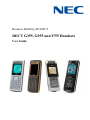
Business Mobility (IP) DECT
DECT G355, G955 and I755 Handsets
User Guide
NEC Unified Solutions Nederland B.V.
HILVERSUM, THE NETHERLANDS
Date: October 2009
Great care has been taken to ensure that the information contained
in this handbook is accurate and complete. Should any errors or
omissions be discovered or should any user wish to make a
suggestion for improving this handbook, they are invited to send the
relevant details to :
NEC Unified Solutions Nederland B.V.
P.O. BOX 32
1200 JD HILVERSUM
THE NETHERLANDS
2
Disclaimer
NEC Unified Solutions reserves the right to revise or make
changes or improvements to the products described in the user
manual or to this user manual itself at any time without
obligation to notify any person of such revision or
improvements.
The pictures, icons, screen shots and diagrams used in this user
manual have been derived from the G955 DECT Handset and
might be slightly different for the G355 and the I755 DECT
Handset.
3
Revision history
Revision history
June, 2008
Creation of the User Manual for the G355 and G955 DECT
Handsets. User Manual based on software version 1.30
July, 2008
New features of Feature Pack 1 added:
o Possible to select sending a message to a Central directory
contact.
o Introduction of Proxy password.
o Possible to use vibrator and ring more or less at the same
time.
o Warning on incorrectly placed MEM card added.
August, 2008
New features of Feature Pack 2 added:
o Possible to determine whether normal message are
displayed immediately upon receipt or not.
o Set up of enquiry call using the Central Directory feature
possible.
o New options Auto answer message and Silent answer
message introduced.
March 2009
o I755 added.
o Norwegian as language option included.
o Ring pattern time changed to Missed call time.
May 2009
o Warning on incorrectly inserted memory card adjusted.
o User Manual based on Software version 01.72.
July 2009
o Correct I755 Charger Rack adapter included.
o Lay-out changes.
October 2009
4
Revision history
o
Reference to VIP call included.
5
Contents
Contents
Disclaimer ........................................................................ 3
Revision history .............................................................. 4
Contents........................................................................... 6
Introduction ................................................................... 13
Feature overview ......................................................... 13
Notice to the user ......................................................... 13
Use in environments with metal particles ..................... 14
G355 and G955 ......................................................................... 14
I755 ........................................................................................... 14
Important safety information ........................................ 16
Sensitive Electronic Environment ................................. 16
Important battery information ....................................... 16
Regulatory information Europe .................................... 18
Declaration of conformity ............................................. 18
Regulatory information United States .......................... 21
FCC information ........................................................... 21
Exposure to Radio Frequency (RF) Signals ................. 21
Hearing Aid Compatibility (HAC/VC) ............................ 22
Regulatory information Canada.................................... 23
IC Information .............................................................. 23
Exposure to Radio Frequency (RF) Signals ................. 23
Product disposal information ....................................... 24
For countries in the European Union .......................................... 24
For countries outside the European Union ................................. 24
Battery disposal information ....................................................... 25
Getting started ............................................................... 26
Installing the battery pack for the G355/G955 .............. 26
6
Contents
Installing the battery pack for the I755 .......................... 27
Installing the charger .................................................... 28
Charging the batteries .................................................. 29
Charging guidelines ................................................................... 30
Charging and operating times .................................................... 30
Charge display ............................................................. 31
Switching the handset on or off .................................... 32
Display areas and handset controls ............................. 33
Icon line ..................................................................................... 34
Dialogue area ............................................................................ 35
Idle mode............................................................................................ 35
Call mode ........................................................................................... 38
Dialogue mode ................................................................................... 41
Menu mode ........................................................................................ 42
Edit mode ........................................................................................... 44
Soft key line ............................................................................... 48
Locking or unlocking the keypad ................................................ 49
DECT system configuration .......................................... 50
Accessing the Connectivity menu................................. 50
Subscribing the handset to a DECT system ................. 51
Manually selecting the DECT system ........................... 53
Enabling automatic DECT system selection ................. 54
Terminating a subscription ........................................... 55
Editing the system name and phone number ............... 55
Call features ................................................................... 57
Make a call................................................................... 57
Dialling a number ....................................................................... 57
Using Predial mode ................................................................... 57
Using Speed dial ....................................................................... 58
Using Loudspeaker .................................................................... 59
Using the Private telephone book or Central Directory to dial a
number ...................................................................................... 59
Making an SOS call ................................................................... 61
Mandown Call (I755 only) .......................................................... 61
Answering a call ........................................................... 61
Answering a call in Normal mode ............................................... 62
Answering a call using any key .................................................. 62
Auto-answering mode ................................................................ 62
Muting the ringer ........................................................................ 62
7
Contents
Rejecting a call .......................................................................... 62
Change settings during a call ....................................... 63
Adjusting the headset or loudspeaker volume ............................ 63
Using mute during a call ............................................................ 63
Transferring a call ........................................................ 63
Voice mail .................................................................... 65
Accessing voice mail ................................................................. 66
Defining a Voice mail number .................................................... 67
By entering number: ........................................................................... 68
By looking up contact: ........................................................................ 68
Calls list ......................................................................... 69
All calls list ................................................................... 70
Accessing the All calls list .......................................................... 70
Answered calls list ....................................................... 71
Accessing the Answered calls list............................................... 71
Dialled calls list ............................................................ 71
Accessing the Dialled calls list ................................................... 71
Missed calls list ............................................................ 72
Accessing the Missed calls list ................................................... 72
Actions on the calls lists ............................................... 73
Checking the details of a call...................................................... 73
Dialling a number ....................................................................... 74
Dialling a number with predialling ............................................... 74
Transferring a number to your contacts list ................................. 75
Transferring a number to the caller filter list ................................ 76
Deleting an entry ....................................................................... 77
Deleting all entries ..................................................................... 78
Contacts ......................................................................... 79
Accessing the Contacts menu .................................................... 80
Adding a new contact................................................................. 80
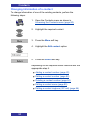
Changing information of a contact .............................................. 82
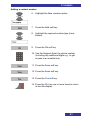
Adding a contact number.................................................................... 83
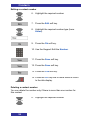
Editing a contact number .................................................................... 84
Deleting a contact number.................................................................. 84
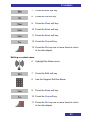
Editing a contact name ....................................................................... 85
Editing a contact ringtone (VIP call) ................................................... 86
Deleting contacts ....................................................................... 86
Speed dial feature...................................................................... 87
Assigning a speed dial number .......................................................... 88
8
Contents
Assigning new contact to a speed dial number .................................. 88
Deleting the speed dial number .......................................................... 89
Transferring numbers to your contacts list .................................. 90
Transferring phone numbers to the caller filter list ...................... 90
Messaging ...................................................................... 92
Message limitations ..................................................... 92
New messages and drafts ............................................ 93
Accessing the Messaging menu ................................................. 93
Saving a new message or editing a draft .................................... 94
Sending a new message or draft ................................................ 95
Deleting a draft .......................................................................... 96
Deleting all drafts ....................................................................... 97
Inbox ............................................................................ 98
Accessing the Inbox Messaging menu ....................................... 98
Reading an incoming message .................................................. 99
Replying to an incoming message.............................................. 99
Forwarding an incoming message............................................ 100
Deleting an incoming message ................................................ 103
Deleting all incoming messages ............................................... 103
Sent messages ...........................................................104
Accessing the Sent Messages menu........................................ 104
Reading a sent message ......................................................... 105
Forwarding a sent message ..................................................... 105
Deleting a sent message.......................................................... 107
Deleting all sent messages ...................................................... 107
Message settings ........................................................108
Accessing the Message settings menu .................................... 108
Configuring the Overwrite old option ........................................ 109
Configuring the Sent message option....................................... 110
Configuring the Display normal messages option ..................... 111
Configuring the Auto answer message option .......................... 112
Configuring the Silent answer message option ......................... 113
Configuring the Voice mail number .......................................... 114
Normal, urgent and emergency messages ..................114
Normal messages .................................................................... 114
Urgent messages..................................................................... 114
Emergency messages ............................................................. 115
Confirming receipts .................................................................. 115
Message list full ..........................................................115
Calendar ........................................................................116
9
Contents
Accessing the Calendar feature ............................................... 116
Changing the calendar format .................................................. 117
Selecting a date ....................................................................... 117
Adding an appointment ............................................................ 118
Viewing an appointment ........................................................... 120
Editing an appointment ............................................................ 121
Copying an appointment .......................................................... 122
Deleting an appointment .......................................................... 122
Additional features .......................................................124
Using the Calculator....................................................124
Using the Stopwatch ...................................................127
Alarms ........................................................................129
Accessing the Alarms menu ..................................................... 129
Assigning or change a daily alarm ............................................ 130
Turning off a daily alarm .......................................................... 130
Assigning or change a recurrent alarm ..................................... 131
Turning off a recurrent alarm .................................................... 132
Telephone settings .......................................................133
General settings ..........................................................133
Accessing the General settings menu ...................................... 134
Profiles .................................................................................... 134
Selecting an active profile................................................................. 135
Switching quickly to and from the Silent profile ................................ 136
Editing a profile ................................................................................. 137
Resetting profiles .............................................................................. 138
Assigning the time and date ..................................................... 138
Choosing a language ............................................................... 141
Configuring shortcuts ............................................................... 143
Configuring the LED signal (I755 only) ..................................... 144
Security options ....................................................................... 145
Using the Phone lock feature ........................................................... 146
Using the Automatic keypad lock feature ......................................... 147
Changing the PIN code .................................................................... 148
Changing the Proxy password.......................................................... 150
Defining the handset name ...................................................... 151
Resetting settings .................................................................... 152
Resetting the memory card ...................................................... 153
Viewing status information ....................................................... 154
Sounds & Alerts settings .............................................155
Accessing the Sounds and alerts menu.................................... 155
10
Contents
Configuring the ring volume ..................................................... 156
Defining the ring melodies........................................................ 157
Assigning the increasing ring feature........................................ 158
Configuring alert volume .......................................................... 159
Defining the alert tone melody .................................................. 160
Enabling the increasing alert feature ........................................ 160
Enabling the vibrator feature .................................................... 161
Enabling the key sound feature ................................................ 162
Assigning confirmation sound .................................................. 163
Enabling the coverage warning feature .................................... 164
Enabling the charger warning feature ....................................... 165
Defining the Missed call time.................................................... 166
Display settings ...........................................................166
Accessing the Display settings menu ....................................... 167
Selecting wallpaper .................................................................. 167
Selecting a theme .................................................................... 170
Selecting a startup screen image ............................................. 171
Configuring power save ........................................................... 173
Calls settings ..............................................................174
Accessing the Calls settings menu ........................................... 174
Accessing Statistics information ............................................... 175
Answer mode configuration...................................................... 176
Caller filter configuration .......................................................... 177
Accessing the Caller filter menu ....................................................... 177
Adding an entry to the Caller filter list ............................................... 178
Editing entries in the Caller filter list ................................................. 179
Deleting entries in the Caller filter list ............................................... 180
Deleting all entries in the Caller filter list ........................................... 181
Activating Caller filter ........................................................................ 183
Configuring emergency calls .................................................... 183
Configuring mandown calls (I755 only) ..................................... 187
Setting the Mandown Mode .............................................................. 187
Defining the Mandown Message ...................................................... 188
Defining the Mandown destination ................................................... 189
Setting the Mandown Auto answer mode ......................................... 189
Setting the Mandown Delay.............................................................. 190
Setting the Mandown Prealarm time ................................................ 191
Assigning the Silent charging feature ....................................... 192
Connectivity settings ...................................................193
Register ................................................................................... 193
Deregister ................................................................................ 193
Selecting a network ................................................................. 194
Bluetooth ................................................................................. 194
11
Contents
Handset accessories ....................................................195
Installing the belt clip on the G355/G955 .................................. 197
Installing the belt clip on the I755 ............................................. 201
Connecting the headset ........................................................... 202
Installing or removing the memory (MEM) card ........................ 202
Installing the MEM card .................................................................... 203
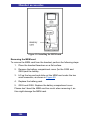
Removing the MEM card .................................................................. 204
Bluetooth module installation ................................................... 205
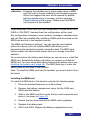
Installing the Bluetooth module on your G955 or I755 DECT Handset
......................................................................................................... 205
Removing the Bluetooth module from your G955 or I755 DECT
Handset ............................................................................................ 206
Bluetooth headset installation .................................................. 207
Accessing the Bluetooth configuration menu .................................... 208
Enabling Bluetooth connectivity ........................................................ 208
Disabling Bluetooth connectivity ....................................................... 209
Adding the Bluetooth headset .......................................................... 209
Connecting and disconnecting a paired Bluetooth headset .............. 210
Deleting a Bluetooth headset ........................................................... 211
12
Introduction
Introduction
NEC Digital Enhanced Cordless Telecommunications (DECT) G355,
G955 and I755 Handsets are cordless phones with enhanced features
suitable for office use. The handsets include a single-press SOS key
used to make one-touch calls or send messages to a particular contact
number.
The G955 and I755 DECT Handsets offer a text-messaging facility to
send and receive messages.
The I755 further offers a mandown feature and is with its sturdiness
very suitable for industrial environments.
NEC G355, G955 and I755 DECT Handsets are compatible both with
traditional DECT and IP DECT systems.
Feature overview
You can use the features of the NEC G355, G955 and I755 DECT
Handsets to perform the following tasks:
send and receive messages (only for G955 and I755 DECT
Handset)
configure audio and display settings
assign daily and recurrent alarms
use the calculator and stopwatch
automatic update of the time and date settings when switching on
the handset
central (or corporate) directory
Notice to the user
The G355, G955 and I755 DECT handsets described in this manual
should only be used in combination with DECT systems delivered by
NEC. In order to take advantage of all features described in this manual
the country and network provider specific features should match the
features of the NEC system.
13
Introduction
Mandown feature
The mandown feature of the I755 does not replace companion
supervision by a colleague or other people. In case of critical,
emergency or life-threatening situations make sure that other persons
are present or that appropriate measures are taken.
The functionality of the mandown alarm is based on a horizontal
handset position. Situations can occur in which the end-user requires
help, but the mandown alarm is not activated, because e.g. the set itself
is not in the horizontal position, the wireless connections are interrupted
or radio coverage in the environment where the mandown alarm is
being used, is not sufficient.
SOS function
The SOS function of the I755 does not replace companion supervision
by a colleague or other people. In case of critical, emergency or lifethreatening situations make sure that other persons are present or that
appropriate measures are taken.
Caution:
Like all cordless telephones, this handset uses radio
signals, which do not guarantee a connection under all
circumstances. Do not rely exclusively on cordless
telephones when making indispensable calls (such as
medical emergencies).
Use in environments with metal particles
G355 and G955
The G355 and G955 DECT Handsets are not meant for use in industrial
and/or production environments. Using the G355 and G955 DECT
Handset in environments with metal particles will cause small metal
particles to stick to the loudspeaker and to the earpiece. This will have a
deteriorating effect on the quality of the speech as heard by the user of
the DECT Handset.
I755
The I755 DECT Handset makes use of inductive charging. Because of
this the I755 is at some places very magnetic and it will therefore attract
metal objects. Metal particles might stick to the I755; this will not affect
14
Introduction
the operation. Nevertheless NEC strongly recommends using a
protective pouch for the I755 DECT handset when it is used in an
environment with small metal particles.
15
Important safety information
Important safety information
Only use this product in countries where the relevant authorities have
authorised its operation.
The I755 DECT Handset complies with IP54 Ŕ according to IEC 529 /
EN 60529.
Sensitive Electronic Environment
Any radio-based equipment can potentially cause interference with
other equipment and can be interfered from other equipment. This also
applies for DECT equipment. However due to the very low transmission
power level the chances for interference are very small. Research
proves that operational DECT phones normally don't influence
electronic equipment however some precautions must be taken into
account for sensitive electronic equipment e.g. sensitive laboratory
equipment. When DECT phones operate in straight nearness of
sensitive electronic equipment incidental influence can appear. You are
advised not to place the DECT phone on or close (less than 10cm) to
this kind of equipment, even in standby mode. Please also use the
other documentation supplied with the various parts of your telephone
system.
Important battery information
These products use rechargeable Lithium-Ion batteries 3.7V, 650mAh.
Only use batteries that come with the handset or dedicated spare
batteries marked with “Battery Pack for G355/G955” or “Battery Pack
for I755” for the G355/G955 resp. the I755 handset. Do not use any
other type.
Never disassemble, customize or short-circuit batteries. Do not place
battery in fire or heat the battery.
Charge the battery of the G355 and G955 handset only in combination
with either:
G355/G955 DECT Handset Desktop Charger and the SALOM
SSW-1444 adapter that comes with the product;
G355/955 Charger Rack and the KINGS KSSI5-050-2500 that
comes with the Charger Rack.
16
Important safety information
Charge the battery of the I755 handset (either on its own or in the
handset) only in combination with either the:
I755 DECT Handset Desktop Charger and the Ten Pao
S008CM1200040 adapter that comes with the product;
I755 Charger Rack and the Ten Pao S040EM1200250 adapter
that comes with the Charger Rack.
Do not charge the batteries by any other means!
Plug the appropriate AC/DC adaptor in a wall outlet socket near the
equipment for easy access/removal of the AC/DC adaptor.
17
Regulatory information Europe
Regulatory information Europe
Declaration of conformity
Česky
“NEC Unified Solutions” tímto prohlašuje, ţe tento “G355/G955” je ve shodě se
základními poţadavky a dalšími příslušnými ustanoveními směrnice 1999/5/ES.
http://www.nec-unified.com/doc
Dansk
Undertegnede “NEC Unified Solutions” erklærer herved, at følgende udstyr “G355/G955”
overholder de væsentlige krav og øvrige relevante krav i direktiv 1999/5/EF.
http://www.nec-unified.com/doc
Deutsch
Hiermit erklärt “NEC Unified Solutions”, dass sich das Gerät “G355/G955”
in
Übereinstimmung mit den grundlegenden Anforderungen und den übrigen einschlägigen
Bestimmungen der Richtlinie 1999/5/EG befindet.
http://www.nec-unified.com/doc
Eesti
Käesolevaga kinnitab “NEC Unified Solutions” seadme “G355/G955” vastavust direktiivi
1999/5/EÜ põhinõuetele ja nimetatud direktiivist tulenevatele teistele asjakohastele
sätetele.
http://www.nec-unified.com/doc
English
Hereby, “NEC Unified Solutions”, declares that this “G355/G955” is in compliance with
the essential requirements and other relevant provisions of Directive 1999/5/EC.
http://www.nec-unified.com/doc
Español
Por medio de la presente “NEC Unified Solutions” declara que el “G355/G955” cumple
con los requisitos esenciales y cualesquiera otras disposiciones aplicables o exigibles de
la Directiva 1999/5/CE.
http://www.nec-unified.com/doc
Ελληνική
ΜΕ ΣΗΝ ΠΑΡΟΤΑ Η NEC ΕΝΟΠΟΙΗΜΕΝΕS ΛΤSΕΙS ΔΗΛΩΝΕΙ ΟΣΙ “G355/G955”
ΤΜΜΟΡΦΩΝΕΣΑΙ ΠΡΟ ΣΙ ΟΤΙΩΔΕΙ ΑΠΑΙΣΗΕΙ ΚΑΙ ΣΙ ΛΟΙΠΕ ΥΕΣΙΚΕ ΔΙΑΣΑΞΕΙ
ΣΗ ΟΔΗΓΙΑ 1999/5/ΕΚ.
http://www.nec-unified.com/doc
18
Regulatory information Europe
Français
Par la présente “NEC Unified Solutions” déclare que l'appareil “G355/G955” est conforme
aux exigences essentielles et aux autres dispositions pertinentes de la directive
1999/5/CE.
http://www.nec-unified.com/doc
Íslenska
Hér með lýsir “NEC Unified Solutions” yfir því að “G355/G955”
grunnkröfur og aðrar kröfur, sem gerðar eru í tilskipun 1999/5/EC.
er í samræmi við
http://www.nec-unified.com/doc
Italiano
Con la presente “NEC Unified Solutions” dichiara che questo “G355/G955” è conforme ai
requisiti essenziali ed alle altre disposizioni pertinenti stabilite dalla direttiva 1999/5/CE.
http://www.nec-unified.com/doc
Latviski
Ar šo “NEC Unified Solutions” deklarē, ka “G355/G955” atbilst Direktīvas 1999/5/EK
būtiskajām prasībām un citiem ar to saistītajiem noteikumiem.
http://www.nec-unified.com/doc
Lietuvių
Šiuo “NEC Unified Solutions” deklaruoja, kad šis “G355/G955” atitinka esminius
reikalavimus ir kitas 1999/5/EB Direktyvos nuostatas.
http://www.nec-unified.com/doc
Malti
Hawnhekk, “NEC Unified Solutions”, jiddikjara li dan “G355/G955” jikkonforma malħtiġijiet essenzjali u ma provvedimenti oħrajn relevanti li hemm fid-Dirrettiva 1999/5/EC.
http://www.nec-unified.com/doc
Magyar
Alulírott, “NEC Unified Solutions” nyilatkozom, hogy a “G355/G955” megfelel a vonatkozó
alapvetõ követelményeknek és az 1999/5/EC irányelv egyéb elõírásainak.
http://www.nec-unified.com/doc
Nederlands
Hierbij verklaart “NEC Unified Solutions” dat het toestel “G355/G955”
in
overeenstemming is met de essentiële eisen en de andere relevante bepalingen van
richtlijn 1999/5/EG.
http://www.nec-unified.com/doc
19
Regulatory information Europe
Norsk
“NEC Unified Solutions” erklærer herved at utstyret “G355/G955” er i samsvar med de
grunnleggende krav og øvrige relevante krav i direktiv 1999/5/EF.
http://www.nec-unified.com/doc
Polski
Niniejszym, "NEC Unified Solutions" deklaruje, ze “G355/G955” jest zgodny z
wymaganiami i innymi warunkami Dyrektywy 1999/5/EC.
http://www.nec-unified.com/doc
Português
“NEC Unified Solutions” declara que este “G355/G955” está conforme com os requisitos
essenciais e outras disposições da Directiva 1999/5/CE.
http://www.nec-unified.com/doc
Slovensko
“NEC Unified Solutions” izjavlja, da je ta “G355/G955” v skladu z bistvenimi zahtevami in
ostalimi relevantnimi določili direktive 1999/5/ES.
http://www.nec-unified.com/doc
Slovensky
“NEC Unified Solutions” týmto vyhlasuje, ţe “G355/G955” spĺňa základné poţiadavky a
všetky príslušné ustanovenia Smernice 1999/5/ES.
http://www.nec-unified.com/doc
Suomi
“NEC Unified Solutions” vakuuttaa täten että “G355/G955” tyyppinen laite on direktiivin
1999/5/EY oleellisten vaatimusten ja sitä koskevien direktiivin muiden ehtojen mukainen.
http://www.nec-unified.com/doc
Svenska
Härmed intygar “NEC Unified Solutions” att denna “G355/G955” står I överensstämmelse
med de väsentliga egenskapskrav och övriga relevanta bestämmelser som framgår av
direktiv 1999/5/EG.
http://www.nec-unified.com/doc
NEC Unified Solutions
Anton Philipsweg 1
1223 KZ Hilversum
The Netherlands
20
0979
Regulatory information U nited States
Regulatory information United States
FCC information
This device complies with Part 15 of the FCC Rules. Operation is
subject to the following two conditions: (1) this device may not cause
harmful interference, and (2) this device must accept any interference
received, including interference that may cause undesired operation.
This equipment has been tested and found to comply with the limits for
a Class B digital device, pursuant to Part 15 of the FCC Rules. These
limits are designed to provide reasonable protection against harmful
interference in a residential installation. This equipment generates, uses
and can radiate radio frequency energy and, if not installed and used in
accordance with the instructions, may cause harmful interference to
radio communications. However, there is no guarantee that interference
will not occur in a particular installation. If this equipment does cause
harmful interference to radio or television reception, which can be
determined by turning the equipment off and on, the user is encouraged
to try to correct the interference by one or more of the following
measures:
Reorient or relocate the receiving antenna.
Increase the separation between the equipment and receiver.
Connect the equipment into an outlet on a circuit different from
that to which the receiver is connected.
Consult the dealer or an experienced radio/TV technician for
help.”
Modifications not expressly approved by NEC Unified Solutions could
void the user's authority to operate the equipment.
Privacy of communications may not be ensured when using this
equipment.
Exposure to Radio Frequency (RF) Signals
This wireless phone is a radio transmitter and receiver. It is designed
and manufactured not to exceed the emission limits for exposure to
radio frequency (RF) energy set by the Federal Communications
Commission (FCC) of the U.S. Government. These limits are part of
comprehensive guidelines and establish permitted levels of RF energy
21
Regulatory information U nited States
for the general population. The guidelines are based on the safety
standards previously set by both U.S. and international standards
bodies. These standards include a substantial safety margin designed
to assure the safety of all persons, regardless of age and health. This
device and its antenna must not be co-located or operating in
conjunction with any other antenna or transmitter.
This product has been shown to be capable of compliance for localized
specific absorption rate (SAR) for uncontrolled environment/general
population exposure limits specified in ANSI/IEEE Std. C95.1-1992 and
had been tested in accordance with the measurement procedures
specified in FCC/OET Bulletin 65 Supplement C (2001) and IEEE 15282003”
For body worn operation, this handset has also been tested and meets
the FCC RF exposure guideline when used with the belt clip supplied
with this product. Use of other accessories may not ensure compliance
with FCC RF exposure guidelines.
Hearing Aid Compatibility (HAC/VC)
This handset meets the FCC standard for Hearing Aid Compatibility.
22
Regulatory information Canada
Regulatory information Canada
IC Information
Privacy of communications may not be ensured when using this
equipment.
Operation of this equipment is subject to the following two conditions:
(1) This device may not cause harmful interference, and (2) this device
must accept any interference received, including interference that may
cause undesired operation.
Exposure to Radio Frequency (RF) Signals
This wireless telephone is a radio transmitter and receiver. It is
designed and manufactured not to exceed the emission limits for
exposure to radio frequency (RF) energy set the Ministry of Health
(Canada), Safety Code 6. These limits are part of comprehensive
guidelines and establish permitted levels of RF energy for the general
population. The guidelines are based on the safety standards previously
set by both U.S. and international standards bodies. These standards
include a substantial safety margin designed to assure the safety of all
persons, regardless of age and health.
This device and its antenna must not be co-located or operating in
conjunction with any other antenna or transmitter. This device has been
shown to be capable of compliance for localized specific absorption rate
(SAR) for uncontrolled environment/general population exposure limits
specified in ANSI/IEEE Standard C95.1:1992 and has been tested in
accordance with the measurement procedures specified in IEEE 15282003.
23
Product disposal information
Product disposal information
For countries in the European Union
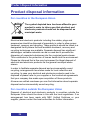
The symbol depicted here has been affixed to your
product in order to inform you that electrical and
electronic products should not be disposed of as
municipal waste.
Electrical and electronic products including the cables, plugs and
accessories should be disposed of separately in order to allow proper
treatment, recovery and recycling. These products should be taken to a
designated facility where the best available treatment, recovery and
recycling techniques are available. Separate disposal has significant
advantages: valuable materials can be re-used and it prevents the
dispersion of unwanted substances into the municipal waste stream.
This contributes to the protection of human health and the environment.
Please be informed that a fine may be imposed for illegal disposal of
electrical and electronic products via the general municipal waste
stream.
In order to facilitate separate disposal and environmentally sound
recycling, arrangements have been made for local collection and
recycling. In case your electrical and electronic products need to be
disposed of please refer to your supplier or the contractual agreements
that your company has made upon acquisition of these products.
At www.nec-unified.com/weee you can find information about separate
disposal and environmentally sound recycling.
For countries outside the European Union
Disposal of electrical and electronic products in countries outside the
European Union should be done in line with the local regulations. If no
arrangement has been made with NEC Unified Solutions or your
supplier, please contact the local authorities for further information.
24
Product disposal information
Battery disposal information
Defect or exhausted batteries should never be disposed of as municipal
waste. Return old batteries to the battery supplier, a licensed battery
dealer or a designated collection facility. Do not incinerate batteries.
25
Getting started
Getting started
This section describes the tasks you must complete before you use
your handset. Install the accessories as described in the following
sections:
Installing the battery pack (page 26)
Installing the charger (page 28)
Charging the batteries (page 29)
Installing or removing the memory (MEM) card (page 202)
Bluetooth module installation (page 205)
Installing the battery pack for the G355/G955
You must install the battery pack before you can use your handset. The
battery compartment is on the back of the handset.
To install a battery pack in your handset, perform the following steps:
1. Place the handset facedown on a flat surface.
2. Remove the battery compartment cover.
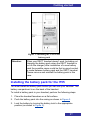
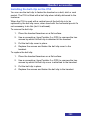
3. Push the battery pack into the casing as shown in Figure 1.
4. Press the battery pack down until it locks.
5. Replace the battery cover.
26
Getting started
Figure 1: Installing the G355/G955
battery pack
Attention:
When your DECT handset doesn‟t work (including not
charging the battery pack when the DECT handset is
put on the charger) after installation of a new battery
pack the possible cause could be that no good contact
is made between battery pack and the DECT handset.
Please remove and reinstall the battery pack in this
case.
Installing the battery pack for the I755
You must install the battery pack before you can use your handset. The
battery compartment is on the back of the handset.
To install a battery pack in your handset, perform the following steps:
1. Place the handset facedown on a flat surface.
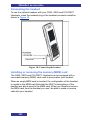
2. Push the battery pack into the casing as shown in Figure 2.
3. Lock the battery by turning the battery lock to the appropriate
position (as shown in Figure 2).
27
Getting started
Figure 2: Installing the I755 battery pack
Installing the charger
To install the charger, perform the following steps:
1. Place the charger on a flat surface.
2. Connect the AC adapter cable to the terminal at the back of the
charger.
3. Connect the adapter to an electrical outlet.
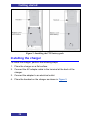
4. Place the handset on the charger as shown in Figure 3.
28
Getting started
Figure 3: G355, G955 and I755 in Desktop Charger
Charging the batteries
Place the handset in the charger as shown in Figure 3.
Attention:
The handset, if switched off, automatically switches on
when placed in the charger.
Alternatively the I755 Desktop Charger can be used to charge a spare
battery pack for the I755. To charge a spare battery pack:
1. Remove the cover of the spare battery charging slot compartment
at the top of the charger.
2. Place the spare battery pack in the spare battery charging slot
compartment. Make sure the battery pack is placed in the spare
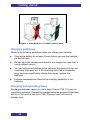
battery charging slot as shown in Figure 4.
29
Getting started
Figure 4: Placement of I755 spare battery pack
Charging guidelines
Observe the following guidelines when you charge your handset:
Charge the battery for at least 6 hours before you use the handset
for the first time.
Do not leave the handset connected to the charger for more than a
month without using it.
You can charge and discharge the batteries hundreds of times, but
eventually they wear out. If the operating time (talk and standby
time) becomes significantly shorter than usual, replace the
batteries.
Extreme temperatures influence the charging capability of the
batteries.
Charging and operating times
Discharged batteries require no more than 8 hours (I755: 10 hours) to
completely recharge. Completely charged batteries provide the handset
with up to 12 hours of talk time (I755: 10 hours) and 120 hours of
standby time.
30
Getting started
WARNING
The talk time and standby time are influenced by the
use of the handset. Influencing these times are e.g.,
display activities, alerting, use of Bluetooth, walking
around a lot (causing many handovers), and so on.
CAUTION
Do not install the charger, handset, and accessories
near the following:
water, moisture, sources of heat, or direct sunlight
devices that generate strong magnetic fields,
electrical appliances, fluorescent lamps, computers,
radios, televisions, and fax or telephone terminals
areas where the handset can be covered or in
excessive dust, and areas subject to vibration,
shock, or extreme temperature fluctuations
locations with poor ventilation.
Charge display
The battery charge status appears on the display screen. When the
battery is nearly discharged, the battery symbol flashes and a warning
tone sounds. If you are on a call, approximately 3 to 5 minutes of talk
time exists before the handset switches off. If you are not on a call and
the handset is not in the charging station, the message “Battery empty”
appears on the display. You cannot make calls while this message
appears.
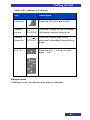
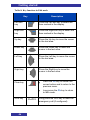
The following table shows the battery charge status icons:
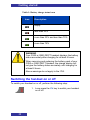
31
Getting started
Table 1: Battery charge status icons
Icon
Description
empty
less than 33%
more than 33% and less than 75%
more than 75%
WARNING
Your G355 or G955 DECT handset displays the battery
status accurately after charging for at least 6 hours.
When removing and replacing the battery pack of your
G355 or G955 DECT handset, the charge display will
not give the battery status accurately until charging for
at least 6 hours.
Above warnings do not apply to the I755.
Switching the handset on or off
To switch your handset on or off, perform the following step:
1. Long press the Clr key to switch your handset
on or off.
32
Getting started
Display areas and handset controls
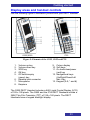
Use the following figure to familiarise yourself with your DECT handset.
Figure 5: Elements of the G355, G955 and I755
1.
2.
3.
4.
5.
Volume up key
Volume down key
SOS key
OK key
Off hook/enquiry
(green) key
6. Headset jack connector
7. Microphone
8. Earpiece
9. Colour display
10. Soft keys
11. On hook/clear/power
(red) key
12. Navigational keys
(Up/Right/Down/Left
Nav. Key
13. Keypad (0-9, * and #)
The G355 DECT Handset includes a 64K Liquid Crystal Display (LCD)
of 128 x 128 pixels. The G955 and the I755 DECT Handsets include a
262K Thin-Film Transistor (TFT) of 128 x 160 pixels. The DECT
Handsets have a keypad backlight display.
33
Getting started
Icon line
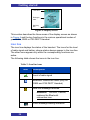
Dialogue
area
Soft key
line
Figure 6: Display screen
This section describes the three areas of the display screen as shown
in Figure 6 and the key functions in the various operational modes of
your G355, G955 or I755 DECT Handset.
Icon line
The icon line displays the status of the handset. The icons for the level
of radio signal and battery charge status always appear in the icon line.
The other icons appear only when the corresponding functions are
active.
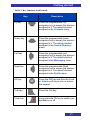
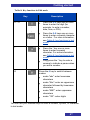
The following table shows the icons in the icon line.
Table 2: Icon line icons
Icon
Description
Level of radio signal
Bluetooth connection status (only for
G955 and I755 DECT Handset)
New text message received
Attention: This icon, if active,
replaces the Bluetooth
connection icon.
Voice message waiting indication
34
Getting started
Table 2: Icon line icons
Icon
Description
Keypad locked
Activated alarm
Attention: This icon, if active,
replaces the Keypad locked icon.
Missed calls
Ringer deactivated
Caller filter (only for G955 and I755
DECT Handset)
Attention: This icon, if active,
replaces the Ringer deactivated
icon.
Battery charge status.
Refer to Table 1 for Battery status
icons.
Dialogue area
The Dialogue area is the main area on the handset screen. It displays
information according to the operational mode of the handset.
Idle mode
In Idle mode, the dialogue area displays the following information:
the name of the DECT system
the Directory Number (DNR) of the handset
the handset name (if configured)
35
Getting started
the name of the active profile
the time and date
If you leave the range of the DECT system, a “No Network” message
appears on the display screen.
If you activate the mandown feature on the I755 the name of the DECT
systems will be replaced by warning message “Mandown on”.
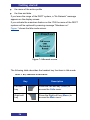
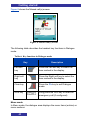
Figure 7 shows the Idle mode screen.
Figure 7: Idle mode screen
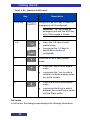
The following table describes the handset key functions in Idle mode.
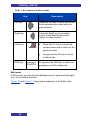
Table 3: Key functions in Idle mode
Key
Description
Left soft
key
Press the Left soft key (Calls) to
access the Calls menu.
Right soft
key
Press the Right soft key (Menu) to
access the Main menu.
36
Getting started
Table 3: Key functions in Idle mode
Key
Description
Up key
Press the programmable Up
navigation key to access the shortcut
assigned to it. The default shortcut
assigned is the Contacts menu.
Down key
Press the programmable Down
navigation key to access the shortcut
assigned to it. The default shortcut
assigned is the Central Directory
menu.
Left key
Press the programmable Left
navigation key to access the shortcut
assigned to it. The default shortcut
assigned is the Messaging menu.
Right key
Press the programmable Right
navigation key to access the shortcut
assigned to it. The default shortcut
assigned is the Profile menu.
OK key
Press the OK key and then the Lock
or Unlock soft key to lock or unlock
the keypad.
Call key
Press the Call key.
Clear key
Long press the Clr key to switch your
handset on or off.
37
Getting started
Table 3: Key functions in Idle mode
Key
Description
Long press the SOS key to make an
emergency call (if configured).
SOS key
Attention: You can make an
emergency call with the SOS key
even if the keypad is locked.
Press the 1–9 keys to enter
predial mode.
1Ŕ9
:
:
Long press the 1–9 keys to
speed dial a number (if
configured).
Press the 0 key to enter predial
mode.
0
Press the * key to enter predial
mode.
*
Long press the * key to enter a
comma to indicate a pause when
you edit a number.
Press the # key to enter predial
mode.
#
Long press the # key to switch
between the current active profile
and the Silent profile.
Call mode
In Call mode, the dialogue area displays the following information:
38
Getting started
the number and name (if available) of the calling party for an
incoming call
the number and name (if added to your contacts list) of the called
party for an outgoing call
the loudspeaker icon (if enabled)
the microphone muted icon (if muted)
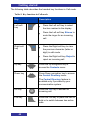
The following table shows the icons in the dialogue area when in Call
mode.
Table 4: Dialogue area icons
Icon
Description
Incoming call
Outgoing call
Loudspeaker on
Microphone muted while loudspeaker on
Microphone muted while loudspeaker off
39
Getting started
The following table describes the handset key functions in Call mode.
Table 5: Key functions in Call mode
Key
Left soft
key
Description
Press the Left soft key to select
the item marked in the display.
Press the Left soft key Silence to
mute the ringer for an incoming
call.
Right soft
key
Press the Right soft key to clear
the previous character (letter or
digit) in edit mode.
Press the Right soft key Reject to
reject an incoming call.
Up key
Press the Up navigation key to
access the Contacts menu.
Down key
Press Down navigation key to access
the Central Directory menu.
The Central Directory feature is
available only if provided by your
communication system.
OK key
Press the OK key to answer an
incoming call.
Call key
Press the Call key to place the call on
hold or to switch between two active
calls.
40
Getting started
Table 5: Key functions in Call mode
Key
Description
Clear key
Press the Clr key to end the call.
Volume
up key
Press the Volume up key to increase
the handset volume during a call.
Volume
down key
Press the Volume down key to
decrease the handset volume during
a call.
0Ŕ9,*,#
Press the 0–9, *, or # key to enter
digits,*, or #.
:
Dialogue mode
In Dialogue mode, the dialogue area displays dialogues.
41
Getting started
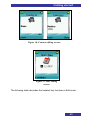
Figure 8 shows the Missed call(s) screen.
Figure 8: Missed call(s) screen
The following table describes the handset key functions in Dialogue
mode.
Table 6: Key functions in Dialogue mode
Key
Description
Left soft
key
Press the Left soft key to select the
item marked in the display.
Right soft
key
Press the Right soft key to select the
item marked in the display.
Clear key
Press the Clr key to exit Dialogue
mode.
SOS key
Long press the SOS key to make an
emergency call (if configured).
Menu mode
In Menu mode, the dialogue area displays the menu items (entries) or
menu sections.
42
Getting started
Figure 9 shows the Main menu and the General settings screen.
Figure 9: Main menu and General settings screens
The following table describes the handset key functions in Menu mode.
Table 7: Key functions in Menu mode
Key
Description
Left soft
key
Press the Left soft key to select the
item marked in the display.
Right soft
key
Press the Right soft key to select the
item marked in the display.
Up key
Press the Up key to move the cursor
to the desired menu item (entry).
Down key
Press the Down key to move the
cursor to the desired menu item
(entry).
43
Getting started
Table 7: Key functions in Menu mode
Key
Description
Left key
Press the Left key to move the cursor
to the desired menu item (entry) or
menu section.
Right key
Press the Right key to move the
cursor to the desired menu item
(entry) or menu section.
Clear key
Press the Clr key to cancel the
current action and to return to the
previous menu.
Long press the Clr key to return
to Idle mode.
SOS key
Long press the SOS key to make an
emergency call (if configured).
Edit mode
In Edit mode, you can use the dialogue area to enter and edit digits
(e.g., for numbers) and text.
Figure 10 and Figure 11 show some examples of the Edit mode.
44
Getting started
Figure 10: Contacts editing screens
Figure 11: Date editing
screen
The following table describes the handset key functions in Edit mode.
45
Getting started
Table 8: Key functions in Edit mode
Key
Description
Left soft
key
Press the Left soft key to select the
item marked in the display.
Right soft
key
Press the Right soft key to select the
item marked in the display.
Up key
Press the Up key to move the cursor
in the text area.
Down key
Press the Down key to move the
cursor in the text area.
Left key
Press the Left key to move the cursor
in the text area.
Right key
Press the Right key to move the
cursor in the text area.
Clear key
Press the Clr key to cancel the
current action and to return to the
previous menu.
Long press the Clr key to return
to Idle mode.
SOS key
46
Long press the SOS key to make an
emergency call (if configured).
Getting started
Table 8: Key functions in Edit mode
Key
Description
0Ŕ9
:
:
*
Press the 0–9 keys one or more
times to enter the digit (for
example, to enter a number,
date, time, or PIN).
Press the 0–9 keys one or more
times to enter a special character
or a letter. For more information,
see Table 9: key functions in text
mode.
Press the * key one or more
times to enter a special
character. For more information,
see Table 9: key functions in text
mode.
Long press the * key to enter a
comma to indicate a pause when
you edit a number.
#
Press the # key to switch between
modes:
mode "abc": enter lowercase
characters
mode "Abc": enter an uppercase
character followed by lowercase
characters
mode "ABC": enter uppercase
characters
mode "123": enter digits
You can use your handset keys to enter a number, symbol, or character
in text mode.
47
Getting started
The following table shows the key to press, (when the handset is in text
mode) to insert letters, numbers, or symbols.
Table 9: key functions in text mode
Key
Uppercase
Lowercase
1
1£$¥€@%&#§^
1£$¥€@%&#§^
2
ABC2ÆÀÁÂÄÅÇ
abc2æàáäåç
3
DEF3ÈÉÊË
def3èéêë
4
GHI4ÍÎÏ
ghi4íîï
5
JKL5
jkl5
6
MNO6ŒÓÔÖØ
mno6œóôöø
7
PQRS7Šß
pqrs7šß
8
TUV8ÙÚÛÜ
tuv8ùúûü
9
WXYZ9ŸŢ
wxyz9ÿţ
0
(space) . , ? ! 0 : ¿ ¡ “ „ ; _ ~
(space) . , ? ! 0 : ¿ ¡ “ „ ; _ ~
*
*/+-=()<>{}[]|\
*/+-=()<>{}[]|\
Soft key line
Soft keys appear below the handset dialogue area. The key functions
change automatically according to the operational state of the handset.
48
Getting started
For example, press the Menu soft key, as shown Figure 6, to access
the Main menu.
Locking or unlocking the keypad
Use the keypad lock feature to prevent accidental operation of the
handset. When you receive an incoming call, the keypad temporarily
unlocks so you can answer the call. The keypad lock reactivates when
you terminate the call.
Attention: You can dial 911 and 112 when the keypad lock is active.
The keypad lock does not affect the SOS key.
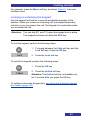
To lock the keypad, perform the following steps:
1. To toggle between the Calls soft key and the
Lock soft key: Press the OK key..
2. Press the Lock soft key.
To unlock the keypad, perform the following steps:
1. Press the OK key.
2. Press the Unlock soft key.
Attention: The Unlock soft key is available only
for 3 seconds after you press the OK key
To configure automatic Keypad lock, see Using the Automatic keypad
lock feature (page 147).
49
DECT system configuration
DECT system configuration
Use the information in this section to configure your DECT handset to
work with a DECT system.
This section describes the following tasks:
Accessing the Connectivity menu (page 50)
Subscribing the handset to a DECT system (page 51)
Manually selecting the DECT system (page 53)
Enabling automatic DECT system selection (page 54)
Terminating a subscription (page 55)
Editing the system name and phone number (page 55)
Accessing the Connectivity menu
To access the Connectivity menu, perform the following steps:
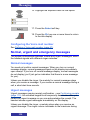
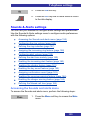
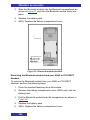
1. Press the Menu soft key to access the Main
menu.
2. Highlight the Settings icon.
3. Press the Select soft key.
4. Highlight the Connectivity menu.
50
DECT system configuration
Subscribing the handset to a DECT system
You must subscribe the handset to at least one DECT system before
you can use the handset to make a call. The handset can operate with
a maximum of four DECT systems, for which the handset stores the
name of the system in a subscription record. The subscribed name
appears on the handset display whenever the handset enters the range
of the DECT system.
If your supplier preinstalls the handset, you need not subscribe your
handset to a system. When the handset is not yet subscribed to a
system, the message Register appears on the display screen.
Use the PABX-PIN code to register the handset with a DECT system.
Before you subscribe to a DECT system, obtain the following
information from your system administrator:
1. PARK code: Use a PARK code system ID only if more than one
DECT system overlaps in your location.
2. DECT system name: The name of the system to which you
subscribe. After you enter the system name, it appears on the idle
display.
3. Phone number: The local phone number assigned to your DECT
handset.
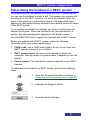
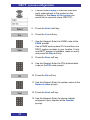
To subscribe your handset to a DECT system, perform the following
steps:
1. Open the Connectivity menu as shown in
Accessing the Connectivity menu (page 50).
2. Highlight the Register option.
3. Press the Select soft key.
51
DECT system configuration
4. Choose either Empty (if there are less than
eight subscriptions to the system on the
handset) or the Name of the system you
would like to overwrite (here: DECT01).
5. Press the Select soft key.
6. Press the Yes soft key.
7. Use the Keypad: Enter the PARK code at the
PARK prompt.
Use a PARK code system ID if more than one
DECT system overlaps in your location. If only
one DECT system is available, make no entry,
and press the Skip soft key.
8. Press the Save soft key.
9. Use the Keypad: Enter the PIN (authorisation
code) at the PIN code prompt.
10. Press the Ok soft key.
11. Use the Keypad: Enter the system name at the
Network name prompt.
12. Press the Save soft key.
13. Use the Keypad: Enter the phone number
assigned to your handset at the Number
prompt.
52
DECT system configuration
14. Press the Save soft key.
15. Press the Clr key one or more times to return
to the idle display.
Manually selecting the DECT system
If you subscribe the handset to more than one DECT system, you can
manually select which system the handset uses by performing the
following steps:
1. Open the Connectivity menu as shown in
Accessing the Connectivity menu (page 50).
2. Highlight the Network select option.
3. Press the Select soft key.
4. Choose the Name of the system from the list
(here: DECT01).
5. Press the Select soft key.
The name of the currently active system is
highlighted.
1. Press the Clr key one or more times to return
to the idle display.
53
DECT system configuration
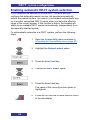
Enabling automatic DECT system selection
If you subscribe the handset to several DECT systems and you
configure the automatic search function, the handset automatically
selects the nearest system. As a result, your handset automatically logs
on to another subscribed DECT system when you leave the effective
range of the current system. If this function is active, the handset will
attach to an available DECT system automatically, independently from
the manually selected system.
To automatically subscribe to a DECT system, perform the following
steps:
1. Open the Connectivity menu as shown in
Accessing the Connectivity menu (page 50).
2. Highlight the Network select option.
3. Press the Select soft key.
4. Choose the Auto. select option.
5. Press the Select soft key.
The name of the currently active system is
highlighted.
6. Press the Clr key one or more times to return
to the idle display.
54
DECT system configuration
Terminating a subscription
When terminating a DECT subscription you will not be able to make
calls over the DECT system to which the subscription is related.
Terminating all DECT subscriptions means you will no longer be able to
make any call with your DECT handset.
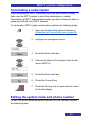
To terminate a DECT system subscription, perform the following steps:
1. Open the Connectivity menu as shown in
Accessing the Connectivity menu (page 50).
2. Highlight the Deregister option.
3. Press the Select soft key.
4. Choose the Name of the system from the list
(here: DECT01).
5. Press the Select soft key.
6. Press the Yes soft key.
7. Press the Clr key one or more times to return
to the idle display.
Editing the system name and phone number
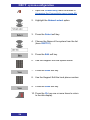
To edit the system name and phone number on your handset, perform
the following steps:
55
DECT system configuration
1. Open the Connectivity menu as shown in
Accessing the Connectivity menu (page 50).
2. Highlight the Network select option.
3. Press the Select soft key.
4. Choose the Name of the system from the list
(here: DECT01).
5. Press the Edit soft key.
6. Use the Keypad: Edit the system name.
7. Press the Save soft key.
8. Use the Keypad: Edit the local phone number.
9. Press the Save soft key.
10. Press the Clr key one or more times to return
to the idle display.
56
Calls list
Call features
Attention: During a call, the display light switches off or dims to prevent
a rapid battery discharge. To highlight the display: Press the OK key.
Make a call
This section describes the features associated with making a call. You
can make a call from your G355, G955 and I755 DECT Handset using
any of the following methods:
Dialling a number (page 57)
Using Predial mode (page 57)
Using Speed dial (page 58)
Using Loudspeaker (page 59)
Using the Private telephone book or Central Directory to dial a
number (page 59)
Making an SOS call (page 61)
Mandown Call (page 61)
Dialling a number
To dial a number, perform the following steps:
1. Press the Call key.
2. Use the Keypad: Enter the phone number
(including any additional digits e.g., to get
access to an outside line).
Using Predial mode
To predial a number, perform the following steps:
57
Call features
1. Use the Keypad: Enter the phone number
(including any additional digits e.g., to get
access to an outside line).
2. Press the Call key.
To edit a number in Predial mode, perform the following steps:
1. Use the Right or Left key to move to the
insertion point.
2. Use the Keypad: Enter the new digits.
3. Press the Clr key to delete individual digits or
to cancel predial.
4. Long press the * key to insert a comma to
indicate a pause when you enter a number.
5. Press the Call key.
6. Press the Clr key one or more times to return
to the idle display.
Using Speed dial
Use the Speed dial feature to make calls by dialling a one-digit code. To
use speed dial, perform the following step:
1. Use the Keypad: Long press the number key
assigned to the phone number.
You can use speed dial only after it is
configured. For more information, see
Assigning a speed dial number (page 88).
58
Calls list
Using Loudspeaker
Your handset includes a Loudspeaker feature to allow several people in
a room to listen to a call.
Attention: The Loudspeaker feature is no substitute for a conference
bridge or a conference device. Always use such devices when high
quality speech is required.
To enable/disable the Loudspeaker feature, perform the following steps:
1. Make or answer a call.
2. Press the Spk on soft key to enable the
feature.
When the loudspeaker function is active, the
handset displays the loudspeaker icon.
3. Press the Volume up or Volume down key to
configure the volume.
4. Press the Spk off soft key to disable the
feature.
Using the Private telephone book or Central Directory
to dial a number
Your handset allows you to use the private telephone book to dial a
number.
If provided by your communication system your handset also allows you
to use the Central Directory to dial a number. The Central Directory is a
database that contains user names and Directory Numbers (DNR).
To use the Private telephone book or Central Directory to dial a
number, perform the following steps:
1. Press the Menu soft key to access the Main
menu.
59
Call features
2. Highlight the Contacts menu.
3. Press the Select soft key.
4. Choose the Private or the Central Directory
option.
5. Press the Select soft key.
Use the Keypad: Enter the first character(s) of
the required name. (E.g., entering “V” will
move you to the first name in the directory
starting with "V".)
6. Press the Ok soft key.
7. Choose the name of the person you want to
call.
For private telephone book only:
8. Choose the required contact‟s number.
9. Press the Call key.
60
Calls list
Making an SOS call
Use this option to make emergency calls to a specific telephone
number. When you press the SOS key, the phone sends a text
message (only with the G955 or I755 DECT Handset) or initiates a
voice call.
You must program an SOS number to use the SOS function. For more
information, see Configuring emergency calls (page 183).
To make an SOS call, perform the following step:
1. Long press the SOS key to dial the number or
send a message.
Mandown Call (I755 only)
The I755 DECT Handset has an integrated sensor, which detects the
position of the handset. If the handset‟s position changes from upright
to horizontal, a mandown (loudspeaking) voice call is initiated or a
message is sent to a pre-programmed mandown number.
If the Auto answer option is activated within the mandown function and
due to mandown a message has been sent, then an incoming call is
automatically answered and a loudspeaking voice call is established.
You must program the Mandown function. For more information see
Configuring mandown calls (page 187).
Answering a call
You can use your handset to answer or reject an incoming call. When
you receive an incoming call, the ringer sounds and the call alert
symbol flashes. This section describes the following features:
Answering a call in Normal mode (page 62)
Answering a call using any key (page 62)
Auto-answering mode (page 62)
Muting the ringer (page 62)
Rejecting a call (page 62)
61
Call features
Answering a call in Normal mode
To answer a call in Normal mode, perform the following step:
1. Press the Call key. (Loudspeaker is off)
OR
1. Press the OK key. (Loudspeaker is on)
Answering a call using any key
To answer a call using any key, perform the following step:
1. Press any key on the Keypad to answer the
call.
This feature is available only when configured.
For more information, see Answer mode
configuration (page 176).
Auto-answering mode
In Auto-answering mode, calls are answered automatically on the
handset. This feature is available only when configured. For more
information, see Answer mode configuration (page 176).
Muting the ringer
To mute the ringer, perform the following step:
1. Press the Silence soft key to mute the ringer
during a call alert.
Rejecting a call
To reject an incoming call, perform the following step:
1. Press the Reject soft key during a call alert.
62
Calls list
Change settings during a call
During a call, you can adjust the headset or loudspeaker volume and
mute the handset:
Adjusting the headset or loudspeaker volume (page 63)
Using mute during a call (page 63)
Adjusting the headset or loudspeaker volume
During a call, you can change the headset or loudspeaker volume using
the volume keys. A bar in the display increases or decreases to indicate
the volume setting. A beep sounds at the minimum or maximum volume
When you adjust the headset or loudspeaker volume, the handset
remembers the new setting the next time you use the handset.
To adjust the headset or loudspeaker volume, perform the following
step:
1. Press the Volume up or Volume down key to
configure the volume.
Using mute during a call
To deactivate (or activate) the handset microphone, perform the
following steps:
1. Press the Mute soft key to deactivate the
handset microphone.
2. Press the Unmute soft key to deactivate the
handset microphone.
Transferring a call
You can use this option to transfer a call or add a third party to a
conference call. The actual function depends on the capabilities and the
configuration of your communication system.
63
Call features
To transfer a call, perform the following steps:
1. To place the first call on hold: Press the Call
key.
2. Use the Keypad: Enter the phone number
(including any additional digits e.g., to get
access to an outside line).
3. To alternate between the two parties: Press
the Call key.
4. Press the Clr key to transfer the call.
To transfer a call using the Private telephone book or the Central
Directory feature (only if it is available) to select the destination, perform
the following steps:
1. To place the first call on hold: Press the Call
key.
2. Press the Up or Down key to select resp. the
Private or the Central Directory.
3. Use the Keypad: Enter the first character(s) of
the required name. (E.g., entering “V” will
move you to the first name in the directory
starting with "V".)
4. Press the Ok soft key.
5. Choose the name of the person you want to
call.
64
Calls list
For private telephone book only:
6. Choose the required contact‟s number.
7. Press the Call key.
8. To alternate between the two parties: Press
the Call key.
9. Press the Clr key to transfer the call.
Voice mail
Use the Voice mail feature (if available on your communication system)
to listen to voice messages left by calling parties. You receive a voice
mail in the following situations:
if your handset is switched off
if your handset is busy
if your handset is out of the coverage area
A new voice message dialogue appears only once, when a caller leaves
a first new message in the mailbox. A voice mail symbol appears in the
icon line and disappears after you play the message.
Attention: Ensure you configure the voice mail access number in the
messaging settings - see Defining a Voice mail number
(page 67).
65
Call features
The following figure shows the voice mail display screen.
Figure 12: Voice mail display screen
Press the Yes soft key to listen to the new voice message if voice mail
number is configured or press the No soft key to close the dialogue.
Accessing voice mail
To access voice mail, perform the following steps:
1. Press the Menu soft key to access the Main
menu.
2. Highlight the Messaging icon.
3. Press the Select soft key.
4. Choose the Inbox menu.
66
Calls list
5. Choose the Listen to voice mail option.
6. Press the Select soft key.
The handset automatically dials the voice mail
access number and you can listen to your
voice mails.
7. Press the Clr key one or more times to return
to the idle display.
Defining a Voice mail number
To define a voice mail access number, perform the following steps:
1. Open the Message Settings menu as shown
in Accessing the Message settings menu
(page 108).
2. Highlight the Voice mail number option.
3. Press the Select soft key.
4. Determine the way to select the voice mail
access number:
By entering number (page 68)
By looking up contact: (page 68)
67
Call features
By entering number:
5. Choose the Enter number option.
6. Press the Select soft key.
7. Use the Keypad: Enter the number.
8. Press the Save soft key.
9. Press the Clr key one or more times to return
to the idle display.
By looking up contact:
5. Choose the Lookup contact option.
6. Press the Select soft key.
7. Highlight the contact name and then the
appropriate number (if more than one
assigned to that contact).
10. Press the Select soft key.
8. Press the Clr key one or more times to return
to the idle display.
68
Calls list
Calls list
The Calls list stores information about dialled, answered, or missed
calls (maximum 50 entries for all lists).
Attention
The actual maximum number of entries can be smaller
depending on the usage of the available memory for other
features.
When there is more than one call to or from a phone number, only the
most recent call appears in the appropriate call list.
The Calls menu contains four tabs: All, Answered, Dialled, and Missed.
You can open the required list by pressing the Right or Left key. When
you open the list, the call information appears on the screen. The first
entry is highlighted; the contact name or CLID (Calling Line
Identification) and the time and date are displayed.
Figure 13: Calls list
If you change the time format to am/pm mode and the date format is
dd/mm/yyyy (for example 06/12/2007), or mm/dd/yyyy (for example
12/06/2007), or dd-mmm-yyyy (06-Dec-2007), then only the date is
displayed in the lists. You can also learn the time of the call by checking
the details of the calls.
69
Calls list
The following table describes the calls list icons.
Table 10: Call list icons
Symbol
Description
All calls
Answered call
Dialled call
Missed call
This section describes the following features:
All calls list (page 70)
Answered calls list (page 71)
Dialled calls list (page 71)
Missed calls list (page 72)
Actions on the calls lists (page 73)
All calls list
The All calls list shows all entries from the Answered, Dialled and
Missed calls lists. The most recent entry is at the top of the list.
Accessing the All calls list
To access the All calls list, perform the following steps:
1. Press the Calls soft key.
70
Calls list
2. Select the All calls list.
Answered calls list
The Answered calls list stores the details of the answered calls. The
most recent entry is at the top of the list.
Accessing the Answered calls list
To access the Answered calls list, perform the following steps:
1. Press the Calls soft key.
2. Select the Answered calls list.
Dialled calls list
The dialled calls list stores the details of the Dialled calls. The most
recent entry is at the top of the list.
Accessing the Dialled calls list
To access the Dialled calls list, perform the following steps:
1. Press the Calls soft key.
2. Select the Dialled calls list.
71
Calls list
Missed calls list
The Missed calls list stores the details of calls that are unanswered,
rejected or blocked by the Caller filter feature (the latter only for G955
and I755). The most recent entry is at the top of the list.
The following table shows the missed call icons.
Table 11: Missed calls icon
Icon
Description
Unanswered or rejected call
Blocked call by Caller filter (only for
G955/I755)
The Missed calls list includes the following features:
The recently missed and unchecked calls are marked in bold
(in this case they will also be marked in bold in the All calls list).
If you answer a call from a number in the Missed calls list, the
number automatically moves from the Missed calls list to the
Answered calls list.
If you dial a number from the Missed calls list, the number
automatically moves from the Missed calls list to the Dialled
calls list.
Accessing the Missed calls list
To access the Missed calls list, perform the following steps:
1. If the message “Number of missed calls: N
Show?” appears on the display: Press the Yes
soft key.
OR
72
Calls list
1. Press the Calls soft key.
2. Select the Missed calls list.
Actions on the calls lists
Except for the action to delete all entries in one of the calls lists (see
Deleting all entries (page 78)), all actions described in this section start
with:
1. Open the appropriate calls list as shown in
previous chapters.
2. Select appropriatre entry.
Depending on the required action continue with the
appropriate step 3:
Checking the details of a call (page 73)
Dialling a number (page 74)
Dialling a number with predialling (page 74)
Transferring a number to your contacts list
(page 75)
Transferring a number to the caller filter list
(page 76)
Deleting an entry (page 77)
Checking the details of a call
To view the details, such as time and date, of the calls in the
All/Answered/Dialled/Missed calls list, perform the following steps:
73
Calls list
3. Press the More soft key.
4. Highlight the View option.
5. Press the Select soft key.
6. Press the Clr key one or more times to return
to the idle display.
Dialling a number
To dial a number from the All/Answered/Dialled/Missed calls list,
perform the following steps:
3. Press the Call key.
Dialling a number with predialling
To dial a number from the All/Answered/Dialled/Missed calls list, but
first want to add predialling information, perform the following steps:
3. Press the More soft key.
4. Highlight the Edit before call option.
5. Use the Right or Left key to move to the
insertion point.
74
Calls list
6. Use the Keypad: Enter the new digits.
7. Press the Call key.
Transferring a number to your contacts list
To transfer a number from the All/Answered/Dialled/Missed calls list to
your contacts list, where the handset treats the number as a new entry,
perform the following steps:
3. Press the More soft key.
4. Highlight the Save option.
5. Press the Select soft key.
6. Highlight the Contacts menu.
7. Press the Select soft key.
8. Press the Add soft key.
Optional step(s):
9. Use the Keypad: Edit the Number.
10. Press the Save soft key.
75
Calls list
Optional step(s):
11. Use the Keypad: Edit the Name.
12. Press the Save soft key.
13. Press the Yes soft key.
14. Press the Clr key one or more times to return
to the idle display.
Transferring a number to the caller filter list
Attention
The Caller filter feature is available only on the G955 and
the I755 DECT Handset.
To transfer a number from the All/Answered/Dialled/Missed calls list to
the caller filter list, perform the following steps:
3. Press the More soft key.
4. Highlight the Save option.
5. Press the Select soft key.
6. Highlight the Caller filter option.
7. Press the Select soft key.
76
Calls list
Optional step(s):
8. Use the Keypad: Edit the Number.
9. Press the Save soft key.
Optional step(s):
10. Use the Keypad: Edit the Name.
11. Press the Save soft key.
12. Press the Clr key one or more times to return
to the idle display.
Deleting an entry
To delete an entry from the All/Answered/Dialled/Missed calls list,
perform the following steps:
3. Press the More soft key.
4. Highlight the Delete entry option.
5. Press the Select soft key.
6. Press the Yes soft key.
7. Press the Clr key one or more times to return
to the idle display.
77
Calls list
Deleting all entries
To delete all entries from the All/Answered/Dialled/Missed calls list,
perform the following steps:
1. Open the appropriate calls list as shown in
previous chapters.
2. Press the More soft key.
3. Highlight the Delete all option.
4. Press the Select soft key.
5. Press the Yes soft key.
6. Press the Clr key one or more times to return
to the idle display.
78
Contacts
Contacts
You can use your handset to store contact numbers and names.
Without a MEM card you can store up to 50 contacts and with a MEM
card you can store up to 200 contacts.
Attention
The actual maximum number of entries can be smaller
depending on the usage of the available memory for other
features.
The following restrictions apply:
Each entry can include a maximum of 16 characters in the name,
and a maximum of 32 digits in the contact number.
Each entry can contain up to 4 numbers. You can identify each
number using one of the following types:
Table 12: Contact's number type indication
Icon
Description
Home
Mobile
Work
Other
If you receive a call from a caller whose number is in the Contact
list, the caller name appears on the display.
79
Contacts
This section describes the following tasks.
Accessing the Contacts menu (page 80)
Adding a new contact (page 80)
Changing information of a contact (page 82)
Deleting contacts (page 86)
Speed dial feature (page 87)
Transferring numbers to your contacts list (page 90)
Transferring phone numbers to the caller filter list (page 90)
Accessing the Contacts menu
To access the Contacts menu, perform the following steps:
1. Press the Menu soft key to access the Main
menu.
2. Highlight the Contacts menu.
3. Press the Select soft key.
Following 2 steps only required in case Central
Directory is supported:
4. Highlight the Private option.
5. Press the Select soft key.
Adding a new contact
To add a new contact, perform the following steps:
80
Contacts
Open the Contacts menu as shown in
Accessing the Contacts menu (page 80).
Highlight the New contact option.
Select the required type of the contact
number.
Press the Add soft key.
Use the Keypad: Enter the phone number
(including any additional digits e.g., to get
access to an outside line).
Long press the * key to insert a comma to
indicate a pause when you enter a number.
Press the Save soft key.
Use the Keypad: Enter the name.
Press the Save soft key.
Press the Yes soft key.
Press the Clr key one or more times to return
to the idle display.
81
Contacts
Changing information of a contact
To change information of one of the existing contacts, perform the
following steps:
1. Open the Contacts menu as shown in
Accessing the Contacts menu (page 80).
2. Highlight the required contact.
3. Press the More soft key.
4. Highlight the Edit contact option.
5. Press the Select soft key.
Depending on the required action continue with the
appropriate step 6:
Adding a contact number (page 83)
Editing a contact number (page 84)
Deleting a contact number (page 84)
Editing a contact name (page 85)
Editing a contact ringtone (VIP call) (page 86)
82
Contacts
Adding a contact number
6. Highlight the New number option.
7. Press the Add soft key.
8. Highlight the required number type (here:
Home).
9. Press the Ok soft key.
10. Use the Keypad: Enter the phone number
(including any additional digits e.g., to get
access to an outside line).
11. Press the Save soft key.
12. Press the Save soft key.
13. Press the Yes soft key.
14. Press the Clr key one or more times to return
to the idle display.
83
Contacts
Editing a contact number
6. Highlight the required number.
7. Press the Edit soft key.
8. Highlight the required number type (here:
Home).
9. Press the Ok soft key.
10. Use the Keypad: Edit the Number.
11. Press the Save soft key.
12. Press the Save soft key.
13. Press the Yes soft key.
14. Press the Clr key one or more times to return
to the idle display.
Deleting a contact number
You can delete the number only if there is more than one number for
this contact.
6. Highlight the required number.
84
Contacts
7. Press the Edit soft key.
8. Press the Ok soft key.
9. Press the Clear soft key.
10. Press the Save soft key.
11. Press the Save soft key.
12. Press the Yes soft key.
13. Press the Clr key one or more times to return
to the idle display.
Editing a contact name
6. Highlight the Name menu.
7. Press the Edit soft key.
8. Use the Keypad: Edit the Name.
9. Press the Save soft key.
10. Press the Yes soft key.
11. Press the Clr key one or more times to return
to the idle display.
85
Contacts
Editing a contact ringtone (VIP call)
6. Highlight the Ringtone menu.
12. Press the Edit soft key.
13. Highlight the required ringtone.
14. Press the Select soft key.
15. Press the Save soft key.
16. Press the Yes soft key.
17. Press the Clr key one or more times to return
to the idle display.
Deleting contacts
To delete contacts, perform the following steps:
1. Open the Contacts menu as shown in
Accessing the Contacts menu (page 80).
2. Highlight the required contact.
3. Press the More soft key.
86
Contacts
4. Highlight the Delete contact option to delete
one specific contact.
OR
4. Highlight the Delete all contact option to
delete all contacts.
5. Press the Select soft key.
6. Press the Yes soft key.
7. Press the Clr key one or more times to return
to the idle display.
Speed dial feature
Use the Speed dial feature to place calls by dialling a one-digit code. To
dial a number using Speed dial feature, ensure that your handset is in
an idle state and long press the key to which you assigned the number.
Attention: Only the first number added to the contact can be assigned
to a Speed Dial key.
This section describes the following tasks:
Assigning a speed dial number (page 88)
Assigning new contact to a speed dial number (page 88)
Deleting the speed dial number (page 89)
87
Contacts
Assigning a speed dial number
To assign a speed dial number, perform the following steps:
1. Open the Contacts menu as shown in
Accessing the Contacts menu (page 80).
2. Highlight the required contact.
3. Press the More soft key.
4. Highlight the Speed dial option.
5. Press the Select soft key.
6. Highlight a digit with an Empty indication for
the speed dial.
7. Press the Add soft key.
8. Press the Clr key one or more times to return
to the idle display.
Assigning new contact to a speed dial number
To assign a new contact to an already used speed dial number, perform
the following steps:
88
Contacts
1. Open the Contacts menu as shown in
Accessing the Contacts menu (page 80).
2. Highlight the required contact.
3. Press the More soft key.
4. Highlight the Speed dial option.
5. Press the Select soft key.
6. Highlight the required speed dial number.
7. Press the Replace soft key.
8. Press the Clr key one or more times to return
to the idle display.
Deleting the speed dial number
To delete a speed dial assignment, perform the following steps:
1. Open the Contacts menu as shown in
Accessing the Contacts menu (page 80).
2. Highlight the required contact.
89
Contacts
3. Press the More soft key.
4. Highlight the Speed dial option.
5. Press the Select soft key.
6. Highlight the required speed dial number.
7. Press the Delete soft key.
8. Press the Clr key one or more times to return
to the idle display.
Transferring numbers to your contacts list
See Transferring a number to your contacts list (page 75).
Transferring phone numbers to the caller filter list
Attention: The Caller filter feature is available only on the G955 and
the I755 DECT Handset.
To transfer numbers to the Caller filter list from the contacts list, perform
the following steps:
1. Open the Contacts menu as shown in
Accessing the Contacts menu (page 80).
2. Highlight the required contact.
90
Contacts
3. Press the More soft key.
4. Highlight the Save in caller filter option.
5. Press the Select soft key.
Optional step(s):
6. Use the Keypad: Edit the Number.
7. Press the Save soft key.
Optional step(s):
8. Use the Keypad: Edit the Name.
9. Press the Save soft key.
10. Press the Clr key one or more times to return
to the idle display.
91
Messaging
Messaging
You can send and receive text messages using the G955 or I755 DECT
Handset.
Attention: The Messaging feature is available only if supported by
your communication system. Contact your system
administrator to determine if you can use this feature.
The Messaging feature is not available on the G355
Handset.
This section describes the following tasks:
Message limitations (page 92)
New messages and drafts (page 93)
Message limitations
The following limitations apply to the Messaging feature:
Up to 80 messages can be stored.
Note that the actual maximum number of messages can be
smaller depending on the usage of the available memory for
other features.
You can send or receive messages only if your handset is
within the coverage area.
An error beep sounds if the message is undelivered.
If you receive a message while you are making changes in a
menu, the phone exits from the menu, and any entries that you
have not yet saved are lost. Similarly, if you receive a message
while you are dialing, the phone number you are dialing is lost,
and if you receive a message while you are writing a text
message, the text of the message you are writing is lost.
92
Messaging
New messages and drafts
This section describes the following tasks:
Accessing the Messaging menu (page 93)
Saving a new message or editing a draft (page 94)
Sending a new message or draft (page 95)
Deleting a draft (page 96)
Deleting all drafts (page 97)
Accessing the Messaging menu
To access the Messaging menu, perform the following steps:
1. Press the Menu soft key to access the Main
menu.
2. Highlight the Messaging icon.
3. Press the Select soft key.
93
Messaging
The following table describes the message icons on the display screen.
Table 13: Menu section icons
Icon
Description
Draft message
Inbox message
Outbox message
Message settings
Saving a new message or editing a draft
To save a new message or edit a draft, perform the following steps:
1. Open the Messaging menu as shown in
Accessing the Messaging menu (Page 93).
2. Select the New and draft option.
3. Highlight the New message option.
OR
3. Highlight the required draft.
4. Use the Keypad: Edit the message.
94
Messaging
5. Press the Clr key.
6. Press the Yes soft key.
Sending a new message or draft
To send a new message or draft, perform the following steps:
1. Open the Messaging menu as shown in
Accessing the Messaging menu (Page 93).
2. Select the New and draft option.
3. Highlight the New message option.
OR
3. Highlight the required draft.
Optional step(s):
4. Use the Keypad: Edit the message.
5. Press the Send soft key.
6. Highlight the required message type (Normal
or Urgent).
95
Messaging
7. Highlight the Send to option.
Lookup contact to choose the number from
your (Private contacts) list.
Enter number to use the Keypad to enter the
number of the addressee.
Send to many to choose several numbers
from your contacts list.
Central directory to choose a number from
the central directory.
8. Press the Send soft key.
9. Press the Ok soft key.
10. Press the Clr key one or more times to return
to the idle display.
Deleting a draft
To delete a draft, perform the following steps:
1. Open the Messaging menu as shown in
Accessing the Messaging menu (Page 93).
2. Select the New and draft option.
3. Highlight the required draft.
96
Messaging
4. Press the More soft key.
5. Highlight the Delete message option.
6. Press the Select soft key.
7. Press the Yes soft key.
8. Press the Clr key one or more times to return
to the idle display.
Deleting all drafts
To delete all drafts, perform the following steps:
1. Open the Messaging menu as shown in
Accessing the Messaging menu (Page 93).
2. Select the New and draft option.
3. Highlight any draft message.
4. Press the More soft key.
97
Messaging
5. Highlight the Delete all messages option.
6. Press the Select soft key.
7. Press the Yes soft key.
8. Press the Clr key one or more times to return
to the idle display.
Inbox
This section describes the following tasks:
Accessing the Inbox Messaging menu (page 98)
Reading an incoming message (page 99)
Replying to an incoming message (page 99)
Forwarding an incoming message (page 100)
Deleting an incoming message (page 103)
Deleting all incoming messages (page 103)
Accessing the Inbox Messaging menu
To access the Inbox Messaging menu, perform the following steps:
1. Open the Messaging menu as shown in
Accessing the Messaging menu (Page 93).
98
Messaging
2. Choose the Inbox menu.
Reading an incoming message
To read an incoming message, perform the following steps:
1. Open the Inbox menu as shown in Accessing
the Inbox Messaging menu (page 98).
2. Highlight the required message.
3. Press the Select soft key.
Optional step(s):
4. Scroll the text of the message in case the
message doesn‟t completely fit on the display.
5. Press the Clr key one or more times to return
to the idle display.
Replying to an incoming message
To reply to an incoming message, perform the following steps:
1. Open the Inbox menu as shown in Accessing
the Inbox Messaging menu (page 98).
2. Highlight the required message.
99
Messaging
3. Press the Select soft key.
4. Press the Reply soft key.
5. Use the Keypad: Create reply message.
6. Press the Send soft key.
7. Highlight the required message type (Normal
or Urgent).
8. Press the Select soft key.
9. Press the Ok soft key.
10. Press the Clr key one or more times to return
to the idle display.
Forwarding an incoming message
To forward an incoming message, perform the following steps:
1. Open the Inbox menu as shown in Accessing
the Inbox Messaging menu (page 98).
2. Highlight the required message.
3. Press the More soft key.
100
Messaging
4. Highlight the Forward option.
Optional step(s):
5. Use the Keypad: Edit the message.
6. Press the Send soft key.
7. Highlight the required message type (Normal
or Urgent).
8. Highlight the Send to option.
Lookup contact to choose the number from
your (Private contacts) list.
Enter number to use the Keypad to enter the
number of the addressee.
Send to many to choose several numbers
from your contacts list.
Central directory to choose a number from
the central directory.
9. Press the Send soft key.
10. Press the Clr key one or more times to return
to the idle display.
101
Messaging
Saving to the contacts list
To save a number to your contacts list, perform the following steps:
1. Open the Inbox menu as shown in Accessing
the Inbox Messaging menu (page 98).
2. Highlight the required message.
3. Press the More soft key.
4. Highlight the Save to contacts option.
5. Press the Add soft key.
Optional step(s):
6. Use the Keypad: Edit the Number.
7. Press the Save soft key.
8. Use the Keypad: Edit the Name.
9. Press the Save soft key.
10. Press the Yes soft key.
11. Press the Clr key one or more times to return
to the idle display.
102
Messaging
Deleting an incoming message
To delete an incoming message, perform the following steps:
1. Open the Inbox menu as shown in Accessing
the Inbox Messaging menu (page 98).
2. Highlight the required message.
3. Press the More soft key.
4. Highlight the Delete message option.
5. Press the Select soft key.
6. Press the Yes soft key.
7. Press the Clr key one or more times to return
to the idle display.
Deleting all incoming messages
To delete all incoming messages, perform the following steps:
1. Open the Inbox menu as shown in Accessing
the Inbox Messaging menu (page 98).
2. Highlight any message.
3. Press the More soft key.
103
Messaging
4. Highlight the Delete all messages option.
5. Press the Select soft key.
6. Press the Yes soft key.
7. Press the Clr key one or more times to return
to the idle display.
Sent messages
This section describes the following tasks:
Accessing the Sent Messages menu (page 104)
Reading a sent message (page 105)
Forwarding a sent message (page 105)
Deleting a sent message (page 107)
Deleting all sent messages (page 107)
Accessing the Sent Messages menu
To access the Sent Messages menu, perform the following steps:
3. Open the Messaging menu as shown in
Accessing the Messaging menu (Page 93).
4. Choose the Sent messages menu.
104
Messaging
Reading a sent message
To read a sent message, perform the following steps:
1. Open the Sent messages menu as shown in
Accessing the Sent Messages menu (page
104).
2. Highlight the required message.
3. Press the View soft key.
Optional step(s):
4. Scroll the text of the message in case the
message doesn‟t completely fit on the display.
5. Press the Clr key one or more times to return
to the idle display.
Forwarding a sent message
To forward a sent message, perform the following steps:
1. Open the Sent messages menu as shown in
Accessing the Sent Messages menu (page
104).
2. Highlight the required message.
3. Press the More soft key.
105
Messaging
4. Highlight the Edit option.
5. Press the Select soft key.
Optional step(s):
6. Use the Keypad: Edit the message.
7. Press the Send soft key.
8. Highlight the required message type (Normal
or Urgent).
9. Highlight the Send to option.
Lookup contact to choose the number from
your (Private contacts) list.
Enter number to use the Keypad to enter the
number of the addressee.Error! Reference
source not found.
Send to many to choose several numbers
from your contacts list.
Central directory to choose a number from
the central directory.
10. Press the Send soft key.
106
Messaging
11. Press the Clr key one or more times to return
to the idle display.
Deleting a sent message
To delete a sent message, perform the following steps:
1. Open the Sent messages menu as shown in
Accessing the Sent Messages menu (page
104).
2. Highlight the required message.
3. Press the More soft key.
4. Highlight the Delete message option.
5. Press the Select soft key.
6. Press the Yes soft key.
7. Press the Clr key one or more times to return
to the idle display.
Deleting all sent messages
To delete all sent messages, perform the following steps:
1. Open the Sent messages menu as shown in
Accessing the Sent Messages menu (page
104).
107
Messaging
2. Highlight any message.
3. Highlight the Delete all messages option.
4. Press the Select soft key.
5. Press the Yes soft key.
6. Press the Clr key one or more times to return
to the idle display.
Message settings
This section describes the following tasks:
Accessing the Message settings menu (page 108)
Configuring the Overwrite old option (page 109)
Configuring the Sent message option (page 110)
Configuring the Display normal messages option (page 111)
Configuring the Auto answer message option (page 112)
Configuring the Silent answer message option (page 113)
Configuring the Voice mail number (page 114)
Accessing the Message settings menu
To access the Message settings menu, perform the following steps:
1. Press the Menu soft key to access the Main
menu.
108
Messaging
2. Highlight the Messaging icon.
3. Choose the Message settings menu section.
Configuring the Overwrite old option
Use the Overwrite old option to control what happens when the
handset receives a new message, but there is no room to store more
messages.
If the Overwrite old option is set to On and there is no room to store a
newly arrived message, the oldest message stored on the phone is
overwritten. If the Overwrite old option is set to Off, and there is no
room to store a newly arrived message, the handset shows the
message but does not store it if the message is emergency or urgent, or
rejects the message if it is normal.
To configure the overwrite option, perform the following steps:
1. Open the Message Settings menu as shown
in Accessing the Message settings menu
(page 108).
2. Highlight the Overwrite old option.
3. Press the Select soft key.
109
Messaging
4. Highlight the required value for the option.
5. Press the Select soft key.
6. Press the Clr key one or more times to return
to the idle display.
Configuring the Sent message option
Use this option to control whether sent messages are stored in the
handset (option set to On) or not (option set to Off).
To configure the sent message option, perform the following steps:
1. Open the Message Settings menu as shown
in Accessing the Message settings menu
(page 108).
2. Highlight the Sent messages option.
3. Press the Select soft key.
110
Messaging
4. Highlight the required value for the option.
5. Press the Select soft key.
6. Press the Clr key one or more times to return
to the idle display.
Configuring the Display normal messages option
Use this option to control whether normal messages are displayed
immediately upon receipt (option set to On) or not (option set to Off).
To configure the Display normal message option, perform the following
steps:
1. Open the Message Settings menu as shown
in Accessing the Message settings menu
(page 108).
2. Highlight the Display option.
3. Press the Select soft key.
111
Messaging
4. Highlight the required value for the option.
5. Press the Select soft key.
6. Press the Clr key one or more times to return
to the idle display.
Configuring the Auto answer message option
Use this option to control whether upon receipt of a special message
automatically a loud speaking call will be set up to an in the special
message defined number (option set to On) or not (option set to Off).
Before setting up the call automatically a warning beep is given to the
user.
To configure the Auto answer msg option, perform the following steps:
7. Open the Message Settings menu as shown
in Accessing the Message settings menu
(page 108).
8. Highlight the Display option.
9. Press the Select soft key.
112
Messaging
10. Highlight the required value for the option.
11. Press the Select soft key.
12. Press the Clr key one or more times to return
to the idle display.
Configuring the Silent answer message option
Use this option to control whether upon receipt of a special message
automatically a loud speaking call will be set up to an in the special
message defined number (option set to On) or not (option set to Off).
Contrary to the Auto answer msg option, no warning beep is given to
the user before setting up the call automatically.
To configure the Silent answer msg option, perform the following
steps:
13. Open the Message Settings menu as shown
in Accessing the Message settings menu
(page 108).
14. Highlight the Silent answer msg option.
15. Press the Select soft key.
113
Messaging
16. Highlight the required value for the option.
17. Press the Select soft key.
18. Press the Clr key one or more times to return
to the idle display.
Configuring the Voice mail number
See Defining a Voice mail number (page 67).
Normal, urgent and emergency messages
The system differentiates between normal and urgent messages, which
the handset signals with different ringer melodies.
Normal messages
You need not confirm normal messages. When you turn on normal
message display, normal messages signal on the display immediately
upon receipt. If you turn off normal message display, normal messages
do not display (you‟ll just get an indication that there is a new message
for you).
Unless you disable the ringer, the melody for normal messages plays
when you receive a message. If you receive a normal message during a
call, a short alert tone sounds.
Urgent messages
Urgent messages require receipt confirmation Ŕ see Confirming receipts
(page 115). An activated keypad lock temporarily deactivates after you
receive an urgent message so you can acknowledge the receipt. The
handset shows urgent messages immediately on the display.
Unless you disable the ringer, a melody plays when you receive an
urgent message. The ringer volume increases to the maximum during
114
Messaging
the signalling process. If you receive an urgent message during a call, a
repeated alert tone sounds.
Emergency messages
Emergency messages require receipt confirmation Ŕ see Confirming
receipts (page 115). An activated keypad lock temporarily deactivates
after you receive an emergency message so you can acknowledge the
receipt. The handset shows emergency messages immediately on the
display.
Unless you disable the ringer, a melody plays when you receive an
emergency message. The ringer volume increases to the maximum
during the signalling process. If you receive an emergency message
during a call, a repeated and in volume increasing alert tone sounds.
Note: It is not possible to send emergency message from the
G955/I755 DECT handset.
Confirming receipts
You must confirm the receipt of urgent and emergency messages. If
you do not confirm the message within 60 seconds, the initiator
receives a message that indicates the message was not delivered.
When you receive an urgent/emergency message, choose one of the
following options:
1. Press the Ok soft key.
OR
1. Press the Delete soft key.
All other keys remain blocked until you confirm the
message with OK or Delete.
Message list full
The message list can store a maximum of 80 messages; if it is full, an
info message “Storage full” appears on the display and the system
handles a new message according to the overwrite setting. For more
information about overwrite settings, see Configuring the Overwrite old
option (page 109).
115
Calendar
Calendar
You can use the calendar to set up reminders, appointments, and
meeting alerts.
The Calendar allows you to store a maximum of 80 (without the MEM
card) and a maximum of 100 (with the MEM card) appointments.
Attention: The actual maximum number of appointments can be
smaller depending on the usage of the available memory
for other features.
Note: To enter/change the date and/or time you can use the keypad
and/or the navigation keys. In the description given below only the
method using the navigation keys is given.
This section describes the following tasks:
Accessing the Calendar feature (page 116)
Changing the calendar format (page 117)
Selecting a date (page 117)
Adding an appointment (page 118)
Viewing an appointment (page 120)
Editing an appointment (page 121)
Copying an appointment (page 122)
Deleting an appointment (page 122)
Accessing the Calendar feature
To access the Calendar feature, perform the following steps:
1. Press the Menu soft key to access the Main
menu.
116
Calendar
2. Highlight the Calendar icon.
3. Press the Select soft key.
Changing the calendar format
To change the calendar format, perform the following steps:
1. Open the Calendar menu as shown in
Accessing the Calendar feature (page 116).
2. Press the More soft key.
3. Highlight the View week option.
OR
3. Highlight the View month option.
4. Press the Select soft key.
5. Press the Clr key one or more times to return
to the idle display.
Selecting a date
To select a date in the calendar, perform the following steps:
1. Open the Calendar menu as shown in
Accessing the Calendar feature (page 116).
2. Press the More soft key.
117
Calendar
3. Highlight the Go to date option.
4. Press the Select soft key.
5. Enter the date.
6. Press the Select soft key.
7. To view the schedule of the selected date:
Press the Select soft key.
8. Press the Clr key one or more times to return
to the idle display.
Adding an appointment
To add an appointment to the calendar, perform the following steps:
1. Open the Calendar menu as shown in
Accessing the Calendar feature (page 116).
2. Press the Select soft key.
3. Highlight the New appointment option.
4. Press the Add soft key.
5. Enter the date.
118
Calendar
6. Press the Continue soft key.
7. Enter the start time.
8. Press the Continue soft key.
9. Highlight the Duration.
10. Press the Select soft key.
Optional step(s):
11. When Other has been selected: Enter the end
date and end time for the appointment.
12. Use the Keypad: Enter the subject.
13. Press the Continue soft key.
14. Use the Keypad: Enter the Location of the
appointment.
119
Calendar
15. Press the Continue soft key.
16. Highlight the Reminder time.
17. Press the Select soft key.
Optional step(s):
18. When Other has been selected: Enter the
reminder date and time for the appointment.
19. Press the Clr key one or more times to return
to the idle display.
Viewing an appointment
Note: Days with appointments will be shown in red when the View
month is used. Hours with appointments will be shown in red when the
View week is used.
To view an appointment in the calendar, perform the following steps:
1. Open the appropriate date as shown in
Selecting a date (page 117).
120
Calendar
2. Highlight the required appointment.
3. Press the View soft key.
4. Press the Clr key one or more times to return
to the idle display.
Editing an appointment
To edit an appointment in the calendar, perform the following steps:
1. Open the appropriate date as shown in
Selecting a date (page 117).
2. Highlight the required appointment.
3. Press the More soft key.
4. Highlight the Edit option.
5. Press the Select soft key.
6. Make the necessary changes by performing
the actions from step 5 in Adding an
appointment (page 118) onward.
7. Press the Clr key one or more times to return
to the idle display.
121
Calendar
Copying an appointment
To copy an appointment, perform the following steps:
1. Open the appropriate date as shown in
Selecting a date (page 117).
2. Highlight the required appointment.
3. Press the More soft key.
4. Highlight the Copy option.
5. Make the necessary changes by performing
the actions from step 5 in Adding an
appointment (page 118) onward.
6. Press the Clr key one or more times to return
to the idle display.
Deleting an appointment
To delete an appointment from the calendar, perform the following
steps:
1. Open the appropriate date as shown in
Selecting a date (page 117).
2. Highlight the required appointment.
122
Calendar
3. Press the More soft key.
4. Highlight the Delete option.
5. Press the Yes soft key.
6. Press the Clr key one or more times to return
to the idle display.
123
Additional features
Additional features
This section explains the additional features available on your G355,
G955 and I755 DECT Handsets:
Using the Calculator (page 124)
Using the Stopwatch (page 127)
Alarms (page 129)
When an incoming call arrives while using one of the additional
features, the feature will be disrupted (e.g. on ongoing stopwatch
measurement will be stopped). When you answer the incoming call you
will automatically leave the feature.
Using the Calculator
Use the calculator to perform basic mathematical calculations.
To use the calculator, perform the following steps:
1. Press the Menu soft key to access the Main
menu.
2. Highlight the Accessories icon.
3. Press the Select soft key.
4. Highlight the Calculator option.
5. Press the Select soft key.
124
Additional features
6. Use the Keypad: Enter a value (maximum 9
numerals).
Press the * key to enter a period (if
necessary).
7. Select the required operation icon.
8. Press the Select soft key.
9. Use the Keypad: Enter a value (maximum 9
numerals).
Press the * key to enter a period (if
necessary).
10. Highlight the equal sign.
11. Press the Select soft key.
12. To perform a calculation using the result,
repeat from 7. To perform a new calculation,
repeat from step 6.
13. Press the Clr key one or more times to return
to the idle display.
125
Additional features
The following table shows the calculator icons available for your use.
Table 14: Calculator icons
Symbol
Description
Addition sign
Division sign
Decimal point sign
Note: In all languages the decimal point is used as the
decimal separator.
Equal sign
Multiplication sign
Percentage sign
Subtraction sign
126
Additional features
Using the Stopwatch
Use the stopwatch to measure elapsed time.
To start the stopwatch, perform the following steps:
1. Press the Menu soft key to access the Main
menu.
2. Highlight the Accessories icon.
3. Press the Select soft key.
4. Highlight the Stopwatch option.
5. Press the Select soft key.
6. Press the Start soft key.
7. Press the Lap soft key to save the
intermediate result (only the last two
intermediate resuls will be shown on the
display) and continue the measurement.
8. Press the Stop soft key to halt the
measurement.
9. Press the Continue soft key to resume the
127
Additional features
halted measurement.
OR
9. Press the Reset soft key to reset the
stopwatch (back to 0).
10. Press the Clr key one or more times to return
to the idle display.
128
Additional features
Alarms
Use the Alarm feature to set up daily or recurring weekly alarms.
This section describes the following tasks:
Accessing the Alarms menu (page 129)
Assigning or change a daily alarm (page 130)
Turning off a daily alarm (page 130)
Assigning or change a recurrent alarm (page 131)
Turning off a recurrent alarm (page 132)
Accessing the Alarms menu
To access the Alarms menu, perform the following steps:
1. Press the Menu soft key to access the Main
menu.
2. Highlight the Accessories icon.
3. Press the Select soft key.
4. Highlight the Alarms option.
5. Press the Select soft key.
129
Additional features
Assigning or change a daily alarm
To assign or change a daily alarm, perform the following steps:
1. Open the Alarms menu as shown in
Accessing the Alarms menu (page 129).
2. Highlight the Alarm option.
3. Press the Select soft key.
4. Use the Keypad: Enter the alarm time.
5. Press the Save soft key.
6. Press the Clr key one or more times to return
to the idle display.
Turning off a daily alarm
To turn off a daily alarm, perform the following steps:
1. Open the Alarms menu as shown in
Accessing the Alarms menu (page 129).
2. Highlight the Alarm option.
3. Press the Select soft key.
130
Additional features
4. Press the Turn off soft key.
5. Press the Clr key one or more times to return
to the idle display.
Assigning or change a recurrent alarm
To assign a recurrent alarm, perform the following steps:
1. Open the Alarms menu as shown in
Accessing the Alarms menu (page 129).
2. Highlight the Recurrent alarm option.
3. Press the Select soft key.
4. Use the Keypad: Enter the alarm time.
5. Press the Continue soft key.
6. Highlight the required day of the week.
:
:
7. Press the Mark soft key to select the required
day of the week. (Note: selected days will be
marked with a green bullet).
131
Additional features
OR
7. Press the Unmark soft key to deselect the
required day of the week.
Repeat previous two steps for all the required days
of the week.
8. Press the Ok soft key.
9. Press the Clr key one or more times to return
to the idle display.
Turning off a recurrent alarm
To turn off a recurrent alarm, perform the following steps:
1. Open the Alarms menu as shown in
Accessing the Alarms menu (page 129).
2. Highlight the Recurrent alarm option.
3. Press the Select soft key.
4. Press the Turn off soft key.
5. Press the Clr key one or more times to return
to the idle display.
132
Telephone settings
Telephone settings
The following table gives the settings you can configure on your
handset and related telephone setting icons on the display.
Table 15: Telephone setting icons
Icon
Description
See
Page
General settings
133
Sounds & Alerts settings
155
Display settings
166
Calls settings
174
Connectivity settings
193
General settings
This section describes the following tasks:
Accessing the General settings menu (page 134)
Profiles (page 134)
Assigning the time and date (page 138)
Choosing a language (page 141)
Configuring shortcuts (page 143)
Configuring the LED signal (I755 only) (page 144)
Security options (page 145)
Defining the handset name (page 151)
Resetting settings (page 152)
133
Telephone settings
Resetting the memory card (page 153)
Viewing status information (page 154)
Accessing the General settings menu
To access the General settings menu, perform the following steps:
1. Press the Menu soft key to access the Main
menu.
2. Highlight the Settings icon.
3. Press the Select soft key.
4. Choose the General menu.
Profiles
Use the Profiles option to personalise your handset. You can use the
following profiles:
Normal
Meeting
Outdoors
Office
Home
Silent
Handsfree
The default profile is Normal.
134
Telephone settings
You can configure the following features for each profile:
Ring volume
Ring melody for external calls
Ring melody for internal calls
Ring melody for unknown calls
Normal message alert
Urgent message alert
Ring melody for emergency calls
Increasing ring feature
Alert volume
Alert tone
Increasing alert
Vibrator (only for the G955 and I755 DECT Handset)
Key sound
Confirmation sound
Coverage warning
Charger warning
Missed call time
For more information about audio settings, see Sounds & Alerts settings
(page 155).
Selecting an active profile
To select an active profile, perform the following steps:
1. Open the General settings menu as shown in
Accessing the General settings menu (page
134).
135
Telephone settings
2. Highlight the Profiles option.
3. Press the Select soft key.
4. Highlight the Select profile option.
5. Press the Select soft key.
6. Highlight the required profile.
:
:
7. Press the Select soft key.
8. Press the Clr key one or more times to return
to the idle display.
Switching quickly to and from the Silent profile
Long press the # key in Idle mode to switch between the active profile
and the Silent profile. If the active profile is Silent, long press of the #
key in Idle mode will switch to the active profile that was set before the
Silent profile was selected as the active one.
136
Telephone settings
Editing a profile
Only the active profile can be edited. To edit the active profile, perform
the following steps:
1. Open the General settings menu as shown in
Accessing the General settings menu (page
134).
2. Highlight the Profiles option.
3. Press the Select soft key.
4. Highlight the Edit profile option.
5. Press the Select soft key.
6. Highlight the required feature.
:
:
7. Press the Select soft key.
8. Make the required changes.
9. Press the Select soft key.
137
Telephone settings
10. Press the Clr key one or more times to return
to the idle display.
Resetting profiles
To set all profiles to the deafult factory settings, perform the following
steps:
1. Open the General settings menu as shown in
Accessing the General settings menu (page
134).
2. Highlight the Profiles option.
3. Press the Select soft key.
4. Highlight the Reset profiles option.
5. Press the Select soft key.
6. Press the Clr key one or more times to return
to the idle display.
Assigning the time and date
Use the time and date option to assign the current time and date. Only
use this opton when your communication system doesn‟t provide the
date and time information. If it does then setting the date and time has
only a temporary effedt and will, in due time, revert to the by the system
provided time and date.
138
Telephone settings
To assign the current time, perform the following steps:
1. Open the General settings menu as shown in
Accessing the General settings menu (page
134).
2. Highlight the Time & date option.
3. Press the Select soft key.
4. Highlight the Time option.
5. Press the Select soft key.
6. Edit the time.
7. Press the More soft key.
8. Highlight the required Time format.
139
Telephone settings
9. Press the Select soft key.
10. Press the Save soft key.
11. Press the Clr key one or more times to return
to the idle display.
To assign the current date, perform the following steps:
1. Open the General settings menu as shown in
Accessing the General settings menu (page
134).
2. Highlight the Time & date option.
3. Press the Select soft key.
4. Highlight the Date option.
5. Press the Select soft key.
140
Telephone settings
6. Edit the date.
7. Press the More soft key.
8. Highlight the required Date format.
9. Press the Select soft key.
10. Press the Save soft key.
11. Press the Clr key one or more times to return
to the idle display.
Choosing a language
Use the Language feature to assign the phone and writing language.
The handset supports the following 13 languages:
English
Spanish
German
French
Italian
Dutch
Portuguese
Danish
Swedish
141
Telephone settings
Turkish
Polish
Greek
Russian
Norwegian
Attention: For both the Greek and Russian language 2 choices are
given. In both cases the only difference between the two is
the order in which the characters assigned to the keys of
the keypad are given to the user (e.g. for giving the contact
name). In the -1 language the Greek resp. the Cyrillic
characters are given first followed by the “normal” roman
characters. In the -2 it is the other way around.
To assign a language, perform the following steps:
1. Open the General settings menu as shown in
Accessing the General settings menu (page
134).
2. Highlight the Language option.
3. Press the Select soft key.
4. Highlight the required language.
5. Press the Select soft key.
6. Press the Clr key one or more times to return
to the idle display.
142
Telephone settings
Configuring shortcuts
Use the shortcuts option to create shortcuts to access some of the
handset menus and features by pressing a single button. You can
assign a shortcut to the following programmable keys: Left, Right, Up,
and Down.
To assign a shortcut, perform the following steps:
1. Open the General settings menu as shown in
Accessing the General settings menu (page
134).
2. Highlight the Shortcuts option.
3. Press the Select soft key.
4. Highlight the required (navigation) key.
5. Press the Select soft key.
6. Highlight the required option to assign as
shortcut to the selected key.
7. Press the Select soft key.
143
Telephone settings
8. Press the Clr key one or more times to return
to the idle display.
Configuring the LED signal (I755 only)
The I755 DECT Handset has a three colored LEDs (red, green and
orange). The LEDs are used to indicate certain conditions to the user:
Missed call
Text message
Voice message
Text or voice message
Mandown
Low battery
The user can assign one of the above to each of the three LEDs (or use
Off if no condition is required for that LED).
To configure the LED settings, perform the following steps:
1. Open the General settings menu as shown in
Accessing the General settings menu (page
134).
2. Highlight the LED signal option.
3. Press the Select soft key.
144
Telephone settings
4. Highlight the required LED.
5. Press the Select soft key.
6. Highlight the required condition to indicate with
the selected LED.
7. Press the Select soft key.
8. Press the Clr key one or more times to return
to the idle display.
Security options
The G355, G955 and I755 DECT Handsets support the following
security settings: phone lock, automatic key lock, PIN code and proxy
password.
This section describes the following tasks:
145
Telephone settings
Using the Phone lock feature (page 146)
Using the Automatic keypad lock feature (page 147)
Changing the PIN code (page 148)
Changing the Proxy password (page 150)
Using the Phone lock feature
Use the Phone lock feature to avoid unauthorised use of your handset.
If the Phone lock is set then upon turning on your handset you‟ll be
asked to enter the PIN code.
To enable or disable the phone lock, perform the following steps:
1. Open the General settings menu as shown in
Accessing the General settings menu (page
134).
2. Highlight the Security option.
3. Press the Select soft key.
4. Highlight the Phone lock option.
5. Press the Select soft key.
146
Telephone settings
6. Use the Keypad: Enter the PIN (authorisation
code) at the PIN code prompt.
7. Press the Ok soft key.
8. Highlight the required value for the option.
9. Press the Select soft key.
10. Press the Clr key one or more times to return
to the idle display.
Using the Automatic keypad lock feature
Use the Automatic keypad lock feature to disable key input and prevent
accidental operation. Automatic keypad lock activates in 30 seconds
after the terminal display goes to power save mode and no keys are
pressed.
To activate the automatic keypad lock, perform the following steps:
1. Open the General settings menu as shown in
Accessing the General settings menu (page
134).
147
Telephone settings
2. Highlight the Security option.
3. Press the Select soft key.
4. Highlight the Automatic keylock option.
5. Press the Select soft key.
6. Highlight the required value for the option.
7. Press the Select soft key.
8. Press the Clr key one or more times to return
to the idle display.
To unlock the keypad see Locking or unlocking the keypad (page 49).
Changing the PIN code
Use the Change PIN code feature to change the PIN code on the
handset.
To change the PIN code, perform the following steps:
1. Open the General settings menu as shown in
148
Telephone settings
Accessing the General settings menu (page
134).
2. Highlight the Security option.
3. Press the Select soft key.
4. Highlight the Change PIN code option.
5. Press the Select soft key.
6. Use the Keypad: Enter the PIN (authorisation
code) at the PIN code prompt.
7. Press the Ok soft key.
8. Use the Keypad: Enter the new PIN code.
9. Press the Ok soft key.
149
Telephone settings
10. Use the Keypad: Enter the new PIN code.
11. Press the Ok soft key.
12. Press the Clr key one or more times to return
to the idle display.
Changing the Proxy password
Use the Change Proxy password feature to change the Proxy password
used at SIP authentication.
To change the Proxy password, perform the following steps:
1. Open the General settings menu as shown in
Accessing the General settings menu (page
134).
2. Highlight the Security option.
3. Press the Select soft key.
4. Highlight the Proxy password option.
150
Telephone settings
Optional step(s):
5. Use the Keypad: Enter the Proxy password.
6. Press the Ok soft key.
7. Use the Keypad: Enter the new Proxy
password.
8. Press the Ok soft key.
9. Use the Keypad: Enter the new Proxy
password.
10. Press the Ok soft key.
11. Press the Clr key one or more times to return
to the idle display.
Defining the handset name
You can define a handset name (maximum of 16 characters) to appear
on the idle display.
To define the handset name, perform the following steps:
151
Telephone settings
1. Open the General settings menu as shown in
Accessing the General settings menu (page
134).
2. Highlight the Handset name option.
3. Press the Select soft key.
4. Use the Keypad: Enter (or change) the
handset name.
5. Press the Save soft key.
6. Press the Clr key one or more times to return
to the idle display.
Resetting settings
Reset the settings to return them to the default delivery state. This is
with the exception of your contacts, the PIN, the Proxy password and
the system registrations.
To reset the settings, perform the following steps:
1. Open the General settings menu as shown in
Accessing the General settings menu (page
134).
2. Highlight the Reset settings option.
152
Telephone settings
3. Press the Select soft key.
4. Press the Yes soft key.
Optional step(s):
5. Use the Keypad: Enter the PIN (authorisation
code) at the PIN code prompt.
6. Press the Ok soft key.
7. Press the Clr key one or more times to return
to the idle display.
Resetting the memory card
Reset the memory card to erase all data from the MEM card.
CAUTION
When you reset the memory card you‟ll also loose
(some of) the system registrations and you might
therefore not be able to make or receive calls with your
DECT handset.
To reset the memory card, perform the following steps:
1. Open the General settings menu as shown in
Accessing the General settings menu (page
134).
2. Highlight the Reset memory card option.
3. Press the Select soft key.
153
Telephone settings
4. Press the Yes soft key.
5. Use the Keypad: Enter the PIN (authorisation
code) at the PIN code prompt.
6. Press the Ok soft key.
7. Press the Clr key one or more times to return
to the idle display.
8. Switch the DECT handset off and on.
Viewing status information
Use the status option to view information about the software release
installed on the handset, hardware version of the handset, battery
charge status, level of radio signal, and free memory.
To view status information, perform the following steps:
1. Open the General settings menu as shown in
Accessing the General settings menu (page
134).
2. Highlight the Status option.
3. Press the Select soft key.
4. Scroll the text on the screen to read all
available status information.
154
Telephone settings
5. Press the Ok soft key.
6. Press the Clr key one or more times to return
to the idle display.
Sounds & Alerts settings
You can use your handset to configure audio settings and preferences.
Use the Sounds & Alerts settings menu to configure audio preferences
with the following options:
Accessing the Sounds and alerts menu (page 155)
Configuring the ring volume (page 156)
Defining the ring melodies (page 157)
Assigning the increasing ring feature (page 158)
Configuring alert volume (page 159)
Defining the alert tone melody (page 160)
Enabling the increasing alert feature (page 160)
Enabling the vibrator feature (page 161)
Enabling the key sound feature (page 162)
Assigning confirmation sound (page 163)
Enabling the coverage warning feature (page 164)
Enabling the charger warning feature (page 165)
Defining the Missed call time (page 166)
Accessing the Sounds and alerts menu
To access the Sounds and alerts menu, perform the following steps:
1. Press the Menu soft key to access the Main
menu.
155
Telephone settings
2. Highlight the Settings icon.
3. Press the Select soft key.
4. Choose the Sounds and alerts menu.
Configuring the ring volume
Use this function to change the ringer volume.
To change the ringer volume, perform the following steps:
1. Open the Sounds and alerts menu as shown
in Accessing the Sounds and alerts menu
(page 155).
2. Highlight the Ring volume option.
3. Press the Select soft key.
4. Adjust the Volume level.
5. Press the Ok soft key.
156
Telephone settings
6. Press the Clr key one or more times to return
to the idle display.
Defining the ring melodies
The G955 and I755 DECT Handsets contain 20 available melodies and
the G355 DECT Handset contains 10 available melodies. The available
melodies can be assigned to various types of calls:
Ring external for external calls
Ring internal for internal calls
Ring unknown call for calls originating from an unkown caller
For the G955 and I755 DECT handset the available melodies can also
be assigned to alerts for various types of messages:
Ring normal msg. for normal message alerts
Ring urgent msg. for urgent message alerts
Ring emergency for emergency message alerts
To define a melody, perform the following steps:
1. Open the Sounds and alerts menu as shown
in Accessing the Sounds and alerts menu
(page 155).
2. Highlight the Ring type for which you want to
change the ring melody.
157
Telephone settings
3. Press the Select soft key.
4. Select a melody.
Optional step(s):
5. Press the Play soft key to listen to the melody.
(Press the Stop soft key to halt listening to the
melody.)
6. Press the Select soft key.
7. Press the Clr key one or more times to return
to the idle display.
Assigning the increasing ring feature
If you enable the increasing ring feature, the volume level gradually
increases during an alert.
To assign the increasing ring feature, perform the following steps:
1. Open the Sounds and alerts menu as shown
in Accessing the Sounds and alerts menu
(page 155).
2. Highlight the Increase ring option.
3. Press the Select soft key.
158
Telephone settings
4. Highlight the required value for the option.
5. Press the Select soft key.
6. Press the Clr key one or more times to return
to the idle display.
Configuring alert volume
Use this function to change the alert volume.
To change the alert volume, perform the following steps:
1. Open the Sounds and alerts menu as shown
in Accessing the Sounds and alerts menu
(page 155).
2. Highlight the Alert volume option.
3. Press the Select soft key.
4. Adjust the Volume level.
5. Press the Ok soft key.
6. Press the Clr key one or more times to return
to the idle display.
159
Telephone settings
Defining the alert tone melody
To define a melody for alerts, perform the following steps:
1. Open the Sounds and alerts menu as shown
in Accessing the Sounds and alerts menu
(page 155).
2. Highlight the Alert tone option.
3. Press the Select soft key.
4. Select a melody.
Optional step(s):
5. Press the Play soft key to listen to the melody.
(Press the Stop soft key to halt listening to the
melody.)
6. Press the Select soft key.
7. Press the Clr key one or more times to return
to the idle display.
Enabling the increasing alert feature
If you enable the increasing alert feature, the volume level gradually
increases during an alert.
To enable the increasing alert feature, perform the following steps:
1. Open the Sounds and alerts menu as shown
in Accessing the Sounds and alerts menu
160
Telephone settings
(page 155).
2. Highlight the Increase alert option.
3. Press the Select soft key.
4. Highlight the required value for the option.
5. Press the Select soft key.
6. Press the Clr key one or more times to return
to the idle display.
Enabling the vibrator feature
Attention: The vibrator feature is available only on the G955 and I755
DECT Handset.
If you enable the vibrator feature, the handset vibrates before ringing
(Vibrate then ring), intermittently with the ringing (Vibrate and ring) or
vibrates instead of ringing (Vibrate only).
To enable the vibrator feature, perform the following steps:
1. Open the Sounds and alerts menu as shown
in Accessing the Sounds and alerts menu
(page 155).
161
Telephone settings
2. Highlight the Vibrator option.
3. Press the Select soft key.
4. Highlight the required value for the option.
5. Press the Select soft key.
6. Press the Clr key one or more times to return
to the idle display.
Enabling the key sound feature
If you enable the key sound feature, a sound occurs when you press a
key.
To enable the key sound feature, perform the following steps:
1. Open the Sounds and alerts menu as shown
in Accessing the Sounds and alerts menu
(page 155).
2. Highlight the Key sound option.
162
Telephone settings
3. Press the Select soft key.
4. Highlight the required value for the option.
5. Press the Select soft key.
6. Press the Clr key one or more times to return
to the idle display.
Assigning confirmation sound
You can assign confirmation sound to indicate if you successfully
perform a specific action.
To assign confirmation sound, perform the following steps:
1. Open the Sounds and alerts menu as shown
in Accessing the Sounds and alerts menu
(page 155).
2. Highlight the Confirmation sound option.
3. Press the Select soft key.
163
Telephone settings
4. Highlight the required value for the option.
5. Press the Select soft key.
6. Press the Clr key one or more times to return
to the idle display.
Enabling the coverage warning feature
If you enable the coverage warning feature, a sound occurs when the
handset is out of base station coverage.
To enable the coverage warning feature, perform the following steps:
1. Open the Sounds and alerts menu as shown
in Accessing the Sounds and alerts menu
(page 155).
2. Highlight the Coverage warning option.
3. Press the Select soft key.
4. Highlight the required value for the option.
164
Telephone settings
5. Press the Select soft key.
6. Press the Clr key one or more times to return
to the idle display.
Enabling the charger warning feature
If you enable the charger warning feature, a sound occurs when the
handset is placed in the charger.
To enable the charger warning feature, perform the following steps:
1. Open the Sounds and alerts menu as shown
in Accessing the Sounds and alerts menu
(page 155).
2. Highlight the Charger warning option.
3. Press the Select soft key.
4. Highlight the required value for the option.
5. Press the Select soft key.
6. Press the Clr key one or more times to return
to the idle display.
165
Telephone settings
Defining the Missed call time
The Missed call time feature allows you to define when an
unanswered incoming call is added to the missed calls list.
To set the Missed call time feature, perform the following steps:
1. Open the Sounds and alerts menu as shown
in Accessing the Sounds and alerts menu
(page 155).
2. Highlight the Missed call time option.
3. Press the Select soft key.
4. Use the Keypad: Enter the time (in seconds)
after which an unsanwered incoming call is
added to the Missed calls list (0 to 99).
5. Press the Save soft key.
6. Press the Clr key one or more times to return
to the idle display.
Display settings
You can change the display settings of your handset. This section
describes the following tasks:
Accessing the Display settings menu (page 167)
Selecting wallpaper (page 167)
Selecting a theme (page 170)
166
Telephone settings
Selecting a startup screen image (page 171)
Configuring power save (page 173)
Accessing the Display settings menu
To access the Display settings menu, perform the following steps:
1. Press the Menu soft key to access the Main
menu.
2. Highlight the Settings icon.
3. Press the Select soft key.
4. Choose the Display menu.
Selecting wallpaper
Wallpaper is the image displayed on the screen of your handset in the
idle state.
To assign wallpaper according to the selected theme, perform the
following steps:
1. Open the Display menu as shown in
Accessing the Display settings menu (page
167).
167
Telephone settings
2. Highlight the Wallpaper option.
3. Press the Select soft key.
4. Select the Theme option.
5. Press the Select soft key.
6. Press the Clr key one or more times to return
to the idle display.
To assign wallpaper other than the selected theme, perform the
following steps:
1. Open the Display menu as shown in
Accessing the Display settings menu (page
167).
2. Highlight the Wallpaper option.
3. Press the Select soft key.
4. Select the Picture option.
168
Telephone settings
5. Press the Select soft key.
6. Select the required Picture from the list.
:
:
Optional step(s):
7. Press the Show soft key to see the selected
picture. (Press the OK soft key to return to
selecting a picture.)
8. Press the Select soft key.
9. Press the Clr key one or more times to return
to the idle display.
If you do not want wallpaper on the screen of the handset, perform the
following steps:
1. Open the Display menu as shown in
Accessing the Display settings menu (page
167).
2. Highlight the Wallpaper option.
3. Press the Select soft key.
169
Telephone settings
4. Select None.
5. Press the Clr key one or more times to return
to the idle display.
Selecting a theme
A theme is a combination of images and colour gradations for the
wallpaper, startup screen, and menu of your handset.
To select a theme, perform the following steps:
1. Open the Display menu as shown in
Accessing the Display settings menu (page
167).
2. Highlight the Themes option.
3. Press the Select soft key.
4. Select the required Theme from the list.
:
:
5. Press the Select soft key.
170
Telephone settings
6. Press the Clr key one or more times to return
to the idle display.
Selecting a startup screen image
The startup screen image displays temporarily when the handset
software starts.
To assign a startup screen image according to the selected theme,
perform the following steps:
1. Open the Display menu as shown in
Accessing the Display settings menu (page
167).
2. Highlight the Startup screen option.
3. Press the Select soft key.
4. Select the Theme option.
5. Press the Select soft key.
6. Press the Clr key one or more times to return
to the idle display.
To assign a startup screen image other than the selected theme,
perform the following steps:
1. Open the Display menu as shown in
Accessing the Display settings menu (page
171
Telephone settings
167).
2. Highlight the Startup screen option.
3. Press the Select soft key.
4. Select the Picture option.
5. Select the required Picture from the list.
:
:
Optional step(s):
6. Press the Show soft key to see the selected
picture. (Press the OK soft key to return to
selecting a picture.)
7. Press the Select soft key.
8. Press the Clr key one or more times to return
to the idle display.
If you do not want to use a startup screen image, perform the following
steps:
1. Open the Display menu as shown in
172
Telephone settings
Accessing the Display settings menu (page
167).
2. Highlight the Startup screen option.
3. Press the Select soft key.
4. Select None.
5. Press the Clr key one or more times to return
to the idle display.
Configuring power save
You can use the power save option to configure a period of time after
which the handset enters an energy-saving state.
To assign a power save time period, perform the following steps:
1. Open the Display menu as shown in
Accessing the Display settings menu (page
167).
2. Highlight the Power save option.
3. Press the Select soft key.
173
Telephone settings
4. Use the Keypad: Enter the time periods in
seconds.
The first value defines the time before
the display becomes dim.
The second value defines the time
starting from the moment the display
dims, before the display switches off. If
you configure this value at 0, the
display never switches off (so it stays
dimmed). Note that this causes the
battery to discharge faster.
5. Press the Save soft key.
6. Press the Clr key one or more times to return
to the idle display.
Calls settings
You can change the call settings for your handset.
Use the Calls settings menu to assign the preferences using the
following options:
Accessing the Calls settings menu (page 174)
Accessing Statistics information (page 175)
Answer mode configuration (page 176)
Caller filter configuration (page 177)
Configuring emergency calls (page 183)
Configuring mandown calls (I755 only) (page 187)
Assigning the Silent charging feature (page 192)
Accessing the Calls settings menu
To access the Calls settings menu, perform the following steps:
174
Telephone settings
1. Press the Menu soft key to access the Main
menu.
2. Highlight the Settings icon.
3. Press the Select soft key.
4. Choose the Calls menu.
Accessing Statistics information
You can view Call time and Message count information using the
Units menu. Note that only information regarding outgoing calls and
messages is given.
To access statistics information, perform the following steps:
1. Open the Calls menu as shown in Accessing
the Calls settings menu (page 174).
2. Highlight the Units option.
3. Press the Select soft key.
4. Highlight the Call time or (only for the G955
and I755 DECT handsets) the Message count
option.
175
Telephone settings
Optional step(s):
5. Press the Reset and then the Yes soft keys to
reset the statistics.
6. Press the Clr key one or more times to return
to the idle display.
Answer mode configuration
Incoming calls can be answered in the following modes:
Any key to answer with any key
Auto answer to answer automatically
Normal to answer with the OK or Call key
To configure the Answer mode, perform the following steps:
1. Open the Calls menu as shown in Accessing
the Calls settings menu (page 174).
2. Highlight the Answer mode option.
3. Press the Select soft key.
4. Highlight the required value for the option.
176
Telephone settings
5. Press the Select soft key.
6. Press the Clr key one or more times to return
to the idle display.
Caller filter configuration
The Caller filter allows you to selectively block or accept calls from
specified phone numbers. You can store up to 10 phone numbers in the
caller filter list. When the caller filter function is active, a filter icon
appears on the display.
Attention: The Caller filter feature is available only on the G955 and
I755 DECT Handset.
This section contains information to help you work with caller filter. It
includes add and edit entries, and activate or deactivate caller filter.
Accessing the Caller filter menu (page 177)
Adding an entry to the Caller filter list (page 178)
Editing entries in the Caller filter list (page 179)
Deleting entries in the Caller filter list (page 180)
Deleting all entries in the Caller filter list (page 181)
Activating Caller filter (page 183)
Accessing the Caller filter menu
To open the Caller filter menu, perform the following steps:
1. Open the Calls menu as shown in Accessing
the Calls settings menu (page 174).
177
Telephone settings
2. Highlight the Caller filter option.
3. Press the Select soft key.
Adding an entry to the Caller filter list
To add an entry to the Caller filter list, perform following steps:
1. Open the Caller filter menu as shown in
Accessing the Caller filter menu (page 177).
2. Highlight the List option.
3. Press the Select soft key.
4. Press the Add soft key.
5. Choose the Enter number option.
6. Press the Select soft key.
7. Use the Keypad: Enter the number.
8. Press the Save soft key.
178
Telephone settings
9. Use the Keypad: Enter the name.
10. Press the Save soft key.
11. Press the Clr key one or more times to return
to the idle display.
OR
5. Choose the Lookup contact option.
6. Press the Select soft key.
7. Highlight the required contact.
8. Press the Select soft key.
9. Press the Clr key one or more times to return
to the idle display.
Editing entries in the Caller filter list
To edit entries in the Caller filter list, perform the following steps:
1. Open the Caller filter menu as shown in
Accessing the Caller filter menu (page 177).
2. Highlight the List option.
179
Telephone settings
3. Press the Select soft key.
4. Highlight the required entry.
5. Press the More soft key.
6. Highlight the Edit option.
7. Press the Select soft key.
8. Use the Keypad: Edit the Number.
9. Press the Save soft key.
10. Use the Keypad: Edit the Name.
11. Press the Save soft key.
12. Press the Clr key one or more times to return
to the idle display.
Deleting entries in the Caller filter list
To delete entries in the Caller filter list, perform the following steps:
1. Open the Caller filter menu as shown in
Accessing the Caller filter menu (page 177).
180
Telephone settings
2. Highlight the List option.
3. Press the Select soft key.
4. Highlight the required entry.
5. Press the More soft key.
6. Highlight the Delete option.
7. Press the Select soft key.
8. Press the Yes soft key.
9. Press the Clr key one or more times to return
to the idle display.
Deleting all entries in the Caller filter list
To delete all entries in the Caller filter list, perform the following steps:
1. Open the Caller filter menu as shown in
Accessing the Caller filter menu (page 177).
2. Highlight the List option.
181
Telephone settings
3. Press the Select soft key.
4. Highlight any entry.
5. Press the More soft key.
6. Highlight the Delete all option.
7. Press the Select soft key.
8. Press the Yes soft key.
9. Use the Keypad: Enter the PIN (authorisation
code) at the PIN code prompt.
10. Press the Ok soft key.
11. Press the Clr key one or more times to return
to the idle display.
182
Telephone settings
Activating Caller filter
Attention: If you activate the Caller filter and configure the accept list,
the handset accepts calls only from the numbers in the
caller filter list. If you configure the block list, the handset
blocks all calls from the numbers in the caller filter list.
To activate an Accept list, a Block list or to deactivate the caller filter
(Filter off), perform the following steps:
1. Open the Caller filter menu as shown in
Accessing the Caller filter menu (page 177).
2. Highlight the Mode option.
3. Press the Select soft key.
4. Highlight the required caller filter option:
Accept list, Block list or Filter off.
5. Press the Select soft key.
6. Press the Clr key one or more times to return
to the idle display.
Configuring emergency calls
Use the Emergency call feature to dial a number or send a text
message rapidly. Use the Emergency call menu to store an emergency
183
Telephone settings
number and a text message. When you press the emergency key, one
of the following actions occurs:
If you do not enter a message, the number is dialled.
If you define a message (up to 160 characters), the handset
sends the message to the number.
Attention: The Emergency call feature is available on the G355,
G955 and I755 Handset, but the message can only be sent
from G955 or I755 DECT Handset.
You can send text messages only if your system supports
this feature. Contact your system administrator to
determine if you can use this feature.
After you send a message, the handset stores the
message in the text message list.
To assign an emergency call number, perform the following steps:
1. Open the Calls menu as shown in Accessing
the Calls settings menu (page 174).
2. Highlight the Emergency call option.
3. Press the Select soft key.
4. Highlight the Number option.
5. Press the Select soft key.
184
Telephone settings
6. Choose the Lookup contact option.
7. Press the Select soft key.
8. Highlight the required contact.
9. Press the Select soft key.
10. Press the Clr key one or more times to return
to the idle display.
OR
6. Choose the Enter number option.
7. Press the Select soft key.
8. Use the Keypad: Enter the number.
9. Press the Save soft key.
10.Press the Clr key one or more times to return
to the idle display.
185
Telephone settings
To assign a text message to an emergency call, perform the following
steps:
1. Open the Calls menu as shown in Accessing
the Calls settings menu (page 174).
2. Highlight the Emergency call option.
3. Press the Select soft key.
4. Highlight the Message option.
5. Press the Select soft key.
6. Use the Keypad: Edit the message.
7. Press the Save soft key.
8. Use the Keypad: Enter the number.
9. Press the Save soft key.
10. Press the Clr key one or more times to return
to the idle display.
186
Telephone settings
Configuring mandown calls (I755 only)
To be able to use the mandown feature on the I755DECT Handset you
need to configure the various items related to this feature.
Access the mandown feature settings by:
1. Open the Calls menu as shown in Accessing
the Calls settings menu (page 174).
2. Highlight the Mandown call option.
3. Press the Select soft key.
Depending on the required action continue with
the appropriate step 4:
Setting the Mandown Mode (page 187)
Defining the Mandown Message (page
188)
Defining the Mandown destination (page
189)
Setting the Mandown Auto answer mode
(page 189)
Setting the Mandown Delay (page 190)
Setting the Mandown Prealarm time (page
191)
Setting the Mandown Mode
If you enable the mandown feature, a voice or message call is set up to
the defined destination when the handset remains in the horizontal
position for longer than the configured pre-alarm time.
To enable or disable the mandown feature, perform the following steps:
187
Telephone settings
4. Highlight the Mode option.
5. Press the Select soft key.
6. Highlight the required value for the option.
7. Press the Select soft key.
8. Press the Clr key one or more times to return
to the idle display.
Defining the Mandown Message
Defines the mandown message that will be sent upon activation of
mandown. When no message is defined a vaice call will be set up when
the mandown situation arises.
To define the mandown message do the following:
4. Highlight the Message option.
5. Press the Select soft key.
188
Telephone settings
6. Use the Keypad: Edit the message.
7. Press the Save soft key.
8. Press the Clr key one or more times to return
to the idle display.
Defining the Mandown destination
Defines the destination that will be called or to whom a message will be
sent when the mandown situation arises.
To define the mandown destination number do the following:
4. Highlight the Number option.
5. Press the Select soft key.
6. Highlight the required Add option.
Lookup contact to choose the number
from your (Private contacts) list.
Enter number to use the Keypad to enter
the number of the addressee.
7. Press the Clr key one or more times to return
to the idle display.
Setting the Mandown Auto answer mode
This option is used to determine whether the next incoming call made to
the DECT handset that generated the mandown alarm message is
automatically answered (option set to On) or not (option set to Off). The
189
Telephone settings
automatically answered call will be set in the loudspeaking mode
immediately.
To set the Auto answer mode, perform the following steps:
4. Highlight the Auto answer option.
5. Press the Select soft key.
4. Highlight the required value for the option.
5. Press the Select soft key.
6. Press the Clr key one or more times to return
to the idle display.
Setting the Mandown Delay
The mandown Delay specifies the time that elapses between the time
that the mandown situation arises and the time the mandown call is set
up. Within this period the mandown call can be cancelled by pressing
the Reject soft key.
To set the Delay, perform the following steps:
4. Highlight the Delay option.
190
Telephone settings
5. Press the Select soft key.
7. Highlight the required value for the option.
:
:
8. Press the Select soft key.
9. Press the Clr key one or more times to return
to the idle display.
Setting the Mandown Prealarm time
The mandown Prealarm time specifies the time that I755 DECT
Handset has to stay in the mandown position (i.e., horizontal) before the
mandown situation arises (and the mandown Delay time starts).
To set the Prealarm time, perform the following steps:
4. Highlight the Prealarm time option.
5. Press the Select soft key.
191
Telephone settings
10. Highlight the required value for the option.
:
:
11. Press the Select soft key.
12. Press the Clr key one or more times to return
to the idle display.
Assigning the Silent charging feature
Activate the Silent charging feature if you do not want the handset to
ring or vibrate while in the charger. Operation returns to normal when
you lift the handset from the charger.
The Silent charging feature can be set to the following:
Off to disable the feature
Discon. to disconnect from the communication system while in
the charger (incoming calls will be redirected to an alternative
destination if that feature is supported by the communication
system)
Silent to turn off the vibrator (G955 and I755 DECT Handset
only) and ringer while in the charger (so incoming calls are still
arrivinig at your DECT handset)
Note that the Auto answer mode remains active independent of the
setting of Silent charging.
To assign the Silent charging feature, perform the following steps:
1. Open the Calls menu as shown in Accessing
192
Telephone settings
the Calls settings menu (page 174).
2. Highlight the Silent charging option.
3. Press the Select soft key.
4. Highlight the required value for the option.
5. Press the Select soft key.
6. Press the Clr key one or more times to return
to the idle display.
Connectivity settings
You can configure the connectivity settings for your handset.
Register
For information about registering the handset, see Subscribing the
handset to a DECT system (page 51).
Deregister
For information about deregistering the handset, see Terminating a
subscription (page 55).
193
Telephone settings
Selecting a network
For information about selecting a network, see Manually selecting the
DECT system (page 53) and Enabling automatic DECT system
selection (page 54).
Bluetooth
Attention: The Bluetooth feature is available only on the G955 and
I755 DECT Handset.
The following sections describe the procedures you can use to
configure Bluetooth:
Bluetooth module installation (page 205)
Bluetooth headset installation (page 207)
194
Handset accessories
Handset accessories
NEC provides accessories with your handset. The following table lists
the accessories available for the G355, G955 and I755 DECT
Handsets.
Table 16: List of accessories
Item
Description
G355/G955 Multi
Charger Rack
The G355/G955 Multi Charger Rack
allows you to charge up to eight G355
and G955 DECT Handsets.
A universal AC Adapter is included
with the G355/G955 Multi Charger
Rack.
I755 Multi Charger
Rack
The I755 Multi Charger Rack allows
you to charge up to six I755 DECT
Handsets.
A universal AC Adapter is included
with the I755 Multi Charger Rack.
G355/G955 Desktop
Charger
Desktop Charger for G355 and G955
DECT Handsets.
I755 Desktop
Charger
Desktop Charger for I755 DECT
Handset. This Desktop Charger
includes the possibility to charge a
spare battery pack.
G355/G955 AC
Adapter Int
AC Adapter for G355/G955 Desktop
Charger with International (EMEA)
mains plug.
195
Handset accessories
Table 16: List of accessories
Item
Description
G355/G955 AC
Adapter UK
AC Adapter for G355/G955 Desktop
Charger with UK mains plug.
G355/G955 AC
Adapter AU
AC Adapter for G355/G955 Desktop
Charger with Australian (and New
Zealand) mains plug.
G355/G955 AC
Adapter NA
AC Adapter for G355/G955 Desktop
Charger with North American mains
plug (and 110V).
I755 AC Adapter
AC Adapter for I755 Desktop Charger
with a mains plug with changeable
socket conection part (for EMEA, UK,
AU or NA).
G355/G955 Battery
Pack
Extra handset battery pack for G355
and G955 DECT Handsets.
I755s Battery Pack
Extra handset battery pack for I755s
DECT Handsets.
I755d Battery Pack
Extra handset battery pack for I755d
DECT Handsets.
Belt Clip Packs
Extra belt clip pack for the DECT
handsets. Two variants: one for the
G355/G955 and one for the I755
DECT Handsets.
196
Handset accessories
Table 16: List of accessories
Item
Description
Handset Pouches
Pouch (carry case) for the DECT
Handsets. Four variants are
available:
1. Horizontal pouch for G355,
G955 or I755 (one pouch fits
all types);
2. Vertial pouch for the
G355/G955;
3. Vertical pouch for the I755;
4. Protective rubber pouch for
the G355/G955.
MEM Card
Memory card for G355, G955 and
I755 DECT Handsets.
Headset
Corded headset for G355, G955 and
I755 Handsets.
Bluetooth Module
Bluetooth module for the G955 and
I755 DECT Handsets (for support of
Bluetooth headset).
Bluetooth Headset
BT31V Bluetooth headset for the
G955 and I755 DECT Handsets
(Bluetooth module required).
Installing the belt clip on the G355/G955
You can use the belt clip to fasten the handset on a belt (swivel belt
clip), shirt or coat pocket (executive clip).
197
Handset accessories
To install the belt clip, perform the following steps:
1. Place the handset facedown on a flat surface.
2. Use the plastic tool to unlock the fastening of the belt clip
compartment cover as shown in Figure 14.
3. The plastic tool is shipped in the box with the handset.
4. Use your thumb to slide the belt clip compartment cover
upward.
5. Remove the belt clip compartment cover.
6. Remove the plastic tool.
7. Install the swivel belt clip as shown in Figure 15 or the
executive clip as shown in Figure 16.
Figure 14: Using plastic tool
198
Handset accessories
Figure 15: Installed swivel belt clip
Figure 16: Installed executive belt clip
199
Handset accessories
To uninstall the belt clip, perform the following steps:
1. Place the handset facedown on a flat surface.
2. Use the plastic tool to unlock the belt clip fastening.
3. The plastic tool is shipped in the box with the handset.
4. Slide the belt clip upward.
5. Remove the belt clip.
6. Remove the plastic tool.
7. Install the belt clip compartment cover as shown in Figure 17.
Figure 17: Installed belt clip compartment cover
CAUTION
Only use the plastic tool that is shipped with your
G355/G955 to unlock the belt clip or the belt clip
compartment cover. Using anything else, like a
screwdriver, can damage your DECT handset and will
void any warranty!
200
Handset accessories
Installing the belt clip on the I755
You can use the belt clip to fasten the handset on a belt, shirt or coat
pocket. The I755 is fitted with a belt clip when initially delivered to the
customer.
When the I755 is used with a vertical pouch the belt clip is to be
replaced by the belt clip cover; when used with the horizontal pouch it‟s
not necessary to do this (but it is allowed).
To remove the belt clip:
1. Place the handset facedown on a flat surface.
2. Use a screwdriver (type Pozidriv 0 or PZ0) to unscrew the two
screws by which the belt clip is attached to the handset.
3. Put the belt clip cover in place.
4. Replace the screws and fasten the belt clip cover to the
handset.
To replace the belt clip:
1. Place the handset facedown on a flat surface.
2. Use a screwdriver (type Pozidriv 0 or PZ0) to unscrew the two
screws by which the belt clip cover is attached to the handset.
3. Put the belt clip in place.
4. Replace the screws and fasten the belt clip to the handset.
201
Handset accessories
Connecting the headset
To use the optional headset with your G355, G955 and I755 DECT
Handsets, insert the headset plug in the headset connector install as
shown in Figure 18.
Figure 18: Connecting the headset
Installing or removing the memory (MEM) card
The G355, G955 and I755 DECT Handsets can be equipped with a
removable memory (MEM) card used to personalise your handset.
When an empty MEM card is inserted, the configuration of the handset
is copied to the MEM card.Note that the DECT subscriptions of the
handset are also moved to the MEM card. When you therefore remove
the MEM card from the handset you won‟t be able to make or receive
calls with your handset.
202
Handset accessories
Attention: Dropping the handset can in some cases cause a MEM
card not to be correctly installed in the handset anymore.
When this happens the user will be warned by audible
warning signals every 5 seconds, and the message
Check memory card is given. Please insert the MEM
card properly in the handset!
When inserting a MEM card with the configuration of some other G355,
G955 or I755 DECT Handset then that configuration will be used.
Any configuration changes or new contacts, messages, calendar items
and call filter items added after installing a MEM card are stored on the
MEM card and not in the handset memory.
The MEM card feature is optional. You can operate your handset
without a memory card. An installed MEM card allows you to
personalise the handset and retain subscriber data. The MEM card
feature makes the data transfer easier when you change to another
handset.
You must remove the battery pack before you can remove or install the
MEM card. Reinstall the battery pack after you remove or install the
MEM card. For more information about removing the battery pack, see
Installing the battery pack (page 26). The MEM card tray is under the
battery pack on the back of the handset.
Note: To install the MEM card into the handset, you must extract it from
the frame.
Installing the MEM card
To install the MEM card in the handset, perform the following steps:
1. Place the handset facedown on a flat surface.
2. Remove the battery compartment cover (for the G355 and
G955) and the battery.
3. Slide in the MEM card from under the two small crescents and
press it, as shown in Figure 19.
4. Ensure that you have inserted the MEM card completely.
5. Replace the battery pack.
6. G355 and G955: Replace the battery compartment cover.
203
Handset accessories
Figure 19: Installing the MEM card
Removing the MEM card
To remove the MEM card from the handset, perform the following steps:
1. Place the handset facedown on a flat surface.
2. Remove the battery compartment cover (for the G355 and
G955)and the battery.
3. Lift up the top-end and slide out the MEM card under the two
small crescents, as shown in Figure 20.
4. Replace the battery pack.
5. G355 and G955: Replace the battery compartment cover.
Please don‟t bend the MEM card too much when removing it, as
this might damage the MEM card.
204
Handset accessories
Figure 20: Removing the MEM card
Bluetooth module installation
The G955 and I755 DECT Handsets are equipped with a radio system
to support Bluetooth wireless technology enabled headsets. Ensure you
are familiar with the operation of the navigation keys to use the
Bluetooth feature.
To install or remove the Bluetooth module, you must remove the battery
pack. For more information about removing the battery pack, see
Installing the battery pack (page 26).
Installing the Bluetooth module on your G955 or I755 DECT
Handset
The Bluetooth module is supplied in an ESD bag and comes complete
with a Quick (Installation) Guide.
To install the Bluetooth module on your G955 or I755 DECT Handset,
perform the following steps:
1. Place the handset facedown on a flat surface.
2. Remove the battery compartment cover (G955 only) and the
battery pack.
205
Handset accessories
3. Slide the Bluetooth module into the Bluetooth compartment as
shown in Figure 21 and click the Bluetooth module firmly into
place.
4. Replace the battery pack.
5. G955: Replace the battery compartment cover.
Figure 21: Bluetooth module installed
Removing the Bluetooth module from your G955 or I755 DECT
Handset
To remove the Bluetooth module from your G955 or I755 DECT
Handset, perform the following steps:
1. Place the handset facedown on a flat surface.
2. Remove the battery compartment cover (G955 only) and the
battery pack.
3. Pull the Bluetooth module from the compartment as shown in
Figure 22.
4. Replace the battery pack.
5. G955: Replace the battery compartment cover.
206
Handset accessories
Figure 22: Bluetoooth module removed
Bluetooth headset installation
You can install a Bluetooth headset on your handset.
The following table describes the Bluetooth headset status icons:
Table 17: Bluetooth headset status
Icon
Description
Connected
Disconnected
In conversation
This section describes the following tasks:
Accessing the Bluetooth configuration menu (page 208)
207
Handset accessories
Enabling Bluetooth connectivity (page 208)
Disabling Bluetooth connectivity (page 209)
Adding the Bluetooth headset (page 209)
Connecting and disconnecting a paired Bluetooth headset
(page 210)
Deleting a Bluetooth headset (page 211)
Accessing the Bluetooth configuration menu
To access the Bluetooth configuration menu, perform the following
steps:
1. Open the Connectivity menu as shown in
Accessing the Connectivity menu (page 45).
2. Highlight the Bluetooth option.
3. Press the Select soft key.
Enabling Bluetooth connectivity
To enable Bluetooth connectivity, perform the following steps:
1. Open the Bluetooth configuration menu as
shown in Accessing the Bluetooth
configuration menu (page 208).
2. The first menu option should be Disabled.
3. Press the Select soft key.
4. Press the Yes soft key.
208
Handset accessories
5. Press the Clr key one or more times to return
to the idle display.
Disabling Bluetooth connectivity
To disable Bluetooth connectivity, perform the following steps:
1. Open the Bluetooth configuration menu as
shown in Accessing the Bluetooth
configuration menu (page 208).
2. The first menu option should be Enabled.
3. Press the Select soft key.
4. Press the Yes soft key.
5. Press the Clr key one or more times to return
to the idle display.
Adding the Bluetooth headset
To add the Bluetooth headset, perform the following steps:
1. Open the Bluetooth configuration menu as
shown in Accessing the Bluetooth
configuration menu (page 208).
2. Enable Bluetooth if it is disabled as shown in
Enabling Bluetooth connectivity (page 208).
3. Start pairing mode on your Bluetooth headset
(refer to yourt headset documentation).
209
Handset accessories
4. Highlight the Search for devices option.
5. Press the Pair soft key.
6. Use the Keypad: Enter the PIN code of your
Bluetooth headset (refer to your headset
documentation).
7. Press the Connect soft key.
8. Press the Clr key one or more times to return
to the idle display.
Connecting and disconnecting a paired Bluetooth headset
When you add a Bluetooth headset, the DECT Handset connects
automatically if active. The DECT Handset disconnects the Bluetooth
headset if the handset is inactive or out-of-range.
To connect and disconnect a Bluetooth handset manually, perform the
following steps:
1. Open the Bluetooth configuration menu as
shown in Accessing the Bluetooth
configuration menu (page 208).
2. Highlight the Paired devices option.
210
Handset accessories
3. Press the Select soft key.
4. Highlight the required device.
5. Press the Connect soft key.
OR
5. Press the Discon. soft key.
6. Press the Clr key one or more times to return
to the idle display.
Deleting a Bluetooth headset
To delete a Bluetooth headset, perform the following steps:
1. Open the Bluetooth configuration menu as
shown in Accessing the Bluetooth
configuration menu (page 208).
2. Highlight the Paired devices option.
3. Press the Select soft key.
4. Highlight the required device.
5. Press the More soft key.
211
Handset accessories
6. Highlight the Delete option.
7. Press the Yes soft key.
8. Press the Clr key one or more times to return
to the idle display.
212