1
Chapter 4: System Monitoring and Alarms
Terminal Mode Text Commands
The SIPL does not support Terminal Mode ASCII text commands defined by the IPMI
Specification (section 13.7.8).
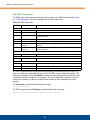
Pigeon Point Systems (PPS) Extension Commands
The MMC firmware supports a set of PPS extension commands that are used to control and
monitor the carrier Intelligent Platform Management Controller (IPMC) state over the serial
debug interface. These commands are used to read the MMC status, implement graceful
payload shutdown, etc.
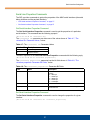
The PPS extension commands are implemented as OEM IPMI commands with network
function codes 2Eh/2Fh and message body transferred in the same manner as for raw IPMI
messages (see “Raw IPMI Messages,” on page 53). Figure 4-1, “PPS Extension Command
Request,” shows an example of a PPS extension command request:
Figure 4-1: PPS Extension Command Request
[B8 00 01 0A 40 00 12]
Data
PPS IANA
Command Code
rqSeq (00h) / Bridge (00b)
NetFn Code (2Eh) / LUN (00b)
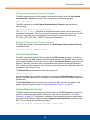
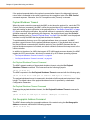
Figure 4-2, “PPS Extension Command Response,” shows an example of a PPS extension
command response:
Figure 4-2: PPS Extension Command Response
[BC 00 01 00 0A 40 00 34]
Data
PPS IANA
Completion Code
Command Code
rqSeq (00h) / Bridge (00b)
NetFn Code (2Eh) / LUN (00b)
54