1
PE0401 Evaluation Kit
6.4.3
PE0401
Check Analogue Path and Set Output Gain
Write 0x03E1 to $C0 (Powerdown Control)
Write 0x410C to $B0 (Analogue Gain)
Write 0x0001 to $CF (Test Mode)
Apply a differential 1kHz, audio signal across the inputs, IP1 (J2, pin 1) and IP2 (J2, pin 2), at a
level of 0dBm between them.
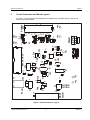
The measured differential level between the IP1FB and IP2FB pins can be used as a reference
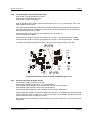
for further measurements. The diagram shown below indicates the positions on the PCB where
these measurements can be made.
Check the audio signal coming out of the AUDIO OUT pin (J2, pin 11).
The level should be -9.6dBm.
Check the audio signal coming out of the MOD1 pin (J2, pin 7). The level should be -6.0dBm.
Check the audio signal coming out of the MOD2 pin (J2, pin 9). The level should be -12.0dBm.
The MOD1 and MOD2 outputs should have a DC bias level of approximately 1.65 volts.
IP2FB
C18
R3
C9
C3
R9
+
JP1
C23
C15
C14
JP4
R22
R24
R25
+
R13
R23
U1
C19
C22
C21
C20
R12
R11
R10
C13
C12
C1
JP2
C4
C8
R2
C17
R6
C5
R1
C16
R5
TP4
J2
TP5
C2
R4
TP1
IP1FB
Figure 4 Measurement points for IP1FB and IP2FB signal levels
6.4.4
Generate Two External Digital Clocks
Write 0x0021 to $C0 (Powerdown Control)
Write 0x1900 to $AB (System Clock 1 PLL Configuration)
Write 0xE040 to $AC (System Clock 1 Reference and Source Configuration)
Write 0x0E00 to $AD (System Clock 2 PLL Configuration)
Write 0xE040 to $AE (System Clock 2 Reference and Source Configuration)
With the default 6.144MHz clock input, a digital clock frequency of 4.096MHz should be observed
at the AUX/SYS CLOCK 1 output (J3, pin 19) and a frequency of 16.384MHz should be observed
at the AUX/SYS CLOCK 2 output (J3, pin 20).
Now write 0xC040 to either $AC or $AE registers, to turn off the CLKOUT1 or CLKOUT2 outputs,
respectively.
© 2008 CML Microsystems Plc
18
UM0401/4