1
User Manual
contents
1.
APPEARANCE ........................................ 6
2.GETTINGSTARTED..
2. 1
..........7
SIM cARD rNSTALLArroN......... ............... 7
2.2 MsN{ony CARD TNSTALLATToN ................ 7
2.3 BnrrBny TNSTALLATToN .......................... g
2.4 CuancrNc THE BATTERy......................... 9
2.5 BArrERy usE........................................... 9
2.6 PIN
copB
........................... 9
3. BRIEFINTRODUCTIONTOYOUR
DEVICE
................9
3.
I Ceu rBy/OK KEv.................................
9
3.2 PowBnou/oFF KEy, ENo cALr, cANcEL
KEY..............
.......................... 10
3.5 NuuBnrc KEys.............................,........
1
0
3.6 LeNcuLcE AND rNpur METHoD............. I
1
3. 7
INcorraruc cALL MoDE ........................... I 1
3.8 STK
Senvrcr
...................12
3.9 INcourNc CALL GRoups ....................... 12
3.10
MeTmcACALL
.............12
4. BASIC OPERATIONS.............................
oN................
4.2 Swrrcu oFF...............
4.1
Swrcu
14
.......14
....... 15
4.3 Suonrcur FrrNCrroNS .......................... 1 5
4.4 MaxB carI,s.........................................
4.5
Aorusr necErvER vor,urraB ...................
I5
1
6
4.6 ANswen cALLs ..................................... I 6
4.7 DAr/SpsED DrAL .................................. I 6
4.8 SBND DTMF
srcNer..
...... 17
4.9 CALL HoLD.................. ............ -............. 17
-2-
Safety and performance
Emergency services
In any country, if you want to make emergency call,
I
dial
ll2
ANote : As determined by the nature of cellular
network, not all emergency calls can be guaranteed
success.
Mobile phone
Mobile phone contains sophisticated eloctonic
circuitry, magnets and battery systems and should
be handled with care, especially note following
points:
r) Your mobile phone will
generate
electromagnetic fields; do not put it near the
magnetic storage medium like computer disk
6APPENDIX I
30!
CovnrroN reurrs ANALysrs ........................
3
0
AaeREvrATroNS EXPLATNED .......................
3
I
near.
a WIf
the battery is damaged, avoid contact
contact with skin,
wash with plenty of wateq if necessary, should
seek medical help.
with things
inside. If
The manufacturer has the final interpretation ofthe
manual.
1
2.Getting started
2.1 SIM card installation
Remove the back cover by pressing down slightly
on the back cover and sliding it in towards the base
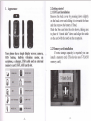
Appearance
o
!t
!8
if fitted.
Slide the Sim card into the slot shown, taking care
to place it "circuit side" down and align the notch
on the card with the notch on the receptacle.
and then remove the battery
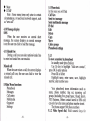
Your phone has a single display screen; camera,
SOS button, built-in vibration motor,
an
earphone, a charger, USB cable and an external
memory card (T-FLASH card) slot.
ts
'l
wRArrcffi
E@rcMNRTEO
l&l
im
s
q
LONO
RING MODE
T19SED CALL
I,
tsArT8Y CAPAOTY
2.2 Memory card installation
If extra storage capacity is required you can
install a memory card. (This device uses T-FLASH
memory card).
2.3 Battery installation
Remove the back cover by Screwdriver
2.4 Charging the battery
New battery will achieve optimal performance
after fully charging and discharging several times.
2.5
Battery use
Warning : Any kind of battery short circuit may
cause explosion, fire or personal
serious consequence!
2.6
injury and other
PIN code
PIN1 code :the personal identity code to enter
it can prevent others from using your
SIM card without your permission.
SIM card,
PUK and PUK2 code (8 disit)
To change the blocked PIN-code. PUK code
(personal unblocking key) is needed. To change
the blocked PIN2 code. PLIK2 code (personal
unblocking key) is needed.
If these two codes are not provided with SIM
card" ask your local service supplier.
Waming
: If you input the wrong PIN code
three times, SIM card will be blocked. please
contact the network operator for help decoding.
3. Brief Introduction to Your device
3.1 Call keviOK Kev
"the
call lwhen phone number is
Used tb initiate
input or already in the phonebook), also used to
answer the call. ln standbv mode. oress this kev to
display recent citt
i'ecords '(all
received\missed\dialed numbers, can display up to
60 numbers); in standby mode, pressing the key
twice will dial the last number called. .
3.2 Power on/off key, End call, cancel key
Long press the key for 2-3 seconds to switch
on/offthe phone.
3.5 Numeric keys
In standby mode, l-9 keys enter numbers and
characters, to make speed dial (once a number has
been allocated). Press any key of 2-9 for more than
2 seconds; you can quickly dial the numbers in
speed dial list.
Note
:
long press"l" key
in
standby mode
means call voice mail service; this number needs to
be set to voice mail center number in advance.
0 Key
Press for 2-3 seconds to enter Silent mode or
back to General mode.
Press when in camera mode to take pictures
"
Press when in text mode to enter a space.
#. In standby mode, long press
"#",
you can
dial a special family number (male). On this
key you can see a male face silhouette for easy
speed
reminder
* In standby mode, long press
you can
speed dial a special family number (female). On this
"*",
key you can see a female silhouette for
easy
reminder
In number dial mode, continuously short press
**" key,
you can enter either "+", "P" or "W"; "
P &W" is to call an extension, "+" is for
intemational calls.
Tip : the difference between "W. P" is that, P is
to pause for 3 seconds and then send DTMF
directly, W will have a window pop up asking
the user whether to send DTMF.
3.5.r
Keypad human voice response
You can hear numbers called in human voice when
you press each key.
The phone is default to Human voice
off
To set to on, Menu-settings-User profrles-(select
profile like General) customize-select tone
settings-kelpad- select Human voice or Tone or
Click or Silent.
3.6 Language and input method
. English is the default
3.7 Incoming call mode
Your phone has built-in vibration andbuzzer;
you can set the following call patterns in profiles:
*trl
rt'{
Ring
switchboard first, then the extension. If you
enter a phone numbeq and insert "P" betw'een
Vibrate
Vibrate then ring
Vibrate and ring
3.8 STK Service
STK Service is SIM card toolkit, specific menu
items are determined by SIM card and rietwork.
3.9 Incoming call groups
Phone groups can be divided
into family,
friends, colleagues, important people, others and so
on. IJsers can set di{ferent ringtones for different
groups.
Making a call
Making a call. the simplest way to make a
phone call is to use numeric keys to enter the
3.10
O
i
O
I
switchboard number and extension number, the
will dial it for you automatically. The
way to insert "P" is as flollows: continuously
preis "*"' key lor three times (then the scree'n
will disolav "P").
Make fixed telephone extension (without "+")
Phone number -l "P" textension number + call
phone
phone numbeq and then press Call key. If you
need to chanse or correct a number. olehse niess
end key to d6lete it. The screen will'display call
animation when dialing and display talk status
information when connected.
Press end key to disconxect.
Make domestic phone call: area code - phone
number - call key
Make intemational phone call
Some fixed telephone extension cannot
through directly, you need to dial
get
ihe
i
key
Emergency call
In any country using digital GSM network,
if
you af,e in network coverage (you can check the
network signal indicator on the top left of the
screen), you should be able to call emergency
services If your ISP does not provide roaming
service in the region. the display will show "can
make emergency calls (EMERGENCY CALLS
ONLY)", to tell you can only carry on that call.
If you are in network coverage, even without
the SIM card, you can make emergency calls. In
Australia you can call 000. Mobile phones can
also use
, 112 (emergency call) service, provided by the
network operator services, if different, consult the
netvvork operator!
IMEI
Intemational mobile phone identification
number. Switch off the phone and remove the
It is
battery; you can see this number printed on the
barcode label on the back of the phone. This
number is also stored in the phone, switch it on and
"* # 06 #'to
enter
4.
display.
4.3 Shortcut functions
Basic operations
4.1 Switch on
Press Power key for 2-3 seconds to switch the
phone on. If SIM card has no password, the
screen will display power-on animation,
Ifthe screen displays "please insert SIM card",
switch the phone off, check whether your SIM card
is correctlv installed or not.
Insert'SIM card, the phone will automatically
verifo whether the SIM card is available or not, then
the sLreen will display following prompt in order:
you
1) "enter the phone lock password "--if
2)
3)
4.2 Switch off
If want to switch off the phone, long press end
key until the screen displays power-offanimation.
In standby mode. press Up key to scroll
through and select the shortcut functions. Press OK
kev to enter the function.
" l.Camera
2. Search contacts
3. SOS Emergency settings
4.
4.4 Make calls
I
enable the phone lock
"enter
PIN"--
ilyou
enable SIM lock
"no service"-- ni:twork register fail,
the
phone cannot perlorm network services
4) "emergency calls only"-- register to other
network, only allowed to dial 000 or 112
5) "searching"-- the phone is searching for
network,
Note : Ifyou do not know PIN code, contact your
network provider.
The default phone password is 001122".
Alarm
5. Write message
6.User profiles
Enter phone number on the kelpad (if enter
wrons character. press end kev to delete), press
call liev to starl the call. To i:nd or cancel the
call, pri:ss "cancel" or power key;
I Use the phonebook to make call: enter
phonebook in standby mode by short press end
key, find names/phone number, press call key to
start the call-
I
Redial the recent dialed phone number: in
standbv mode. oress call kev. vou can view last
phone'numberd and name'list. Scroll
to
the
Note:
desired number or name, press call key to start
call.
4.5
Speed dial set up, Menu - Organiser umliers-set numbei-Select numb"er (2-9)
or (* female familyl or (# male family) -edit-select
number from phonebook-OK.
To change or delete a number select number as
above and - options
Family
Adjust receiver volume
During talk, adjust the volume by press + -
volume keys (left side keys).
4.6 Answer calls
When there is incoming call, it
Note. To enable speed dial;menu
family numbers-status-on or off.
Default is 'On"
will prompt in
the way of ring\vibrateVing and vibrate\ring'then
vibrate, accordiig to the pho-ne settings
To answer a call, press Call key.
Any key answer can be set in Menu- Settings
-User Profiles-(select profile)
customise-answEr
mode- any key on/off
To refuse a call, press power key
If you ave applied the calling
number
identification service, the caller's phone number
will be displayed on the screen. If the number is
stored in the phonebook, the name corresponding
to the number will be displayed on the scredn.
4.7 DiaVSpeed
dial
Your phone has 9 speed dial keys. You can
customize these keys to correspond to the phone
number. In standby mode. long press [2-9] key, you
can quickly speed dial a calll [] key is the specific
number for voice mail speed dial, once set with the
voice mail number, it can be used.
N
\
I
-
organizer -
4.8 Send DTMF signal
When set "send DTMF sienal" function. durins
a call. when you press nume"ric keys and **" "#*
keys, they will be sent to the receiver in the form of
DTMF signal. If you do not staf,t this function, dial
extension number and some other functions may
nol achieve. Default is on.
4.9 Call hold
If you have the "call hold" service, during a
call click "option", function menu appears
follows:
O Hold sinsle call
O
J
I
O
O
End sinsTe call
New cail
Phonebook
Messase
Sound"recording
as
I
.
Mute
DTMF
Note : Some menu items only arise in certain
circumstances, or need local netwbrk support, such
as "new call".
4.10 Message display
sMs
When the user receives an unread short
message. the screen displays an unread message
icon; the user can click to read the message.
4.11 Hands free
During a call you can select options-hands free
to enter into hands free conversation.
Missed call
When the user misses a call, the screen displays
a missed call icon, the user can click to view the
missed ca1l.
S.Main Menu functions
Phonebook
Messages
Call centre
Multimedia
Organizer
Settings
5.1 Phonebook
In this menu you will find
CallView
Send text message
Send multimedia messase
IP dial
Edit
Delete
copy
Move
Caller groups
Phonebook settings
5.1.1
To store a number in phonebook
In standby mode press End key
Use Up key to highlight "Aitd new contacr",
press OK to enter options
Press OK to Select
Highlight nam€, enter name, save, highlight
number, enter number save
Your phonebook stores information such as:
name. phone number, ring set, incoming call
groups (including five grouftypes:, friend, f,amily,
VTP, Business. Others contacr itored in SIM caid
can only have the name and phone number stored.
The phone support 500 plone numbers
5.1.2 Make Speed dial, Hold numeric keys for
- 19-
more than 2 seconds to initiate the preset shortcut
speed dial.
Menu-Settings-call settings-caller lD-select
Ouick
search
-
In standby mode short press End key to
enter
phone book or menu - phondbook
' Enter the first lener of stored name to locate
besinnins of the names with selected lener' For
eximpleio
search "Smith" enter "S".
Search contact
Enter the name of the contact, click "search" in
the phonebook, and find the matching record.
Add contact
In SIM card: a record includes name and phone
number.
In
a
phone:
record includes name. phone
number, ringtone select, incoming call groups.
Copy all copy all the records in SIM card or in
the ohone.
belete: delete all the records in SIM card or in
the ohone. or delete one bY one.
incoming call groupl: set call ringtone and
group members for the five gtouPs.
Settings
Storase status: view the current use
of
the
phone
ohone bo"ok. including StM card and
inemory. Disptay form-at: "used capacity / total
capacity."
phone book settings-my numberTo enable own number display or not.
'Owir number enter:
Phone book
-20 -
-
options -
hide or send. Delault is Send
5.2 Message
In this menu vou
will find
Write messale
Inbox
Outbox
MMS
Broadcast message
SMS settings
5.2.1 Send a message Menu-phonebook-options-send text message5.2.2 Write messages
Press "#" key to switch the input mode
(displayed in top ieft of screen), press n*" key to
select the symbol irput, up\ down key to sdlect
character, press to enter the character Press
up\down key to move the cursor, and then back /
delete key to delete the corresponding words and
characteri,
5.2.3
Inbox
You can view received short messages in inbox.
5.2.4 Outbox
When sending a message, select "save and
-21 -
send", the message will be saved to outbox; can
also save the texi you edit directly to outbox. in
Missed calls
Dialed calls
Received calls
Delete call logs
Call timers
Call lost
it is shown as "no number", that is, no
transmission destination; if fail to send your
message, the message will be saved to outbox. You
outbox
can op-erate messages saved in outbox: to send. edit.
deletd, copy to the phone. move to the phone,
delete all, birpy all. move all. use number.
Commonly used phrases
Edit or deiete the commonly used phrases
5.2.5
as
photos.
received calls and the phone numbei dialed, but also
records the time of all calls.
Dialed calls: you can view the last 20
phone
numbers you hdve dialed from the list.
Received calls: You can view the last 20 phone
numbers which have been answered from tlie list
5.2.6 SMS settings
You can set some parameters of SMS in this
menu.
Status setting:
*
*
Your phone can record not only missed calls,
Missed calls: you can view the last 20 missed call
phone numbers
MMS
Multimedia message service
Send messages including multimedia such
Text messaging counter
GPRS counter
-status:
Storase
vou can view
mem5ry smtus of-SlM card\Phone.
the
SMS
Prefen6d storage: set SMS storage place
(SIM card\phone).
5.3 Call centre
In this menu you
will find
(nefwork service).
Delete call records: to delete the recent calls lists.
SMS Counter: View record of sent messages and
received messages.
5.4
Multimedia
To increase the size of the memorv. see Gettins
Started-Memory card installation. Silme functioni
may not operate without additional memory.
In this menu you will find
File manager
Camera
-23
Image viewer
Audio player
5.4.5 Sound/ voice call recorder. vou can use to
record your notes or conversations.
Sound recorder
FM radio
5.4.1 File manager, View memory used/unused in
Phone and TF card
Use up/down keys to select Phone or Memory card
5.4.2 Camera, select OK to open camera or use UP
shortcut key.
Press OK again to enter camera settings and to view
photos.
Press shutter release key (0) to take picture
Use -| or side volume key to adjust exposure. You
can view exposure in the 1eft of screen.
Use Up/Down key to adjust Zoom setting. You can
-
5.4.6 FJt4 Radio, Select "options"
channel list..
Slide FM key on right side ofphone to tum on or
off.
5.4.7 Connect
to
PC. To download
5.5 Organizer
In this menu you can find
Services
SOS Emergency setting
Speed Dial setting
Calendar
5.4.4 Audio player, play downloaded music files or
ring tones. Additional memory may be required.
or
uoload
pictures music and data, connect the USB ca6le to
tle mini USB port on the phone and connect the
USB to the computer.
The computer screen will show Mass or Com, select
Mass. Follow the on-screen prompts to open the
files. If you have a TF storas-e card in voui nhone
then select either TF or p-hone stora'se oh the
computer to view the files lbbth will be dlsplayed in
'my computer'.
view setting in top of screen.
5.4.3 Image viewer, view photos and enter options
View, Browse style, Send, Use as, rename, Delete,
Sort by, Delete all files, Storage (memory card or
phone)
to view and
to set u!
select from channel list. aui'to search
Alarm
Calculator
5.5.1 Services.
this i. yotr network dependant functions'
5.5.2 SOS Emergency setting
Select Status onbr off, this can also be done trom
;1i;rd"ta:'ia you select status "off' then the SOS
button will not operate.
SOS numUer, yoil can enter up to 3 numbers
Edit SOS SMS message.
NOTE. When SOS button is pressed the phone will
immediatelv send SMS emergency message to any
mobile nuniber stored in SOS memory
The phone will then ring the first number stored and
rr ,d *i*o. it will riig stored numbers 2 and 3
until a number is answered.
NtirE. cii..t SoS operation with numbers after
thev have been entered-and saved.
ii;a; bt ;;are of this when selecting SoS
numbers to enter.
5.5.3 Speed dial and Family numbers
numbers
Menu-6rganiser-familY
'd;;il,;31..i;on"
toi:tautt setting) to enable speed
dial.
ilJnumber. The speed dial numbers from 2 -9 can
be set.
3.t.ii
tpe"O dial kev number and then the -number
iin te ietecteo from the phonebook'
;;L;ilI*.4
*
Familv special number (Female) and # (Male) can
be entered in the same waY.
5.5.4 Calendar. Select to view calendar for month
oiintJr date for viewing other months'
5.5.5 Alarm, you can set and edit up
to
five
separate alarm settings
5.5.6 Calculator. The calculator is designed for
simple use and has limited accuracy'
5.6 Settines
In this meiu You can find,
User Profiles
Phone settings
Call settings
Nerwork settings
SecuritY.settings
ConnectlttY
Restore facfory settings
Profiles
5.6.1 User-t.i..iprofiles
ili'ria
for General,
Mee$ng'
Outdoor, Indoor, Headset. Can also be set nom
the Shortcuts
or
Select "activate" to activate the^required setting
;iiustomize" to change details tbr each settlng as
follows.
is abc. You can change when inputting text by using
the # key.
TONE SETTING
Change incoming call tone, alarm tone, Power on
tone. Power off tone, Message tone, Kelpad tone
(includes voice option)
VOLUME
Adjust Ring tone and Key tone volumes
ALERTTYPE
Set for Ring Only, Vibe Only, Vibe and Ring, Vibe
then Ring
RINGTYPE
Set for Single ring, Repeat orAscending
EXTRATONE
Select option of a tone for a Waming, Error, Camp
on, Connect
ANSWERMODE
Select "Any key answer" on or off. If select "off'
then only pressing the OK answer key will answer
an incoming call. If select "on" then press any key
to answer call.
5.6.2 Phone settings/time and date
Time and date setting
Signal light, tums on or off the blue signal
indicator light.
Schedule power on/off. Up to four settings
can be made.
Language, Default is English
Preferred input method. For SMS the default
Display, you can change screen saver, power
on and off displays, select if date and time to be
shown (default is on)
Flight Mode. select Flight or Normal mode
Misc setting, LCD backlight, set brightness
(select and use + or
- side keys to adjust) For time
on, to adjust time on, select and use * or - side
keys.
5.6.3 Call settings
Caller ID, display or hide
Call waiting, activate or deactivate
Call divert. set up divert criteria
Call barring, set call barring criteria
Auto redial, set on or if service provided.
IP dial, network dependant
Call time display on or off
Call time reminder, can set to off, single or
periodic.
5.6.4Network settings
Select network, automatic or
manual
selection.
5.6.5 Security settings
Sim security settings, select Sim lock or
change password.
Phone lock, select
required.
on or off,
password
3ad./poor reception
Auto keypad lock, can select keypad to lock
"on" after
set time or none at all. Default is "none'
Change password, phone password can be
changed. Need input old password first.
5.6.6 Connectivity
Select data account, add or edit details. Requires
GPRS settings to be supplied by operator if not
preset in phone
5.6.7 Restore
?hone can't call
rut
l. The battery may havc
lattery is
:harging
:ver-discharged, connect
the
2. Battery
has
nol :harger and wait 30 minutes tc
ree ifit starts to charge. ;
performance
leteriorated.
l.signal is too weak, or around
settings. Default password is I122.
radio interference;
2. Check SIM card is installed
;orrectly, SIM card is not
:he
lannot connect
Common faults
service
lheck dialins not prohibited
factory settings
Appendix I
lheck you have
:onnected
You can restore settings to the default factory
6
Check the signal strength
indicator Try a better area
lCheck signal strength
he network
tc
Fault Diagnosis
Possible Cause
lamaged? Please contact and
:heck with the network service
1.The battery has no power;
2. The
orovider.
Cannot switch on
battery placement is
incorrect.
SIM card error
I.SIM card is dirfy, clean the
SIM card;
2.re-install the SIM card;
3. SIM card is damaged, replace
the SIM card.
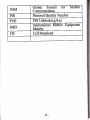
Abbreviations explained
SMS
Short Message Service
MMS
SIM
Multimedia Message service
Subscriber ldentity Module
GSM
PIN
PUK
t_
Global Svstem tor
Moblle
Communicition
Personal Identity Number
IMEI
PIN Unblocking Key
International Moblle Equlpment
Identitv
CB
Cell Broadcast