1
HIPE Owner's Guide
Build 13.0.5130
• If you opened the file in a previous HIPE session, choose it from File → Open Recent.
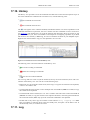
Running scripts from the Editor view.
toolbar:
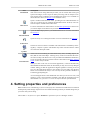
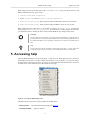
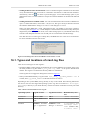
You can run scripts with the following four icons in the
•
Run: runs either a single statement of your script (the one indicated by the arrow) or all the
selected statements at once.
•
Run all: runs the entire script.
•
Stop: stops execution of the script. The current statement of the script will be completed before
the script stops running. This can lead to a delay before the script stops.
Running scripts in debugging mode. This mode allows you to pause the script at certain locations,
and inspect and change the value of any variable. This is useful for finding the cause of problems in
the script. See the Scripting Guide for details: Section 1.37 in Scripting Guide.
Running scripts without opening them. To run a script without opening it, right click on it in the
Navigator view and choose one of the following options:
• Run Script. HIPE runs the script. Variables generated by the script appear in the Variables view.
This corresponds to the following command, where path/to/myscript.py is the path to the
script:
execfile("path/to/myscript.py")
• Run in Background. HIPE runs the script. Variables generated by the script do not appear.
This corresponds to the following command, where path/to/myscript.py is the path to the
script:
bg('execfile("path/to/myscript.py")')
Running a script in the background can be useful, for example, when you have a script that generates a
complicated plot. You want the plot to appear, but without the related variables populating the Variables view.
10. Running scripts outside HIPE
HIPE's main executable (hipe) file substitutes (from HIPE 12.0) the jylaunch standalone script interpreter.
Note
Please note that, in this section, and to avoid the ambiguity of only changing the case
between the GUI version (HIPE) and the command line version (hipe), several expressions
are used to explicitly refer to the command line version:
• hipe batch command
• hipe as (a) batch processor
• hipe as (a) script interpreter
• batch version of hipe
• batch-mode hipe / hipe in batch mode
15