1
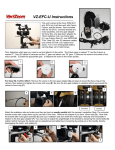
Connecting battery to TFT monitor:
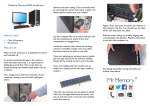
1. Attach the battery to your TFT monitor by
screwing the integral ¼”-20 screw into the
threaded hole on the bottom of the monitor.
If you plan to mount the monitor on top of
your camera, you can screw the swivel
shoe mount into the bottom of the battery.
2. Connect the 12VDC/1A step-up cable to
the battery using the plug marked “Battery”.
Plug the yellow-tipped end of the step-up
cable (marked “12V DC Output”) into the
power jack on your TFT monitor.
3. The battery should power your TFT monitor
for approximately 1.5 - 2 hours. You can
stack two or three batteries underneath the
monitor by screwing one into the monitor
and then screwing another battery into the
bottom of the first. When the first battery
runs out, simply switch the plug to the fresh
battery.
SPECIAL NOTE ABOUT POWERING
THE TFT MONITOR WITH THE AC ADAPTER:
THE AC ADAPTER INCLUDED WITH YOUR VZ-702M KIT WILL POWER THE VZ-TFT
MONITOR DIRECTLY. TO POWER THE MONITOR DIRECTLY FROM THE AC
OUTLET, SIMPLY PLUG THE ADAPTER INTO THE WALL SOCKET AND INSERT
THE OUTPUT CONNECTOR DIRECTLY INTO THE MONITOR POWER JACK. DO
NOT USE THE CHARGING INTERFACE CABLE TO POWER THE MONITOR! THE
CHARGING INTERFACE CABLE SHOULD ONLY BE USED TO CHARGE THE
BATTERY.
Notes:
-
It is normal for the charger, adapter and battery to become warm during operation.
If either the charging interface cable or step-up cable do not seem to be working (the LED
does not illuminate), simply unplug and re-plug the components so they can reset.
Unplug the battery pack when not in use as connected devices will drain power even when
turned off.
All batteries naturally discharge over time even when not in use, so recharge the battery within
a day of planned use for maximum power.
The VZ-702M battery kit is covered by a 90-day warranty (parts/labor). Please retain your receipt for warranty
verification. All returns and repairs must be accompanied by a Return Merchandise Authorization number
(RMA #). Contact us at 888-826-3399 / 512-219-7722 or at www.varizoom.com