1
Chapter 5: Configuring IPSec/VPN Tunnels ............................................................................... 58
5-1
VPN/IPSec Introduction ............................................................................................ 58
5-2
VPN Application Types ............................................................................................. 60
5-3
VPN / IPSec Setup .................................................................................................... 61
5-4
Example1: Tunnel between Two VPN Routers ....................................................... 65
5-5
Example2: Tunnel between VPN Router-and-VPN Client with Fix IP ...................... 65
5-6
Example3: Tunnel between VPN Router-and-VPN Client
with dynamic IP ..................................................................................................................... 66
Chapter 6: Configuring IPSec on Windows 2000/XP .................................................................. 67
6-1
6-2
6-3
Environment .............................................................................................................. 67
Steps in Windows 2000/XP ..................................................................................... 68
Steps in ADSL Integrated Gateway ......................................................................... 80
Chapter 7: Security ..................................................................................................................... 82
Chapter 8: Trouble Shooting ....................................................................................................... 88
Hardware .............................................................................................................................. 88
Client Side (Computers) ........................................................................................................ 89
Appendix A: Frequently Asked Questions .................................................................................. 90
Wireless Questions ............................................................................................................... 91
Appendix B: Setting up TCP/IP Protocol ..................................................................................... 95
Installing the TCP/IP Protocol for Windows .......................................................................... 95
Fixed IP Addresses Configuration ........................................................................................ 98
Appendix C: Macintosh Setup ................................................................................................... 100
Appendix D: Technical Specifications ....................................................................................... 102
Specifications for Wireless Model only (NB5580W) .......................................................... 102
General Specifications for both NB5580 & NB5580W ....................................................... 102
Appendix E: Cable Connections ............................................................................................... 104
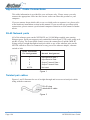
RJ-45 Network ports ........................................................................................................... 104
Twisted pair cables ............................................................................................................. 104
Straight and crossover cable configuration ....................................................................... 105
RJ11 connector and cable .................................................................................................. 105
605 to RJ-11 adapter ........................................................................................................... 106
USB cable ............................................................................................................................ 106
Appendix F: EM1100 ADSL Microfilter ..................................................................................... 107
Appendix G: EM1180 ADSL POTS Splitter Installation Guide .................................................... 108
Features .............................................................................................................................. 108
Location for Installation ....................................................................................................... 108
Wiring Instructions .............................................................................................................. 109
Wall Mounting Instructions .................................................................................................. 110
Appendix H: Glossary ............................................................................................................... 111
Appendix I: Registering your NetComm Product ....................................................................... 115
Contact Information ............................................................................................................. 115
Product Warranty ................................................................................................................ 119
Rev.1 - YML686
NB5580/W User Guide
www.netcomm.com.au
Page 3