1
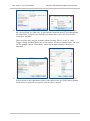
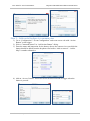
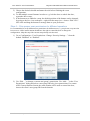
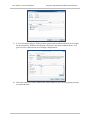
HOW TO – Axis CommunicationsIntegration Guide AXIS Camera Station and AXIS A1001 Step 3 – Add control buttons to a camera view 1) Go to “Configuration”/ “Event Configuration” and create a new rule with “Action Button” as the trigger. 2) Select “Command button” in “Add Action Button” dialog. 3) Enter the name and instruction for the button, choose the camera views on which the button should be added from the dropdown list besides “Add to camera”. “Add to Map” is another alternative. 4) Add an “Access Control” action and select the desired action to trigger when the button is pressed. Rev: 1.0, Last updated: 27/05/2015 4