1
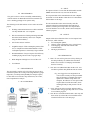
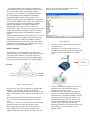
2 VI. INPUT The inputs to M.O.V.E come from the GPS module and the OBDII connection to the car, stored on the SD card. III. DELIVERABLES The goal is to have a device successfully communicating with the vehicle via Bluetooth PAN wireless network and have a working prototype of our system ready. The following are the deliverables we have at the end of the project: Working communication between vehicle and ELM 322 chip and SD card - user computer. Wireless transmission of GPS positioning and OBD data stored on the memory card to user computer using the Xbee module(s). GUI for the end user interface. Insightful analysis of fuel consumption pattern of the user, in comparison with standard database of fuelconsumption patterns as released by US government. Recommendations of ways to improve fuel efficiency including laying out best routes on google maps. Block Diagram with high level view of M.O.V.E User Manual IV. USER INTERFACE The user interface consists of a GUI giving the user an array of different options like viewing route using GPS data (google maps API), view daily/weekly/monthly fuel analysis reports, to chose their own car from a drop down menu, for a better, more comprehensive analysis. V. BLOCK DIAGRAM The requested data will be transmitted to the user computer and stored in a local database when the receiver-transmitter Xbee modules are in range. The microcontroller on the control circuitry reads file contents on the SD card and transmits that character by character, Arduino processing on the user end puts these received characters in a text file, which is then read by the software program. VII. OUTPUT Output will be desired function of the received request from the end user, which includes: fuel consumption pattern, analysis of fuel consumption over a period of time, route mapping, with most fuel efficient route recommendation, Driving style inferences. VIII. USER MANUAL M.O.V.E. users will log into user GUI by clicking on the link provided by our software that will allow them access to M.O.V.E. homepage and monitor their fuel economy. Once users are authenticated then an M.O.V.E. user will able to perform many different tasks as needed. o E.g. once logged in a user might desire to view his fuel economy over the past month. Since all the data is constantly stored and updated on a database setup on the user computer, the software we write pull out the required data out of the data make, draws meaningful analysis and presents it to the user. A user will also be able to navigate and map out the routes he takes using google maps API we’ve created in our software program. Once the user is finished with all tasks a user may end their session by selected the exit icon/link that will exit them for their M.O.V.E main page.