1
BOSS 3.0 Software User’s Manual
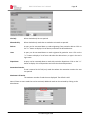
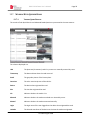
Email Address
Page 17
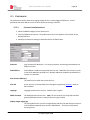
Email address or addresses associated with the user. BOSS alerts for the user are sent
to the email addresses specified here. Multiple addresses should be separated with a
comma or a semicolon.
Alert Notification By
A user can be configured to receive BOSS alerts through the application (Dispatch),
Email, or both mediums. Click the << or >> buttons to cycle through the options,
stopping at the desired selection.
Notification Timeout
The cutoff time from the time of when a hit occurred after which an alert will no longer
be sent to the user. For example, if the notification timeout is 20 minutes and a plate
of interest is detected at 12:00pm, notification is not sent to the user after 12:20pm.
This timeout prevents alerts being sent for events that are delayed in arrival to BOSS.
Language
The language preference for the user. The default value is English.
Displayed Images Height
This setting defines the size in pixels of the images (Reads and Hits) that will display for
the user in the Dispatch and Reads sections.
Expiration Date
Date for the User account to automatically be disabled. Simply leave this field at its
default value (30 years from current date) if no expiration is desired.
PAGIS Password
The PAGIS password for the user. Note: The user must be in a Group that has been
granted PAGIS permissions in order for the user to user to login to PAGIS.
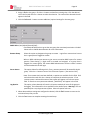
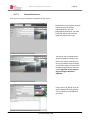
When advanced User settings are configured as desired, click the Back button to return to the
main New User Entry screen.
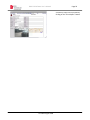
Click the Save button to complete creating the new User.
© Federal Signal 2009