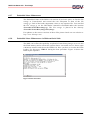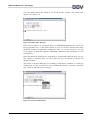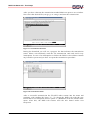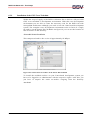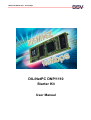
1
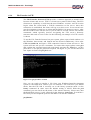
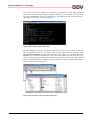
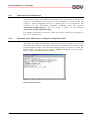
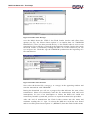
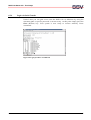
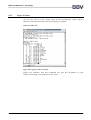
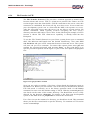
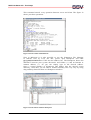
DNP/1110 Starter Kit – First Steps
DIL/NetPC DNP/1110
Starter Kit
User Manual
DNP/1110 Starter Kit – First Steps
Contents
1.
INTRODUCTION ......................................................................................................................4
1.1
1.2
Conventions used in this Document......................................................................................4
Main Features.......................................................................................................................4
2.
BOARD LAYOUT......................................................................................................................6
3.
BOARD COMPONENTS...........................................................................................................7
3.1
3.2
3.3
3.4
3.5
3.6
3.7
Power LED...........................................................................................................................7
Output LEDs ........................................................................................................................7
DIP Switches........................................................................................................................7
Serial Interface COM1..........................................................................................................7
10Base-T Ethernet Interface .................................................................................................8
RCM Jumper........................................................................................................................8
DIL-64 Interface...................................................................................................................8
4.
MOUNTING THE DIL/NETPC ................................................................................................9
5.
CABLE CONNECTIONS ........................................................................................................ 10
5.1
5.2
5.3
6.
Serial Link.......................................................................................................................... 10
Ethernet Link...................................................................................................................... 12
Power Supply ..................................................................................................................... 12
FIRST STEPS........................................................................................................................... 13
6.1
Using a Windows–based development System ................................................................... 13
6.1.1
Setup the Serial Link .................................................................................................................. 13
6.1.2
6.1.3
Checking the Ethernet Link ........................................................................................................ 15
Web Server Access .................................................................................................................... 16
6.1.4
Login via Serial Console ............................................................................................................ 17
6.1.5
Login via Telnet......................................................................................................................... 18
6.1.6
File Transfer via FTP ................................................................................................................. 19
6.1.7
6.1.8
Embedded Linux Maintenance ................................................................................................... 21
Embedded Linux Maintenance via HyperTerminal/Serial Link ................................................... 21
6.2
Using a Linux–based development System ......................................................................... 23
6.2.1
Setup the Serial Link .................................................................................................................. 23
6.2.2
6.2.3
Checking the Ethernet Link ........................................................................................................ 25
Web Server Access .................................................................................................................... 26
6.2.4
Login via Serial Console ............................................................................................................ 27
6.2.5
Login via Telnet......................................................................................................................... 28
6.2.6
File Transfer via FTP ................................................................................................................. 29
SSV EMBEDDED SYSTEMS
2
DNP/1110 Starter Kit – First Steps
6.2.7
6.2.8
Embedded Linux Maintenance ................................................................................................... 31
Embedded Linux Maintenance via Minicom/Serial Link ............................................................ 31
6.2.9
Installation of the GNU Cross Toolchain .................................................................................... 34
Appendix 1: DNP/1110 Pinout – JEDEC 64-pin DIL Connector (1. Part) ...................................... 39
Appendix 2: DNP/1110 Pinout – JEDEC 64-pin DIL Connector (2. Part) ...................................... 40
Appendix 3: DNP/1110 Memory Map............................................................................................ 41
Appendix 4: Using the Compact Flash (CF)-Interface .................................................................... 41
Appendix 5: GNU General Public License ..................................................................................... 43
Appendix 6: GNU Lesser General Public License .......................................................................... 48
List of Figures................................................................................................................................ 55
List of Tables ................................................................................................................................. 56
List of Appendixes......................................................................................................................... 56
Contact .......................................................................................................................................... 57
Document History.......................................................................................................................... 57
SSV EMBEDDED SYSTEMS
3
DNP/1110 Starter Kit – First Steps
1. Introduction
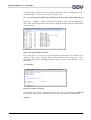
This document describes how to get started with the DNP/1110 Starter Kit. For
further information about the individual components of this Starter Kit you may
follow the links from our website at: http://www.dilnetpc.com
Our Website contains a lot of technical information, which will be updated in
regular periods.
For further technical information – like hardware description etc. – please check
out the DIL/NetPC Starter Kit CD-ROM, which is included in every Starter Kit.
1.1
Conventions used in this Document
Convention
Usage
italic
Filenames, as well as Internet addresses such as www.ssvembedded.de
italic
User inputs, command lines and pathnames
bold
New terms
monospace text Program code
Table 1: Convention usage
1.2
Main Features
Evaluation Board DNP/EVA2 (Special Version)
•
DIL-64 Socket for one DIL/NetPC DNP/1110
•
RS232 Serial Interface (COM1)
•
10BASE-T/100BASE-TX Ethernet Interface
•
8 User-Definable LEDs
•
8 Manual DIP Switches
•
1 Reset Switch
•
Wire-Wrap-Area
•
5VDC Power Input Connector
•
Null-Modemcable
•
Size 142 x 124 mm
SSV EMBEDDED SYSTEMS
4
DNP/1110 Starter Kit – First Steps
DIL/NetPC DNP/1110
•
Intel StrongARM SA-1110 CPU with 206 MHz Clock Speed.
•
32 MByte SDRAM Memory, 16 MByte FLASH Memory
•
10/100 Mbps Ethernet Interface
•
Two 16550 Serial Ports (one with all Handshakes)
•
20-bit General Purpose high-speed Parallel I/O
•
8-bit I/O Expansion Bus
•
5 Interrupt Inputs, 4 Chip Select Outputs
•
Programmable Watchdog Timer
•
JTAG IEEE 1149.1 Test Interface
•
In-System Programming Features
•
64-pin JEDEC DIL-64 Connector, 2.54mm Centers
•
3.3 Volt Low Power Design, Supply Voltage 3.3 VDC (+- 5%)
•
Supply Current 300 mA typ. at 206 MHz
•
Size 82mm x 28mm
SSV EMBEDDED SYSTEMS
5
DNP/1110 Starter Kit – First Steps
2. Board Layout
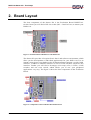
The base component of the Starter Kit is the Evaluation Board DNP/EVA2.
On this board you will find a DIL-64 socket (DIL = Dual In Line) to mount your
DNP/1110.
Figure 1: Evaluation Board DNP/EVA2 with DNP/1110
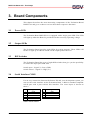
The Starter Kit provides all required basic hard- and software environment, which
allow you the development of individual applications for your DNP/1110. For an
instant connection to your hardware the Evaluation Board supports a serial COM1
interface, a 10Base-T Ethernet interface as well as a DIL-64 (DIL =Dual In Line)
interface. Further you will find a Prototype (wire-wrap) area, 8 LEDs, 8 DIP
switches and one reset switch, which allows you to test your peripheral
applications very easy. The figure 2 shows the base components of the Evaluation
Board.
Figure 2: Components of the Evaluation Board DNP/EVA2
SSV EMBEDDED SYSTEMS
6
DNP/1110 Starter Kit – First Steps
3. Board Components
This chapter describes the most interesting components of the Evaluation Board
DNP/EVA2 and gives a short overview about their respective functions.
3.1
Power LED
The Evaluation Board DNP/EVA2 is equipped with a single green LED. This LED
will light up when the Board is provided with the necessary operating voltage.
3.2
Output LEDs
The Evaluation Board provides eight LEDs for testing purposes. These LEDs will
flicker or light up to indicate traffic on the output ports PA0–PA7.
3.3
DIP Switches
The Evaluation Board has a set of eight DIP-switches that give you the possibility
to control the input ports PB0–PB7.
Switch open – Signal V in Low (GND)
Switch closed – Signal V in High (Vcc)
3.4
Serial Interface COM1
For an easy connection between the Starter Kit and your development system you
can use the serial interface on the Evaluation Bord. A RS232 standard compliant
Sub-D port with 9 pins realizes this interface. The exact layout is shown on
table 2.
Pin
1
2
3
4
5
Signal
DCD
RxD
TxD
DTR
GND
Pin
6
7
8
9
Signal
DSR
RTS
CTS
RI
Table 2: Pinout COM1
SSV EMBEDDED SYSTEMS
7
DNP/1110 Starter Kit – First Steps
3.5
10Base-T Ethernet Interface
The DNP/1110 is using a SMSC LAN91C111 chip that allows Ethernet
connectivity with a speed up to 100Mbps. The RJ45 Ethernet interface on the
Evaluation Board is just a simple connection over a transformer to the DIL-64
interface pins, which are connected to the SMSC LAN controller on the
DNP/1110.
3.6
RCM Jumper
Use this jumper to activate the RCM mode of the DNP/1110. The RCM mode
(Remote Console Mode) offers the possibility to control the PNP/1110 via
terminal program. To activate the RCM mode place a jumper cap on both pins of
the RCM jumper, so that it is short. If you remove the jumper cap, or place the
jumper cap on just one pin, the jumper is open and you are not able to use the
RCM mode.
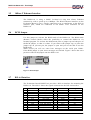
When closed you will see some boot messages on the serial port COM1.
If the RCM jumper is open, these messages are blocked. Figure 3 shows the exact
position of the RCM jumper onto the DNP/1110.
Figure 3: RCM Jumper
3.7
DIL-64 Interface
The Evaluation Board DNP/EVA2 provides a DIL-64 interface for mounting the
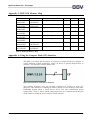
DNP/1110. The table 3 shows the signals connected to the DIL-64 interface.
Pin
1
2
3
4
5
6
7
8
9
10
11
12
SSV EMBEDDED SYSTEMS
Name
PA0
PA1
PA2
PA3
PA4
PA5
PA6
PA7
PB0
PB1
PB2
PB3
Usage
YES, LED
YES, LED
YES, LED
YES, LED
YES, LED
YES, LED
YES, LED
YES, LED
YES, DIP-Switch
YES, DIP-Switch
YES, DIP-Switch
YES, DIP-Switch
Pin
33
34
35
36
37
38
39
40
41
42
43
44
Name
RX+
RXRESOUT#
VBAT
CLKOUT
TXD2
RXD2
INT5
INT4
INT3
INT2
INT1
Usage
YES
YES
NO
NO
NO
NO
NO
NO
NO
NO
NO
NO
8
DNP/1110 Starter Kit – First Steps
13
14
15
16
17
18
19
20
21
22
23
24
25
26
27
28
29
30
31
32
PB4
PB5
PB6
PB7
PC0
PC1
PC2
PC3
RXD1
TXD1
CTS1
RTS1
DCD1
DSR1
DTR1
RI1
RESIN
TX+
TXGND
YES, DIP-Switch
YES, DIP-Switch
YES, DIP-Switch
YES, DIP-Switch
NO
NO
NO
NO
YES
YES
YES
YES
YES
YES
YES
YES
YES
YES
YES
YES
45
46
47
48
49
50
51
52
53
54
55
56
57
58
59
60
61
62
63
64
CS4#
CS3#
CS2#
CS1#
RDY
RD#
WR#
SA3
SA2
SA1
SA0
SD7
SD6
SD5
SD4
SD3
SD2
SD1
SD0
VCC
NO
NO
NO
NO
NO
NO
NO
NO
NO
NO
NO
NO
NO
NO
NO
NO
NO
NO
NO
YES
Table 3: Signals connected to the DNP/EVA2 DIL-64 Interface
4. Mounting the DIL/NetPC
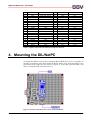
To mount the DNP/1110 on the Evaluation Board DNP/EVA2 set it carefully on
the DIL-64 interface onto the Evaluation Board. Please note, that the DNP/1110 is
positioned in the right way like shown in figure 4. After that, push the DNP/1110
down, so that the DIL-64 socket fixes it.
Figure 4: Position of the DIL/NetPC on the Evaluation Board
SSV EMBEDDED SYSTEMS
9
DNP/1110 Starter Kit – First Steps
5. Cable Connections
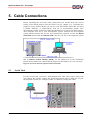
Before installing the necessary cable connections you should check the correct
setting of the RCM jumper onto the PNP/1110 (see chapter 3.6). Normally this
jumper is set by default. Before you can use your DIL/NetPC Starter Kit you need
a further Desktop- or Notebook-PC that act as development system. This
development system should run under MS-Windows or Linux in an ideal manner.
This computer will act as your development system. Between the development
system and the Starter Kit are two new connections required. At first the RS232
Serial Link and second the Ethernet Link. The PC will act as development system
and as Remote Console Monitor (RCM) for the DNP/1110 on the Evaluation
Board. Please make sure, that the RCM jumper on the DNP/1110 is set correctly.
Figure 5: Overview about the required cable Connections
5.1
Serial Link
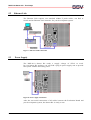
For the Serial Link, you need a Null-Modemcable. This cable comes along with
your Starter Kit. Please connect the Evaluation Board with a COM port of your
development system (for example COM1 or COM2) by using this cable.
SSV EMBEDDED SYSTEMS
10
DNP/1110 Starter Kit – First Steps
Figure 6: Serial Link Connection
SSV EMBEDDED SYSTEMS
11
DNP/1110 Starter Kit – First Steps
5.2
Ethernet Link
The Ethernet Link requires two standard 10Base-T patch cables, one Hub or
Switch and an Ethernet-LAN interface for your development system.
Figure 7: Ethernet Link Connection
5.3
Power Supply
The DNP/1110 Starter Kit needs a supply voltage of 5VDC to work.
In your Starter Kit package you will find a plug-in power supply unit to provide
the system with the necessary power.
Figure 8: Power supply Connection
After the successful connection of all cables between the Evaluation Board and
your development system, the Starter Kit is ready to run.
SSV EMBEDDED SYSTEMS
12
DNP/1110 Starter Kit – First Steps
6. First Steps
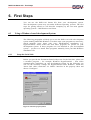
You can use the DNP/1110 Starter Kit from your development system.
This development system may run under different operating systems. The first
steps for getting started we will describe exemplary by the two most popular
operating systems – MS-Windows and Linux.
6.1
Using a Windows–based development System
The following paragraphs will help you to use the DNP/1110 with a development
system running under MS-Windows. For these steps some programs are necessary,
which normally come along with every MS-Windows installation (e.g.
HyperTerminal). Please make sure that these programs are present on your
development system. If these programs are not installed at your development
system – you have to install these programs manually from your MS-Windows
installation CD.
6.1.1
Setup the Serial Link
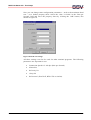
Before you provide the Evaluation Board with power for the first time, please run
a terminal program – for example Windows HyperTerminal – that offers
communication capabilities on your development system. In the following you
will see the necessary settings for HyperTerminal under Windows. Select the
"direct link cable connection via COM1" interface in the property sheet and
choose "Configure".
Figure 9: Interface property Sheet
SSV EMBEDDED SYSTEMS
13
DNP/1110 Starter Kit – First Steps
Now you can change some configuration parameters – such as the maximum baud
rate – on a further property sheet. Select the value "115.200" in the "Bits per
Second" field and close the property sheet by clicking the "OK" button, like
shown in figure 10.
Figure 10: Baud rate Settings
All these settings can also be used for other terminal programs. The following
parameters are important to use:
•
Connection Speed 115.200 bps (Bits per Second)
•
8 Data bits
•
No Parity bit
•
1 Stop bit
•
No Protocol (Xon/Xoff, RTS/CTS or similar).
SSV EMBEDDED SYSTEMS
14
DNP/1110 Starter Kit – First Steps
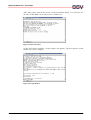
Now turn on the power for the Evaluation Board and you will see all steps of the
DNP/1110 boot process in the terminal program window at your PC.
Figure 11: DIL/NetPC boot Process
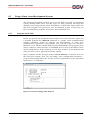
For a first test of the DNP/1110 you have to change the assigned IP-address of
your development system to "192.168.0.1". To change the IP-address under MSWindows just click "StartàSettingsàControl PanelàNetworkàTCP/IP" and
enter the new IP-address. Please make sure, that you don’t use another IP-address
– this will lead to different network problems.
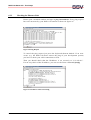
6.1.2
Checking the Ethernet Link
To test the TCP/IP-communication we use PING a very popular TCP/IP-utility
program. Please open a DOS window (you can find it in the Windows Start menu)
and enter:
ping 192.168.0.126.
Figure 12: Communication check via PING
SSV EMBEDDED SYSTEMS
15
DNP/1110 Starter Kit – First Steps
The Starter Kit must answer this ping. Otherwise an error will occur. In this case
you have to check all parts of your LAN-connection, including the IP-address of
the development system. Then you should check the correct IP-address setting to
the value "192.168.0.1". For an easy check of the IP-address, you can use the
following DOS-command:
ipconfig
Figure 13: Communication check via ipconfig command
Once the ping was successful, you are ready to start a Web browser on your
development PC. This browser can be the Microsoft Internet Explorer or another
suitable Web browser like the Netscape Communicator or Opera or similar.
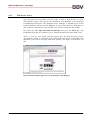
6.1.3
Web Server Access
Open the URL http://192.168.0.126/index.htm. The Embedded Web Server will
deliver you a small description about the DNP/1110. That’s it. Now you are online
with the Starter Kit and your Web browser is connected to the Embedded Web
Server of the DNP/1110. It shows you a static web page with some pictures.
Figure 14 show you this Web page in the browser window.
Figure 14: DNP/1110 Web page shown by the MS-Internet Explorer
SSV EMBEDDED SYSTEMS
16
DNP/1110 Starter Kit – First Steps
If your Web browser can’t establish a connection to the Web Server – but the Ping
was successful – you should check your browser settings. Please ensure, that your
browser is joined with TCP/IP by using the Ethernet card in your development
system. Alternatively you have to install a suitable Web browser.
In some cases the Web browser is only configured for modem based Internet
access. In this case, please install a second Web browser from your original
operating system CD-ROM.
6.1.4
Login via Serial Console
With a development system running under MS-Windows you can gain access onto
the DNP/1110 via HyperTerminal by using the username gast. There is no specific
password needed. On the point where the password is expected simply press the
Enter (Return) key. Your system is now ready to execute arbitrary commands.
Figure 15: Login procedure via HyperTerminal
SSV EMBEDDED SYSTEMS
17
DNP/1110 Starter Kit – First Steps
6.1.5
Login via Telnet
You are now able to start a Telnet client on the development system. Open a
command shell and enter the following command:
telnet 192.168.0.126
Figure 16: Login procedure via Telnet
Please pay attention, that this command will pass the IP-address of your
DNP/1110 in shape of a parameter to the client.
SSV EMBEDDED SYSTEMS
18
DNP/1110 Starter Kit – First Steps
6.1.6
File Transfer via FTP
The File Transfer Protocol (FTP) provides a common approach to transfer files
between clients and servers. FTP is a client/server protocol like Telnet. The FTP
client/server capability is build into the most Windows versions. An FTP session
begins when the client build a TCP/IP connection to the server. Once this
connection is established, the client will log on to this server. In our actual case
your development system acts as client and the DNP/1110 operate as server. After
the successful access onto the server you are able to execute various file transfer
commands, which typically involves navigating the FTP server’s directory
structure and send or receive files. In the following an example of a FTP session
is shown.
To use the File Transfer Protocol on your system, please open a DOS window (via
the Windows Start menu) and branch into the desired subdirectory. Now enter
FTP 192.168.0.126 and open a FTP connection between client and server. The
system will now ask you for a username. To answer this request please enter gast
and confirm the expected password with simply pressing the Enter-key. At this
point there is no specific password required. On figure 17 you see the described
user inputs in form of highlighted text.
Figure 17: Login procedure via FTP
Now you are ready to transfer a file from your Windows-based development
system to the DNP/1110. Before you can transfer a file with FTP you should
check, that the FTP link is correctly set to the binary operation mode via the
binary command. In some cases the default setting is ASCII. With the pwd
command you can check out the name of the remote directory. Please note, that
the Read/Write access is only allowed for the directory /home/gast. To transfer a
file from your development system to the DNP/1110 use the command:
put filename.
SSV EMBEDDED SYSTEMS
19
DNP/1110 Starter Kit – First Steps
For a first view on the content of a directory you should use ls –al. This command
shows you the files stored inside a specific directory. To terminate a FTP session
use the command bye. This will cancel every operation between client and server.
The figure 18 shows you these operations.
Figure 18: FTP file transfer under DOS
In some Windows versions the Internet Explorer is able to act as FTP client just
like an Internet browser. To transfer files by using the Internet Explorer enter
ftp://[email protected] as URL into the address bar. Moreover open the Windows
Explorer as second file destination. Now you can transfer your desired files very
easy by using drag and drop between these two windows. Simply drag the selected
file(s) from the Windows Explorer into the Internet Explorer window and drop it
down into the choosen directory.
Figure 19: File transfer using the Internet Explorer
SSV EMBEDDED SYSTEMS
20
DNP/1110 Starter Kit – First Steps
6.1.7
Embedded Linux Maintenance
The Embedded Linux of the DNP/1110 consists of two basic parts. At first the file
zimage as Linux-kernel and second the root filesystem in form of the file
rimage.gz. Each component exists as a separate file. You can find the file
rimage.gz on the DIL/NetPC Starterkit CD-ROM under the location
\Linux\DNP1110-Bin\rimage.gz. The file zimage is placed in the directory
\Linux\DNP1110-Bin\zimage\bin\zimage
For updates or the newest versions of these files please check out our website at:
http://www.dilnetpc.com
6.1.8
Embedded Linux Maintenance via HyperTerminal/Serial Link
The DNP/1110 offers the capability to upload a Linux binary image, to save it into
the Flash memory and to reboot the system after a successful receive. Please open
a HyperTerminal window and reboot the DNP/1110.Now you have to invoke the
Flash Loader. For this you have to press CTRL+L during the boot procedure.
Figure 20 shows the BIOS report sequence.
Figure 20: Boot Procedure
SSV EMBEDDED SYSTEMS
21
DNP/1110 Starter Kit – First Steps
Figure 21: Flash Loader Messages
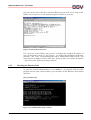
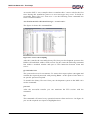
Once the BIOS detect the CTRL+L the Flash Loader invokes and offers three
options (see Fig. 20). Please choose option "1" to transfer data via "YMODEM
PROTOCOL". Once you have pressed the key "1" the Flash Loader is set in a wait
state until a file to transfer is selected in the appearing window. During this status
the Flash Loader is continously sending the letter "C" to the console as you can
see in figure 222. With this sign the YMODEM synchronizes the beginning of a
file transmission.
Figure 22: Flash Loader file Select
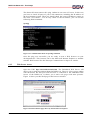
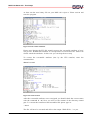
Now select the desired file (rimage.gz or zimage) in the appearing window and
start the transmition with YMODEM.
During the download you will see a progress bar that indicates the state of the
transmission. Please wait absolutely until the file transmission ends and avoid
interruptions. In case of an interruption or failure the DNP/1110 would not
contain any bootable system and you have to repeat the transmission procedure.
After the end of transmission the Flash Loader returns into the menu and
continues sending the "C" sign. To reboot the DNP/1110 with the new kernel
and/or root filesystem choose option "3" (REBOOT) from the Flash Loader menu.
SSV EMBEDDED SYSTEMS
22
DNP/1110 Starter Kit – First Steps
6.2
Using a Linux–based development System
The following paragraphs will help you to use the DNP/1110 with a development
system running under Linux. For this steps are some programs necessary that
normally come along with the Linux installation (i.e. Minicom). Please make sure
that these programs are present on your development system. If necessary you
have to install these programs from your Linux installation CD.
6.2.1
Setup the Serial Link
Before you provide the Evaluation Board with power for the first time, please run
a terminal program like Minicom. Minicom is a simple serial communications
program originally written by Miquel van Smoorenburg. It offers base
communication capabilities and integrates well with the Linux user interface.
Minicom is a lot like the old MS-DOS program PROCOMM. This program can be
used to connect a Linux-based PC to embedded devices such as the DNP/1110 for
initial configurations. In the following we will show you how to use Minicom and
what you have to do to adjust the necessary settings.
Open a terminal window and type in the command minicom -s to become access to
the serial port settings. Now you can change some configuration parameters –
such as the maximum baud rate. Set the serial port parameters for the maximum
baud rate on "115.200 bps".
Figure 23: Serial Port Settings under Minicom
SSV EMBEDDED SYSTEMS
23
DNP/1110 Starter Kit – First Steps
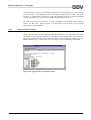
After that, please turn on the power for the Evaluation Board. You will now see
all steps of the DNP/1110 boot process via Minicom.
Figure 24: Boot Procedure
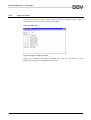
To the end of this sequence a login request will appear. The boot process of the
DNP/1110 is now complete.
Figure 25: Login Request
SSV EMBEDDED SYSTEMS
24
DNP/1110 Starter Kit – First Steps
6.2.2
Checking the Ethernet Link
Please open a terminal window and type in ping 192.168.0.126. Every ping request
has to be answered by your DNP/1110 similar as shown in figure 26.
Figure 26: Ping Request
To cancel the ping request just press the keyboard shortcut Ctrl+C. If an error
occurs (e.g. the DNP/1110 don’t answer the ping of your development system)
you have to check your cable connections at first.
Then you should check that the IP-address is set correctly to "192.168.0.1".
For an easy check of the IP-address, you can use the Linux-command ifconfig.
Figure 27: IP-address check via ifconfig
SSV EMBEDDED SYSTEMS
25
DNP/1110 Starter Kit – First Steps
6.2.3
Web Server Access
Once the ping was successful, you are ready to start a Web browser on your
development system. This may be the Konqueror File Manager or the Netscape
Communicator/Navigator. The Konqueror File Manager is normally part of the
Linux installation and acts as File Manager as well as Web browser. Konqueror is
able to detect automaticaly when an URL were entered and shows the content.
Just enter the URL http://192.168.0.126/index.htm and press the Enter-key. The
Embedded Web Server will deliver you a small description about the DNP/1110.
That’s it. You are now online with the Starter Kit. The Web browser of your
development system is connected to the Embedded Web Server of the DNP/1110
and shows you a static web page with some pictures. The figure 28 will show you
this.
Figure 28: DNP/1110 Web page shown by the Konqueror File Manager
SSV EMBEDDED SYSTEMS
26
DNP/1110 Starter Kit – First Steps
6.2.4
Login via Serial Console
Under Linux you can gain access onto the DNP/1110 via Minicom by using the
username gast. A specific password is not necessary. At this point simply press the
Enter (Return) key. Your system is now ready to execute arbitrary Linux
commands.
Figure 29: Login procedure via Minicom
SSV EMBEDDED SYSTEMS
27
DNP/1110 Starter Kit – First Steps
6.2.5
Login via Telnet
You are now able to start a telnet client on the development system. Open a
Minicom command shell and enter the following command:
telnet 192.168.0.126
Figure 30: Login procedure via Telnet
Please pay attention, that this command will pass the IP-address of your
DNP/1110 in shape of a parameter to the client.
SSV EMBEDDED SYSTEMS
28
DNP/1110 Starter Kit – First Steps
6.2.6
File Transfer via FTP
The File Transfer Protocol (FTP) provides a common approach to transfer files
between clients and servers. FTP is a client/server protocol like Telnet. An FTP
session begins when the client build a TCP/IP connection to the server. Once this
connection is established, the client will log on to this server. In our actual case
your development system acts as client and the DNP/1110 operates as server.
After the successful access onto the server you are able to execute various file
transfer commands, which typically involves navigating the FTP server’s
directory structure and send or receive files. In the following an example of a FTP
Session is shown. The FTP client/server capability is already build into the
Konqueror.
To use the File Transfer Protocol on your Linux system please open a command
shell, like Minicom and branch into the desired subdirectory. Now enter FTP
192.168.0.126 and open a FTP connection between client and server. The system
will now ask you for a username. To answer this request please enter gast and
confirm the expected password with pressing Enter. At this point there is no
specific password required. On the figure 31 you see the user inputs as highlighted
text.
Figure 31: Login procedure via FTP
Now you are ready to transfer a file from a Linux-based development system to
the DNP/1110. Before you can transfer a file with FTP you should check, that the
FTP link mode is correctly set to the binary operation mode via the binary
command. In some cases the default setting is ASCII. With the command pwd you
can check out the name of the remote directory. The Read/Write access is only
allowed for the directory /home/gast. To transfer a file from your development
system to the DNP/1110 use put filename to transfer the desired file.
For a first view on the content of a directory you should use ls –al. This command
shows you the files stored inside a specific directory. To terminate a FTP session
use the command bye.
SSV EMBEDDED SYSTEMS
29
DNP/1110 Starter Kit – First Steps
This command cancels every operation between server and client. The figure 32
shows you these operations.
Figure 32: File transfer with Minicom
Next to Minicom it is also possible to use the Konqueror File Manager
to transfer files by FTP. For this, please open Konqueror and enter
ftp://[email protected] as URL into the address bar. The Konqueror knows the
difference between your system directories and folders (\\) and an Internet or
intranet address (//). So you can simply type in the desired address.
Open a second instance of Konqueror and change into the desired source
directory. After that, you are able to transfer arbitrary files very easy by using
drag and drop between these two Konqueror windows.
Figure 33: File transfer with the Konqueror
SSV EMBEDDED SYSTEMS
30
DNP/1110 Starter Kit – First Steps
6.2.7
Embedded Linux Maintenance
The Embedded Linux of the DNP/1110 consists of two basic parts. At first the file
zimage as Linux-kernel and second the root filesystem in form of the file
rimage.gz. Each of the both components exists as one separate file. You can find
the file rimage.gz on the DIL/NetPC Starterkit CD-ROM under the location
\Linux\DNP1110-Bin\rimage.gz. The file zimage is placed in the direcory
\Linux\DNP1110-Bin\zimage\bin\zimage
For updates or the newest versions of these files please check out our website at:
http://www.dilnetpc.com
6.2.8
Embedded Linux Maintenance via Minicom/Serial Link
The DNP/1110 offers the capability to upload a Linux binary image, to save it into
the Flash memory and to reboot the system after a successful receive. Please open
a Minicom window and reboot the DNP/1110. Now you have to invoke the Flash
Loader. For this press CTRL+L during the boot procedure. Figure 34 shows the
BIOS report sequence.
Figure 34: Boot Procedure
SSV EMBEDDED SYSTEMS
31
DNP/1110 Starter Kit – First Steps
Once the BIOS detect the CTRL+L the Flash Loader invokes and offers three
options (see figure 35).
Figure 35: Flash Loader Messages
Please choose option "1" to transfer data via "YMODEM PROTOCOL". Once you
have pressed the key "1" the Flash Loader is set in a wait state. During this status
the Flash Loader is continously sending the letter "C" to the console as you can
see in figure 35. With this sign the YMODEM synchronize the beginning of a file
transmission.
Open the Minicom upload menu with the key combination ALT+S. Now you see
five options to transmit data. On this point you have absolutely to choose the
option "zmodem".
The reason to do this although you normally would choose ymodem is a little bug
in Minicom, so here you have to select zmodem absolutely. Choosing "ymodem"
may result in different error messages.
Figure 36: Transfer method Select
SSV EMBEDDED SYSTEMS
32
DNP/1110 Starter Kit – First Steps
After you have choosen the transmission method Minicom opens a new window.
Now select the desired file (rimage.gz or zimage) and start the transmission.
Figure 37: Transmission file Select
During the download you will see a progress bar that indicates the transmission
status. Please wait absolutely until the file transmission ends and avoid every
interruption. In case of an interruption or failure the DNP/1110 would not contain
any bootable system and you have to repeat the transmission procedure.
Figure 38: Transmission Status
After a successful transmission the FLASH Loader returns into the menu and
continues with sending the letter "C". To reboot the DNP/1110 with the new
kernel and/or root filesystem choose option "3" (REBOOT) from the Flash Loader
menu. After this, the DNP/1110 restarts with the new kernel and/or root
filesystem
SSV EMBEDDED SYSTEMS
33
DNP/1110 Starter Kit – First Steps
6.2.9
Installation of the GNU Cross Toolchain
Within the scope of supply of the DNP/1110 Starter Kit we deliver a full pre-build
GNU cross toolchain as development environment. With this cross development
environment you are able to create the necessary code for the DNP/1110 with
StrongARM architecture although you work on an x86 Linux-based development
system. The complete cross development environment exists in form of a single
tar-archive on the Starter Kit CD-ROM. On figure 38 you can see the location of
this tar-archive in the directory:
/Linux/DNP1110-ToolChain
This compressed archive has a size of approximately 85 MByte.
Figure 39: Location of the tar-archive on the Starter Kit CD-ROM
To install the toolchain archive on your Linux-based development system you
have to be logged-in as Administrator with the respective rights. After this, you
just have to unpack the entire tar-archive outgoing from the directory
/usr/local
SSV EMBEDDED SYSTEMS
34
DNP/1110 Starter Kit – First Steps
To unpack these archive please execute the following Linux command line from a
terminal window. You can see this also on figure 40:
tar –xzf /cdrom/Linux/DNP1110-ToolChain/arm-toolchain-39SSV20011207.tgz
Instead of …/cdrom/… please use the correct path to your own CD-ROM drive.
The Linux tar program needs some time to unpack all files from the CD-ROM to
your hard disk.
Figure 40: Unpacking the tar-Archive
For a first test of your new cross development environment you should save a
simple C source code – like the Hallo Welt program shown in figure 41 – into a
file within the directory /usr/local. Under Linux you can do this directly via the
command:
cat > filename
Figure 41: A simple C-Program
To complete the C source code input, please press the key combination CTRL+Z.
If desired it is possible to check the file content by entering the command line:
cat test1.c
SSV EMBEDDED SYSTEMS
35
DNP/1110 Starter Kit – First Steps
At next the GNU C cross compiler have to translate this C source code for the first
time. During this translation process no error messages may occur. To build an
executable binary file test1 from test1.c use the following Linux command line
from a terminal window:
/usr/local/arm/2.95.2/bin/arm-linux-gcc –o test1 test1.c
The figure 42 shows this command line.
Figure 42: C-source code Compiling
After this, transfer the executable binary file from your development system to the
DNP/1110 RAM disk within a FTP session. For this, enter the following command
line within a terminal window and open a FTP connection between client and
server:
ftp 192.168.0.126
The system asks now for a username. To answer this request please enter gast and
confirm the expected password with pressing Enter. At this point of time there is
no specific password required.
To transfer the binary file test1 from your development system to the DNP/1110
use the command:
put test1
After the successful transfer you can terminate the FTP session with the
command:
bye
This command will cancel every operation between client and server. On figure 43
you see the required user inputs as highlighted text.
SSV EMBEDDED SYSTEMS
36
DNP/1110 Starter Kit – First Steps
At least run the new binary file on your DNP/1110. Open a Telnet session and
start the program.
Figure 43: File transfer with FTP
Please note: During the FTP file transfer process the executable attribute of test1
can get lost. Without this attribute it is not possible to execute this file. Some FTP
clients watch the attributes. In this case you can skip the next step.
To restore the executable attribute (lost by the FTP transfer) enter the
command line:
chmod +x test1
Figure 44: Telnet Session
After the executable attribute were reassigned you should check the correct status
with the command ls –al. Now you will see the content of the directory named
gast. To execute the transferred and assembled file please type in:
. /test1
The file will now be executed and deliver the output "Hallo Welt…" to you.
SSV EMBEDDED SYSTEMS
37
DNP/1110 Starter Kit – First Steps
For the assembling of a C-program the gcc will normally be activated by using a
so-called makefile.
CROSS =
CC
=
CFLAGS =
LFLAGS =
/usr/local/arm/2.95.2/bin/arm-linux$(CROSS)gcc
-Wall –O2 –march=armv4 –mtune=strongarm
-Wl,-s
$(PROJ):
$(PROJ).c Makefile
$(CC)
$(CFLAGS)
$(LFLAGS)
$(PROJ).c
-o
$(PROJ)
clean:
rm –f $(PROJ)
All required parameters needed to create the desired binary file are stored in such
a makefile.
SSV EMBEDDED SYSTEMS
38
DNP/1110 Starter Kit – First Steps
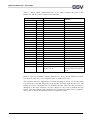
Appendix 1: DNP/1110 Pinout – JEDEC 64-pin DIL Connector (1. Part)
Pin
1
2
3
4
5
6
7
8
9
10
11
12
13
14
15
16
17
18
19
20
21
22
23
24
25
26
27
28
29
30
31
32
Name
PA0
PA1
PA2
PA3
PA4
PA5
PA6
PA7
PB0
PB1
PB2
PB3
PB4
PB5
PB6
PB7
PC0
PC1
PC2
PC3
RXD1
TXD1
CTS1
RTS1
DCD1
DSR1
DTR1
RI
RESIN
TX+
TXGND
Group
PIO
PIO
PIO
PIO
PIO
PIO
PIO
PIO
PIO
PIO
PIO
PIO
PIO
PIO
PIO
PIO
PIO
PIO
PIO
PIO
SIO
SIO
SIO
SIO
SIO
SIO
SIO
SIO
RESET
LAN
LAN
----
Function
Parallel I/O, Port A, Bit 0
Parallel I/O, Port A, Bit 1
Parallel I/O, Port A, Bit 2
Parallel I/O, Port A, Bit 3
Parallel I/O, Port A, Bit 4
Parallel I/O, Port A, Bit 5
Parallel I/O, Port A, Bit 6
Parallel I/O, Port A, Bit 7
Parallel I/O, Port B, Bit 0
Parallel I/O, Port B, Bit 1
Parallel I/O, Port B, Bit 2
Parallel I/O, Port B, Bit 3
Parallel I/O, Port B, Bit 4
Parallel I/O, Port B, Bit 5
Parallel I/O, Port B, Bit 6
Parallel I/O, Port B, Bit 7
Parallel I/O, Port C, Bit 0
Parallel I/O, Port C, Bit 1
Parallel I/O, Port C, Bit 2
Parallel I/O, Port C, Bit 3
COM1 Serial Port, RXD Pin
COM1 Serial Port, TXD Pin
COM1 Serial Port, CTS Pin
COM1 Serial Port, RTS Pin
COM1 Serial Port, DCD Pin
COM1 Serial Port, DSR Pin
COM1 Serial Port, DTR Pin
COM1 Serial Port, RI Pin
RESET Input
Ethernet Interface, TX+ Pin
Ethernet Interface, TX- Pin
Ground
Table 4: DNP/1110 Pinout – Pin 1 to 32
SSV EMBEDDED SYSTEMS
39
DNP/1110 Starter Kit – First Steps
Appendix 2: DNP/1110 Pinout – JEDEC 64-pin DIL Connector (2. Part)
Pin
33
34
35
36
37
38
39
40
41
42
43
44
45
46
47
48
49
50
51
52
53
54
55
56
57
58
59
60
61
62
63
64
Name
RX+
RXRESOUT
VBAT
CLKOUT
TXD2
RXD2
INT5
INT4
INT3
INT2
INT1
CS4
CS3
CS2
CS1
RDY
RD
WR
SA3
SA2
SA1
SA0
SD7
SD6
SD5
SD4
SD3
SD2
SD1
SD0
VCC
Group
LAN
LAN
RESET
PSP
PSP
PSP
PSP
PSP
PSP
PSP
PSP
PSP
PSP
PSP
PSP
PSP
PSP
PSP
PSP
PSP
PSP
PSP
PSP
PSP
PSP
PSP
PSP
PSP
PSP
PSP
PSP
----
Function
Ethernet Interface, RX+ Pin
Ethernet Interface, RX- Pin
RESET Output
Real Time Clock Battery Input
Clock Output (Default 3.6864 MHz)
COM2 Serial Port, TXD Pin
COM2 Serial Port, RXD Pin
Interrupt Input 5
Interrupt Input 4
Interrupt Input 3
Interrupt Input 2
Interrupt Input 1
Chip Select Output 4
Chip Select Output 3
Chip Select Output 2
Chip Select Output 1
External Ready Input
Read Signal, Expansion Bus
Write Signal, Expansion Bus
Expansion Bus, Address Bit 3
Expansion Bus, Address Bit 2
Expansion Bus, Address Bit 1
Expansion Bus, Address Bit 0
Expansion Bus, Data Bit 7
Expansion Bus, Data Bit 6
Expansion Bus, Data Bit 5
Expansion Bus, Data Bit 4
Expansion Bus, Data Bit 3
Expansion Bus, Data Bit 2
Expansion Bus, Data Bit 1
Expansion Bus, Data Bit 0
3.3 Volt Power Input
Table 5: DNP/1110 Pinout – Pin 33 to 64
SSV EMBEDDED SYSTEMS
40
DNP/1110 Starter Kit – First Steps
Appendix 3: DNP/1110 Memory Map
Physical Addr.
0x000000000x07FFFFFF
0x200000000x20FFFFFF
0x300000000x30FFFFFF
0x310000000x31FFFFFF
0x320000000x32FFFFFF
0x330000000x33FFFFFF
0x800000000xB7FFFFFF
0xC00000000xC7FFFFFF
Virtual Addr.
0xE80000000xEFFFFFFF
0xF60000000xF6FFFFFF
None
Description
16 Mbyte FLASH
Cached
No
Buffered
No
Access
R/W
Ethernet Controller
No
No
R/W
Chip Select Signal CS1
No
No
R/W
None
Chip Select Signal CS2
No
No
R/W
None
Chip Select Signal CS3
No
No
R/W
None
Chip Select Signal CS4
No
No
R/W
0x800000000xB7FFFFFF
0x000000000x07FFFFFF
SA-1110 internal Registers
No
No
R/W
32 Mbyte SDRAM
Yes
Yes
R/W
Table 6: DNP/1110 Memory Map
Appendix 4: Using the Compact Flash (CF)-Interface
The DNP/1110 offers the possibility to connect a Compact Flash (CF) adapter to
realize different system expansions. Figure 45 shows a general diagram how to
connect a CF-interface onto the DNP/1110.
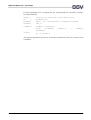
Figure 45: DNP/1110 CF-Interface Connection
This chapter describes only one possible capability to connect an 8-bit CFinterface. This interface is running in memory mode. For the memory mode SSV
Embedded System offers a Linux device driver. For more information please
contact SSV. Table 7 shows which connections have to be made between the pins
of the DNP/1110 and the 8-bit Compact Flash interface.
SSV EMBEDDED SYSTEMS
41
DNP/1110 Starter Kit – First Steps
Table 7 shows which connections have to be made between the pins of the
DNP/1110 and the 8-bit Compact Flash interface.
From
DNP/1110 Pin
63
62
61
60
59
58
57
56
55
54
53
52
51
50
48 (CS1)
Other
GND
GND
GND
VCC
VCC
NC
NC
NC
To
CF Pin
21
22
23
2
3
4
5
6
20
19
18
17
36
9
7
1, 50
8, 10..12, 14..16
39, 41
13, 38
32, 34, 35, 44
47..49, 27..31
26, 25
24, 33, 37, 40,
42, 43, 45, 46
Function
Data 0
Data 1
Data 2
Data 3
Data 4
Data 5
Data 6
Data 7
Addr. 0
Addr. 1
Addr. 2
Addr. 3
WR#
RD#
CF.CS#
Power (0V)
A10, A9..7, A6..4
CSEL, RESET
Power (3.3V)
CE2#, IOR#, IOW#, REG#
D8..10, D11..15
CD1#, CD2#
WP, VS1, RDY/BSY, VS2,
WAIT#, INPACK#, BVD2,
BVS1
Table 7: CF-Interface Pin Usage
Note: To use our standard Compact Flash device driver for the DNP/1110 make
sure that CF.CS# (Pin 7 of Compact Flash) is connected to CS1.
This interface does not support the so-called “hot plug in” mode. To use this mode
a special logic is needed. Plugging cards into the card cage with the power on will
usually not cause a problem but you shouldn’t do this. However, the card may be
damaged if the right sequence of pins contacts as the card is pushed into the
socket. This may damage chips and they may become hot when power is applied.
This is one of the most common failures of expansion cards.
SSV EMBEDDED SYSTEMS
42
DNP/1110 Starter Kit – First Steps
Appendix 5: GNU General Public License
GNU GENERAL PUBLIC LICENSE. Version 2, June 1991. Copyright © 1989, 1991 Free
Software Foundation, Inc. 59 Temple Place, Suite 330, Boston, MA 02111-1307 USA.
Everyone is permitted to copy and distribute verbatim copies of this license document,
but changing it is not allowed.
Preamble
The licenses for most software are designed to take away your freedom to share and
change it. By contrast, the GNU General Public License is intended to guarantee your
freedom to share and change free software—to make sure the software is free for all its
users. This General Public License applies to most of the Free Software Foundation’s
software and to any other program whose authors commit to using it. (Some other Free
Software Foundation software is covered by the GNU Library General Public License
instead.) You can apply it to your programs, too.
When we speak of free software, we are referring to freedom, not price. Our General
Public Licenses are designed to make sure that you have the freedom to distribute copies
of free software (and charge for this service if you wish), that you receive source code or
can get it if you want it, that you can change the software or use pieces of it in new free
programs; and that you know you can do these things.
To protect your rights, we need to make restrictions that forbid anyone to deny you these
rights or to ask you to surrender the rights. These restrictions translate to certain
responsibilities for you if you distribute copies of the software, or if you modify it.
For example, if you distribute copies of such a program, whether gratis or for a fee, you
must give the recipients all the rights that you have. You must make sure that they, too,
receive or can get the source code. And you must show them these terms so they know
their rights.
We protect your rights with two steps: (1) copyright the software, and (2) offer you this
license which gives you legal permission to copy, distribute and/or modify the software.
Also, for each author’s protection and ours, we want to make certain that everyone
understands that there is no warranty for this free software. If the software is modified
by someone else and passed on, we want its recipients to know that what they have is not
the original, so that any problems introduced by others will not reflect on the original
authors’ reputations.
Finally, any free program is threatened constantly by software patents. We wish to avoid
the danger that redistributors of a free program will individually obtain patent licenses, in
effect making the program proprietary. To prevent this, we have made it clear that any
patent must be licensed for everyone’s free use or not licensed at all.
The precise terms and conditions for copying, distribution and modification follow.
GNU GENERAL PUBLIC LICENSE. TERMS AND CONDITIONS FOR COPYING,
DISTRIBUTION AND MODIFICATION
1.
This License applies to any program or other work which contains a notice placed by
the copyright holder saying it may be distributed under the terms of this General
Public License. The “Program”, below, refers to any such program or work, and a
“work based on the Program” means either the Program or any derivative work under
copyright law: that is to say, a work containing the Program or a portion of it, either
verbatim or with modifications and/or translated into another language. (Hereinafter,
translation is included without limitation in the term “modification”.)
SSV EMBEDDED SYSTEMS
43
DNP/1110 Starter Kit – First Steps
Each license is addressed as “you”.
Activities other than copying, distribution and modification are not covered by this
License; they are outside its scope. The act of running the Program is not restricted, and
the output from the Program is covered only if its contents constitute a work based on the
Program (independent of having been made by running the Program). Whether that is true
depends on what the Program does.
1.
You may copy and distribute verbatim copies of the Program’s source code as you
receive it, in any medium, provided that you conspicuously and appropriately publish
on each copy an appropriate copyright notice and disclaimer of warranty; keep intact
all the notices that refer to this License and to the absence of any warranty; and give
any other recipients of the Program a copy of this License along with the Program.
You may charge a fee for the physical act of transferring a copy, and you may at your
option offer warranty protection in exchange for a fee.
2. You may modify your copy or copies of the Program or any portion of it, thus forming
a work based on the Program, and copy and distribute such modifications or work under
the terms of Section 1 above, provided that you also meet all of these conditions:
1.
You must cause the modified files to carry prominent notices stating that you changed
the files and the date of any change.
b) You must cause any work that you distribute or publish, that in whole or in part
contains or is derived from the Program or any part thereof, to be licensed as a whole at
no charge to all third parties under the terms of this License.
c) If the modified program normally reads commands interactively when run, you must
cause it, when started running for such interactive use in the most ordinary way, to print
or display an announcement including an appropriate copyright notice and a notice that
there is no warranty (or else, saying that you provide a warranty) and that users may
redistribute the program under these conditions, and telling the user how to view a copy
of this License. (Exception: if the Program itself is interactive but does not normally
print such an announcement, your work based on the Program is not required to print an
announcement.)
These requirements apply to the modified work as a whole. If identifiable sections of that
work are not derived from the Program, and can be reasonably considered independent
and separate works in themselves, then this License, and its terms, do not apply to those
sections when you distribute them as separate works. But when you distribute the same
sections as part of a whole which is a work based on the Program, the distribution of the
whole must be on the terms of this License, whose permissions for other licensees extend
to the entire whole, and thus to each and every part regardless of who wrote it.
Thus, it is not the intent of this section to claim rights or contest your rights to work
written entirely by you; rather, the intent is to exercise the right to control the distribution
of derivative or collective works based on the Program.
In addition, mere aggregation of another work not based on the Program with the Program
(or with a work based on the Program) on a volume of a storage or distribution medium
does not bring the other work under the scope of this License.
3. You may copy and distribute the Program (or a work based on it, under Section 2) in
object code or executable form under the terms of Sections 1 and 2 above provided that
you also do one of the following:
1.
Accompany it with the complete corresponding machine-readable source code, which
must be distributed under the terms of Sections 1 and 2 above on a medium
customarily used for software interchange; or,
SSV EMBEDDED SYSTEMS
44
DNP/1110 Starter Kit – First Steps
b) Accompany it with a written offer, valid for at least three years, to give any third
party, for a charge no more than your cost of physically performing source distribution, a
complete machine-readable copy of the corresponding source code, to be distributed
under the terms of Sections 1 and 2 above on a medium customarily used for software
interchange; or,
c) Accompany it with the information you received as to the offer to distribute
corresponding source code. (This alternative is allowed only for noncommercial
distribution and only if you received the program in object code or executable form with
such an offer, in accord with Subsection b above.)
The source code for a work means the preferred form of the work for making
modifications to it. For an executable work, complete source code means all the source
code for all modules it contains, plus any associated interface definition files, plus the
scripts used to control compilation and installation of the executable. However, as a
special exception, the source code distributed need not include anything that is normally
distributed (in either source or binary form) with the major components (compiler, kernel,
and so on) of the operating system on which the executable runs, unless that component
itself accompanies the executable.
If distribution of executable or object code is made by offering access to copy from a
designated place, then offering equivalent access to copy the source code from the same
place counts as distribution of the source code, even though third parties are not
compelled to copy the source along with the object code.
4. You may not copy, modify, sublicense, or distribute the Program except as expressly
provided under this License. Any attempt otherwise to copy, modify, sublicense or
distribute the Program is void, and will automatically terminate your rights under this
License.
However, parties who have received copies, or rights, from you under this License will
not have their licenses terminated so long as such parties remain in full compliance.
5. You are not required to accept this License, since you have not signed it. However,
nothing else grants you permission to modify or distribute the Program or its derivative
works. These actions are prohibited by law if you do not accept this License. Therefore,
by modifying or distributing the Program (or any work based on the Program), you
indicate your acceptance of this License to do so, and all its terms and conditions for
copying, distributing or modifying the Program or works based on it.
6. Each time you redistribute the Program (or any work based on the Program), the
recipient automatically receives a license from the original licensor to copy, distribute or
modify the Program subject to these terms and conditions. You may not impose any
further restrictions on the recipients’ exercise of the rights granted herein.
You are not responsible for enforcing compliance by third parties to this License.
7. If, as a consequence of a court judgment or allegation of patent infringement or for any
other reason (not limited to patent issues), conditions are imposed on you (whether by
court order, agreement or otherwise) that contradict the conditions of this License, they
do not excuse you from the conditions of this License. If you cannot distribute so as to
satisfy simultaneously your obligations under this License and any other pertinent
obligations, then as a consequence you may not distribute the Program at all. For
example, if a patent license would not permit royalty-free redistribution of the Program
by all those who receive copies directly or indirectly through you, then the only way you
could satisfy both it and this License would be to refrain entirely from distribution of the
Program.
If any portion of this section is held invalid or unenforceable under any particular
circumstance, the balance of the section is intended to apply and the section as a whole is
intended to apply in other circumstances.
SSV EMBEDDED SYSTEMS
45
DNP/1110 Starter Kit – First Steps
It is not the purpose of this section to induce you to infringe any patents or other property
right claims or to contest validity of any such claims; this section has the sole purpose of
protecting the integrity of the free software distribution system, which is implemented by
public license practices. Many people have made generous contributions to the wide
range of software distributed through that system in reliance on consistent application of
that system; it is up to the author/donor to decide if he or she is willing to distribute
software through any other system and a licensee cannot impose that choice.
This section is intended to make thoroughly clear what is believed to be a consequence of
the rest of this License.
8. If the distribution and/or use of the Program is restricted in certain countries either by
patents or by copyrighted interfaces, the original copyright holder who places the
Program under this License may add an explicit geographical distribution limitation
excluding those countries, so that distribution is permitted only in or among countries not
thus excluded. In such case, this License incorporates the limitation as if written in the
body of this License.
9. The Free Software Foundation may publish revised and/or new versions of the General
Public License from time to time. Such new versions will be similar in spirit to the
present version, but may differ in detail to address new problems or concerns.
Each version is given a distinguishing version number. If the Program specifies a version
number of this License which applies to it and “any later version”, you have the option of
following the terms and conditions either of that version or of any later version published
by the Free Software Foundation. If the Program does not specify a version number of
this License, you may choose any version ever published by the Free Software
Foundation.
10. If you wish to incorporate parts of the Program into other free programs whose
distribution conditions are different, write to the author to ask for permission. For
software which is copyrighted by the Free Software Foundation, write to the Free
Software Foundation; we sometimes make exceptions for this. Our decision will be
guided by the two goals of preserving the free status of all derivatives of our free
software and of promoting the sharing and reuse of software generally.
NO WARRANTY
11. BECAUSE THE PROGRAM IS LICENSED FREE OF CHARGE, THERE IS NO
WARRANTY FOR THE PROGRAM, TO THE EXTENT PERMITTED BY
APPLICABLE LAW. EXCEPT WHEN OTHERWISE STATED IN WRITING THE
COPYRIGHT HOLDERS AND/OR OTHER PARTIES PROVIDE THE PROGRAM “AS
IS” WITHOUT WARRANTY OF ANY KIND, EITHER EXPRESSED OR IMPLIED,
INCLUDING, BUT NOT LIMITED TO, THE IMPLIED WARRANTIES OF
MERCHANTABILITY AND FITNESS FOR A PARTICULAR PURPOSE. THE ENTIRE
RISK AS TO THE QUALITY AND PERFORMANCE OF THE PROGRAM IS WITH
YOU. SHOULD THE PROGRAM PROVE DEFECTIVE, YOU ASSUME THE COST OF
ALL NECESSARY SERVICING, REPAIR OR CORRECTION.
12. IN NO EVENT UNLESS REQUIRED BY APPLICABLE LAW OR AGREED TO IN
WRITING WILL ANY COPYRIGHT HOLDER, OR ANY OTHER PARTY WHO MAY
MODIFY AND/OR REDISTRIBUTE THE PROGRAM AS PERMITTED ABOVE, BE
LIABLE TO YOU FOR DAMAGES, INCLUDING ANY GENERAL, SPECIAL,
INCIDENTAL OR CONSEQUENTIAL DAMAGES ARISING OUT OF THE USE OR
INABILITY TO USE THE PROGRAM (INCLUDING BUT NOT LIMITED TO LOSS OF
DATA OR DATA BEING RENDERED INACCURATE OR LOSSES SUSTAINED BY
YOU OR THIRD PARTIES OR A FAILURE OF THE PROGRAM TO OPERATE WITH
ANY OTHER PROGRAMS), EVEN IF SUCH HOLDER OR OTHER PARTY HAS
BEEN ADVISED OF THE POSSIBILITY OF SUCH DAMAGES.
SSV EMBEDDED SYSTEMS
46
DNP/1110 Starter Kit – First Steps
END OF TERMS AND CONDITIONS
How to Apply These Terms to Your New Programs
If you develop a new program, and you want it to be of the greatest possible use to the
public, the best way to achieve this is to make it free software which everyone can
redistribute and change under these terms.
To do so, attach the following notices to the program. It is safest to attach them to the
start of each source file to most effectively convey the exclusion of warranty; and each
file should have at least the “copyright” line and a pointer to where the full notice is
found.
<one line to give the program’s name and a brief idea of what it does.>
Copyright © <year> <name of author>
This program is free software; you can redistribute it and/or modify it under the terms of
the GNU General Public License as published by the Free Software foundation; either
version 2 of the License, or (at your option) any later version.
This program is distributed in the hope that it will be useful, but WITHOUT ANY
WARRANTY; without even the implied warranty of MERCHANTABILITY or FITNESS
FOR A PARTICULAR PURPOSE. See the GNU General Public License for more
details.
You should have received a copy of the GNU General Public License along with this
program; if not, write to the Free Software Foundation, Inc., 59 Temple Place, Suite 330,
Boston, MA 02111-1307 USA
Also add information on how to contact you by electronic and paper mail.
If the program is interactive, make it output a short notice like this when it starts in an
interactive mode:
Gnomovision version 69, Copyright © year name of author Gnomovision comes with
ABSOLUTELY NO WARRANTY; for details type `show w’. This is free software, and
you are welcome to redistribute it under certain conditions; type `show c’ for details.
The hypothetical commands `show w’ and `show c’ should show the appropriate parts of
the General Public License. Of course, the commands you use may be called something
other than `show w’ and `show c’; they could even be mouse-clicks or menu items—
whatever suits your program.
You should also get your employer (if you work as a programmer) or your school, if any,
to sign a “copyright disclaimer” for the program, if necessary. Here is a sample; alter the
names:
Yoyodyne, Inc., hereby disclaims all copyright interest in the program `Gnomovision’
(which makes passes at compilers) written by James Hacker.
<signature of Ty Coon>, 1 April 1989
Ty Coon, President of Vice
This General Public License does not permit incorporating your program into proprietary
programs. If your program is a subroutine library, you may consider it more useful to
permit linking proprietary applications with the library. If this is what you want to do,
use the GNU Library General Public License instead of this License.
SSV EMBEDDED SYSTEMS
47
DNP/1110 Starter Kit – First Steps
Appendix 6: GNU Lesser General Public License
GNU LESSER GENERAL PUBLIC LICENSE. Version 2.1, February 1999. Copyright ©
1991, 1999 Free Software Foundation, Inc. 59 Temple Place, Suite 330, Boston, MA
02111-1307 USA. Everyone is permitted to copy and distribute verbatim copies of this
license document, but changing it is not allowed. [This is the first released version of the
Lesser GPL. It also counts as the successor of the GNU Library Public License, version
2, hence the version number 2.1.]
Preamble
The licenses for most software are designed to take away your freedom to share and
change it. By contrast, the GNU General Public Licenses are intended to guarantee your
freedom to share and change free software—to make sure the software is free for all its
users.
This license, the Lesser General Public License, applies to some specially designated
software packages—typically libraries—of the Free Software Foundation and other
authors who decide to use it. You can use it too, but we suggest you first think carefully
about whether this license or the ordinary General Public License is the better strategy to
use in any particular case, based on the explanations below.
When we speak of free software, we are referring to freedom of use, not price. Our
General Public Licenses are designed to make sure thatyou have the freedom to distribute
copies of free software (and charge for this service if you wish); that you receive source
code or can get it if you want it; that you can change the software and use pieces of it in
new free programs; and that you are informed that you can do these things.
To protect your rights, we need to make restrictions that forbid distributors to deny you
these rights or to ask you to surrender these rights. These restrictions translate to certain
responsibilities for you if you distribute copies of the library or if you modify it.
For example, if you distribute copies of the library, whether gratis or for a fee, you must
give the recipients all the rights that we gave you. You must make sure that they, too,
receive or can get the source code. If you link other code with the library, you must
provide complete object files to the recipients, so that they can relink them with the
library after making changes to the library and recompiling it. And you must show them
these terms so they know their rights. We protect your rights with a two-step method: (1)
we copyright the library, and (2) we offer you this license, which gives you legal
permission to copy, distribute and/or modify the library.
To protect each distributor, we want to make it very clear that there is no warranty for the
free library. Also, if the library is modified by someone else and passed on, the
recipients should know that what they have is not the original version, so that the original
author’s reputation will not be affected by problems that might be introduced by others.
Finally, software patents pose a constant threat to the existence of any free program. We
wish to make sure that a company cannot effectively restrict the users of a free program
by obtaining a restrictive license from a patent holder. Therefore, we insist that any
patent license obtained for a version of the library must be consistent with the full
freedom of use specified in this license.
Most GNU software, including some libraries, is covered by the ordinary GNU General
Public License. This license, the GNU Lesser General Public License, applies to certain
designated libraries, and is quite different from the ordinary General Public License. We
use this license for certain libraries in order to permit linking those libraries into non-free
programs.
SSV EMBEDDED SYSTEMS
48
DNP/1110 Starter Kit – First Steps
When a program is linked with a library, whether statically or using a shared library, the
combination of the two is legally speaking a combined work, a derivative of the original
library. The ordinary General Public License therefore permits such linking only if the
entire combination fits its criteria of freedom.
The Lesser General Public License permits more lax criteria for linking other code with
the library.
We call this license the “Lesser” General Public License because it does Less to protect
the user’s freedom than the ordinary General Public License. It also provides other free
software developers Less of an advantage over competing non-free programs. These
disadvantages are the reason we use the ordinary General Public License for many
libraries. However, the Lesser license provides advantages in certain special
circumstances.
For example, on rare occasions, there may be a special need to encourage the widest
possible use of a certain library, so that it becomes a de-facto standard. To achieve this,
non-free programs must be allowed to use the library. A more frequent case is that a free
library does the same job as widely used non-free libraries. In this case, there is little to
gain by limiting the free library to free software only, so we use the Lesser General
Public License.
In other cases, permission to use a particular library in non-free programs enables a
greater number of people to use a large body of free software. For example, permission
to use the GNU C Library in non-free programs enables many more people to use the
whole GNU operating system, as well as its variant, the GNU/Linux operating system.
Although the Lesser General Public License is Less protective of the users’ freedom, it
does ensure that the user of a program that is linked with the Library has the freedom and
the wherewithal to run that program using a modified version of the Library.
The precise terms and conditions for copying, distribution and modification follow. Pay
close attention to the difference between a “work based on the library” and a “work that
uses the library”. The former contains code derived from the library, whereas the latter
must be combined with the library in order to run.
GNU LESSER GENERAL PUBLIC LICENSE. TERMS AND CONDITIONS FOR
COPYING, DISTRIBUTION AND MODIFICATION
1.
This License Agreement applies to any software library or other program which
contains a notice placed by the copyright holder or other authorized party saying it
may be distributed under the terms of this Lesser General Public License (also called
“this License”). Each licensee is addressed as “you”.
A “library” means a collection of software functions and/or data prepared so as to be
conveniently linked with application programs (which use some of those functions and
data) to form executables.
The “Library”, below, refers to any such software library or work which has been
distributed under these terms. A “work based on the Library” means either the Library or
any derivative work under copyright law: that is to say, a work containing the Library or
a portion of it, either verbatim or with modifications and/or translated straightforwardly
into another language. (Hereinafter, translation is included without limitation in the term
“modification”.)
“Source code” for a work means the preferred form of the work for making modifications
to it. For a library, complete source code means all the source code for all modules it
contains, plus any associated interface definition files, plus the scripts used to control
compilation and installation of the library.
SSV EMBEDDED SYSTEMS
49
DNP/1110 Starter Kit – First Steps
Activities other than copying, distribution and modification are not covered by this
License; they are outside its scope. The act of running a program using the Library is not
restricted, and output from such a program is covered only if its contents constitute a
work based on the Library (independent of the use of the Library in a tool for writing it).
Whether that is true depends on what the Library does and what the program that uses the
Library does.
1.
You may copy and distribute verbatim copies of the Library’s complete source code
as you receive it, in any medium, provided that you conspicuously and appropriately
publish on each copy an appropriate copyright notice and disclaimer of warranty;
keep intact all the notices that refer to this License and to the absence of any
warranty; and distribute a copy of this License along with the Library.
You may charge a fee for the physical act of transferring a copy, and you may at your
option offer warranty protection in exchange for a fee.
2. You may modify your copy or copies of the Library or any portion of it, thus forming a
work based on the Library, and copy and distribute such modifications or work under the
terms of Section 1 above, provided that you also meet all of these conditions:
1.
The modified work must itself be a software library.
b) You must cause the files modified to carry prominent notices stating that you changed
the files and the date of any change.
c) You must cause the whole of the work to be licensed at no charge to all third parties
under the terms of this License.
d) If a facility in the modified Library refers to a function or a table of data to be supplied
by an application program that uses the facility, other than as an argument passed when
the facility is invoked, then you must make a good faith effort to ensure that, in the event
an application does not supply such function or table, the facility still operates, and
performs whatever part of its purpose remains meaningful. (For example, a function in a
library to compute square roots has a purpose that is entirely well-defined independent of
the application. Therefore, Subsection 2d requires that any application-supplied function
or table used by this function must be optional: if the application does not supply it, the
square root function must still compute square roots.)
These requirements apply to the modified work as a whole. If identifiable sections of that
work are not derived from the Library, and can be reasonably considered independent and
separate works in themselves, then this License, and its terms, do not apply to those
sections when you distribute them as separate works. But when you distribute the same
sections as part of a whole which is a work based on the Library, the distribution of the
whole must be on the terms of
this License, whose permissions for other licensees extend to the entire whole, and thus to
each and every part regardless of who wrote it.
Thus, it is not the intent of this section to claim rights or contest your rights to work
written entirely by you; rather, the intent is to exercise the right to control the distribution
of derivative or collective works based on the Library.
In addition, mere aggregation of another work not based on the Library with the Library
(or with a work based on the Library) on a volume of a storage or distribution medium
does not bring the other work under the scope of this License.
3. You may opt to apply the terms of the ordinary GNU General Public License instead of
this License to a given copy of the Library. To do this, you must alter all the notices that
refer to this License, so that they refer to the ordinary GNU General Public License,
version 2, instead of to this License. (If a newer version than version 2 of the ordinary
GNU General Public License has appeared, then you can specify that version instead if
SSV EMBEDDED SYSTEMS
50
DNP/1110 Starter Kit – First Steps
you wish.) Do not make any other change in these notices.
Once this change is made in a given copy, it is irreversible for that copy, so the ordinary
GNU General Public License applies to all subsequent copies and derivative works made
from that copy.
This option is useful when you wish to copy part of the code of the Library into a
program that is not a library.
4. You may copy and distribute the Library (or a portion or derivative of it, under Section
2) in object code or executable form under the terms of Sections 1 and 2 above provided
that you accompany it with the complete corresponding machine-readable source code,
which must be distributed under the terms of Sections 1 and 2 above on a medium
customarily used for software interchange.
If distribution of object code is made by offering access to copy from a designated place,
then offering equivalent access to copy the source code from the same place satisfies the
requirement to distribute the source code, even though third parties are not compelled to
copy the source along with the object code.
5. A program that contains no derivative of any portion of the Library, but is designed to
work with the Library by being compiled or linked with it, is called a “work that uses the
Library”. Such a work, in isolation, is not a derivative work of the Library, and therefore
falls outside the scope of this License.
However, linking a “work that uses the Library” with the Library creates an executable
that is a derivative of the Library (because it contains portions of the Library), rather than
a “work that uses the library”. The executable is therefore covered by this License.
Section 6 states terms for distribution of such executables.
When a “work that uses the Library” uses material from a header file that is part of the
Library, the object code for the work may be a derivative work of the Library even
though the source code is not. Whether this is true is especially significant if the work
can be linked without the Library, or if the work is itself a library. The threshold for this
to be true is not precisely defined by law.
If such an object file uses only numerical parameters, data structure layouts and
accessors, and small macros and small inline functions (ten lines or less in length), then
the use of the object file is unrestricted, regardless of whether it is legally a derivative
work. (Executables containing this object code plus portions of the Library will still fall
under Section 6.)
Otherwise, if the work is a derivative of the Library, you may distribute the object code
for the work under the terms of Section 6. Any executables containing that work also fall
under Section 6, whether or not they are linked directly with the Library itself.
6. As an exception to the Sections above, you may also combine or link a “work that uses
the Library” with the Library to produce a work containing portions of the Library, and
distribute that work under terms of your choice, provided that the terms permit
modification of the work for the customer’s own use and reverse engineering for
debugging such modifications.
You must give prominent notice with each copy of the work that the Library is used in it
and that the Library and its use are covered by this License. You must supply a copy of
this License. If the work during execution displays copyright notices, you must include
the copyright notice for the Library among them, as well as a reference directing the user
to the copy of this License. Also, you must do one of these things:
1.
Accompany the work with the complete corresponding machine-readable source code
for the Library including whatever changes were used in the work (which must be
SSV EMBEDDED SYSTEMS
51
DNP/1110 Starter Kit – First Steps
distributed under Sections 1 and 2 above); and, if the work is an executable linked
with the Library, with the complete machine-readable “work that uses the Library”,
as object code and/or source code, so that the user can modify the Library and then
relink to produce a modified executable containing the modified Library. (It is
understood that the user who changes the contents of definitions files in the Library
will not necessarily be able to recompile the application to use the modified
definitions.)
b) Use a suitable shared library mechanism for linking with the Library. A suitable
mechanism is one that (1) uses at run time a copy of the library already present on the
user’s computer system, rather than copying library functions into the executable, and (2)
will operate properly with a modified version of the library, if the user installs one, as
long as the modified version is interface-compatible with the version that the work was
made with.
c) Accompany the work with a written offer, valid for at least three years, to give the
same user the materials specified in Subsection 6a, above, for a charge no more than the
cost of performing this distribution.
d) If distribution of the work is made by offering access to copy from a designated place,
offer equivalent access to copy the above specified materials from the same place.
e) Verify that the user has already received a copy of these materials or that you have
already sent this user a copy.
For an executable, the required form of the “work that uses the Library” must include any
data and utility programs needed for reproducing the executable from it. However, as a
special exception, the materials to be distributed need not include anything that is
normally distributed (in either source or binary form) with the major components
(compiler, kernel, and so on) of the operating system on which the executable runs, unless
that component itself accompanies the executable.
It may happen that this requirement contradicts the license restrictions of other
proprietary libraries that do not normally accompany the operating system. Such a
contradiction means you cannot use both them and the Library together in an executable
that you distribute.
7. You may place library facilities that are a work based on the Library side-by-side in a
single library together with other library facilities not covered by this License, and
distribute such a combined library, provided that the separate distribution of the work
based on the Library and of the other library facilities is otherwise permitted, and
provided that you do these two things:
1.
Accompany the combined library with a copy of the same work based on the Library,
uncombined with any other library facilities. This must be distributed under the terms
of the Sections above.
b) Give prominent notice with the combined library of the fact that part of it is a work
based on the Library, and explaining where to find the accompanying uncombined form
of the same work.
8. You may not copy, modify, sublicense, link with, or distribute the Library except as
expressly provided under this License. Any attempt otherwise to copy, modify,
sublicense, link with, or distribute the Library is void, and will automatically terminate
your rights under this License. However, parties who have received copies, or rights,
from you under this License will not have their licenses terminated so long as such parties
remain in full compliance.
9. You are not required to accept this License, since you have not signed it. However,
nothing else grants you permission to modify or distribute the Library or its derivative
SSV EMBEDDED SYSTEMS
52
DNP/1110 Starter Kit – First Steps
works. These actions are prohibited by law if you do not accept this License. Therefore,
by modifying or distributing the Library (or any work based on the Library), you indicate
your acceptance of this License to do so, and all its terms and conditions for copying,
distributing or modifying the Library or works based on it.
10. Each time you redistribute the Library (or any work based on the Library), the
recipient automatically receives a license from the original licensor to copy, distribute,
link with or modify the Library subject to these terms and conditions. You may not
impose any further restrictions on the recipients’ exercise of the rights granted herein.
You are not responsible for enforcing compliance by third parties with this License.
11. If, as a consequence of a court judgment or allegation of patent infringement or for
any other reason (not limited to patent issues), conditions are imposed on you (whether by
court order, agreement or otherwise) that contradict the conditions of this License, they
do not excuse you from the conditions of this License. If you cannot distribute so as to
satisfy simultaneously your obligations under this License and any other pertinent
obligations, then as a consequence you may not distribute the Library at all. For
example, if a patent license would not permit royalty-free redistribution of the Library by
all those who receive copies directly or indirectly through you, then the only way you
could satisfy both it and this License would be to refrain entirely from distribution of the
Library.
If any portion of this section is held invalid or unenforceable under any particular
circumstance, the balance of the section is intended to apply, and the section as a whole is
intended to apply in other circumstances.
It is not the purpose of this section to induce you to infringe any patents or other property
right claims or to contest validity of any such claims; this section has the sole purpose of
protecting the integrity of the free software distribution system which is implemented by
public license practices. Many people have made generous contributions to the wide
range of software distributed through that system in reliance on consistent application of
that system; it is up to the author/donor to decide if he or she is willing to distribute
software through any other system and a licensee cannot impose that choice.
This section is intended to make thoroughly clear what is believed to be a consequence of
the rest of this License.
12. If the distribution and/or use of the Library is restricted in certain countries either by
patents or by copyrighted interfaces, the original copyright holder who places the Library
under this License may add an explicit geographical distribution limitation excluding
those countries, so that distribution is permitted only in or among countries not thus
excluded. In such case, this License incorporates the limitation as if written in the body
of this License.
13. The Free Software Foundation may publish revised and/or new versions of the Lesser
General Public License from time to time. Such new versions will be similar in spirit to
the present version, but may differ in detail to address new problems or concerns.
Each version is given a distinguishing version number. If the Library specifies a version
number of this License which applies to it and “any later version”, you have the option of
following the terms and conditions either of that version or of any later version published
by the Free Software Foundation. If the Library does not specify a license version
number, you may choose any version ever published by the Free Software Foundation.
14. If you wish to incorporate parts of the Library into other free programs whose
distribution conditions are incompatible with these, write to the author to ask for
permission. For software which is copyrighted by the Free Software Foundation, write to
the Free Software Foundation; we sometimes make exceptions for this. Our decision will
be guided by the two goals of preserving the free status of all derivatives of our free
software and of promoting the sharing and reuse of software generally.
SSV EMBEDDED SYSTEMS
53
DNP/1110 Starter Kit – First Steps
NO WARRANTY
15. BECAUSE THE LIBRARY IS LICENSED FREE OF CHARGE, THERE IS NO
WARRANTY FOR THE LIBRARY, TO THE EXTENT PERMITTED BY APPLICABLE
LAW. EXCEPT WHEN OTHERWISE STATED IN WRITING THE COPYRIGHT
HOLDERS AND/OR OTHER PARTIES PROVIDE THE LIBRARY “AS IS” WITHOUT
WARRANTY OF ANY KIND, EITHER EXPRESSED OR IMPLIED, INCLUDING, BUT
NOT LIMITED TO, THE IMPLIED WARRANTIES OF MERCHANTABILITY AND
FITNESS FOR A PARTICULAR PURPOSE. THE ENTIRE RISK AS TO THE
QUALITY AND PERFORMANCE OF THE LIBRARY IS WITH YOU. SHOULD THE
LIBRARY PROVE DEFECTIVE, YOU ASSUME THE COST OF ALL NECESSARY
SERVICING, REPAIR OR CORRECTION.
16. IN NO EVENT UNLESS REQUIRED BY APPLICABLE LAW OR AGREED TO IN
WRITING WILL ANY COPYRIGHT HOLDER, OR ANY OTHER PARTY WHO MAY
MODIFY AND/OR REDISTRIBUTE THE LIBRARY AS PERMITTED ABOVE, BE
LIABLE TO YOU FOR DAMAGES, INCLUDING ANY GENERAL, SPECIAL,
INCIDENTAL OR CONSEQUENTIAL DAMAGES ARISING OUT OF THE USE OR
INABILITY TO USE THE LIBRARY (INCLUDING BUT NOT LIMITED TO LOSS OF
DATA OR DATA BEING RENDERED INACCURATE OR LOSSES SUSTAINED BY
YOU OR THIRD PARTIES OR A FAILURE OF THE LIBRARY TO OPERATE WITH
ANY OTHER SOFTWARE), EVEN IF SUCH HOLDER OR OTHER PARTY HAS BEEN
ADVISED OF THE POSSIBILITY OF SUCH DAMAGES.
END OF TERMS AND CONDITIONS
How to Apply These Terms to Your New Libraries
If you develop a new library, and you want it to be of the greatest possible use to the
public, we recommend making it free software that everyone can redistribute and change.
You can do so by permitting redistribution under these terms (or, alternatively, under the
terms of the ordinary General Public License). To apply these terms, attach the following
notices to the library. It is safest to attach them to the start of each source file to most
effectively convey the exclusion of warranty; and each file should have at least the
“copyright” line and a pointer to where the full notice is found.
<one line to give the library’s name and a brief idea of what it does.>
Copyright © <year> <name of author>
This library is free software; you can redistribute it and/or modify it under the terms of
the GNU Lesser General Public License as published by the Free Software Foundation;
either version 2.1 of the License, or (at your option) any later version. This library is
distributed in the hope that it will be useful, but WITHOUT ANY WARRANTY; without
even the implied warranty of MERCHANTABILITY or FITNESS FOR A PARTICULAR
PURPOSE.
See the GNU Lesser General Public License for more details. You should have received a
copy of the GNU Lesser General Public License along with this library; if not, write to
the Free Software Foundation, Inc., 59 Temple Place, Suite 330, Boston, MA 021111307 USA
Also add information on how to contact you by electronic and paper mail. You should
also get your employer (if you work as a programmer) or your school, if any, to sign a
“copyright disclaimer” for the library, if necessary. Here is a sample; alter the names:
Yoyodyne, Inc., hereby disclaims all copyright interest in thelibrary `Frob’ (a library for
tweaking knobs) written by James Random Hacker.
<signature of Ty Coon>, 1 April 1990
Ty Coon, President of Vice
SSV EMBEDDED SYSTEMS
54
DNP/1110 Starter Kit – First Steps
List of Figures
Figure 1: Evaluation Board DNP/EVA2 with DNP/1110 ................................................. 6
Figure 2: Components of the Evaluation Board DNP/EVA2 ............................................ 6
Figure 3: RCM Jumper.................................................................................................... 8
Figure 4: Position of the DIL/NetPC on the Evaluation Board ......................................... 9
Figure 5: Overview about the required cable Connections ............................................. 10
Figure 6: Serial Link Connection................................................................................... 11
Figure 7: Ethernet Link Connection............................................................................... 12
Figure 8: Power supply Connection............................................................................... 12
Figure 9: Interface property Sheet ................................................................................. 13
Figure 10: Baud rate Settings ........................................................................................ 14
Figure 11: DIL/NetPC boot Process .............................................................................. 15
Figure 12: Communication check via PING .................................................................. 15
Figure 13: Communication check via ipconfig command............................................... 16
Figure 14: DNP/1110 Web page shown by the MS-Internet Explorer ............................ 16
Figure 15: Login procedure via HyperTerminal............................................................. 17
Figure 16: Login procedure via Telnet........................................................................... 18
Figure 17: Login procedure via FTP.............................................................................. 19
Figure 18: FTP file transfer under DOS......................................................................... 20
Figure 19: File transfer using the Internet Explorer........................................................ 20
Figure 20: Boot Procedure............................................................................................. 21
Figure 21: Flash Loader Messages................................................................................. 22
Figure 22: Flash Loader file Select ................................................................................ 22
Figure 23: Serial Port Settings under Minicom .............................................................. 23
Figure 24: Boot Procedure............................................................................................. 24
Figure 25: Login Request .............................................................................................. 24
Figure 26: Ping Request ................................................................................................ 25
Figure 27: IP-address check via ifconfig........................................................................ 25
Figure 28: DNP/1110 Web page shown by the Konqueror File Manager ....................... 26
Figure 29: Login procedure via Minicom ...................................................................... 27
Figure 30: Login procedure via Telnet........................................................................... 28
Figure 31: Login procedure via FTP.............................................................................. 29
Figure 32: File transfer with Minicom ........................................................................... 30
Figure 33: File transfer with the Konqueror ................................................................... 30
Figure 34: Boot Procedure............................................................................................. 31
Figure 35: Flash Loader Messages................................................................................. 32
Figure 36: Transfer method Select................................................................................. 32
Figure 37: Transmission file Select ............................................................................... 33
Figure 38: Transmission Status ..................................................................................... 33
Figure 39: Location of the tar-archive on the Starter Kit CD-ROM ................................ 34
SSV EMBEDDED SYSTEMS
55
DNP/1110 Starter Kit – First Steps
Figure 40: Unpacking the tar-Archive ........................................................................... 35
Figure 41: A simple C-Program..................................................................................... 35
Figure 42: C-source code Compiling ............................................................................. 36
Figure 43: File transfer with FTP................................................................................... 37
Figure 44: Telnet Session .............................................................................................. 37
Figure 45: DNP/1110 CF-Interface Connection ............................................................. 41
List of Tables
Table 1: Convention usage .............................................................................................. 4
Table 2: Pinout COM1 .................................................................................................... 7
Table 3: Signals connected to the DNP/EVA2 DIL-64 Interface ...................................... 9
Table 4: DNP/1110 Pinout – Pin 1 to 32........................................................................ 39
Table 5: DNP/1110 Pinout – Pin 33 to 64...................................................................... 40
Table 6: DNP/1110 Memory Map ................................................................................. 41
Table 7: CF-Interface Pin Usage ................................................................................... 42
List of Appendixes
Appendix 1: DNP/1110 Pinout – JEDEC 64-pin DIL Connector (1. Part) ...................... 39
Appendix 2: DNP/1110 Pinout – JEDEC 64-pin DIL Connector (2. Part) ...................... 40
Appendix 3: DNP/1110 Memory Map........................................................................... 41
Appendix 4: Using the Compact Flash (CF)-Interface ................................................... 41
Appendix 5: GNU General Public License .................................................................... 43
Appendix 6: GNU Lesser General Public License ......................................................... 48
List of Figures............................................................................................................... 55
List of Tables................................................................................................................ 56
List of Appendixes........................................................................................................ 56
Contact ......................................................................................................................... 57
Document History......................................................................................................... 57
SSV EMBEDDED SYSTEMS
56
DNP/1110 Starter Kit – First Steps
Contact
SSV Embedded Systems
Heisterbergallee 72
D-30453 Hannover
Tel. +49-(0)511-40000-0
Fax. +49-(0)511-40000-40
E-Mail: [email protected]
Internet: www.ssv-embedded.de
Document History
Revision
Date
Name
1.00
18.12.2001
First Version.
KDW, JNE
1.01
23.01.2002
Technical Data updates.
KDW
1.02
31.01.2002
Some new chapters added.
JNE
1.03
04.03.2002
Further chapter added.
JNE
1.04
06.09.2002
Memory Map corrected, RCM chapter added
JNE
1.05
02.12.2002
Appendix 4 added
JNE
1.06
14.05.2003
Error corrections within Appendix 4
KDW
This document is written only for the internal application. The contents of this
document can change any time without announcement. There is taken over no
guarantee for the accuracy of the statements. Copyright © SSV EMBEDDED
SYSTEMS 2003. All rights reserved.
INFORMATION PROVIDED IN THIS DOCUMENT IS PROVIDED 'AS IS'
WITHOUT WARRANTY OF ANY KIND. The user assumes the entire risk as to
the accuracy and the use of this document. Some names within this document can
be trademarks of their respective holders.
SSV EMBEDDED SYSTEMS
57