1
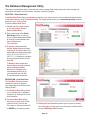
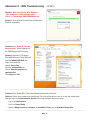
Problem: Microsoft Access Security Notice “A potential security concern has been identified”
Solution: (depends on the version
of MS Access)
Click on the Office Button
Select Trust Center
Select Trust Center Settings
Select Trusted Locations and
add your new trusted location
................................................................................................................................................................................
TEMPbadge Printer
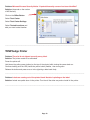
Problem: The print is not aligned correctly on my label.
Solution: The printer needs to be calibrated.
Power the printer off.
Hold down the yellow power button (on the top of the printer) while turning the power back on.
Continue holding until the LED (inside the yellow button) flashes , then turns green
Release the button and press once or twice (ejecting a label each time).
................................................................................................................................................................................
Problem: Labels are coming out of the printer blank. No data is printing on the label.
Solution: Labels are upside down in the printer. Turn the roll the other way and re-install in the printer.
................................................................................................................................................................................
Page 18