1
Chapter 4 — Troubleshoot and Maintain the SD62 Base Station
Problems and Possible Solutions
If you have problems using your SD62, use this section to try to find a
solution.
Problems and Possible Solutions
Problem
Possible Solution
The SD62 does not turn
on.
The SD62 is not receiving power. Make sure you
are using the correct cable and power supply (if
necessary). When the SD62 is powered-up it
emits two beeps and the status light flashes
green one time.
30
You cannot establish a
Bluetooth connection (the
blue Intermec Ready-toWork indicator is not on).
Restart the SD62 by disconnecting and
reconnecting the power supply. You can also
reset the factory defaults of both the SD62 and
your scanner.
The SD62 cannot
communicate with the
host.
Make sure the cables are connected between the
SD62 and the host. Make sure the SD62 is
configured correctly for the interface you are
using. For help see “Connect the SD62
System” on page 7.
You scan a data bar code
but the SD62 does not
beep and the light does not
flash.
The data may still be in the process of being sent
to the host. Data transmission may be slow if
there is interference with Bluetooth
communications or if the scanner is too far
from the SD62 base station. Check the blue
Ready-to-Work light to be sure that the scanner
is connected to the SD62.
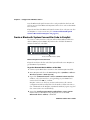
The Bluetooth System
Connect bar code on the
SD62 is damaged or
missing and cannot be
read by the scanner
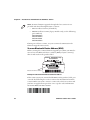
Use the EasySet software to create a new
Bluetooth System Connect bar code (see
“Bluetooth Connection Bar Code” on
page 25).
The scanner beeps error
when trying to read the
Bluetooth System Connect
bar code on the SD62
Depending on the scanner you are using, you
might need to use the Bluetooth Quick Connect
bar code delivered with the product in the box.
See “Connect an Intermec Scanner to the
SD62” on page 12.
SD62 Base Station User’s Guide