1
2.1.2
PLAYBACK INTERFACE
In addition to LIVE channels, the main software interface is also provided with a channel dedicated to viewing a recording
stored on the remote DVR which can be used without abandoning the LIVE video channels (as instead occurs when the
dedicated PLAYBACK window is used) capable of viewing up to 4 recordings at the same time with additional
management/saving functions of the same on local PC.
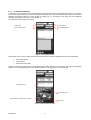
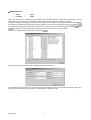
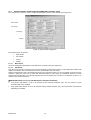
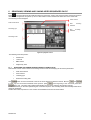
The rapid view section appears as follows:
DVR device
Video channel
Start recording date
End recording date
Figure 2: mini playback interface
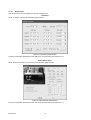
This interface can be used to rapidly search the recordings saved on DVR and satisfying the set search parameters:
DVR remote device
video channel
start/end recording date
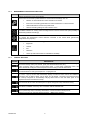
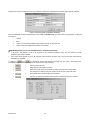
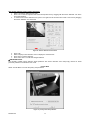
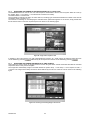
Select the concerned recording in the corresponding list by double-clicking on it: the selected video will be automatically
played in the mini playback window in DVR streaming without occupying space on the PC hard disk.
Recording hit list
Audio control bar
Control buttons: play/pause, stop, audio
Scroll bar
Figure 3: select and view recording
DS1093-010
5