1
CIP Objects 69
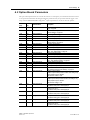
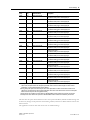
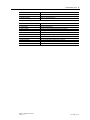
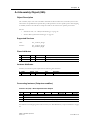
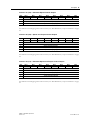
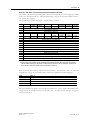
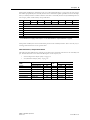
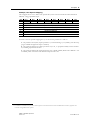
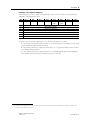
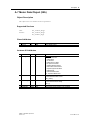
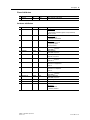
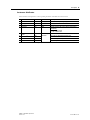
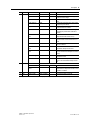
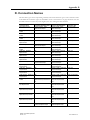
Example, User Specific Mapping
This example shows how to define user specific data (in this case Inverter Monitor Data Parameter
#000Dh)1 using prepended output.
Byte
Bit 7
Bit 6
Bit 5
0 At reference Ref from net Ctrl from net
1
2
3
4
5
...
...
Bit 4
Ready
Bit 3
Running 2
(Rev)
Drive state
Speed actual (Low byte)
Speed actual (High byte)
Input Power (Low byte)
Input Power (High byte)
...
...
Bit 2
Running1
(Fwd)
Bit 1
Warning
Bit 0
Faulted
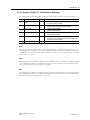
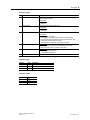
To achieve the user specific mapping above, set the inverter parameters as follows:
1. Set parameter 514h (1300, Option parameter 1, “General Settings”) to 9 (0009h) (user data mapping is enabled and prepend input is enabled).
2. Set parameter 527h (1319, Option parameter 20) to 71, i.e. prepend assembly instance number
71, including Speed actual data.
3. Set parameter 532h (1330, Option Parameter 31), to 200Dh (8205d, Monitor data #000Dh +
offset 2000h), which constitutes user defined write process data #1.
1.
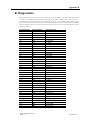
For definitions of Monitor data parameter numbers, please consult the Instruction manual of Mitsubishi inverter drive, appendix “For
customers using HMS network options”.
A8NEIP_2P EtherNet/IP Option Board
Doc.Rev. 1.00
Doc.Id. HMSI-216-123