1
Program Window
Program Window
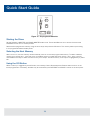
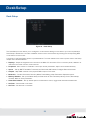
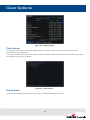
The Program Window is central to the programming functionality on the Solution & Solution XL desk. It is
recommended (but not mandatory) that the Program Window is displayed on the monitor screen when setting up
memories, submasters or palettes.
To display the Program Window on the monitor press the PGM WIN key. As you adjust dimmer levels, select fixtures
and adjust their parameters with the control wheels, or by other methods, the corresponding information is shown
in the Program Window.
The dimmer and fixture parameter data displayed in the Program Window can then be recorded to memories,
submasters or palettes as required.
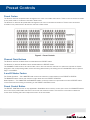
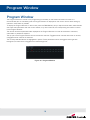
The top part of the Program Window shows the dimmer channels. Tagged dimmer channels are shown in red text,
untagged dimmer channels in white text.
The currently selected fixtures are highlighted in yellow. Fixture parameters which are tagged have a light blue
background, those that are untagged have a dark background.
Figure 18 - Program Window
19