1
www.vcea.org
S i n c e 1 9 7 2 Consulting Civil, Environmental & Municipal Engineering
Land Surveying Professional Planning Landscape Architecture
ANTI-DEGRADATION STUDY
QUALITY ASSURANCE SAMPLING PLAN
PLUMSTED TOWNSHIP
WASTEWATER TREATMENT FACILITY
WITH DISCHARGE TO THE
CROSSWICKS CREEK
PLUMSTED TOWNSHIP, OCEAN COUNTY, NEW JERSEY
APRIL 29, 2011
REVISED
JUNE 14, 2011
JUNE 27, 2011
JULY 1, 2011
JULY 7, 2011
JULY 15, 2011
JULY 18, 2011
SOUTHCENTRAL NJ OFFICE • 4 AAA Drive • Suite 102 • Hamilton NJ 08691 • 609.689.1100 • Fax: 609.689.1120
TABLE OF CONTENTS
PAGE
1.
PROJECT NAME ...................................................................................................... 1
2.
PROJECT REQUESTED BY .................................................................................... 1
3.
DATE OF REQUEST ................................................................................................ 1
4.
PROJECT INITIATION DATE................................................................................... 1
5.
PROJECT OFFICER................................................................................................. 1
6.
QUALITY ASSURANCE OFFICER .......................................................................... 1
7.
INTRODUCTION - PROJECT NEED ....................................................................... 1
8.
PROJECT DESCRIPTION
A. PURPOSE.......................................................................................................... 2
B. PROPOSED FACILITIES................................................................................... 2
C. STREAM CLASSIFICATION.............................................................................. 2
D. DATA USAGE .................................................................................................... 3
E. WATER QUALITY MODEL SELECTION........................................................... 3
F. SAMPLING AND FLOW MEASUREMENT LOCATIONS.................................. 4
G. SAMPLE ANALYSIS
1. AMBIENT WATER QUALITY CHARACTERISTICS .................................. 6
2. DISSOLVED OXYGEN MODEL DEVELOPMENT..................................... 7
9.
SCHEDULE OF TASKS AND PRODUCTS.............................................................. 8
10.
PROJECT ORGANIZATION AND RESPONSIBILITY ............................................. 9
11.
SAMPLING PROCEDURES
A. CRITERIA FOR SAMPLING .............................................................................. 9
B. STREAM FLOW ............................................................................................... 11
C. SAMPLING PROTOCOL
1. AMBIENT WATER QUALITY.................................................................... 12
2. INTENSIVE SURVEYS............................................................................. 13
D. SAMPLING FOR LABORATORY ANALYSIS.................................................. 14
E. IN-SITU TESTING............................................................................................ 14
12.
CHAIN OF CUSTODY ............................................................................................ 15
13.
TEST PROCEDURES............................................................................................. 15
14.
CALIBRATION AND PREVENTATIVE MAINTENANCE........................................ 15
15.
DOCUMENTATION, DATA REDUCTION AND REPORTING ............................... 15
16.
QUALITY ASSURANCE AND QUALITY CONTROL ............................................. 16
17.
PERFORMANCE AND SYSTEMS AUDITS ........................................................... 16
18.
DATA VALIDATION ................................................................................................ 16
19.
CORRECTIVE ACTION .......................................................................................... 17
20.
REPORTS
A. INTERIM REPORT........................................................................................... 17
B. FINAL REPORT ............................................................................................... 17
APPENDIX
1.
PROJECT NAME: Township of Plumsted Proposed Wastewater Treatment
Facility, Discharge to the Crosswicks Creek
2.
PROJECT REQUESTED BY: Township of Plumsted Municipal Utilities Authority
3.
DATE OF REQUEST: April 1, 2011
4.
DATE OF PROJECT INITIATION: April 1, 2011
5.
PROJECT OFFICER; Gregg W. Barkley, P.E.
6.
QUALITY ASSURANCE OFFICER: Christopher B. Jepson, P.E.
7.
INTRODUCTION/PROJECT NEED
(from Plumsted MUA recommendation to the Plumsted Twp. Committee)
The Redevelopment Plan adopted by the Township Committee in 2004 as
amended in 2005 provides the mechanism for the Township to realize a
coordinated program of redevelopment and rehabilitation in the area of New
Egypt designated by the State of New Jersey as our Town Center. The purpose
of the Redevelopment Plan is to provide a more vibrant, culturally interesting and
attractive downtown to serve as a growth center to retain and attract new
businesses and shoppers from within Plumsted and its surrounding environs. At
the heart of the Redevelopment Plan is the need to provide sewer service and to
expand water supply to support the revitalization effort. Among the stated goals
and objectives of the Redevelopment Plan for the sewering of the New Egypt
Town Center (NETC) are to: 1) create a public sewer system within the Town
Center to address public health and welfare issues caused by failing, inadequate
or improperly designed septic systems or cesspools; and 2) to reverse the
significant ongoing economic decline of the downtown as the direct result of the
absence of public sewer.
The provision of public sewer is required to remove the economic barriers to new
and expanded growth and to improve the environmental quality of the
Crosswicks Creek. Most of the downtown is within the 100 year flood hazard
area of the Crosswicks Creek. The related shallow depth to groundwater and
small lot sizes make it difficult to support and sustain septic systems and
cesspools. Approximately 60% of existing septic systems and cesspools pre date
1969 when Ocean County began keeping records. As such, most of the septic
systems and cesspools are old and will require in the future significant and costly
Plumsted Township
1
Quality Assurance Sampling Plan
repair or replacement. Added to this, many of the existing buildings were created
before current health codes that would have required much larger lot sizes. In
fact, it is likely that downtown New Egypt and much of the surrounding environs
as it exists today would not have been permitted at anywhere near the existing
density if modern health codes and zoning had been in place at that time without
a public sewer system. The provision of public sewer will provide an economic
boost to the downtown, support the “Smart Growth initiative for Plumsted
Township” by channeling growth to the NETC and will eliminate the costly need
for the repair or replacement of failing septic systems and cesspools. For these
reasons, the provision of public sewer in the NETC continues to be a high priority
for Plumsted Township and the PMUA.
To fund the sewer improvements, the Township hoped to utilize the
Redevelopment Plan to enable a public/private partnership with a designated
redeveloper(s) to pay for the sewer infrastructure. In the absence of a PRRC, or
to stimulate re interest in a PRRC or other private reinvestment, the Township
has the option to publicly finance the sewer infrastructure improvements through
bonds issued by the New Jersey Environmental Infrastructure Trust.
8.
PROJECT DESCRIPTON
A.
PURPOSE
The purpose of this sampling plan is to characterize ambient water quality of the
Crosswicks Creek at the proposed discharge location of a new sanitary
wastewater treatment facility. In addition, the plan includes the monitoring to be
conducted to satisfy the data needs associated with modeling the future
dissolved oxygen (DO) impacts of the proposed discharge.
B.
PROPOSED FACILITIES
A site has been identified as a potential location for the wastewater treatment
facility. This site is located on County Route 537 where it crosses over the
Crosswicks Creek. Although this site is located approximately 1¼ miles from the
New Egypt Town Center, its location appears well suited for wastewater
treatment and disposal due to its proximity to the county road for access and the
Crosswicks Creek for discharge. The site is located in an area zoned for
commercial/industrial uses with only two (2) residential properties located within
¼ mile of the proposed wastewater treatment facility.
C.
STREAM CLASSIFICATION
The Crosswicks Creek is classified by the NJDEP as a Fresh Water Category 2 –
Non Trout stream (FW2-NT) for its entire length. As such its designated uses are:
1.
Maintenance, migration and propagation of the natural and established
biota
Plumsted Township
2
Quality Assurance Sampling Plan
2.
3.
4.
5.
D.
Primary contact recreation
Industrial and agricultural water supply
Public water supply after conventional filtration treatment
Any other reasonable uses
DATA USAGE
The data collected during this study will used in addressing the anti-degradation
provisions at N.J.A.C. 7:9B-1.5(d) associated with the proposed discharge.
Utilization of this data will include
1.
Characterization of existing water quality levels in the Crosswicks
Creek
2.
Characterization of the likely future water quality levels in Crosswicks
Creek after initiation of the proposed effluent discharge, and
3.
Assistance to the Department in establishing effluent limitations for the
proposed discharge that comply with the provisions of N.J.A.C. 7:14A
and N.J.A.C. 7:9B.
E.
WATER QUALITY MODEL SELECTION
The water quality model selected for the evaluation of the future dissolved
oxygen impacts of the proposed discharge on Crosswicks Creek is QUAL2E, the
EPA-supported, one-dimensional, steady-state stream model. QUAL2E is used
extensively as a water quality evaluation tool by the Department and permittees,
and is described as follows:
1.
One dimensional. The channel is well-mixed vertically and laterally.
2.
Branching. The system can consist of a mainstem river with branched
tributaries.
3.
Stream can be divided into reaches characterized by constant
hydraulic, physical, chemical and biological parameters. Each reach
can be considered to be a string of completely mixing reactors; as
called compertational elements.
4.
Diel heat budget. The heat budget and temperature are simulated as a
function of meteorology on a diel time scale.
5.
Diel water-quality kinetics. All water quality variables are simulated on
a diel time scale.
6.
Heat and mass inputs. Point and non-point loads and withdrawals are
simulated.
Reference: Brown, L. C. and T. O. Barnwell. 1987. The enhanced
stream water quality models QUAL2E and QUAL2E-UNCAS:
documentation and user manual. Env. Res. Laboratory. US EPA, EPA
/600/3-87/007, Athens, GA.
Plumsted Township
3
Quality Assurance Sampling Plan
QUAL2E was selected as the appropriate model framework during the May 26,
2011 site visit by NJDEP personnel including Tom Jenq, the Department’s
modeling expert. The decision is based on the observed conditions in the stream
including the relatively simple geometry with little observed biological activity
(little floating algae, rooted aquatics or periphyton). The field parameters of
dissolved oxygen, temperature and conductivity measured during the site visit
indicated minimal spatial variation along the study area length from the Rt. 537
Crossing downstream to Extonville which gives further support to the choice of
QUAL2E.
F.
SAMPLING AND FLOW MEASUREMENT LOCATIONS
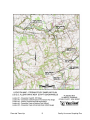
Five (5) sampling locations for this study are depicted on the USGS Map on
Page 5. The locations were inspected by NJDEP representatives during a study
area site visit conducted on May 26, 2011. Sample Location #1 is the location for
water quality characterization. Sampling Locations #1 through #5 are the
locations for data collection including ambient water quality and flow to support
the Crosswicks Creek Dissolved Oxygen Model calibration and validation.
To identify locations #1, #2, #3 & #4, marker stakes will be placed on both sides
of the stream above the water line. Location #5, being the USGS gauging station
location, is identified by the weir across the stream. All sampling and
measurement of flow will be performed between the location markers or
immediately upstream of the weir in the case of Location #5.
The locations are as follows:
Sample Location #1: This location is also the anticipated discharge location for
the proposed wastewater treatment facility. The location is approximately 100
feet upstream of the Rt. 537 Bridge. Coordinates and elevation of the location are
40o05’02.80’’N - 74o32’26.70”W and approximately 58’ above mean sea level.
Sample Location #2: This location is on the Crosswicks Creek approximately
1.36 miles downstream from the proposed discharge location (Location #1). The
location is approximately 200 feet downstream from the Arneytown-Hornerstown
Bridge over the Crosswicks Creek. Coordinates and elevation of the location are
40o06’10.05’’N - 74o32’37.55”W and approximately 50’ above mean sea level.
Sample Location #3: This location is on the Lahaway Creek which is a significant
tributary to the Crosswicks Creek. The sampling location is immediately
downstream from the Holmes Mill Road (a.k.a. Allentown – New Egypt Road)
bridge over the Lahaway Creek. Coordinates and elevation of the location are
40o06’25.40’’N - 74o32’11.50”W and approximately 50’ above mean sea level.
Plumsted Township
4
Quality Assurance Sampling Plan
Plumsted Township
5
Quality Assurance Sampling Plan
Sample Location #4: This location is on the Crosswicks Creek approximately 4.6
miles downstream from the proposed discharge location. The sampling location
is immediately downstream from the Walnford Road Bridge over the Crosswicks
Creek. Coordinates and elevation of the location are 40o08’00’’N - 74o33’36.70”W
and approximately 49’ above mean sea level.
Sample Location #5: This location is on the Crosswicks Creek approximately 8.0
miles downstream from the proposed discharge location. This location is also the
site of Gauging Station #01464500, Crosswicks Creek at Extonville, which is
maintained by the USGS. Samples will be obtained immediately upstream of the
weir structure associated with the gauging station. Coordinates and elevation of
the location are 40o08’14’’N - 74o36’00”W and approximately 28’ above mean
sea level.
G.
SAMPLE ANALYSIS
1.
Ambient Water Quality Characterization: The following testing and
sampling will be performed at Sample Location #1 on up to 20
occasions as outlined in subsequent Item 11. C. Sampling Protocol
for Ambient Water Quality of this plan.
In-situ testing will be performed for the following parameters:
pH
Temperature
Conductivity
Dissolved Oxygen (DO)
Laboratory testing will be performed for the following parameters:
Carbonaceous Biochemical Oxygen Demand (CBOD5)
Total Suspended Solids (TSS)
Total Dissolved Solids (TDS)
Fecal Coliform
E. Coli
Oil and Grease
Ammonia, as N
Nitrate, as N
Total Phosphorus
Hardness, as CaCO3
Alkalinity
Turbidity
Arsenic, total Recoverable
Barium, total
Cadmium, total recoverable
Chromium, total recoverable
Chromium, Trivalent & Hexavalent
Plumsted Township
6
Quality Assurance Sampling Plan
Ambient Water Characterization Testing Continued
Copper, total recoverable
Cyanide, total
Lead, total recoverable
Mercury, total
Nickel, total recoverable
Selenium, total recoverable
Silver, total recoverable
Thallium, total
Zinc, total recoverable
Sulfate
Bis (2-ethylhexyl) phthalate
Chlorine Produced Oxidants (CPO)
Volatiles (from N.J.A.C. 7:14A-4.10, Table II)
Acrolein
1,2-Dichloropropane
Acrylonitrile
1,3-Dichloropropylene
Benzene
Ethylbenzene
Bromoform
Methyl Bromide
Carbon Tetrachloride
Methyl Chloride
Chlorobenzene
Methylene Chloride
Chlorodibromomethane (Dibromochloromethane) 1,1,2,2-Tetrachloroethane
Chloroethane
Tetrachloroethylene
2-Chloroethylvinyl Ether
Toluene
Chloroform
1,2-trans-Dichloroethylene
Bromodichloromethane
1,1,1-Trichloroethane
1,1-Dichloroethane
1,1,2-Tricloroethane
1,2- Dichloroethane
Trichloroethylene
1,1-Dichloroethylene
Vinyl Chloride
2.
Dissolved Oxygen Model Development: The following testing and
sampling will be performed at Sample Locations #1 through #5
during the two intensive sampling events over a 3 day period as
outlined in subsequent item 11. C. Sampling Protocol for Intensive
Surveys of this plan.
In-situ testing will be performed for the following parameters:
pH
Temperature
Conductivity
Dissolved Oxygen (DO)
Laboratory testing will be performed for the following parameters:
Carbonaceous Biochemical Oxygen Demand (CBOD5)
Carbonaceous Biochemical Oxygen Demand (CBOD20)
Total Suspended Solids (TSS)
Total Volatile Suspended Solids (TVSS)
Plumsted Township
7
Quality Assurance Sampling Plan
Dissolved Oxygen Model Development Testing Continued
Total Dissolved Solids (TDS)
Turbidity
Hardness
Alkalinity
Ammonia
Total Kjeldahl Nitrogen
Nitrate
Nitrite
Total Phosphorus
Organic Phosphorus
Inorganic (ortho) Phosphorus
Chlorophyll a
Sampling for the ambient water quality characterization tests that are performed at the
laboratories will be performed by QC Laboratories or Accutest Laboratories. The in-situ
testing will be performed by QC Laboratories, Certification #PA166 or Accutest
Laboratories, Certification #12129. Collected samples will be tested by QC
Laboratories; Accutest Laboratories; and NJ Analytical Laboratories, Certification
#11005. See the Appendix F Table for a listing of the tests to be performed by each
Laboratory.
Sediment oxygen demand (SOD) samples will be obtained by a representative of
HDR/HydroQual at locations #1, #2, #4 and #5 on one of the three days of the first
intensive sampling event. Laboratory analysis will be performed by HDR Engineering.
(NJ Laboratory Certification No. 02594 for dissolved oxygen testing)
The list of laboratory parameters for model development was guided by “Guidance on
Dissolved Oxygen Study Monitoring Program Requirements in Unidirectional Streams”,
NJDEP, March 7, 2011 and the EPA’s Users Manual for QUAL2E surface water
modeling programs.
9.
SCHEDULE OF TASKS AND PRODUCTS
A.
The following project schedule is proposed for this work:
•
•
•
•
•
Plumsted Township
May 1, 2011 – Date of this Quality Assurance Sampling Plan and
submittal for plan review
July 15 through October 30, 2011 – Dates of field sampling, sample
submission to the laboratory and laboratory analysis. (unless
extended due to insufficient sampling conditions)
October, 2011 – Submission of interim report, Dissolved Oxygen
model calibration and validation.
December 31, 2011 – Project Officer receipt of final results of
laboratory analysis.
January 31, 2012 – Date of final report and submission to NJDEP
8
Quality Assurance Sampling Plan
B.
10.
11.
Following the completion of the sampling and analysis of the stream flow
data, a final report will be prepared outlining the anti-degradation analysis.
Existing water quality will be determined at the proposed discharge
location and site-specific in-stream metals criteria will be calculated. If instream criteria are satisfied then effluent limits will be calculated such that
the existing water quality is maintained or it is demonstrated that there is
important social and economic justification for allowing some degradation
of the existing water quality.
PROJECT ORGANIZATION AND RESPONSIBILITY
Sampling Coordination:
(Project Officer, VCEA)
Gregg Barkley
Rainfall Measurement
(MUA Director)
Peter Ylvisaker
Sampling QC:
(Field Supervisor, QC Labs)
(Field Supervisor, Accutest)
Rich Wheeler
Harold Meissner
Laboratory Analysis:
(Director, QC Labs )
(Director, Accutest)
(Director, NJ Analytical)
John Ruane
David Speis
Alan Thomas
Laboratory QA:
(Officer, QC Labs)
(Officer, Accutest )
(Officer, NJ Analytical)
Oommen V. Kappil
Phillip Worby
George Latham
Performance/Systems
Auditing:
(QA Officer, VCEA)
Chris Jepson
Data Processing/
Data Quality Review:
(QA Officer, VCEA)
Chris Jepson
Overall QA
(QA Officer, VCEA)
Chris Jepson
Overall Coordination
(Project Officer, VCEA)
Gregg Barkley
SAMPLING PROCEDURES
A.
CRITERIA FOR SAMPLING
Water quality sampling and flow measurement will be performed only on
days when low flow conditions exist. Low flow is defined as when the flow
is below the stream flow that is exceeded 70% of the time, (d70) and a
minimum of 2 days after a rainfall event of 0.5 inches or greater within a
24 hour period.
Plumsted Township
9
Quality Assurance Sampling Plan
The continuous USGS stream flow gage at the Crosswicks Creek on
Extonville Road (USGS Gage #01464500) will be used to plan sampling
events in order to satisfy the flow conditions. This gage station is located
approximately 8.0 miles down stream from the proposed sampling point.
According to correspondence from the US Geological Survey (USGS), the
flow value at gauging station #0146500 that is exceeded 70% of the time
is 65 cubic feet per second (cfs) for the historical record from 1941 to
2010. Due to a noticeable decrease in flow since the 1990’s, the USGS
also assessed the flow value at the gauging station that is exceeded 70%
of the time for the period of 1990 to 2010 to be 59 cfs. It is our intent to
utilize the lower value of 59 cfs as the target flow rate for determination of
low flow conditions. See Appendix A for the USGS correspondence.
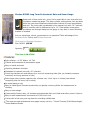
The measurement of the rainfall will be performed with a Stratus Rg202
rain gauge which will be located at the Plumsted Township Municipal
Building which is approximately ½ mile from stream sampling location #1
as depicted on the map on page 4. Daily recordings of the precipitation
from Monday to Friday will be made between 8:00 am and 9:00 am. When
possible, precipitation measurements will be made on weekends
(Saturday & Sunday) during the same time periods. When a measurement
cannot be made on Saturday and/or Sunday and precipitation is observed
the following day, it will be assumed that the precipitation occurred during
the previous 24 hour period.
The proposed Stratus Rg202 rain gauge is constructed of clear butyrate
plastic with a 4” diameter outer funnel which directs the collected rainfall
into a smaller diameter inner cylinder with a capacity of 1”. The inner
cylinder is graduated at 0.01” increments. Excess rainfall overflows to the
outer cylinder for a total capacity of 11 inches. To measure flow over 1”,
the inner cylinder is emptied and the water in the outer cylinder is poured
into the smaller for a direct reading. This can be repeated any number of
times to obtain the full rainfall volume. Information regarding the proposed
gauge is included in Appendix B.
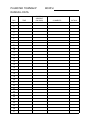
During the course of the study, rainfall will be monitored on a daily basis
with a written log of the rainfall recorded. See Appendix C for the
proposed rainfall data log. The recording of the rainfall data will be
performed by the Executive Director of the Plumsted Municipal Utilities
Authority, Peter Ylvisaker. In the event that Mr. Ylvisaker is unavailable to
perform this task, it will be performed by the QC Officer or a capable
designee.
The Project Officer will review the stream flow data available from the
USGS online and precipitation data on a daily basis throughout the
sampling period. If the low flow and precipitation conditions are met, the
laboratory will be notified that sampling may proceed. In addition, weather
Plumsted Township
10
Quality Assurance Sampling Plan
forecasts will be considered when the 3 day intensive sampling periods
are selected.
If insufficient flow/precipitation conditions preclude the initiation and
completion of a weekly sampling event, the sampling event can be made
up in subsequent weeks. See Section 11.C for sampling protocol
B.
STREAM FLOW
At the sampling locations #1 through #4 as described previously, stakes
will be driven in the upper portion of the bank on each side of the stream
channel to identify the location for all measurements. Between the 2
stakes, the elevation of the stream channel will be determined so that a
cross section profile can be prepared. During each flow measurement
event, the water level elevation and the stream velocity at several
locations across the stream profile will be measured so that a volumetric
flow rate can be calculated. All flow measurements will be made by
representatives of Van Cleef Engineering Associates.
Stream flow will be determined at sampling location #1, #2, #3 & #4 on the
first day of each 3-day intensive sampling event. If, on the 2nd day of each
intensive sampling event, the flows recorded at the USGS gauge at the
Crosswicks Creek on Extonville Road (USGS Gage #01464500) vary by
more than 5% from the flows recorded on the 1st day, a flow measurement
will be taken on the 2nd day. If, on the 3rd day of each intensive sampling
event, the flows recorded at the USGS gage at the Crosswicks Creek on
Extonville Road (USGS Gage #01464500) vary by more than 5% from the
flows recorded on either the 1st or 2nd days, a flow measurement will be
taken on the 3rd day.
Flow at sampling location #5, Crosswicks Creek at Extonville, is available
real-time from the USGS web-site and will be recorded daily between 7:00
to 9:00 am.
At Stations #1, 2, 3 & 4 measurement of the stream velocity will be made
at numerous points (typically 1 – 2 foot horizontal increments) across the
stream profile.
The depth of the velocity measurement will be as follows:
Profile depth <2.5 feet – measure at 60% of the depth
Profile depth >2.5 feet – measure at 20% & 80% of the depth, then
average the 2 readings
The velocities obtained and the incremental depth and spacing of the
measurement locations will be used to determine the flow for that section.
The total stream flow will be the sum of the individual rates for each
section.
Plumsted Township
11
Quality Assurance Sampling Plan
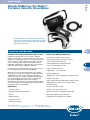
The measurement of the stream velocity will be made with a MarshMcBirney hand held Flow Mate 2000 portable velocity meter. This unit
utilizes electromagnetic induction created by the moving liquid to
determine velocity. The unit is capable of instantaneous measurement of
velocity from 0 – 20 ft/sec with a ±2% accuracy. Information regarding the
flow meter is included in Appendix D.
C.
SAMPLING PROTOCOL
1.
Ambient Water Quality
Samples for all of the parameters listed previously will be collected
at Location #1 on twenty (20) occasions.
For the first four (4) weeks of the monitoring program, sampling
events will be conducted at a frequency of twice per week (2 /
week) and will not be conducted on consecutive days. For the
remaining sixteen (16) weeks of the ambient water quality
monitoring program, sampling events will be performed at a
frequency of once per week through October 31, 2011. All samples
will be collected during low-flow conditions as defined in Section
11A and daylight hours.
If insufficient flow/precipitation conditions preclude the initiation and
completion of a weekly or twice weekly sampling event(s), the
sampling event(s) can be made up in subsequent weeks. However,
multiple-sampling event weeks will only be utilized to make-up
sampling events in past weeks that were unable to be performed
due to flow/precipitation conditions. (i.e. a multi-sampling event
week will not be used to satisfy the need for future weekly sampling
events) In addition, if the twenty (20) sampling events cannot be
completed by October 31, 2011 (due to insufficient
flow/precipitation conditions) the ambient water quality monitoring
program may be extended into subsequent months provided that
the low flow conditions are met. In both of these situations, no more
than three (3) sampling events can occur in a one week (7 day)
period and samples shall not be taken on consecutive days.
All samples will be obtained between markers placed on the stream
embankments.
If non-detectable results are recorded in each of the first 10
sampling events for any of the parameters associated with
characterizing existing water quality in Crosswicks Creek (with the
exception of ammonia and alkalinity), sampling and analysis for
those parameters may be discontinued upon approval from all
Plumsted Township
12
Quality Assurance Sampling Plan
Department signatories of this Work/QAPP (i.e. notification to, and
subsequent approval from, all Department signatories is required
before sample and analysis may be discontinued for a parameter).
2.
Intensive Surveys
Intensive Surveys for model development will be conducted at all
five (5) locations on two (2) occasions for three (3) consecutive
days under low flow conditions as defined in Section 11A.
Temperature, pH, conductivity, and Dissolved Oxygen (DO) will be
measured in-situ once per day during each of the three days of an
Intensive Survey.
Samples will be obtained for laboratory analysis for CBOD5,
CBOD20, TSS, TVSS, TDS, turbidity, hardness, alkalinity, total
inorganic carbon, ammonia, TKN, nitrate, nitrite, total phosphorus,
organic phosphorus, ortho-phosphorus, and chlorophyll a. will be
conducted once per day during each Intensive Survey day.
In-situ testing and sampling for laboratory analysis during each
Intensive Survey day will be scheduled on a staggered basis such
that over the three day survey, samples at each location are
obtained during the early morning (~7:00 am-10am), mid-day (~11
am to 2pm) and afternoon (~2 pm- 5 pm)
Measurements of the stream depth and velocity at the locations will
also be obtained as previously outlined under Item 11B. Stream
Flow, so that the flow can be calculated.
Sediment oxygen demand will be measured once at each
Crosswicks Creek main stem location (Sampling Locations 1, 2, 4
and 5) during Intensive Survey 1.
Diurnal variation of temperature, pH, conductivity, and DO will be
measured for one day during each Intensive Survey at Sampling
Locations 1 through 5 by measurement of these parameters from
one hour prior to sunrise to one hour after sunset. At least 6
measurements will be made at each sampling location over the
diurnal time frame.
The first of the two intensive surveys will be conducted prior to
August 12th and the second intensive survey will be conducted at
least 2 weeks following the first survey and prior to September 15th.
Plumsted Township
13
Quality Assurance Sampling Plan
D.
SAMPLING FOR LABORATORY ANALYSIS:
During sampling events, a composite of 3 quarter point grab samples will
be collected across the stream cross section The samples will be taken at
a point no lower than mid-depth in the water column by the technician. If
the technician must wade into the stream to obtain the samples; the
technician will be down stream while the sample bottle is filled.
The individual samples will be transferred to a larger volume container to
provide a composite sample. The appropriate amounts of this composite
sample will be transferred to the sample bottles for transport to the
laboratory. Prior to the sampling event, the large volume container will be
decontaminated according the to the following procedure: (1)
distilled/deionized water rinse, (2) non-phosphate detergent wash, (3)
distilled/deionized water rinse, (4) air dry, and (5) distilled/deionized water
rinse.
The respective laboratory performing the tests will provide new and
unused sample bottles for each sampling event. QC Laboratories will
provide the large volume container for compositing. If multiple sampling
sites are visited, a separate container will be provided for each site.
Stream sediment sampling for Sediment Oxygen Demand (SOD) will be
obtained by extracting duplicate core tube samples from the Crosswicks
Creek at Locations #1, 2, 4 & 5. These samples will be approximately two
(2) inches in diameter and three inches deep into the loose sediment at or
near the center of the stream channel.
The cores for Sediment Oxygen Demand (SOD) will be obtained by direct
push of the SOD tube into the sediment, capping the tube and removing it
from the sediment. The tube bottom will then be capped. The tubes will
stored away from light for transport to the HDR|HydroQual laboratory for
processing. See Appendix G for the SOD sampling and testing procedure
including information regarding the dissolved oxygen meter to be utilized.
E.
IN-SITU TESTING
The analysis for pH, temperature, conductivity and dissolved oxygen will
be performed at the site by representatives of the QC Laboratories or
Accutest Laboratories.
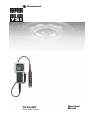
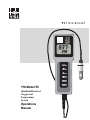
QC Labs will utilize a YSI 556 MPS Multi-Meter which performs all of the
tests with a single unit. Accutest Labs utilizes separate units which include
a YSI Model 55 Meter for Dissolved Oxygen; YSI EC300 Meter for
Conductivity and YSI Model 100 Meter for pH. Any of the units will provide
Plumsted Township
14
Quality Assurance Sampling Plan
a Temperature measurement. The sample probe(s) will be inserted
directly into the stream at mid-width and mid-depth. See Appendices H
through K for information on the Meters.
12.
CHAIN OF CUSTODY
Chain of Custody procedures will be followed for all samples collected. This
chain will document the name of every individual who was in physical possession
of the sample from the time of the sample to the time of the analysis. A sample
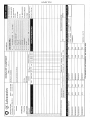
Chain of Custody form is included in Appendix E.
13.
TEST PROCEDURES
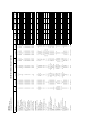
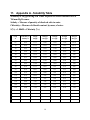
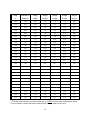
Included in Appendix F is a table outlining all of the test parameters to be
performed as well as the sample type, test method, laboratory performing the
test, holding time, container, sample preservation, laboratory MDL, reporting
units, laboratory recommended limit and NJDEP recommended quantitative limits
(RQLs).
Sediment oxygen demand (SOD) sampling and analysis will be performed by
HDR/HydroQual in accordance with the protocol included in Appendix G.
Any deviations in the sampling or test procedures will be reported to and
approved by the NJDEP prior to implementing the change and so noted in the
final report.
14.
CALIBRATION AND PREVENTATIVE MAINTENANCE
Calibration and preventative maintenance of laboratory equipment will be the
responsibility of QC Laboratories, HDR/HydroQual and NJ Analytical Labs. as NJ
Licensed Laboratories and will be in accordance with N.J.A.C. 7:18-1.1 et seq.
and 40 CFR §136.
15.
DOCUMENTATION, DATA REDUCTION AND REPORTING
The laboratory will supply all QA/QC data with the summary of results. All data
will be kept on file by the applicant for a minimum of five years and all data will be
included in the reports to the NJDEP.
Plumsted Township
15
Quality Assurance Sampling Plan
16.
QUALITY ASSURANCE AND QUALITY CONTROL
The NJ Licensed Laboratory will be responsible for all quality assurance/quality
control (QA/QC) which will be in conformance with N.J.A.C. 7:18-1.1 et seq. and
40 CFR §136.
17.
PERFORMANCE AND SYSTEMS AUDITS
All NJDEP certified laboratories participate in the Office of Quality Assurance
proficiency testing program, in accordance with NJAC 7:18-2.13 for each
category of certification. Laboratories are required to pass the testing program in
order to maintain the certification. The NJDEP Office of Quality Assurance
periodically conducts a field audit of sampling operations and procedures.
18.
DATA VALIDATION
Data validation will be performed by the respective Laboratories as required by
the NJDEP to maintain their certification. This includes actions to be followed if
method blanks or laboratory blanks fall outside of the prescribed limits.
Corrective action procedures will be followed in the event that a calibration
standard, duplicate, performance evaluation result, etc. are outside of the
acceptable range or control limit as follows:
a)
Method Blank: The method blank cannot show the presence of the
parameter of interest above the reported detection limit. Analysis of the
batch should not continue until the source of the problem has been
corrected.
b)
Laboratory Fortified Blank: Where appropriate, must fall within the Quality
Control (QC) limits. If the laboratory fortified blank is outside the limits, the
following corrective actions shall be taken:
a. Check data and recovery calculations
b. Check reference QC standard.
c. Re-analyze sample batch.
c)
QC Matrix Spike: Should fall within the QC control limits established for
each methodology. The corrective actions should be as follows:
i.
Check data and recovery calculations.
ii.
Check if laboratory fortified blank and reference standard is
acceptable.
iii.
If only matrix spike is not within control limits, check other
constituents present for possible matrix interference as detailed in
the specific method. IF sample matrix is identified as the problem,
this may be footnoted. If the matrix spike is consistently outside for
Plumsted Township
16
Quality Assurance Sampling Plan
a particular parameter, another methodology may be suggested for
sample analysis.
Check reference QC standard if one was performed for that batch.
If matrix spike is not within control limits, check for presence of that
parameter at a high value which may be greater than the spike
amount causing invalid spike recovery.
iv.
v.
19.
d)
Precision evaluated by control charts which are continuously maintained
and updated at quarterly intervals. Matrix spike duplicates must have a
relative percentage difference equal to or lower that the calculated relative
percentage difference. If reproducibility cannot be achieved and sample
matrix interferences are not apparent, batch re-analysis will be necessary.
Calculations and dilutions should be checked prior to re-analysis.
e)
Accuracy shall be evaluated by:
i.
Initial and continuing calibration standards within the acceptable
criteria.
ii.
Laboratory fortified blank acceptance by control limits is to be
continuously maintained, updated and within control limits.
iii.
Recovery control charts continuously maintained and updated.
CORRECTIVE ACTION
All NJDEP certified laboratories must have written corrective action procedures
that they adhere to in the event that calibration standards, performance
evaluation results, blanks, duplicates and spikes are out of the acceptable range
or control limits. If the acceptable results cannot be obtained during any given
day, sample analysis must be repeated when the QA/QC limits are within the
acceptable range.
Any deviation from this approved Work/QAPP will be reported to and approved
by the NJDEP signatories prior to implementing the change. These changes will
be noted in the final report with the appropriate justification. In addition, any data
that needs to be rejected will be presented in the final report along with an
explanation of the justification.
20.
REPORTS
A.
Interim Report: An interim report which includes the following information
will be prepared and submitted to the Department for review and approval.
•
•
•
The raw analytical data collected and compiled for the purposes of
modeling dissolved oxygen in the receiving stream;
The model inputs utilized in calibration and validation of the selected
water quality model;
The model calibration and validation outputs; and
Plumsted Township
17
Quality Assurance Sampling Plan
•
B.
The proposed model inputs utilized for the model projections to
evaluate the future impacts of the proposed discharge.
Final Report: The final report will present the data collected and all
calculations utilized in determining the stream flow and impact
assessment of the proposed discharge on the stream. At a minimum, the
report will include the following:
•
•
•
•
•
•
•
A summary of sampling locations and procedures utilized in the study;
All of the raw analytical data including sample blank data with
supporting QA/QC information;
Precipitation data from the rain gauge for the 72 hours during and
preceding all sampling events;
Flow data from the USGS gage #0164500 for the dates of all sampling
events;
Numerical flow for the USGS gage #0164500 that is exceeded 70% of
the time.
All information contained in the interim report;
Inputs and outputs of the model projection conducted to evaluate
future impacts of the proposed discharge.
Three (3) copies of the final report will be submitted for review and approval to
the Bureau of Surface Water Permitting. Each hard copy will include a CD that
contains a Microsoft Excel version of all raw data collected during the study.
Plumsted Township
18
Quality Assurance Sampling Plan
APPENDIX A
U.S.G.S. Corespondence
Regarding
th
70 Percentile flows for the Crosswicks Creek
Page 1 of 2
Gregg Barkley
From:
Amy R McHugh [[email protected]]
Sent:
Friday, May 27, 2011 8:59 AM
To:
[email protected]
Cc:
R. Edward Hickman
Subject: Re: Crosswicks Creek Flow
Greg,
Sorry for the delay, and thank you for the reminder.
The 70th percentile in the last 20 years vs. the entire period of record wasn't as different as I had
expected. It appears that the decreasing flows greatest effect are more on the far left tail of the data (eg.
7-day minimum), whereas the annual mean hasn't varied much at all.
The 70th percentile flows for Crosswicks Creek are as follows.
At the gage, 01464500 Crosswick Creek at Extonville:
1941-2010 - 65 cfs
1990-2010 - 59 cfs
At Route 537:
1941-2010 - 37 cfs
1990-2010 - 33 cfs
Thank you for your patience. If you need anything else, let me know.
Amy
------------------------------------------------------Amy McHugh
Hydrologist
USGS, New Jersey Water Science Center
810 Bear Tavern Road, Suite 206
West Trenton, NJ 08628
(609) 771-3967
--------------------------------------------------------
From:
"Gregg Barkley" <[email protected]>
To:
<[email protected]>
Date:
05/17/2011 11:44 AM
Subject:
6/9/2011
Crosswicks Creek Flow
Page 2 of 2
Amy
As I outlined in our discussion this morning, this office is preparing an Antidegredation Study Work Plan for the
Crosswicks Creek in Plumsted Township. The data collected in this study will be used to establish discharge limits
for a proposed wastewater treatment facility.
Could you please provide the stream flow volume that is exceeded 70% of the time (d70) at the Crosswicks Creek
gauging station on Extonville Road (Gage #01464500). Additionally, calculated statistics for the Crosswicks Creek
stream flow at the Rt. 537 bridge would be helpful as well. (See attached map)
You indicated that the stream baseflow decreased somewhat in the 1990's and has remained lower than the
previous historical record since that time. As a result you will provide data for the entire historical record and well
as data from the 1990's forward to the present.
Please contact me with any questions.
Gregg W. Barkley, P.E.
Van Cleef Engineering Associates
4 AAA Drive, Suite 102
Hamilton, NJ 08691
ph 609-689-1100
fax 609-689-1120
[email protected]
The information contained in this message may be confidential and is for the intended addressee only.
Any unauthorized use, dissemination of the information, or copying of this message is prohibited.
If you are not the intended addressee, please notify the sender immediately and delete this message.
[attachment "USGS Plumsted Stream Disch Map .pdf" deleted by Amy R McHugh/WRD/USGS/DOI]
6/9/2011
APPENDIX B
Stratus RG202
Rain Gauge
< *8& >8>' '''#& 8
& ""&"?& #'% ''8>'%'
8' &7& '%8 @ % ? &7" %&% 8?ABC '
% '8' %8& &BBC?' ' &
% &"%""&" ## %?&"
7 *'&%%?
#&7&>'>" D*%"& & $ % >%3'&)&?
'* 0"'&' ???
0*&E./FAF &#E
!"#
.'' GH?FIC%-BHC''
''%& '' #
!#''% %
&" %8 '&%%
/ %&% 8?ABC '
&' %%' & "&7
'#&'#& '#& "& !- ' "& #'% & '& B&BB
&8&
& "&7 8>' '
5' &
!#''&*7 *'#&2&*'# #'% & '"
!#'%"
&%#%&#>3 '# 78J% # &
!# %& B4BAA
8 # '" %" ''%
C& ' "&"#7&#???C( &> '">
- (& &
APPENDIX C
Log Sheet for
Rainfall Data
PLUMSTED TOWNSHIP
MONTH
RAINFALL DATA
DAY
1
2
3
4
5
6
7
8
9
10
11
12
13
14
15
16
17
18
19
20
21
22
23
24
25
26
27
28
29
30
31
TIME
RAINFALL
(NEAREST
0.01 INCH)
COMMENTS
INITIALS
APPENDIX D
Marsh – McBirney
Flow Mate 2000 Velocity Meter
DATA SHEET
Flow
Marsh-McBirney Flo-Mate™
Portable Velocity Flow Meter
The Flo-Mate 2000 is a hand held, battery powered point
velocity meter. It is lightweight yet rugged with no moving
parts, water resistant with data storage/recall capabilities
and fixed period averaging.
Features and Benefits
WW
Flo-Mate—the Industry Standard for Over 35 Years
Features That Make the Difference
Determine volumetric flow in rivers, streams, irrigation
ditches, sanitary pipes, or wherever water flows. Check the
calibration of existing flow meters, as well as performance of
weirs and flumes. Features that make Flo-Mate your clear
choice of velocity meters include instantaneous readout,
lightweight, rugged field construction with no moving parts,
water resistant enclosure, and battery operation.
• Instantaneous readout of flow velocity
Flo-Mate’s proven electromagnetic velocity sensor assures
you of unsurpassed accuracy and dependability.
• Water resistant electronics
When the sensor is placed in flowing water, its magnetic
field creates a voltage. This voltage is sensed by electrodes
embedded in the sensor and is transmitted through the
cable to the meter. The voltage amplitude, representing the
rate of water flowing around the sensor, is electronically
processed and displayed on the instrument panel.
Turbulent/noisy flows are also easily metered with Flo-Mate’s
two user-selectable data averaging features—Fixed Period
Averaging or Time Constant Mode.
• Ideal for performance verification of flumes,
weirs and other primary devices
• Check calibration of existing flow meters
E
• Proven electromagnetic sensor
• Lightweight — only 3.5 pounds
• Data Storage/Recall
• Rugged case made of high impact molded materials
• Measures low flows
• Direct replacement for USGS type mechanical meters
• Adjustable filter modes: Time constant or fixed
period averaging
Applications
• System self-check function
• Streams & Rivers
• Battery saver mode/auto shut-off
• Weir/Flume/Flow Meter Calibration
• Battery powered—rechargeable or disposable
• Sewers
• Bar graph displays timing information
• Mining Channels
• Optional disconnectable sensor available
• Irrigation Channels
• Most Open Channels
DW = drinking water WW = wastewater municipal PW = pure water / power
IW = industrial water E = environmental C = collections FB = food and beverage
C
2
Specifications and Ordering Information
FLO-MATE FLOW METER
VELOCITY MEASUREMENT
Materials
Sensor: Polyurethane
Cable: Polyurethane jacket
Electronic Case: High impact molded
plastic–NEMA 4X
Range
-0.5 to +20 ft./s (-0.15 to 6 m/s)
Zero Stability
±0.05 ft./s
Accuracy
±2% of reading plus zero stability
Method
Electromagnetic
Output
Display: 3 1/2 digit
Environmental
Sensor: 0 to 72°C (32 to 160°F)
Electronics: 0 to 50°C (32 to 122°F)
Keep it pure.
Make it simple.
Power Requirements
Batteries: Two D Cells
Alkaline Battery Life: 25-30 continuous
ON hours
Weight
With sensor and 20 ft. of cable:
1.6 kg (3.5 lbs.)
Without sensor: 1.1 kg (2.5 lbs.)
2.
3.
4.
5.
6.
7.
8.
9.
The flow meter shall be capable of
providing an instantaneous readout of
flow velocity.
The method of velocity measurement
shall be electromagnetic.
The range of velocity measurement shall
be -0.15 to 6 m/s (-0.5 to +20 ft./s).
The flow meter shall measure low flows.
The flow meter shall be capable of
storage and recall of up to 19 data
points while profiling in the field.
The flow meter shall have an external
charging capability.
The flow meter shall have adjustable
filter modes of time constant or fixed
period average.
The flow meter shall have a system selfcheck function.
The flow meter shall have a battery
saver mode/auto shut-off.
Flo-Mate
No Sensor Connector
Sensor with Disconnect
Open Channel Velocity Sensor-Std
20 Ft. Cable (Std)
Cable as needed Max Cable 100 Ft.
10. The flow meter shall be battery powered
using rechargeable or disposable
batteries.
11. The flow meter shall have a bar graph
that displays timing information.
12. The flow meter shall have an optional
disconnectable sensor available.
13. The flow meter shall have no moving
parts.
14. The flow meter shall be water resistant.
15. The flow meter shall be portable.
16. The weight of the flow meter shall be no
greater than 1.1 kg (2.5 lbs.) without the
sensor and no greater than 1.6 kg (3.5
lbs.) with the sensor and 20 feet of
cable.
17. The flow meter shall be the MarshMcBirney Flo-Mate Portable Velocity
Flow Meter.
Model 2000-
Sensor Cable
Connector
___
1
5
Sensor
___
Sensor
Cable
___
1
0
9
Accessories
75002
75002M
75013
75013M
75003
Be right.
For current price information,
technical support, and ordering
assistance, contact the Hach
office or distributor serving
your area.
Engineering Specifications
1.
At Hach, it’s about learning
from our customers and
providing the right answers.
It’s more than ensuring the
quality of water—it’s about
ensuring the quality of life.
When it comes to the things
that touch our lives...
Standard Wading Rod Kit, English—consists of four 2-foot long sections marked
in tenth foot increments, double end hanger, and base plate.
Standard Wading Rod Kit, Metric—same as 75002 but marked in metric units.
Top-Setting Wading Rod Kit, English—permits convenient setting of sensor.
Marked in tenth foot increments.
Top-Setting Wading Rod Kit, Metric—same as 75013 but marked in metric units.
Suspension Cable Kit - consists of a 15 lb. Finned weight, and hanger. Specify
length of stainless steel cable required.
NOTE: Additional cable cannot be added after order is entered. Contact factory for lengths greater than 100 ft.
Lit. No. 2636 Rev 1
L92 Printed in U.S.A.
©Hach Company, 2009. All rights reserved.
In the interest of improving and updating its equipment, Hach Company reserves the right to alter specifications to equipment at any time.
In the United States and all other
countries except Europe, contact:
HACH COMPANY
4539 Metropolitan Court
Frederick, MD 21704-9452, U.S.A.
Telephone: 800-368-2723
Fax: 301-874-8459
E-mail: [email protected]
www.hachflow.com
In Europe contact:
Flow-Tronic
Rue J.H. Cool 19a
B-4840 Welkenraedt Belgium
Telephone: +32-87-899799
Fax: +32-87-899790
E-mail: [email protected]
www.flow-tronic.com
APPENDIX E
QC Laboratories
Chain of Custody Sheet
APPENDIX F
Table of Analytical Tests, Methods, MDLs and RQLs
Field Composite
Field Composite
Field Composite
Field Composite
Field Composite
QC
QC
QC
QC
QC
Field Composite
Field Composite
Field Composite
Field Composite
Field Composite
Field Composite
NJ Analyt
NJ Analyt
QC
QC
QC
QC
Fecal Coliform (MF)
E.coli (MF)
Phosphorus, Total (Low)
Phosphorus, ORGANIC by Calculation
Phosphorus, INORGANIC (Low)
TKN
Ammonia, as N
Organic Nitrogen, by Calculation
Oil & Grease
Field PH
Field Dissolved Oxygen
Field Temperature
Field Specific Conductance
Grab
QC
NJ Analyt
Field Composite
Field Composite
Field Composite
QC
QC
QC
Field Composite
Field Composite
QC
NJ Analyt
Field Composite
QC
Nitrate as N
Nitrite as N
Alkalinity, Total as CaCO3
Turbidity
Sulfate
Chlorophyll A
Grab
QC
CHL-A
SO4
Turb
Alk
NO2-Low
NO3-Low
FLD-Cond
Residual Chlorine
Grab - insitu
QC/Accutest
FLD-Temp
FLD-DO
FLD-PH
1664-HEM
(TKN-NH3)
NH3-Low
KJ-Low
OPO4 Low
Organic Phos
T.Phos-Low
E.coli MF
FC-MF
TVSS
TDS
TSS
CBOD-20
CBOD5
CN-total
CR+6
Hard
Zn
Tl
Ag
Se
Ni
Hg
Pb
Cu
CR+3
Cr
Cd
Ba
As - Low
Test Code
EPA 446.0
EPA 300.0
EPA 180.1
SM 2320B
EPA 300.0
EPA 300.0
SM 4500 CL G
SM 2510 B
SM 2550 B
SM 4500 O C/G
SM 4500 H + B
EPA 1664-HEM
Calculation
SM 4500NH3 B+D
EPA 351.2
SM 4500P B.5 E
Calculation (total - ortho)
SM 4500P B.5 E
EPA 1603
SM 9222D
SM 2540D
SM 2540C
SM 2540D
SM 5210B
SM 5210B
EPA 335.4
SM 3500CR D
EPA 200.7
EPA 200.8
EPA 200.8
EPA 200.8
EPA 200.8
EPA 200.8
EPA 245.1
EPA 200.8
EPA 200.8
Calculation
EPA 200.8
EPA 200.8
EPA 200.8
EPA 200.8
Method
48 hr
28 Days
48 Hours
14 days
48 Hours
48 Hours
Immediate
Immediate
Immediate
Immediate
Immediate
28 Days
NA
28 Days
28 Days
48 Hours
28 Days
28 Days
6 hours
6 hours
7 Days
7 Days
7 Days
48 Hrs
48 Hrs
14 days
24 Hours
180 days
180 days
180 days
180 days
180 days
180 days
28 days
180 days
180 days
NA
180 days
180 days
180 days
180 days
Holding Time
Container
2 x950 mL Amber Glass
1/2 Pt Plastic
1/2 Pt Plastic
1/2 Pt Plastic
1/2 Pt Plastic
1/2 Pt Plastic
N/A
N/A
N/A
N/A
N/A
1 QT Glass
NA
1/2 Pt Plastic
1/2 Pt Plastic
1/2 Pt Plastic
1/2 Pt Plastic
1/2 Pt Plastic
1/2 Pt Plastic
100 mL Sterile, Sodium
thiosulfate
100 mL Sterile, Sodium
thiosulfate
1/2 Pt Plastic
1/2 Pt Plastic
1 QT Plastic
1 QT Plastic
1/2 Pt Plastic
1/2 Pt Plastic
250 mL Plastic
250 mL Plastic
250 mL Plastic
250 mL Plastic
250 mL Plastic
250 mL Plastic
250 mL Plastic
250 mL Plastic
250 mL Plastic
NA
250 mL Plastic
250 mL Plastic
250 mL Plastic
250 mL Plastic
CROSSWICKS CREEK WATER QUALITY SAMPLING
Chlorine Produced Oxidents (Residual Chlorine)
Grab - insitu
Field Composite
NJ Analyt
QC/Accutest
Field Composite
QC
Grab - insitu
Field Composite
QC
Grab - insitu
Field Composite
QC
QC/Accutest
Field Composite
QC
QC/Accutest
Grab
Field Composite
QC
Grab
Field Composite
QC
Accutest
Field Composite
Field Composite
QC
QC
Field Composite
QC
Field Composite
Field Composite
QC
Field Composite
Field Composite
QC
QC
Field Composite
QC
Field Composite
QC
Sample Type
QC
Laboratory
Conventional Chemistries
Chromium, Hexavalent (+6)
Cyanide, Total
Carbonaceous BOD-5
Carbonaceous BOD- 20 Day
Total Suspended Solids
Total Dissolved Solids
Total Volatile Suspeneded Solids
METALS
Arsenic, Total Recoverable
Barium, Total
Cadmium, Total Recoverable
Chromium, Total Recoverable
Chomium, Trivalent (+3)
Copper, Total Recoverable
Lead, Total Recoverable
Mercury
Nickel, Total Recoverable
Selenium, Total Recoverable
Silver, Total Recoverable
Thallium, Total Recoverable
Zinc, Total Recoverable
Hardness, Total as CaCO3
Parameter
Antidegradation Study Work Plan
7/18/11 Rev.
Plumsted Twp, Ocean Co
Cool 4'C
Cool 4'C
Cool 4'C
Cool 4'C
Cool 4'C
H2SO4, pH<2
N/A
N/A
N/A
N/A
N/A
HCL, pH<2
NA
H2SO4, pH<2
H2SO4, pH<2
Cool 4'C
H2SO4, pH<2
H2SO4, pH<2
Cool 4'C
Cool 4'C
Cool 4'C
Cool 4'C
Cool 4'C
Cool 4'C
Cool 4'C
Caustic, NaOH
Cool 4'C
HNO3, pH< 2
HNO3, pH< 2
HNO3, pH< 2
HNO3, pH< 2
HNO3, pH< 2
HNO3, pH< 2
HNO3, pH< 2
HNO3, pH< 2
HNO3, pH< 2
NA
HNO3, pH< 2
HNO3, pH< 2
HNO3, pH< 2
HNO3, pH< 2
Preservation
0.5
0.5
1 col/100 mL
0.009
0.009
0.009
0.3
0.10
0.12
1.4
0.50
0.25
0.0
10
0.02
0.1
0.025
2
0.1
5
1 col/100 mL
1
1
0.006
0.006
0.006
0.12
0.01
0.12
1.02
0.50
0.25
0.0
10
0.02
0.0257
0.0049
2
0.1
1.7
10
10
1
1
2
20
10
2.000
2.000
2.000
2.000
[1]
2.000
2.000
0.200
2.000
2.000
2.000
2.000
5.00
5000
5
2.8
1
1
2
20
10
0.549
0.126
0.0649
0.491
NA
0.221
0.07
0.047
0.139
0.752
0.652
0.239
1.48
5000
Lab MDL
Project
Quantification
Level
mg/m3
mg/l
NTU
mg/l
mg/l
mg/l
mg/l
uMhos/cm
Degree C
mg/l
Std Units
mg/l
mg/l
mg/l
mg/l
mg/l
mg/l
mg/l
col/100 ml
col/100 ml
mg/l
mg/l
mg/l
mg/l
mg/l
ug/L
ug/L
ug/L
ug/L
ug/L
ug/L
ug/L
ug/L
ug/L
ug/L
ug/L
ug/L
ug/L
ug/L
ug/L
ug/L
Units
- - - - Laboratory Limits - - - -
70-130
NA
91-113
NA
79.3-118
68.4-126
+/-27
NA
78-114
NA
NA
0.2 'C
NA
NA
89.4-113
76.2-104
NA
NA
89.6-113
NA
71-121
90-110
NA
NA
N/A
N/A
N/A
70-130
70-130
70-130
70-130
NA
70-130
70-130
70-130
70-130
70-130
70-130
70-130
70-130
70-130
25
NA
3.24
NA
4.5
17.2
+/-20
NA
18
+/-0.5
+/-0.5
+/-0.5
20%
0.1 mg/l
6.45
2.68
10
10
3.41
NA
7.49
35
20
20
+/-5 % D
+/-5 % D
+/-5 % D
20
20
20
20
NA
20
20
20
20
20
20
20
20
20
70-130
NA
93.2-108
NA
92.5-107
73.7-117
+/-10
N/A
83-101
+/-0.5 unit
+/-0.5 mg/L
+/-0.5'C
80-120
80-120
88.3-109
88.7-108
90-110
90-110
91.9-107
NA
90-110
90-110
84.6-115
84.6-115
75.9-111
87.7-108
75.9-111
85-115
85-115
85-115
85-115
NA
85-115
85-115
85-115
85-115
85-115
85-115
85-115
85-115
85-115
Accuracy MS/D Precision LCS Accuracy %
% Rec
% RPD
Rec
Sample Type
Grab
Grab
Grab
Grab
Grab
Grab
Grab
Grab
Grab
Grab
Grab
Grab
Grab
Grab
Grab
Grab
Grab
Grab
Grab
Grab
Grab
Grab
Grab
Grab
Grab
Grab
Grab
Grab
Grab
Grab
QC
QC
QC
QC
QC
QC
QC
QC
QC
QC
QC
QC
QC
QC
QC
QC
QC
QC
QC
QC
QC
QC
QC
QC
QC
QC
QC
QC
QC
QC
Field Composite
QC
Laboratory
Sample Type
Laboratory
VOC-624/ac/can
VOC-624/ac/can
VOC-624/ac/can
VOC-624/ac/can
VOC-624/ac/can
VOC-624/ac/can
VOC-624/ac/can
VOC-624/ac/can
VOC-624/ac/can
VOC-624/ac/can
VOC-624/ac/can
VOC-624/ac/can
VOC-624/ac/can
VOC-624/ac/can
VOC-624/ac/can
VOC-624/ac/can
VOC-624/ac/can
VOC-624/ac/can
VOC-624/ac/can
VOC-624/ac/can
VOC-624/ac/can
VOC-624/ac/can
VOC-624/ac/can
VOC-624/ac/can
VOC-624/ac/can
VOC-624/ac/can
VOC-624/ac/can
VOC-624/ac/can
VOC-624/ac/can
VOC-624/ac/can
Test Code
625-BN
Test Code
EPA 624
EPA 624
EPA 624
EPA 624
EPA 624
EPA 624
EPA 624
EPA 624
EPA 624
EPA 624
EPA 624
EPA 624
EPA 624
EPA 624
EPA 624
EPA 624
EPA 624
EPA 624
EPA 624
EPA 624
EPA 624
EPA 624
EPA 624
EPA 624
EPA 624
EPA 624
EPA 624
EPA 624
EPA 624
EPA 624
14 days
14 days
14 days
14 days
14 days
14 days
14 days
14 days
14 days
14 days
14 days
14 days
14 days
14 days
14 days
14 days
14 days
14 days
14 days
14 days
14 days
14 days
14 days
14 days
14 days
14 days
14 days
14 days
14 days
14 days
Holding Time
7 Days
EPA 625
Method
Holding Time
Method
Container
3 x 40 mL VOA Vials
3 x 40 mL VOA Vials
3 x 40 mL VOA Vials
3 x 40 mL VOA Vials
3 x 40 mL VOA Vials
3 x 40 mL VOA Vials
3 x 40 mL VOA Vials
3 x 40 mL VOA Vials
3 x 40 mL VOA Vials
3 x 40 mL VOA Vials
3 x 40 mL VOA Vials
3 x 40 mL VOA Vials
3 x 40 mL VOA Vials
3 x 40 mL VOA Vials
3 x 40 mL VOA Vials
3 x 40 mL VOA Vials
3 x 40 mL VOA Vials
3 x 40 mL VOA Vials
3 x 40 mL VOA Vials
3 x 40 mL VOA Vials
3 x 40 mL VOA Vials
3 x 40 mL VOA Vials
3 x 40 mL VOA Vials
3 x 40 mL VOA Vials
3 x 40 mL VOA Vials
3 x 40 mL VOA Vials
3 x 40 mL VOA Vials
3 x 40 mL VOA Vials
3 x 40 mL VOA Vials
3 x 40 mL VOA Vials
Container
3 x 1Liter Glass
CROSSWICKS CREEK WATER QUALITY SAMPLING
HCL, PH2
HCL, PH2
HCL, PH2
HCL, PH2
HCL, PH2
HCL, PH2
HCL, PH2
HCL, PH2
HCL, PH2
HCL, PH2
HCL, PH2
HCL, PH2
HCL, PH2
HCL, PH2
HCL, PH2
HCL, PH2
HCL, PH2
HCL, PH2
HCL, PH2
HCL, PH2
HCL, PH2
HCL, PH2
HCL, PH2
HCL, PH2
HCL, PH2
HCL, PH2
HCL, PH2
HCL, PH2
HCL, PH2
HCL, PH2
Preservation
Cool 4'C
Preservation
Units
Project
Quantification
Level
1
1
1
1
1
1
1
1
1
1
1
2
2
1
1
1
1
1
1
1
1
1
1
1
1
1
1
1
1
1
Lab MDL
0.19
0.16
0.12
0.1
0.19
0.14
0.21
0.19
0.1
0.12
0.15
1.81
0.51
0.11
0.13
0.12
0.19
0.13
0.17
0.19
0.12
0.11
0.38
0.14
0.15
0.19
0.15
0.12
0.2
0.22
ug/L
ug/L
ug/L
ug/L
ug/L
ug/L
ug/L
ug/L
ug/L
ug/L
ug/L
ug/L
ug/L
ug/L
ug/L
ug/L
ug/L
ug/L
ug/L
ug/L
ug/L
ug/L
ug/L
ug/L
ug/L
ug/L
ug/L
ug/L
ug/L
ug/L
ug/L
1
0.7
Units
Project
Quantification
Level
Lab MDL
17%
52-162
46-157
52-150
59-155
det-234
49-155
det-210
54-156
det-227
17-183
det-305
48-161
71-138
37-151
35-155
45-169
70-140
37-160
53-149
14-230
51-138
37-162
det-242
14-230
det-221
64-148
47-150
71-157
17-181
det-251
2.5
2.5
3.0
2.9
2.9
2.7
2.5
2.6
2.5
2.8
12.8
13.2
7.4
2.5
2.9
2.6
2.5
2.4
3.0
3.1
2.6
2.6
4.2
3.2
2.3
2.7
2.6
2.7
3.3
2.8
Precision
Standard
Deviation (s)
MS Accuracy
ug/L
Limits % Recovery
8-158%
13.7-30.1
13.5-27.2
14.3-27.1
14.2-28.5
3.7-42.3
14.3-27.4
3.8-36.2
13.6-28.5
det-227
17-183
det-50.4
2.2-81.7
17.6-61.8
15.2-26.0
10.1-28.0
11.4-31.1
17.2-23.5
16.4-27.4
13.8-26.6
8.4-40.4
13.7-24.2
17.4-26.7
det-41.2
det-45.9
det-41.0
17.0-26.6
16.6-26.7
18.6-27.6
8.9-31.5
det-43.5
LCS Accuracy
Concentration
Limts ug/L
8-158%
Accuracy MS/D Precision LCS Accuracy %
% Rec
% RPD
Rec
Note: NA = Not Applicable
[1] For the purposes of reporting Chromium Trivalent (+3) data for this project, the following protocol will be followed:
A. When the Total Chromium value is reported as a value less than the Project Quantification Level (i.e.<2 ug/L), Chromium Trivalent will also be reported as a value of less than the Total Chromium Project
Detection Level (i.e. <2 ug/L)
B. When (1) the Total Chromium value is reported as a quantifiable value greater or equal to the Project Quantification Level (i.e. > 2 ug/L) but less than the Project Quantification Level for Chromium Trivalent (+6)
(i.e. <10.0 ug/L) and (2) the results for Chromium (+6) are reported as a value less than Project Quantification Level (i.e. “<10.0 ug/L”), Chromium (+3) will be reported as a value less than the reported value
for Total Chromium.
C. When (1) the Total Chromium value is reported as a quantifiable value greater or equal to the Project Quantification Level for Chromium (+6) (i.e. >10.0 ug/L) and (2) the results for Chromium (+6) are
reported as a value less than Project Quantification Level (i.e. “<10.0 ug/L”), Chromium (+3) will be reported using the following calculation:
Chromium (+3) = Total Chromium - [0.5 x the Project Quantification Level for Chromium (+6)]
D. When (1) the Total Chromium value is reported as a quantifiable value greater or equal to the Project Quantification Level for Chromium (+6) (i.e. >10.0 ug/L) and (2) the results for Chromium (+6) are
reported as a quantifiable value greater or equal to the Project Quantification Level (i.e. >10.0 ug/L), Chromium (+3) will be reported using the following calculation: Chromium (+3) = Total Chromium – Chromium (+6)
E. When the Chromium (+6) results are greater than the Total Chromium results, the results for Chromium (+3) will be reported as a footnote indicating the value for Chromium (+3) cannot be determined.
Parameter
Volatile Organics
1,1,1-Trichloroethane
1,1,2,2-Tetrachloroethane
1,1,2-Trichloroethane
1,1-Dichloroethane
1,1-Dichloroethylene
1,2-Dichloroethane
1,2-Dichloropropane
1,2-trans-Dichloroethylene
1,3-Dichlorpropene-cis
1,3-Dichlorpropene-trans
2-Chloroethyl Vinyl Ether
Acrolein
Acrylonitrile
Benzene
BromodichloroMethane
Bromoform
Carbon Tetrachloride
Chlorobenzene
ChloroDibromoMethane
Chloroethane
Chloroform
Ethylbenzene
Methyl Bromide, BromoMethane
Methyl Chloride, ChloroMethane
Methylene Chloride
Tetrachloroethylene
Toluene
Trichloroethylene
Trichlorofluoromethane
Vinyl Chloride
Parameter
Base Neutral Extractable Organics
Bis (2-Ethylhexyl) Phthalate
Antidegradation Study Work Plan
7/18/11 Rev.
Plumsted Twp, Ocean Co
APPENDIX G
Sediment Oxygen Measurements
As provided by HDR/HydroQual
SEDIMENT OXYGEN DEMAND MEASUREMENTS
1
INTRODUCTION
A critical component of water quality models is the sediment oxygen demand
(SOD). HydroQual, and its predecessor organization Hydroscience, have been measuring
SOD and sediment flux and incorporating it into water quality models for over twentyfive years. Applications include models where measured SOD is directly incorporated,
such as for the Qachita River in Arkansas and Louisiana (July 1992) and state-of-the-art
sediment flux models such as developed for the Chesapeake Bay for the U.S. Army
Corps of Engineers (February 1991). SOD analysis is under the general direction of
Dr.Dominic DiToro. Dr. DiToro is a recognized expert on sediment flux processes and
modeling. Publications include "Sediment Oxygen Demand Model: Methane and
Ammonia
Oxidation,"
(Journal
of
Environmental
Engineering,
ASCE,
September/October, 1991) and "A Diagenic Oxygen Equivalents Model of Sediment
Oxygen Demand," (Sediment Oxygen Demand, Processes, Modeling & Measurement,
University of Georgia Institute of Natural Resources, 1986).
2
SAMPLING PROCEDURES
SOD measurements are performed in the laboratory using sediment cores.
HydroQual has found the core technique to generally be more effective than in-situ
methods. Performing SOD measurements in the laboratory allows better analytical
control, allows low water column dissolved oxygen concentrations to be adjusted to
avoid SOD inhibition, and allows replicates to be performed on the same core by
reaerating and repeating the experiment.
Sediment cores are collected using four inch inner diameter plexiglass core tubes
having a beveled lower edge to aid in core tube penetration. Core tubes are manufactured
by Aquatic Research Innovations, Seattle, Washington. Use of these relatively large
diameter core tubes minimizes possible wall effects which could disturb the sediment
sample and also maximizes test sensitivity and availability of overlying sample water for
a given depth of overlying water. Cores are collected upstream of the sampler to
minimize disturbance of the sediment sample. Core tubes are pressed into the sediment
such that, as nearly as possible, 6 inches of overlying water is retained in the core tube
above the core sample. A rubber end cap is then placed on top of the core tube to create a
vacuum which prevents the core sample from slipping downward and the core sample is
then slowly removed from the sediment. At this point a plastic disc is placed on the
bottom of the core tube and a second rubber end cap is then placed on the bottom end of
the core tube. The core is then returned to the surface where the bottom end caps are
sealed with stainless steel clamps to insure that leakage does not occur. Cores may also
be collected from a boat by using an extension rod. When using an extension rod, an
anti-backflow valve is attached to the top end of the core tube. This automatically seals
the tube to create a vacuum as the tube is withdrawn from the sediment.
The four inch core tubes work best in soft sediments with high organic
concentrations. For sandy or hardpacked sediments onto which the four inch core tubes
can not be driven or for which the wall friction of the four inch core tubes is insufficient
to prevent the core from slipping out of the tube, two inch inner diameter plexiglass core
tubes manufactured by Wildco, Inc., may be substituted. The two inch core tubes fit
inside a stainless steel sleeve which protects the plexiglass core tube and allows the core
tube to be driven with much greater force. In some cases, when the bottom is too rocky
to obtain a core and an alternate location must be selected.
To correct for oxygen demand due to water column BOD, water column samples
are collected along with each core.
After collection, cores are maintained in an upright position, at approximately in
situ river temperature, and are transported to the laboratory for analysis. The cores will
be set up and run at HydroQual's Laboratory, Mahwah, New Jersey.
3
ANALYTICAL PROCEDURES FOR OXYGEN DEMAND
In the laboratory, dissolved oxygen monitoring is performed using a standard YSI
Model 50 dissolved oxygen meter calibrated in accordance with New Jersey DEP SOPs.
SOD Laboratory Procedures
The following procedure is followed to determine the SOD of the sediment core.
The procedure measures the flux of O2 to the sediment. Units are in g/m2/day.
1.
The top rubber end cap is removed and a circular plexiglass lid having orings is slid inside the core tube to provide an air tight and leak proof seal.
About 6 inches of water column is left above the sediment. Care is taken
to insure that all air bubbles are removed. The o-ring lids have a 0.8 inch
hole sized to facilitate a dissolved oxygen probe and several smaller holes
to facilitate a circulation system (for mixing). These holes are sealed with
stoppers when not in use.
2.
The water column is gently aerated using an air stone until the dissolved
oxygen approaches saturation and core temperature stabilizes at lab
temperature.
3.
Overlying water column "blanks" are set up along side the sediment cores
to correct the SOD for demand due to water column BOD. These can be
set up in an empty tube or done in a BOD bottle.
4.
The dissolved oxygen meter (YSI Model 50 w/ stirrer) is calibrated.
5.
Cores are gently mixed between dissolved oxygen readings using a
circulation system or a mixing paddle.
6.
The lid stopper is removed, dissolved oxygen probe inserted, and initial
dissolved oxygen reading is taken. Prior to all dissolved oxygen readings,
the overlying water is gently mixed to insure dissolved oxygen uniformity.
The time, temperature (from meter), and dissolved oxygen are recorded.
The dissolved oxygen probe is then removed and the lid stopper is
reinserted.
Readings are generally made every hour. Active sediments will
necessitate more frequent measurements and less active sediments less
frequent measurements.
7.
8.
Generally, the experiment is run until a dissolved oxygen depletion of at
least 2 to 4 mg/L has been achieved. If the dissolved oxygen for a core
depletes rapidly, the water column may be reaerated and the experiment
repeated as a replicate.
The sediment oxygen demand rate is derived from the SOD procedure raw data
(Step 8) by plotting the dissolved oxygen versus time for both the sediment core and
water column "blank", performing linear regressions to obtain slopes, and deriving the
SOD from the following equation:
SOD = ( K sod − K bod ) x H
where:
Ksod
Kbod
H
= Sediment dissolved oxygen slope (mg/L per day)
= "Blank" dissolved oxygen slope (mg/L per day)
= water column height (m) in core tube
SOD may then be corrected to 20oC using the following equation:
(
SOD 20 = SODT / θ( T − 20)
)
with θ = 1.08
T = temperature at which SOD test is performed, oC
APPENDIX H
YSI 556 MPS Multi-Meter
YSI
Environmental
YSI 556 MPS
Multi Probe System
Operations
Manual
Contents
1.
Safety .........................................................................................................................1
1.1
General Information...........................................................................................1
2. General Information ................................................................................................6
2.1
Description.........................................................................................................6
2.2
Unpacking the Instrument..................................................................................7
2.3
Features of the YSI 556 Multi-Probe System ....................................................8
2.4
Batteries .............................................................................................................9
2.5
Power On .........................................................................................................14
2.6
Setting Display Contrast ..................................................................................14
2.7
Backlight..........................................................................................................15
2.8
General Screen Features ..................................................................................15
2.9
Keypad Use......................................................................................................16
2.10
Instrument Reset ..............................................................................................17
2.11
Menu Flowchart...............................................................................................18
3. Probe Module..........................................................................................................18
3.1
Introduction......................................................................................................19
3.2
Unpacking the Probe Module ..........................................................................19
3.3
Features of the YSI 5563 Probe Module .........................................................20
3.4
Preparing the Probe Module ............................................................................20
3.5
Transport/Calibration Cup ...............................................................................24
3.6
Instrument/Cable Connection ..........................................................................25
4. Sensors.....................................................................................................................26
5.
Report ......................................................................................................................29
6.
Calibrate..................................................................................................................32
6.1
Getting Ready to Calibrate ..............................................................................32
6.2
Calibration Procedures.....................................................................................35
6.3
Return to Factory Settings. ..............................................................................52
7. Run...........................................................................................................................54
7.1
Real-Time Data................................................................................................54
8. File............................................................................................................................55
8.1
Accessing the File Screen ................................................................................55
8.2
Directory ..........................................................................................................56
8.3
View File .........................................................................................................58
8.4
Upload to PC....................................................................................................59
8.5
File Memory ....................................................................................................63
8.6
Delete All Files ................................................................................................64
YSI Incorporated
YSI 556 MPS
Page
i
Contents
9.
Logging....................................................................................................................66
9.1
Accessing the Logging Setup Screen ..............................................................66
9.2
Setting Logging Interval..................................................................................67
9.3
Storing Barometer Readings............................................................................67
9.4
Creating a Site List ..........................................................................................68
9.5
Editing a Site List ............................................................................................72
9.6
Logging Data Without a Site List....................................................................72
9.7
Logging Data with a Site List..........................................................................75
9.8
Adding Data to Existing Files .........................................................................77
10. System Setup...........................................................................................................79
10.1
Accessing the System Setup Screen ................................................................79
10.2
Language Setting .............................................................................................80
10.3
Date and Time Setup .......................................................................................80
10.4
Data Filter ........................................................................................................82
10.5
Shutoff Time....................................................................................................84
10.6
Comma Radix ..................................................................................................85
10.7
ID.....................................................................................................................85
10.8
GLP Filename..................................................................................................85
10.9
TDS Constant ..................................................................................................86
10.10 Barometer Units ..............................................................................................87
10.11 Calibrate Barometer ........................................................................................88
11. Maintenance............................................................................................................90
11.1
Sensor Care and Maintenance .........................................................................90
11.2
Upgrading YSI 556 MPS Software .................................................................96
12. Storage.....................................................................................................................99
12.1
General Recommendations for Short Term Storage........................................99
12.2
General Recommendations for Long Term Storage ........................................99
13. Troubleshooting....................................................................................................102
14. Appendix A YSI 556 MPS Specifications...........................................................105
15. Appendix B Instrument Accessories...................................................................106
16. Appendix C Required Federal Communications Notice ..................................107
17. Appendix D Health Safety ...................................................................................108
18. Appendix E Customer Service ............................................................................111
18.1
Ordering and Technical Support....................................................................111
18.2
YSI Authorized Service Centers....................................................................111
18.3
Cleaning Instructions.....................................................................................111
Page ii
YSI 556 MPS
YSI Incorporated
Contents
18.4
Packing Procedure .........................................................................................112
18.5
Warranty ........................................................................................................113
19. Appendix F Ferrite Bead Installation.................................................................114
20. Appendix G EcoWatch.........................................................................................116
20.1
Installing EcoWatch for Windows.................................................................116
20.2
EcoWatch Tutorial.........................................................................................116
21. Appendix H Calibration Record Information ...................................................127
21.1
Viewing the Calibration Record (.glp) File ...................................................127
21.2
Uploading the Calibration Record (.glp) File ................................................127
21.3
Understanding the Calibration Record (.glp) File..........................................127
YSI Incorporated
YSI 556 MPS
Page iii
2. General Information
2.1
Description
The rugged and reliable YSI 556 MPS (Multi-Probe System) combines the
versatility of an easy-to-use, easy-to-read handheld unit with all the
functionality of a multi-parameter system. Featuring a waterproof, impactresistant case, the YSI 556 MPS simultaneously measures dissolved oxygen,
conductivity, temperature, and optional pH and ORP. A simple cellular
phone style keypad and large display make the instrument easy to use. The
TM
YSI 556 MPS is compatible with YSI EcoWatch
software.
TM
for Windows
The YSI 556 MPS assists the user in conforming to Good Laboratory
Practice (GLP) standards which help ensure that quality control/quality
assurance methods are followed. Battery life is displayed with a fuel gauge,
and the user can choose standard alkaline batteries or an optional
rechargeable battery pack.
The 1.5 MB memory can store more than 49,000 data sets. Other options
include a flow cell and barometer. The internal barometer can be usercalibrated and displayed along with other data, used in dissolved oxygen
calibrations, and logged to memory for tracking changes in barometric
pressure.
Features
•
•
Waterproof -meets IP67 specifications
Field-replaceable DO electrode module; pH and pH/ORP sensors
•
Compatible with EcoWatch for Windows data analysis
software
Assists with Good Laboratory Practice Standards (GLP)
Choice of DO membrane material for different applications
Easy-to-use, screw-on cap DO membranes
User-upgradeable software from YSI website
Three-year warranty on the instrument; one-year on the probe
modules
Available with 4,10, and 20 m cable lengths
Stores over 49,000 data sets, time and date stamped
•
•
•
•
•
•
•
Page 6
TM
YSI 556 MPS
TM
YSI Incorporated
Probe Module
Section 3
•
•
•
2.2
Auto temperature compensating display contrast
Optional barometer
Optional rechargeable battery pack or standard alkaline batteries
Unpacking the Instrument
1. Remove the instrument from the shipping box. Note that the
probe module and sensors are shipped in a separate box and
will be unpacked later in Section 3.2 Unpacking the Probe
Module
NOTE: Do not discard any parts of supplies.
2. Use the packing list to ensure all items are present.
3. Visually inspect all components for damage.
NOTE: If any parts are missing or damaged, contact your
YSI Service Center immediately. Refer to Appendix E
Customer Service or www.ysi.com.
YSI Incorporated
YSI 556 MPS
Page 7
Probe Module
2.3
Section 3
Features of the YSI 556 Multi-Probe System
Display
Backlight
Key
On/Off Key
Enter Key
Arrow Keys
Alpha/Numeric
Keys – Used to
enter letters and
numbers
Escape Key
Cable Connector
Figure 2.1 Front View of YSI 556 MPS
Page 8
YSI 556 MPS
YSI Incorporated
Probe Module
Section 3
Accessory
Mounting
Holes
Barometer
Vent Patch
Lid
Battery Lid
Screws
Figure 2.2 Back View of YSI 556 MPS
2.4
Batteries
2.4.1 Battery Life
Standard Alkaline Batteries
With the standard battery configuration of 4 alkaline C cells, the YSI 556
MPS will operate continuously for approximately 180 hours. Assuming a
standard usage pattern when sampling of 3 hours of “on time” in a typical
day, the alkaline cells will last approximately 60 days.
Optional Rechargeable Battery Pack
When fully charged, the optional rechargeable battery pack will provide
approximately 50 hours of battery life.
YSI Incorporated
YSI 556 MPS
Page 9
Probe Module
Section 3
2.4.2 Inserting 4 C Batteries
Figure 2.1 Inserting C Cells
CAUTION: Install batteries properly to avoid damage to the
instrument.
1. Loosen the four screws in the battery lid on the back of the
instrument using any screwdriver.
2. Remove the battery lid.
3. Insert four C batteries between the clips following the polarity
(+ and -) labels on the bottom of the battery compartment.
4. Check gasket for proper placement on the battery lid.
5. Replace the battery lid and tighten the 4 screws securely and
evenly.
NOTE: Do not over-tighten the screws.
Page 10
YSI 556 MPS
YSI Incorporated
Probe Module
Section 3
2.4.3 Inserting Optional Rechargeable Battery Pack
Figure 2.2 Inserting Battery Pack
CAUTION: Read all cautions and warning that come with the battery
pack before using the battery pack.
1. Loosen the four screws in the battery lid on the back of the
instrument using any screwdriver.
2. Remove the C battery lid and store for future use. Remove C
batteries, if installed.
3. Install the rechargeable battery pack and lid and tighten the 4
screws securely and evenly.
NOTE: Do not over tighten the screws.
YSI Incorporated
YSI 556 MPS
Page 11
Probe Module
Section 3
2.4.4 Charging the Optional Rechargeable Battery Pack
Charger Adapter cable
(YSI 6119)
Wall Power
Supply (YSI
6114)
Figure 2.3 Charging the Battery Pack
CAUTION: Do not use or store the battery pack at extreme
temperatures such as in strong direct sunlight, in cars during hot
weather or close to heaters.
1. Install the rechargeable battery pack into the instrument as
described in Section 2.4.3 Inserting Optional Rechargeable
Battery Pack.
2. Attach the charger adapter cable (YSI 6119) to the instrument.
NOTE: Wall power supplies for use in countries outside the US and
Canada can be found in Appendix B Instrument Accessories.
3. Insert the barrel connector of the wall power supply into the
barrel of the adapter cable.
CAUTION: Do not charge the battery pack continuously for more than
48 hours.
CAUTION: Do not drop or expose to water.
CAUTION: Do no charge the battery pack at temperatures below 0°C
or above 40°C.
4. Plug the wall power supply into an AC power outlet for
approximately 2 hours to obtain an 80% to 90% charge for 6
hours to get a full charge.
Page 12
YSI 556 MPS
YSI Incorporated
Probe Module
Section 3
NOTE: The battery pack can be recharged whether the instrument
is on or off.
2.4.5 Storing the Battery Pack
Remove the battery pack from the instrument when the
instrument will not be used for extended periods of time to
prevent over discharge of the battery pack.
Store the battery pack in a heavy plastic bag to prevent
accidental shorting of the terminals. Store between –20 and
30°C.
2.4.6 Optional Cigarette Lighter Charger
CAUTION: Read all warnings and cautions that come with the charger
before using the charger.
CAUTION: Only use cigarette lighter charger when rechargeable
battery pack is inserted into instrument.
CAUTION: Do not mishandle cigarette lighter charger. Do not expose
to moisture.
1. Plug the barrel connector of the cigarette lighter charger into
the mating end of the YSI 6119 Charger Adapter Cable.
2. Attach the MS-19 end of the YSI 6119 Charger Adapter
Cable to the instrument.
3. Make one of the following modifications to the other end of
the charger:
Slide the adapter ring off the plug to use the device with an
American or Japanese vehicle.
.
YSI Incorporated
YSI 556 MPS
Page 13
Probe Module
Section 3
Figure 2.1 Charger Plug Adapter Use
Leave the adapter ring on the plug and position it so that the slots on
the adapter ring line up with the plug’s spring clips to use the device
on a European vehicle.
Figure 2.2 European Charger Plug Adapter Use
NOTE: If the charger stops working properly, refer to Section 13
Troubleshooting.
2.5
Power On
Press and release the on/off button in the upper left corner of the instrument
keypad to turn the instrument on or off. See Figure2.1 Front View of YSI
556 MPS.
2.6
Setting Display Contrast
The display contrast automatically compensates for temperature changes.
However, under extreme temperature conditions you may wish to optimize
the display by manual adjustment as follows:
Page 14
YSI 556 MPS
YSI Incorporated
Probe Module
Section 3
1. Press and hold down the backlight key in the upper right
corner of the keypad and press the “up” arrow to increase
(darken) the contrast.
2. Press and hold down the backlight key in the upper right
corner of the keypad and press the “down” arrow to decrease
(lighten) the contrast.
2.7
Backlight
Press and release the backlight key in the upper right corner of the keypad
to turn the backlight on or off. See Figure 2.1 Front View of YSI 556 MPS.
NOTE: The backlight turns off automatically after two minutes of non-use.
2.8
General Screen Features
Main display
Status Bar
Barometer Reading (optional) –
Updated in real time, not
corrected to sea level
Battery Charge – NiMH label
indicates use of optional
rechargeable battery pack,
pulsing indicates that battery is
charging, flashing indicates
batteries almost exhausted.
Current Time
Current Date
Figure 2.4 Main Screen Menu
YSI Incorporated
YSI 556 MPS
Page 15
Probe Module
2.9
Section 3
Keypad Use
On/Off key
Backlight/Contrast
Escape Key – Use
to return to
previous position
in menu
Arrow Keys
Enter Key
Alpha/Numeric Keys
– Used to enter letters
and numbers
Period/Decimal
Point Key
Minus/Hyphen (-)
Key
Figure 2.5 Keypad Features
KEY
LETTER/NUMBER
1
1
2
ABC2abc3
3
DEF3def3
4
GHI4ghi4
5
JKL5jkl5
6
MNO6mno6
7
PQRS7pqrs7
8
TUV8tuv8
9
WXYZ9wxyz9
0
0
Figure 2.6 Keypad Features
1. See Figure 2.10 Keypad Letters & Numbers and press the
appropriate key repeatedly until letter or number desired
appears in display.
Page 16
YSI 556 MPS
YSI Incorporated
Probe Module
Section 3
NOTE: Press the key repeatedly in rapid succession to get to
the desired letter or number. If you pause for more than a
second, the cursor automatically scrolls to the right to prepare
for the next input.
EXAMPLE 1: Press the 6 key once and release to display an
uppercase “M”.
EXAMPLE 2: Press the 6 key four times and release to
display the number “6”.
EXAMPLE 3: Press the 6 key five times and stop to display a
lowercase “m”.
2. Press the left arrow key to go back and reenter a number or
setter that needs to be changed.
Press the Enter key when your entry is complete.
NOTE: The instrument software permits only numeric entries
in many instances, such as when setting the clock or entering
calibration parameters.
2.10 Instrument Reset
The YSI 556 MPS is characterized by sophisticated software that should
provide trouble-free operation. However, as with all high-capability
software packages, it is always possible that the user will encounter
circumstances in which the instrument does not respond to keypad entry. If
this occurs, the instrument function can easily be restored by removing and
then reapplying battery power. Simply remove either your C-cells or
rechargeable battery pack from the battery compartment, wait 30 seconds
and then replace the batteries. See Section 2.4 Batteries for battery
removal/reinstallation instructions.
YSI Incorporated
YSI 556 MPS
Page 17
Probe Module
Section 3
2.11 Menu Flowchart
Run
Log One Sample
Start Logging
Temperature
Specific Conductance
Conductivity
Report
Resistivity
Temperature
Sensor
Conductivity
Dissolved Oxygen
pH
ORP
TDS
Salinity
DO % Saturation
DO mg/L
pH
pH mV
ORP
Calibrate
Condutivity
DO
pH
ORP
File
Directory
Upload to PC
Plot file
View file
File memory
Delete all files
Interval
Use Site List
Logging Setup
Store Barometer
Version
Store Site Number
Language
Edit Site List
Data & time
Data filter
Shut off time
System Setup
Comma Radix
ID
Circuit board SN
GLP file name
TDS Constant
Barometer Units
Calibrate barometer
Page 18
YSI 556 MPS
YSI Incorporated
3. Probe Module
3.1
Introduction
The YSI 5563 Probe module is used for measuring dissolved oxygen,
temperature, conductivity, and optional pH and ORP. The probe module is
rugged, with the sensors enclosed in a heavy duty probe sensor guard with
attached sinking weight. A 4, 10 or 20 meter cable is directly connected to
the probe module body making it waterproof. An MS-19 connector at the
end of the cable makes the YSI 5563 fully compatible with the YSI 556
Multi-Probe System.
3.2
Unpacking the Probe Module
1. Remove the YSI 5563 Probe Module from the shipping
boxes.
NOTE: Do not discard any parts or supplies.
2. Use the packing list to ensure all items are present.
3. Visually inspect all components for damage.
NOTE: If any parts are missing or damaged, contact a YSI
representative immediately. Refer to: Appendix E Customer
Service o visit www.ysi.com.
Page 19
YSI 556 MPS
YSI Incorporated
Probe Module
3.3
Section 3
Features of the YSI 5563 Probe Module
Strain Relief
Metal Probe
Connector Nut
Cable
pH/ORP Probe
Dissolved Oxygen
(DO) Probe
Conductivity/
Temperature
Probe
Transport/
Calibration Cup
Probe Sensor Guard
Figure 3.1 Probe Module
3.4
Preparing the Probe Module
To prepare the probe module for calibration and operation, you need to
install the sensors into the connectors on the probe module bulkhead. In
addition to sensor installation, you need to install a new DO membrane cap.
3.4.1 Sensor Installation
Whenever you install, remove or replace a sensor, it is extremely important
that the entire probe module and all sensors be thoroughly dried prior to the
removal of a sensor or a sensor port plug. This will prevent water from
entering the port. Once you remove a sensor or plug, examine the connector
inside the probe module sensor port. If any moisture is present, use
compressed air to completely dry the connector. If the connector is
corroded, return the probe module to your YSI Distributor or directly to YSI
Customer Service. Refer to Appendix E Customer Service.
Page 20
YSI 556 MPS
YSI Incorporated
Probe Module
Section 3
Conductivity/Temperature and pH, pH/ORP Sensor Installation
1. Unscrew and remove the probe sensor guard.
2. Using the sensor installation tool supplied in the YSI 5511
maintenance kit, unscrew and remove the sensor port plugs.
Figure 3.2 Port Plug Removal
3. Locate the port with the connector that corresponds to the
sensor that is to be installed.
pH or pH/ORP port
Dissolved Oxygen
port
Conductivity/Temperature
port
Figure 3.3 Sensor Port Identification
4. Apply a thin coat of o-ring lubricant (supplied in the YSI
5511 maintenance kit) to the o-rings on the connector side of
the sensor (see Figure 3.4 O-ring Lubrication).
YSI Incorporated
YSI 556 MPS
Page 21
Probe Module
Section 3
O-Rings
Sensor nut
Figure 3.4 O-ring Lubrication
CAUTION: Make sure that there are NO contaminants between the o-ring
and the sensor. Contaminants that are present under the o-ring may cause
the o-ring to leak.
5. Be sure the probe module sensor port is free of moisture and
then insert the sensor into the correct port. Gently rotate the
sensor until the two connectors align.
6. With the connectors aligned, screw down the sensor nut using
the sensor installation tool.
Figure 3.5 Sensor Installation
CAUTION: Do not cross thread the sensor nut. Tighten the nut until it is
flush with the face of the probe module bulkhead. Do not over tighten.
Figure 3.6 Bulkhead Seating
7. Repeat steps 3-6 for any other sensors.
Page 22
YSI 556 MPS
YSI Incorporated
Probe Module
Section 3
8. Replace the probe sensor guard.
Dissolved Oxygen Sensor Installation
The YSI 5563 comes with the DO sensor already installed. Refer to Section
11.1.2 DO Sensor Replacement for instructions on installing the YSI 559
Replaceable DO Module Kit.
3.4.2 Membrane Cap Selection
The YSI 5563 is shipped with a YSI 5909 kit that contains membrane caps
made with 2 mil polyethylene (PE), a material which should be ideal for
most field applications of the 556. However, YSI also offers membrane caps
made with two other materials (1 mil polyethylene and 1 mil Teflon) which
some users may also prefer. All membranes available for the 556/5563
system provide comparable accuracy if used properly. The difference
between the two thicknesses of PE is found in the trade-off of flow
dependence and response time as described below. Teflon is offered because
some users may prefer to continue using the traditional membrane material
used by YSI. To avoid confusion, the membrane caps are color coded as
described below and can be ordered in kits as noted:
1 mil Teflon – Black Caps (Kit = YSI 5906)
1 mil Polyethylene (PE) – Yellow Caps (Kit = YSI 5908)
2 mil Polyethylene (PE) – Blue Caps (Kit = YSI 5909)
The 1 mil Teflon caps will offer traditional, reliable performance for most
dissolved oxygen applications. The 1 mil PE caps will provide a
significantly faster dissolved oxygen response (as long as your 556 Data
Filter is set correctly as described below in Sections 10.2 and 10.3.1) while
also giving readings which are significantly less flow dependent than the 1
mil Teflon caps. Finally, 2 mil PE caps will show a large reduction in flow
dependence over 1 mil Teflon while not significantly increasing the
response time. Generally, one of the PE caps is likely to provide better
performance for your application.
IMPORTANT: No matter which type of membrane cap you select, you
will have to confirm your selection in the 556 software from the Sensor
menu as described in Section 4 Sensors.
YSI Incorporated
YSI 556 MPS
Page 23
Probe Module
Section 3
3.4.3 Membrane Cap Installation
NOTE: The YSI 5563 DO sensor (already installed in the probe module)
was shipped dry. A shipping membrane was installed to protect the
electrode. A new membrane cap must be installed before the first use.
1. Unscrew and remove the probe sensor guard.
2. Unscrew, remove, and discard the old membrane cap.
3. Thoroughly rinse the sensor tip with distilled water.
4. Prepare the electrolyte according to the directions on the
electrolyte solution bottle.
5. Hold the new membrane cap and fill it at least ½ full with the
electrolyte solution.
6. Screw the membrane cap onto the sensor moderately tight. A
small amount of electrolyte should overflow.
Caution: Do not touch the membrane surface.
7. Screw the probe sensor guard on moderately tight.
3.5
Transport/Calibration Cup
The YSI 5563 Probe module has been supplied with a convenient
transport/calibration cup. This cup is an ideal container for calibration of the
different sensors, minimizing the amount of solution needed. Refer to
Section 6 Calibrate.
Page 24
YSI 556 MPS
YSI Incorporated
Probe Module
Section 3
3.5.1 Transport/Calibration Cup Installation
1. Remove probe sensor guard, if already installed.
2. Ensure that an o-ring is installed in the o-ring groove on the
threaded end of the probe module body.
3. Screw the transport/calibration cup on the threaded end of the
probe module and securely tighten.
NOTE: Do not over tighten as this could cause damage to the
threaded portions.
O-ring
Figure 3.7 Transport/Calibration Cup Installation
3.6
Instrument/Cable Connection
Attach the cable to the instrument as follows:
1. Line up the pins and guides on the cable with the holes and
indentations on the cable connector at the bottom of the YSI
556 instrument. See Figure 2.1 Front View of YSI 556 MPS.
2. Holding the cable firmly against the cable connector, turn the
locking mechanism clockwise until it snaps into place.
Remove the cable from the instrument by turning the cable
connector counterclockwise until the cable disengages from the
instrument.
YSI Incorporated
YSI 556 MPS
Page 25
4. Sensors
The Sensors screen allows the user to enable or disable each of the sensors
and select which membrane material will be used for the dissolved oxygen
sensor. Disabled sensors will not be displayed on the screen in real time or
logged to files.
1. Press the On/off key to display the run screen.
2. Press the Escape key to display the main menu screen.
Figure 4.1 Main Menu Screen
3. Use the arrow keys to highlight the Sensor selection.
4. Press the Enter key to display the sensors enabled screen.
Enabled sensor
Disabled Sensor
Page 26
YSI 556 MPS
YSI Incorporated
Sensors
Section 4
Figure 4.2 Sensors Enabled Screen Before DO Membrane Selection
A black dot to the left of a sensor indicates that sensor is enabled. Sensors
with an empty circle are disabled.
Highlight the “DO None” entry as shown above and press Enter to display
the membrane choice screen. Consult Section 3.4.2 Membrane Cap
Selection for information on the advantages of each type of membrane
material. Blue membrane caps using 2 mil polyethylene (PE) were shipped
with your YSI 5563 and are likely to be the best choice for most 556 field
applications.
Figure 4.3 Membrane Selection Screen
Highlight the desired membrane choice – in this case, 2 mil PE - and press
Enter to activate your selection with a dot to the left of the screen. Then
press Escape to return to the Sensor menu that now shows your DO
membrane selection.
YSI Incorporated
YSI 556 MPS
Page 27
Sensors
Section 4
Figure 4.4 Sensors Enabled Screen After DO Membrane Selection
NOTE: The Temperature sensor cannot be disabled. Most
other sensors require temperature compensation for accurate
readings. In addition, the conductivity sensor must be
activated in order to obtain accurate dissolved oxygen mg/L
readings.
5. Use the arrow keys to highlight the sensor you want to
change, then press the Enter key to enable or disable it.
6. Repeat step 5 for each sensor you want to change.
7. Press the Escape key to return to the main menu screen.
Page 28
YSI 556 MPS
YSI Incorporated
APPENDIX I
YSI 55 – Dissolved Oxygen & Temperature Meter
YSI Model 55
Handheld Dissolved
Oxygen and
Temperature
System
Operations
Manual
Table of Contents
1. General Description ......................................................................................................1
2. Specifications ................................................................................................................2
3. Preparing The Meter .....................................................................................................3
3.1. Unpacking.........................................................................................................................3
3.2. Warranty Card ..................................................................................................................3
3.3. Batteries ............................................................................................................................3
3.4. Calibration/Storage Chamber...........................................................................................4
3.5. Hand Strap ........................................................................................................................4
3.6. The Meter Case.................................................................................................................4
4. Preparing The Probe.....................................................................................................5
4.1. Description........................................................................................................................5
4.2. Choosing The Right Membrane.......................................................................................5
4.3. Probe Preparation..............................................................................................................5
4.4. Membrane Installation......................................................................................................6
4.5. Probe Operation and Precautions.....................................................................................7
5. Calibration......................................................................................................................8
5.1. Before You Calibrate........................................................................................................8
5.2. The Calibration Process....................................................................................................8
6. Principles Of Operation................................................................................................10
6.1. Discussion Of Measurement Errors.................................................................................10
7. Troubleshooting............................................................................................................12
8. Warranty And Repair ....................................................................................................14
8.1. Cleaning Instructions........................................................................................................15
8.2. Packing Instructions .........................................................................................................16
9. Required Notice.............................................................................................................17
10. Accessories And Replacement Parts .......................................................................18
11. Appendix A - Solubility Table ....................................................................................19
12. Appendix B - Conversion Chart ................................................................................21
i
1. General Description
The YSI Model 55 Handheld Dissolved Oxygen System is a rugged, micro-processor based, digital
meter with an attached YSI dissolved oxygen probe.
The YSI Model 55 is designed for field use and is available with cable lengths of 12, 25 or 50 feet.
The body of the probe has been manufactured with stainless steel to add rugged durability and
sinking weight. The large Liquid Crystal Display (LCD) is easy to read and is equipped with a backlight for use in dark or poorly lighted areas.
The Model 55's micro-processor allows the system to be easily calibrated with the press of a few
keys. Additionally, the micro-processor performs a self-diagnostic routine each time the instrument
is turned on. The self-diagnostic routine provides you with useful information about the function of
the instrument circuitry and the quality of the readings you obtain. For a list of these diagnostic
features, see chapter 7 Troubleshooting.
The system simultaneously displays temperature in oC and dissolved oxygen in either mg/L
(milligrams per liter) or % air saturation. The system requires only a single calibration regardless of
which dissolved oxygen display you use. You can switch back and forth from % air saturation to
mg/L with a single push of the MODE key.
A calibration chamber is built into the instrument. A small sponge in the chamber can be moistened
to provide a water saturated air environment which is ideal for air calibration. This chamber is also
designed for transporting and storing the probe. When the probe is stored in the chamber, the moist
environment will prolong effective membrane performance and probe life.
The instrument is powered by six AA-size alkaline batteries. A new set of alkaline batteries will
provide approximately 100 hours of continuous operation. When batteries need to be replaced, the
LCD will display a "LO BAT" message.
The YSI Model 55 instrument case is splash resistant. You can operate your Model 55 in a steady
rain without damage to the instrument.
1
2. Specifications
Probe Operating Environment
Medium: fresh, sea, or polluted water
Temperature: -5 to +45oC
Depth: 0 to 12, 0 to 25 or 0 to 50 feet (depending on cable length)
o
Meter Ambient Operating/Storage Temperature: -10 to +50 C
Material: ABS, Stainless Steel, Acrylic, and other materials.
Dimensions:
Height: 9.5 inches
(24.13 cm)
Thickness:
2.2 inches
(5.6 cm)
Width:
3.5 inches max.
( 8.89 cm)
Weight:
1.7 pounds
( 0.77 kg)
Power: 9 VDC - 6 AA-size Alkaline Batteries (included)
Approximately 100 hours operation from each new set of batteries
Water Tightness: Meets or exceeds IP65 standards
Extensive testing of the YSI Model 55 suggests the following typical performance:
Temperature
Sensor Type................Thermistor
Range..........................-5 to +45oC
o
Accuracy ....................± 0.2 C
o
Resolution ..................0.1 C
Dissolved Oxygen % Saturation
Sensor Type................Membrane covered polarographic
Range..........................0 to 200 % air saturation
Accuracy ....................± 2 % air saturation
Resolution ..................0.1 % air saturation
Dissolved Oxygen mg/L
Sensor Type................Calculated from % air saturation, temperature and salinity.
Range..........................0 to 20 mg/L
Accuracy ....................± 0.3 mg/L
Resolution ..................0.01 mg/L
2
3. Preparing The Meter
3.1. Unpacking
When you unpack your new YSI Model 55 Handheld Dissolved Oxygen System for the first time,
check the packing list to make sure you have received everything you should have. If there is
anything missing or damaged, call the dealer from whom you purchased the Model 55. If you do not
know which of our authorized dealers sold the system to you, call YSI Customer Service at 800-7654974 or 937-767-7241, and we'll be happy to help you.
3.2. Warranty Card
Before you do anything else, please complete the Warranty Card and return it to YSI. This will
record your purchase of this quality instrument in our computer system. Once your purchase is
recorded, you will receive prompt, efficient service in the event any part of your YSI Model 55
should ever need repair.
3.3. Batteries
There are a few things you must do to prepare
your YSI Model 55 for use. First, locate the six
AA-size alkaline batteries which were
included. Use a screwdriver or a small coin to
remove the thumbscrew on the bottom of the
instrument. This thumbscrew holds the batterychamber cover in place. The battery-chamber
cover is marked with the words "OPEN" and
"CLOSE."
O-RING
HAND STRAP
POLARITY LABEL
NOTE: On some models, the battery cover
thumbscrew may be unscrewed by hand (a
screwdriver may not be required).
BATTERY CHAMBER LID
There is a small label inside each of the two
battery-chamber sleeves. These labels illustrate
the correct way to install the batteries into each
sleeve of the battery-chamber.
NOTE: It is very important that the batteries be installed ONLY as illustrated. The instrument
will not function if the batteries are installed incorrectly.
3
Turn the instrument on by pressing and releasing the ON/OFF button on the front of the instrument.
The instrument will activate all segments of the display for a few seconds, which will be followed by
a self test procedure which will last for several more seconds. During this power on self test
sequence, the instrument’s microprocessor is verifying that the instrument is working. If the
instrument were to detect a problem, a continuous error message would be displayed. If the
instrument does not operate, consult chapter 7 Troubleshooting.
NOTE: The information on the display will be meaningless since the probe has not yet been
prepared.
You may also want to take the instrument into a dark room and, with the instrument ON, hold down
the LIGHT key. The instrument back-light should illuminate the LCD so that the display can be
easily read.
3.4. Calibration/Storage Chamber
The Model 55 has a convenient calibration/storage
chamber built into the instrument’s side. This
chamber provides an ideal storage area for the probe
during transport and extended non-use. If you look
into the chamber, you should notice a small round
sponge in the bottom. Carefully put 3 to 6 drops of
clean water into the sponge. Turn the instrument
over and allow any excess water to drain out of the
chamber. The wet sponge creates a 100% water
saturated air environment for the probe which is
ideal for dissolved oxygen calibration.
CALIBRATION CHAMBER
3.5. Hand Strap
The hand strap is designed to allow comfortable operation of the Model 55 with minimum effort. If
the hand strap is adjusted correctly, it is unlikely that the instrument will be easily dropped or
bumped from your hand.
To adjust the hand strap on the back of the meter, unsnap the leather cover and pull the two Velcro
strips apart. Place your hand between the meter and the strap and adjust the strap length so that your
hand is snugly held in place. Press the two Velcro strips back together and snap the leather cover
back into place.
3.6. The Meter Case
The meter case is sealed at the factory and is not intended to be opened, except by authorized service
technicians. Do not attempt to separate the two halves of the meter case as this may damage the
instrument, break the water-proof seal, and may void the manufacturer's warranty.
4
4. Preparing The Probe
4.1. Description
The YSI Model 55 dissolved oxygen probe is a nondetachable, polarographic sensor designed
specifically for the YSI Model 55 Handheld
Dissolved Oxygen System. Probe cables are
available in lengths of 12, 25 or 50 feet.
4.2. Choosing The Right Membrane
The YSI Model 5775 Standard Membrane Kit is
supplied with the YSI Model 55. This kit contains
thirty 1 mil (.001") membranes and a bottle of KCl
solution. YSI recommends the 5775 membranes for
most applications.
For special conditions, a 0.5 mil (.0005") membrane
is available. Order YSI Model 5776 High
Sensitivity Membrane Kit. This half-thickness
membrane improves measurement time at low temperatures and helps suppress background current
at very low dissolved oxygen levels. When data is routinely collected at sample temperatures below
15oC and at dissolved oxygen levels below 20% air saturation, the low signal current resulting from
the use of the standard membranes tends to magnify the probe's inherent constant background signal.
Using the high sensitivity membranes in this situation will decrease the percentage of error due to
the probe's background current.
For long-term monitoring situations ONLY, a half-sensitivity, double-thickness, 2 mil (.002")
membrane is available. For these applications, order the YSI Model 5685 Membrane Kit, which
includes membranes and electrolyte.
4.3. Probe Preparation
The YSI Model 55 probe is shipped dry. Before using the Model 55, the protective membrane on
the probe tip must be removed, the probe must be filled with KCl solution and a new
membrane must be installed. Follow the instructions below to install the KCl solution and
membrane.
To prepare for installation of a new membrane on your YSI Model 55 dissolved oxygen probe:
1. Unscrew the probe sensor guard.
2. Remove the old O-ring and membrane.
3. Thoroughly rinse the sensor tip and KCl reservoir with distilled water.
4. Prepare the electrolyte according to the directions on the KCl solution bottle.
5
4.4. Membrane Installation
A. Secure a membrane between your thumb and the
probe body. Add electrolyte to the probe until a
large meniscus completely covers the gold
cathode.
NOTE: Handle the membrane material with care,
touching it at the ends only.
A
B
B. With the thumb and forefinger of your other hand,
grasp the free end of the membrane.
C. With a continuous motion, stretch the membrane
up, over, and down the other side of the sensor.
Stretching forms the membrane to the contour of
the sensor tip.
D. Secure the end of the membrane under your
forefinger while continuing to hold the probe.
C
E. Roll the O-ring over the end of the probe, being
careful not to touch the membrane surface. There
should be no wrinkles in the membrane or trapped
air bubbles under the membrane. Some wrinkles
may be removed by lightly tugging on the edges
of the membrane beyond the O-ring.
F. Trim off excess membrane with scissors or a
sharp knife. Check that the stainless steel
temperature sensor is not covered by excess
membrane.
D
E
G. Shake off excess KCl. Rinse the stainless steel
thoroughly with distilled water to prevent
corrosion. Reinstall the sensor guard. The sensor
should be kept in a humid environment (such as
the calibration chamber) between measurements
and when not in use.
6
F
4.5. Probe Operation and Precautions
1.
Membrane life depends on usage. Membranes will last a long time if installed properly and
treated with care. Erratic readings are a result of loose, wrinkled, damaged, or fouled
membranes, or from large (more than 1/8" diameter) bubbles in the electrolyte reservoir. If
erratic readings or evidence of membrane damage occurs, you should replace the membrane
and the KCl solution. The average replacement interval is two to four weeks.
2.
If the membrane is coated with oxygen consuming (e.g. bacteria) or oxygen evolving organisms
(e.g. algae), erroneous readings may occur.
3.
Chlorine, sulfur dioxide, nitric oxide, and nitrous oxide can affect readings by behaving like
oxygen at the probe. If you suspect erroneous readings, it may be necessary to determine if
these gases are the cause.
4.
Avoid any environment which contains substances that may attack the probe materials. Some of
these substances are concentrated acids, caustics, and strong solvents. The probe materials that
come in contact with the sample include FEP Teflon, acrylic plastic, EPR rubber, stainless steel,
epoxy, polyetherimide and the polyurethane cable covering.
5.
For correct probe operation, the gold cathode must always be bright. If it is tarnished (which
can result from contact with certain gases), or plated with silver (which can result from
extended use with a loose or wrinkled membrane), the gold surface must be restored. To restore
the cathode, you may either return the instrument to the factory or clean it using the YSI Model
5680 Probe Reconditioning Kit. Never use chemicals or abrasives not supplied with this kit.
6.
It is also possible for the silver anode to become contaminated, which will prevent successful
calibration. To clean the anode, remove the O-ring and membrane and soak the probe overnight
in 3% ammonium hydroxide. Next, rinse the sensor tip and KCl reservoir with deionized water,
add new KCl solution, and install a new membrane and O-ring. Turn the instrument on and
allow the system to stabilize for at least 30 minutes. If, after several hours, you are still unable
to calibrate, return the YSI Model 55 system to an authorized service center for service.
7.
If the sensor O-ring is worn or loose, replace it with the appropriate O-ring provided in the YSI
Model 5945 O-ring Pack.
8.
To keep the electrolyte from drying out, store the probe in the calibration/storage chamber with
the wet sponge.
7
5. Calibration
Dissolved oxygen calibration must be done in an environment with a known oxygen content.
Since the amount of oxygen in the atmosphere is known, it makes an excellent environment for
calibration (at 100% relative humidity). The calibration/storage chamber contains a moist sponge
to create a 100% water saturated air environment.
5.1. Before You Calibrate
Before you calibrate the YSI Model 55, complete the procedures discussed in the Preparing the
Meter and Preparing the Probe chapters of this manual.
To accurately calibrate the YSI Model 55, you will need to know the following information:
•
The approximate altitude of the region in which you are located.
•
The approximate salinity of the water you will be analyzing. Fresh water has a salinity of
approximately zero. Sea water has a salinity of approximately 35 parts per thousand (ppt). If
you are not certain what the salinity of the sample water is, use a YSI Model 30 SalinityConductivity-Temperature meter to determine it.
5.2. The Calibration Process
1.
Ensure that the sponge inside the
instrument's calibration chamber is wet.
Insert the probe into the calibration
chamber.
2.
Turn the instrument on by pressing the
ON/OFF button on the front of the
instrument. Wait for the dissolved oxygen
and temperature readings to stabilize
(usually 15 minutes is required after
turning the instrument on).
3.
To enter the calibration menu, use two
fingers to press and release both the UP
ARROW and DOWN ARROW keys at
the same time.
4.
The LCD will prompt you to enter the
local altitude in hundreds of feet. Use the
arrow keys to increase or decrease the
altitude.
CALIBRATION CHAMBER
EXAMPLE: Entering the number 12 here indicates 1200 feet.
8
5.
When the proper altitude appears on the LCD, press the ENTER key. The Model 55 should
now display CAL in the lower left of the display, the calibration value should be displayed in
the lower right of the display and the current DO reading (before calibration) should be on the
main display.
6.
Make sure that the DO reading (large display) is stable, then press the ENTER button. The
LCD will prompt you to enter the approximate salinity of the water you are about to analyze.
You can enter any number from 0 to 40 parts per thousand (PPT) of salinity. Use the arrow keys
to increase or decrease the salinity setting. When the correct salinity appears on the LCD (zero
for fresh water), press the ENTER key. The instrument will return to normal operation.
Once the calibration process is complete, the only keys which will remain operational are the
MODE key, the LIGHT key and the ON/OFF key. You can move back and forth from reading
dissolved oxygen in the mg/L mode or the % air saturation mode by pressing the MODE key. If you
are working in a dark area and have difficulty reading the LCD, press and hold the LIGHT key to
activate the back-light of the YSI Model 55. The ON/OFF key turns the instrument on or off.
For best results:
•
Each time the Model 55 is turned off, re-calibrate before taking measurements.
•
Calibrate at a temperature within ±10°C of the sample temperature.
9
6. Principles Of Operation
The sensor consists of an acrylic body with a circular gold cathode embedded in the end. Inside the
gold ring there is a small chamber containing a porous silver anode. In operation, this chamber is
filled with a solution of KCl electrolyte containing a small amount of surfactant to improve wetting
action.
A thin permeable membrane, stretched over the sensor, isolates the electrodes from the environment,
while allowing gases to enter. When a polarizing voltage is applied to the sensor electrodes, oxygen
which has passed through the membrane reacts at the cathode causing a current to flow.
The membrane passes oxygen at a rate proportional to the pressure difference across it. Since
oxygen is rapidly consumed at the cathode, it can be assumed that the oxygen pressure inside the
membrane is zero. Hence, the force causing the oxygen to diffuse through the membrane is
proportional to the partial pressure of oxygen outside the membrane. As the oxygen partial pressure
varies, so does the oxygen diffusion through the membrane. This causes the probe current to change
proportionally.
It is important to recognize that oxygen dissolved in the sample is consumed during the test. It is
therefore essential that the sample be continuously stirred at the sensor tip. If stagnation occurs, your
readings will be artificially low. Stirring may be accomplished by mechanically moving the sample
around the probe tip, or by rapidly moving the probe through the sample. The rate of stirring should
be at least 1 foot per second.
6.1. Discussion Of Measurement Errors
There are three basic types of dissolved oxygen errors. Type 1 errors are related to limitations of
instrument design and tolerances of instrument components. These are primarily the meter linearity
and the resistor tolerances. Type 2 errors are due to basic probe accuracy tolerances, mainly
background signal, probe linearity, and variations in membrane temperature coefficient. Type 3
errors are related to the operator's ability to determine the conditions at the time of calibration. If
calibration is performed against more accurately known conditions, type 3 errors are appropriately
reduced.
Type 1 Errors
A. Meter linearity error: ±1% of full scale reading, or ±0.15 mg/L
B. Component and circuitry error: ±0.05 mg/L
Type 2 Errors
A. DO errors caused by temperature compensation for measurements at ±10°C from calibration
temperature: ±1% (0.08 mg/L at 25°C)
DO errors caused by temperature measurement errors: A maximum ±0.2°C temperature error is
equal to ±0.5% (0.04mg/L at 25°C).
10
Type 3 Errors
A. Altitude:
Operator Error:
A 1000 foot error in altitude (when calibrating) is equal to an error of
approximately 3.6% at the 10 mg/L level.
Instrument Error: The maximum DO error caused by calibrating to altitude in increments
of 100 feet: ±0.18% (< 0.015 mg/L at 25°C)
B. Humidity:
Errors occur if calibration is performed at less than 100% humidity. The worst possible case
would be calibration at 0% humidity. The error varies with the calibration temperature as
follows:
Temperature
Calibration Error at 0% humidity
0oC
0.09 mg/L
10oC
0.14 mg/L
20oC
0.21 mg/L
30oC
0.33 mg/L
40oC
0.50 mg/L
Approximating The Error
It is unlikely that the actual error in any measurement will be the maximum possible error. A better
error approximation is obtained using a root mean squared (r.m.s.) calculation:
r.m.s. error = ±[1a2 + 1b2 + 2a2 + 2b2 + 3a2 + 3b2]½ mg/L
NOTE: This sample calculation is for a near extreme set of conditions.
11
7. Troubleshooting
NOTE: An error displayed briefly during the first few seconds after turning the
instrument on does NOT indicate a problem.
SYMPTOM
1. Instrument will not turn on
2. Instrument will not calibrate
3. Instrument "locks up"
POSSIBLE CAUSE
ACTION
A. Low battery voltage
A. Replace batteries (Page 3)
B. Batteries installed incorrectly
B. Check battery polarity. (Page 3)
C. Meter requires service
C. Return system for service (Page 14)
A. Membrane is fouled or damaged
A. Replace membrane and KCl (Page 6)
B. Probe anode is fouled or dark
B. Clean anode (Page 7)
C. Probe cathode is tarnished
C. Clean cathode (Page 7)
D. System requires service
D. Return system for service (Page 14)
A. Instrument has received a shock
B. Batteries are low or damaged
A. Remove battery lid, wait 15 seconds
for reset, replace lid. (Page 3)
C. System requires service
B. Replace batteries (Page 3)
C. Return system for service (Page 14)
4. Instrument readings are inaccurate
A. Cal altitude is incorrect
A. Recalibrate w/correct value (Page 8)
B. Salinity setting is incorrect
B. Recalibrate w/correct value (Page 8)
C. Probe not in 100% water saturated
air during Cal procedure
D. Membrane fouled or damaged
C. Moisten sponge and place in Cal
chamber w/ probe and Recal (Page 4,
8)
E. Probe anode is fouled or dark
D. Replace membrane (Page 6)
F. Probe cathode is tarnished
E. Clean anode (Page 7)
G. System requires service
F. Clean cathode (Page 7)
G. Return system for service (Page 14)
5. LCD displays "LO BAT"
A. Batteries are low or damaged
A. Replace batteries (Page 3)
A. Probe current too low to calibrate
A. Replace membrane and KCl (Page 6)
or
Main display flashes “OFF”
6. Main display reads “undr”
B. System requires service
B. Clean anode (Page 7)
C. Clean cathode (Page 7)
D. Return system for service (Page 14)
7. Main display reads “OVEr”
A. Sample O2 concentration is more
than 20 mg/L
A. Recalibrate using correct altitude and
salinity compensation (Page 8).
B. Probe current too high to calibrate
B. Replace membrane and KCl (Page 6)
C. System requires service
C. Clean cathode (Page 7)
D. Clean anode (Page 7)
E. Return system for service (Page 14)
8. Main display reads "Er 0"
A. Calibration current out of range
A. Replace membrane and KCl (Page 6)
B. Instrument's self-test detects
improper probe voltage during
calibration
B. Clean anode (Page 7)
12
C. Clean cathode (Page 7)
D. Return system for service (Page 14)
SYMPTOM
9. Main display reads "Er 1"
or
Main display reads “Err”
(Secondary display reads “ra”)
10. Main display reads "Er 2"
or
Main display reads “Err”
POSSIBLE CAUSE
ACTION
A. Instrument's self-test detects a
variance in RAM
A. Remove battery lid, wait 15 seconds
for reset, replace lid. (Page 3)
B. System requires service
B. Return system for service (Page 14)
A. Instrument's self-test detects a
variance in ROM checksum
A. Remove battery lid, wait 15 seconds
for reset, replace lid. (Page 3)
B. System requires service
B. Return system for service (Page 14)
A. Instrument's self-test detects a
system malfunction or component
failure
A. Remove battery lid, wait 15 seconds
for reset, replace lid. (Page 3)
(Secondary display reads “ro”)
11. Main display reads "Er 3"
or
Main display reads "FAIL"
(secondary display reads “eep”)
12. Main display reads "Er 4"
B. Return system for service (Page 14)
B. System requires service
A. Sample O2 concentration is more
than 20 mg/L
A. Recalibrate using correct altitude and
salinity compensation (Page 8).
B. System requires service
B. Replace membrane and KCl (Page 6)
C. Clean anode (Page 7)
D. Clean cathode (Page 7)
E. Return system for service (Page 14)
13. Main display reads "Er 5"
14. Main display reads "Er 6"
A. Displayed O2 concentration is below
-0.5 mg/L.
A. Recalibrate using correct altitude and
salinity compensation (Page 8).
B. System requires service
B. Return system for service (Page 14)
A. Sample O2 concentration is over
range (% mode)
A. Recalibrate using correct altitude and
salinity compensation (Page 8).
B. System requires service
B. Replace membrane and KCl (Page 6)
C. Clean anode (Page 7)
D. Clean cathode (Page 7)
E. Return system for service (Page 14)
15. Main display reads "Er 7"
16. Secondary display reads "Er 8"
or
Main Display reads “OVEr”
A. Displayed O2 concentration is below
-3.0%
A. Recalibrate using correct altitude and
salinity compensation (Page 8).
B. System requires service
B. Return system for service (Page 14)
A. Sample temperature is more than
+45.9oC
A. Reduce the sample temperature
B. Return system for service (Page 14)
B. System requires service
(Secondary display reads “ovr”)
17. Secondary display reads "Er 9"
or
Main Display reads “OVEr”
A. Sample temperature is less than
o
-5 C
A. Increase sample temperature.
B. Return system for service (Page 14)
B. System requires service
(Secondary display reads “udr”)
18. Main display reads "Er A"
A. Short in probe/cable assembly
A. Replace probe/cable assembly
B. System requires service
B. Return system for service (Page 14)
13
8. Warranty And Repair
YSI Model 55 Dissolved Oxygen and Temperature Meters are warranted for two years from date of
purchase by the end user against defects in materials and workmanship. YSI Model 55 probes and cables
are warranted for one year from date of purchase by the end user against defects in material and
workmanship. Within the warranty period, YSI will repair or replace, at its sole discretion, free of charge,
any product that YSI determines to be covered by this warranty.
To exercise this warranty, write or call your local YSI representative, or contact YSI Customer Service in
Yellow Springs, Ohio. Send the product and proof of purchase, transportation prepaid, to the Authorized
Service Center selected by YSI. Repair or replacement will be made and the product returned,
transportation prepaid. Repaired or replaced products are warranted for the balance of the original
warranty period, or at least 90 days from date of repair or replacement.
Limitation of Warranty
This Warranty does not apply to any YSI product damage or failure caused by (i) failure to install,
operate or use the product in accordance with YSI’s written instructions, (ii) abuse or misuse of the
product, (iii) failure to maintain the product in accordance with YSI’s written instructions or standard
industry procedure, (iv) any improper repairs to the product, (v) use by you of defective or improper
components or parts in servicing or repairing the product, or (vi) modification of the product in any way
not expressly authorized by YSI.
THIS WARRANTY IS IN LIEU OF ALL OTHER WARRANTIES, EXPRESSED OR IMPLIED, INCLUDING ANY
WARRANTY OF MERCHANTABILITY OR FITNESS FOR A PARTICULAR PURPOSE. YSI’s LIABILITY
UNDER THIS WARRANTY IS LIMITED TO REPAIR OR REPLACEMENT OF THE PRODUCT, AND THIS
SHALL BE YOUR SOLE AND EXCLUSIVE REMEDY FOR ANY DEFECTIVE PRODUCT COVERED BY THIS
WARRANTY. IN NO EVENT SHALL YSI BE LIABLE FOR ANY SPECIAL, INDIRECT, INCIDENTAL OR
CONSEQUENTIAL DAMAGES RESULTING FROM ANY DEFECTIVE PRODUCT COVERED BY THIS
WARRANTY.
YSI Authorized Service Centers
Please visit www.ysi.com or contact YSI Technical Support for the nearest authorized service center.
YSI Incorporated • Technical Support • Phone: +1 937 767-7241 • 800 897-4151 • Fax: 937 767-1058 • Email: [email protected]
14
8.1. Cleaning Instructions
NOTE: Before they can be serviced, equipment exposed to biological, radioactive, or toxic
materials must be cleaned and disinfected. Biological contamination is presumed for any
instrument, probe, or other device that has been used with body fluids or tissues, or with waste
water. Radioactive contamination is presumed for any instrument, probe or other device that has
been used near any radioactive source.
If an instrument, probe, or other part is returned or presented for service without a Cleaning
Certificate, and if in our opinion it represents a potential biological or radioactive hazard, our
service personnel reserve the right to withhold service until appropriate cleaning,
decontamination, and certification has been completed. We will contact the sender for
instructions as to the disposition of the equipment. Disposition costs will be the responsibility of
the sender.
When service is required, either at the user's facility or at YSI, the following steps must be taken
to insure the safety of our service personnel.
1. In a manner appropriate to each device, decontaminate all exposed surfaces, including any
containers. 70% isopropyl alcohol or a solution of 1/4 cup bleach to 1 gallon tap water are
suitable for most disinfecting. Instruments used with waste water may be disinfected with
.5% Lysol if this is more convenient to the user.
2. The user shall take normal precautions to prevent radioactive contamination and must use
appropriate decontamination procedures should exposure occur.
3. If exposure has occurred, the customer must certify that decontamination has been
accomplished and that no radioactivity is detectable by survey equipment.
4. Any product being returned to the YSI Repair Center, should be packed securely to prevent
damage.
5. Cleaning must be completed and certified on any product before returning it to YSI.
15
8.2. Packing Instructions
1. Clean and decontaminate items to insure the safety of the handler.
2. Complete and include the Cleaning Certificate.
3. Place the product in a plastic bag to keep out dirt and packing material.
4. Use a large carton, preferably the original, and surround the product completely with packing
material.
5. Insure for the replacement value of the product.
Cleaning Certificate
Organization
Department
Address
City
State
Zip
Country
Phone
Model No. of Device
Lot Number
Contaminant (if known)
Cleaning Agent(s) used
Radioactive Decontamination Certified?
(Answer only if there has been radioactive exposure)
Yes
No
Cleaning Certified By
Name
Date
16
9. Required Notice
The Federal Communications Commission defines this product as a computing device and requires
the following notice:
This equipment generates and uses radio frequency energy and if not installed and used properly,
may cause interference to radio and television reception. There is no guarantee that interference will
not occur in a particular installation. If this equipment does cause interference to radio or television
reception, which can be determined by turning the equipment off and on, the user is encouraged to
try to correct the interference by one or more of the following measures:
•
•
•
•
re-orient the receiving antenna
relocate the computer with respect to the receiver
move the computer away from the receiver
plug the computer into a different outlet so that the computer and receiver are on
different branch circuits.
If necessary, the user should consult the dealer or an experienced radio/television technician for
additional suggestions. The user may find the following booklet, prepared by the Federal
Communications Commission, helpful: "How to Identify and Resolve Radio-TV Interference
Problems." This booklet is available from the U.S. Government Printing Office, Washington, DC
20402, Stock No. 0004-000-00345-4.
17
10. Accessories And Replacement Parts
The following parts and accessories are available from YSI or any Franchise Dealer authorized by
YSI.
YSI Order Number
Description
5775
Standard Membrane and KCl kit (1 mil)
5776
High Sensitivity Membrane and KCl kit (.5 mil)
5685
Half Sensitivity Membrane Kit (2 mil)
5680
Probe Reconditioning Kit (sanding tool and disks for cathode cleaning)
5945
O-ring Kit
5520
Carrying Case
055205
Replacement Probe and Cable Assembly (12 feet)
055206
Replacement Probe and Cable Assembly (25 feet)
055229
Replacement Probe and Cable Assembly (50 feet)
055201
Replacement Front Case Cover
055242
Replacement Rear Case Cover
055244
Replacement Battery Cover Kit
055204
Replacement Case Gasket and Screw
055219
Storage Chamber Sponge
115603
Main Board Assembly
18
11. Appendix A - Solubility Table
Solubility of Oxygen in mg/L in Water Exposed to Water-Saturated Air at
760 mm Hg Pressure.
Salinity = Measure of quantity of dissolved salts in water.
Chlorinity = Measure of chloride content, by mass, of water.
0
0
S( /00) = 1.80655 x Chlorinity ( /00)
Temp
Chlorinity: 0
5.0 ppt
10.0 ppt
15.0 ppt
20.0 ppt
25.0 ppt
C
Salinity: 0
9.0 ppt
18.1 ppt
27.1 ppt
36.1 ppt
45.2 ppt
0.0
14.62
13.73
12.89
12.10
11.36
10.66
1.0
14.22
13.36
12.55
11.78
11.07
10.39
2.0
13.83
13.00
12.22
11.48
10.79
10.14
3.0
13.46
12.66
11.91
11.20
10.53
9.90
4.0
13.11
12.34
11.61
10.92
10.27
9.66
5.0
12.77
12.02
11.32
10.66
10.03
9.44
6.0
12.45
11.73
11.05
10.40
9.80
9.23
7.0
12.14
11.44
10.78
10.16
9.58
9.02
8.0
11.84
11.17
10.53
9.93
9.36
8.83
9.0
11.56
10.91
10.29
9.71
9.16
8.64
10.0
11.29
10.66
10.06
9.49
8.96
8.45
11.0
11.03
10.42
9.84
9.29
8.77
8.28
12.0
10.78
10.18
9.62
9.09
8.59
8.11
13.0
10.54
9.96
9.42
8.90
8.41
7.95
14.0
10.31
9.75
9.22
8.72
8.24
7.79
15.0
10.08
9.54
9.03
8.54
8.08
7.64
16.0
9.87
9.34
8.84
8.37
7.92
7.50
17.0
9.67
9.15
8.67
8.21
7.77
7.36
18.0
9.47
8.97
8.50
8.05
7.62
7.22
19.0
9.28
8.79
8.33
7.90
7.48
7.09
o
19
Temp
Chlorinity: 0
5.0 ppt
10.0 ppt
15.0 ppt
20.0 ppt
25.0 ppt
C
Salinity: 0
9.0 ppt
18.1 ppt
27.1 ppt
36.1 ppt
45.2 ppt
20.0
9.09
8.62
8.17
7.75
7.35
6.96
21.0
8.92
8.46
8.02
7.61
7.21
6.84
22.0
8.74
8.30
7.87
7.47
7.09
6.72
23.0
8.58
8.14
7.73
7.34
6.96
6.61
24.0
8.42
7.99
7.59
7.21
6.84
6.50
25.0
8.26
7.85
7.46
7.08
6.72
6.39
26.0
8.11
7.71
7.33
6.96
6.62
6.28
27.0
7.97
7.58
7.20
6.85
6.51
6.18
28.0
7.83
7.44
7.08
6.73
6.40
6.09
29.0
7.69
7.32
6.96
6.62
6.30
5.99
30.0
7.56
7.19
6.85
6.51
6.20
5.90
31.0
7.43
7.07
6.73
6.41
6.10
5.81
32.0
7.31
6.96
6.62
6.31
6.01
5.72
33.0
7.18
6.84
6.52
6.21
5.91
5.63
34.0
7.07
6.73
6.42
6.11
5.82
5.55
35.0
6.95
6.62
6.31
6.02
5.73
5.46
36.0
6.84
3.52
6.22
5.93
5.65
5.38
37.0
6.73
6.42
6.12
5.84
5.56
5.31
38.0
6.62
6.32
6.03
5.75
5.48
5.23
39.0
6.52
6.22
5.98
5.66
5.40
5.15
40.0
6.41
6.12
5.84
5.58
5.32
5.08
41.0
6.31
6.03
5.75
5.49
5.24
5.01
42.0
6.21
5.93
5.67
5.41
5.17
4.93
43.0
6.12
5.84
5.58
5.33
5.09
4.86
44.0
6.02
5.75
5.50
5.25
5.02
4.79
45.0
5.93
5.67
5.41
5.17
4.94
4.72
o
* This table is provided for your information only. It is NOT required when calibrating the Model
55 in accordance with the instructions outlined in the chapter entitled Calibration.
20
12. Appendix B - Conversion Chart
To Convert From
To
Equation
Feet
Meters
Multiply by 0.3048
Meters
Feet
Multiply by 3.2808399
Degrees Celsius
Degrees Fahrenheit
(°C × 9/5) + 32
Degrees Fahrenheit
Degrees Celsius
(°F - 32) × 5/9
Milligrams per liter (mg/L)
Parts per million (ppm)
Multiply by 1
21
1725 Brannum Lane
Yellow Springs, Ohio 45387 USA
937 767-7241 • 800 765-4974 • Fax 937 767-9353
[email protected] • www.YSI.com
© 1997 YSI Incorporated
055207
A55207D - Web
January 07
APPENDIX J
YSI EC300 – Conductivity & Temperature Meter
Operations Manual
YSI EC300
Portable
Conductivity, Salinity
and Temperature
Instrument
•
•
•
•
•
Pure
English
Français
Español
Deutsch
Italiano
Data for a
Healthy
Planet.
®
CONTENTS
WARRANTY .................................................................................................... 1
CONTACT INFORMATION............................................................................. 1
GENERAL INTRODUCTION........................................................................... 3
INITIAL INSPECTION ..................................................................................... 3
SPLASH RESISTANCE .................................................................................. 3
BATTERY INSTALLATION ............................................................................. 3
KEY FUNCTIONS OF THE MODEL EC300 ................................................... 4
THE LCD DISPLAY ......................................................................................... 4
MEASUREMENT MODES .............................................................................. 4
CALIBRATION................................................................................................. 5
TDS ............................................................................................................ 5
CELL .......................................................................................................... 5
Temperature Coefficient............................................................................. 5
Temperature Reference ............................................................................. 5
Conductivity Calibration.............................................................................. 5
CONDUCTIVITY MEASUREMENTS .............................................................. 6
PROBE MAINTENANCE................................................................................. 6
TROUBLESHOOTING .................................................................................... 6
SPECIFICATIONS........................................................................................... 7
RECOMMENDED SPARE PARTS LIST......................................................... 7
2
GENERAL INTRODUCTION
The model EC300 is one of three instruments in the EcoSense product line from YSI. The
EC300 is a precision tool that measures conductivity, salinity and temperature. A built-in
microprocessor calculates and compensates for all parameters related to conductivity and
temperature determinations.
This unit has a splash-resistant IP65 case. The mechanical touch keys are highly reliable with
tactile and audio feedback. This instrument uses one 9V battery. Re-calibration is not required
when power is restored.
The front of the instrument has a large LCD that displays temperature and either temperature
compensated or non-temperature compensated conductivity, salinity or TDS simultaneously
along with user prompts and mode indicators. The unit prompts users through calibration and
measurement procedures.
The model EC300 is available with a single four-electrode cell. Other features include automatic
conductivity ranging, automatic temperature compensation, long battery life, and 50/60 Hz AC
noise rejection. This meter is universal and user-friendly for field, industrial and laboratory
applications.
INITIAL INSPECTION
Carefully unpack the unit and accessories, and inspect for shipping damages. Compare
received parts with materials listed on the packing list. Notify YSI immediately of any damage or
missing parts. Save all packing materials until satisfactory operation is confirmed.
SPLASH RESISTANCE
Though the EC300 instrument is housed in a splash proof case, DO NOT use it underwater; the
connector is not waterproof. The splash-resistant case prevents permanent damage to the unit if
accidentally dropped into non-corrosive solutions. In case of submersion, follow these steps
immediately:
1.
Dry the connector if necessary, and replace the conductivity probe. Rinse unit carefully with
distilled water. After rinsing and drying, inspect and clean connectors to remove all
contaminants that may affect probe connections.
2.
Wait for the unit and probe to dry completely before resuming operation.
3.
If the unit does not function correctly after steps 1 and 2, call YSI for possible repair or
replacement (see Warranty).
BATTERY INSTALLATION
An initial display of “BAT” on the LCD indicates approximately one hour
of battery life for unit operation within specifications. Replace battery
when “BAT” appears on the LCD. (See Figure 1.)
To replace battery, remove the two battery cover screws, battery cover
and o-ring. Replace the 9V battery. Replace battery cover and o-ring
(align the o-ring properly to insure a good seal) and fasten the two
battery cover screws for the splash-resistant feature.
3
Figure 1.
Battery Installation
KEY FUNCTIONS OF THE MODEL EC300
1.
: Turns the unit ON or OFF. Calibration values are not erased when the unit is turned off.
When the unit is not in use, turn it off to save battery life. For long-term storage, remove the
battery.
2.
MODE: Selects display mode. In Normal operation, press MODE to sequentially display
uncompensated conductivity, temperature compensated conductivity, salinity and total
dissolved solids (TDS). In calibration mode, this key exits the current calibration and
displays the next calibration parameter.
3.
CAL: In normal operation, changes the mode from Normal to Calibration.
4.
5.
(Enter) : In Calibration Set-up, press this key to save the current parameter to memory.
∆ and ∇ Keys: Increases or decreases the display value as desired.
1
5
THE LCD DISPLAY
1.
6
CONDUCTIVITY: Displays when
measuring conductivity.
2.
BAT: Low battery indicator.
3.
Main display for compensated and
uncompensated conductivity,
salinity and TDS values.
2
7
8
9
10
3
11
4.
CAL: Calibration mode indicator.
5.
TDS: Displays when measuring total
dissolved solids.
6.
SALINITY: Displays when measuring
salinity.
7.
CELL: Indicates conductivity cell constant value.
8.
°C: Flashes during temperature compensated conductivity measurement. During
calibration, indicates temperature reference unit.
9.
ppt: Parts per thousand; indicates salinity measurement.
4
12
Figure 1. LCD Display
%: Displays during calibration; indicates temperature coefficient unit.
10. uS, mS: micro Siemens, milli Siemens; Indicates conductivity measurement.
11. g/L: grams/Liter; indicates TDS measurement.
12. °C: Temperature display.
MEASUREMENT MODES
1.
Temperature - Current solution temperature continually displays.
2.
Temperature Compensated Conductivity - Measurement of conductivity, compensated
to 25°C or another specified value between 15 and 25°C. Expressed as uS/cm or mS/cm
with a flashing “°C”.
3.
Uncompensated Conductivity – Direct measurement of conductivity, not compensated to
a specific temperature. Expressed as uS/cm or mS/cm.
4.
Salinity – Measurement of salinity; expressed in parts per thousand (ppt).
5.
TDS – Measurement of total dissolved solids (TDS); expressed in grams per liter (g/L)
Carefully observe the units displayed at the far side of the LCD to determine the desired mode.
4
CALIBRATION
Calibration setup contains five sections: TDS, Cell, Temperature Coefficient, Temperature
reference, and Conductivity Calibration. To access these sections:
1. Connect the conductivity probe and cable assembly to the unit and turn the unit on. The
screen will display CELL and the cell constant of the conductivity probe.
2. Allow temperature readings to stabilize, then press CAL to enter the calibration mode; CAL
appears on the LCD. Press MODE to sequentially display the following sections:
Note: Press Enter ( ) to accept any values changes in each section and automatically
advance to the next section. If there are no changes, the unit accepts the current value and
proceeds to the next section.
TDS
TDS is determined by multiplying conductivity (mS) by a TDS factor. The default factor value is
0.65. To change the TDS factor, use the ∆ and ∇ keys to adjust the value between 0.30 and
1.00. Press Enter ( ) to save the new value, or press MODE to cancel the change and
display the CELL screen.
CELL
The second screen will display CELL and the current cell value. The default cell value is 5.00
and is displayed in the lower right of the screen. The unit allows a variance of ±0.50 before
displaying an error message. The cell value cannot be adjusted at this screen; calibrating
conductivity is the only way to adjust the cell constant. Press Enter ( ) to reset the cell
constant to 5.00 and display the Temperature Coefficient screen.
Note: Be certain to press Enter ( ) to reset the cell constant to 5.00. If MODE is pressed,
the unit retains the previous cell constant and calibrates from a value that is already offset.
Temperature Coefficient
The unit uses the temperature coefficient to calculate temperature compensated conductivity.
The default value is 1.91%. To change the temperature coefficient, use the ∆ and ∇ keys to
adjust the value between 0 and 4.00%. Press Enter ( ) to save the new value, or press
MODE to cancel the change and display the Temperature Reference screen.
Temperature Reference
The unit uses the temperature reference value to calculate temperature compensated
conductivity. The default value is 25°C. To change the temperature coefficient, use the ∆ and
∇ keys to adjust the value between 15 and 25°C. Press Enter ( ) to save the new value, or
press MODE to cancel the change and display the Conductivity Calibration screen.
Conductivity Calibration
1. Immerse the probe in a standard of known conductivity, preferably a standard in the middle
range of the solutions to be measured. Completely submerge the probe without touching
the sides of the calibration container. Shake the probe lightly to remove any air bubbles
trapped in the conductivity cell.
2. Allow temperature to stabilize. The message ‘rAng’ (range) may display briefly to indicate
unit auto-ranging; this is normal. After temperature stabilization, use the ∆ and ∇ keys to
adjust the conductivity value to that of the conductivity standard at 25°C. Press Enter ( )
to calibrate. The unit beeps twice to indicate a successful calibration, then automatically
switches to normal operation mode.
5
CONDUCTIVITY MEASUREMENTS
1. Turn the unit on. Place the probe in the solution to be measured. Completely submerge the
probe. Shake the probe lightly to remove any trapped air bubbles in the conductivity cell.
2. Press MODE to enter the desired measurement mode. The message ‘rAng’ (range) may
appear briefly on the display indicate auto-ranging; this is normal. Allow temperature to
stabilize before taking measurements.
PROBE MAINTENANCE
The most important requirement for accurate and reproducible conductivity measurements is a
clean cell. A dirty cell changes the conductivity of a solution through contamination. Clean the
cell thoroughly before storing it. To clean the conductivity cell:
1.
Dip the cell in cleaning solution and agitate for two
to three minutes. Any foaming acid tile cleaner, such
as Dow Chemical Bathroom Cleaner, should clean
adequately. For a stronger cleaner, use a solution of
1:1 isopropyl alcohol and 1 N HCl. Remove the cell
from the cleaning solution.
2.
Use the nylon brush (supplied) to dislodge any
contaminants from inside the electrode chamber.
3.
Repeat steps one and two until the cell is completely clean. Rinse the cell thoroughly in
deionized, or clean tap water.
TROUBLESHOOTING
MAIN DISPLAY
PROBLEM
• Conductivity is >200.0 mS
OvEr
• Salinity is > 70.00 ppt
POSSIBLE SOLUTION
• Completely submerge the
probe.
• Allow sufficient time for the
electrode and Temp probe
stabilization.
OvEr/Undr during calibration
Cell Constant Calibration is
out of range
• Recalibrate with correct value
for the conductivity standard.
• Replace conductivity standard.
• Clean cell.
• Return for service.
MAIN
DISPLAY
SECONDARY
DISPLAY
OvEr/Undr
OvEr
Temperature >90.0 °C
Undr
Temperature < -10.0 °C
6
• Decrease/Increase the sample
temperature.
• Return for service.
SPECIFICATIONS
Display
Conductivity,
Auto-ranging
Salinity
Temperature °C
Range
0.0 to 499.9 uS/cm
500 to 4999 uS/cm
5.00 to 49.99 mS/cm
50.0 to 200.0 mS/cm
0.0 to 70.0 ppt
-10.0 to 90 °C
Accuracy
±1% of reading plus 2 uS/cm
±1% of reading plus 5 uS/cm
±1% of reading plus 0.05 uS/cm
±2.5% of reading plus 0.5 mS/cm
0.2% Full Scale
±0.2 °C or ±0.4% Full Scale,
whichever is greater
Reference Temperature
15.0 to 25.0 °C
Temperature Coefficient
0.0% to 4.0%
Cell Constant
5.00 ± 0.50
TDS Constant Range
0.30 to 1.00
Power
One 9V battery
Calibration Back-up
Yes
Audio Feedback
Yes, on all touch keys
Water Resistance
Splash-resistant, IP 65
Operating Temp. Range
0 to 50 °C
Operating Relative Humidity Range
up to 95%
Temperature Probe
Thermistor, 10kΩ / 25 °C
Dimensions (L x W x D)
186 mm x 70 mm x 37 mm (7.3 in x 2.8 in x 1.5 in)
Weight (batteries included)
430 grams (1 lb)
Resolution
0.01 uS/cm
1 mS/cm
0.01 mS/cm
0.1 mS/cm
0.1 ppt
0.1 °C
RECOMMENDED SPARE PARTS LIST
PART #
DESCRIPTION
300-4
4-meter probe and cable assembly.
300-10
10-meter probe and cable assembly.
380
Carrying case, hard sided.
480
Instrument carrying case with shoulder strap, soft sided.
Item #605369 • Drawing #A605369
Revision B • December 2003
For the most recent version of this manual, visit www.ysi.com/environmental
7
APPENDIX K
YSI 100 – pH & Temperature Meter
Operations Manual
EcoSense® pH100
Portable
pH, mV and
Temperature
Instrument
•
•
•
•
•
English
Français
Español
Deutsch
Italiano
WARRANTY
®
The EcoSense pH100 Instrument is warranted for one year from date of purchase by the end user
against defects in materials and workmanship. pH100 probes and cables are warranted for six months
from date of purchase by the end user against defects in material and workmanship. Within the
warranty period, YSI will repair or replace, at its sole discretion, free of charge, any product that YSI
determines to be covered by this warranty.
To exercise this warranty, write or call your local YSI representative, or contact YSI Customer Service
in Yellow Springs, Ohio. Send the product and proof of purchase, transportation prepaid, to the
Authorized Service Center selected by YSI. Repair or replacement will be made and the product
returned, transportation prepaid. Repaired or replaced products are warranted for the balance of the
original warranty period, or at least 90 days from date of repair or replacement.
Limitation of Warranty
This Warranty does not apply to any YSI product damage or failure caused by: (i) failure to install,
operate or use the product in accordance with YSI's written instructions; (ii) abuse or misuse of the
product; (iii) failure to maintain the product in accordance with YSI's written instructions or standard
industry procedure; (iv) any improper repairs to the product; (v) use by you of defective or improper
components or parts in servicing or repairing the product; or (vi) modification of the product in any way
not expressly authorized by YSI.
THIS WARRANTY IS IN LIEU OF ALL OTHER WARRANTIES, EXPRESSED OR IMPLIED,
INCLUDING ANY WARRANTY OF MERCHANTABILITY OR FITNESS FOR A PARTICULAR
PURPOSE. YSI's LIABILITY UNDER THIS WARRANTY IS LIMITED TO REPAIR OR
REPLACEMENT OF THE PRODUCT, AND THIS SHALL BE YOUR SOLE AND EXCLUSIVE
REMEDY FOR ANY DEFECTIVE PRODUCT COVERED BY THIS WARRANTY. IN NO EVENT
SHALL YSI BE LIABLE FOR ANY SPECIAL, INDIRECT, INCIDENTAL OR CONSEQUENTIAL
DAMAGES RESULTING FROM ANY DEFECTIVE PRODUCT COVERED BY THIS
WARRANTY.
CONTACT INFORMATION
YSI Inc. • 1725 Brannum Lane • Yellow Springs OH, 45387
800-897-4151 • 937-767-7241 • Fax: 937-767-1058
Email: [email protected] • Website: www.ysiecosense.com
1
CONTENTS
WARRANTY.................................................................................................... 1
CONTACT INFORMATION............................................................................. 1
GENERAL INTRODUCTION .......................................................................... 3
INITIAL INSPECTION ..................................................................................... 3
SPLASH RESISTANCE .................................................................................. 3
BATTERY INSTALLATION ............................................................................. 3
KEY FUNCTIONS OF THE MODEL pH100 ................................................... 4
THE LCD DISPLAY......................................................................................... 4
OPERATIONAL PROCEDURES .................................................................... 4
Buffer Set Selection ................................................................................... 4
pH Calibration ............................................................................................ 4
Using the model pH160 Electrode Simulator............................................. 5
pH Measurements...................................................................................... 5
Temperature Measurements...................................................................... 6
mV Measurements ..................................................................................... 6
TROUBLESHOOTING .................................................................................... 6
SPECIFICATIONS .......................................................................................... 6
RECOMMENDED SPARE PARTS LIST ........................................................ 7
2
GENERAL INTRODUCTION
The model pH100 is one of three instruments in the EcoSense product line from YSI. The
pH100 is a precision tool that measures pH, mV and temperature. A built-in microprocessor
stores, calculates and compensates for all parameters related to pH determinations including pH
electrode temperature characteristics, electrode slope deviations and buffer solutions.
This unit has a splash-proof IP65 case. The mechanical touch keys are highly reliable with
tactile and audio feedback. This meter uses one 9V battery. Re-calibration is not required when
power is restored.
The front of the meter has a large LCD that displays pH or mV and temperature simultaneously
along with user prompts and mode indicators. The unit prompts the user through calibration and
measurement procedures.
An AUTOLOCK feature for both pH and mV measurements enables the unit to automatically
sense the end point and "lock" the display to indicate the end point value of a measurement. The
pH100 can also be used in non-AUTOLOCK mode. AUTOLOCK and user prompts help
eliminate most errors in determining pH and mV values, resulting in precise, repeatable, errorfree measurements.
The model pH100 is available with pH, mV, ORP and ATC (Automatic Temperature
Compensation) probes. Other features include electrode offset recognition, electrode slope
recognition, electrode efficiency display, built-in buffer coefficients, automatic or manual
temperature compensation, long battery life, and 50/60 Hz AC noise rejection. This meter is
universal, user-friendly, for field, industrial and laboratory applications.
INITIAL INSPECTION
Carefully unpack the unit and accessories, and inspect for shipping damages. Compare
received parts with materials listed on the packing list. Notify YSI immediately of any damage or
missing parts. Save all packing materials until satisfactory operation is confirmed.
SPLASH RESISTANCE
Though the pH100 meter is housed in a watertight case, DO NOT use it underwater. The splashresistant case prevents permanent damage to the unit if accidentally dropped into non-corrosive
solutions. Follow these steps immediately if the unit is immersed in any solution:
1.
Rinse unit carefully with distilled water. After rinsing and drying, inspect and clean connectors to
remove all contaminants that may affect probe connections.
2.
Wait for the unit and probe to dry completely before resuming operation.
3.
If the unit does not function correctly after steps 1 and 2, call YSI for possible repair or
replacement (see Warranty).
BATTERY INSTALLATION
An initial display of “BAT” on the LCD indicates approximately one hour
of battery life for unit operation within specifications. Replace battery
when “BAT” appears on the LCD. (See Figure 1.)
To replace battery, remove the two battery cover screws and battery
cover and o-ring. Replace the 9V battery. Replace battery cover and
o-ring (align the o-ring properly to insure a good seal) and fasten the
two battery cover screws for the splash-resistant feature.
3
Figure 1.
Battery Installation
KEY FUNCTIONS OF THE MODEL pH100
1.
: Turns the unit ON or OFF. The pH calibration values are not erased when the unit is
turned off. The unit powers up in the same status as when it was turned off. When the unit is
not in use, turn it off to save battery life. For long term storage, remove the batteries.
2.
MODE: Selects display mode. Press MODE to sequentially display pH-AUTOLOCK , mVAUTOLOCK , pH, and mV. Calibration values are not affected by changing display mode.
3.
STAND and SLOPE Keys: Used for dual-point pH calibration of the unit. Press and hold
STAND while turning on the power to change buffer sets.
4.
Δ and ∇ Keys: Press to enter temperature values in manual (MAN) mode. These keys are
inoperative when operating in ATC mode.
5.
MEA./EFF.: Press to release the unit from AUTOLOCK status when operating in pHAUTOLOCK or mV-AUTOLOCK mode. Press and hold for 5 seconds to display the
electrode efficiency.
6.
ESC: Press to clear the unit when an error signal appears; it clears all calibration values
stored in internal memory. To prevent accidental clearing during normal use, the key does
not respond unless pressed and held for 2 seconds. The key responds only when an error
message displays.
When ESC is pressed, all LCD elements light. After about 2 seconds, the unit enters pHAUTOLOCK mode. “AUTOLOCK” displays and “STAND” begins to flash indicating the need
for calibration. Press ESC only when errors occur that require unit re-calibration.
THE LCD DISPLAY
WAIT: Displays while unit waits for a stable
reading or end point sensing.
2.
BAT: Low battery indicator.
3.
ATC/MAN: “ATC” displays if an ATC probe
is connected. Otherwise, “MAN” displays.
4.
STAND/SLOPE: “STAND” or “SLOPE”
remains steady if the parameter has been
calibrated. If either one has not been
calibrated, it flashes.
1
2
6
BAT
1.
WAIT
HOLD EFF%
7
pH
mV
8
9
3
4
5
STAND ATC
SLOPE MAN
AUTO
C
5.
AUTO: Autolock mode indicator.
6.
HOLD: Indicates a reading is frozen during
Autolock mode.
7.
EFF%: Displays when the user views electrode efficiency. It is recommended to replace the
electrode when efficiency is less than 75%.
8.
pH/mV : Unit and mode indicators.
9.
Main display for pH, mV and probe efficiency values.
Figure 2. LCD Display
10. °C: Temperature display.
OPERATIONAL PROCEDURES
Buffer Set Selection
The pH100 has two buffer sets: 7.00, 4.01, 10.01 pH and 6.86, 4.00, 9.18 pH. The factory
default is buffer set 7.00, 4.01, and 10.01. To change the buffer set, turn off the unit and place
the sensor in buffer 7.0. Next, turn the unit on while pressing and holding the STAND key.
Continue pressing the STAND key until the unit beeps. If the unit is uncalibrated and in pH
mode, it displays “7.00” if the first set is active, and “6.86” if the second set is active.
4
10
pH Calibration
The pH100 uses a 2-point calibration. The first point must be a 6.86/7.00 buffer, and the second
either a 4.00/4.01 or 9.18/10.01. These buffers can be purchased from a YSI representative.
1.
Turn the unit on. Connect the pH electrode to the BNC connector and the ATC/Temp probe
to the ATC/Temp connector of the unit; “ATC” displays. Press MODE until “pH” displays.
Autolock may be on or off as desired.
2.
Place the pH and ATC/temp probes into the first buffer solution (either 7.00 or 6.86). Allow
temperature readings to stabilize, then press and hold “STAND” for 3 seconds to calibrate.
If AUTOLOCK is off, the first point has been calibrated. If AUTOLOCK is on, “WAIT” flashes
until the unit detects a stable reading. Once the unit calibrates the first point, “SLOPE”
flashes.
NOTE: If no temperature probe is connected, adjust the temperature reading to that of the
first buffer using the Δ or ∇ keys (0.0 to 60ºC) BEFORE pressing “STAND”.
3.
Rinse the pH and ATC/temp probes in distilled water, then place into the second buffer
solution (either 4.01/4.00 or 10.01/9.18). Allow temperature readings to stabilize, then press
“SLOPE” to calibrate. If AUTOLOCK is off, the second point has been calibrated. If
AUTOLOCK is on, “WAIT” flashes until the unit detects a stable reading. Once the unit
calibrates the second point, the unit beeps twice and both “STAND” and “SLOPE” display
steadily.
NOTE: If no temperature probe is connected, adjust the temperature reading to that of the
first buffer using the Δ or ∇ keys (0.0 to 60ºC) BEFORE pressing “SLOPE”.
4. The unit calculates and compensates for the pH electrode slope deviation corresponding to
the values of the two calibration buffers. The unit is now dual-point calibrated and ready for
measurements. After calibration, press and hold MEA. /EFF. for about 5 seconds to display
the new electrode efficiency.
Using the model pH160 Electrode Simulator
The model pH160 Electrode Simulator can be used to confirm proper instrument calibration. To
use the simulator:
1. Install the 9V battery provided.
2.
Attach the pH160 to the pH100. Turn both units on. The pH160 has a small switch to the
right of the pH buttons.
3.
In pH measurement mode, press one of the pH buffer simulator buttons on the pH160. The
corresponding pH value should appear on both screens.
Note: Calibration with the pH simulator calibrates only the instrument - NOT the instrument and
probe. For best accuracy, calibrate the pH instrument and probe together using buffer solutions.
pH Measurements
To take pH measurements, “STAND” and “SLOPE” must display steadily, indicating the unit is
dual-point calibrated and ready for measurements. If “STAND” and “SLOPE” are blinking,
perform a pH calibration before taking measurements.
1.
Press MODE to enter pH mode with AUTOLOCK on or off as desired. For inherently
unstable samples, the unit will not AUTOLOCK. Turn AUTOLOCK off in this case.
2. Rinse the pH electrode and/or ATC/temp probe with distilled water and immerse in the
sample to be measured. Remove any air bubbles trapped around the probe by shaking or
stirring the probe. Allow the pH and/or temperature to stabilize. If no ATC/temp probe is
connected, “MAN” displays, indicating manual temperature compensation. Set unit to display the
sample temperature by pressing the Δ and ∇ keys (-10.0 to 120°C). If an ATC/temp probe is
connected “ATC” displays along with the sample temperature.
5
3. If AUTOLOCK is off, the pH value of the sample displays on the screen. If both pH and
temperature readings are stable, take a reading. If AUTOLOCK is on, press MEA./EFF.
“WAIT” flashes until the unit determines a stable pH reading.
Temperature Measurements
The model pH100 can measure temperature independently with the ATC/Temp probe without
using the pH electrode. Place the ATC/Temp probe in the media to be measured. The measured
temperature displays.
mV Measurements
1.
Connect the optional combination mV electrode to the unit. Press MODE to enter mV mode
with AUTOLOCK on or off as desired. For inherently unstable samples, the unit will not
AUTOLOCK. Use mV mode with AUTOLOCK off in this case.
2.
Rinse electrode with distilled water and immerse it in sample to be measured. If AUTOLOCK is
off, the mV value of the sample will be displayed on the screen. If AUTOLOCK is on, press
MEA./EFF. “WAIT” flashes until the unit determines a stable mV reading.
TROUBLESHOOTING
MAIN
DISPLAY
Er 1
Er 2
Er 3
OvEr/Undr
POSSIBLE CAUSE
CORRECTIVE ACTION
• pH electrode offset is greater/less than
+/-1.5 pH.
• STAND was pressed before the
electrode and ATC/Temp probe settle to
within ±1.5 pH of the buffer value.
• pH electrode is faulty
• Replace the buffer and/or the
pH electrode. Press ESC.
• Allow sufficient time for the
electrode and ATC/Temp probe
to stabilize.
• Return for service.
• pH electrode slope is off by more than
30% of ideal slope.
• SLOPE was pressed before the
electrode and ATC/Temp probe settled
to within 30% of the buffer value.
• Buffer 4.00, 4.01, 9.18 or 10.01 is not
correct.
• Check that the correct buffer is
used and that the electrode
slope is not off by more than
30% from the theoretical slope.
• Allow sufficient time for the
electrode and ATC/Temp probe
to stabilize.
• Replace the buffer and/or the
pH electrode. Press ESC.
• Return for service.
• Temperature is out of the 0.0 to 60.0 °C
range.
• Bring the buffer temperature
within range.
• Return for service.
• Measured pH is out of the 16.00/-2.00
pH range.
• Measured mV is out of the 1250/-2000
mV range.
• Measured temperature is out of the
10/120 °C range.
• Bring the out of range unit into
the correct measuring range.
• If units are within proper range,
return product for service.
SPECIFICATIONS
Display
pH
mV
Temperature °C
Range
-2.00 to 16.00 pH
-1999 to 1250 mV
-10.0 to 120 °C
Accuracy
±0.1%, ±2 lsd
±0.1%, ±1 lsd
±0.5 °C
6
Resolution
0.01 pH
1 mV
0.1 °C
AUTO/MANual -10.0 to 120.0 °C
pH Temp Compensation
(4.01, 7.00 & 10.01) or (4.00, 6.86 & 9.18)
pH Buffer Recognition
pH Buffer
Range
Calibration
Temp.
0 to 60 °C
pH Electrode Offset Recognition
±90mV at pH 7.00 or 6.86
pH Electrode Slope Recognition
±30% at pH 4.00, 4.01, 9.18 or 10.01
Power
One 9V battery
Calibration Back-up
Yes
Audio Feedback
Yes, on all touch keys
Autolock Feature
Yes
0 to 50 °C
Operating Temp. Range
Operating
Range
Relative
Humidity
up to 95%
ATC Probe
Thermistor, 10kΩ / 25 °C
Dimensions (L x W x D)
186 mm x 70 mm x 37 mm (7.3 in x 2.8 in x 1.5
in)
Weight (batteries included)
430 grams (1 lb)
RECOMMENDED SPARE PARTS LIST
PART #
DESCRIPTION
100-1
1-meter waterproof Y-cable with combo pH/reference junction & ATC
electrodes.
100-4
4-meter waterproof Y-cable with combo pH/reference junction & ATC
electrode.
110-1
pH electrode with 1-meter cable.
115-1
mV electrode with 1-meter cable.
130-1
ATC (temperature) electrode with 1-meter cable.
160
pH Simulator electrode.
180
pH carrying case, hard sided.
440
Cable weight kit
480
Instrument carrying case, soft sided.
Item #605367 • Drawing #A605367
Revision E • March 2008
For the latest version of this manual, visit www.ysiecosense.com
7