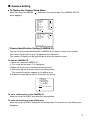
1
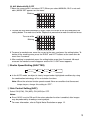
5 Electronic Sensitivity Enhancement (SENS UP)
The electronic sensitivity enhancement mode changes as follows:
OFF
X2 AUTO
X16 AUTO
X6 FIX
●
X4 AUTO
X32 AUTO
X10 FIX
X6 AUTO
X2 FIX
OFF
X16 FIX
X10 AUTO
X4 FIX
X32 FIX
While the SENS UP function is selected, noise or spots may appear in the picture when
the sensitivity of the camera is increased. This is a normal phenomenon.
6 Synchronization Setting (SYNC)
The priorities of SYNC modes are assigned as follows:
1. Multiplexed vertical drive (VD2)
2. Internal sync (INT)
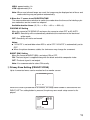
Note: Whenever the vertical drive pulse (VD2) is supplied to the camera, the camera sync
mode is automatically switched to the multiplexed vertical drive pulse (VD2) regardless of the selected sync mode.
7 White Balance Setting (WHITE BAL)
1. Auto-Tracing White Balance Mode (ATW1/ ATW2)
The range of color temperature is
ATW1 2 600 K-6 000 K
ATW2 2 000 K-6 000 K
* ATW2 is suited to setting when a sodium lamp is used.
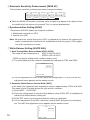
(1) The white balance of the camera is automatically adjusted at ATW1 and ATW2.
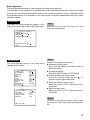
** ATW1 **
••••|••••
+
••••|••••
+
R
B
RET TOP END
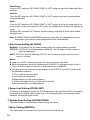
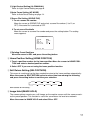
(2) For fine adjustment of ATW1/ATW2, press the setting button. The ATW1/ATW2 fine
adjustment menu appears on the monitor screen.
2. Automatic White Balance Control Mode (AWC)
In this mode, the supported color temperature range is approximately 2 500K to 8 000K.
This mode is best in location where the light source is constant.
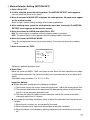
(1) Select AWC n PUSH SET.
(2) Press the setting button to start the white balance setup. PUSH SET is highlighted to
indicate that white balance is being set.
(3) PUSH SET returns to normal when balance setting is completed.
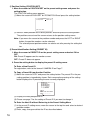
(4) For fine adjustment of the AWC, move the cursor to AWC and press the setting button. The AWC fine adjustment menu appears on the monitor screen.
**
AWC
R
B
10
RET TOP END
**
••••|••••
+
••••|••••
+