1
4 OpenOCD flash memory support
Let's check, erase and program the ARM LPC's flash.
4.1 Check the flash status
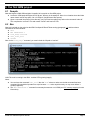
The ARM LPC has an on-board flash memory. For example, to check the flash status (to see if it is erased or not), type:
● mww 0xE01FC040 1 (that switches the LPC memory mapping off - for details, see 10.3)
● flash erase_check 0 (that takes a few seconds) (notice the spaces and underscore in the command)
● flash info 0
That shows a list of flash sectors, with their status.
Notes:
1. The ARM needs to be stopped for these commands to work, so issue the “halt” command to stop the ARM if
required.
2. The “protected” status shown by “flash info 0” command is meaningless for the ARM LPCs.
4.2 Erase the flash
Use “flash erase 0 0 8” to erase the whole flash of an LPC2132 . The “8” is the last sector number. Change it to “26”
to erase the whole LPC2138.
4.3 Program the flash
Use “flash write 0 filename 0”.
Of course, replace “filename” with the file name that you want to program (including its path).
The startup kit includes compiled files that can be programmed in the flash. For example, try “LPC.flash.LEDglow.bin”.
Once programmed, it is executed at power up, and makes the LED glow.
For big files, flash programming can be sped up by using the command “arm7_9 dcc_downloads enable”.
KNJN FX2 ARM development boards
Page 7