1
6. Safety &
Specifications
STUDENT GROUP SPEAKER CONTROLS
AND CONNECTIONS CONT’D
12
5. Maintenance &
Troubleshooting
11
10
4. Additional
Information
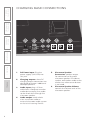
CHARGE
9
3. DaiIy Operation
8
POWER
Charge
16V/0.3A
1. Overview
2. Initial Set-up
13
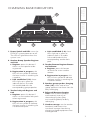
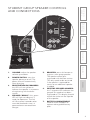
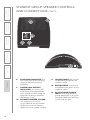
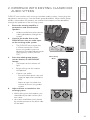
8.
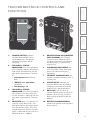
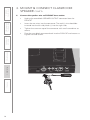
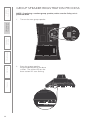
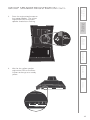
CHARGING INDICATOR: this
LED turns RED when charging,
green to indicate charging
complete.
9.
POWER/LOW BATTERY
INDICATOR: this Power LED
blinks blue when powered on,
turns solid blue when ready for
operation and turns red when
the battery is low.
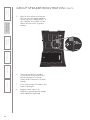
10. SPEAKER NUMBER STICKER:
this sticker acts as a clear
visual indicator for the teacher
to determine which speaker
represents which group number.
10
11. LOUDSPEAKER: the internal
loudspeaker distributes the
teacher’s voice.
12. MICROPHONE: the internal
microphone that picks up the
students’ voice.
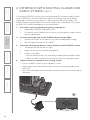
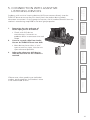
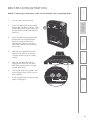
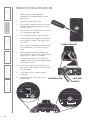
13. DC CHARGING/POWER
INPUT: to charge optional
group speaker #5-6, plug the
charging cable from the base
station into this jack.