1
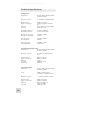
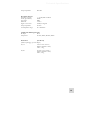
Technical Specifications
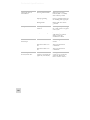
Audio signal carries an
unwanted hum.
Microphone level is too low.
No or low sound from a
channel input.
Turntable input is too low in
level and/or lacks bass.
54
Not using balanced cables.
Make sure you are using
balanced (XLR or 1/4” TRS)
cables wherever possible.
Improper grounding
Insert a “ground lift switch” into
the offending cable’s signal path.
Damaged cable
Replace cable with a known
good cable.
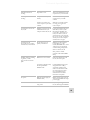
Phantom power is not
turned on.
Turn on phantom power using
the “+48V” switch on top panel
of IO|14/26.
Microphone is damaged.
Test the microphone on other
audio devices. If you detect
damage, contact the
manufacturer or dealer.
Gain set too low.
Increase the gain for that
channel.
Instrument volume is too
low.
Turn up the instrument’s
volume knob.
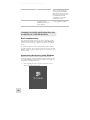
Instrument volume is too
low.
Turn up the instrument’s
volume knob.
“Mic/Line” and “Phono”
switch is set incorrectly (this
applies only to the IO|26)
Hook up your turntable to
outputs 7-8 (on your IO|26)
and set the “Mic/Line or
Phono” switch to “Phono.”