1
Logging FOCUS Usage: FOCLOG
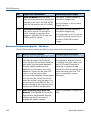
No.
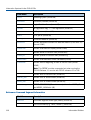
Report Title and Contents
Interpreting Report Output
103
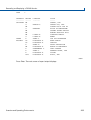
Most Online Sessions summarizes
usage trends over the period by number
of sessions (grouped by tens) and most
frequent users in each.
Spikes identify heavy usage
periods, such as end-of-month,
quarter, or year, or special
promotions or events.
Upward trends by period may
indicate other symptoms. Run
Report 108 or 109 to see details of
a specific user’s activity in the
higher categories.
104
Total MSO Sessions shows, by period,
what part of FOCUS online usage is
performed via MSO (for sites running
MSO).
A significant percentage generally
indicates a company's efficient use
of shared resources provided by
MSO.
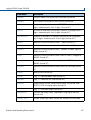
105
Total FOCUS Users rolls up overall
FOCUS usage across the site for each
period. The Active Users and Total Jobs
columns imply average usage per user,
and the CPU column tracks the actual
FOCUS processing performed during the
period.
Look for spikes (positive or
negative) and progressive trends in
the numbers. Many other reports
break down these summarized
numbers.
106
Attempt to Group Users by 4-Char
Prefix assumes that the first four
characters of the userid roughly
corresponds to definable groups in an
organization. If that assumption is true
for your company, this report may be of
value. The report shows the number of
users with that prefix and the CPU used
by that group. Re-sorting by CPU could
point to the largest group of FOCUS
users on the site.
Assuming the first four user ID
characters are significant
workgroup differentiators, this
report can be useful for comparing
relative usage loads.
Site-Wide FOCUS Usage Trend
summarizes site-wide FOCUS usage for
each period, broken out by batch and
online usage and by Reports (extracts)
versus Updates (data changes).
Look for significant usage spikes in
CPU or number of runs, and
possible imbalances between
reports and update operations.
107
Overview and Operating Environments
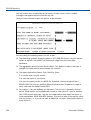
Alternatively, see Information
Captured in the FOCLOG File on
page<$pagenum> for a description
of the FOCLOG Master File in order
to develop your own schemes for
collapsing user IDs into local
groups.
331