1
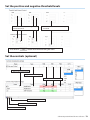
3.4.5-f — Controls settings table
Description:
Adds controls supplied with parameters taken from reagent’s manual.
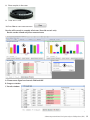
Empty Control’s table
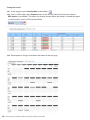
Filled Control’s table
Default controls list
Default controls type
Entering a control
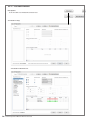
3.4.5.1-f — Control’s name field
3.4.5.2-f — Control’s type field
Description:
User sets the name of the standards
Description:
Enter the type of the standards via keyboard
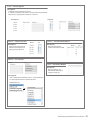
Default table
Entering standard
3.4.5.3-f — Threshold value for controls for each channel
Description:
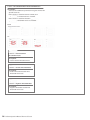
User sets the value for thresholds:
“+ / – “ values for 3.4.4.1-f — Internal Control Threshold level (IC) (page 18) (FAM in example above).
“pos/neg/eq/nd” values for 3.4.4.2-f — Positive Threshold value (page 18) (CY-5 in example above).
Controls with value “––– “means that value is not set or channel is not used.
Entering threshold value
Software Operation Manual: How to add a test 19