1
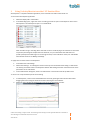
1 VelocityChart Overview VelocityChart in Tobii Studio plots the angular eye velocity, gaze coordinates (raw or processed), and the classified fixation coordinates of a recording. The main purpose of VelocityChart is to help the user set the parameters in the data processing functions, particularly when using the I‐VT fixation filter. Below, a VelocityChart showing eye tracking data on a timeline. The straight red line in VelocityChart above shows the Velocity threshold in the I‐VT fixation classifier. The other lines described on the chart legend are: X/Y: gaze coordinates (raw or processed) (mm). Fixation X/Fixation Y: Fixation coordinates (mm). Fixation: Indicates fixations found. Velocity: Absolute value of the eyes angular velocity (degree/second). © 2011 Tobii Technology ‐ All rights reserved. Tobii Technology and the Tobii logo are either registered trademarks or trademarks of Tobii Technology in the United States and/or other countries. www.tobii.com 3