1
Dolby E Multichannel Distribution System User Manual
DP572 Dolby E Decoder
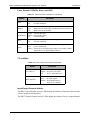
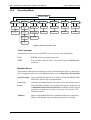
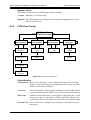
Voiceover Mode
Selects Mono or Stereo for Voiceover PCM input. Mono adds PCM Input Channels 1
and 2 and attenuates 6 dB.
Note: Voiceover and Switched Out modes can be selected via the Status port.
See Section 4.1.8 - Status.
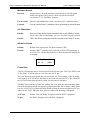
Voiceover Atten
Applies 0 to -31 dB attenuation to the main Dolby E program. At 0 dB attenuation,
overload can occur if the main Dolby E program and Voiceover audio both reach
0 dBFS.
Delay SRC
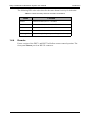
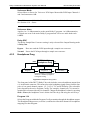
The Delay Sample Rate Converter setting is only relevant if the Output Routing mode
is Delay Out.
Bypass:
Does not send the PCM input through a sample rate converter.
Normal: Passes the PCM input through a sample rate converter.
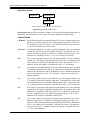
4.2.3
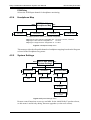
Headphone Prog
Enter
Headphone Prog
Program 1
DP572 Unit Setup
Headphone Prog
Esc
Headphone Prog
Program 2
Headphone Prog
PCM Delay
Range: Program 1 to Program N
where N = number of programs
in Program Config
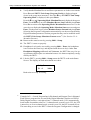
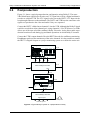
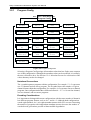
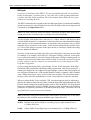
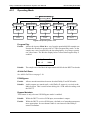
Figure 4-6 Headphone Prog menu
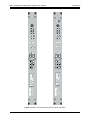
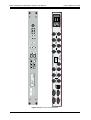
The front panel of the DP572 Dolby E decoder includes a stereo headphone output from
a ¼-inch female connector. This menu selects the headphone signal source from the four
pairs of rear-panel channel outputs: 1/2, 3/4, 5/6, 7/8, and PCM Delay. The selectable
pairs depend on the active Program Config. For example, channel pair 7/8 can not be
monitored in a format with only six channels. Change the headphone volume by pressing
Shift + Enter (the headphone icon is below the Enter key) and using the arrow keys.
Program 1–N
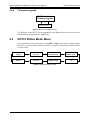
Selects the Program within the Program Config to monitor through the headphone output.
The Headphone Map menu (see below) contains the allowable channel-to-headphone
mappings for that Program.
4-9