1
e-VARDAN
6.
6.1
Dealer’s User Manual
CTD
Print Form 1
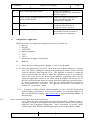
The option is used to take a print of the application after submission. Enter your ERN
(e-Registration number) and date
and click “Go” to generate form VAT 1. In this print form,
click the [Print] option provided at the end of the form to take the print for reference.
6.2.
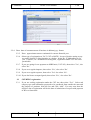
The option is used to take a print of the registration request confirmation after
submission. Enter your ERN (e-Registration number) and date and click “Go” to generate the
printed form. After taking a print, it has to be signed by proprietor / all partners / Kartha of HUF/
all members of association of persons / authorised signatory in the case of a company /a trust /
a club / a statutory body/a society and hand it over to the CTI at the time of his visit.
7.
Search e-Reg. Ref. No.
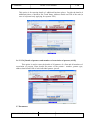
This option is provided for the applicant to search his Ack. Number in case he forgets the
same. The Ack.Number is searched based on the mobile phone number and Ack. Date.
8. Allotment of TIN and downloading of certificate:
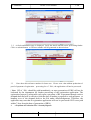
If the application for registration is accepted and cleared by the RA concerned and TIN
generated, on logging on to e-Registration Status, one can find a message as under:
ERN no.: 12345678
Date : 11/01/2011
You have been allotted with TIN
29123456789 - VAT –LVO 010
NIC-KASC-VATeVARDAN-UM01
NIC
Rel. Date : 31.01.2011