1
e-VARDAN
Dealer’s User Manual
CTD
1.
Introduction
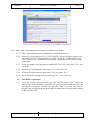
1.1.(a) Open the website http://ctax.kar.nic.in and click on e-Registration and go to the main
page with options as displayed.
(b) e-Registration Application - For submitting new application.
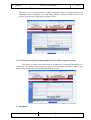
(c ) e-Payment of Reg. Fee – option for making e-Payment of Registration fee. The applicant
should have net banking facility in a designated bank.
(d) e-Payment of Prof. Tax – option for making e-Payment of Profession Tax.
(e ) e-Payment of Security Deposit –option for making e-Payment of Security Deposit.
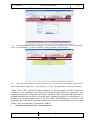
(f) Status of e-Reg. Application – option to know the status of the application.
(g) Print Form-1 (Reg.Application) – option for printing the Registration application
(h) Search e-Reg.Ref.No –option to search the e-Reg.Ref.No. ( ERN) linked to mobile phone
number of the applicant and date of submission of e-Reg application.
1.2:
Class of dealers required to be registered under the KVAT Act, 2003 :
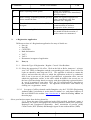
SI.No
Who is liable to be registered
1
Every dealer whose taxable turnover
exceeds or who reasonably expects his total
turnover exceeds rupees five lakh per
annum or rupees forty thousand per month
but the limit of turnover is not applicable to
the dealers specified at sl.no 3 to 7 below
If business is received by transfer from
another dealer ( transferee ) who is liable for
registration
Dealer purchasing / receiving taxable goods
from outside the State.
2
3
NIC-KASC-VATeVARDAN-UM01
NIC
When the liability for registration
accrues.
Forthwith
Liable for registration from the date
of transfer
Liable for registration
irrespective of the value immediately
after first interstate purchase /
receipt.
Rel. Date : 31.01.2011