1
e-VARDAN
2.2.4
Dealer’s User Manual
CTD
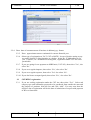
Enter date of commencement of business in dd/mm/yyyy format.
2.2.5
Enter approximate turnover estimated for current financial year.
2.2.6
Select type of registration as VAT, COT or BOTH. In case of dealers opting to pay
tax under Section 15 doing business as a dealer ( below Rs. 25 lakhs turnover per
year ) / hotelier, etc / mechanized cruising unit , registration under CST Act is not
permissible.
2.2.7
If you are opting for tax payment on MRP basis (VAT 105), then select ‘Yes’, else
select ‘No’.
2.2.8
If you are a regular importer, then select ‘Yes’, else select ‘No’.
2.2.9
If you are a regular exporter, then select ‘Yes’ else select ‘No’.
2.2.10 If you deal in tax exempted goods, then select ‘Yes’, else select ‘No’.
2.3
CST/KTEG registration
2.3.1
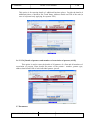
If you are seeking registration under the CST Act, then select “Yes”. Select sub
category type and commodity proposed to be purchased from outside the state and
the purpose of purchase from the list and click “Add”. You may note that the
effective date of registration will be the date of submission of request with payment
of RF or a future date.
NIC-KASC-VATeVARDAN-UM01
NIC
Rel. Date : 31.01.2011