1
Getting Started
E. Creating a New Estimate
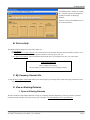
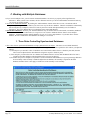
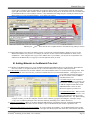
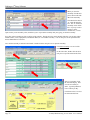
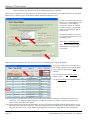
1) From the “MainForm”, Click on “New Estimate”.
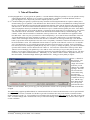
2) In the “New Estimate” screen, type a Project
Name... let’s type “East Street Office Building”.
Then, press TAB to select a Client. Let’s say this
estimate is for a new Client, the “ABC Company”,
so the Client’s name is not in the pop up menu.
Click the “New” Button and create a new Client by
typing “ABC Company” in the
ClientCompanyName field. Close the “Enter
Client” screen. Fill in the other boxes on the “New
Estimate” screen. Red Text are required fields.
If you select “Use New Csi Codes”, you are
selecting that all Databases switch to the new 6 digit Master Format 2004 Csi codes. The old system was 5 digits like
03000 for Concrete. Click the “Create New Estimate” button.
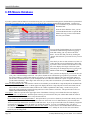
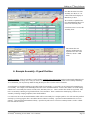
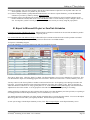
3) The MainForm now shows you are working on the “East Street Office Building” estimate.
1. Organize Your Estimate
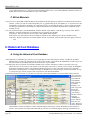
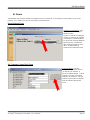
You organize your estimate by making Sections and Zones. Use the 2 buttons in the Setup area
of the MainForm.
Sections are typically the CSI sections found in the Architect’s spec book, such as Concrete,
Masonry, etc. You must make at least one Zone. Zones let you divide a project into areas you
want totaled separately. Examples of Zones might be Building A and Building B, or “New
Construction” and “Renovations” or Base Bid, Alternate 1, Alternate 2.
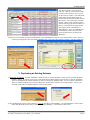
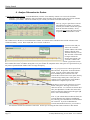
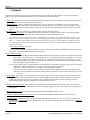
1) Let’s create some Sections for our estimate. You can have one or many Sections. From the
MainForm, click the “Make Sections” button.
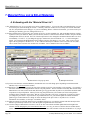
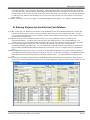
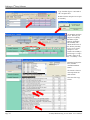
The green form on the left shows the Sections in this
estimate, and the list is empty because this is a new
estimate. In the 2 white boxes at the top of the green
form, you can type a Csi number like “03000” and
“Concrete” and press Return. But it’s easier to click on
the Csi Sections you want in the grey list to the right of
the green form. Each time you click a line the line is
copied to the Green list. This is called a “Click Copy”
screen and ArenaSoft uses Click Copy screens in may
places.
Let’s add lines “02220 Building Demolition”, 03000
Concrete and “04000 Masonry” to our estimate by clicking on these lines (click the words or numbers).
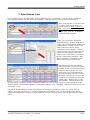
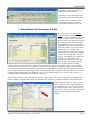
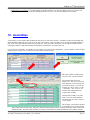
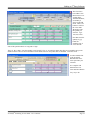
2) Now let’s create a Zone for our estimate. You can have one or many Zones. From the MainForm, click the “Make Zones”
button. Type “Zone 1”. Close the screen.
Page 8
ArenaSoftTM Estimating Version 2R80 - User’s Manual