1
CDE Resmap
7.0
Chapter 8.8
Statistical/Process Data
N/A
8.0
Available Processes, Process Notes
8.1
8.2
9.0
Available Programs:
8.1.1
4” Wafers: 49, 25, 9, 5, 1 point and 17 point diameter measurements.
8.1.2
6” wafers: 49, 25, 9, 5, 1 point and 25 point diameter measurements.
Process Notes:
8.2.1
The probe installed is type A: Tip radius 40 μm, Force 100grams, Tip spacing 1.0 mm.
8.2.2
To copy the measurement results, use Windows Screen Shot (Alt+PrintScreen). First
copy the screen display to the clipboard, and paste it to WordPad. Then you can use
USB flash memory drive to transfer the file to your PC.
Equipment Operation
9.1
Equipment Description
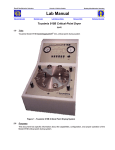
The Resmap Four Point Probe comprises of a probe station and a PC. Under the cover of the
probe station, there is a wafer stage with concentric circular grooves for aligning wafers from 2
to 12 inches. The maximum measurement diameter is 8”. On the out edge of the wafer stage,
there is a rectangular ceramic for probe pin conditioning. Do not touch the ceramic to avoid
contamination.
9.2
Measurement procedures
9.2.1
Enable the CDE ResMap Four Point Probe (cde-resmap).
9.2.2
Open the cover. Load and align your wafer/sample on the stage.
9.2.3
On the PC screen, click [Operator] drop down menu, then select [Run Recipe]. Select
the Recipe you plan to use from the appropriate project (section 11.1). Click [ok] button.
Or click [Previous] button to repeat the previous recipe.
9.2.4
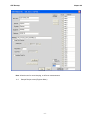
The PC displays the Run Parameter screen. Enter the information on the left side of the
screen for record keeping purpose. Ignore the Wafer ID field on right side of the screen,
because the tool does not have a cassette loader.
9.2.5
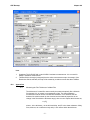
Click the [Run] button and the tool run the selected recipe. When it finishes, the PC
displays the raw data of all the measurements.
once the measurements are completed, you can use the graphic utilities to
analyzie/organize your data.
remove your wafer, and log out of the machine. with the cover closed.
9.2.6
9.2.7
10.0
Trouble Shooting Guidelines
10.1 Problem:
Pins not touching sample.
-2-