1
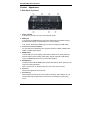
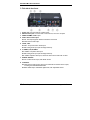
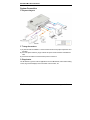
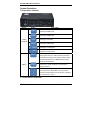
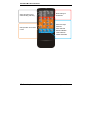
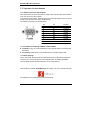
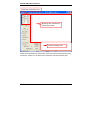
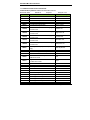
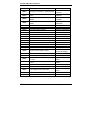
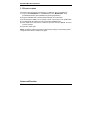
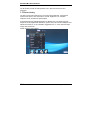
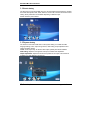
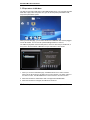
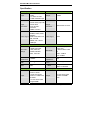
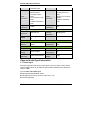
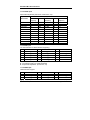
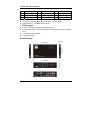
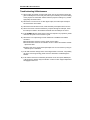
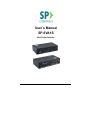
User’s Manual SP-6VA1S Mini Scaler Switcher SP-6VA1S Mini Scaler Switcher Table of Contents Introduction ..................................................................................................................... 1 Product Appearance ..................................................................................................... 2 System Connection ......................................................................................................... 4 System Operations ......................................................................................................... 5 Specification.................................................................................................................. 14 Advanced Function ....................................................................................................... 14 Video and Audio Signal Introduction ............................................................................. 16 Panel Drawing .............................................................................................................. 18 Troubleshooting & Maintenance ................................................................................... 19 Safety Operation Guide ................................................................................................ 20 Warranty ....................................................................................................................... 21 SP Controls, Inc. www.spcontrols.com SP-6VA1S Mini Scaler Switcher Introduction 1.1 Introduction to SP-6VA1S SP-6VA1S is a full HD scaler switcher with 6 video & 3 audio inputs, it scales & switches any video signal HDMI, VGA, YPbPr, C-Video & S-video to HDMI up to 1080P. It is controllable via the IR and RS232 buttons. The SP-6VA1S is a high performance switcher scaler for educational institutions, meeting rooms, conference rooms, etc. 1.2 Features 6 video Inputs: 2 x HDMI, 1 x VGA, 1 x YPbPr, 1 x C-video & 1 x S-video, and upscale to HDMI output at 1080P Support VGA resolutions: 640x480, 800x600, 1024x768, 1280x1024, 1280x768, 1360x768@60Hz, 1920x1080 Built-in PAL/NTSC and audio format automatic identification technologies, with good video and audio processing technology for high performance Output display H/V size: adjustable to resolve any overscale issue Output display H/V position moveable Picture/MP3 display via USB Video parameter setting and preset Powerful OSD function with full control, support output freeze function Built-in break-point memory and power-off protection function HDMI1.3 and HDCP compatible Firmware upgradeable via USB Front panel lockout Controllable via button, IR & RS232 1.3 Package Contents 1 x SP-6VA1S 2 x Mounting ears 1 x IR remote (battery not included) 1 x Power adapter (DC 12V) 4 x Screws 1 x RS232 cable 1 x User Manual Notes:Please confirm if the product and the accessories are all included, if not, please contact with the dealers. SP Controls, Inc. 1 www.spcontrols.com SP-6VA1S Mini Scaler Switcher Product Appearance 1.4 SP-6VA1S Front Panel 1 Power indicator It will show as red when the unit is connected with power. 2 USB input It can work as the USB flash disk, support the JPEG picture presentation playing, and MP3 audio playing. It is operated by the on-screen display. It can work as the firmware updating port (connect to computer via USB cable). 3 Video source selection buttons You can select the video/audio source by these six buttons: HDMI1, HDMI2, VGA, YPbPr, C-VIDEO and S-VIDEO. 4 MENU button To active OSD (on-screen display), works with the direction key. When pressed, it will enter into the Picture setting, Audio setting, System setting and USB setting mode. The MENU button also can cancel the last operation. 5 ENTER button This button works with the MENU button and the direction key. When pressed, it can confirm the setting parameter. When in USB mode, the ENTER button also acts as the confirm function. 6 IR sensor Receives the signal from the IR remote. 7 Direction key When entering into OSD mode, the four buttons will active. When OSD is off, only the left button and the right button can be used for controlling the volume (VOL-, VOL+). SP Controls, Inc. 2 www.spcontrols.com SP-6VA1S Mini Scaler Switcher 1.5 SP-6VA1S Rear Panel 1 2 3 4 Power port: Connects with the 12VDC power. RS232 control port: connects with a control device, such as a computer. HDMI1 & HDMI2: HDMI inputs. VGA & stereo audio input: VGA: VGA input supports different resolutions and format. AUDIO: Stereo audio input. 5 YPbPr, L&R: YPbPr: Component video YPbPr input. L&R: Analog audio input (Left and Right channel). 6 C-VIDEO, L&R, S-VIDEO: C-VIDEO: Composite video input. L&R: Analog audio input (Left and Right channel). S-VIDEO: Separate video input, shares the same stereo audio with C-video. 7 DIGITAL OUTPUT: Coax: Coaxial audio output, with SPDIF format. 8 OUTPUTS: AUDIO: Stereo audio output. All the input audio will be switched to this output, including the embedded HDMI audio. HDMI: HDMI output. Embedded digital audio, with adjustable volume. SP Controls, Inc. 3 www.spcontrols.com SP-6VA1S Mini Scaler Switcher System Connection 1.6 System Diagram 1.7 Usage Precautions 1) System should be installed in a clean environment and has proper temperature and humidity. 2) All of the power switches, plugs, sockets and power cords should be insulated and safe. 3) All devices should be connected before power is turned on. 1.8 Application The SP-6VA1S is good for various applications such as Broadcast, multi-media meeting rooms, large screen displays and command & control centers, etc. SP Controls, Inc. 4 www.spcontrols.com SP-6VA1S Mini Scaler Switcher System Operations 1.9 Operations of Buttons Module Button HDMI1 Switching to HDMI1 input HDMI2 Switching to HDMI2 input 1 VIDEO SOURCE VGA Switching to VGA input YPBPR Switching to YPbPr input C-VIDEO Switching to C-video input S-VIDEO Switching to S-video input MENU MENU Description ENTER ↑ ↓ ← → MENU button, to activate OSD (on-screen display) for using the direction keys. When pressed, it will enter into the Picture setting, Audio setting, System setting and USB setting mode. The MENU button will also cancel the last operation. ENTER button works with the MENU button and the direction keys. When pressed, it will confirm the setting parameter. When using the Direction keys in OSD mode, all four buttons are active. When OSD is off, only the left button and the right button can be used for controlling the volume (VOL-, VOL+). 1.10 Operations of IR Remote SP Controls, Inc. 5 www.spcontrols.com SP-6VA1S Mini Scaler Switcher Select the video source, audio following switching Status setting for audio/video Select the output resolution OSD operation and volume control SP Controls, Inc. XGA:1024x768 WXGA:1280x800 720P:1280x720 1080P:1920x1080 6 www.spcontrols.com SP-6VA1S Mini Scaler Switcher 1.11 Operation of Control Software 1.11.1 RS232 Connection with Computer When SP-6VA1S connects to the COM1 or COM2 of the computer with control software, users can control it by that computer. To control the scaler switcher, users should use a 3-pole male captive screw to 9-pin HD female connector and use the public COM software. The definition of its pins is as the table below: No. 1 2 3 4 5 6 7 8 9 Pin N/u Tx Rx N/u Gnd N/u N/u N/u N/u Function Unused Transmit Receive Unused Ground Unused Unused Unused Unused 1.11.2 Installation/uninstalling of RS232 Control Software Installation: Copy the control software file to the computer which is connected with SP-6VA1S. Uninstalling: Delete all the control software files in corresponding file path. 1.11.3 Basic Settings First to connect SP-6VA1S with all input source devices and output displaying devices needed, then to connect SP-6VA1S with a computer which is installed with RS232 control software. Double-click the software icon to run this software. Here we take the software CommWatch.exe as example. The icon is showed as below: The interface of the control software is showed as below: SP Controls, Inc. 7 www.spcontrols.com SP-6VA1S Mini Scaler Switcher Parameter Configuration area Monitoring area, indicates if the command sent works. Command Sending area Please set the parameters of COM number, bound rate, data bit, stop bit and the parity bit correctly, and then you are able to send command in Command Sending Area. SP Controls, Inc. 8 www.spcontrols.com SP-6VA1S Mini Scaler Switcher 1.11.4 RS232 Communication Commands Communication protocol: RS232 Communication Protocol Baud rate: 9600 Data bit: 8 Stop bit: 1 Parity bit: none Command Function Feedback Example 0600% MUTE Mute On 0601% UnMute Mute Off 0602% Audio volume up Volume: XX 0603% Audio volume down Volume: XX 0604% Lock the front panel button Panel Locked 0605% Unlock the front panel button Panel UnLocked Preset the volume. The XX is ranging Volume: XX 01XX% from 00 to 99 Preset the brightness. The XX is ranging Brightness: XX 02XX% from 00 to 99 Preset the contrast. The XX is ranging Contrast: XX 03XX% from 00 to 99 Preset the saturation. The XX is ranging Saturation: XX 04XX% from 00 to 99 Preset the sharpness. The XX is ranging Sharpness: XX 05XX% from 00 to 07 Auto-adjust the input parameter(VGA VGA Adjustment 0606% only) 0607% Auto-adjust the color temperature Color Temp: XX 0608% ZOOM the image, set the aspect ratio Aspect Ratio: XX 0609% OK, for OSD selection OK Left of OSD or volume up when not in Left 0610% OSD menu mode Right of OSD or volume down when not Right 0611% in OSD menu mode 0612% Up of OSD Up 0613% Down of OSD Down 0614% set the picture mode Picture Mode : XX 0615% SM Mode Sound Mode: XX 0616% MENU of OSD MENU 0617% Reset to factory defaults Factory reset 0620% Switching to HDMI1 input Source: HDMI 1 0621% Switching to HDMI2 input Source: HDMI 2 0622% Switching to VGA input Source: VGA 0623% Switching to YPbPr input Source: YPbPr 0624% Switching to S-Video input Source: SVIDEO SP Controls, Inc. 9 www.spcontrols.com SP-6VA1S Mini Scaler Switcher 0625% Switching to composite video input 0626% Change the resolution to 1024X768 XGA 0630% 0631% 0632% 0633% 0634% 0635% 0636% 0637% 0638% 0639% 0640% 0699% 0644% Change the resolution to 1280X720 720P Change the resolution to 1280X800 WXGA Change the resolution to 1920X1080 1080P Check the volume level Check the input source Check the output resolution Check the image mode Check the audio mode Check the image aspect ratio Check the brightness Check the contrast Check the saturation Check sharpness Check the color temperature Check the firmware version Enable OSD CHANNEL display 0645% Disable OSD CHANNEL display 0646% 0647% 0650% 0651% Enable Volume Bar display Disable Volume Bar display Enable Digital audio(HDMI and SPDIF )output Disable digital audio (HDMI and SPDIF) output Check OSD CHANNEL display status Check Volume Bar display status 0652% Check Digital audio output status 0655% 0656% Freeze output image Cancel the freezing of output image 0627% 0628% 0629% 0648% 0649% SP Controls, Inc. 10 Source: CVIDEO Resolution: XGA 1024X768 Resolution: 720P 1280X720 Resolution: WXGA 1280X800 Resolution: 1080P 1920X1080 Volume: XX Source: XXXXXX Resolution: XXXXXXXX Picture Mode : XX Sound Mode: XX Aspect Ratio: XX Brightness: XX Contrast: XX Saturation: XX Sharpness: XX Color Temp: XX SP-6VA1S V XXXXX OSD Source: Display OSD Channel (Source):No Display Volume Bar: Display Volume Bar: No Display Digital Sound Ouput: Enable Digital Sound Ouput: Disable OSD Source: Display Volume Bar: Display Digital Sound Ouput: Enable Freeze: Enable Freeze: Disable www.spcontrols.com SP-6VA1S Mini Scaler Switcher 1.12 Firmware Update SP-6VA1S supports firmware field-updating, by USB flash disk. The Operation is: 1) Copy the file “MT23ATV.bin” to a USB flash disk. (The “MT23ATV.bin” file is provided/authorized by SP CONTROLS engineering department) 2) Plug the USB flash disk to the SP-6VA1S USB port on its front panel. 3) Press the button “MENU” for 15 seconds or more, until it comes out an update OSD. 4) The SP-6VA1S will capture the new firmware from USB flash disk. 5) After update to the new firmware, reboot and send the command “0617%” to restore to factory settings. 6) After that, reboot again. Notice: If send the RS232 command to restore factory setting is unsuccessful, please change the baud rate to 115200 and try again. Advanced Function SP Controls, Inc. 11 www.spcontrols.com SP-6VA1S Mini Scaler Switcher The SP-6VA1S provides an OSD operation menu, with various functions and languages. 1.13 Picture Setting The first icon from left of OSD menu is to set the picture parameter. It includes the pictures mode preset, color temperature, contrast, brightness, hue, saturation, sharpness, scale, and Advance picture adjust. Some parameters are available depending on different input. The Advance Picture Adjust can set the Digital Noise Reduction, dynamic color, skin tone and Adaptive Luma adjustment function on or off. And DNR is suggested to be on, it can make the output image clear and smooth. Please check the picture below: SP Controls, Inc. 12 www.spcontrols.com SP-6VA1S Mini Scaler Switcher 1.14 Audio Setting The Second icon from left of OSD menu is to set the audio/sound parameter. It includes the sound effect preset, bass, treble, balance, scene mode, surround and smart volume setting. Some parameters are available depending on different input. Please check the picture below: 1.15 System Setting The Third icon from left of OSD menu is the system setting. It includes the OSD language setting, Listen, output image freeze, VGA setting, output adjustment and output resolution change. Listen: Audio output only. To resume video output, please press button “MENU”. VGA setting: Adjust the H/V signal of VGA input, includes auto adjustment. Output adjustment: Adjust H/V size and H/V position of the output. This function is available only with HDMI and VGA inputs. SP Controls, Inc. 13 www.spcontrols.com SP-6VA1S Mini Scaler Switcher 1.16 Operations of USB Menu The last icon from left of OSD menu is the USB operation menu. You can enter the USB flash disk, to play music and picture. And, you can set the picture presentation order, and picture presentation speed. When you enter this page, you can select the file from USB flash disk, which is plugged into the SP-6VA1S. You can use the up/down/left/right buttons to control it. The USB can play MP3 music and JPG picture. And it can show the lyric of MP3 file, if the lyric is in the same folder of MP3 file. The lyric should be in .LRC format: NOTE: 1 When you are in the USB folder page, the ENTER button is for confirm function. When use the IR remote, the OK button is for confirm function. The button “Menu” is the return function. The RETURN button on the IR remote is for return function. 2 When the resolution is 1024x768, it does not support the USB flash disk. 3 When the resolution is changed, the OSD menu will be off. SP Controls, Inc. 14 www.spcontrols.com SP-6VA1S Mini Scaler Switcher Specification Video Input Input Input Connector Video Signal Video Output 2 HDMI, 1 VGA, 1 YPbPr 1 C-Video1 S-Video 1 USB multimedia input Female HDMI Female VGA(15 pin HD) Female RCA 4 pin mini DIN connector USB-A connector HDMI 1.3/DVI, VGA, RGBHV, RGBs, RGsB, RsBsGs, NTSC 3.58, NTSC 4.42, PAL, SECAM MPEG / AVI / JPG for USB input Output 1 HDMI Output Connector HDMI female connector Video Signal HDMI Bandwidth HDMI:4.95Gbps(1.65Gb ps per color) C-Video/S-Video:150M Hz YPbPr: 170MHz VGA: 375MHz Video General Resolution Range Maximum Pixel Clock VGA Cross Talk Gain 1080P, 1920*1080 ; 720P, 1280*720; WXGA,1280*800 ; XGA, 1024*768. 145MHz -50dB@5MHz 0dB Audio Input Input Video Impedance Input / Output Level HDCP 75Ω 0.5V~2.0Vp-p Compliant with DVI & HDMI 1.3 standards Audio output 1 Dual-mono stereo audio for YPbPr 1 Dual-mono stereo audio for C-VIDEO and S-VIDEO 1 3.5mm stereo audio 2 digital HDMI SP Controls, Inc. Output 15 1 3.5mm stereo audio 1 COAX and HDMI audio www.spcontrols.com SP-6VA1S Mini Scaler Switcher Input Connector embedded audio 2 RCA (L&R) for YPbPr 2 RCA (L&R) for C-Video & S-Video audio 1 3.5mm jack for VGA audio 2 HDMI for embedded audio Output Connector 1 3.5mm jack for line audio 1 RCA for CO-AX audio (SPDIF) 1 HDMI for embedded audio Output Impedance 50Ω Stereo Channel Separation >80dB @1KHz IR remote, Buttons & RS232 Pin Configuration 2 = TX, 3 = RX, 5 = GND -20 ~ +70 Humidity Power Consumption Product Weight 10% ~ 90% Input >10kΩ Impedance Audio General Frequency Response 20Hz~20K Hz CMRR >90dB @20Hz to 20K Hz Control Parts Control/ Remote General Temperature Power Supply Case Dimension DC12V adapter W182x H42x D104mm 6W 0.5Kg Video and Audio Signal Introduction 1.17 Video Signal SP-6VA1S supports a wide range of video signals, such as C-Video, S-Video, YPbPr, VGA and HDMI. And all can be scaled to high-resolution HDMI format and switched to output on HDMI. 1.17.1 C-Video and S-Video input Supporting PAL/SECAM/NTSC format Changeable aspect ratio. (Full-screen, wide screen, 4:3) Color RGB adjustable SP Controls, Inc. 16 www.spcontrols.com SP-6VA1S Mini Scaler Switcher 1.17.2 YPbPr input Aspect ratio adjustment (Full-screen, wide screen, 4:3): Input Resolution 720×480 I 720×480 P 720×576 I 720×576 P 1280×720P 1280×720P 1920×1080 I 1920×1080 I 1920×1080 I 1920×1080 p 1920×1080 p Display Parameter Frame Frame frequency frequency 2:1 525 15.75 60 1:1 525 31.5 60 2:1 625 15.625 50 1:1 625 31.25 50 1:1 750 45 60 1:1 750 37.50 50 2:1 1125 28.125 50 2:1 1125 33.75 60 2:1 1250 31.25 50 1:1 1250 62.5 50 1:1 1250 67.5 60 The bandwidth is up to170MHz Frame frequency 4:3 4:3 4:3 4:3 16:9 16:9 16:9 16:9 16:9 16:9 16:9 1.17.3 VGA input The VGA resolution is VESA standard, supporting: No. Resolution No. Resolution 1 640×480@60 Hz 6 800×600@75 Hz 2 640×480@72 Hz 7 1024×768@60 Hz 3 720×400@70 Hz 8 1024×768@70 Hz 4 800×600@60 Hz 9 1024×768@75 Hz 5 800×600@72 Hz 10 1280×1024@75 Hz The bandwidth is up to 375MHz (-3dB). The following audio can adjust bass/treble Aspect ratio adjustment. (Full-screen, 4:3) No. 11 12 13 Resolution 1280×768 1360×768@60 Hz 1920×1080 1.17.4 HDMI input HDMI resolution support: No. 1 2 3 Resolution 640×480@60Hz 640×480@72Hz 640×480@75Hz SP Controls, Inc. No. 8 9 10 Resolution 1024×768@60 Hz 1024×768@70 Hz 1024×768@75 Hz 17 No. 15 16 17 Resolution 1600×900@60Hz 1600×1200@60Hz 1920×540 www.spcontrols.com SP-6VA1S Mini Scaler Switcher 4 800×600@56Hz 11 1280×720P 18 1920×1080I 5 800×600@60 Hz 12 1280×1024@75Hz 19 1920×1080P 6 800×600@72 Hz 13 1280×800@60Hz 20 1920×1200@60Hz 7 800×600@75Hz 14 1360×768 Digital embedded audio decoding. Aspect ratio adjustment (Full-screen, wide screen, 4:3, auto-adjust). Support HDCP1.3, compatible with DVI signal. 1.18 Audio Signal 3 Stereo audio input & 2 HDMI embedded audio input 3 simultaneous outputs. 3.5mm stereo audio, COAX (SPDIF), and HDMI embedded audio. Volume/Bass/Treble adjustable Audio status presets Panel Drawing SP Controls, Inc. 18 www.spcontrols.com SP-6VA1S Mini Scaler Switcher Troubleshooting & Maintenance 1) When images of terminal unit output with ghost, such as the projector output with ghost. Generally this is not a faulty unit; this may be caused by an incorrect setting on the projector or a bad cable. Please check the projector’s setting or try another high quality connection cable. 2) When there is a color loss or no video signal output, check the input and output end connections of the cables. 3) When the IR remote doesn’t work, check the battery and replace with a new one. 4) When user cannot control the switcher by computer through its COM port, check the COM port number in the software and make sure the COM port is correct. 5) If the POWER indicator doesn’t work or does not respond to any operation, please make sure the power cord connection is good. 6) When there is no output image or audio while there is feedback from RS232 command: The audio/video connector is loose, please connect again. The audio/video connector has a broken circuit or a short circuit inside it. Please replace the cable. Check if there is any signal at the input/output end. You can check it by using an oscilloscope or a multimeter. 7) If the static becomes stronger when connecting the BNC connectors, it is probably due to the incorrect grounding, please correct it otherwise it would damage the switcher. 8) If the switcher cannot be controlled by the buttons on the front panel, RS232 port or IR remote, the switcher may have broken. Contact our tech support department at [email protected]. SP Controls, Inc. 19 www.spcontrols.com SP-6VA1S Mini Scaler Switcher Safety Operation Guide In order to guarantee the reliable operation of the equipment, please abide by the following installation and maintenance guidelines: 1) The system must be mounted properly. Please use 3-prong plugs and an alternating power supply ranging from 100v to 240v and from 50Hz to 60Hz. 2) Store device at room temperature (not very hot or very cold). 3) As the unit generates heat when running, the working environment should have adequate ventilation to avoid damage caused by overheating. 4) Cut off the general power switch in humid weather, or if left unused for long time. 5) Before using, ensure that the alternating current wire is pulled out of the power supply: Take off or reship any components of the equipment. Take off or rejoin any pin or other link of the equipment. 6) DO NOT try to open the casing of the equipment, DO NOT repair it on your own in case of injury, or causing damage to the equipment. 7) DO NOT splash liquid in or around the equipment. SP Controls, Inc. 20 www.spcontrols.com SP-6VA1S Mini Scaler Switcher Warranty 1) We offer a three-year warranty on the SP-6VA1S from the date of purchase. 2) Warranty repair or replacement will not apply if the unit is: Beyond the warranty period. Damaged due to incorrect usage, storage or repaired by user. Damaged caused by force majeure. All returns require prior authorization. To obtain a return authorization, contact our technical support department at (877) 367-8444 ext. 302 or email [email protected]. SP Controls, Inc. 21 www.spcontrols.com SP-6VA1S Mini Scaler Switcher SP Controls, Inc. Tel: (650) 392-7880 Toll Free (US): (877)-367-8444 Email: [email protected] Website: www.spcontrols.com SP Controls, Inc. 22 www.spcontrols.com