1
7.
Battery removal and installation
Warning
,
Make sure to turn off your phone before you
removing the batlery.
Do noi take out the battery when
the
watch in the boot or
have other external power supply connection. otheruise may
damage the
Sll\,4
card and watch.
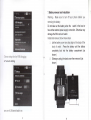
lnstall and remove, follow lhese steps:
l
Let the baitery cover two clasp align at ihe clasp of the
body of watch : Press the battery until the battery
completely lock into the battery compartment (as
Cbm$ sningie\ elop-USB debugging
6.
\etx ork S€tting
tm
on
wifi. Bluetooth
shown)
2
Sideways unplug the back cover ihen remove it.(as
shown)
and so on