1
4
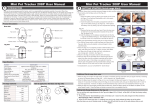
UNDERCOVER T-EP03 USER MANUAL
SEARCH
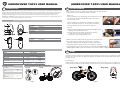
When a tagged item is misplaced, you can use the
Base unit to search for it, if it is within a 1600 ft / 500 m
(line of sight) radius. Try this first in an open area (e.g.
large room, or in your yard).
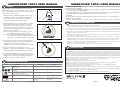
Press
1. Take the Base Unit and stand apart from the Tag
unit (about 15-20 ft). On the Base unit, press the
Search Button once. The Base unit will begin to
chirp and the Tag unit will begin to beep.
2. Before searching, you must first calibrate the Base
to the current terrain and environment. Hold the
Base unit in front of you at chest level, and scan
the area slowly in a circular direction, from right to
left for 360° (a) and again from left to right (b), one
360° turn in 3-4 seconds.
Note: You don’t have to scan a full 360°; you can
use a narrower search angle (e.g. 180°).
Note: If the “Direction Indicator” illuminates green
on the Base unit during this calibration process,
it does not yet indicate the Tag unit’s direction.
a
Calibrate
b
180-360
3. Next, begin the search by slowly scanning a third
time from right to left (c). The “Direction Indicator” on
the Base Unit will illuminate (green) when it
establishes the direction of the tagged item location.
Search
c
5. If the Tag unit is hidden (e.g. in a pocket), you can
MUTE the Base unit by holding down the button on
the Base unit, allowing you to follow the Tag beep
audible to in-point Tag unit’s location.
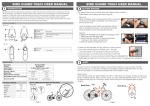
OPERATION INSTURCTION
Base unit
Scenarios
When the bicycle is shocked
accidentally,…
Tag unit
Beeps for 10 seconds
Beeps for 10 seconds
Continuously send out beeps
Continuously send out beeps
Continuously send out beeps
No sound
Press the search button to locate
your
Green LED blinks
Continuously send out beeps
When the battery is low
Buzzer beeps once every
2 minutes
Buzzer beeps once every
2 minutes
When the bicycle movement still
continues,
When Tag unit is power-off, destroyed
or the bicycle is hijacked, …
Page 3
Out of range or Loss signal :
a.) Base unit beeps and signal LED blinks for 30 seconds out of range or loss signal; then Base unit
will enter sleep mode automatically.
b.) Base unit beeps twice at a 4 minutes interval (to remind user to switch power OFF for power-saving.)
c.) To wake-up Base unit, press Search button to go to wake-up process.
Low battery:
When the Base or Tag unit is under low battery condition, it will beep at a 2 minutes interval,
please change the battery.
Important: Under low battery condition, it may cause abnormal function of alarm or searching.
6
WARNINGS AND INFORMATION
1. The Base unit and Tag units are water-repellent, but not waterproof!
Keep the device dry. Precipitation, humidity, and all types of liquids or moisture can contain minerals that may corrode
electronic circuits. If your device gets wet, remove the battery, and allow the device to dry completely before replacing it.
2. If you want to use the device during air flight, please comply with the air safety regulations for each respective country.
3. We reserve the right to change the hardware/software specifications and designs, as well as the information in the
manuals, at any time without prior notice.
4. Proper operating temperatures for this product are between 40˚F~103˚F (5˚C~40˚C). Proper Storage Temperatures
are between -4˚F~185˚F (-20˚C~85˚C) .
5. Under low battery charge conditions, both Base and Tag will alert with a beep every 2 minutes - in this case, replace
batteries immediately. Low battery conditions may result in unpredictable product behavior, such as low alert volume
and false readings. To save battery charge, turn off both units when appropriate (e.g. evenings at home).
6. The Batteries provided in this product should be disposed of properly according to national or regional recycling
regulations - contact local authorities for more information.
Warning: Do not expose the batteries to fire or heat - this may result in danger from explosions.
7
4. Move in the direction of the Tag Unit. As you
approach the Tag unit, the frequency of the chirping
and blinking (LED) on the Base Unit will increase.
5
UNDERCOVER T-EP03 USER MANUAL
Additional Information
CERTIFICATIONS
Federal Communication Commission Interference Statement
This equipment has been tested and improved to comply with the limits of a Class B digital device, pursuant to Part 15
of the FCC Rules. These limits are designed to provide reasonable protection against harmful interference in a
residential installation. This FCC Certifications equipment generates, uses and can radiate radio frequency energy, if
installed and used not in accordance with the instructions, may cause harmful interference to radio communications.
However, there is no guarantee that interference will not occur in a particular installation. If this equipment does cause
harmful interference to radio or television reception, which can be determinedly turning the equipment off and on, the
user is encouraged to try to correct the interference by one of the following measures:
■ Reorient or relocate the receiving antenna.
■ Increase the separation between the equipment and receiver.
■ Connect the equipment into an outlet on a circuit different from that to which the receiver is connected.
■ Consult the dealer or an experienced radio/TV technician for help.
This device complies with Part 15 of the FCC Rules. Operation is subject to the following two conditions:
(1) This device may not cause harmful interference, and
(2) this device must accept an interference received, including interference that may cause undesired operation.
FCC Caution: Any changes or modifications are not expressly approved by the party responsible for compliance which
could void the user's authority to operate this equipment.
EU Declaration Conformity
This product is carrying the CE-Mark in accordance with the related European Directives.
91E-02B8-U50G20
Page 4