1
Profibus: Easy start up using Mac motor and S7 Profibus controller
Revision: 14-07-2006
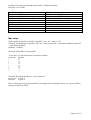
Figure 2 Telegram layout for Input data getting status as bit and word. Startadr.: IB
Using profibus the units will be in counts. Positioning: counts, Acceleration: counts/sec.^2,
velocity: counts/sec
How to use…
The idea about this note and program is to have an easy to use program, that may give You a
possibility for fast setup and test of Your hardware. Hopefully You may save some development
time using the blocks in Your programming.
Following steps are necessary:
1. set switches on MAC motor as described under configuration
2. If needed change addresses, and correct parameter “Node addr.” In function calls.
3. Run DoZeroScr (M0.3) and try MOVE (M0.5 or M0.6), to see Your drive is positioning.
4. Make modifications and finish Your job…
Good luck !
PLC program description: Easy-Mac
The PLC program is split in several sections to make it a more simple to understand.
The program is constructed using subroutines for driver operations, The user should apply new
parameters and call the routines.
For a simple test of program, You may use the monitorlists “Variable table” in the project.
Common for the project is the word M99.1, collecting error flag from each part of the program.
Section Main-test, OB1
To start a drive briefly, run the function DoZeroSrc, and thereafter positioning using the examples
Move1 and Move2.
Examples of how to call the different function to control Mac drives. The sections necessarily can
easily be copied into other User applications with the needed subroutines.
The section includes 2 calls for examples. One for positioning out at x100000, and one for
positioning back to 0. The 2 calls has different positioning profiles. To position X using slow
Page 3 of 10