1
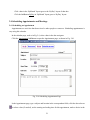
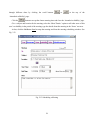
‘ShowTimeAs’ option that tells other users of this user’s availability in the period of the appointment, type
the details about the appointment in the ‘Notes’ text area, and click the linkButton SetUp.
2.4.2 Scheduling a Meeting
A meeting is an appointment to that a user can invite people and reserve resources. Resources include
objects that a user may typically use in a meeting, such as conference rooms, overhead projectors, or
laptop computers. Both people and resources may or may not be available for a meeting, but a user can
use the ‘AttendeeAvailability’ page to check the availability of the people and resources and choose a
time for a meeting that best fits all attendees’ and resources’ schedule.
In the calendar page, such as Fig. 2.4, select a date in the date navigator.
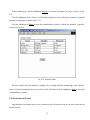
Click the Meeting linkButton to open the meeting page, as shown in Fig. 2.8.
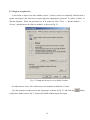
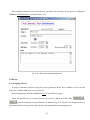
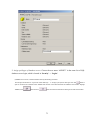
Click the To linkButton to open the Contact page to invite people and reserve resources, as shown in
Fig. 2.11.
Fig. 2.11 Contact Page shows How to Invite People and Reserve Resources
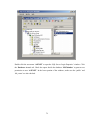
Select ‘Faculty’ from the ‘From Group’ Dropdown list.
22