1
iData 90 User Manual
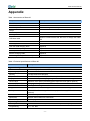
Fault
Cause
Solution
respond.
No sound can be heard.
The iData 90 is closed.
A message indicating
that the memory of the
iData 90 is full is
displayed.
The iData 90 fails to
decode a barcode when
reading it.
The volume is too low or is
disabled.
Adjust the volume.
The iData 90 is in the
inactive state.
After being inactive for a period of time, the
iData 90 is closed. If the iData 90 is powered
by a battery, set the time segment to a value
in the range from 1 to 5 minutes and the
interval to 1 minute. If the iData 90 is
powered by external power supply, set the
time segment to 1, 2, 10, 15, or 30 minutes.
The battery is used up.
Replace the battery.
Too many files are stored in
the iData 90.
Remove unused memos and records. If
necessary, save the records on the host or
increase the storage capacity by using an
SD card.
Too many applications are
installed on the iData 90.
Remove applications installed on the iData
90.
The scan application is not
loaded.
Load the iScan program in the iData 90.
The barcode is defective
and the scanner cannot
read it.
Check that the barcode is not defective.
The battery volume is low.
If the scanner stops sending out laser beam
after you turn on the switch, check the
battery volume.
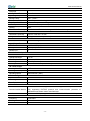
Table 7-2 Cable faults
Fault
Cause
Solution
Charging fails.
The cable
contact.
is in
poor
Replace the cable.
The ActiveSync software
cannot be connected.
The cable
contact.
is in
poor
Replace the cable.
Table 7-3 Wi-Fi faults
Fault
An AP cannot
connected.
be
Cause
Solution
A message is displayed,
showing that the AP is
unavailable.
Start the WLAN device.
A message is displayed,
showing that the AP is
The DHCP function is not enabled on the
AP/router and the IP address cannot be set.
- 31 -